SQL Window Functions ROW NUMBER RANK LEAD & LAG
Introduction
SQL Window Functions are one of the most powerful features in modern relational databases. They allow us to perform calculations across a set of rows that are related to the current row without collapsing the result into a single output like GROUP BY does.
In simple terms, SQL window functions such as ROW_NUMBER, RANK, LEAD, and LAG help us analyze data row-by-row while still keeping the full dataset visible.
For example, imagine a university database in Lahore where we want to rank students based on their marks, or a sales system in Karachi where we want to track revenue trends over time. Traditional SQL struggles with such tasks, but window functions make it simple and efficient.
For Pakistani students learning data analysis, SQL window functions are extremely important for:
- Data analyst jobs in Pakistan (e.g., banks like HBL, UBL)
- Freelancing on platforms like Upwork & Fiverr
- Working with dashboards and reporting tools (Power BI, Tableau)
Prerequisites
Before learning SQL window functions, you should already understand:
- Basic SQL SELECT statements
- Filtering data using WHERE
- Sorting data using ORDER BY
- Aggregate functions like SUM(), COUNT(), AVG()
- Basic understanding of database tables and columns
If you're not confident in these topics, you should first review:
- SQL Basics Tutorial on theiqra.edu.pk
- SQL Aggregation Functions Guide
Core Concepts & Explanation
Understanding Window Functions in SQL
A window function performs calculations across a "window" (subset) of rows related to the current row.
Unlike GROUP BY:
- GROUP BY reduces rows
- Window functions keep all rows
Example:
- GROUP BY = total salary per department (one row per dept)
- Window function = each employee row + department ranking
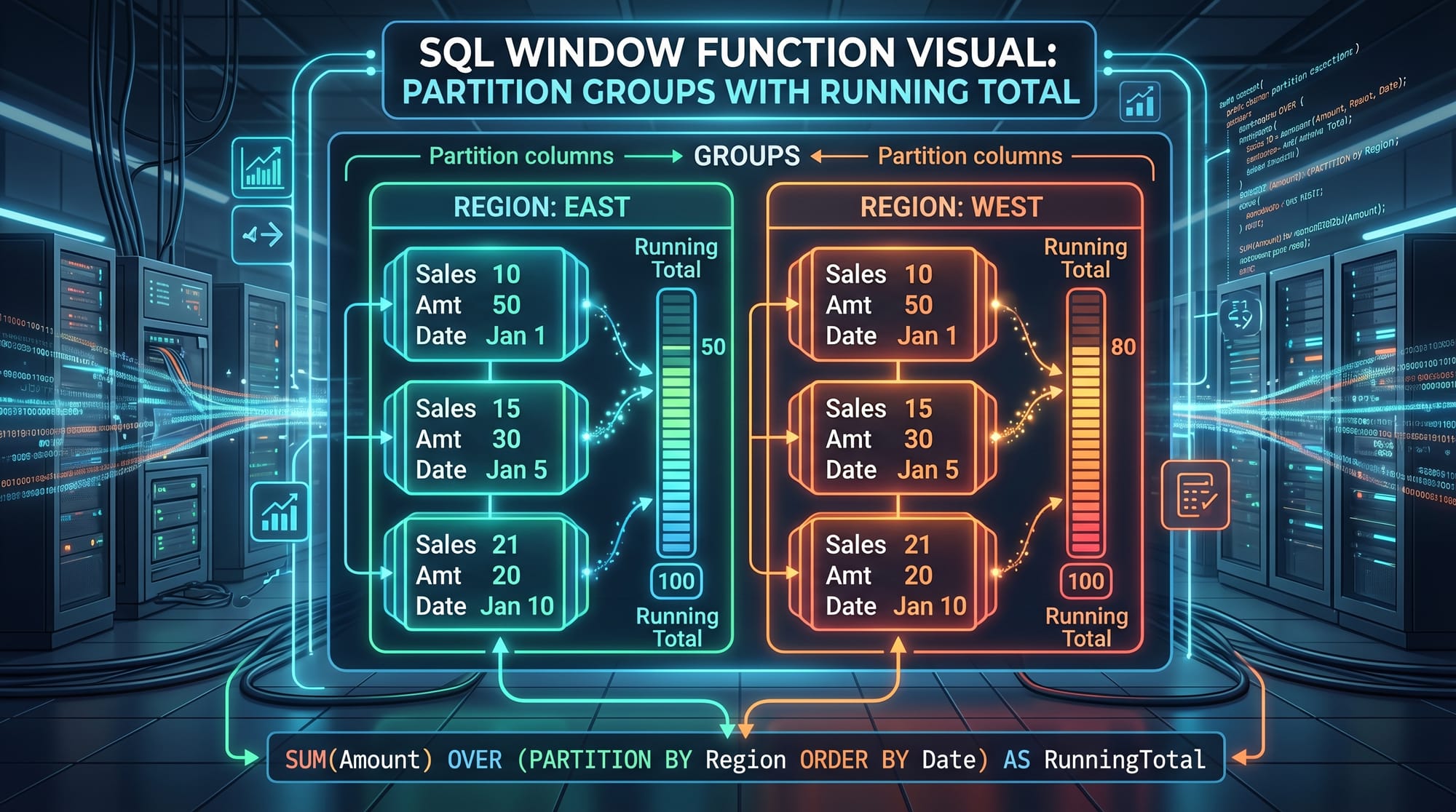
OVER() Clause — The Heart of Window Functions
The OVER() clause defines the window of rows.
It can include:
- PARTITION BY → divides data into groups
- ORDER BY → defines order inside each group
Example structure:
function_name() OVER (
    PARTITION BY column
    ORDER BY column
)
Explanation:
- function_name() → window function like ROW_NUMBER()
- PARTITION BY → group data (e.g., department)
- ORDER BY → sort inside each group
ROW_NUMBER() — Assign Unique Row Numbers
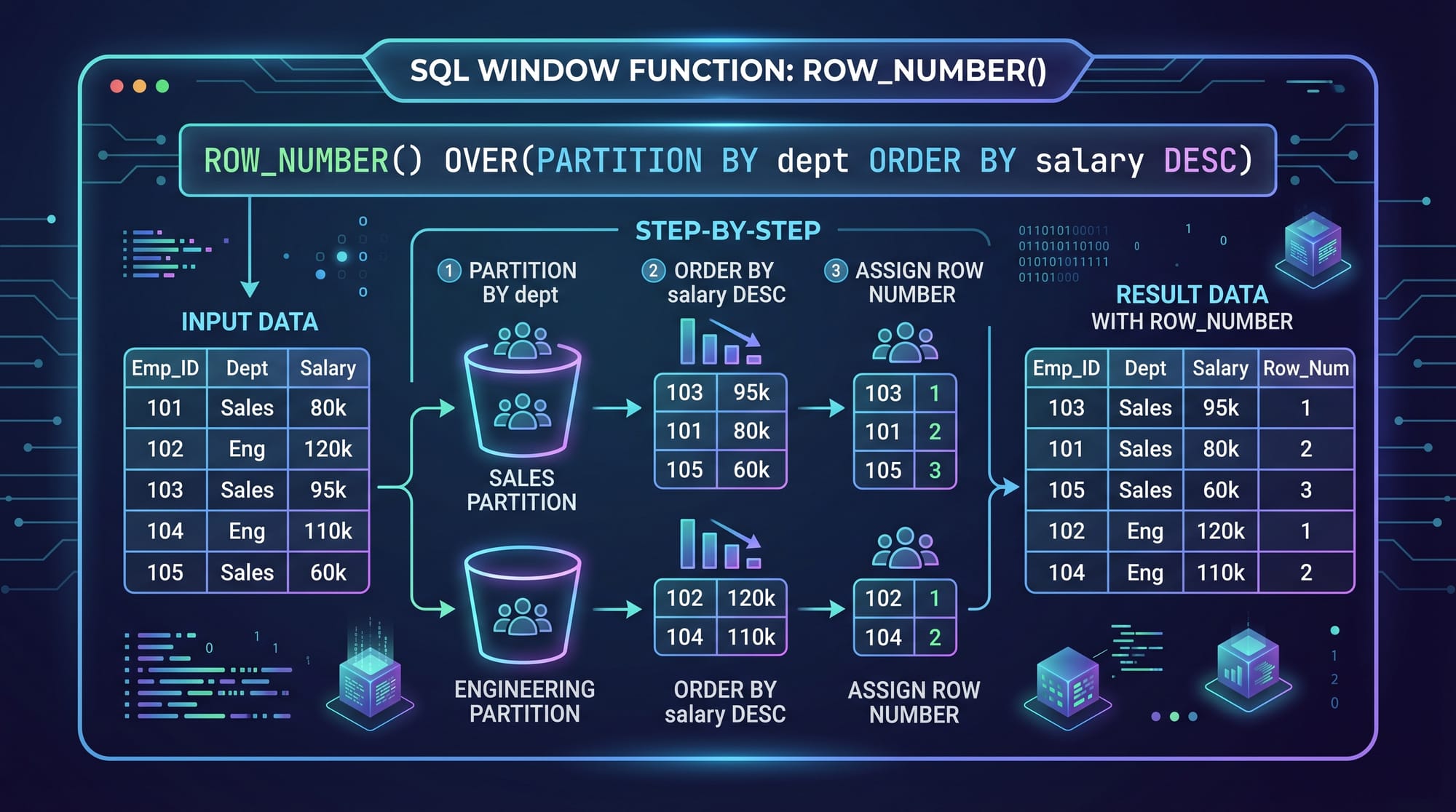
ROW_NUMBER assigns a unique sequential number to each row within a partition.
Example concept:
- First row = 1
- Second row = 2
- No duplicates, even if values are same
RANK() — Ranking with Gaps
RANK assigns ranking but:
- If two rows tie → same rank
- Next rank is skipped
Example:
- 1, 2, 2, 4 (3 is skipped)
LEAD() — Look at Next Row
LEAD allows you to access the next row’s value without a self-join.
Example use:
- Compare today’s sales with tomorrow’s sales
LAG() — Look at Previous Row
LAG allows you to access the previous row’s value.
Example use:
- Compare current month revenue with previous month
Practical Code Examples
Example 1: Employee Salary Ranking in Lahore Company
SELECT
    employee_name,
    department,
    salary,
    ROW_NUMBER() OVER (PARTITION BY department ORDER BY salary DESC) AS row_num
FROM employees;
Explanation:
SELECT employee_name→ shows employee namedepartment→ shows department namesalary→ shows salary amountROW_NUMBER()→ assigns unique ranking per departmentPARTITION BY department→ resets numbering for each departmentORDER BY salary DESC→ highest salary gets rank 1AS row_num→ alias for output column
This query helps HR teams in Karachi companies to identify top earners in each department.
Example 2: Monthly Sales Trend in Pakistan E-commerce Store
SELECT
    month,
    revenue,
    LAG(revenue) OVER (ORDER BY month) AS previous_month_revenue,
    revenue - LAG(revenue) OVER (ORDER BY month) AS growth
FROM sales;
Explanation:
month→ time periodrevenue→ current month revenueLAG(revenue)→ gets previous month revenueOVER (ORDER BY month)→ ensures correct time orderrevenue - LAG(...)→ calculates growth difference
This is commonly used in Pakistani e-commerce businesses like Daraz analytics dashboards.
Common Mistakes & How to Avoid Them
Mistake 1: Forgetting ORDER BY inside OVER()
Many students write:
ROW_NUMBER() OVER (PARTITION BY department)
Problem:
- No ordering → random numbering
Fix:
ROW_NUMBER() OVER (PARTITION BY department ORDER BY salary DESC)
Always define ordering when ranking matters.
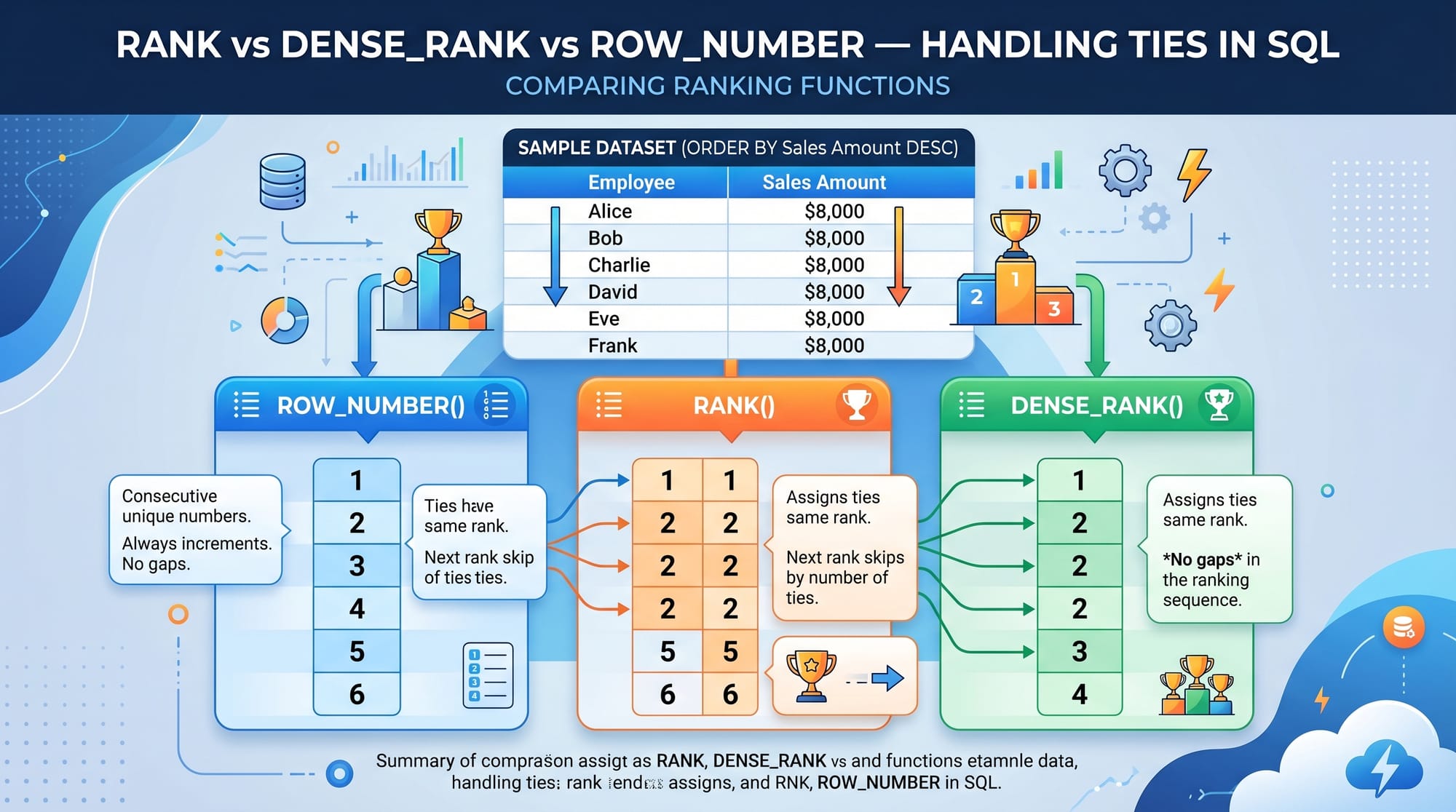
Mistake 2: Confusing RANK and ROW_NUMBER
Problem:
Students expect continuous ranking but use RANK instead.
Fix:
- Use ROW_NUMBER → unique ranking
- Use RANK → ties allowed with gaps
- Use DENSE_RANK → ties allowed without gaps
Practice Exercises
Exercise 1: Top Students in Islamabad University
Problem:
Write a query to rank students by marks in each department.
Solution:
SELECT
    student_name,
    department,
    marks,
    ROW_NUMBER() OVER (PARTITION BY department ORDER BY marks DESC) AS rank
FROM students;
Explanation:
- Partitions students by department
- Orders them by marks
- Assigns unique ranking
Exercise 2: Compare Monthly Salaries in Karachi Company
Problem:
Show each employee’s salary and previous month salary difference.
Solution:
SELECT
    employee_name,
    month,
    salary,
    LAG(salary) OVER (PARTITION BY employee_name ORDER BY month) AS previous_salary
FROM payroll;
Explanation:
- PARTITION BY employee → separates each employee
- ORDER BY month → ensures correct timeline
- LAG() → fetches previous salary value
Frequently Asked Questions
What is a window function in SQL?
A window function performs calculations across a set of rows related to the current row. Unlike GROUP BY, it does not collapse rows, making it useful for analytics and reporting.
How is ROW_NUMBER different from RANK?
ROW_NUMBER assigns unique sequential numbers without duplicates, while RANK assigns the same rank to tied values and skips the next rank number.
What does PARTITION BY do in SQL window functions?
PARTITION BY divides data into groups so that window functions are applied separately within each group, such as per department or per city.
When should I use LEAD and LAG?
Use LEAD when you want to compare with the next row, and LAG when you want to compare with the previous row. They are useful for trend analysis like sales or salary changes.
Are window functions used in real jobs in Pakistan?
Yes, window functions are widely used in data analyst roles in Pakistan, especially in banks, telecom companies, and e-commerce platforms for reporting and dashboards.
Summary & Key Takeaways
- SQL window functions help analyze data without grouping rows
- ROW_NUMBER assigns unique ranking per partition
- RANK handles ties but creates gaps in ranking
- LEAD compares with next row, LAG compares with previous row
- PARTITION BY divides data into logical groups
- Essential for data analytics jobs in Pakistan
Next Steps & Related Tutorials
To strengthen your SQL skills, continue learning:
- Learn more in the SQL Tutorial
- Master analytics in SQL for Data Analysis
- Explore advanced reporting with SQL Joins and Subqueries
- Improve database skills with Advanced SQL Techniques
If you want, I can also convert this into a WordPress-ready blog post, PDF lesson, or interactive quiz for students.
Test Your Python Knowledge!
Finished reading? Take a quick quiz to see how much you've learned from this tutorial.