SQLAlchemy Tutorial Python ORM Complete Guide 2026
Introduction
SQLAlchemy is one of the most powerful and flexible tools for working with databases in Python. In this SQLAlchemy Tutorial: Python ORM Complete Guide 2026, you’ll learn how to use SQLAlchemy to interact with databases using Python objects instead of writing raw SQL queries.
For Pakistani students studying programming, especially those building web apps, freelancing projects, or university assignments, learning SQLAlchemy is a major advantage. Whether you’re building a student management system for a university in Lahore or an e-commerce app handling PKR transactions in Karachi, SQLAlchemy helps you write clean, scalable, and maintainable code.
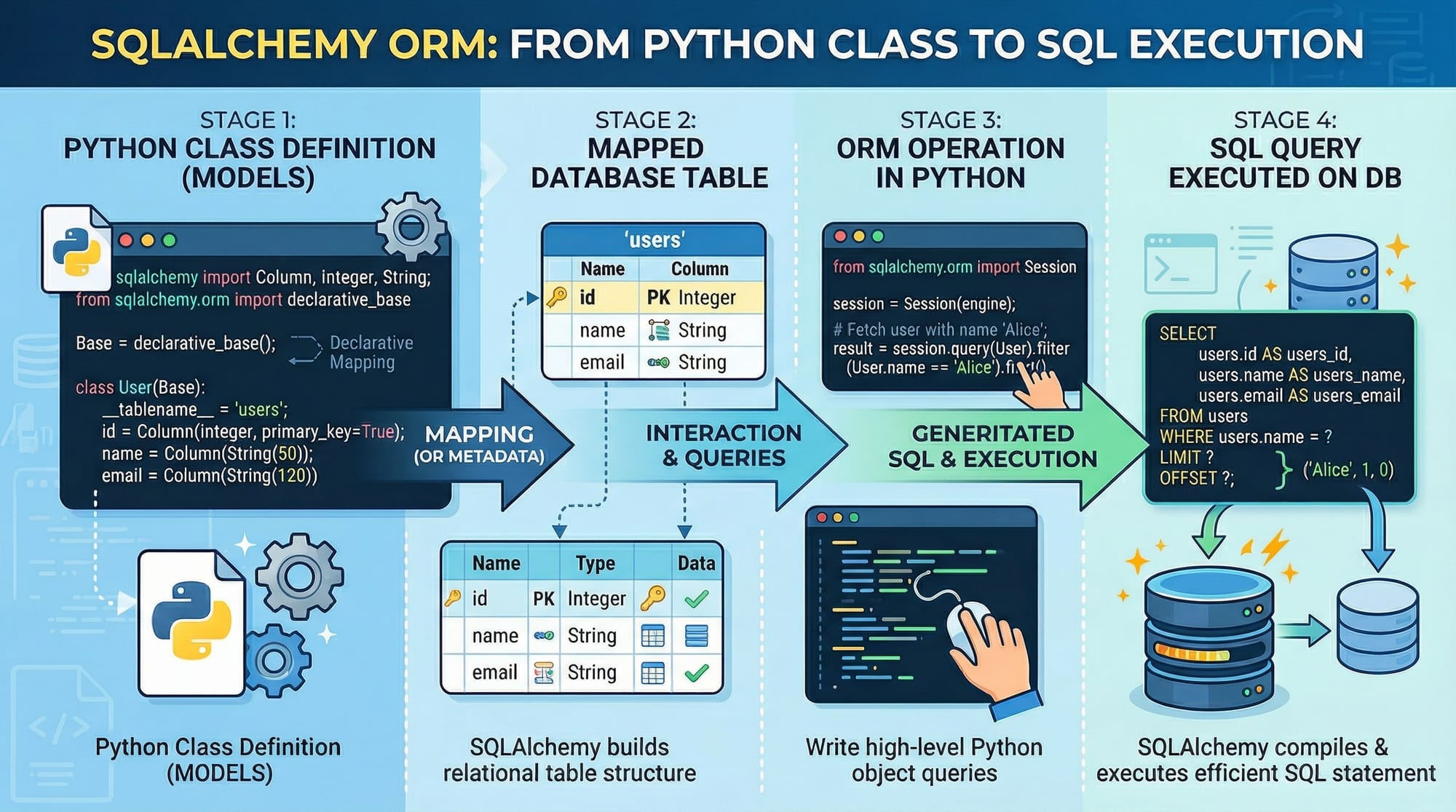
At its core, SQLAlchemy is a Python ORM (Object Relational Mapper), meaning it maps Python classes to database tables. Instead of writing complex SQL queries, you work with Python objects—and SQLAlchemy handles the database interactions for you.
Prerequisites
Before starting this SQLAlchemy Python tutorial, you should have:
- Basic knowledge of Python (functions, classes, imports)
- Understanding of SQL (SELECT, INSERT, UPDATE, DELETE)
- Familiarity with databases like SQLite or PostgreSQL
- Python installed on your system
- A code editor like VS Code or PyCharm
Optional but helpful:
- Basic knowledge of web frameworks like Flask or Django
Core Concepts & Explanation
ORM (Object Relational Mapping) Fundamentals
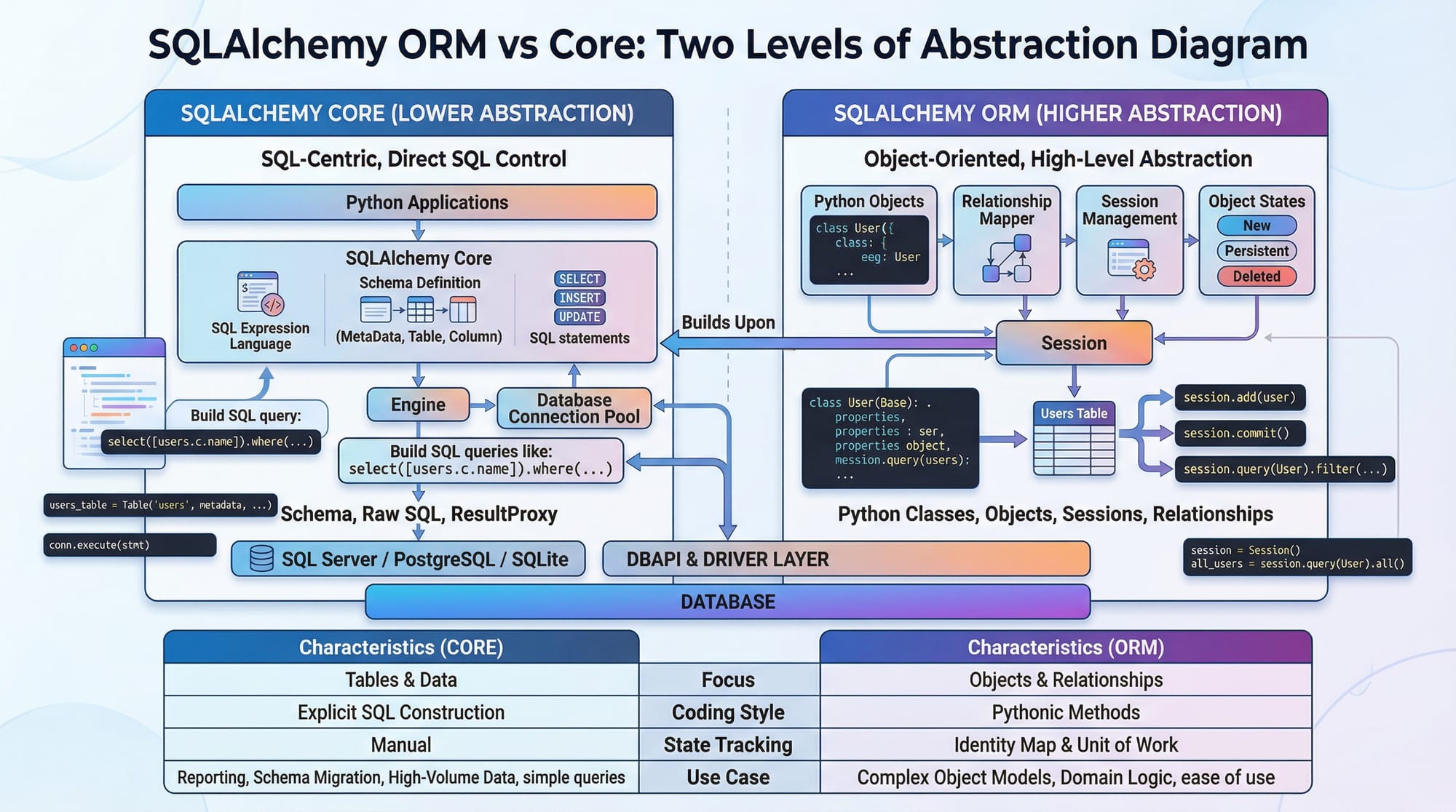
ORM stands for Object Relational Mapping. It allows you to interact with a database using Python classes instead of SQL queries.
Example:
Instead of writing:
SELECT * FROM students;
You write:
session.query(Student).all()
Here:
Studentis a Python class- SQLAlchemy converts it into an SQL query behind the scenes
Benefits:
- Cleaner code
- Database abstraction
- Easier maintenance
Declarative Base, Models & Sessions
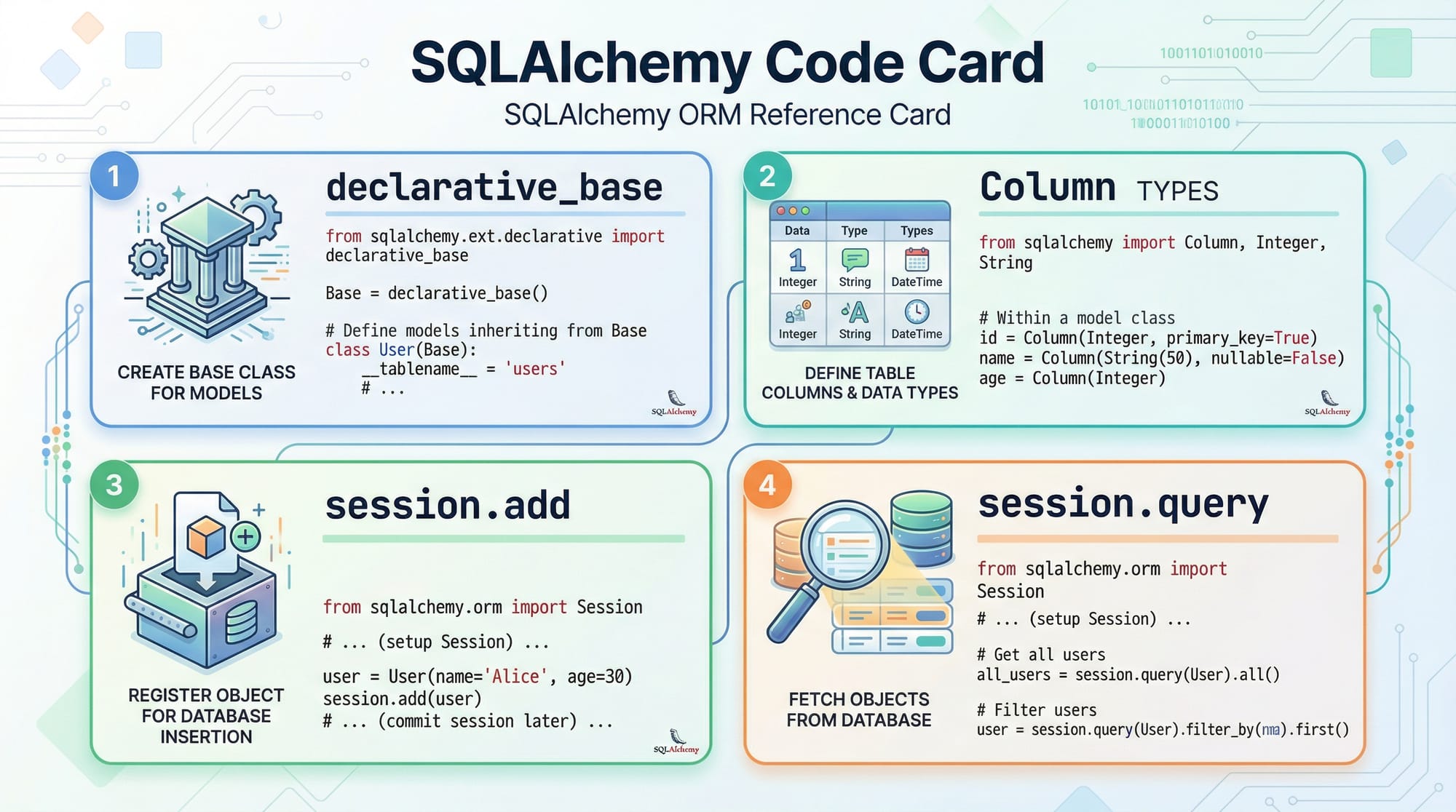
SQLAlchemy uses a declarative system to define database tables as Python classes.
Key Components:
- Base: The base class for models
- Column: Defines table columns
- Session: Manages database operations
Example:
from sqlalchemy import create_engine, Column, Integer, String
from sqlalchemy.orm import declarative_base

Base = declarative_base()

class Student(Base):
    __tablename__ = 'students'

    id = Column(Integer, primary_key=True)
    name = Column(String)
    city = Column(String)
Explanation:
create_engine: Connects to the databasedeclarative_base(): Creates base class__tablename__: Defines table nameColumn: Defines fieldsprimary_key=True: Sets unique ID
Practical Code Examples
Example 1: Create and Insert Data into Database
from sqlalchemy import create_engine, Column, Integer, String
from sqlalchemy.orm import declarative_base, sessionmaker

# Step 1: Create database connection
engine = create_engine('sqlite:///students.db')

# Step 2: Create base class
Base = declarative_base()

# Step 3: Define model
class Student(Base):
    __tablename__ = 'students'

    id = Column(Integer, primary_key=True)
    name = Column(String)
    city = Column(String)

# Step 4: Create table
Base.metadata.create_all(engine)

# Step 5: Create session
Session = sessionmaker(bind=engine)
session = Session()

# Step 6: Add data
student1 = Student(name="Ali", city="Lahore")
session.add(student1)

# Step 7: Commit changes
session.commit()
Line-by-line Explanation:
create_engine: Connects SQLite databaseBase: Initializes ORM baseStudent: Defines table structurecreate_all: Creates table if not existssessionmaker: Creates session factorysession: Database interaction instancesession.add(): Adds new recordcommit(): Saves changes permanently
Example 2: Real-World Application (University Fee System)
from sqlalchemy import create_engine, Column, Integer, String, Float
from sqlalchemy.orm import declarative_base, sessionmaker

engine = create_engine('sqlite:///fees.db')
Base = declarative_base()

class Fee(Base):
    __tablename__ = 'fees'

    id = Column(Integer, primary_key=True)
    student_name = Column(String)
    amount = Column(Float)

Base.metadata.create_all(engine)

Session = sessionmaker(bind=engine)
session = Session()

# Add fee records
fee1 = Fee(student_name="Ahmad", amount=25000)
fee2 = Fee(student_name="Fatima", amount=30000)

session.add_all([fee1, fee2])
session.commit()

# Query data
fees = session.query(Fee).all()

for fee in fees:
    print(f"{fee.student_name} paid PKR {fee.amount}")
Explanation:
Float: Stores fee amount in PKRadd_all: Adds multiple recordsquery().all(): Fetches all records- Loop prints each student fee
Common Mistakes & How to Avoid Them
Mistake 1: Forgetting to Commit Changes
Problem:
session.add(student)
# Missing commit
Fix:
session.commit()
Explanation:
Without commit(), changes are not saved to the database.
Mistake 2: Not Creating Tables Before Use
Problem:
Trying to insert data before creating tables.
Fix:
Base.metadata.create_all(engine)
Explanation:
Always create tables before inserting data.
Practice Exercises
Exercise 1: Student Record System
Problem:
Create a table with fields:
- id
- name
- marks
Solution:
class Student(Base):
    __tablename__ = 'students'

    id = Column(Integer, primary_key=True)
    name = Column(String)
    marks = Column(Integer)
Explanation:
Defines a simple student record table.
Exercise 2: Product Inventory
Problem:
Store product name and price in PKR.
Solution:
class Product(Base):
    __tablename__ = 'products'

    id = Column(Integer, primary_key=True)
    name = Column(String)
    price = Column(Float)
Explanation:
Used for e-commerce apps in Pakistan.
Frequently Asked Questions
What is SQLAlchemy in Python?
SQLAlchemy is a Python ORM that allows developers to interact with databases using Python objects instead of writing SQL queries manually. It simplifies database operations and improves code readability.
How do I install SQLAlchemy?
You can install SQLAlchemy using pip:
pip install sqlalchemy
This installs the latest version for your Python environment.
Is SQLAlchemy better than raw SQL?
SQLAlchemy is easier for large projects because it reduces repetition and improves maintainability. However, raw SQL may be faster for complex queries.
What databases does SQLAlchemy support?
SQLAlchemy supports SQLite, PostgreSQL, MySQL, Oracle, and more. It allows you to switch databases with minimal code changes.
How do I update data using SQLAlchemy?
You can update records like this:
student = session.query(Student).first()
student.name = "Updated Name"
session.commit()
Summary & Key Takeaways
- SQLAlchemy is a powerful Python ORM for database interaction
- It allows you to use Python classes instead of SQL queries
- Sessions manage database operations like add, update, delete
- Always commit changes to save data
- Useful for real-world Pakistani projects like fee systems and e-commerce apps
- Supports multiple databases with flexible configuration
Next Steps & Related Tutorials
To continue your learning journey on theiqra.edu.pk, explore these tutorials:
- Learn Python fundamentals in our Python Tutorial for Beginners
- Master databases with our PostgreSQL Tutorial for Students
- Build web apps using Flask Web Development Guide
- Understand database design in SQL Database Design Tutorial
These resources will help you become a complete backend developer and open freelancing opportunities in Pakistan’s growing tech market 🚀
Test Your Python Knowledge!
Finished reading? Take a quick quiz to see how much you've learned from this tutorial.