SwiftUI Advanced Animations NavigationStack & Combine
Introduction
SwiftUI has transformed how developers build iOS applications by introducing a declarative and modern UI framework. In this SwiftUI advanced: animations, NavigationStack & Combine tutorial, we will explore three powerful topics that elevate your iOS development skills: advanced animations, the new NavigationStack system, and reactive programming using Combine.
For Pakistani students aiming to build professional iOS apps—whether freelancing on platforms like Fiverr or working in companies in Lahore, Karachi, or Islamabad—mastering these advanced concepts is essential. These tools allow you to create smooth user experiences, handle complex navigation flows, and manage asynchronous data efficiently.
Prerequisites
Before diving into this advanced tutorial, you should already have:
- Strong understanding of Swift programming language
- Basic knowledge of SwiftUI (Views, Modifiers, State)
- Familiarity with Xcode and iOS app lifecycle
- Understanding of async/await concepts
- Basic idea of MVVM architecture
Core Concepts & Explanation
Advanced SwiftUI Animations
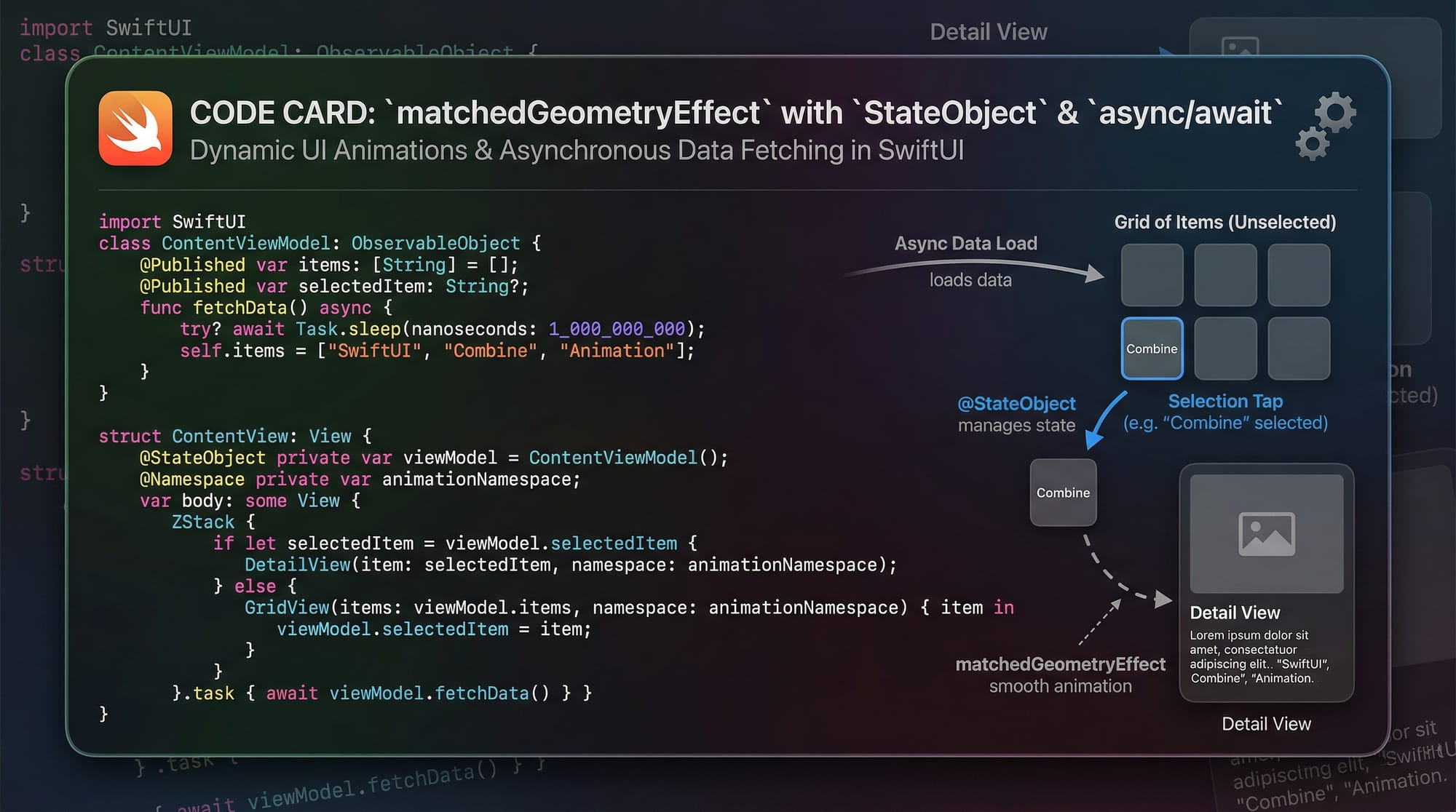
SwiftUI animations go beyond simple transitions. Advanced animations allow you to create smooth, interactive, and visually appealing UI experiences.
Key Features:
withAnimation {}block.animation()modifiermatchedGeometryEffect- Gesture-based animations
Example:
struct AnimatedBox: View {
    @State private var isExpanded = false

    var body: some View {
        VStack {
            RoundedRectangle(cornerRadius: 20)
                .fill(isExpanded ? Color.green : Color.blue)
                .frame(width: isExpanded ? 200 : 100,
                       height: isExpanded ? 200 : 100)
                .onTapGesture {
                    withAnimation(.spring()) {
                        isExpanded.toggle()
                    }
                }
        }
    }
}
Line-by-line explanation:
@State private var isExpanded: Stores animation stateRoundedRectangle: UI element being animated.fill(...): Changes color dynamically.frame(...): Changes size based on state.onTapGesture: Triggers animationwithAnimation(.spring()): Applies spring animation effect
NavigationStack & Programmatic Navigation
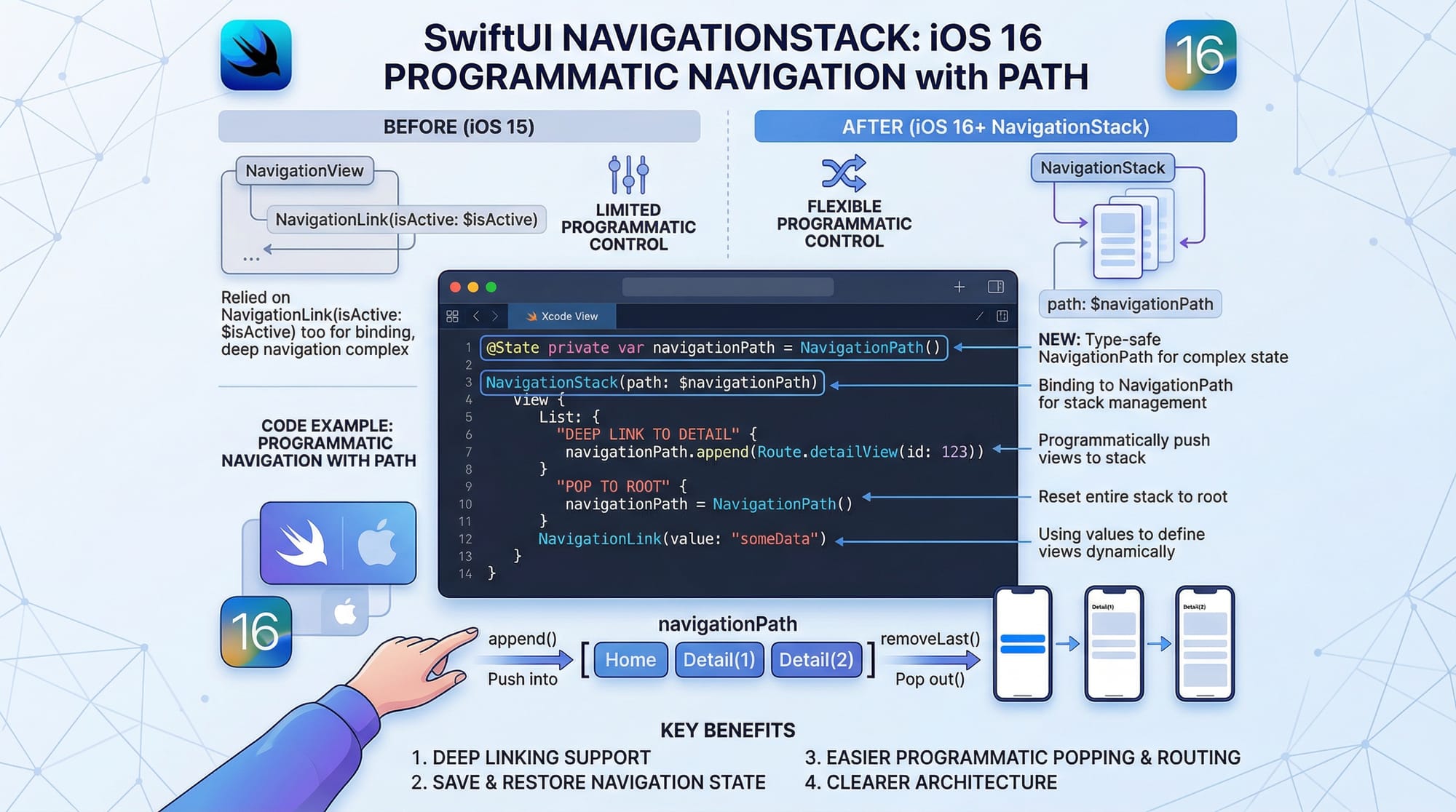
Introduced in iOS 16, NavigationStack replaces NavigationView with a more powerful and flexible system.
Key Features:
- Stack-based navigation
- Path-based navigation
- Programmatic routing
Example:
struct NavigationExample: View {
    @State private var path: [String] = []

    var body: some View {
        NavigationStack(path: $path) {
            VStack {
                Button("Go to Details") {
                    path.append("Details")
                }
            }
            .navigationDestination(for: String.self) { value in
                Text("You are on \(value) screen")
            }
        }
    }
}
Explanation:
@State private var path: Stores navigation stackNavigationStack(path:): Initializes navigation systemButton: Pushes new screenpath.append(...): Adds destination.navigationDestination: Defines destination view
Combine Framework in SwiftUI
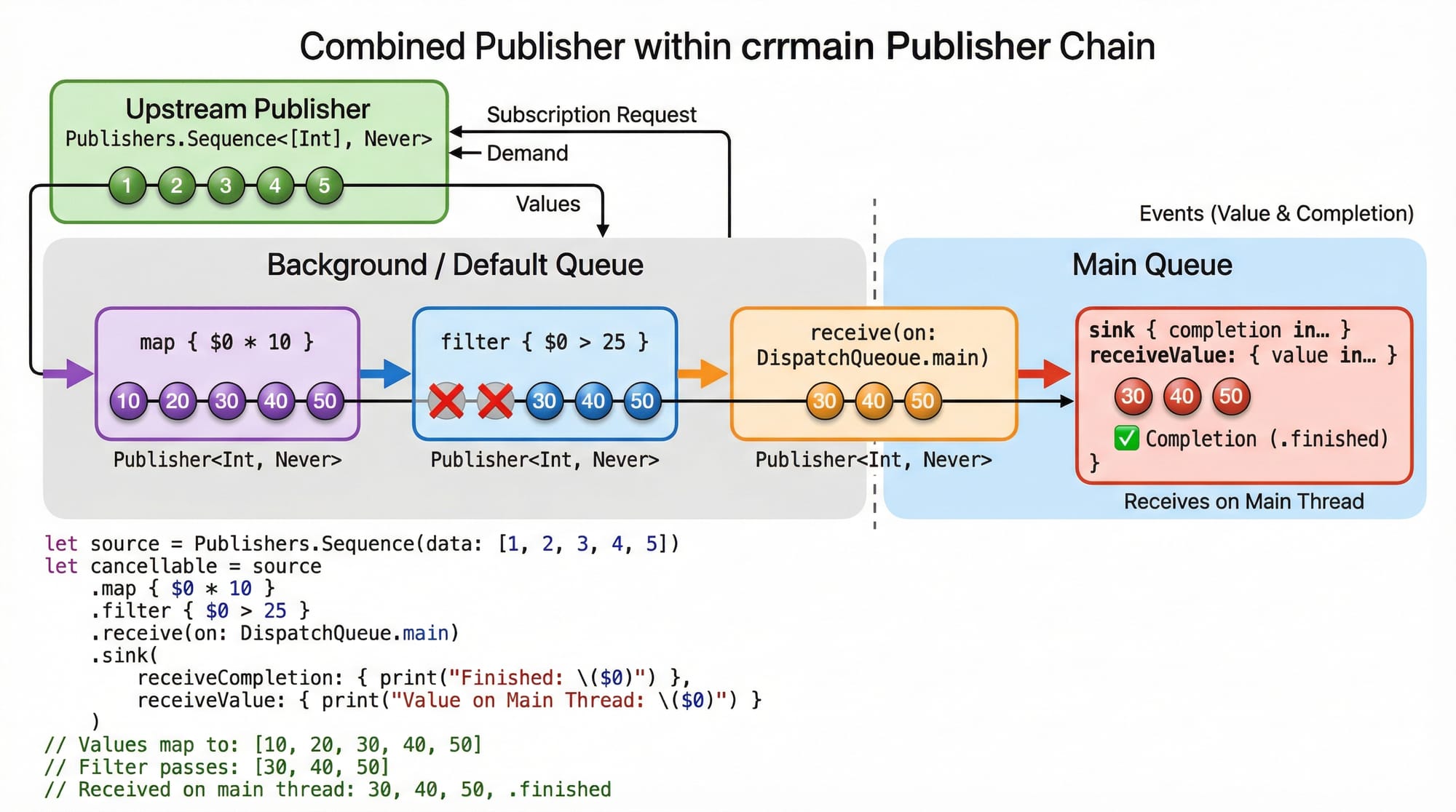
The Combine framework enables reactive programming—handling data streams and asynchronous events.
Key Concepts:
- Publishers
- Subscribers
- Operators (map, filter, etc.)
Example:
import Combine

class DataViewModel: ObservableObject {
    @Published var value: String = ""
    private var cancellables = Set<AnyCancellable>()

    init() {
        Just("Hello Pakistan")
            .map { $0.uppercased() }
            .sink { [weak self] result in
                self?.value = result
            }
            .store(in: &cancellables)
    }
}
Explanation:
@Published: Notifies UI of changesJust: Creates publisher.map: Transforms data.sink: Receives output.store: Keeps subscription alive
Practical Code Examples
Example 1: Animated Product Card
struct ProductCard: View {
    @State private var expanded = false

    var body: some View {
        VStack {
            Image("laptop")
                .resizable()
                .frame(height: expanded ? 200 : 100)

            Text("Price: PKR 120,000")

            Button("Toggle") {
                withAnimation {
                    expanded.toggle()
                }
            }
        }
    }
}
Explanation:
expanded: Controls animation stateImage: Resizes dynamicallyText: Displays product price in PKRButton: Triggers animationwithAnimation: Smooth transition
Example 2: Real-World Application (Login Flow with Combine)
class LoginViewModel: ObservableObject {
    @Published var username = ""
    @Published var password = ""
    @Published var isValid = false

    private var cancellables = Set<AnyCancellable>()

    init() {
        Publishers.CombineLatest($username, $password)
            .map { user, pass in
                return user.count > 3 && pass.count > 5
            }
            .assign(to: &$isValid)
    }
}
Explanation:
@Published username/password: User inputsCombineLatest: Combines two publishers.map: Validation logic.assign: UpdatesisValid- Used in login forms like Pakistani e-commerce apps
Common Mistakes & How to Avoid Them
Mistake 1: Overusing Animations
Too many animations can make your app feel slow.
Fix:
Use animations only where needed.
withAnimation(.easeInOut(duration: 0.3)) {
    state.toggle()
}
Mistake 2: Incorrect NavigationStack Usage
Developers often misuse NavigationStack by not managing paths properly.
Fix:
Always use a structured data model instead of strings.
enum Route {
    case detail
}
Practice Exercises
Exercise 1: Animate Button
Problem: Create a button that scales when tapped.
Solution:
@State private var scale: CGFloat = 1

Button("Tap Me") {
    withAnimation {
        scale = scale == 1 ? 1.5 : 1
    }
}
.scaleEffect(scale)
Exercise 2: Navigation Flow
Problem: Navigate from Home to Profile screen.
Solution:
NavigationStack {
    NavigationLink("Go to Profile", destination: Text("Profile Screen"))
}
Frequently Asked Questions
What is SwiftUI advanced?
SwiftUI advanced refers to complex concepts like animations, navigation handling, and reactive programming that go beyond basic UI building.
How do I use Combine in SwiftUI?
You use Combine by creating publishers and subscribing to them using operators like sink, map, and assign.
What is NavigationStack?
NavigationStack is a modern navigation system introduced in iOS 16 that replaces NavigationView and supports programmatic navigation.
Why are animations important in SwiftUI?
Animations improve user experience by making transitions smooth and interactive, which is essential in modern apps.
Can I use Combine with MVVM?
Yes, Combine works perfectly with MVVM by managing data flow between ViewModel and View.
Summary & Key Takeaways
- SwiftUI advanced topics include animations, NavigationStack, and Combine
- Animations make apps interactive and engaging
- NavigationStack enables clean and scalable navigation
- Combine simplifies asynchronous data handling
- These skills are essential for professional iOS development
- Practice with real-world examples to master concepts
Next Steps & Related Tutorials
To continue your learning journey on theiqra.edu.pk:
- Learn more about iOS Development fundamentals with our beginner-friendly guide
- Explore our complete Swift Tutorial series for mastering Swift
- Build scalable apps with our MVVM architecture in SwiftUI tutorial
- Dive into async/await in Swift for modern concurrency
By mastering these advanced SwiftUI topics, Pakistani students can confidently build production-ready iOS applications and compete globally in the tech industry 🚀
Test Your Python Knowledge!
Finished reading? Take a quick quiz to see how much you've learned from this tutorial.