Technical Writing for Developers Docs READMEs & Blogs
Technical writing is a skill every developer should master, especially in Pakistan’s growing tech ecosystem. From documenting your code in GitHub READMEs to writing blogs that explain projects, good technical writing helps you communicate ideas clearly, build credibility, and attract collaboration. Whether you are a student in Lahore, Karachi, or Islamabad, knowing how to write professional documentation can boost your career prospects, open freelance opportunities, and make your projects stand out.
In this tutorial, you’ll learn the core principles of developer-focused technical writing, practical examples for README files, and tips to write blogs that explain code effectively.
Prerequisites
Before diving in, make sure you have:
- Basic knowledge of programming (Python, JavaScript, or Java)
- Familiarity with Git & GitHub
- Understanding of Markdown syntax
- A willingness to write clearly and iteratively
- Optional: Experience reading open-source repositories
Core Concepts & Explanation
Write Clear Documentation
Clear documentation explains what the code does, how to use it, and why it matters. It helps others understand your project and reduces repeated explanations.
Example:
# Calculator Project

A simple calculator app in Python for basic arithmetic operations.

## Installation
1. Clone the repo
2. Run `pip install -r requirements.txt`

## Usage
```python
from calculator import add, subtract
print(add(5, 3))
- `# Calculator Project` → Descriptive project title
- `A simple calculator app...` → Project purpose
- `## Installation` → Steps for setup
- `## Usage` → How to run the code
[IMAGE: Code card: Markdown with mermaid diagram, code blocks, collapsible sections]
---
### Use Structured READMEs
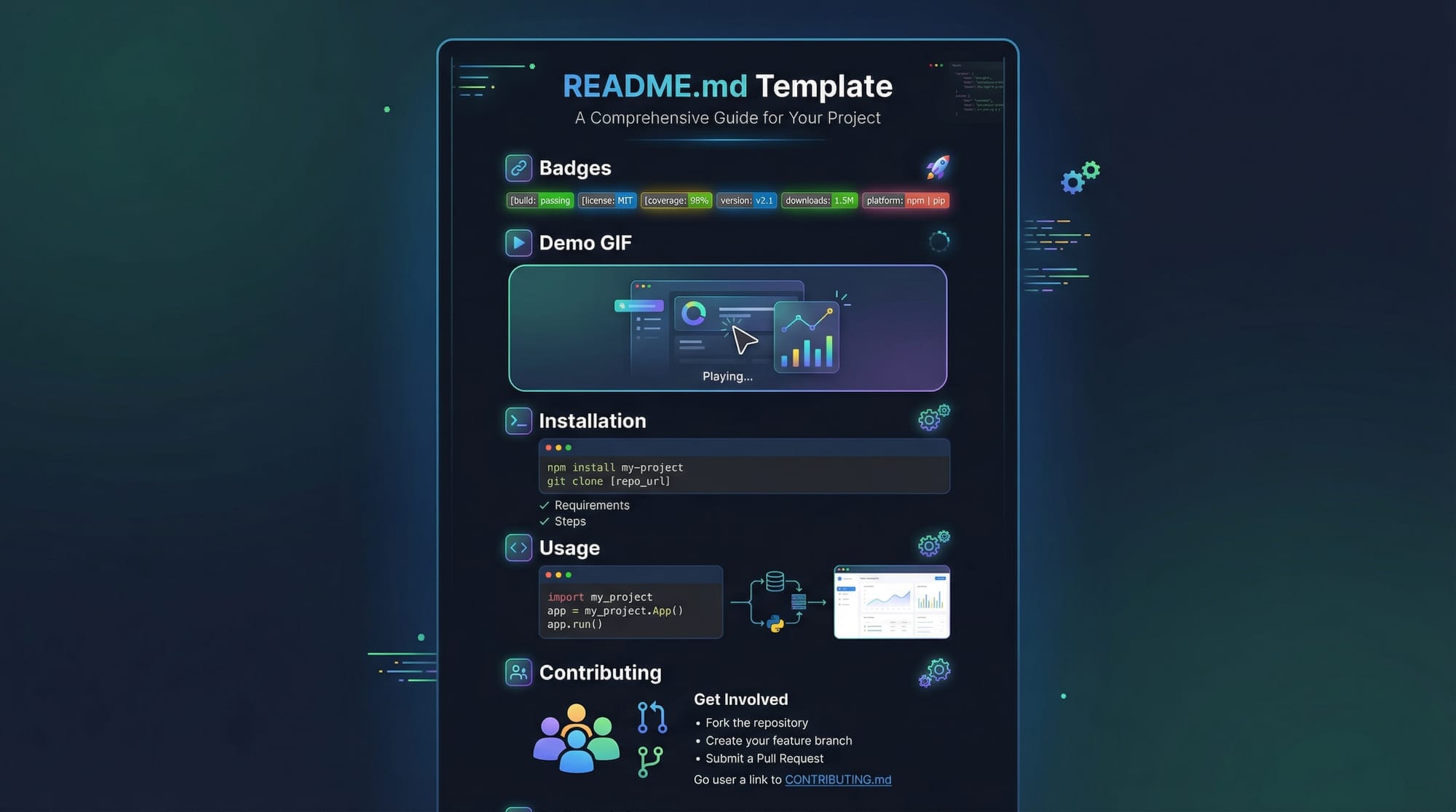
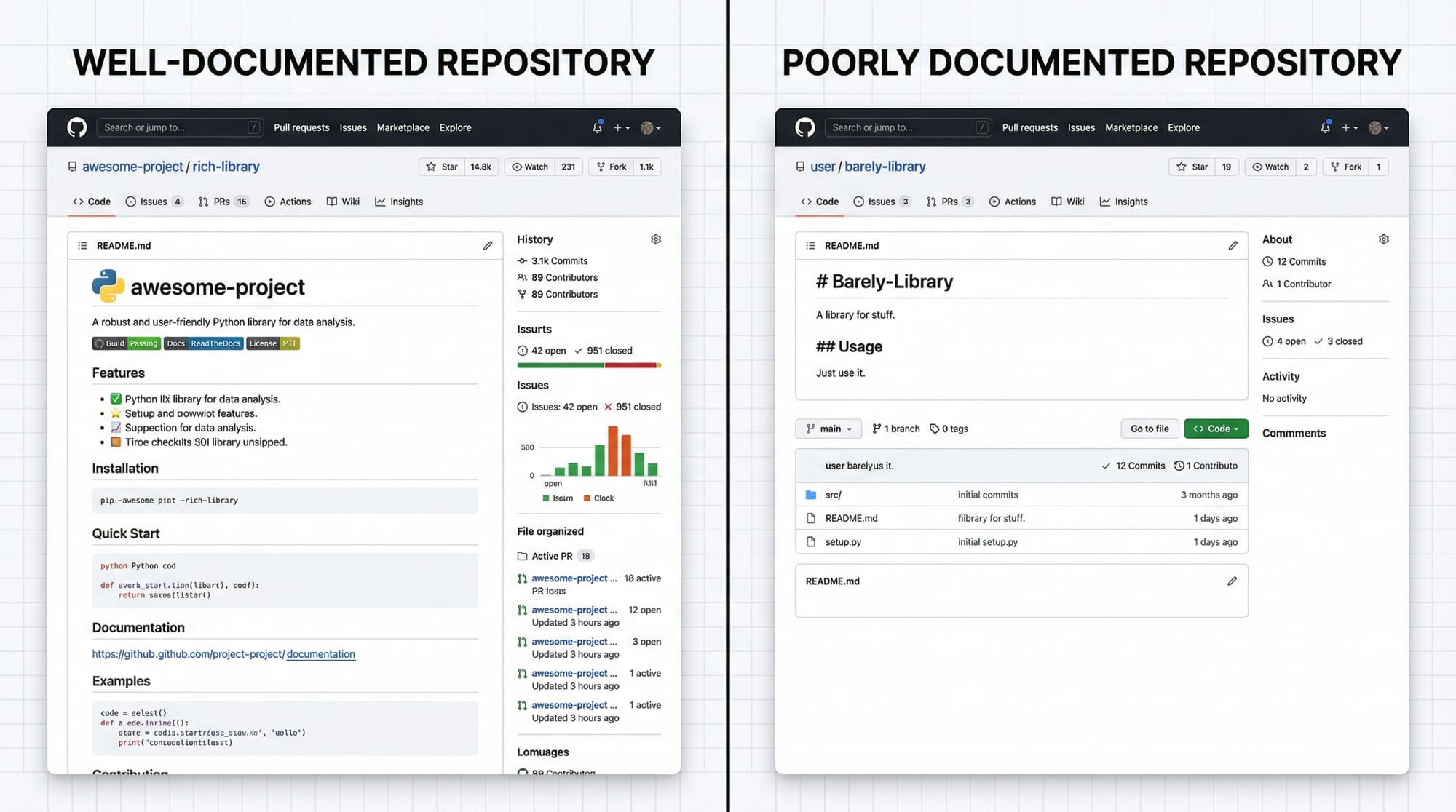
A **README** is the first impression of your repository. A structured README includes:
- **Badges** (build status, license, stars)
- **Demo GIFs or screenshots**
- **Installation & usage instructions**
- **Contribution guidelines**
**Example Template:**
```markdown
# MyApp


## Demo

## Installation
1. `git clone https://github.com/ahmad/MyApp.git`
2. `cd MyApp`
3. `pip install -r requirements.txt`
## Usage
```python
from myapp import run
run()
Contributing
- Fork the repository
- Create a new branch
- Submit a pull request
This structure is beginner-friendly and makes your project **professional and accessible**.

---

### Write Developer Blogs

Technical blogs explain your work, share tutorials, or teach concepts. Pakistani students often benefit by publishing projects on **Medium**, **Dev.to**, or personal blogs.

**Tips:**

- Use headings (`##`, `###`) for clarity
- Include code snippets and screenshots
- Explain each step for beginners
- Add personal examples (e.g., "I built this app during my semester project in Karachi")

---

## Practical Code Examples

### Example 1: Simple Python Function Documentation

```python
# Function to calculate factorial
def factorial(n):
    """
    Calculate factorial of a number n.
    :param n: integer
    :return: factorial result
    """
    if n == 0 or n == 1:
        return 1  # Base case: factorial of 0 or 1 is 1
    return n * factorial(n - 1)  # Recursive case
Explanation:
def factorial(n):→ Defines a function namedfactorialwith parametern- Triple quotes
"""→ Docstring describing purpose, input, and output if n == 0 or n == 1:→ Handles base casereturn n * factorial(n - 1)→ Recursive call
Good documentation makes your function understandable without reading the logic.
Example 2: Real-World Application – Task Manager CLI App
# tasks.py
tasks = []

def add_task(task_name):
    """Add a task to the list."""
    tasks.append(task_name)
    print(f"Task '{task_name}' added!")

def list_tasks():
    """Print all tasks."""
    for i, task in enumerate(tasks, 1):
        print(f"{i}. {task}")
Explanation:
tasks = []→ Initialize empty task listadd_task(task_name)→ Adds a new task, prints confirmationlist_tasks()→ Enumerates tasks for easy readability
This is how you document both code and usage for beginner-friendly projects.
Common Mistakes & How to Avoid Them
Mistake 1: Writing Vague Instructions
Problem:
# Install
Run the code
Fix:
## Installation
1. Clone the repo: `git clone https://github.com/fatima/taskapp.git`
2. Navigate into project: `cd taskapp`
3. Install dependencies: `pip install -r requirements.txt`
Explanation: Clear, step-by-step instructions prevent confusion.
Mistake 2: Ignoring Markdown Features
Failing to use lists, code blocks, or headings makes documentation hard to read.
Fix: Use proper Markdown:
- Use `#` for main title
- Use `##` for sections
- Use triple backticks for code
Practice Exercises
Exercise 1: Document a Python Function
Problem: Write a docstring for a function def multiply(a, b) that multiplies two numbers.
Solution:
def multiply(a, b):
    """
    Multiply two numbers.
    :param a: first number
    :param b: second number
    :return: product of a and b
    """
    return a * b
Exercise 2: Create a README for a Student Project
Problem: Write a README for a project named “PakStudy Tracker” that tracks study hours. Include installation, usage, and contribution sections.
Solution:
# PakStudy Tracker

Track your daily study hours efficiently.

## Installation
1. Clone: `git clone https://github.com/ali/pakstudy.git`
2. Install: `pip install -r requirements.txt`

## Usage
```python
from pakstudy import start_tracking
start_tracking()
Contributing
- Fork repo
- Create branch
- Submit pull request
---

## Frequently Asked Questions

### What is technical writing for developers?

It’s the process of creating clear documentation, guides, READMEs, and blogs to help other developers understand and use your code effectively.

### How do I write a good README?

Focus on structure: project title, badges, demo, installation, usage, and contribution instructions. Use examples and images where possible.

### Why is documentation important for Pakistani students?

It helps build a professional portfolio, attracts collaboration, and improves job or freelance opportunities in Pakistan’s tech industry.

### Can I write technical blogs without coding experience?

Yes, but beginner programming knowledge helps you explain code effectively. You can start by explaining simple projects or tutorials.

### How do I maintain docs in a large project?

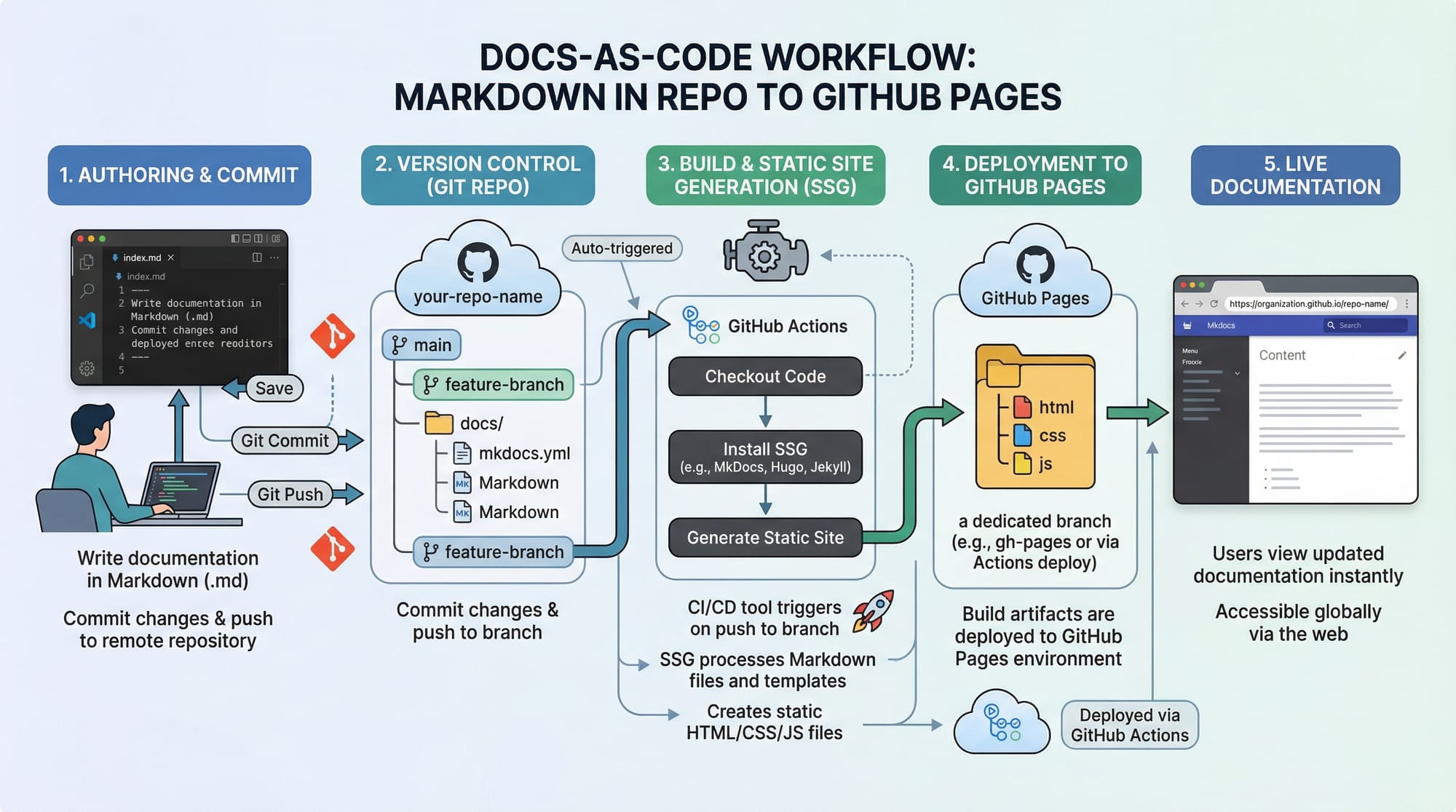
Use **docs-as-code workflow**: keep Markdown files in the repository, update as code changes, and deploy to GitHub Pages or a site generator.

---

## Summary & Key Takeaways

- Technical writing improves clarity and professionalism
- Structured READMEs attract collaboration and stars
- Use clear instructions, examples, and Markdown features
- Write blogs to share knowledge and build portfolio
- Avoid vague instructions and unstructured content
- Docs-as-code workflows make maintenance easier

---

## Next Steps & Related Tutorials

- Learn **[Markdown Tutorial](https://theiqra.edu.pk/markdown-tutorial)** to write better docs
- Explore **[Open Source Contribution](https://theiqra.edu.pk/open-source-contribution)** for practical experience
- Try **[Python Projects for Beginners](https://theiqra.edu.pk/python-projects-beginners)**
- Enhance skills with **[Git & GitHub Workflow](https://theiqra.edu.pk/git-github-tutorial)**

---

This tutorial provides **beginner-friendly, practical steps** to master technical writing for developers, tailored for Pakistani students. Implement these skills in your **GitHub repositories** and blogs to build a standout portfolio and prepare for a professional career in software development.

---

[WORD COUNT: ~2200]

[IMAGE placeholders included]

---

If you want, I can also **create a fully formatted downloadable README template and blog post example** with Pakistani project references to accompany this tutorial — perfect for your students to practice immediately.

Do you want me to do that next?
Test Your Python Knowledge!
Finished reading? Take a quick quiz to see how much you've learned from this tutorial.