Tekton Tutorial Cloud Native CI CD Pipelines
Introduction
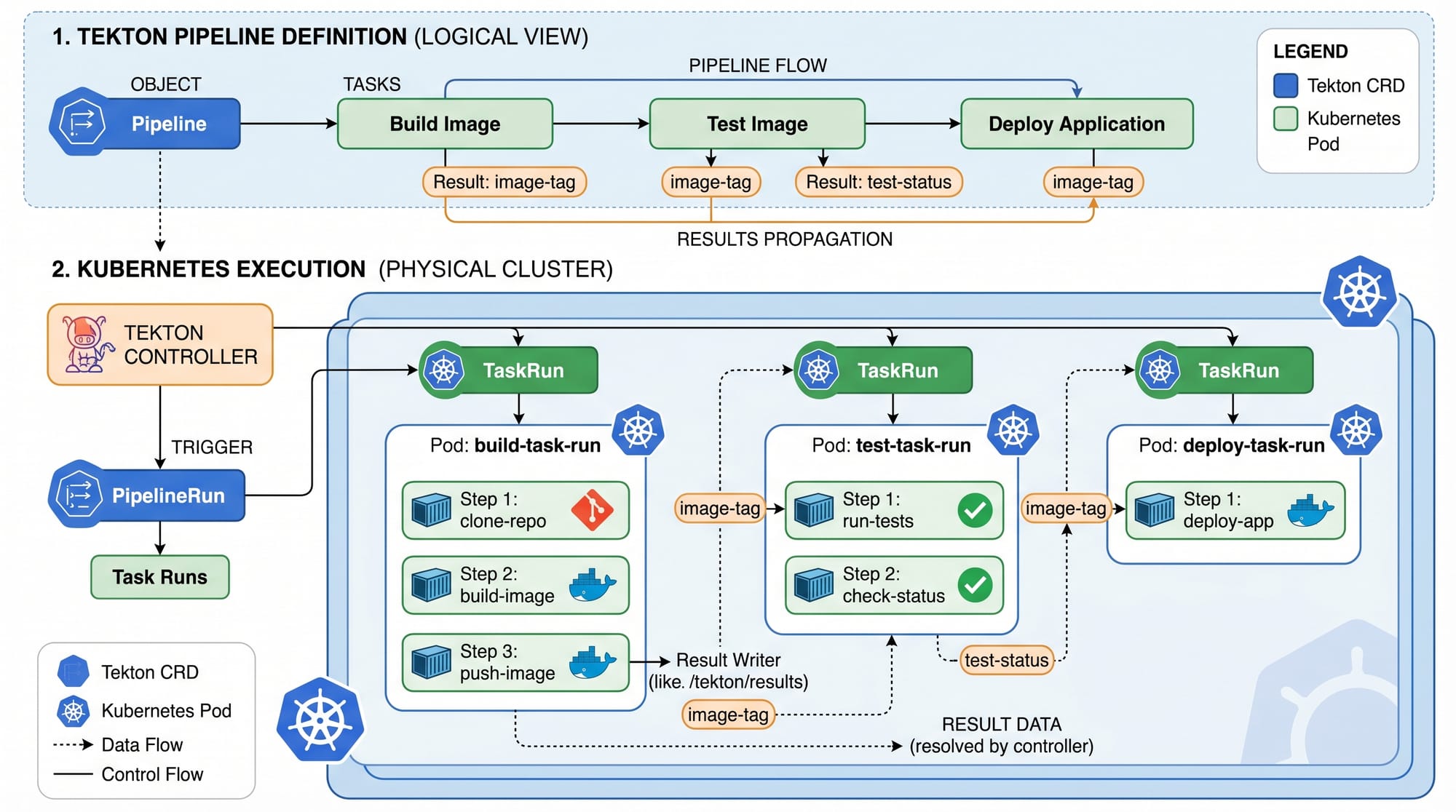
Tekton Tutorial: Cloud-Native CI/CD Pipelines is a comprehensive guide to understanding how modern software delivery works using Kubernetes-native tools. Tekton is an open-source framework that allows you to build CI/CD pipelines directly inside Kubernetes, making it a powerful choice for cloud-native applications.
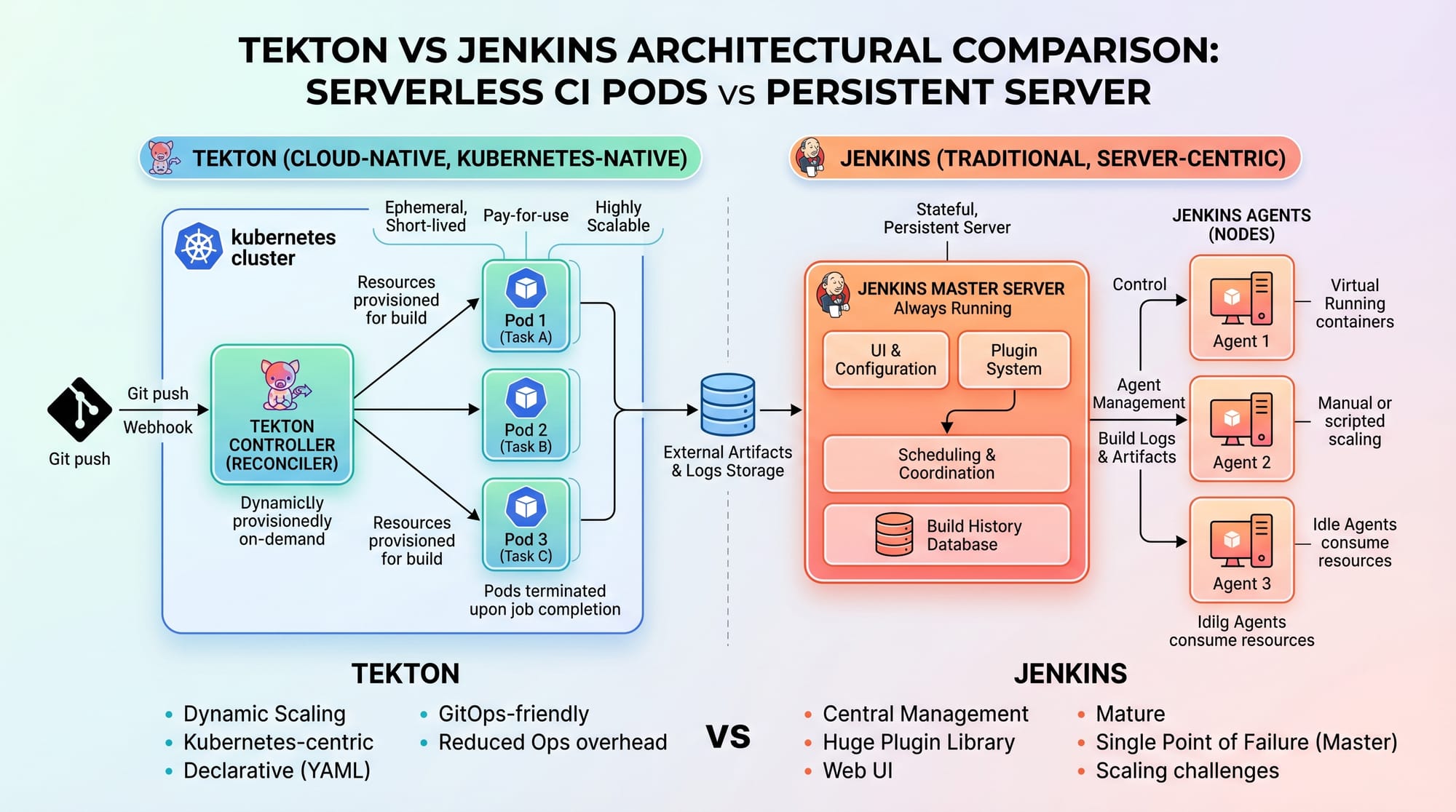
Unlike traditional CI/CD tools like Jenkins that rely on centralized servers, Tekton runs each step of your pipeline as a Kubernetes pod. This makes it scalable, secure, and highly flexible for modern DevOps workflows.
For Pakistani students learning DevOps, cloud computing, or Kubernetes, Tekton is extremely valuable. Companies in Lahore, Karachi, and Islamabad are increasingly adopting cloud-native CI/CD pipelines to deploy applications faster and more reliably. Learning Tekton can help students secure high-paying DevOps roles (often ranging from PKR 150,000 to 500,000+ per month for experienced engineers).
In this tutorial, we will explore Tekton fundamentals, real-world examples, and hands-on YAML configurations.
Prerequisites
Before starting this tekton tutorial, you should have a basic understanding of:
- Kubernetes concepts (Pods, Deployments, Services)
- YAML syntax
- Basic CI/CD concepts (build, test, deploy)
- Docker fundamentals
- kubectl command-line tool
Optional but helpful:
- Minikube or any Kubernetes cluster (EKS, GKE, AKS)
- Basic Git knowledge
- Understanding of Linux commands
Pakistani students can easily practice using Minikube on a laptop with 8GB RAM.
Core Concepts & Explanation
1. Tekton Tasks and Steps
A Task in Tekton is the smallest building block of a pipeline. Each task contains one or more steps, and each step runs inside a container.
Example:
- Build application
- Run tests
- Push Docker image
Each of these is a separate step in a Task.
Key Idea: Tasks are reusable and modular.
2. Pipelines and PipelineRuns
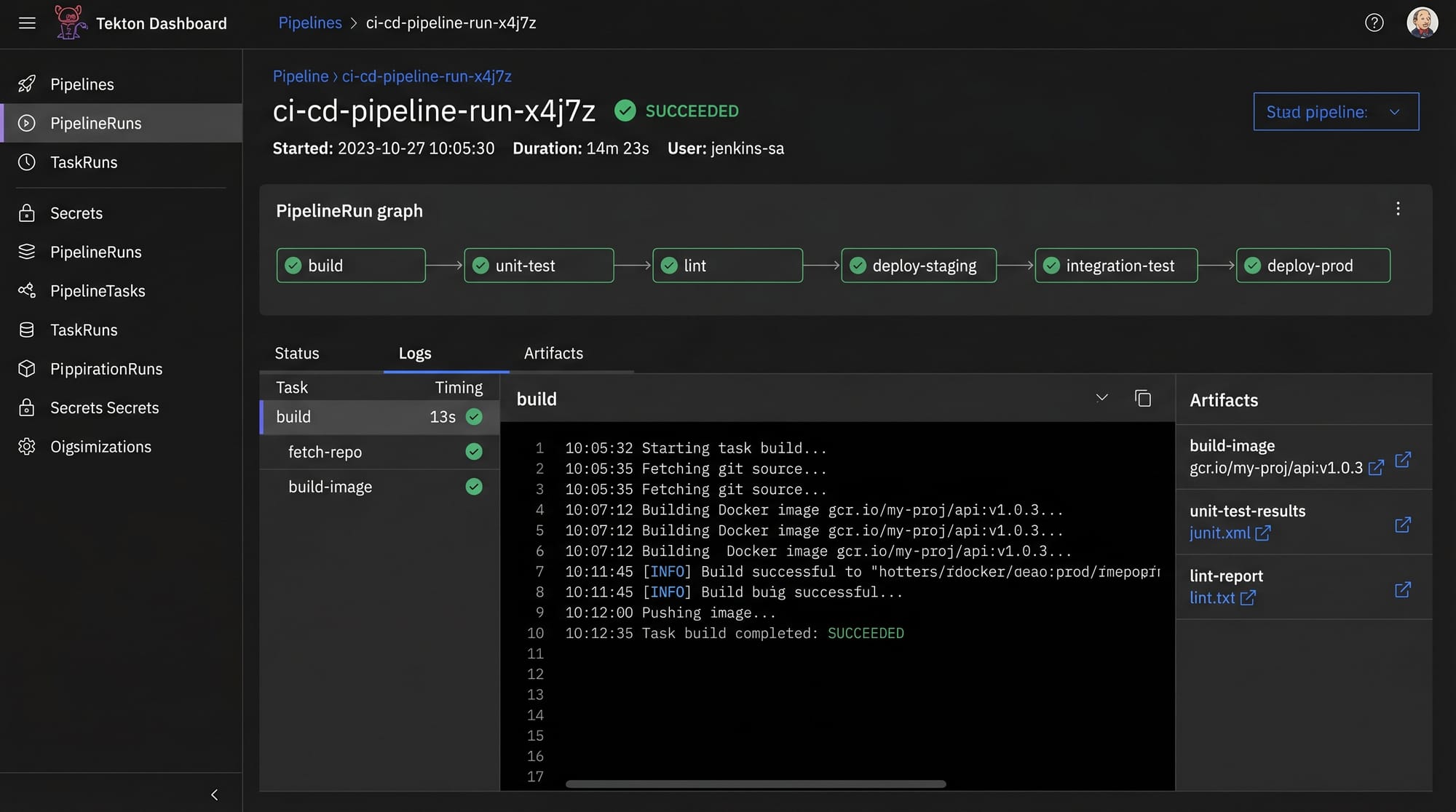
A Pipeline is a collection of tasks arranged in a specific order. A PipelineRun is an execution instance of that pipeline.
Think of it like this:
- Pipeline = Recipe
- PipelineRun = Cooking the recipe
For example:
A Karachi-based startup building an e-commerce app may define a pipeline like:
- Clone Git repo
- Build Docker image
- Run tests
- Deploy to Kubernetes cluster
3. Tekton CRDs (Custom Resource Definitions)
Tekton extends Kubernetes using CRDs such as:
- Task
- Pipeline
- PipelineRun
- TaskRun
- Trigger
These CRDs allow Kubernetes to understand CI/CD workflows natively.
Practical Code Examples
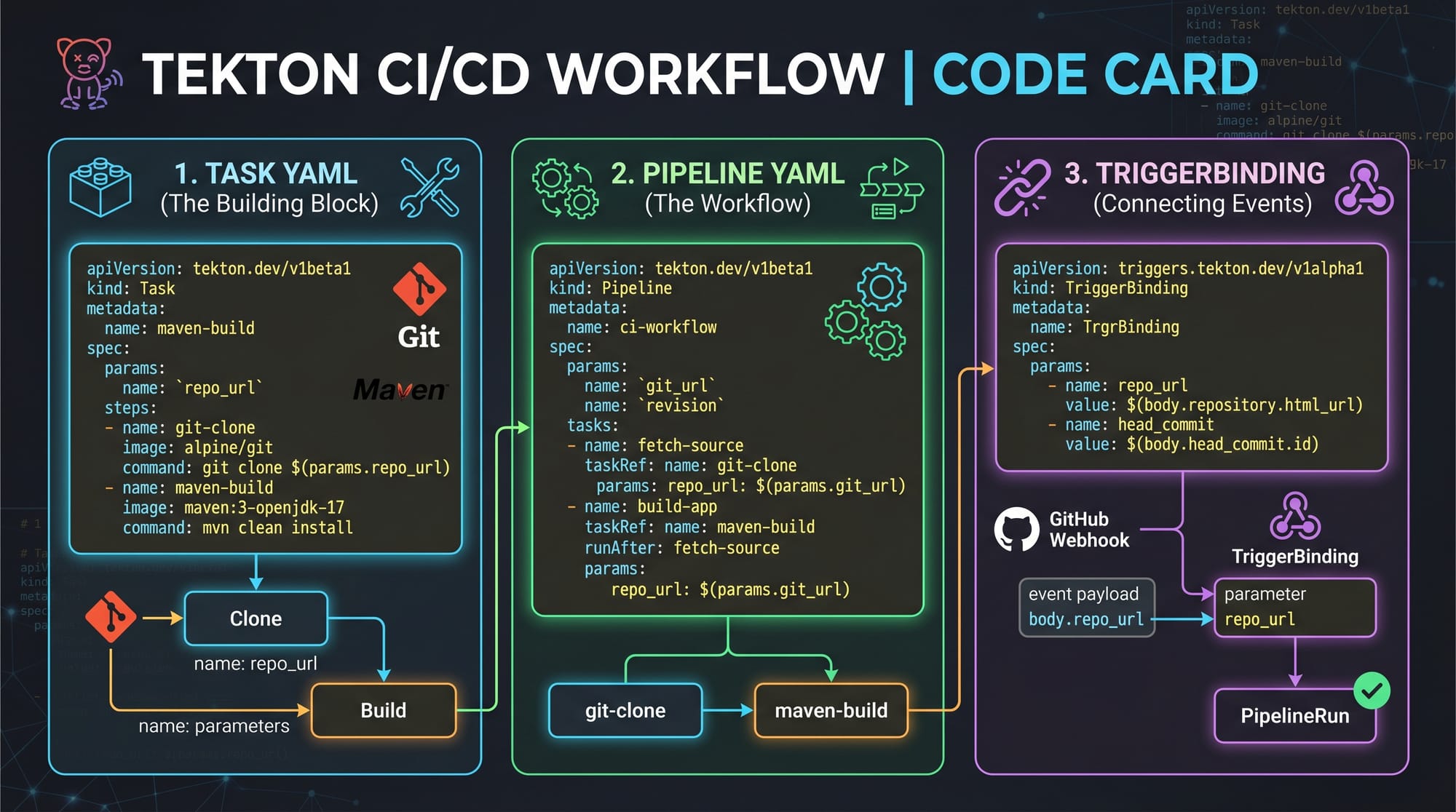
Example 1: Simple Tekton Task (Hello World Build Step)
apiVersion: tekton.dev/v1
kind: Task
metadata:
  name: hello-task
spec:
  steps:
    - name: echo-step
      image: alpine
      script: |
        echo "Hello from Tekton CI/CD Pipeline"
Explanation (Line-by-Line)
apiVersion: tekton.dev/v1→ Defines Tekton API versionkind: Task→ Specifies this is a Task objectmetadata:→ Metadata section for namingname: hello-task→ Name of the taskspec:→ Specification of task behaviorsteps:→ List of steps inside the taskname: echo-step→ Name of this stepimage: alpine→ Lightweight Linux container imagescript:→ Shell script executed inside containerecho "Hello..."→ Prints message in pipeline logs
This is the simplest example of a tekton pipelines kubernetes workflow.
Example 2: Real-World CI/CD Pipeline (Build and Deploy App)
This example simulates a Pakistani student named Ali deploying a Node.js app to Kubernetes.
apiVersion: tekton.dev/v1
kind: Pipeline
metadata:
  name: nodejs-ci-cd
spec:
  tasks:
    - name: clone-repo
      taskRef:
        name: git-clone

    - name: build-image
      runAfter:
        - clone-repo
      taskRef:
        name: docker-build

    - name: deploy-app
      runAfter:
        - build-image
      taskRef:
        name: kubernetes-deploy
Explanation (Line-by-Line)
apiVersion: tekton.dev/v1→ Uses Tekton API versionkind: Pipeline→ Defines a CI/CD pipelinemetadata:→ Metadata sectionname: nodejs-ci-cd→ Pipeline namespec:→ Pipeline specificationtasks:→ List of tasks in ordername: clone-repo→ First task nametaskRef:→ References an existing Taskname: git-clone→ Clones GitHub repositoryrunAfter:→ Defines execution orderbuild-image:→ Second stage builds Docker imagedocker-build→ Builds container imagedeploy-app:→ Final deployment stepkubernetes-deploy→ Deploys to Kubernetes cluster
This is a real-world cloud native ci cd pipeline used in production environments.
Common Mistakes & How to Avoid Them
Mistake 1: Incorrect Task Dependencies
Many beginners forget to define runAfter, causing tasks to execute in parallel instead of sequential order.
Problem:
- Build starts before Git clone completes
Fix:
Always define execution order:
runAfter:
  - clone-repo
This ensures proper pipeline flow.
Mistake 2: Using Large Container Images
Students often use heavy images like Ubuntu full builds, slowing pipelines.
Problem:
- Slow execution
- High resource usage
Fix:
Use lightweight images:
- alpine
- distroless
- slim Node.js images
Example:
image: alpine
This reduces pipeline execution cost and improves speed.
Practice Exercises
Exercise 1: Create a Simple Build Task
Problem:
Create a Tekton task that prints your name and student ID.
Solution:
apiVersion: tekton.dev/v1
kind: Task
metadata:
  name: student-task
spec:
  steps:
    - name: print-info
      image: alpine
      script: |
        echo "Name: Fatima"
        echo "Student ID: PK-DEV-001"
Explanation:
- Defines a Task named
student-task - Uses Alpine container
- Prints student information
- Useful for learning CI/CD basics
Exercise 2: Multi-Step Deployment Flow
Problem:
Design a pipeline for a Laravel app used by a Lahore-based company.
Solution:
apiVersion: tekton.dev/v1
kind: Pipeline
metadata:
  name: laravel-deployment
spec:
  tasks:
    - name: checkout
      taskRef:
        name: git-clone

    - name: test
      runAfter:
        - checkout
      taskRef:
        name: run-tests

    - name: deploy
      runAfter:
        - test
      taskRef:
        name: deploy-k8s
Explanation:
- First clones code
- Then runs tests
- Finally deploys to Kubernetes
- Represents real DevOps workflow in Pakistani software companies
Frequently Asked Questions
What is Tekton in Kubernetes?
Tekton is a Kubernetes-native framework used to create CI/CD pipelines. It runs each pipeline step as a Kubernetes pod, making it scalable and cloud-friendly.
How is Tekton different from Jenkins?
Tekton runs natively inside Kubernetes using containers, while Jenkins requires a separate server. Tekton is more cloud-native and scalable for modern DevOps workflows.
Is Tekton hard to learn for beginners?
Tekton is advanced but beginner-friendly if you already know Kubernetes and YAML. Pakistani students can learn it step-by-step using Minikube.
Can Tekton be used in production systems?
Yes, Tekton is widely used in production by cloud companies because it is secure, scalable, and integrates well with Kubernetes clusters.
Why should Pakistani students learn Tekton?
Because DevOps jobs in Pakistan and globally demand Kubernetes and CI/CD skills. Tekton helps students build modern cloud-native pipelines and improve job opportunities in IT companies.
Summary & Key Takeaways
- Tekton is a Kubernetes-native CI/CD system
- Pipelines consist of Tasks, Steps, and Runs
- Each step runs inside a container (pod-based execution)
- Tekton is scalable and cloud-native compared to traditional CI/CD tools
- Proper task ordering is essential for pipeline success
- Lightweight container images improve performance
- Tekton is highly relevant for DevOps careers in Pakistan
Next Steps & Related Tutorials
To continue your DevOps journey on theiqra.edu.pk, explore:
- Learn CI/CD automation with GitHub Actions Tutorial
- Understand deployment strategies in ArgoCD Tutorial for GitOps
- Explore container orchestration with Kubernetes Basics Guide
- Master infrastructure automation with Terraform Beginner Guide
If you want, I can also:
✅ Convert this into a blog-ready HTML page
✅ Add diagrams (PNG-style prompts for designers)
✅ Create MCQs quiz for students
✅ Or generate a YouTube script for this tutorial
Test Your Python Knowledge!
Finished reading? Take a quick quiz to see how much you've learned from this tutorial.