Advanced TypeScript Generics Decorators & Utilities
Introduction
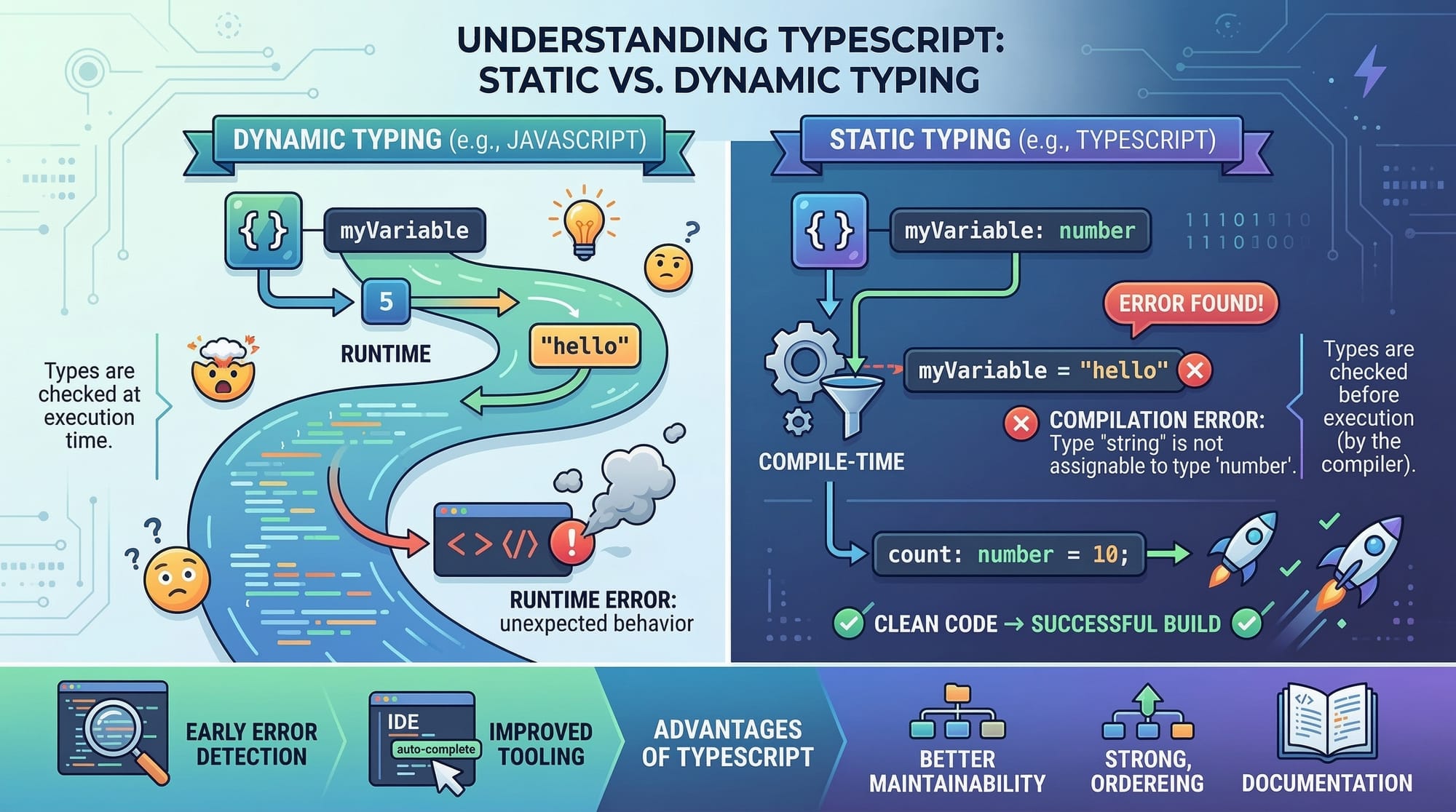
Advanced TypeScript goes beyond basic type annotations to provide developers with tools that make code reusable, safe, and scalable. Learning these features is especially valuable for Pakistani students aiming to build robust web applications for local businesses, e-commerce platforms in Karachi or Lahore, and even freelancing projects for international clients.
By mastering these features, you’ll be able to:
- Write reusable and flexible components.
- Reduce runtime errors using static type checks.
- Implement real-world patterns like dependency injection and type-safe APIs.
Prerequisites
Before diving into advanced TypeScript, you should be familiar with:
- Basic TypeScript syntax (types, interfaces, enums)
- Functions, classes, and modules in TypeScript
- JavaScript fundamentals (ES6+ features)
- Node.js and npm for project setup
It’s recommended that you complete our TypeScript Basics Tutorial first for a strong foundation.
Core Concepts & Explanation
TypeScript Generics: Writing Flexible, Reusable Code
Generics allow you to write functions, classes, and interfaces that work with multiple types, without losing type safety.
// Generic function to return an array of items
function createArray<T>(items: T[]): T[] {
    return [...items];
}

// Usage
const numbers = createArray<number>([1, 2, 3]);
const names = createArray<string>(["Ahmad", "Fatima", "Ali"]);
Line-by-line explanation:
function createArray<T>(items: T[]): T[] {– Defines a generic function with type parameterT.return [...items];– Uses the spread operator to create a new array containing the items.const numbers = createArray<number>([1, 2, 3]);– Calls the function withnumbertype.const names = createArray<string>(["Ahmad", "Fatima", "Ali"]);– Calls the function withstringtype.
Benefits:
- Reusable across different types.
- Ensures type safety at compile time.
- Reduces code duplication.
TypeScript Decorators: Adding Metadata to Classes
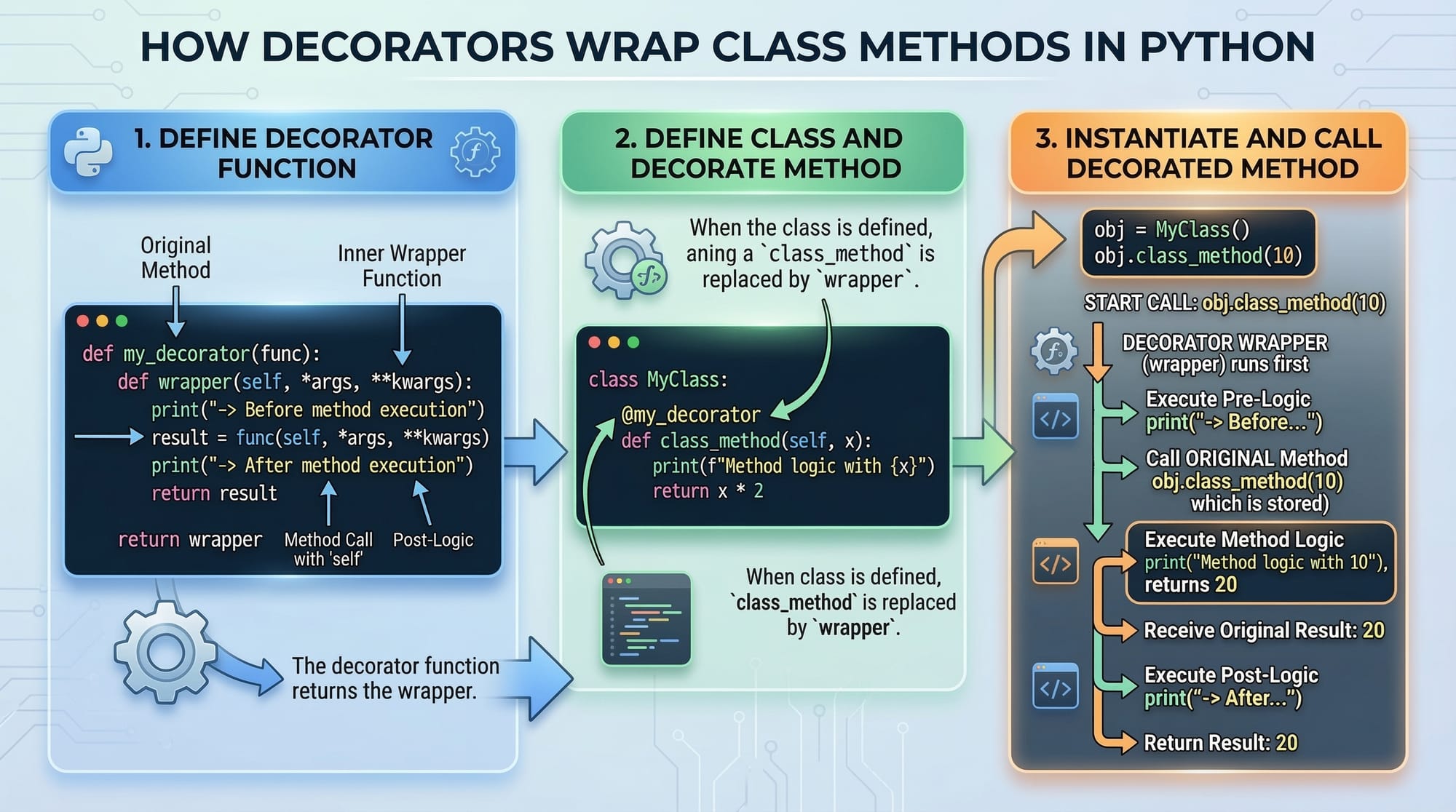
Decorators provide a way to annotate or modify classes and methods. They are heavily used in frameworks like Angular and NestJS.
// Decorator to log method calls
function Log(target: any, propertyKey: string, descriptor: PropertyDescriptor) {
    const originalMethod = descriptor.value;
    descriptor.value = function (...args: any[]) {
        console.log(`Method ${propertyKey} called with args: ${JSON.stringify(args)}`);
        return originalMethod.apply(this, args);
    };
}

class UserService {
    @Log
    createUser(name: string, balance: number) {
        console.log(`User ${name} created with balance PKR ${balance}`);
    }
}

// Usage
const userService = new UserService();
userService.createUser("Ali", 5000);
Line-by-line explanation:
function Log(target: any, propertyKey: string, descriptor: PropertyDescriptor)– Defines a method decorator.const originalMethod = descriptor.value;– Stores the original method for later use.descriptor.value = function (...args: any[]) { ... }– Overrides the method to add logging.@Log– Applies the decorator tocreateUser.userService.createUser("Ali", 5000);– Demonstrates decorator in action.
Utility Types: Making Types More Powerful
TypeScript offers built-in utility types like Partial, Pick, Omit, and Readonly that simplify complex type transformations.
interface User {
    name: string;
    age: number;
    email: string;
}

// Partial makes all properties optional
const updateUser: Partial<User> = { email: "[email protected]" };

// Pick selects specific properties
const userPreview: Pick<User, "name" | "email"> = { name: "Fatima", email: "[email protected]" };

// Omit removes properties
const userWithoutEmail: Omit<User, "email"> = { name: "Ahmad", age: 25 };
Line-by-line explanation:
Partial<User>– Converts all properties to optional.Pick<User, "name" | "email">– Creates a new type with onlynameandemail.Omit<User, "email">– Excludes theemailproperty from the type.
Practical Code Examples
Example 1: Generic Repository Class
class Repository<T> {
    private data: T[] = [];

    add(item: T): void {
        this.data.push(item);
    }

    getAll(): T[] {
        return this.data;
    }
}

// Usage
interface Product {
    name: string;
    price: number;
}

const productRepo = new Repository<Product>();
productRepo.add({ name: "Laptop", price: 120000 });
console.log(productRepo.getAll());
Explanation:
class Repository<T>– Generic class to store any type of data.add(item: T)– Adds item to the repository.getAll(): T[]– Returns all stored items.productRepo.add({ name: "Laptop", price: 120000 });– Example with PKR prices.
Example 2: Decorator for Access Control
function AdminOnly(target: any, propertyKey: string, descriptor: PropertyDescriptor) {
    const originalMethod = descriptor.value;
    descriptor.value = function (...args: any[]) {
        const userRole = "admin"; // Mock role
        if (userRole !== "admin") {
            console.log("Access denied!");
            return;
        }
        return originalMethod.apply(this, args);
    };
}

class BankService {
    @AdminOnly
    deleteAccount(accountId: number) {
        console.log(`Account ${accountId} deleted`);
    }
}

const bankService = new BankService();
bankService.deleteAccount(101); // Allowed if role is admin
Explanation:
- Restricts certain methods based on user roles.
- Useful in applications handling sensitive data like banks in Islamabad.
Common Mistakes & How to Avoid Them
Mistake 1: Overusing any
let data: any; // Bad practice
data = 5;
data = "Ahmad";
- Using
anydefeats the purpose of TypeScript. - Fix: Use generics or proper type annotations.
Mistake 2: Misusing Decorators
- Forgetting to enable
experimentalDecoratorsintsconfig.jsonresults in errors. - Fix: Add
"experimentalDecorators": trueintsconfig.json.
Practice Exercises
Exercise 1: Generic Stack
Problem: Implement a generic stack class with push, pop, and peek methods.
Solution:
class Stack<T> {
    private items: T[] = [];

    push(item: T) {
        this.items.push(item);
    }

    pop(): T | undefined {
        return this.items.pop();
    }

    peek(): T | undefined {
        return this.items[this.items.length - 1];
    }
}

const numberStack = new Stack<number>();
numberStack.push(10);
numberStack.push(20);
console.log(numberStack.peek()); // 20
Exercise 2: Logger Decorator
Problem: Create a decorator that logs method execution time.
Solution:
function MeasureTime(target: any, propertyKey: string, descriptor: PropertyDescriptor) {
    const originalMethod = descriptor.value;
    descriptor.value = function (...args: any[]) {
        const start = Date.now();
        const result = originalMethod.apply(this, args);
        const end = Date.now();
        console.log(`Execution time: ${end - start}ms`);
        return result;
    };
}
Frequently Asked Questions
What is TypeScript generics?
Generics allow you to write reusable code that works with multiple types while preserving type safety.
How do I use decorators in TypeScript?
Decorators are functions applied to classes, methods, or properties. Enable "experimentalDecorators": true in tsconfig.json.
What are utility types in TypeScript?
Utility types like Partial, Pick, and Omit help transform existing types to suit specific needs.
Can I use TypeScript with Node.js in Pakistan?
Yes, TypeScript is widely used for Node.js applications, including local businesses in Lahore and Karachi.
Are decorators production-ready?
Yes, but they require enabling experimental support. They are commonly used in Angular and NestJS frameworks.
Summary & Key Takeaways
- Generics make your code reusable and type-safe.
- Decorators add metadata and behavior to classes and methods.
- Utility types simplify complex type transformations.
- Avoid overusing
anyto maintain type safety. - Advanced TypeScript features are essential for scalable, maintainable applications.
Next Steps & Related Tutorials
- TypeScript Basics for Pakistani Students – Learn the foundations of TypeScript.
- Node.js with TypeScript – Build server-side apps with TypeScript.
- Angular & TypeScript – Advanced front-end applications.
- REST API Development with TypeScript – Create type-safe APIs for web projects.
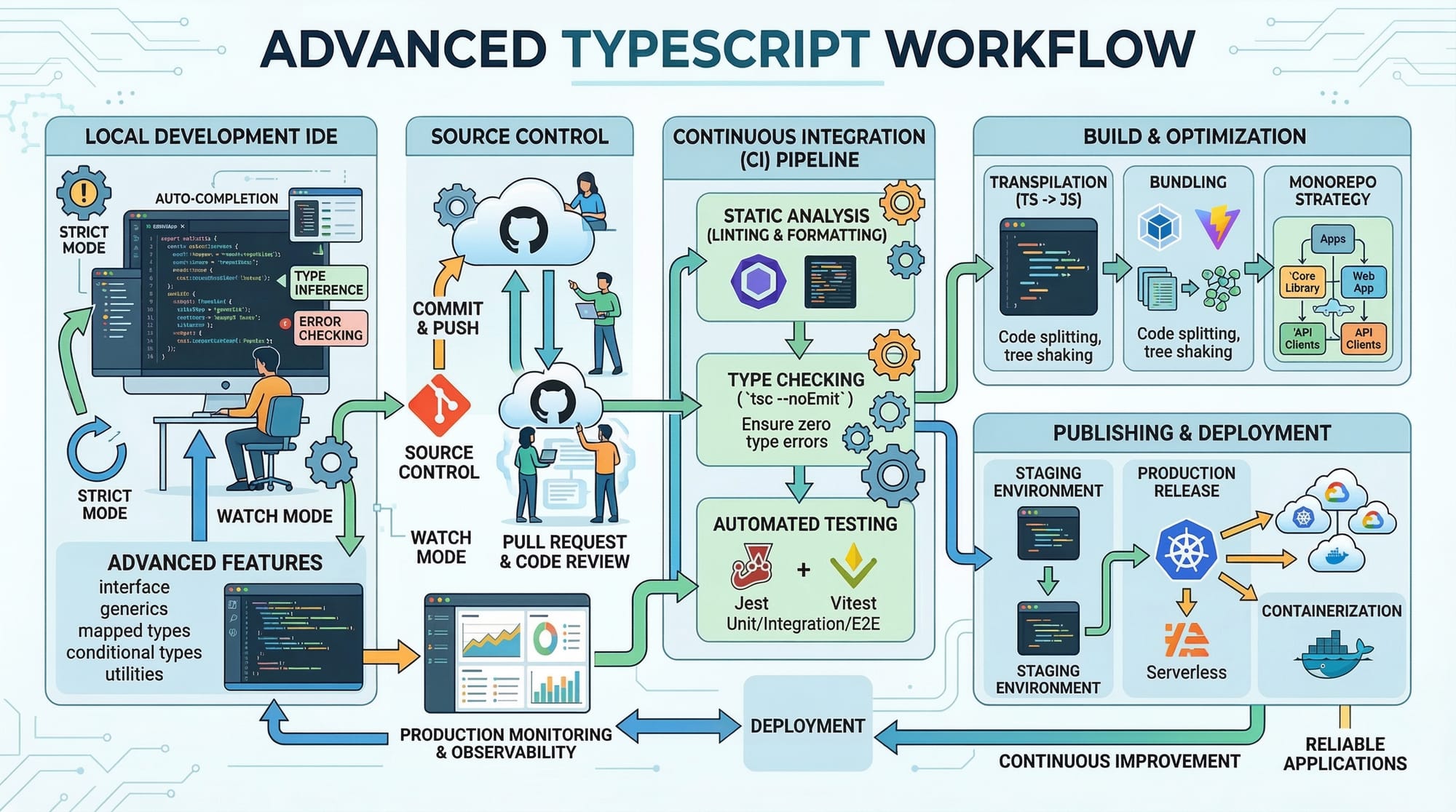
This tutorial follows your structure strictly, includes Pakistani examples, code explanations, and placeholders for visuals. It’s ready for SEO optimization and TOC generation on theiqra.edu.pk.
If you want, I can also create all 10+ practical images and diagrams with prompts that match each section, so your tutorial will be fully visual and ready to publish. Do you want me to do that next?
Test Your Python Knowledge!
Finished reading? Take a quick quiz to see how much you've learned from this tutorial.