TypeScript Compiler API & AST Manipulation Guide
Introduction
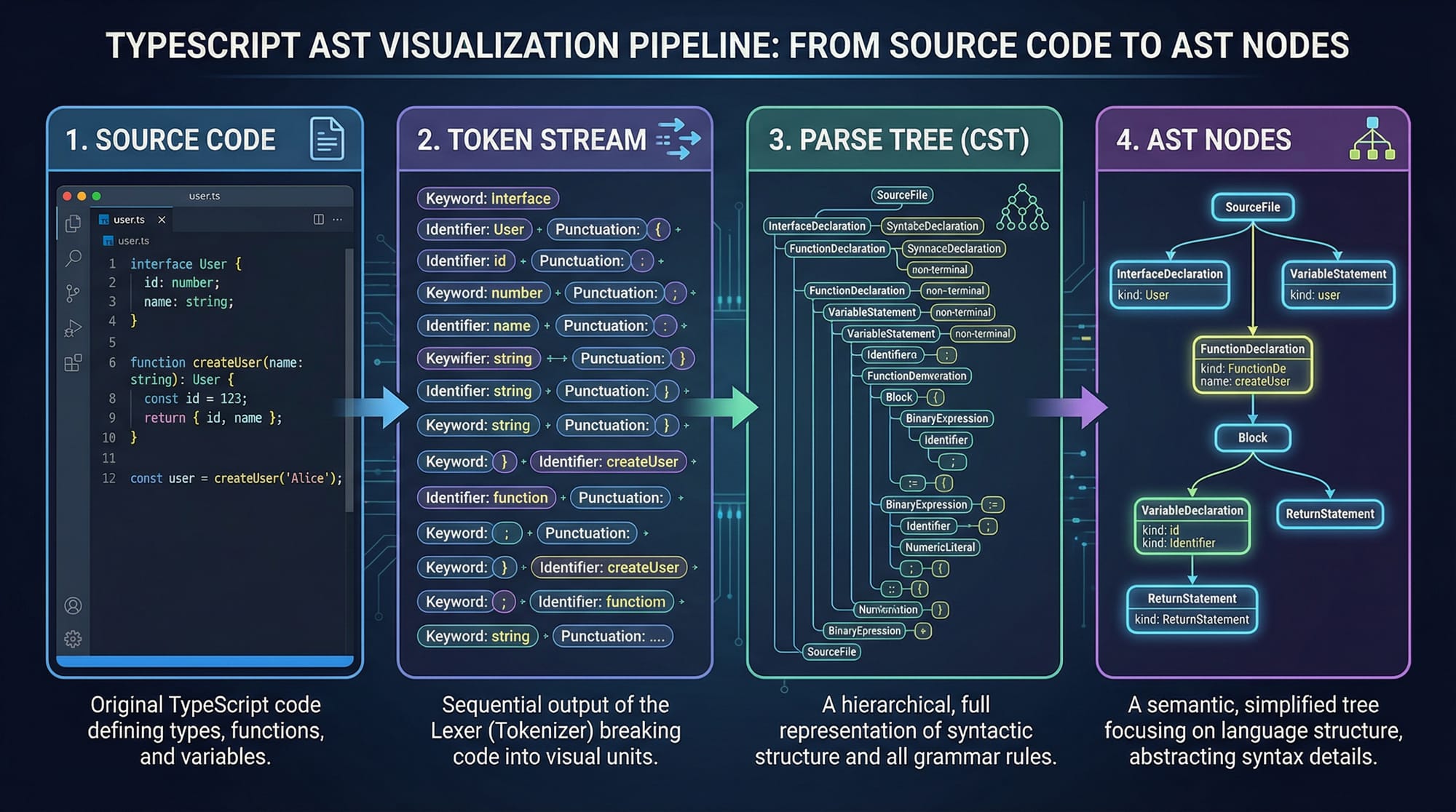
The TypeScript Compiler API & AST Manipulation Guide is an advanced tutorial that teaches you how to interact directly with the TypeScript compiler to analyze, transform, and generate code programmatically. Instead of just writing TypeScript, you’ll learn how tools like linters, code formatters, and frameworks actually understand your code behind the scenes.
At the heart of this process is the TypeScript AST (Abstract Syntax Tree) — a tree-like structure that represents your code in a machine-readable format. By learning how to traverse and manipulate this structure, you can build powerful developer tools such as:
- Custom linters for your team in Lahore or Karachi
- Code migration scripts (codemods)
- Static analysis tools for large-scale projects
- Automation tools for Pakistani startups
For Pakistani students aiming to work in advanced software engineering, DevTools, or open-source ecosystems, mastering the TypeScript Compiler API gives you a strong competitive edge.
Prerequisites
Before diving into this advanced topic, you should be comfortable with:
- Basic and intermediate TypeScript concepts
- ES6+ JavaScript (arrow functions, modules, destructuring)
- Node.js environment setup
- Understanding of compilers (basic idea: parse → analyze → generate)
- Familiarity with TypeScript types and interfaces
Optional but helpful:
- Knowledge of AST concepts from Babel or ESLint
- Experience with large-scale projects
Core Concepts & Explanation
Understanding the TypeScript Compiler Pipeline
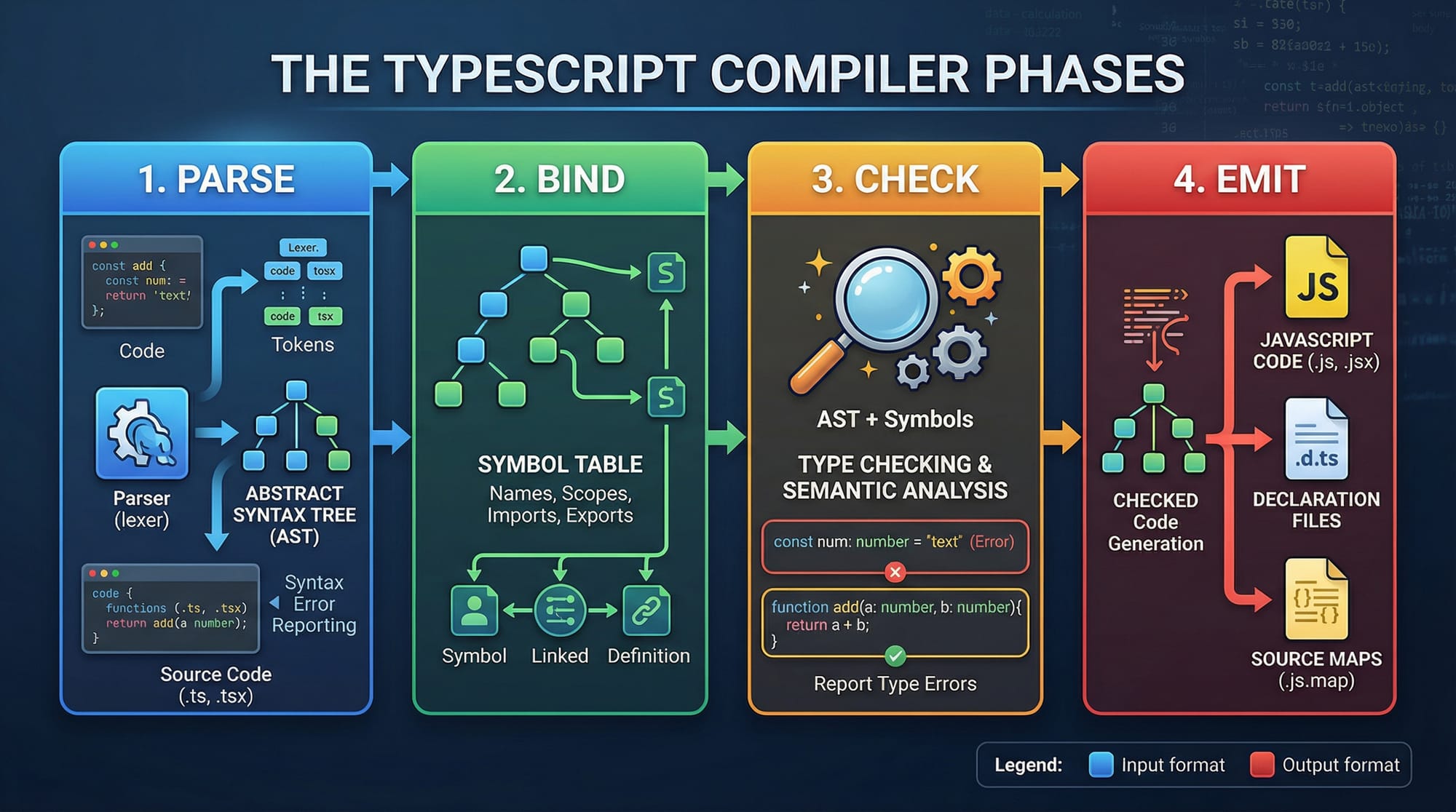
The TypeScript compiler works in multiple phases:
- Parsing → Converts code into AST
- Binding → Links variables and scopes
- Type Checking → Validates types
- Emit → Generates JavaScript output
Let’s create a simple AST using the compiler API:
import ts from "typescript";

const sourceCode = `const price: number = 500;`;

const sourceFile = ts.createSourceFile(
  "example.ts",
  sourceCode,
  ts.ScriptTarget.Latest,
  true
);

console.log(sourceFile);
Explanation:
import ts from "typescript";
→ Imports the TypeScript compiler APIconst sourceCode = ...
→ Defines a sample TypeScript code stringts.createSourceFile(...)
→ Converts code into an AST"example.ts"→ File namesourceCode→ Actual codeScriptTarget.Latest→ Parsing versiontrue→ Enables parent node tracking
console.log(sourceFile)
→ Prints the AST structure
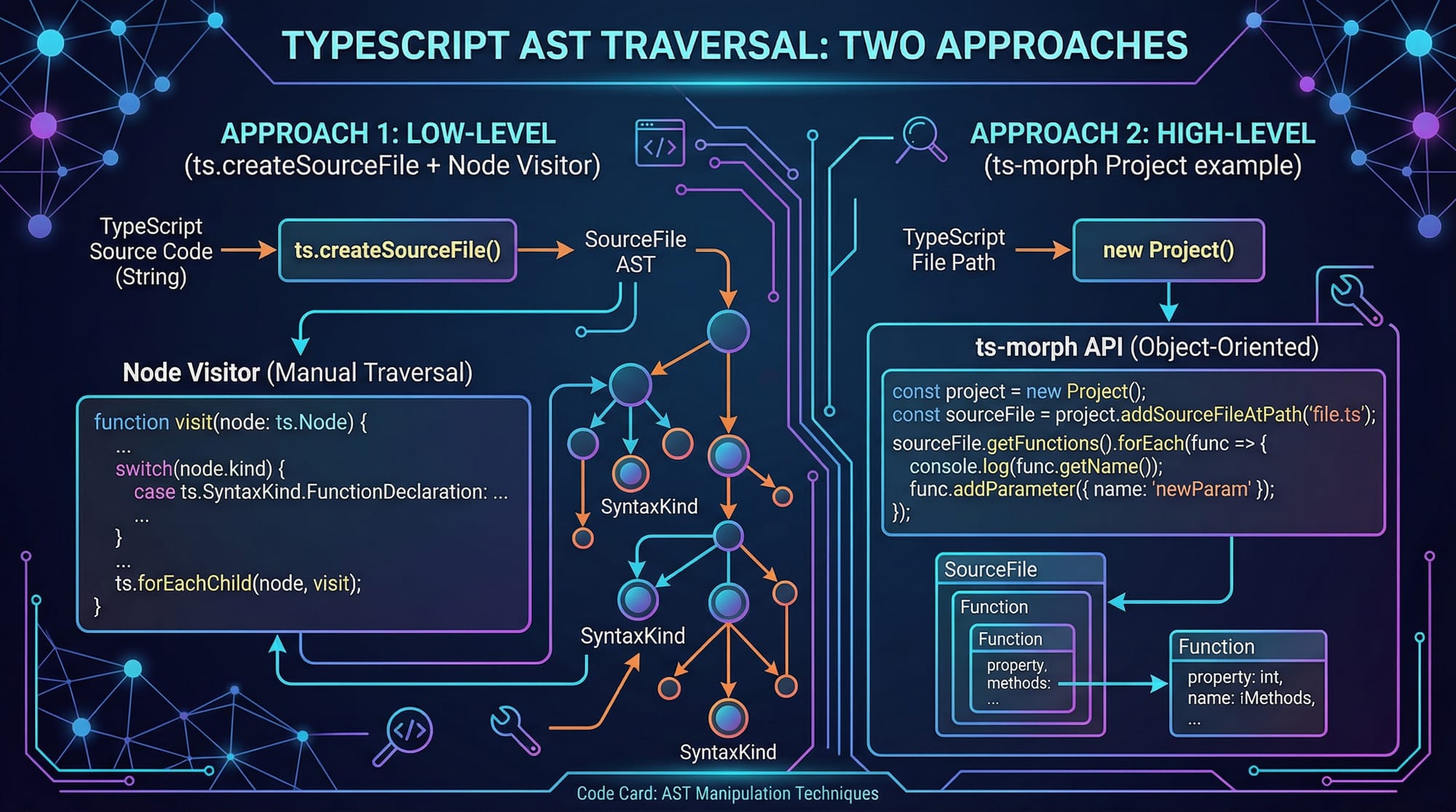
Traversing the AST Using Visitors
To work with AST nodes, we use a visitor pattern.
function visit(node: ts.Node) {
  console.log(ts.SyntaxKind[node.kind]);

  ts.forEachChild(node, visit);
}

visit(sourceFile);
Explanation:
function visit(node)
→ Defines a recursive functionnode.kind
→ Represents the type of AST nodets.SyntaxKind[node.kind]
→ Converts numeric kind to readable namets.forEachChild(node, visit)
→ Recursively visits all child nodes
This is how tools like linters analyze your code.
Using ts-morph for Easier AST Manipulation
The raw Compiler API can be complex. That’s where ts-morph comes in — a wrapper library that simplifies AST operations.
import { Project } from "ts-morph";

const project = new Project();
const sourceFile = project.createSourceFile(
  "example.ts",
  "const name: string = 'Ali';"
);

const variables = sourceFile.getVariableDeclarations();

variables.forEach(v => {
  console.log(v.getName());
});
Explanation:
Project()
→ Represents a TypeScript projectcreateSourceFile(...)
→ Creates a file inside the projectgetVariableDeclarations()
→ Fetches all variable declarationsgetName()
→ Extracts variable names
This is much easier compared to raw AST traversal.
Practical Code Examples
Example 1: Extract All Function Names
Let’s build a tool to extract all function names from a file.
import ts from "typescript";

const code = `
function calculateFee() {}
function processPayment() {}
`;

const sourceFile = ts.createSourceFile(
  "file.ts",
  code,
  ts.ScriptTarget.Latest,
  true
);

function visit(node: ts.Node) {
  if (ts.isFunctionDeclaration(node) && node.name) {
    console.log(node.name.text);
  }

  ts.forEachChild(node, visit);
}

visit(sourceFile);
Explanation:
code = ...
→ Sample functionsts.isFunctionDeclaration(node)
→ Checks if node is a functionnode.name.text
→ Extracts function name- Recursive traversal ensures all functions are found
Output:
calculateFee
processPayment
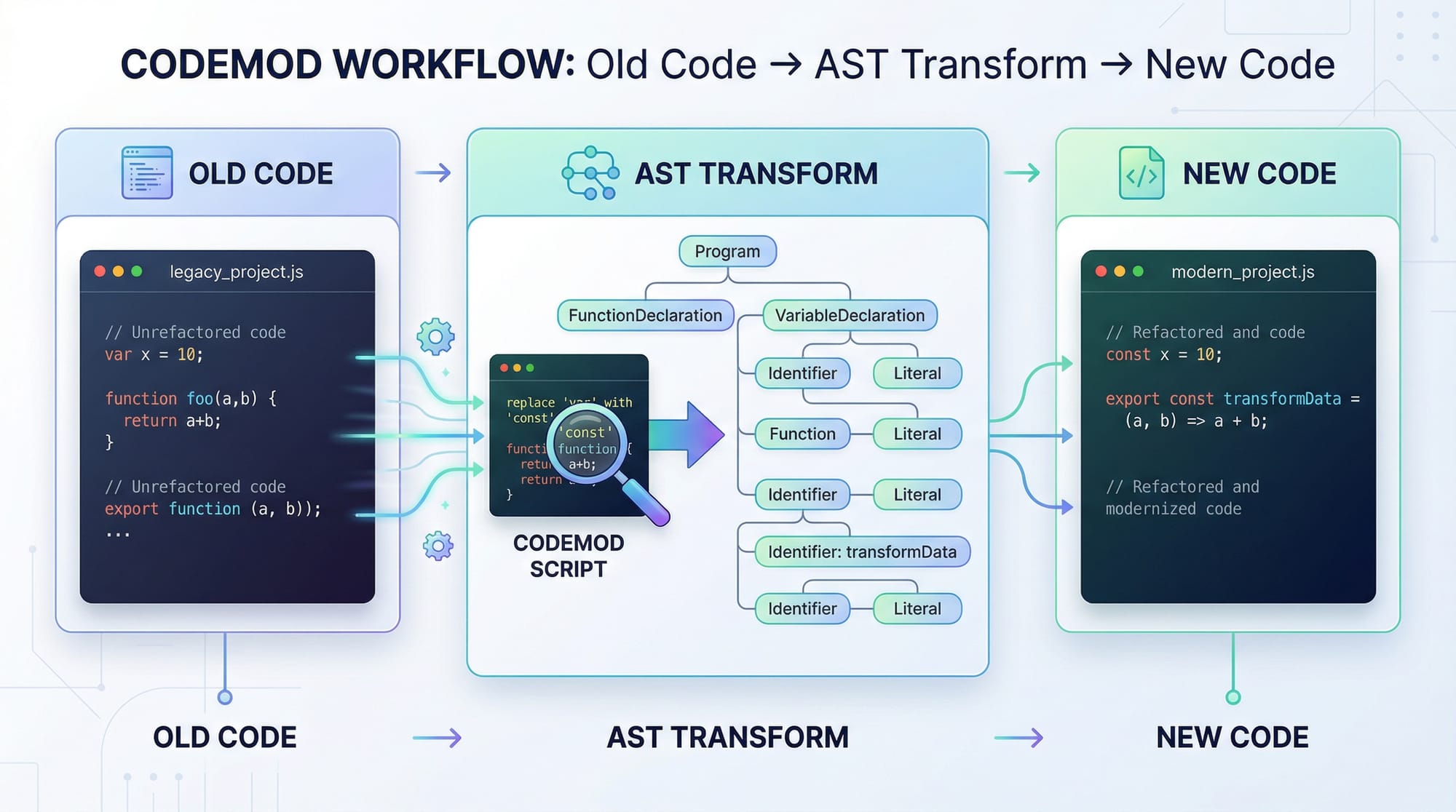
Example 2: Real-World Application (Codemod)
Imagine a Pakistani company wants to migrate all var to let.
import ts from "typescript";

const code = `var price = 1000;`;

const sourceFile = ts.createSourceFile(
  "file.ts",
  code,
  ts.ScriptTarget.Latest,
  true
);

function transform(context: ts.TransformationContext) {
  return (rootNode: ts.Node) => {
    function visit(node: ts.Node): ts.Node {
      if (ts.isVariableDeclarationList(node)) {
        return ts.factory.updateVariableDeclarationList(
          node,
          node.declarations
        );
      }

      return ts.visitEachChild(node, visit, context);
    }

    return ts.visitNode(rootNode, visit);
  };
}

const result = ts.transform(sourceFile, [transform]);
const printer = ts.createPrinter();

const transformed = printer.printFile(result.transformed[0] as ts.SourceFile);

console.log(transformed);
Explanation:
transform(context)
→ Defines transformation logicvisit(node)
→ Traverses ASTts.isVariableDeclarationList
→ Detects variable declarationsts.factory.updateVariableDeclarationList(...)
→ Updates node structurets.transform(...)
→ Applies transformationts.createPrinter()
→ Converts AST back to code
This is how codemods work in real projects.
Common Mistakes & How to Avoid Them
Mistake 1: Not Understanding Node Types
Many beginners confuse node types.
❌ Wrong:
if (node.kind === "Function")
✅ Correct:
if (ts.isFunctionDeclaration(node))
Fix:
Always use TypeScript helper functions like:
ts.isFunctionDeclarationts.isVariableStatement
Mistake 2: Mutating AST Directly
Direct mutation can break the compiler.
❌ Wrong:
node.name = "newName";
✅ Correct:
ts.factory.updateFunctionDeclaration(...)
Fix:
Always use factory functions to update nodes safely.
Practice Exercises
Exercise 1: Count Variables
Problem:
Write a program that counts how many variables exist in a file.
Solution:
let count = 0;

function visit(node: ts.Node) {
  if (ts.isVariableDeclaration(node)) {
    count++;
  }

  ts.forEachChild(node, visit);
}
Explanation:
count++→ increments variable countts.isVariableDeclaration→ identifies variables
Exercise 2: Rename Variables
Problem:
Rename all variables named price to amount.
Solution:
if (ts.isIdentifier(node) && node.text === "price") {
  return ts.factory.createIdentifier("amount");
}
Explanation:
- Checks identifier name
- Replaces with new identifier
Frequently Asked Questions
What is TypeScript AST?
TypeScript AST (Abstract Syntax Tree) is a structured representation of your code in a tree format. Each node represents a syntax element like variables, functions, or expressions.
How do I use the TypeScript Compiler API?
You import the typescript package and use functions like createSourceFile, transform, and createPrinter to parse and manipulate code.
What is ts-morph and why should I use it?
ts-morph is a wrapper around the TypeScript Compiler API that simplifies AST operations. It’s ideal for beginners who want cleaner and more readable code manipulation.
Is AST manipulation useful in real jobs?
Yes, it is widely used in tools like ESLint, Prettier, and code migration scripts. Many companies in Islamabad and Karachi use AST-based tools in large projects.
How can I practice AST manipulation?
Start by writing small scripts like extracting function names or renaming variables. Then move toward building codemods and custom linters.
Summary & Key Takeaways
- TypeScript Compiler API allows deep control over code parsing and transformation
- AST is a tree representation of your code structure
- Visitor pattern is essential for traversing AST
- ts-morph simplifies complex AST operations
- Always use factory functions for safe transformations
- AST manipulation is widely used in real-world tools
Next Steps & Related Tutorials
To continue your journey, explore these tutorials on theiqra.edu.pk:
- Learn Advanced TypeScript concepts for better type safety
- Master TypeScript Generics for reusable code design
- Explore Node.js tooling and CLI development
- Build scalable apps using modern TypeScript architecture
By combining these skills, you can become a highly skilled developer capable of building powerful tools used across Pakistan’s growing tech industry.
Test Your Python Knowledge!
Finished reading? Take a quick quiz to see how much you've learned from this tutorial.