TypeScript Decorators & Metadata Complete Guide
Introduction
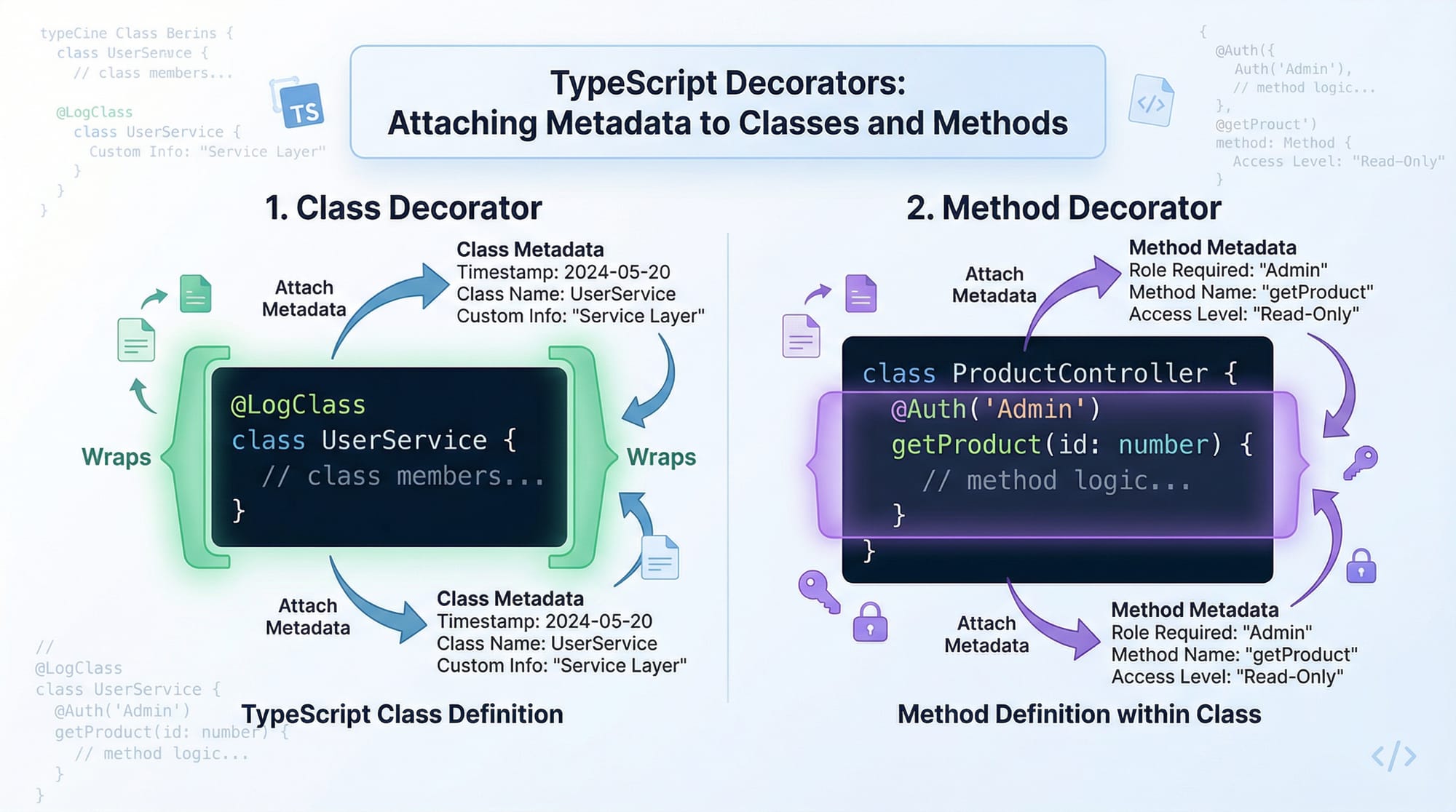
TypeScript decorators and metadata are powerful advanced features that allow developers to add extra behavior to classes, methods, properties, and parameters in a clean and reusable way. In simple terms, decorators are special functions that “wrap” or enhance your code, while metadata allows you to store and retrieve additional information about your code at runtime.
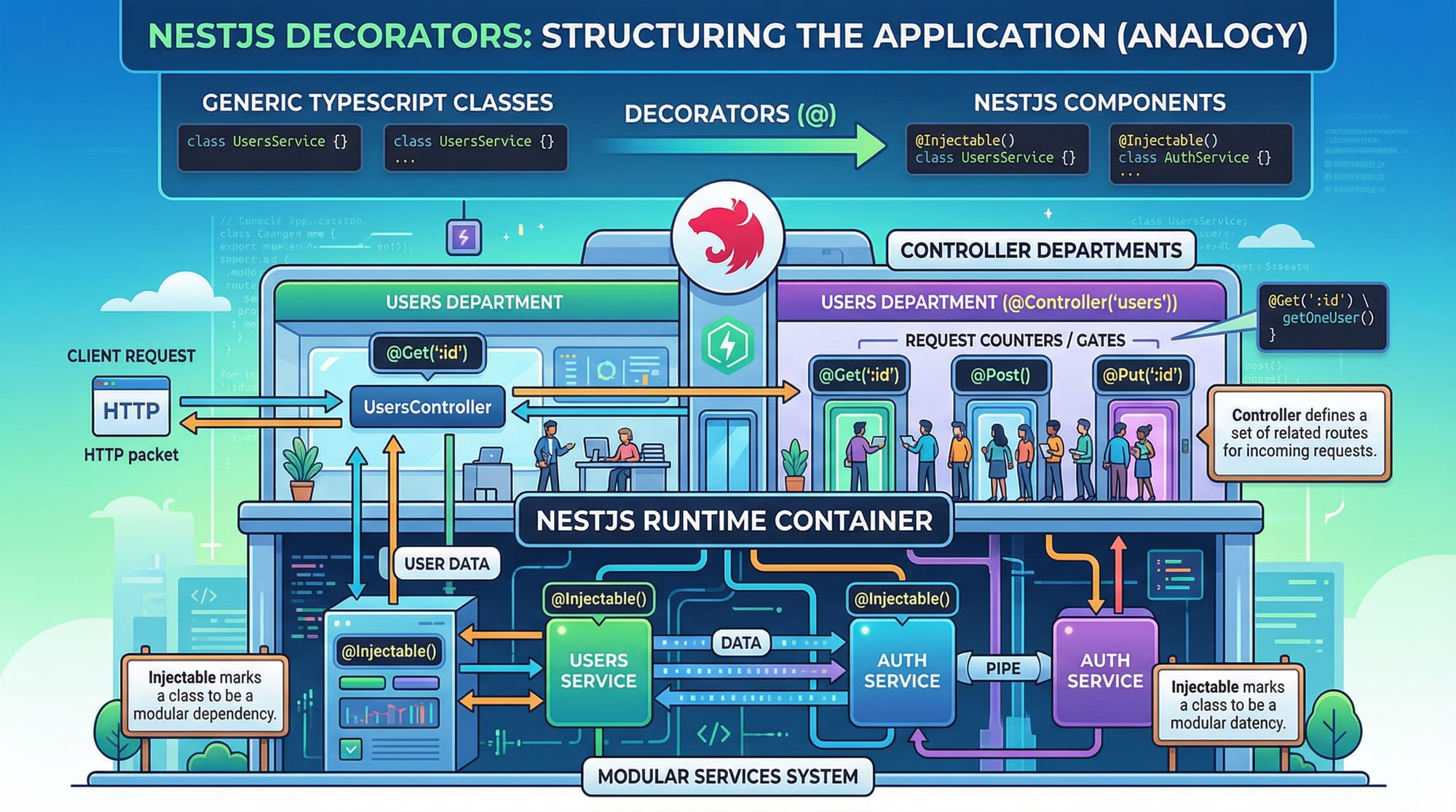
For Pakistani students aiming to build scalable applications—especially using frameworks like NestJS or Angular—understanding decorators is essential. Whether you're building a backend API for a Lahore-based startup or a student management system for a university in Islamabad, decorators help you write cleaner, more maintainable, and professional-grade code.
Prerequisites
Before diving into this advanced topic, you should be comfortable with:
- Basic TypeScript syntax (types, interfaces, classes)
- ES6+ JavaScript concepts (classes, arrow functions)
- Object-Oriented Programming (OOP)
- Node.js fundamentals
- npm package installation (we will use
reflect-metadata)
Core Concepts & Explanation
What Are TypeScript Decorators?
A decorator is a special kind of declaration that can be attached to a class, method, property, or parameter using the @ symbol.
Decorators are functions that run at runtime and can modify or observe the decorated element.
Example:
function LogClass(constructor: Function) {
  console.log("Class created:", constructor.name);
}

@LogClass
class Student {
  name = "Ali";
}
Explanation line-by-line:
function LogClass(...)→ Defines a decorator function.constructor: Function→ Receives the class constructor.console.log(...)→ Logs when the class is created.@LogClass→ Applies the decorator to the class.class Student→ The class being decorated.
Types of Decorators in TypeScript
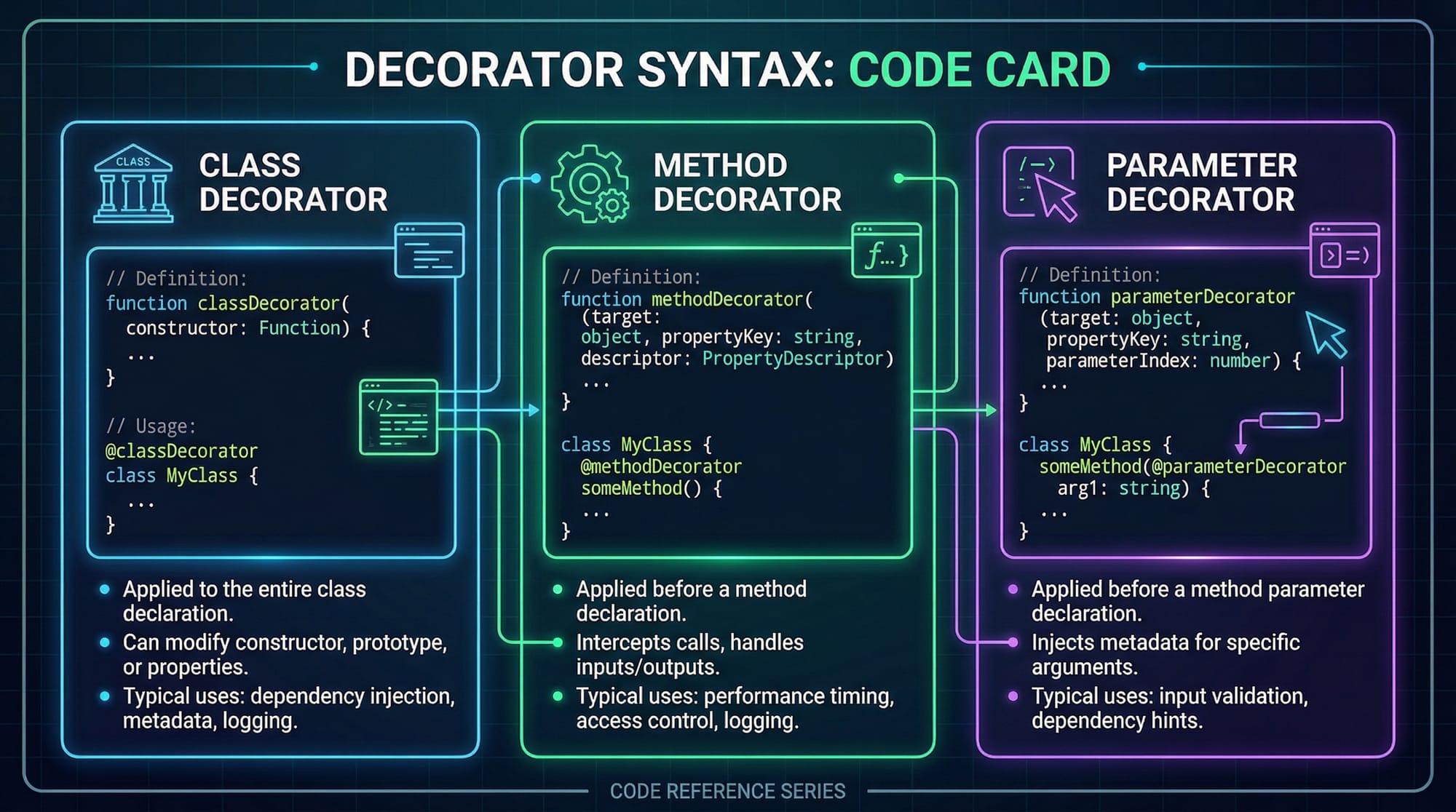
There are five main types:
- Class Decorators
- Method Decorators
- Property Decorators
- Accessor Decorators
- Parameter Decorators
Example of a method decorator:
function LogMethod(target: any, key: string, descriptor: PropertyDescriptor) {
  console.log("Method name:", key);
}

class Course {
  @LogMethod
  startCourse() {
    console.log("Course started");
  }
}
Explanation line-by-line:
target→ The prototype of the class.key→ Method name (startCourse).descriptor→ Property descriptor for method.@LogMethod→ Decorator applied to method.startCourse()→ Method being decorated.
What Is Metadata in TypeScript?
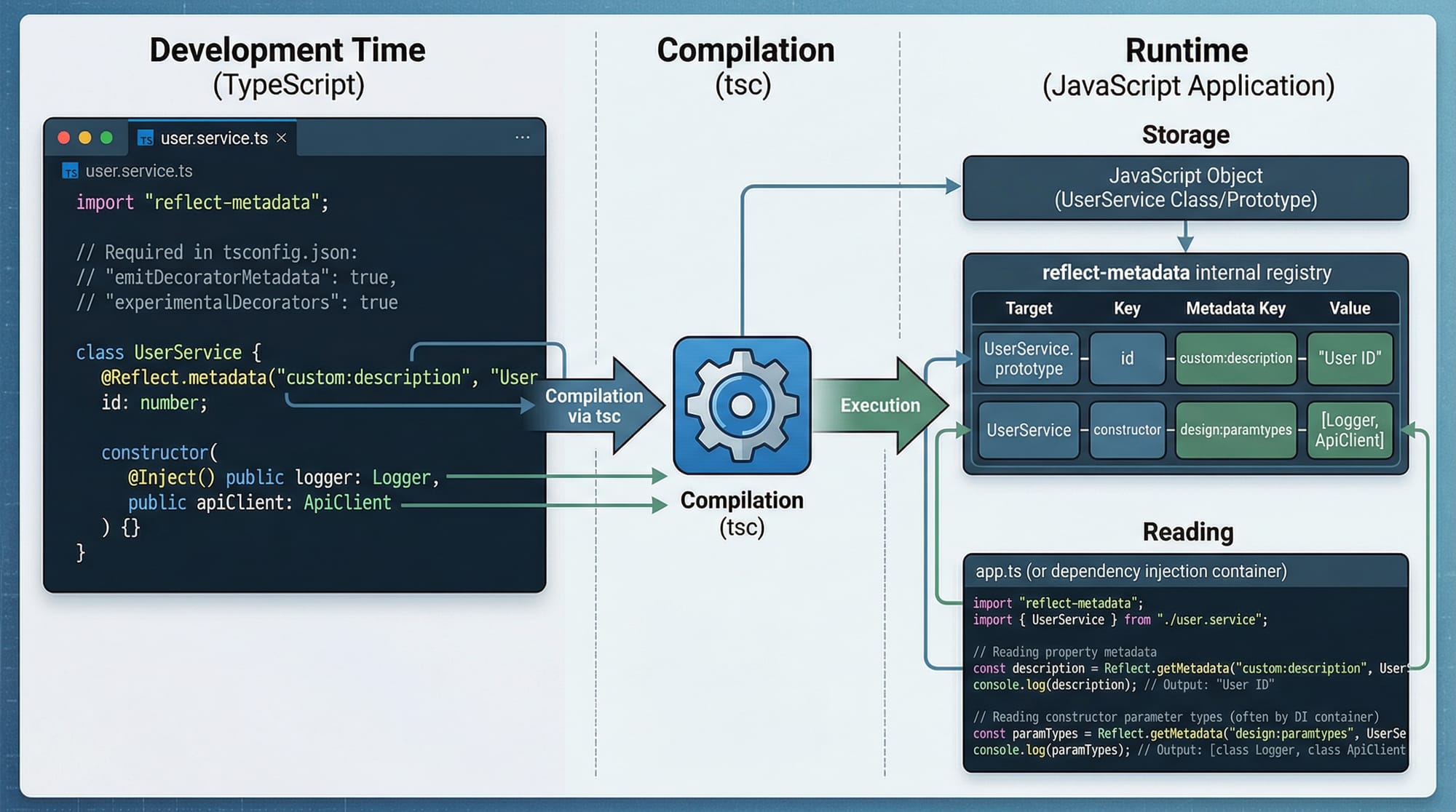
Metadata means data about data. In TypeScript, metadata is often used with decorators to store additional information about classes or methods.
We use the reflect-metadata library for this.
Install it:
npm install reflect-metadata
Enable in tsconfig.json:
{
  "experimentalDecorators": true,
  "emitDecoratorMetadata": true
}
Example:
import "reflect-metadata";

class Teacher {
  name: string;

  constructor(name: string) {
    this.name = name;
  }
}
With metadata enabled, TypeScript automatically stores type information.
Using reflect-metadata
import "reflect-metadata";

function LogType(target: any, key: string) {
  const type = Reflect.getMetadata("design:type", target, key);
  console.log(`${key} type:`, type.name);
}

class Student {
  @LogType
  age: number;
}
Explanation line-by-line:
Reflect.getMetadata(...)→ Reads metadata."design:type"→ Key for property type.target, key→ Target object and property name.type.name→ Displays the type (Number).@LogType→ Applies decorator to property.
Practical Code Examples
Example 1: Logging Decorator
function Logger(message: string) {
  return function (constructor: Function) {
    console.log(message);
    console.log(constructor.name);
  };
}

@Logger("Creating Student Class")
class Student {
  constructor(public name: string) {}
}
Explanation line-by-line:
Logger(message: string)→ Decorator factory (takes argument).return function(...)→ Returns actual decorator.console.log(message)→ Prints custom message.constructor.name→ Prints class name.@Logger(...)→ Applies decorator with argument.class Student→ Target class.
Example 2: Real-World Application (Validation System)
Imagine a system in Karachi where a student registration form must validate input.
import "reflect-metadata";

const requiredMetadataKey = Symbol("required");

function Required(target: any, propertyKey: string) {
  let existingRequired =
    Reflect.getMetadata(requiredMetadataKey, target) || [];
  existingRequired.push(propertyKey);
  Reflect.defineMetadata(requiredMetadataKey, existingRequired, target);
}

function validate(obj: any) {
  const requiredFields =
    Reflect.getMetadata(requiredMetadataKey, obj) || [];

  for (let field of requiredFields) {
    if (!obj[field]) {
      console.log(`Missing required field: ${field}`);
      return false;
    }
  }
  return true;
}

class StudentForm {
  @Required
  name: string;

  @Required
  city: string;

  constructor(name: string, city: string) {
    this.name = name;
    this.city = city;
  }
}

const form = new StudentForm("Ahmad", "");
validate(form);
Explanation line-by-line:
requiredMetadataKey→ Unique key for metadata storage.@Required→ Marks fields as required.Reflect.getMetadata(...)→ Reads existing metadata.Reflect.defineMetadata(...)→ Saves updated metadata.validate(obj)→ Checks required fields.for (let field...)→ Iterates fields.if (!obj[field])→ Validates empty values.StudentForm→ Example class.validate(form)→ Runs validation.
Common Mistakes & How to Avoid Them
Mistake 1: Forgetting to Enable Decorators
Problem:
Code won’t compile or decorators won’t work.
Fix:
{
  "experimentalDecorators": true,
  "emitDecoratorMetadata": true
}
Always enable both options in tsconfig.json.
Mistake 2: Not Importing reflect-metadata
Problem:
Metadata functions don’t work.
Fix:
import "reflect-metadata";
This must be imported once at the entry point of your app.
Practice Exercises
Exercise 1: Create a Class Logger
Problem:
Create a decorator that logs "User created" whenever a class is instantiated.
Solution:
function LogCreation(constructor: Function) {
  console.log("User created");
}

@LogCreation
class User {
  name = "Fatima";
}
Explanation:
LogCreationlogs message.- Applied using
@LogCreation. - Runs when class is defined.
Exercise 2: Property Type Logger
Problem:
Log the type of a property using metadata.
Solution:
import "reflect-metadata";

function TypeLogger(target: any, key: string) {
  const type = Reflect.getMetadata("design:type", target, key);
  console.log(`${key} type is ${type.name}`);
}

class Product {
  @TypeLogger
  price: number;
}
Explanation:
Reflect.getMetadataretrieves type.- Logs property type.
- Works because metadata is enabled.
Frequently Asked Questions
What is a TypeScript decorator?
A TypeScript decorator is a function prefixed with @ that modifies or observes a class, method, property, or parameter. It runs at runtime and helps add reusable behavior.
How do I enable decorators in TypeScript?
You must enable "experimentalDecorators": true and "emitDecoratorMetadata": true in your tsconfig.json file.
What is reflect-metadata used for?
It is a library that allows storing and retrieving metadata at runtime, often used with decorators for advanced features like dependency injection.
Are decorators used in real-world frameworks?
Yes, frameworks like NestJS and Angular heavily rely on decorators for routing, dependency injection, and configuration.
Can I create custom decorators?
Absolutely. You can create class, method, property, or parameter decorators to suit your application needs.
Summary & Key Takeaways
- Decorators enhance classes, methods, and properties using
@syntax - Metadata allows storing extra information about code at runtime
reflect-metadatais essential for advanced decorator usage- Always enable decorators in
tsconfig.json - Widely used in modern frameworks like NestJS
- Helps build scalable, maintainable applications
Next Steps & Related Tutorials
To deepen your understanding, explore these related tutorials on theiqra.edu.pk:
- Learn Advanced TypeScript concepts to master generics, utility types, and design patterns
- Explore Node.js backend development for building scalable APIs
- Dive into Java Spring Boot to compare decorator-style programming with annotations
- Understand Microservices Architecture for real-world system design
By mastering decorators and metadata, you’re stepping into professional-level TypeScript development—something highly valuable in Pakistan’s growing tech industry. 🚀
Test Your Python Knowledge!
Finished reading? Take a quick quiz to see how much you've learned from this tutorial.