TypeScript Generics Advanced Patterns & Constraints
Introduction
TypeScript generics are one of the most powerful features of TypeScript, allowing developers to write flexible, reusable, and type-safe code. In this typescript generics tutorial, we go beyond the basics and explore advanced TypeScript generics patterns and constraints that are widely used in real-world applications.
For Pakistani students in cities like Lahore, Karachi, and Islamabad—especially those preparing for software engineering roles or freelancing—understanding advanced generics can significantly improve code quality and employability. Whether you are building APIs, handling complex data structures, or working with frameworks like React, generics help you write scalable and maintainable code.
In this tutorial, we will explore constraints, conditional types, mapped types, inference with infer, and real-world patterns used in production systems.
Prerequisites
Before diving into advanced generics, you should be comfortable with:
- Basic TypeScript syntax (types, interfaces, functions)
- Basic generics (
<T>) - Functions and arrow functions in JavaScript/TypeScript
- Object and array manipulation
- ES6 features (spread operator, destructuring)
- Understanding of
keyofandtypeof
If you’re new, first read the TypeScript Basics tutorial on theiqra.edu.pk.
Core Concepts & Explanation
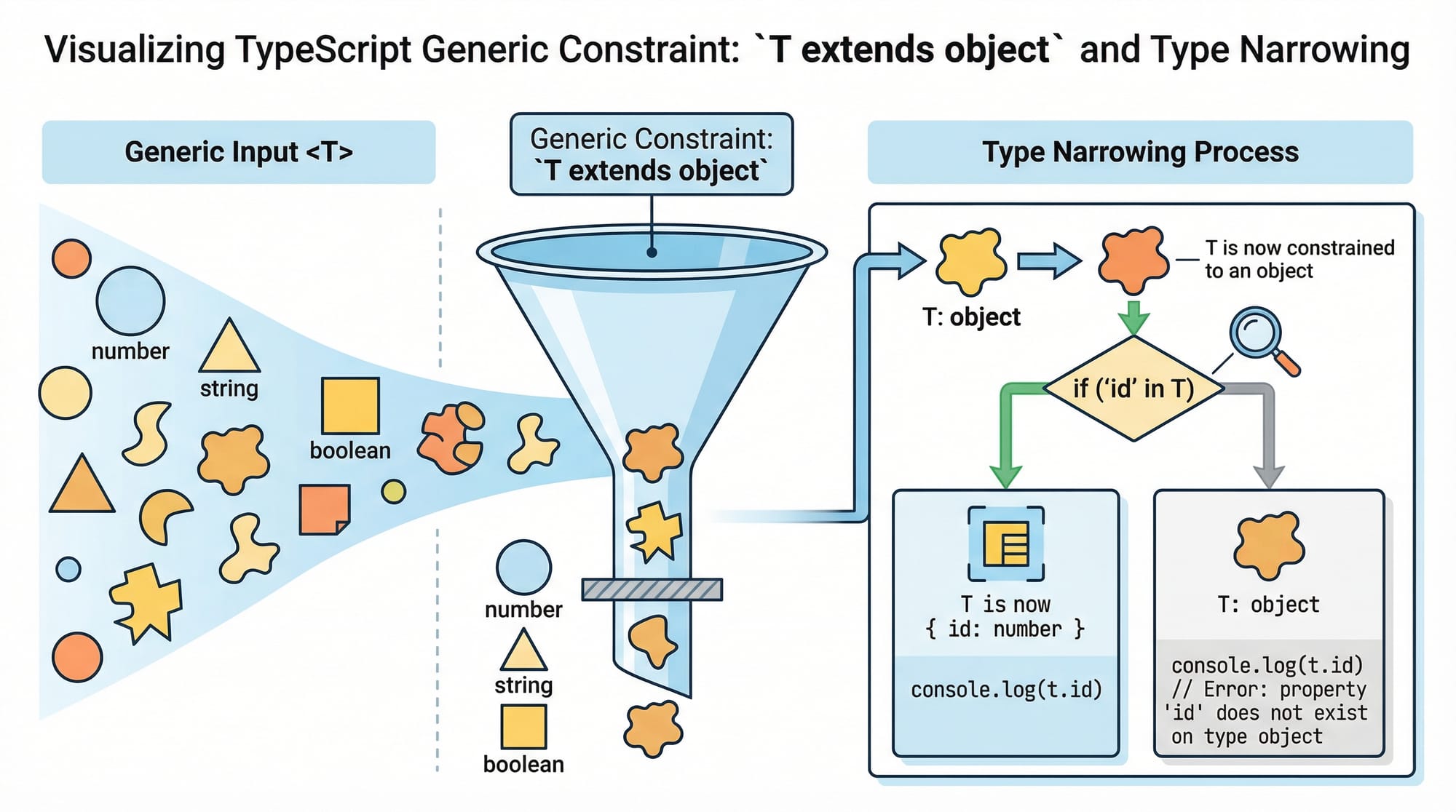
Generic Constraints with extends
Generic constraints allow you to restrict the types that can be used with generics.
function printLength<T extends { length: number }>(item: T): number {
  return item.length;
}
Line-by-line explanation:
function printLength<T extends { length: number }>
→ Defines a generic typeTbut restricts it to types that have alengthproperty.(item: T)
→ Accepts a parameter of typeT.return item.length;
→ Safe to accesslengthbecause of the constraint.
Usage:
printLength("Ahmad");       // ✅ string has length
printLength([1, 2, 3]);     // ✅ array has length
printLength(100);           // ❌ number doesn't have length
Conditional Types & infer Keyword
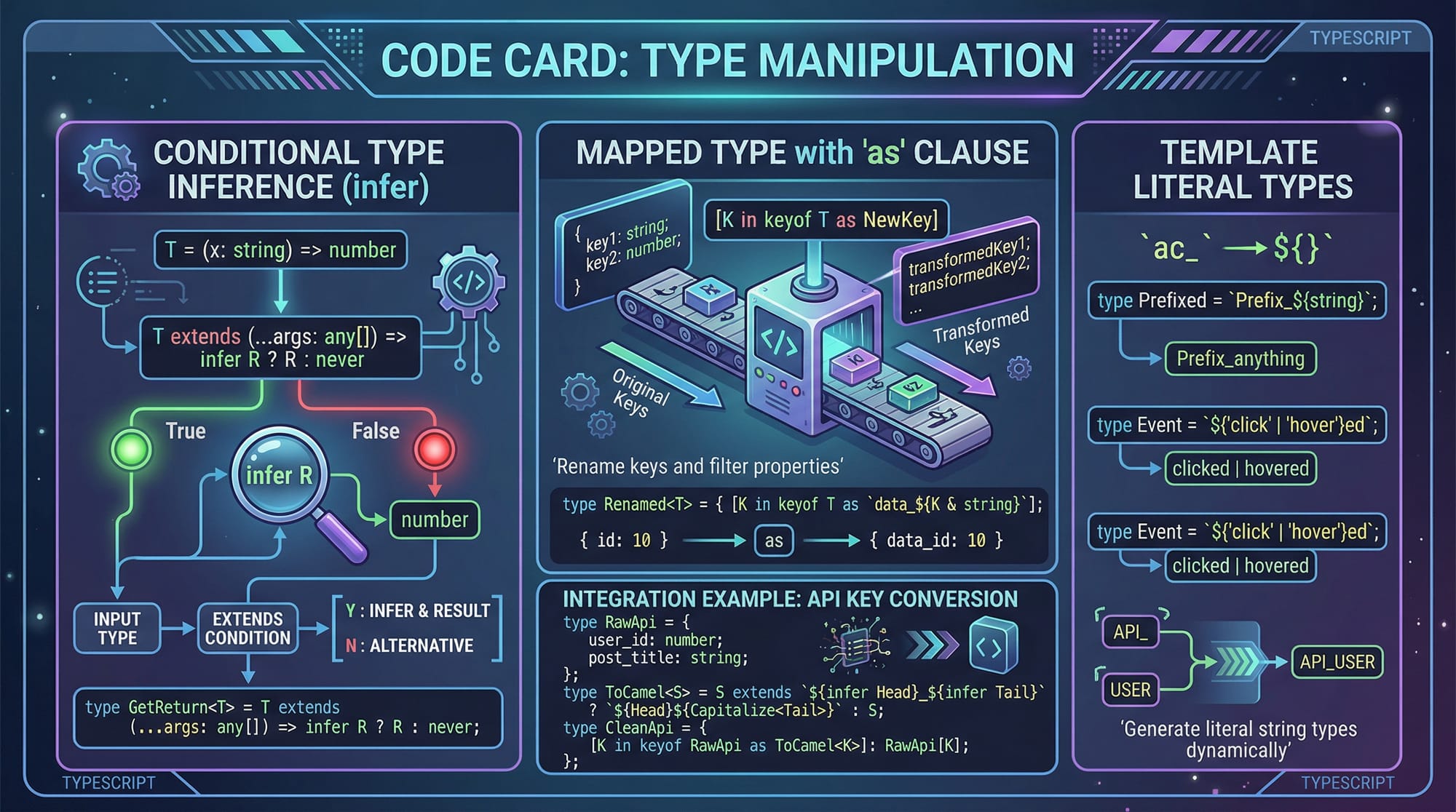
Conditional types allow types to depend on conditions.
type GetReturnType<T> = T extends (...args: any[]) => infer R ? R : never;
Explanation:
T extends (...args: any[]) => infer R
→ Checks ifTis a function.infer R
→ Extracts the return type intoR.? R : never
→ If true, returnR; otherwisenever.
Example:
type Fn = () => string;
type Result = GetReturnType<Fn>; // string
Mapped Types with Key Remapping (as)
Mapped types allow transforming object types.
type PrefixKeys<T> = {
  [K in keyof T as `prefix_${string & K}`]: T[K];
};
Explanation:
[K in keyof T]
→ Loop over all keys inT.as 'prefix_${string & K}'
→ Rename keys using template literals.T[K]
→ Preserve original value types.
Example:
type User = {
  name: string;
  age: number;
};

type PrefixedUser = PrefixKeys<User>;
Result:
{
  prefix_name: string;
  prefix_age: number;
}
Distributive Conditional Types
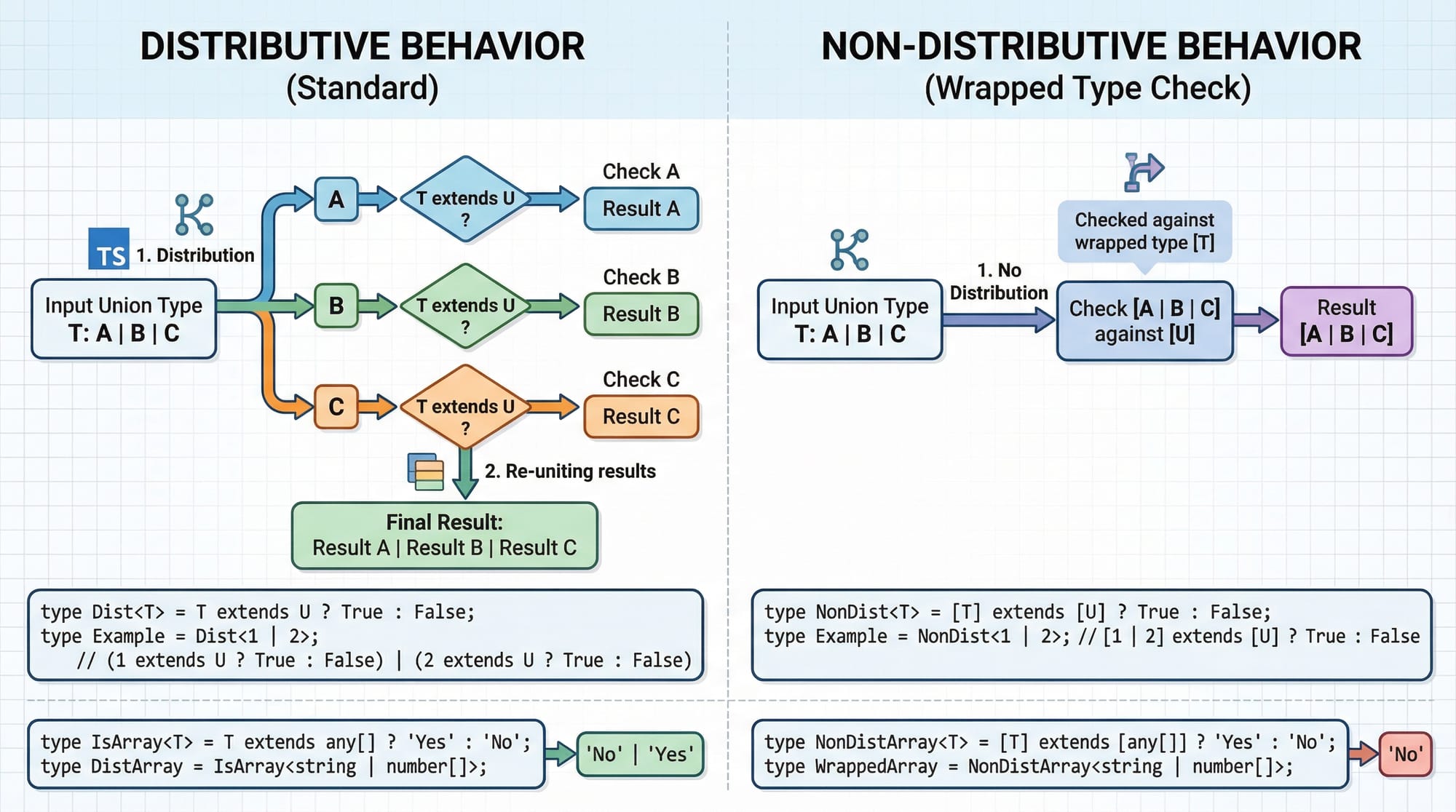
When conditional types are applied to unions, they distribute over each member.
type ToArray<T> = T extends any ? T[] : never;
Example:
type Result = ToArray<string | number>;
Becomes:
string[] | number[]
Practical Code Examples
Example 1: Advanced API Response Handler
type ApiResponse<T> = {
  data: T;
  status: number;
  success: boolean;
};

function fetchData<T>(data: T): ApiResponse<T> {
  return {
    data,
    status: 200,
    success: true,
  };
}
Line-by-line explanation:
type ApiResponse<T>
→ Generic type for API responses.data: T
→ Flexible data type.function fetchData<T>(data: T)
→ Generic function.return { ... }
→ Returns structured response.
Usage:
const user = fetchData({ name: "Fatima", city: "Lahore" });
const price = fetchData(5000); // PKR value
Example 2: Real-World Application — E-commerce Cart
type CartItem<T> = {
  product: T;
  quantity: number;
};

function calculateTotal<T extends { price: number }>(
  items: CartItem<T>[]
): number {
  return items.reduce((total, item) => {
    return total + item.product.price * item.quantity;
  }, 0);
}
Explanation:
T extends { price: number }
→ Ensures product has a price.CartItem<T>[]
→ Array of cart items.reduce(...)
→ Calculates total cost.
Usage:
const items = [
  { product: { name: "Laptop", price: 100000 }, quantity: 1 },
  { product: { name: "Mouse", price: 2000 }, quantity: 2 },
];

const total = calculateTotal(items); // PKR total
Common Mistakes & How to Avoid Them
Mistake 1: Overusing any Instead of Generics
❌ Wrong:
function identity(value: any): any {
  return value;
}
Problem:
- Loses type safety.
✅ Fix:
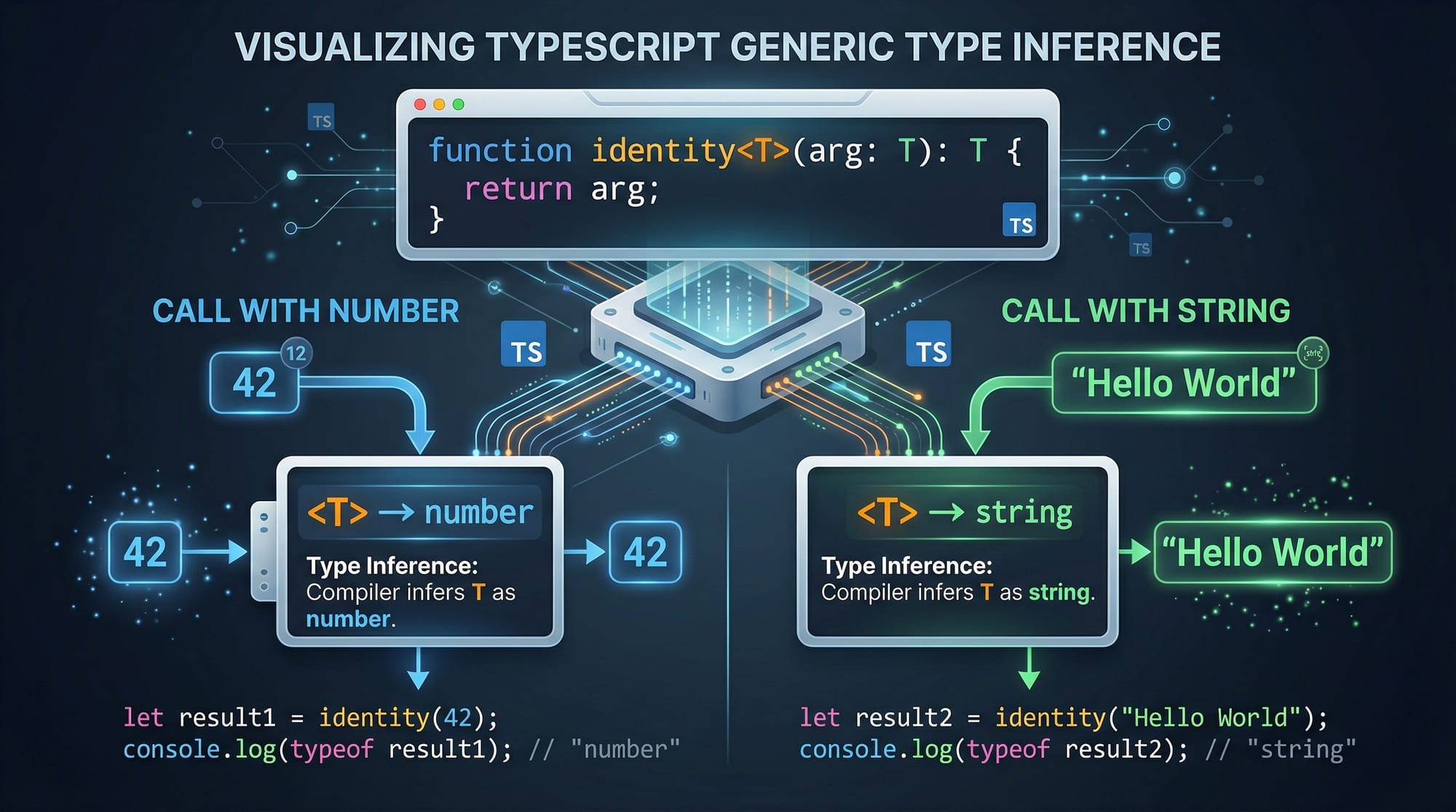
function identity<T>(value: T): T {
  return value;
}
Explanation:
Tpreserves input type.- Ensures type safety.
Mistake 2: Missing Constraints
❌ Wrong:
function getPrice<T>(item: T) {
  return item.price;
}
Problem:
- TypeScript error:
pricemight not exist.
✅ Fix:
function getPrice<T extends { price: number }>(item: T) {
  return item.price;
}
Explanation:
- Constraint ensures
priceexists.
Practice Exercises
Exercise 1: Extract Array Element Type
Problem:
Create a generic type that extracts the type inside an array.
Solution:
type ElementType<T> = T extends (infer U)[] ? U : T;
Explanation:
infer Uextracts array element type.- Returns
Uif array, otherwiseT.
Exercise 2: Create Readonly Version
Problem:
Convert all properties of a type into readonly.
Solution:
type MyReadonly<T> = {
  readonly [K in keyof T]: T[K];
};
Explanation:
- Iterates over keys.
- Adds
readonlymodifier.
Frequently Asked Questions
What is TypeScript generics?
TypeScript generics allow you to write reusable and flexible code by defining types as variables. They help maintain type safety while working with different data types.
How do I use constraints in generics?
You can use the extends keyword to restrict generic types. This ensures that only types with specific properties or structures are allowed.
What is the infer keyword in TypeScript?
infer is used in conditional types to extract and assign a type dynamically. It is especially useful for working with complex types like function return values.
Why are generics important in real-world projects?
Generics improve code reusability, maintainability, and type safety. They are widely used in APIs, libraries, and frameworks like React.
How do distributive conditional types work?
They automatically apply conditions to each member of a union type. This allows more flexible and powerful type transformations.
Summary & Key Takeaways
- Generics allow writing reusable and type-safe code
- Constraints (
extends) ensure safe property access - Conditional types enable dynamic type logic
inferhelps extract types from complex structures- Mapped types transform object types efficiently
- Advanced generics are essential for scalable applications
Next Steps & Related Tutorials
To continue your learning journey, explore these tutorials on theiqra.edu.pk:
- Learn the basics in TypeScript Basics to strengthen your foundation
- Dive deeper into Advanced TypeScript for real-world patterns
- Explore backend development with Node.js API Development using TypeScript
- Build scalable apps with React + TypeScript Complete Guide
Mastering advanced TypeScript generics will give you a strong edge in the Pakistani tech industry, whether you're aiming for jobs, internships, or freelancing on platforms like Fiverr and Upwork. Keep practicing and building real projects!
Test Your Python Knowledge!
Finished reading? Take a quick quiz to see how much you've learned from this tutorial.