TypeScript Utility Types Partial Pick Omit & More
Introduction
TypeScript has become an essential tool for modern JavaScript developers, especially for students in Pakistan aiming to build scalable applications. One of the most powerful features of TypeScript is utility types—predefined generic types that help transform and manipulate existing types efficiently.
In this tutorial, TypeScript Utility Types: Partial, Pick, Omit & More, you’ll learn how to use built-in helpers like Partial, Pick, Omit, Required, and others to write cleaner, reusable, and safer code.
Why should Pakistani students learn this?
- Many companies in Lahore, Karachi, and Islamabad now use TypeScript in production
- Utility types reduce code duplication and improve maintainability
- They are heavily used in frameworks like React and Node.js
Prerequisites
Before starting, you should have:
- Basic understanding of TypeScript (interfaces, types)
- Knowledge of JavaScript ES6 (objects, arrays, functions)
- Familiarity with generics (helpful but not mandatory)
- Basic coding experience (e.g., building small apps)
Core Concepts & Explanation
Understanding TypeScript Utility Types
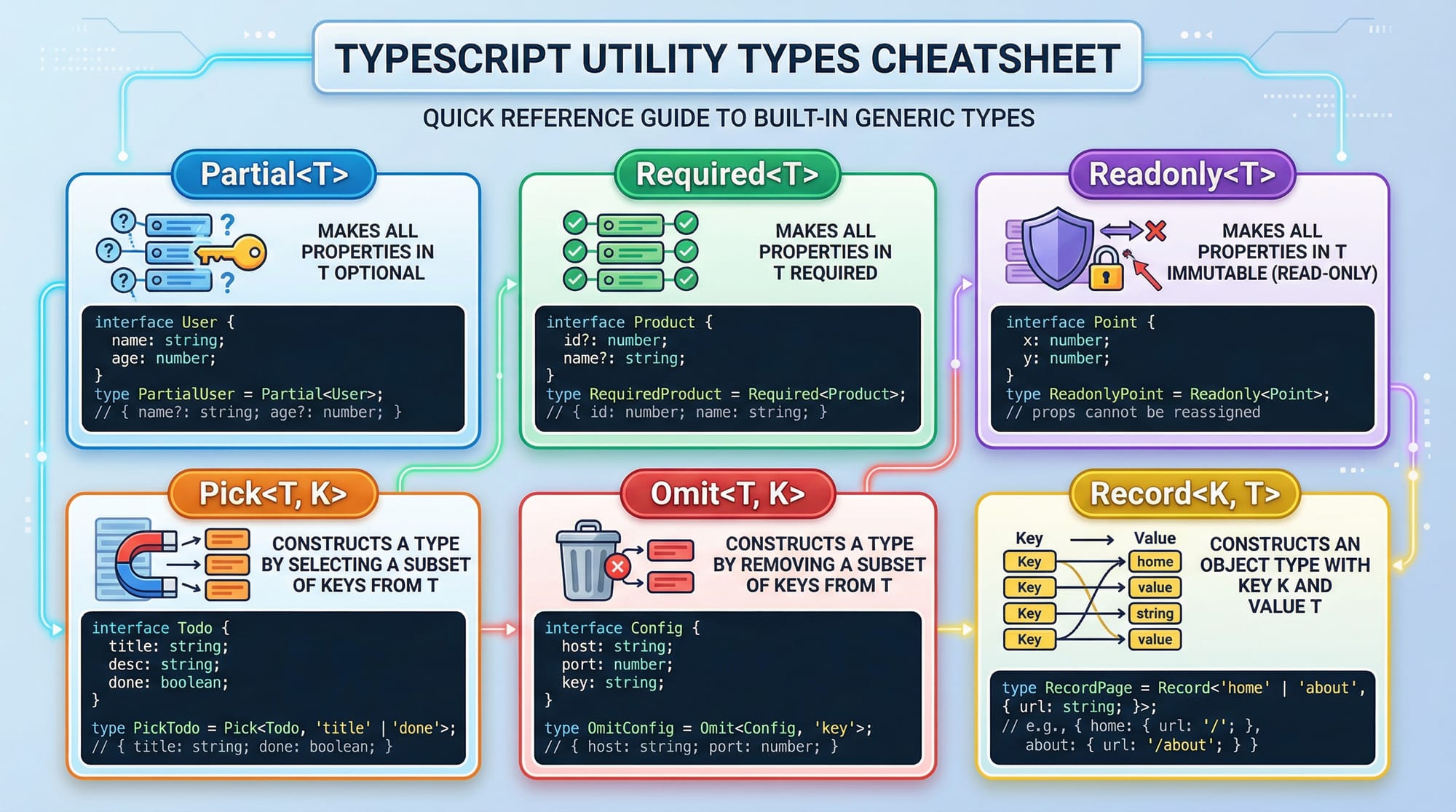
Utility types are built-in generic helpers that allow you to transform existing types into new ones without rewriting them.
For example, instead of rewriting an interface for a partial update, you can use Partial<T>.
interface Student {
  name: string;
  age: number;
  city: string;
}

type PartialStudent = Partial<Student>;
Explanation line-by-line:
interface Student: Defines a student structurename,age,city: Required propertiesPartial<Student>: Converts all properties into optionalPartialStudent: New type where all fields are optional
Key Utility Types: Partial, Pick, Omit, Required
1. Partial
Makes all properties optional.
type UpdateStudent = Partial<Student>;
Explanation:
Partial<Student>: All fields become optional- Useful for update APIs
2. Pick<T, K>
Select specific properties from a type.
type StudentName = Pick<Student, "name">;
Explanation:
Pick<Student, "name">: Only includesname- Useful when you only need limited data
3. Omit<T, K>
Remove specific properties from a type.
type StudentWithoutAge = Omit<Student, "age">;
Explanation:
- Removes
agefrom Student - Keeps remaining properties
4. Required
Makes all properties required.
type FullStudent = Required<PartialStudent>;
Explanation:
- Converts optional fields back to required
- Useful when enforcing strict validation
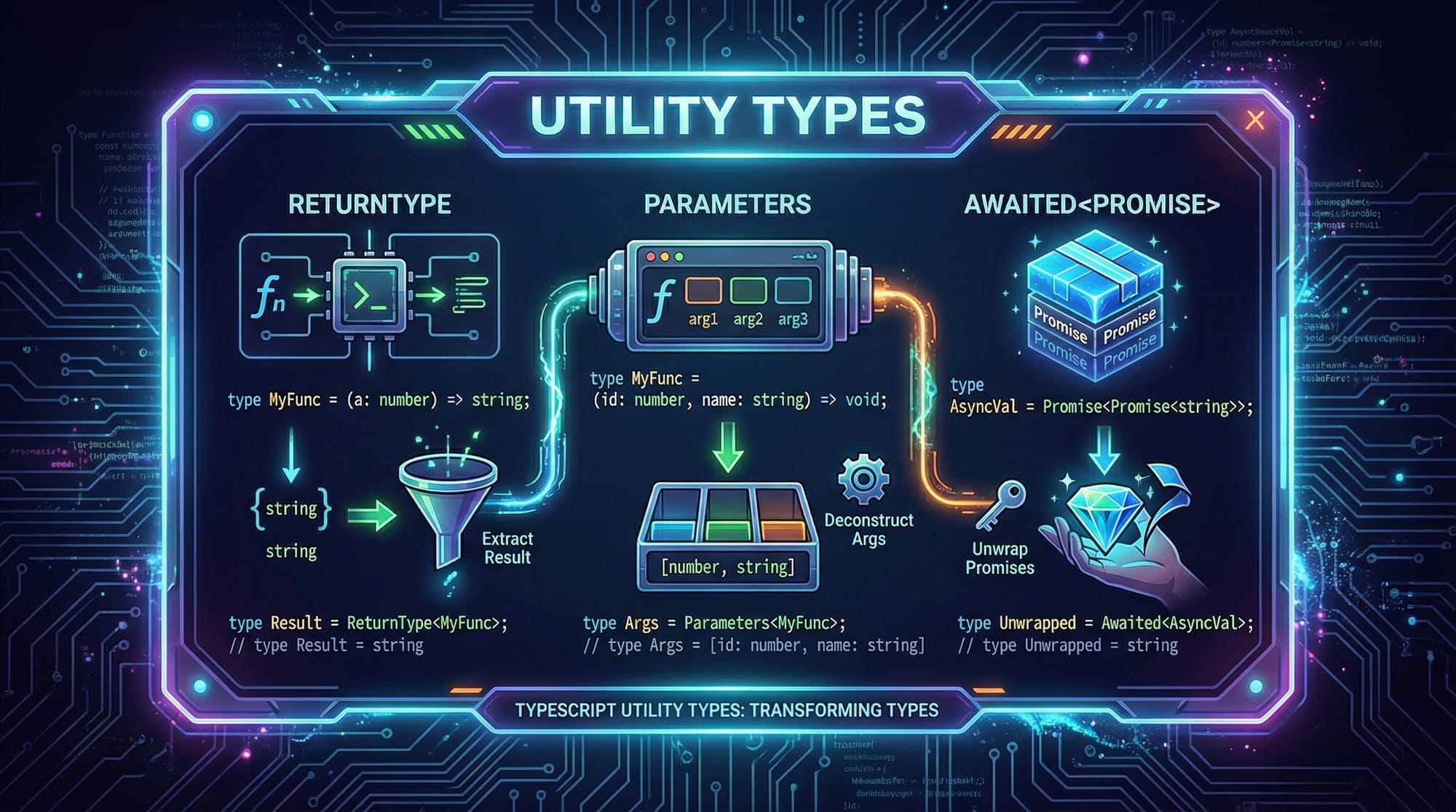
Advanced Utility Types
function fetchData() {
  return Promise.resolve({ name: "Ali", age: 22 });
}

type Data = ReturnType<typeof fetchData>;
type Params = Parameters<typeof fetchData>;
type AwaitedData = Awaited<Data>;
Explanation line-by-line:
fetchData: Function returning a PromiseReturnType<typeof fetchData>: Gets return type of functionParameters<typeof fetchData>: Gets function parameters (empty here)Awaited<Data>: Extracts resolved value from Promise
Practical Code Examples
Example 1: Updating Student Profile (Partial Usage)
interface Student {
  name: string;
  age: number;
  city: string;
}

function updateStudent(student: Student, updates: Partial<Student>) {
  return { ...student, ...updates };
}

const student = {
  name: "Ahmad",
  age: 20,
  city: "Lahore"
};

const updatedStudent = updateStudent(student, { city: "Karachi" });
Explanation line-by-line:
interface Student: Defines structureupdateStudent: Function to update studentPartial<Student>: Allows passing only changed fields{ ...student, ...updates }: Merges old and new dataupdatedStudent: Result with updated city
Example 2: Real-World Application (E-commerce Order System)
interface Order {
  id: number;
  customerName: string;
  amount: number;
  status: string;
}

// Only pick required fields for invoice
type Invoice = Pick<Order, "id" | "amount">;

// Remove sensitive data
type PublicOrder = Omit<Order, "customerName">;

const order: Order = {
  id: 101,
  customerName: "Fatima",
  amount: 5000,
  status: "Paid"
};

const invoice: Invoice = {
  id: order.id,
  amount: order.amount
};

const publicOrder: PublicOrder = {
  id: 101,
  amount: 5000,
  status: "Paid"
};
Explanation line-by-line:
interface Order: Defines order structurePick<Order, "id" | "amount">: Selects only invoice fieldsOmit<Order, "customerName">: Removes sensitive datainvoice: Only includes necessary fieldspublicOrder: Safe to expose publicly
Common Mistakes & How to Avoid Them
Mistake 1: Using Partial Everywhere
Problem:
Using Partial<T> everywhere can make your app unsafe.
function createStudent(student: Partial<Student>) {
  // risky!
}
Fix:
function createStudent(student: Student) {
  // safer
}
Explanation:
Partialremoves required checks- Only use it where necessary (e.g., updates)
Mistake 2: Confusing Pick and Omit
Problem:
Developers often mix them up.
type Wrong = Pick<Student, "age" | "city">;
Fix:
type Correct = Omit<Student, "name">;
Explanation:
Pick: choose what you needOmit: remove what you don’t need
Practice Exercises
Exercise 1: Create Partial Type
Problem:
Create a partial version of this interface:
interface Product {
  name: string;
  price: number;
  stock: number;
}
Solution:
type PartialProduct = Partial<Product>;
Explanation:
- Makes all fields optional
- Useful for updating product stock
Exercise 2: Remove Property
Problem:
Remove price from Product.
Solution:
type ProductWithoutPrice = Omit<Product, "price">;
Explanation:
Omitremoves selected field- Keeps remaining properties
Frequently Asked Questions
What is TypeScript utility types?
TypeScript utility types are built-in generic types that help transform existing types. They reduce repetition and improve code readability.
How do I use Partial in TypeScript?
Use Partial<T> when you want to make all properties optional. It is commonly used in update operations like forms or APIs.
What is the difference between Pick and Omit?
Pick selects specific properties, while Omit removes specific properties from a type. Both are useful depending on your needs.
When should I use Required?
Use Required<T> when you want to enforce that all properties must be present, especially in validation or strict APIs.
Are utility types used in real projects?
Yes, they are widely used in real-world projects, especially in React, APIs, and backend systems across companies in Pakistan.
Summary & Key Takeaways
- Utility types help transform existing types without rewriting code
Partialmakes properties optional (great for updates)Pickselects specific propertiesOmitremoves unwanted properties- Advanced types like
ReturnTypeandAwaitedimprove type inference - Avoid overusing utility types to maintain type safety
Next Steps & Related Tutorials
To continue your TypeScript journey, explore these tutorials on theiqra.edu.pk:
- Learn the fundamentals in TypeScript Basics
- Build modern apps with TypeScript with React
- Understand advanced typing with TypeScript Generics
- Explore backend development with Node.js + TypeScript
These topics will help you become job-ready for software roles in Pakistan’s growing tech industry 🚀
Test Your Python Knowledge!
Finished reading? Take a quick quiz to see how much you've learned from this tutorial.