Visual Regression Testing Percy & Chromatic Tutorial
Introduction
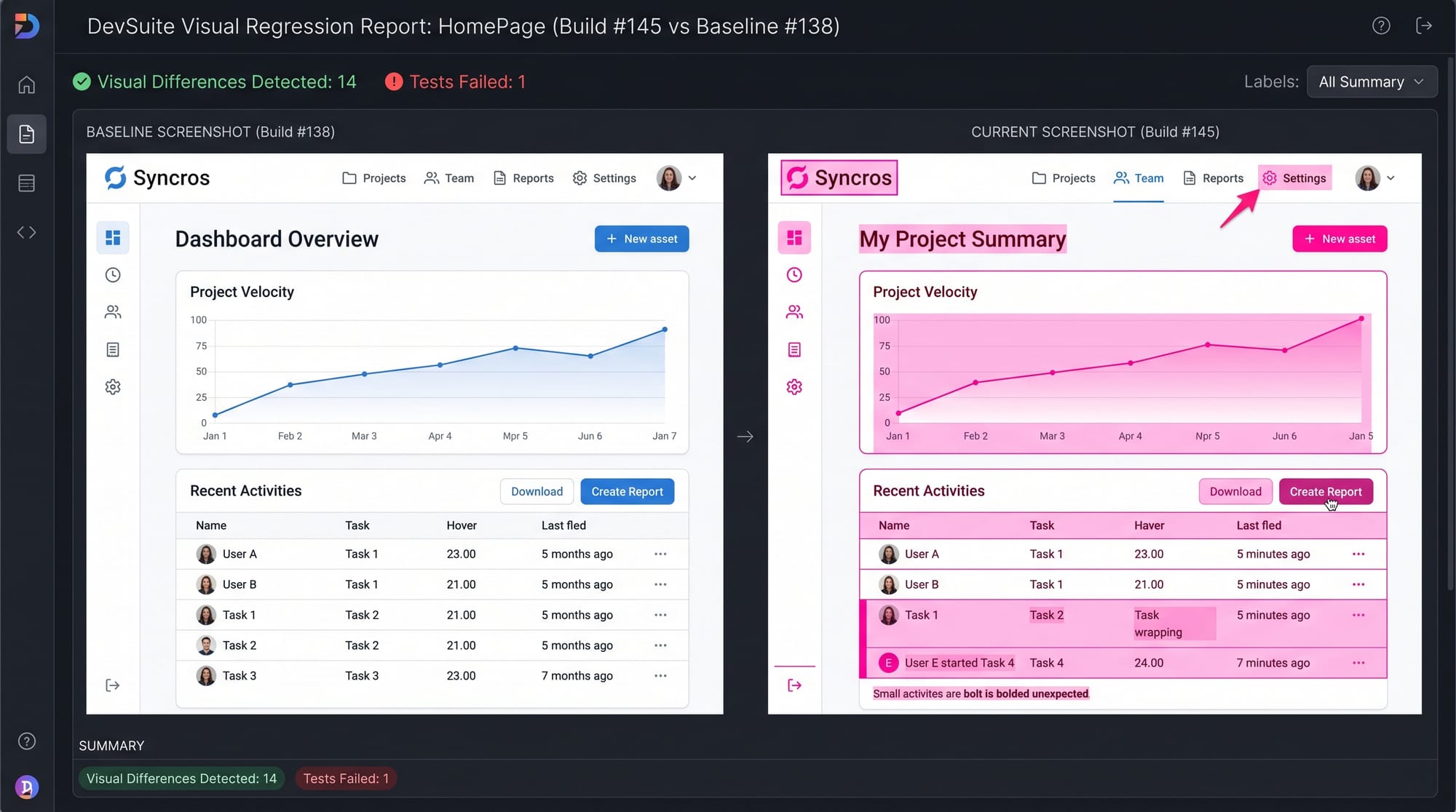
Visual regression testing is a modern software testing technique that ensures your web application’s UI (User Interface) does not change unexpectedly after code updates. In simple terms, it compares screenshots of your application before and after changes to detect visual differences.
In this Visual Regression Testing: Percy & Chromatic Tutorial, you will learn how tools like Percy and Chromatic help automate UI testing and prevent design bugs from reaching production. These tools are widely used in real-world companies and are becoming essential skills for frontend developers.
For Pakistani students learning modern web development in cities like Lahore, Karachi, and Islamabad, mastering visual testing can significantly improve your job opportunities in local IT companies and international freelance platforms like Upwork and Fiverr.
For example, imagine Fatima from Lahore updates a button color in a React project. Without visual regression testing, she might accidentally break alignment on mobile screens. Percy or Chromatic would immediately highlight the issue before deployment.
Prerequisites
Before starting this tutorial, you should have a basic understanding of:
- HTML, CSS, and JavaScript fundamentals
- Basic React.js knowledge (recommended but not required)
- Git and GitHub basics
- Familiarity with testing concepts (unit vs integration testing)
- Node.js installed on your system
If you are a beginner, we recommend first going through:
- React Basics Tutorial on theiqra.edu.pk
- JavaScript ES6 Guide
Core Concepts & Explanation
Visual Regression Testing Basics
Visual regression testing works by capturing screenshots of your UI and comparing them with previously approved “baseline” images.
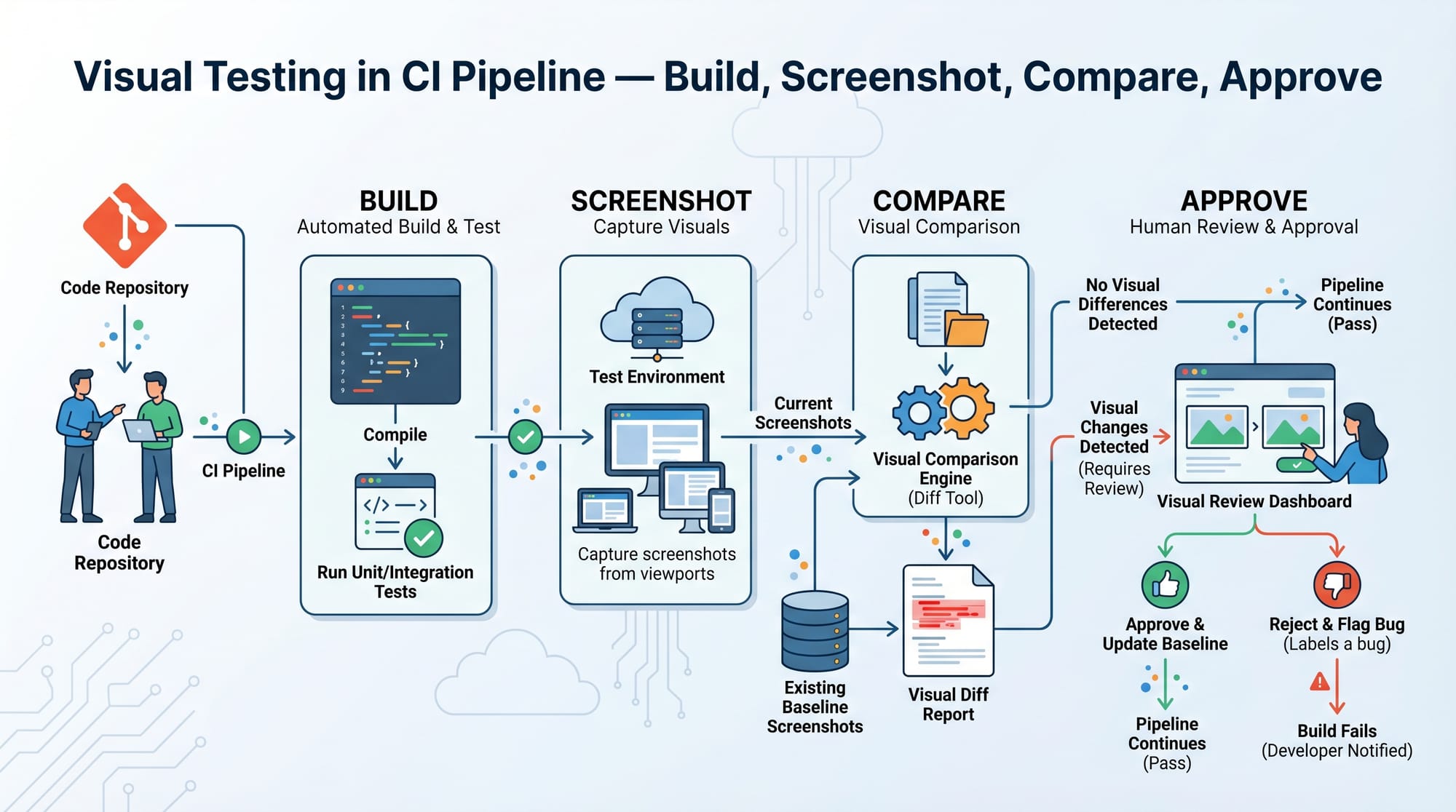
The process typically includes:
- Initial snapshot (baseline image) is saved
- Code changes are made
- New snapshot is taken
- Comparison is performed automatically
- Differences are highlighted for review
This helps detect:
- Broken layouts
- Misaligned components
- Unexpected color changes
- Responsive design issues
For example, if Ali from Karachi updates a navbar in a React app and accidentally breaks spacing in mobile view, visual regression testing will highlight it instantly.
Percy (BrowserStack Percy)
Percy is a powerful visual testing tool developed by BrowserStack. It integrates with CI/CD pipelines and automatically captures screenshots during tests.
Key features of Percy:
- Automated visual comparisons
- CI/CD integration (GitHub Actions, GitLab CI)
- Cross-browser testing
- Team-based review workflow
Percy works great with testing frameworks like Cypress and Playwright.
Chromatic (Storybook Visual Testing)
Chromatic is a visual testing and review tool specifically designed for Storybook components. It helps frontend teams test UI components in isolation.
Key features of Chromatic:
- Works with Storybook components
- Visual diff detection
- UI review workflow
- Deployment preview links
For example, when a developer in Islamabad updates a “Login Button” component in Storybook, Chromatic automatically checks if the UI changed unexpectedly.
Practical Code Examples
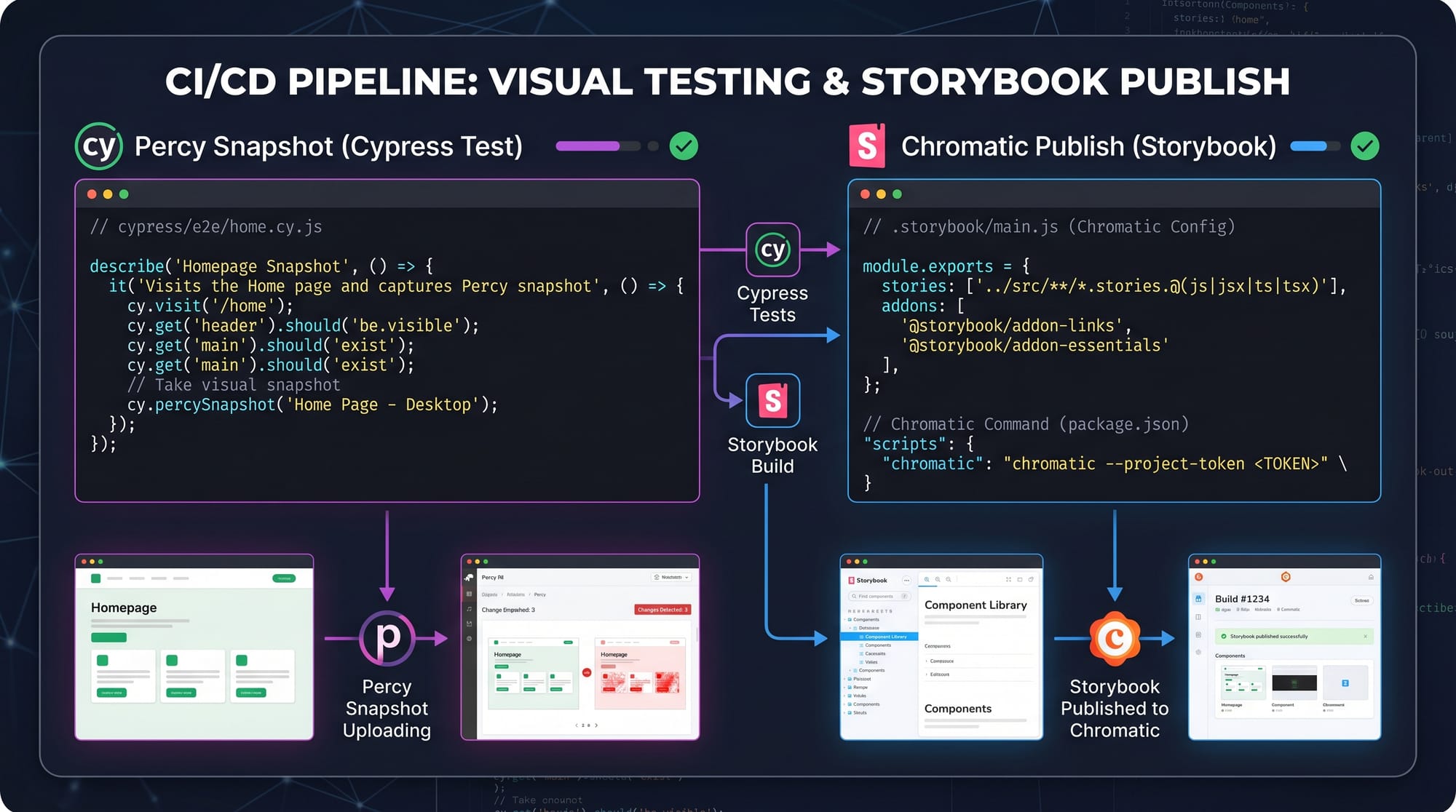
Example 1: Percy with Cypress Snapshot Testing
describe('Homepage Visual Test', () => {
  it('should match homepage UI', () => {
    cy.visit('https://example.com');
    cy.percySnapshot('Homepage');
  });
});
Line-by-line explanation:
describe('Homepage Visual Test', () => {
Defines a test group for homepage visual testing.it('should match homepage UI', () => {
Defines an individual test case.cy.visit('https://example.com');
Opens the website in the test browser.cy.percySnapshot('Homepage');
Captures a visual snapshot of the page and sends it to Percy for comparison.
This ensures that any UI change in the homepage is detected before deployment.
Example 2: Chromatic with Storybook
// Button.stories.js
import React from 'react';
import { Button } from './Button';

export default {
  title: 'Components/Button',
  component: Button,
};

export const Primary = () => <Button label="Click Me" />;
Line-by-line explanation:
import React from 'react';
Imports React library.import { Button } from './Button';
Imports the Button component.export default { title: 'Components/Button', component: Button };
Registers the component in Storybook under “Components/Button”.export const Primary = () => <Button label="Click Me" />;
Creates a visual test case for the button.
When this runs in Chromatic, it captures UI snapshots and compares them with previous versions.
Common Mistakes & How to Avoid Them
Mistake 1: Ignoring Baseline Updates
Many beginners forget to update baseline images after intentional UI changes. This causes unnecessary test failures.
Solution:
Always review changes carefully and accept updates in Percy or Chromatic when the UI change is intentional.
For example, if Ahmed from Islamabad redesigns a dashboard layout, he should approve the new baseline after verifying correctness.
Mistake 2: Running Tests Without CI Integration
Some developers run visual tests locally only, which defeats the purpose of automation.
Solution:
Integrate Percy or Chromatic with CI tools like GitHub Actions so tests run automatically on every push.
Practice Exercises
Exercise 1: Basic Percy Snapshot
Problem:
Create a Cypress test that captures a visual snapshot of the login page.
Solution:
cy.visit('/login');
cy.percySnapshot('Login Page');
This captures the login UI for visual comparison.
Exercise 2: Storybook Component Testing
Problem:
Create a Storybook story for a card component.
Solution:
export const CardExample = () => (
  <Card title="Welcome" content="Hello from Pakistan!" />
);
This allows Chromatic to test the card UI visually.
Frequently Asked Questions
What is visual regression testing?
Visual regression testing is a technique that compares screenshots of a web application before and after changes to detect unintended UI differences. It ensures UI consistency across updates.
How does Percy work in testing?
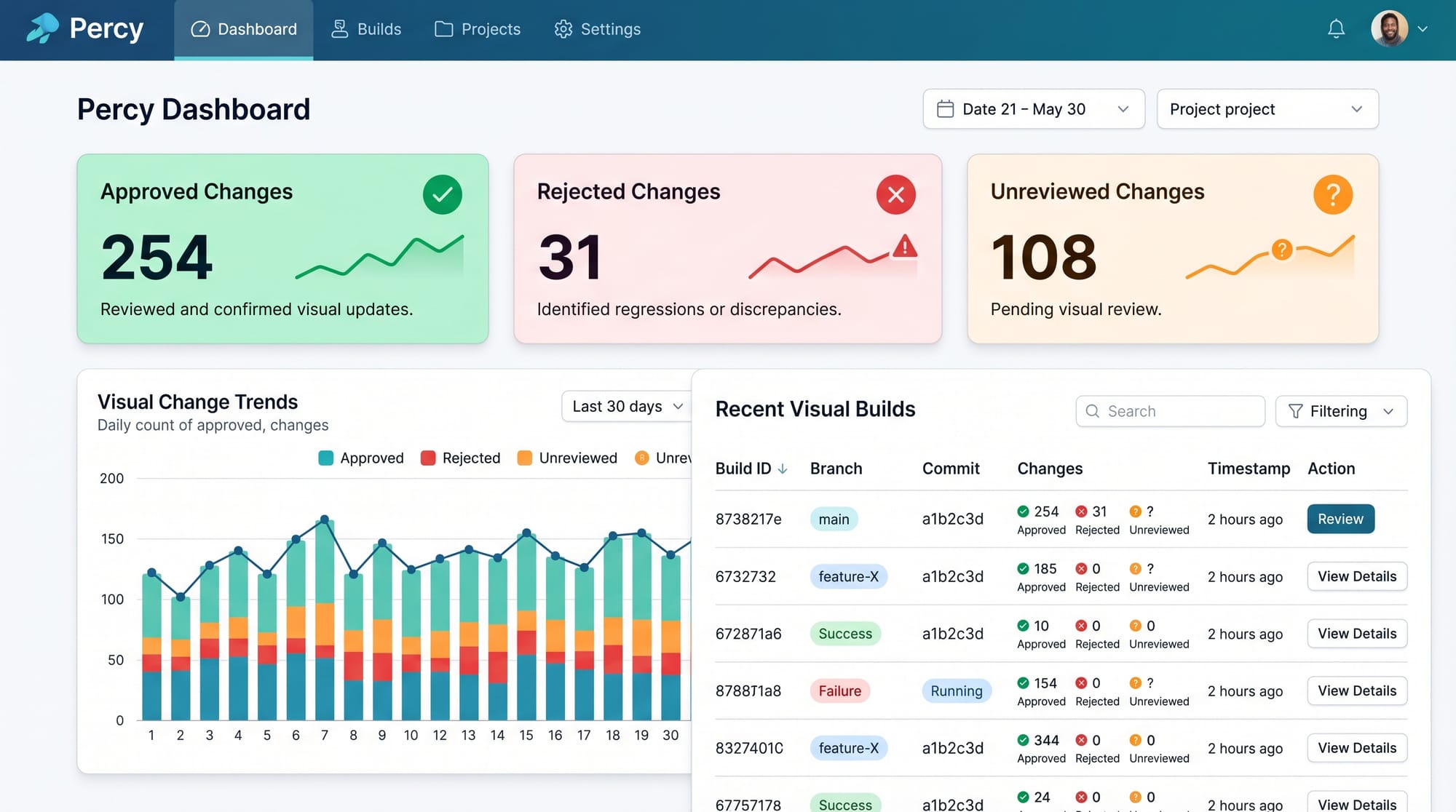
Percy captures screenshots during automated tests and compares them with baseline images. Any differences are flagged for review in a visual dashboard.
What is Chromatic used for in Storybook?
Chromatic is used to test and review Storybook components visually. It ensures UI components do not break when developers make changes.
Do I need coding skills for visual regression testing?
Yes, basic JavaScript and testing knowledge is required. However, tools like Percy and Chromatic simplify the process significantly.
Which is better: Percy or Chromatic?
Percy is better for full application testing, while Chromatic is best for component-level testing using Storybook. Many teams use both together.
Summary & Key Takeaways
- Visual regression testing ensures UI consistency across code changes
- Percy is ideal for full application visual testing
- Chromatic is designed for Storybook component testing
- CI/CD integration makes testing fully automated
- It helps prevent UI bugs before production
- Essential skill for modern frontend developers
Next Steps & Related Tutorials
Now that you understand visual regression testing, you can explore more advanced topics:
- Learn component development with the Storybook Tutorial on theiqra.edu.pk
- Explore end-to-end testing in the Playwright Tutorial
- Strengthen your automation skills with Cypress Testing Guide
- Improve CI/CD knowledge with GitHub Actions Tutorial
Mastering these tools will help you become a professional frontend or QA engineer ready for jobs in Pakistan and international remote opportunities.
Test Your Python Knowledge!
Finished reading? Take a quick quiz to see how much you've learned from this tutorial.