Web Accessibility (WCAG) Building Inclusive Websites Guide
Introduction
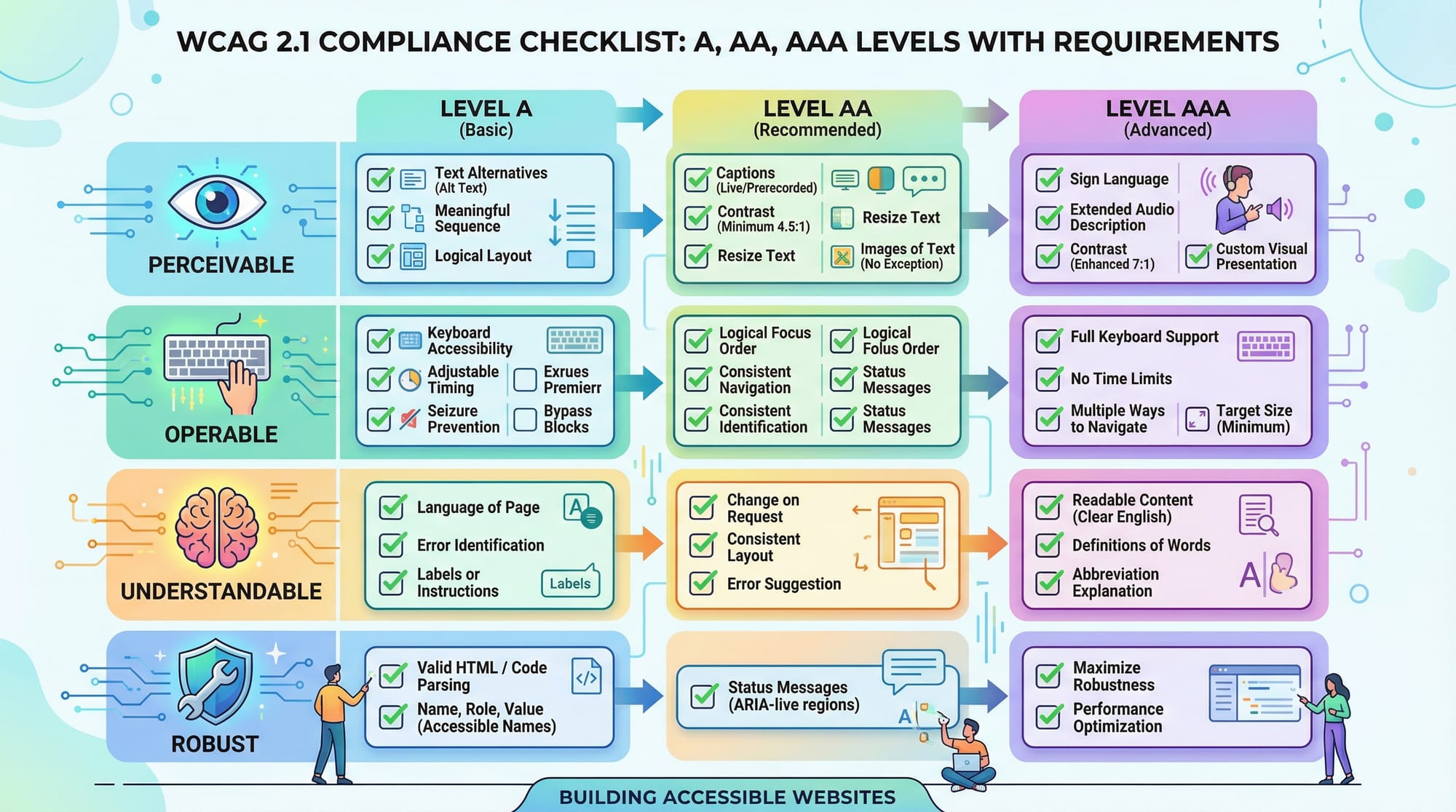
Web accessibility refers to designing and developing websites that everyone can use, including people with disabilities. The Web Content Accessibility Guidelines (WCAG 2.1) provide a global standard for making websites accessible, usable, and inclusive.
In this web accessibility tutorial, you’ll learn how to build websites that work for users with visual, auditory, motor, and cognitive challenges. Whether someone is using a screen reader in Lahore, navigating with a keyboard in Karachi, or accessing content on a slow mobile network in Islamabad, accessibility ensures equal access for all.
For Pakistani students, learning accessible web design is especially important because:
- It improves job prospects in global tech markets
- It enhances user experience for diverse audiences
- It aligns with modern development standards used by companies worldwide
Accessibility is not just a feature—it’s a responsibility.
Prerequisites
Before starting this tutorial, you should have:
- Basic knowledge of HTML (tags, elements, attributes)
- Understanding of CSS (styling, layout basics)
- Familiarity with JavaScript (optional but helpful)
- Basic understanding of how websites work
- A code editor like VS Code
Core Concepts & Explanation
Perceivable Content (WCAG Principle 1)
Content must be presented in ways users can perceive. This means users should be able to see or hear content.
Examples:
- Adding
alttext for images - Providing captions for videos
- Using sufficient color contrast
<img src="lahore.jpg" alt="Badshahi Mosque in Lahore during sunset">
Explanation:
img: Displays an imagesrc: Specifies the image filealt: Provides a text alternative for screen readers
Operable Interfaces (WCAG Principle 2)
Users must be able to navigate and interact with your website.
Examples:
- Keyboard navigation support
- Skip links for faster navigation
- Avoiding time-based content without controls
<a href="#main-content" class="skip-link">Skip to main content</a>
Explanation:
a: Anchor linkhref="#main-content": Jumps to main content section- Helps keyboard users skip repetitive menus
Understandable Content (WCAG Principle 3)
Users should be able to understand the information and how to use the interface.
Examples:
- Clear labels on forms
- Consistent navigation
- Simple language (important for beginners)
Robust Content (WCAG Principle 4)
Content should work with current and future technologies, including assistive tools.
Examples:
- Using semantic HTML
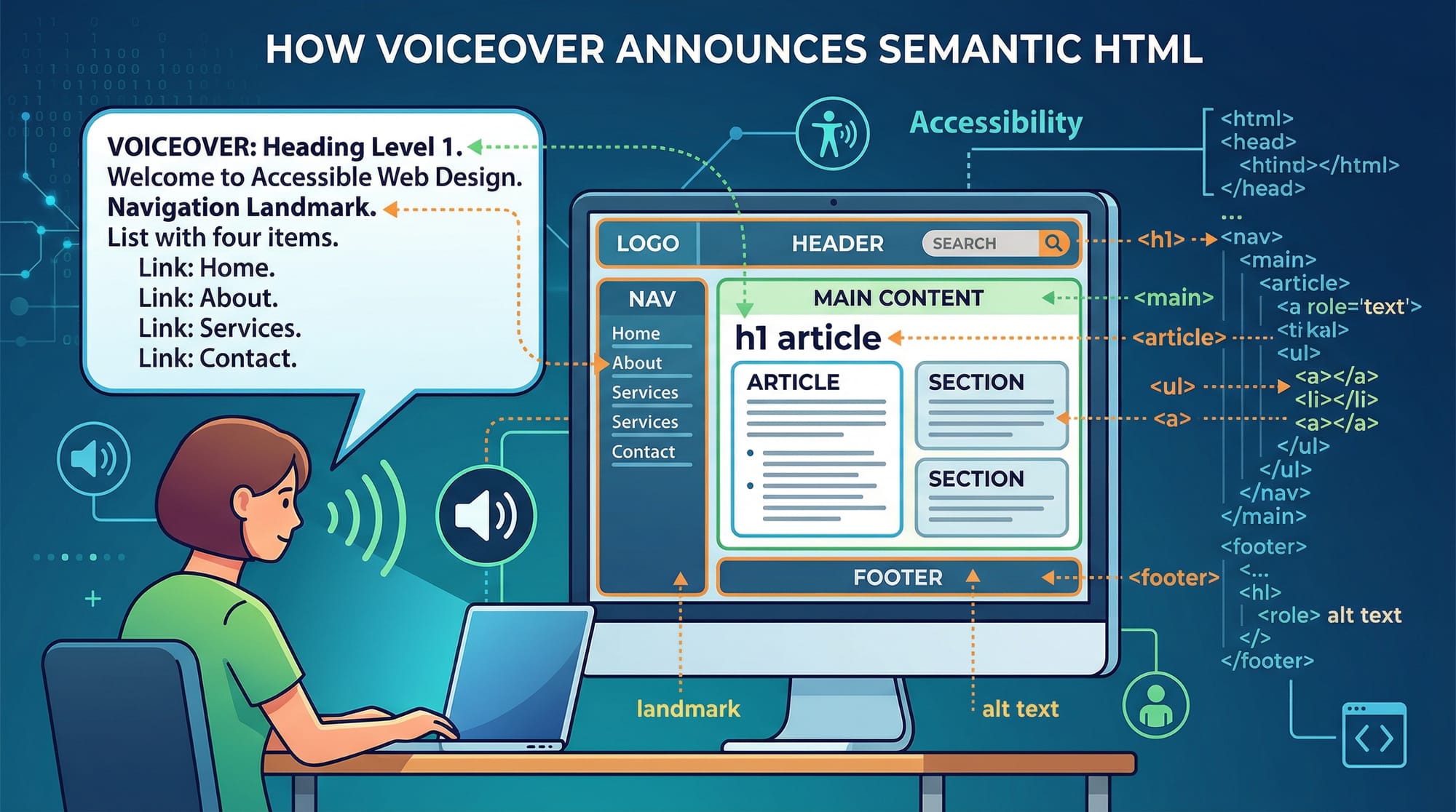
- Supporting screen readers
Semantic HTML for Accessibility
Semantic HTML improves accessibility automatically.
<header>
  <h1>Welcome to Iqra University</h1>
</header>
Explanation:
<header>: Defines page header<h1>: Main heading for screen readers
Keyboard Navigation & Focus Management
Users should navigate using only the keyboard.
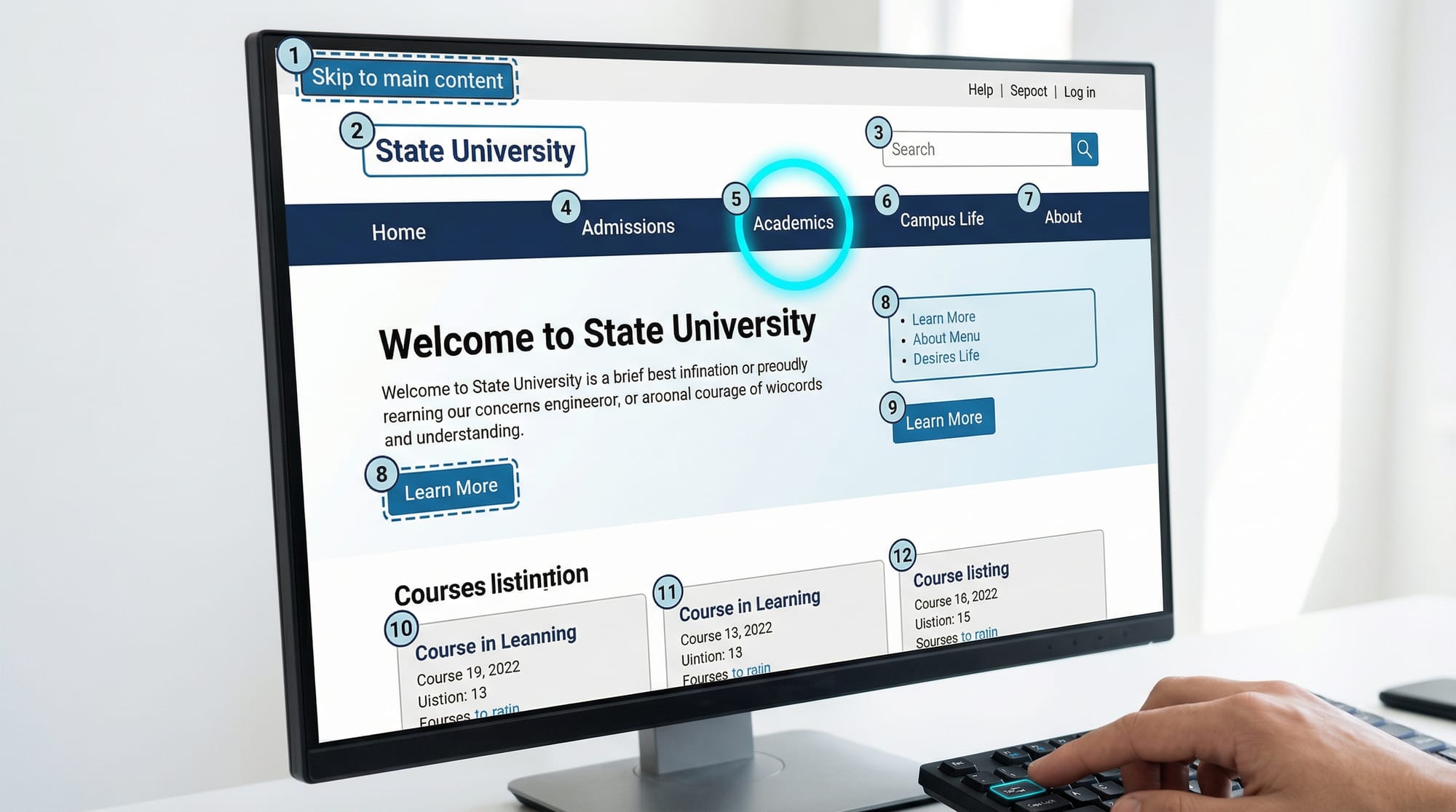
Key practices:
- Use
tabindex - Ensure visible focus indicators
- Logical tab order
Practical Code Examples
Example 1: Accessible Form Design
<form>
  <label for="name">Full Name:</label>
  <input type="text" id="name" name="name">

  <label for="email">Email Address:</label>
  <input type="email" id="email" name="email">

  <button type="submit">Submit</button>
</form>
Line-by-line Explanation:
<form>: Container for form elements<label>: Describes input fieldfor="name": Links label to input<input>: User input fieldtype="text": Text inputid="name": Unique identifier<button>: Submit form
Why it matters:
- Screen readers read labels
- Improves usability for all users
Example 2: Real-World Application (E-commerce Website in Pakistan)
Imagine Ahmad is building an online store in Karachi selling clothes in PKR.
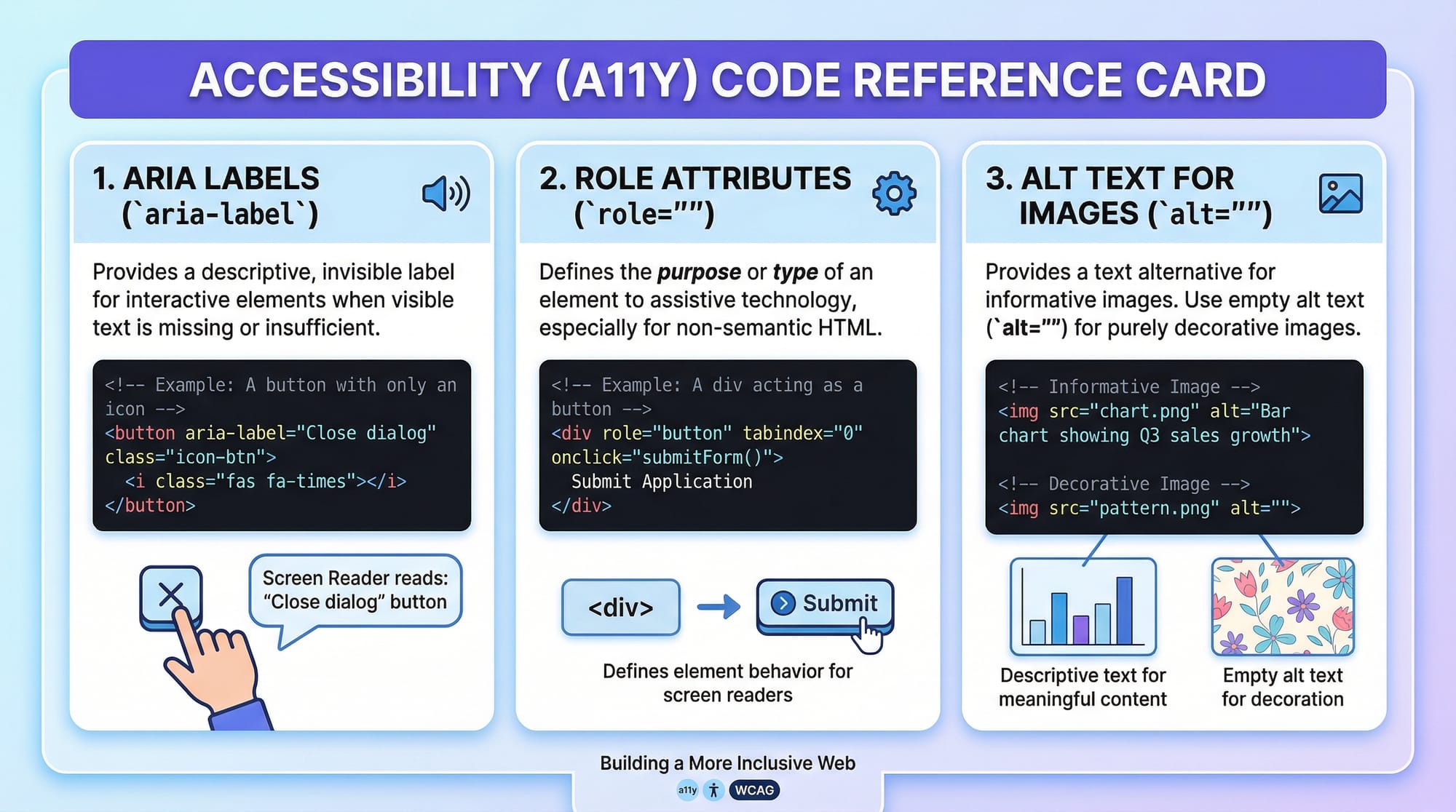
<button aria-label="Add to cart for 1500 PKR">Add to Cart</button>

<img src="shirt.jpg" alt="Blue cotton shirt for men priced at 1500 PKR">
Line-by-line Explanation:
<button>: Action buttonaria-label: Describes button for screen readers<img>: Product imagealt: Describes image clearly
Why it matters:
- Blind users understand product details
- Improves SEO and usability
Common Mistakes & How to Avoid Them
Mistake 1: Missing Alt Text
❌ Wrong:
<img src="image.jpg">
✅ Correct:
<img src="image.jpg" alt="Student coding in Islamabad">
Explanation:
- Without
alt, screen readers cannot describe the image - Always provide meaningful descriptions
Mistake 2: Poor Color Contrast
❌ Example:
Light grey text on white background
✅ Fix:
Use high contrast colors
body {
  color: #000;
  background-color: #fff;
}
Explanation:
- Dark text on light background improves readability
- Important for visually impaired users
Mistake 3: Using Div Instead of Semantic Tags
❌ Wrong:
<div onclick="submitForm()">Submit</div>
✅ Correct:
<button type="submit">Submit</button>
Explanation:
<button>is accessible by default- Supports keyboard and screen readers
Practice Exercises
Exercise 1: Add Accessibility to an Image
Problem:
Fix this image:
<img src="karachi.jpg">
Solution:
<img src="karachi.jpg" alt="Clifton Beach in Karachi with people enjoying sunset">
Exercise 2: Improve Button Accessibility
Problem:
Fix this button:
<div onclick="buyNow()">Buy Now</div>
Solution:
<button onclick="buyNow()" aria-label="Buy product now">Buy Now</button>
Frequently Asked Questions
What is WCAG 2.1?
WCAG 2.1 is a set of international guidelines for making web content accessible to people with disabilities. It includes rules for design, content, and development practices.
How do I make my website accessible?
Start by using semantic HTML, adding alt text, ensuring keyboard navigation, and following WCAG principles like perceivable and operable content.
Why is accessibility important in Pakistan?
Accessibility ensures everyone, including users with disabilities, can access digital services. It also helps Pakistani developers compete in global markets.
What tools can I use to test accessibility?
You can use tools like Lighthouse, WAVE, and browser extensions to check accessibility issues.
Do I need to learn ARIA?
Yes, ARIA helps improve accessibility when HTML alone is not enough, but it should be used carefully and only when needed.
Summary & Key Takeaways
- Web accessibility ensures websites are usable by everyone
- WCAG 2.1 provides global standards for accessibility
- Use semantic HTML for better accessibility
- Always include alt text for images
- Ensure keyboard navigation works properly
- Avoid common mistakes like poor contrast and missing labels
Next Steps & Related Tutorials
To continue your learning journey, explore these tutorials on theiqra.edu.pk:
- Learn how to structure pages with HTML Accessibility best practices
- Improve styling with our CSS Tutorial
- Understand layouts with Responsive Web Design Guide
- Dive deeper into forms with Advanced HTML Forms Tutorial
By mastering accessibility, you’re not just building websites—you’re building inclusive digital experiences for everyone in Pakistan and beyond.
Test Your Python Knowledge!
Finished reading? Take a quick quiz to see how much you've learned from this tutorial.