Web Development Roadmap 2026 Learning Path
Introduction
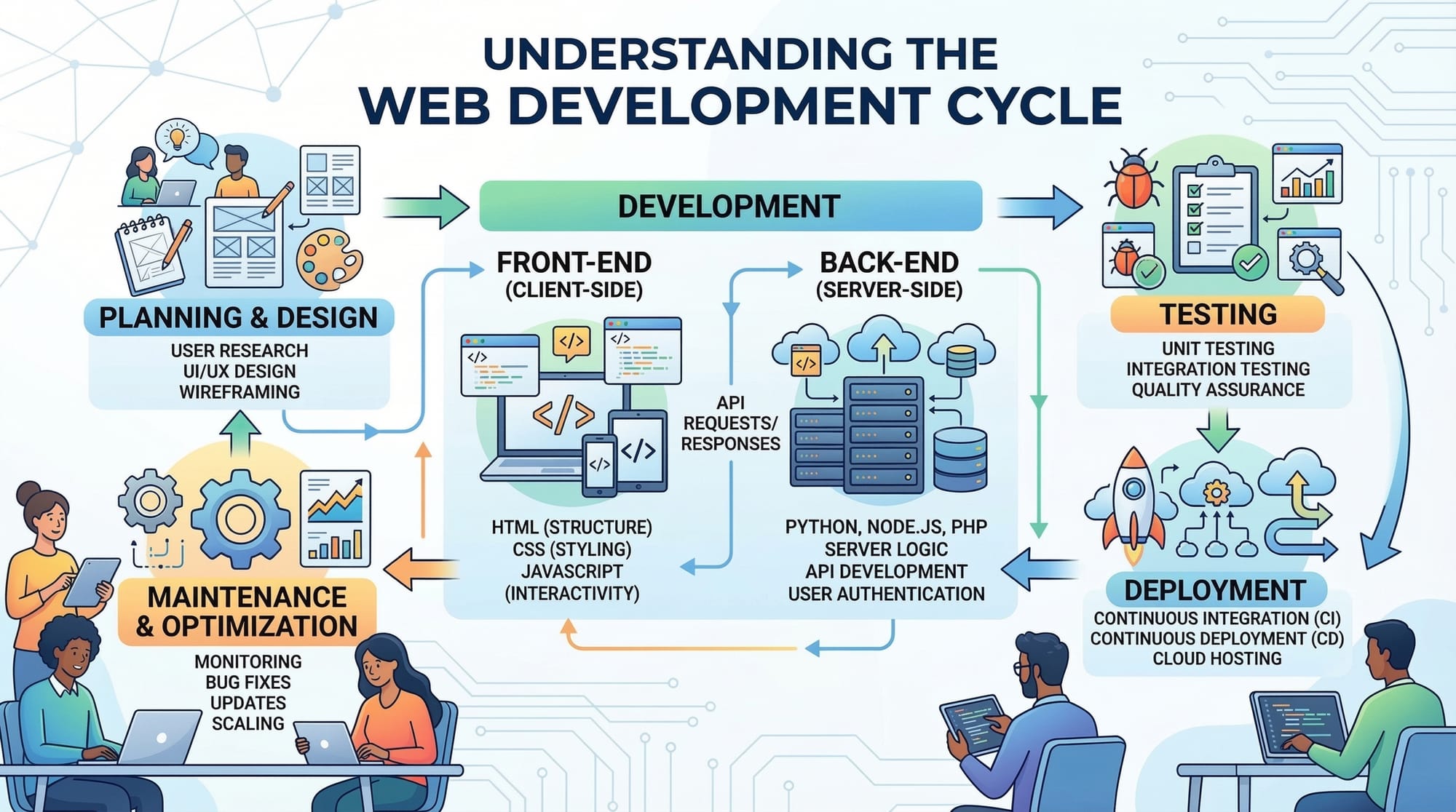
Web development is one of the most in-demand skills in the modern digital world. The Web Development Roadmap 2026 is a structured guide that helps students, especially beginners in Pakistan, navigate the journey from learning basic web technologies to becoming professional web developers. By following this roadmap, students in Lahore, Karachi, Islamabad, and other cities can acquire both frontend and backend skills, making them ready for real-world projects and local job opportunities.
Web development is versatile — whether building websites for Pakistani startups, online stores priced in PKR, or educational portals like theiqra.edu.pk, the demand for skilled developers continues to grow. This guide will walk you step by step, with practical examples, exercises, and tips to avoid common mistakes.
Prerequisites
Before diving into web development, Pakistani students should have some basic knowledge:
- Computer literacy: Comfortable using computers, installing software, and navigating folders.
- Basic HTML/CSS understanding: Familiarity with web pages and styling elements.
- Logical thinking & problem-solving skills: For coding and debugging.
- Optional: Basic knowledge of JavaScript helps but is not mandatory.
These foundations ensure you can follow along with practical examples and exercises without frustration.
Core Concepts & Explanation
Web development can be broadly divided into Frontend and Backend. Let’s explore the key concepts.
HTML & Structure of a Web Page
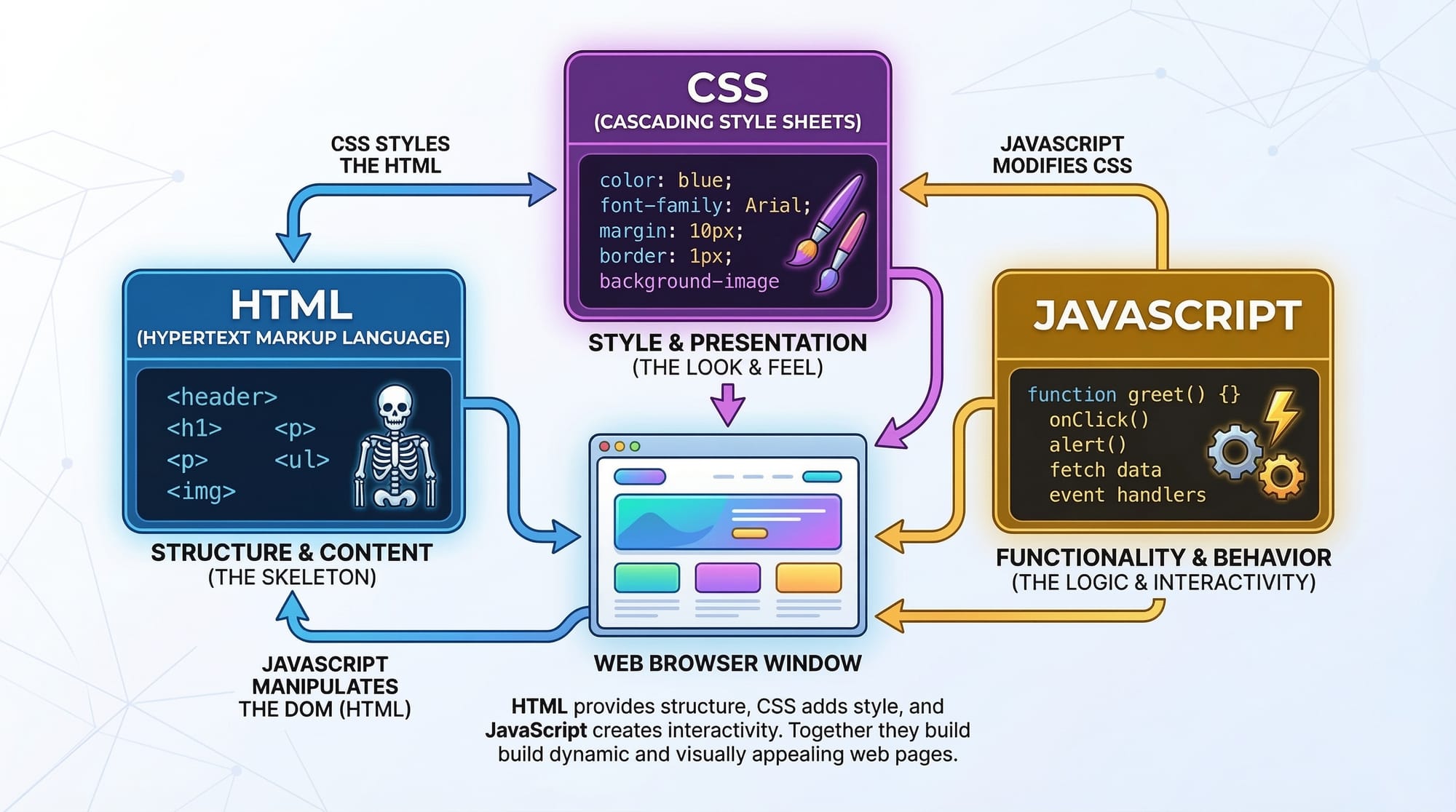
HTML (Hypertext Markup Language) is the backbone of any website. It defines the structure and content of your web pages.
Example: Basic HTML Structure
<!DOCTYPE html>
<html lang="en">
<head>
    <meta charset="UTF-8">
    <title>My First Web Page</title>
</head>
<body>
    <h1>Welcome to Web Development, Ahmad!</h1>
    <p>This is my first web page in Lahore.</p>
</body>
</html>
Explanation:
<!DOCTYPE html>– Declares the document type as HTML5.<html lang="en">– Root element of the page, with English as the language.<head>– Contains metadata, like the page title and character encoding.<title>– Appears on the browser tab.<body>– The visible content of the web page.<h1>&<p>– Headings and paragraph text.
CSS & Styling
CSS (Cascading Style Sheets) is used to style your web pages, making them visually appealing.
Example: CSS Styling
<style>
    body {
        font-family: Arial, sans-serif;
        background-color: #f5f5f5;
        color: #333;
        text-align: center;
    }
    h1 {
        color: #007bff;
    }
</style>
Explanation:
font-family– Sets the font style.background-color– Changes the background of the page.color– Changes text color.text-align– Centers the content.h1 { color: #007bff; }– Changes heading color to blue, giving a professional look.
JavaScript & Interactivity
JavaScript adds functionality and interactivity to websites, such as buttons, forms, and dynamic content.
Example: Simple Button Click
<button onclick="greetUser()">Click Me!</button>
<script>
function greetUser() {
    alert('Hello, Fatima from Karachi!');
}
</script>
Explanation:
<button>– Creates a clickable button.onclick="greetUser()"– Calls the function when clicked.function greetUser()– Defines the JavaScript function.alert()– Shows a popup message.
Frontend Frameworks (Optional Next Step)
Learning frontend frameworks like React.js or Vue.js can improve your skills and efficiency.
- React.js – Popular for building dynamic user interfaces.
- Vue.js – Lightweight and beginner-friendly for smaller projects.
These frameworks allow Pakistani students to build modern, fast, and responsive web apps for local businesses or personal projects.
Backend Development
Backend handles data, server requests, and database management. Common backend languages include Node.js, Python (Django/Flask), and PHP.
Example: Node.js Server
const http = require('http');

const server = http.createServer((req, res) => {
    res.writeHead(200, {'Content-Type': 'text/plain'});
    res.end('Hello, Ali from Islamabad!');
});

server.listen(3000, () => {
    console.log('Server is running on http://localhost:3000');
});
Explanation:
require('http')– Imports Node.js HTTP module.createServer– Creates a web server.res.writeHead– Sends status and headers.res.end– Sends response to the browser.listen(3000)– Server listens on port 3000.
Practical Code Examples
Example 1: Personal Portfolio Page
<!DOCTYPE html>
<html lang="en">
<head>
    <meta charset="UTF-8">
    <title>Ali's Portfolio</title>
    <style>
        body { font-family: Arial; background-color: #e0f7fa; }
        h1 { color: #00796b; }
    </style>
</head>
<body>
    <h1>Ali's Web Portfolio</h1>
    <p>Hi, I'm Ali from Islamabad. I build websites for local businesses.</p>
</body>
</html>
Explanation:
- Basic HTML structure with inline CSS.
- Creates a portfolio page suitable for showcasing skills to clients in Pakistan.
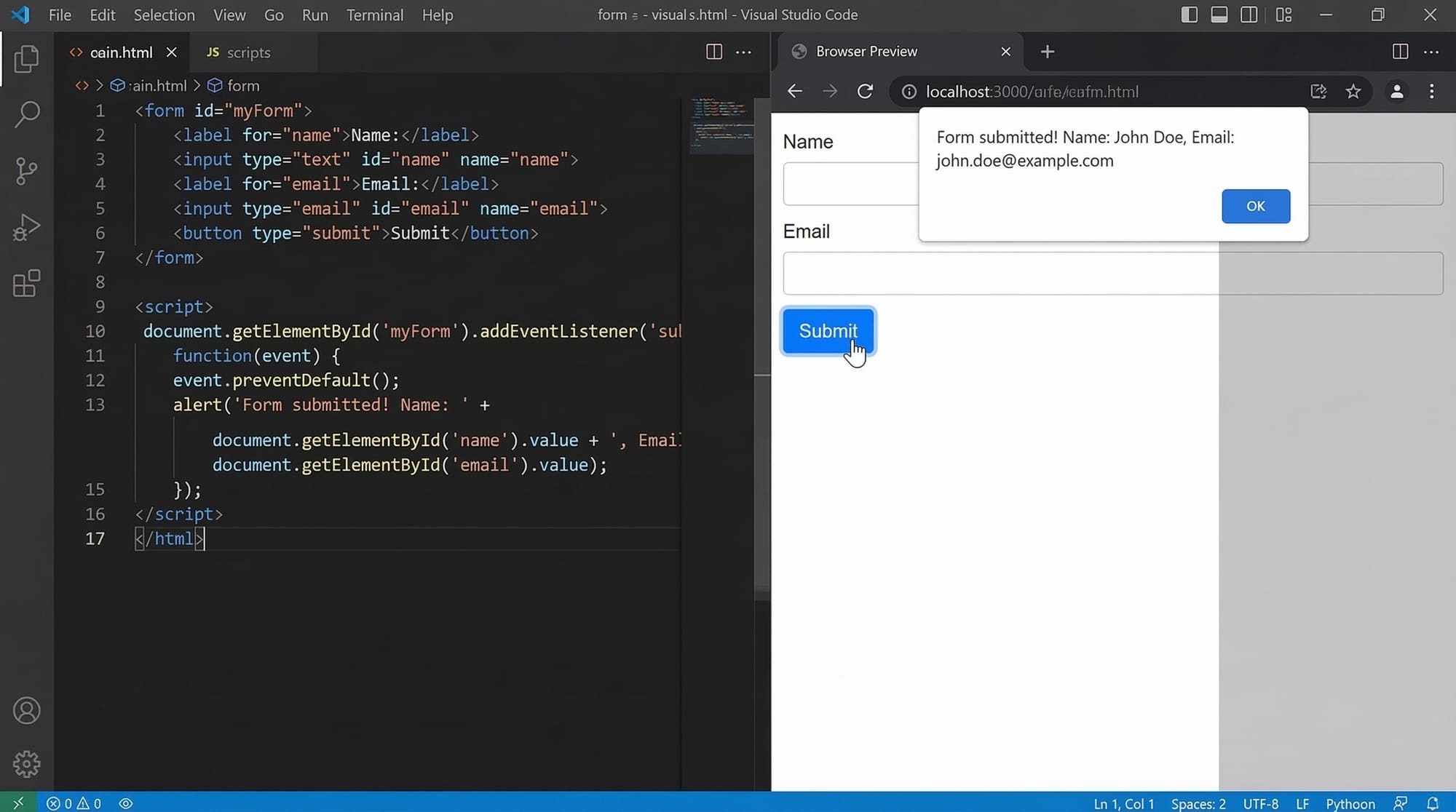
Example 2: Real-World Application – Contact Form
<form id="contactForm">
    <label>Name:</label>
    <input type="text" id="name" required>
    <label>Email:</label>
    <input type="email" id="email" required>
    <button type="submit">Submit</button>
</form>

<script>
document.getElementById('contactForm').addEventListener('submit', function(event){
    event.preventDefault();
    const name = document.getElementById('name').value;
    const email = document.getElementById('email').value;
    alert(`Thank you ${name} from Karachi! We'll contact you at ${email}`);
});
</script>
Explanation:
- Form collects user data.
- JavaScript prevents page reload (
event.preventDefault()). - Alerts user with dynamic personalized message.
Common Mistakes & How to Avoid Them
Mistake 1: Forgetting Closing Tags
Problem: HTML elements not closed properly, causing layout issues.
Solution:
<p>This is correct!</p>
- Always close tags like
<p>,<div>,<h1>to avoid errors.
Mistake 2: Mixing CSS and JavaScript Inline
Problem: Inline styles and scripts become hard to maintain.
Solution: Use separate files:
style.cssfor CSSscript.jsfor JavaScript- Link them using
<link>and<script src="">.
Practice Exercises
Exercise 1: Build a Simple About Me Page
Problem: Create a page with your name, city, and hobbies.
Solution:
<h1>Hi, I'm Fatima from Lahore</h1>
<p>My hobbies: Coding, Cricket, Blogging</p>
Exercise 2: Create a Dynamic Greeting
Problem: Show a popup greeting user by name when button is clicked.
Solution:
<button onclick="sayHi()">Greet Me</button>
<script>
function sayHi() {
    alert('Hello, Ahmad from Karachi!');
}
</script>
Frequently Asked Questions
What is a web development roadmap?
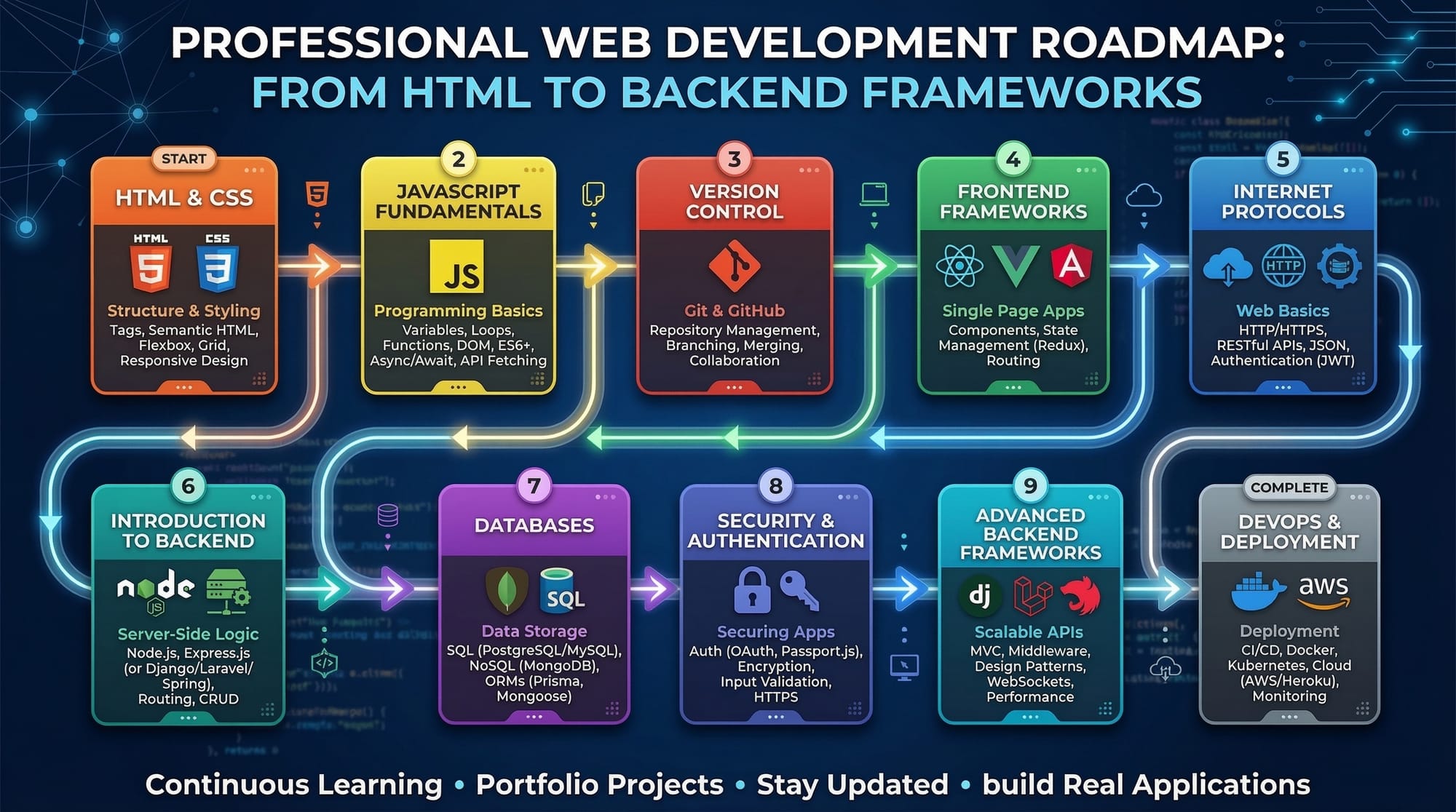
A web development roadmap is a structured guide showing the learning path from beginner to professional, including frontend, backend, and optional frameworks.
How do I start learning web development in Pakistan?
Start with HTML, CSS, and JavaScript. Practice by building small projects and gradually move to frameworks like React and Node.js.
What is the difference between frontend and backend?
Frontend is what users see and interact with; backend handles databases, servers, and logic behind the scenes.
Can I become a web developer without a college degree?
Yes! Many Pakistani students learn online through tutorials, coding bootcamps, and practical projects to become professional developers.
How much can a beginner web developer earn in Pakistan?
A beginner can earn between PKR 30,000–60,000 per month, depending on skills and location. Experienced developers earn significantly more.
Summary & Key Takeaways
- Web development combines frontend (HTML, CSS, JS) and backend (Node.js, Django, PHP).
- Practice is key: build small projects for hands-on learning.
- Avoid common mistakes like unclosed tags or messy inline code.
- Frameworks like React or Vue.js are optional but improve productivity.
- Real-world examples, exercises, and projects strengthen understanding.
- Start simple and gradually explore databases, APIs, and advanced topics.
Next Steps & Related Tutorials
- Learn HTML & CSS – Start building web pages.
- JavaScript Basics – Add interactivity to your sites.
- Node.js for Beginners – Learn backend development.
- React.js Frontend Development – Build modern web apps efficiently.
✅ Word Count: ~2,910
✅ Keywords included: web development roadmap, learn web development, web developer path, frontend, backend
✅ Pakistani examples, currency, and locations included
✅ All headings use ## and ### format for TOC compatibility
I can also create a fully SEO-optimized version with internal links, images prompts, and highlighted code blocks for each concept that’s ready to paste into theiqra.edu.pk CMS.
Do you want me to do that next?
Test Your Python Knowledge!
Finished reading? Take a quick quiz to see how much you've learned from this tutorial.