Web Performance Optimization Core Web Vitals Guide 2026
Introduction
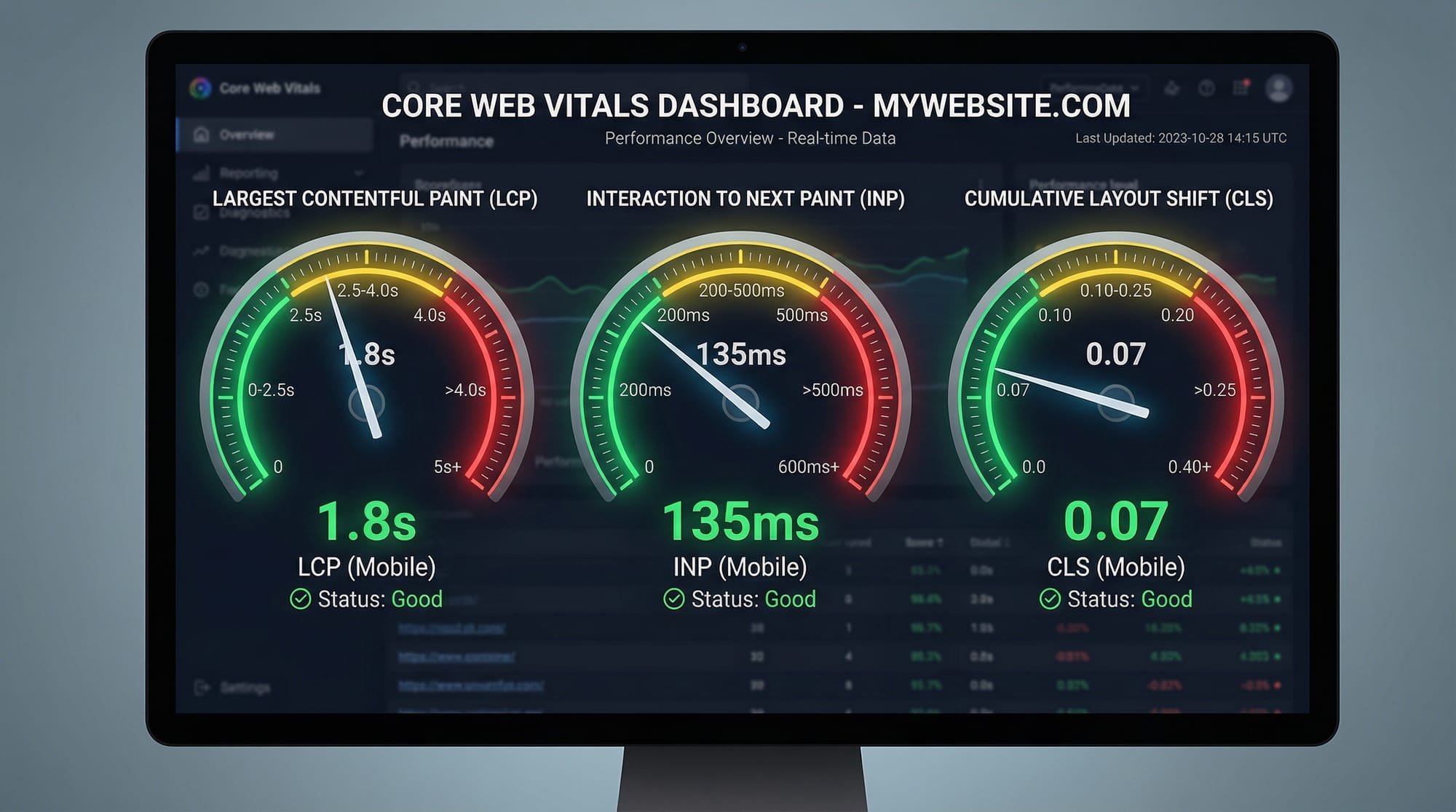
Web performance optimization is the process of making your website load faster, respond quicker, and feel smoother for users. In 2026, Core Web Vitals have become the standard way to measure user experience on the web. These metrics—Largest Contentful Paint (LCP), Interaction to Next Paint (INP), and Cumulative Layout Shift (CLS)—directly impact SEO rankings and user satisfaction.
For Pakistani students building websites for local businesses in Lahore, Karachi, or Islamabad, performance is not just a technical detail—it’s a competitive advantage. A fast website can increase conversions, reduce bounce rates, and improve Google rankings.
For example:
- Ahmad runs an e-commerce store in Lahore—if his site loads slowly, users leave before buying.
- Fatima builds a portfolio—if her animations lag, recruiters lose interest.
- Ali develops a blog—if pages shift unexpectedly, readers get frustrated.
Learning web performance tutorial, core web vitals, optimize website speed is essential for modern developers.
Prerequisites
Before starting this guide, you should have:
- Basic understanding of HTML, CSS, and JavaScript
- Familiarity with browser developer tools (Chrome DevTools)
- Basic knowledge of how websites load (request/response cycle)
- Understanding of hosting and domains (helpful but not required)
Core Concepts & Explanation
Understanding Core Web Vitals (LCP, INP, CLS)
Core Web Vitals focus on real user experience:
1. Largest Contentful Paint (LCP)
Measures loading performance.
- Good: ≤ 2.5 seconds
- Example: Hero image or main heading loads quickly.
2. Interaction to Next Paint (INP)
Measures responsiveness.
- Good: ≤ 200 ms
- Example: Button click responds instantly.
3. Cumulative Layout Shift (CLS)
Measures visual stability.
- Good: ≤ 0.1
- Example: Page elements don’t jump unexpectedly.
Example:
If Ali’s blog shifts when ads load → poor CLS
If Fatima’s site takes 5 seconds → poor LCP
If Ahmad’s checkout button lags → poor INP
Critical Rendering Path Optimization
The critical rendering path is how the browser converts code into pixels on screen.
Steps:
- HTML parsing
- CSS rendering
- JavaScript execution
- Paint to screen
Slowdowns happen when:
- Large CSS blocks rendering
- JavaScript blocks UI
- Too many network requests
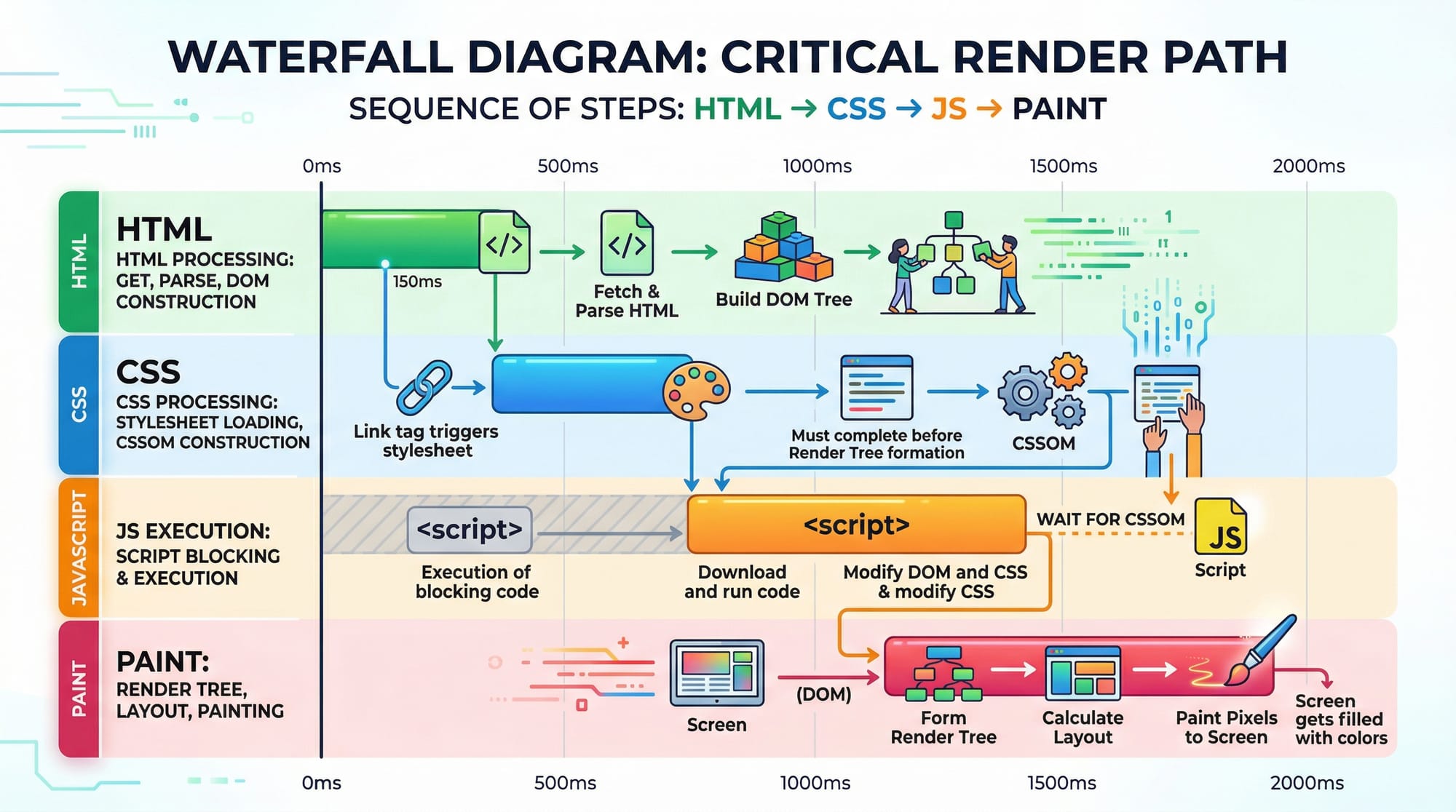
Goal: Reduce blocking resources and speed up rendering.
Resource Optimization Techniques
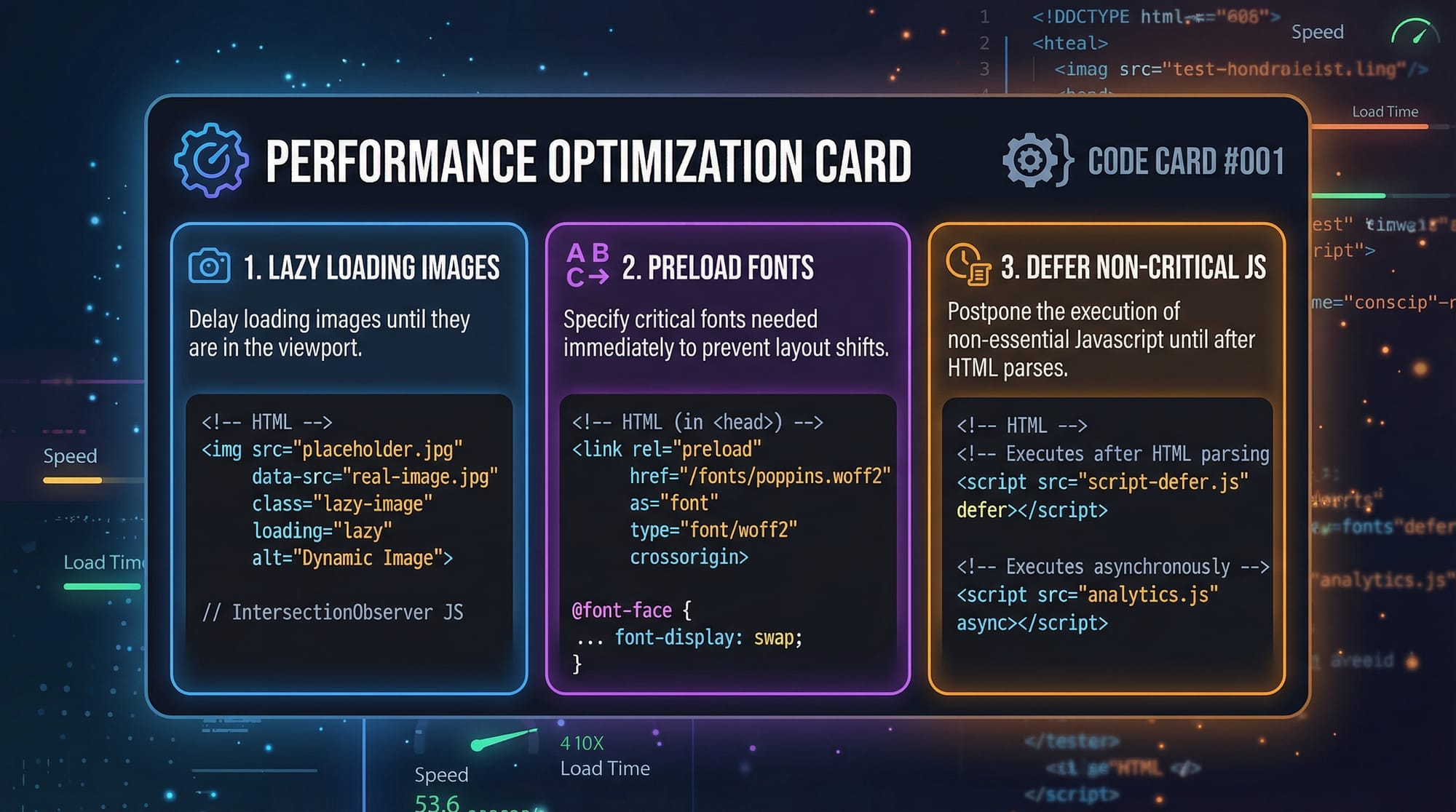
Key strategies include:
- Minification: Remove unnecessary characters
- Compression: Use Gzip or Brotli
- Caching: Store assets locally
- Lazy Loading: Load content only when needed
Example:
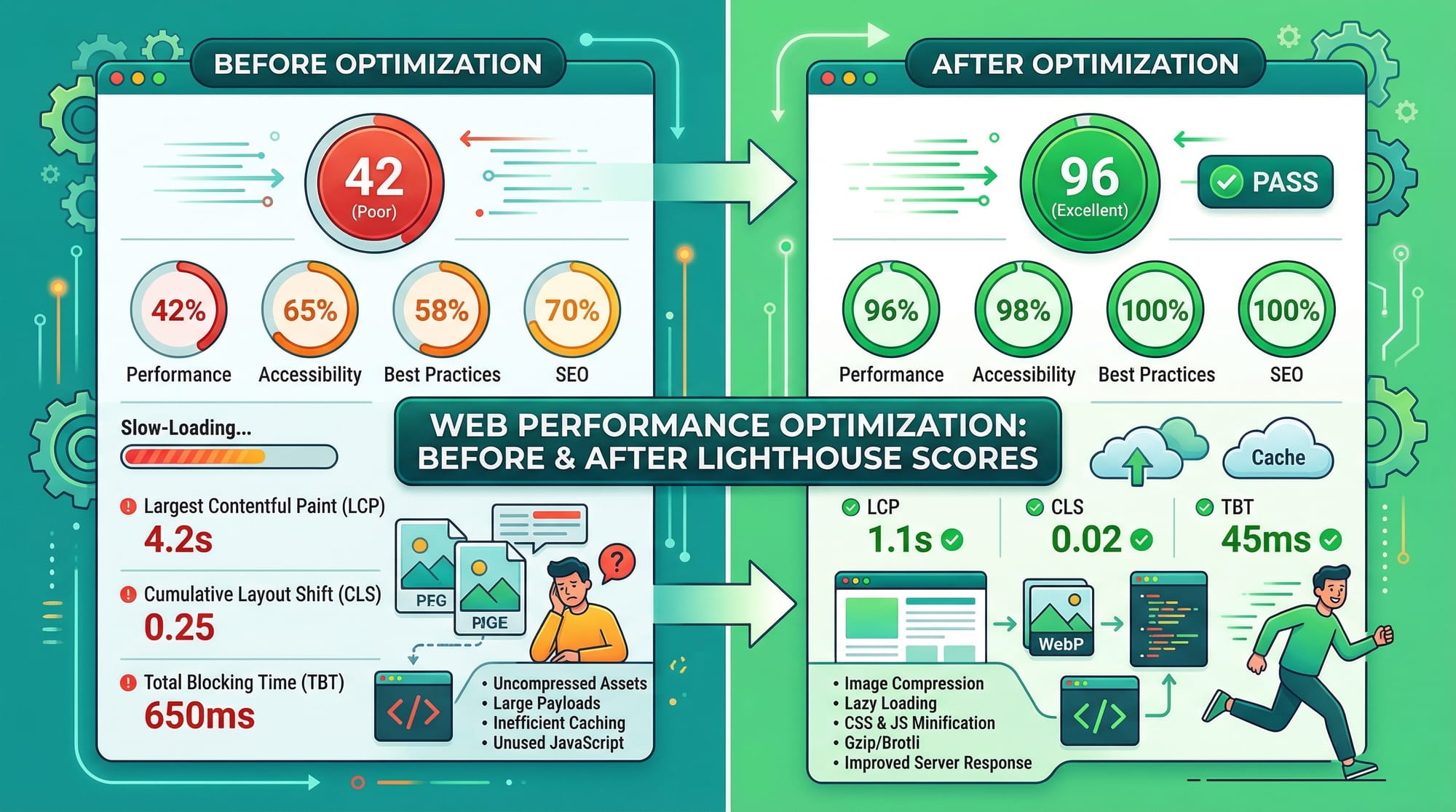
A student in Karachi builds a news site:
- Without optimization → 5MB load
- With optimization → 1.5MB load
Image & Media Optimization
Images often make up 70% of page weight.
Best practices:
- Use modern formats (WebP, AVIF)
- Resize images properly
- Enable lazy loading
Example:
Fatima uploads a 5MB image → slows site
Optimized to 200KB → loads instantly
JavaScript Performance Optimization
JavaScript can block the main thread.
Solutions:
- Use
deferandasync - Split code (code splitting)
- Remove unused scripts
Practical Code Examples
Example 1: Optimize Loading with Defer & Async
<!DOCTYPE html>
<html>
<head>
  <title>Optimized Page</title>

  <!-- CSS loads first -->
  <link rel="stylesheet" href="styles.css">

  <!-- Defer JS -->
  <script src="app.js" defer></script>
</head>
<body>
  <h1>Hello Pakistan</h1>
</body>
</html>
Line-by-line explanation:
<!DOCTYPE html>→ Defines HTML5 document<link rel="stylesheet">→ Loads CSS earlydefer→ Delays JS execution until HTML is parsed<h1>→ Main content loads quickly
Result: Faster LCP and better performance
Example 2: Real-World Application (Lazy Loading + Preload)
<!DOCTYPE html>
<html>
<head>
  <title>Performance Optimized</title>

  <!-- Preload font -->
  <link rel="preload" href="font.woff2" as="font" type="font/woff2" crossorigin>

  <!-- CSS -->
  <link rel="stylesheet" href="styles.css">
</head>
<body>

  <!-- Lazy load image -->
  <img src="image.jpg" loading="lazy" alt="Student project">

  <!-- Defer JS -->
  <script src="script.js" defer></script>

</body>
</html>
Line-by-line explanation:
preload→ Loads important font earlyloading="lazy"→ Delays image loadingdefer→ Prevents JS blocking<img>→ Loads only when visible
Real-world benefit:
A portfolio site in Islamabad loads faster and improves SEO.
Common Mistakes & How to Avoid Them
Mistake 1: Loading Large Unoptimized Images
Problem:
Uploading raw images (5MB+) slows down LCP.
Fix:
<img src="optimized.webp" width="600" height="400" loading="lazy">
Explanation:
- Use WebP format
- Set dimensions
- Enable lazy loading
Mistake 2: Blocking JavaScript Execution
Problem:
Scripts block page rendering.
Fix:
<script src="main.js" defer></script>
Explanation:
deferallows HTML to load first- Improves responsiveness (INP)
Mistake 3: Layout Shifts (CLS Issues)
Problem:
Content jumps during loading.
Fix:
img {
  width: 100%;
  height: auto;
}
Explanation:
- Reserve space for images
- Prevents layout shifts
Practice Exercises
Exercise 1: Fix Slow Image Loading
Problem:
A page loads slowly due to large images.
<img src="large.jpg">
Solution:
<img src="small.webp" loading="lazy" width="500" height="300">
Explanation:
- Optimized format
- Lazy loading
- Defined dimensions
Exercise 2: Improve JavaScript Performance
Problem:
JS blocks rendering.
<script src="app.js"></script>
Solution:
<script src="app.js" defer></script>
Explanation:
- Prevents blocking
- Improves page speed
Frequently Asked Questions
What is Core Web Vitals?
Core Web Vitals are a set of performance metrics defined by Google to measure user experience. They focus on loading speed, interactivity, and visual stability.
How do I improve website speed?
You can improve speed by optimizing images, using caching, minimizing CSS/JS, and enabling lazy loading.
Why is LCP important?
LCP measures how fast the main content loads. A slow LCP leads to poor user experience and lower SEO rankings.
What causes high CLS?
CLS is caused by elements shifting unexpectedly, often due to missing size attributes or dynamically loaded content.
How do I test my website performance?
You can use tools like Chrome DevTools Lighthouse, PageSpeed Insights, and WebPageTest to analyze performance.
Summary & Key Takeaways
- Core Web Vitals (LCP, INP, CLS) are essential for SEO and UX
- Optimize images using modern formats like WebP
- Use
deferandasyncto improve JavaScript performance - Reduce render-blocking resources
- Lazy loading significantly improves page speed
- Always test performance using tools
Next Steps & Related Tutorials
To continue your learning journey on theiqra.edu.pk, explore these tutorials:
- Learn styling optimization in our CSS Tutorial (focus on reducing render-blocking CSS)
- Build fast apps with our Next.js Tutorial (automatic performance optimization)
- Understand backend speed in our Node.js performance guide
- Explore advanced frontend optimization techniques in our JavaScript performance tutorial
By mastering these topics, you’ll be able to build fast, modern, and scalable web applications—a highly valuable skill in Pakistan’s growing tech industry 🚀
Test Your Python Knowledge!
Finished reading? Take a quick quiz to see how much you've learned from this tutorial.