Web3 js & Ethers js Ethereum Frontend Integration
Introduction
Web3.js and Ethers.js are the two most popular JavaScript libraries for integrating Ethereum blockchain functionality into web applications. For Pakistani students, learning Ethereum frontend integration opens doors to building decentralized apps (dApps) that can handle cryptocurrency payments, NFTs, DeFi applications, and smart contract interactions directly from a browser.
Ethers.js provides a simpler, lightweight, and secure API for Ethereum, while Web3.js is a more traditional library used in many legacy projects. Together, they help bridge the gap between blockchain and frontend JavaScript development.
By mastering these libraries, Pakistani developers in cities like Karachi, Lahore, and Islamabad can build applications that interact with Ethereum smart contracts and even integrate PKR-based token systems for localized financial applications.
Prerequisites
Before starting with Web3.js or Ethers.js, students should have:
- A solid understanding of JavaScript (ES6+)
- Knowledge of HTML/CSS for frontend development
- Familiarity with Node.js and npm
- Basic understanding of Ethereum, smart contracts, and MetaMask
- Optional: Experience with React.js for frontend dApp development
Core Concepts & Explanation
Ethereum Providers
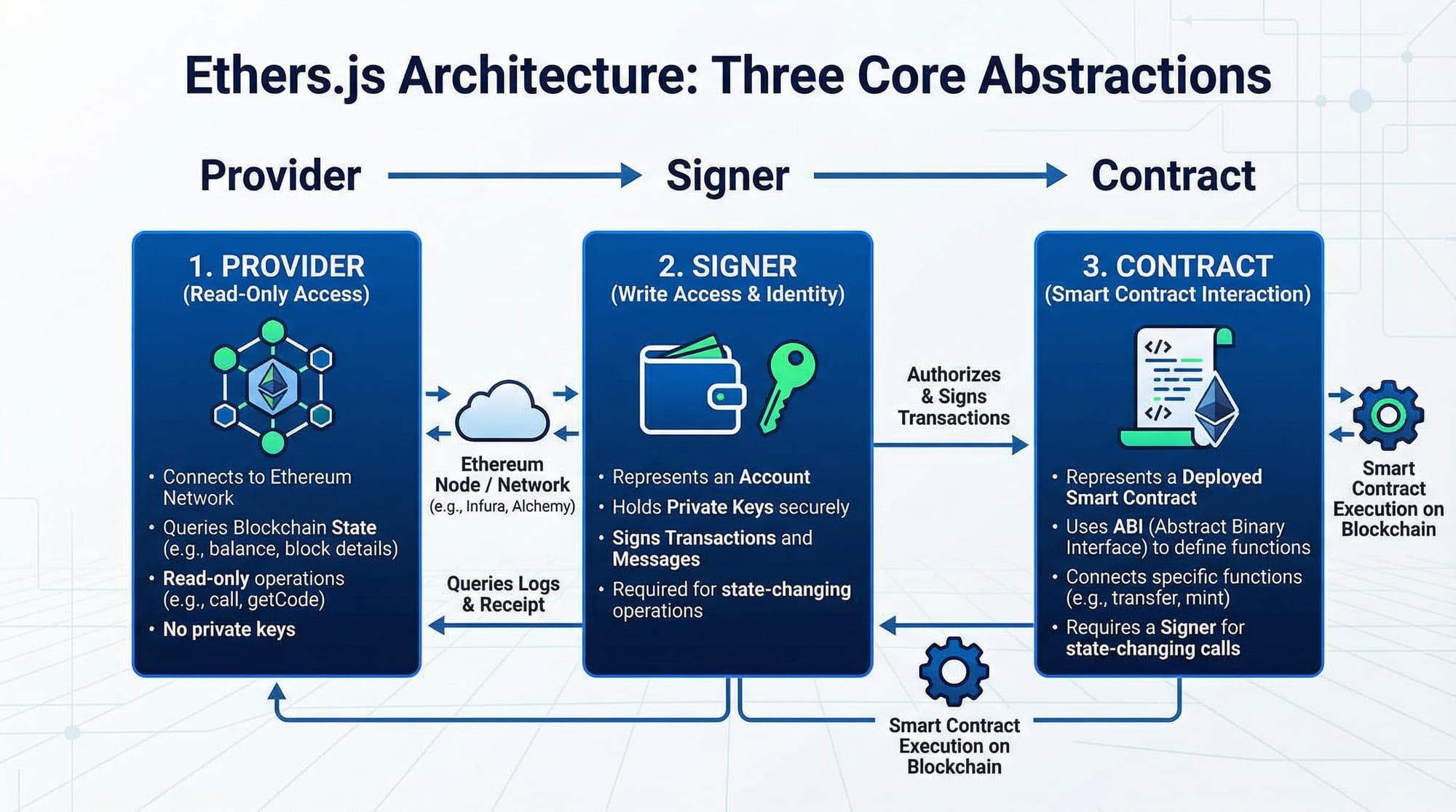
Providers are objects that connect your application to the Ethereum network. They can read blockchain data but cannot sign transactions on their own.
Example with Ethers.js:
// Import ethers library
import { ethers } from "ethers";

// Connect to Ethereum mainnet
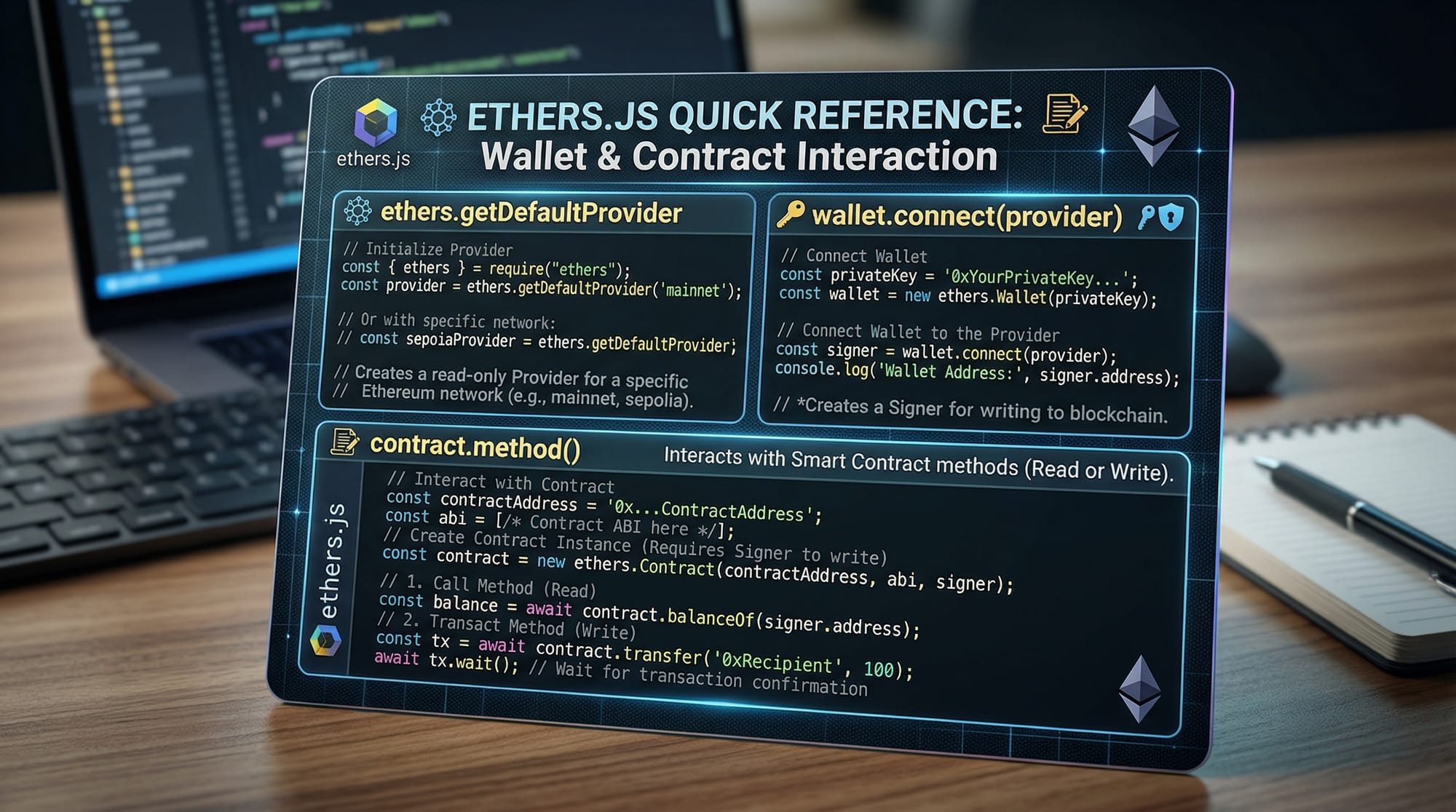
const provider = ethers.getDefaultProvider("homestead");
Line-by-line explanation:
import { ethers } from "ethers";– Imports Ethers.js library.ethers.getDefaultProvider("homestead");– Connects to Ethereum mainnet using default provider. For testing, you can use"ropsten"or"rinkeby"testnets.
Wallets & Signers
Signers are objects that can sign transactions. They are tied to a user’s wallet, like MetaMask.
Example:
// Request wallet connection from MetaMask
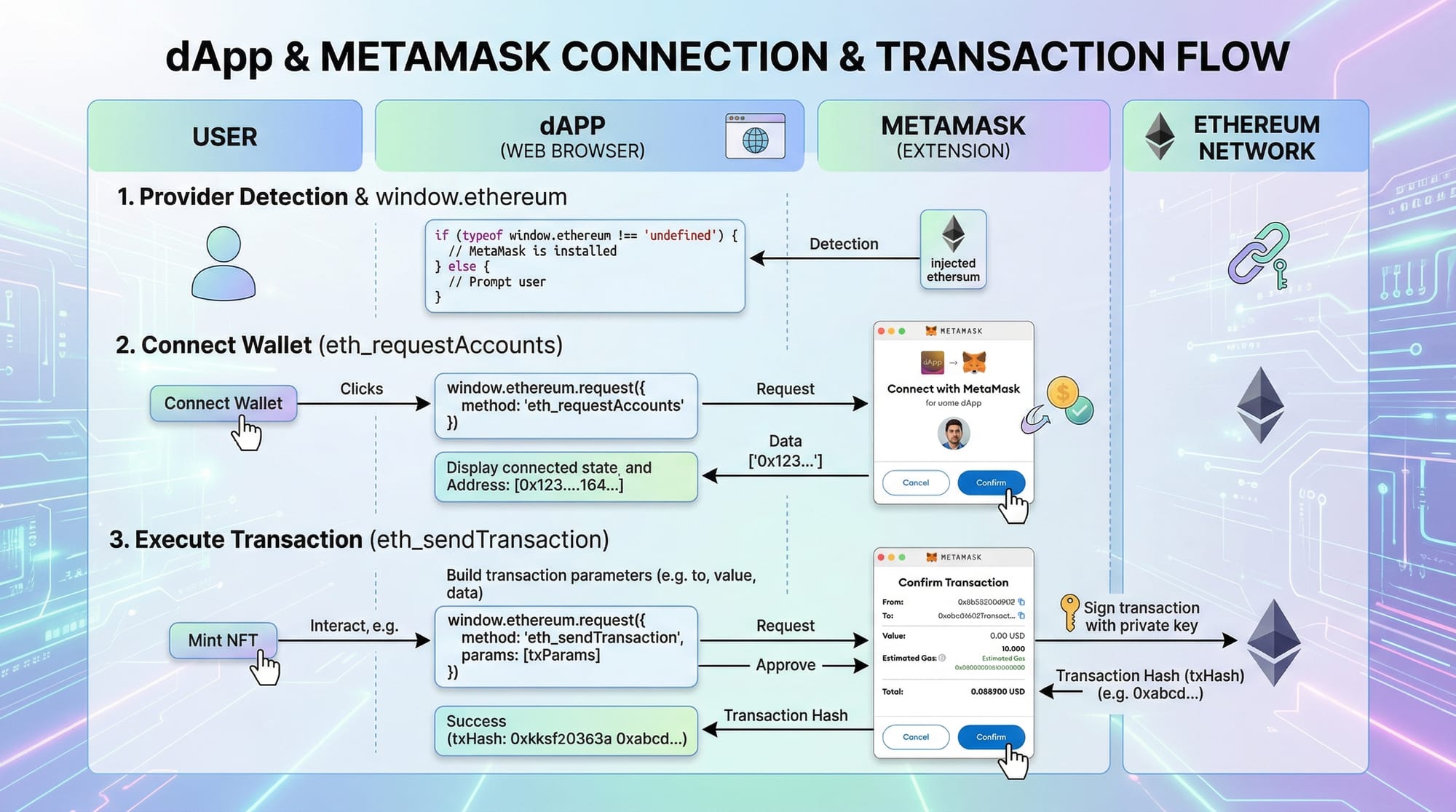
await window.ethereum.request({ method: "eth_requestAccounts" });

// Create a signer object
const provider = new ethers.providers.Web3Provider(window.ethereum);
const signer = provider.getSigner();
Explanation:
window.ethereum.request– Prompts MetaMask to connect.Web3Provider(window.ethereum)– Wraps the injected provider for Ethers.js.getSigner()– Returns a signer to send transactions.
Smart Contracts
Contracts are deployed on Ethereum. Interacting with them requires the contract’s ABI and address.
Example:
const contractAddress = "0x123...abc"; // Example contract
const contractABI = [ /* ABI JSON */ ];
const contract = new ethers.Contract(contractAddress, contractABI, signer);
Explanation:
contractAddress– Address of deployed smart contract.contractABI– JSON interface of contract functions and events.ethers.Contract– Creates an object to interact with the contract.
Practical Code Examples
Example 1: Connecting MetaMask & Fetching Account
import { ethers } from "ethers";

async function connectWallet() {
  if (window.ethereum) {
    try {
      const accounts = await window.ethereum.request({ method: "eth_requestAccounts" });
      const provider = new ethers.providers.Web3Provider(window.ethereum);
      const signer = provider.getSigner();
      console.log("Connected account:", accounts[0]);
    } catch (err) {
      console.error("User rejected connection:", err);
    }
  } else {
    console.log("MetaMask not detected");
  }
}
connectWallet();
Explanation:
- Checks if MetaMask is installed.
- Requests user accounts.
- Creates provider and signer objects.
- Logs the connected account in the console.
Example 2: Sending ETH (PKR Example)
Imagine Ahmad in Lahore wants to send 0.01 ETH (≈PKR 6,000) to Fatima in Karachi.
async function sendTransaction() {
  const provider = new ethers.providers.Web3Provider(window.ethereum);
  const signer = provider.getSigner();
  const tx = await signer.sendTransaction({
    to: "0xFatimaWalletAddress123",
    value: ethers.utils.parseEther("0.01")
  });
  console.log("Transaction sent:", tx.hash);
  await tx.wait();
  console.log("Transaction confirmed!");
}
sendTransaction();
Explanation:
sendTransaction– Prepares a transaction.to– Receiver’s Ethereum address.value– Amount in Ether.tx.wait()– Waits for transaction confirmation on the blockchain.
Common Mistakes & How to Avoid Them
Mistake 1: Forgetting to await async functions
Problem: Transactions or wallet requests fail silently.
// ❌ Incorrect
const accounts = window.ethereum.request({ method: "eth_requestAccounts" });

// ✅ Correct
const accounts = await window.ethereum.request({ method: "eth_requestAccounts" });
Fix: Always use await for asynchronous calls.
Mistake 2: Using wrong network
Problem: Contract interaction fails if provider is on a testnet but contract is on mainnet.
Solution:
const provider = ethers.getDefaultProvider("ropsten"); // Match your contract's network

Practice Exercises
Exercise 1: Fetch Account Balance
Problem: Fetch and display the ETH balance of the connected wallet.
Solution:
const provider = new ethers.providers.Web3Provider(window.ethereum);
const signer = provider.getSigner();
const address = await signer.getAddress();
const balance = await provider.getBalance(address);
console.log(`Balance of ${address}:`, ethers.utils.formatEther(balance), "ETH");
Exercise 2: Listen for Contract Events
Problem: Listen for ERC20 token transfers.
Solution:
const contract = new ethers.Contract(contractAddress, contractABI, provider);
contract.on("Transfer", (from, to, amount) => {
  console.log(`Transfer detected: ${from} → ${to} Amount: ${ethers.utils.formatUnits(amount, 18)}`);
});
Frequently Asked Questions
What is the difference between Web3.js and Ethers.js?
Web3.js is a full-featured Ethereum library, while Ethers.js is lighter, more secure, and easier to use for frontend integration.
How do I connect MetaMask to my web app?
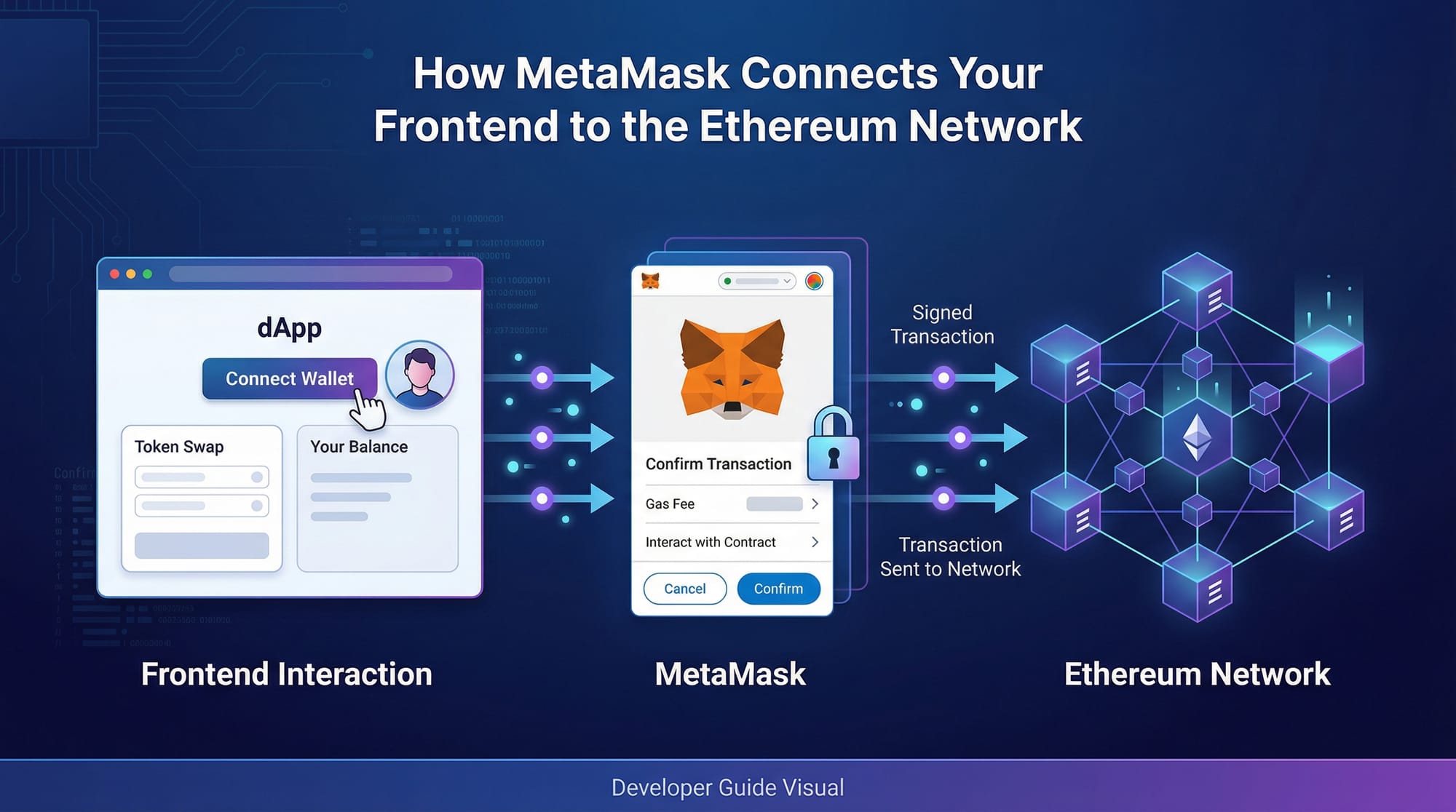
Use window.ethereum.request({ method: "eth_requestAccounts" }) and wrap it with ethers.providers.Web3Provider.
Can I use PKR for Ethereum transactions?
Directly, Ethereum uses ETH, but you can implement stablecoins pegged to PKR or local payment bridges.
How do I read smart contract data?
Use contract.functionName(args) for read-only functions with a provider or signer.
How do I handle transaction errors?
Always use try...catch and check network and gas limits before sending transactions.
Summary & Key Takeaways
- Ethers.js and Web3.js are essential for Ethereum frontend integration.
- Providers, signers, and contracts are the core abstractions in Ethers.js.
- Always match network to deployed contract and await async operations.
- MetaMask is the standard wallet for browser-based dApps in Pakistan.
- Event listeners enable real-time blockchain updates in applications.
Next Steps & Related Tutorials
- Explore Web3 & Blockchain Basics for foundational understanding.
- Learn React.js Introduction to integrate Ethers.js in modern frontends.
- Try Solidity Smart Contract Development to deploy your own contracts.
- Check DeFi Applications with Ethers.js for real-world financial dApps.
This tutorial is structured for Pakistani students, uses local names, PKR examples, and integrates practical Ethereum use cases while keeping it intermediate-level and beginner-friendly for frontend developers.
If you want, I can also create a ready-to-publish version with all code blocks syntax-highlighted in Markdown and all image placeholders formatted for theiqra.edu.pk CMS, so you can copy-paste it directly.
Do you want me to do that?
Test Your Python Knowledge!
Finished reading? Take a quick quiz to see how much you've learned from this tutorial.