WebAssembly (WASM) Tutorial for Beginners 2026
Introduction
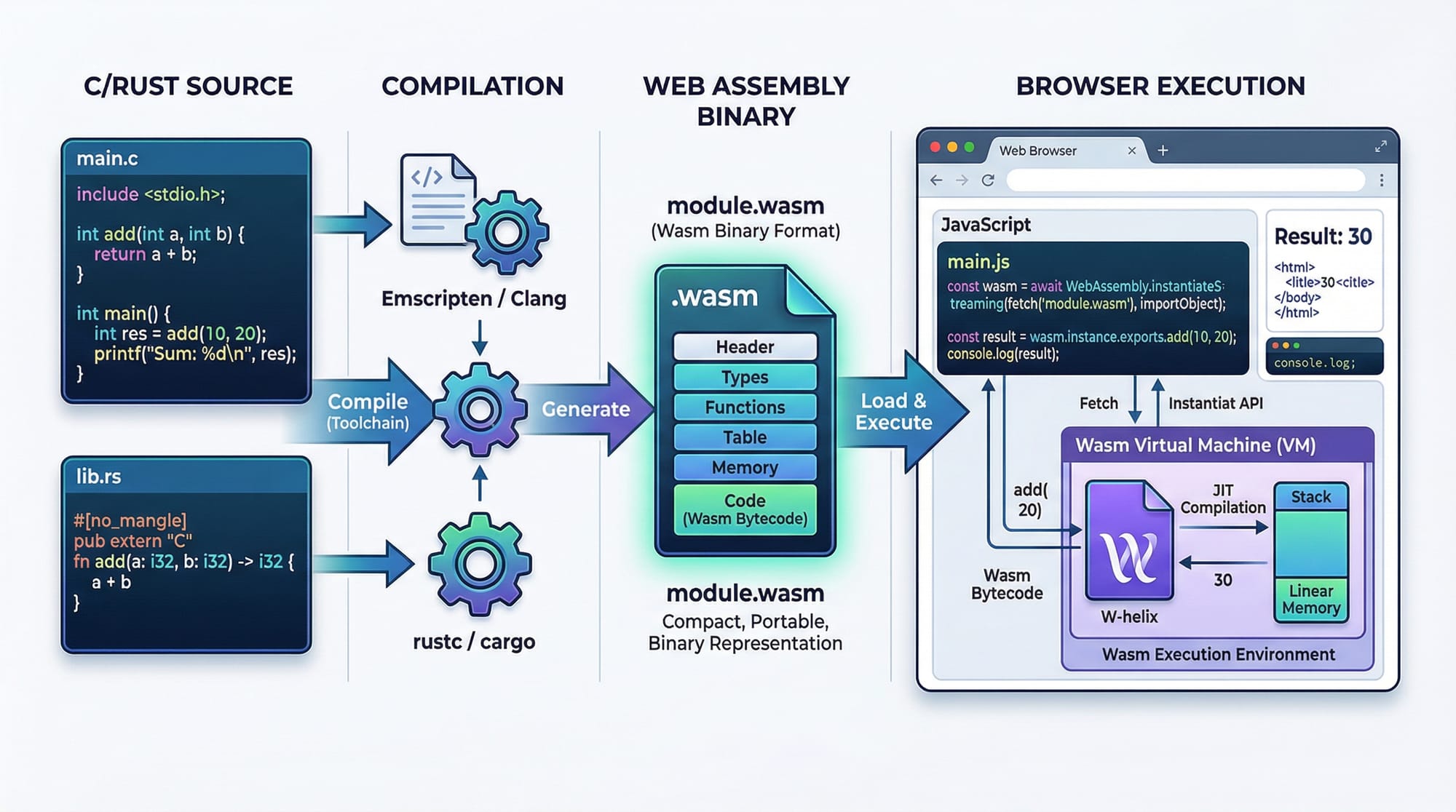
WebAssembly (WASM) is one of the most exciting technologies shaping modern web development. In this webassembly tutorial for beginners 2026, you’ll learn how to run high-performance code (written in languages like C, C++, and Rust) directly inside the browser—alongside JavaScript.
Traditionally, web apps relied heavily on JavaScript for everything. While powerful, JavaScript can struggle with CPU-intensive tasks like video processing, gaming engines, or scientific calculations. This is where WebAssembly comes in—it allows near-native performance inside the browser.
For Pakistani students in cities like Lahore, Karachi, and Islamabad, learning WebAssembly opens doors to:
- High-performance web development jobs
- Game development and simulations
- Blockchain and fintech applications
- Freelancing opportunities on global platforms
If you're already learning webassembly javascript integration, this guide will take your skills to the next level.
Prerequisites
Before starting this wasm tutorial, make sure you are comfortable with:
- Basic JavaScript (functions, variables, async/await)
- HTML fundamentals
- Command line basics (optional but helpful)
- Programming knowledge (C, C++, or Rust is a plus)
💡 Tip: If you're new to JavaScript, start with a beginner-friendly JavaScript tutorial before diving into WASM.
Core Concepts & Explanation
What is WebAssembly (WASM)?
WebAssembly (WASM) is a binary instruction format that runs in web browsers. It is designed for:
- Speed (near-native performance)
- Portability (runs across all browsers)
- Security (sandboxed environment)
Unlike JavaScript, which is interpreted, WASM is compiled—making it faster for heavy computations.
Example Workflow:
- Write code in Rust or C++
- Compile to
.wasm - Load it in the browser using JavaScript
WASM vs JavaScript — When to Use What?
Not everything should be written in WASM. Use each tool wisely:
| Task | Best Choice |
|---|---|
| UI interactions | JavaScript |
| Heavy calculations | WASM |
| DOM manipulation | JavaScript |
| Image processing | WASM |
Example:
If Ahmad is building a currency converter app for PKR, JavaScript is enough.
But if Fatima is building a video editing tool, WASM is ideal.
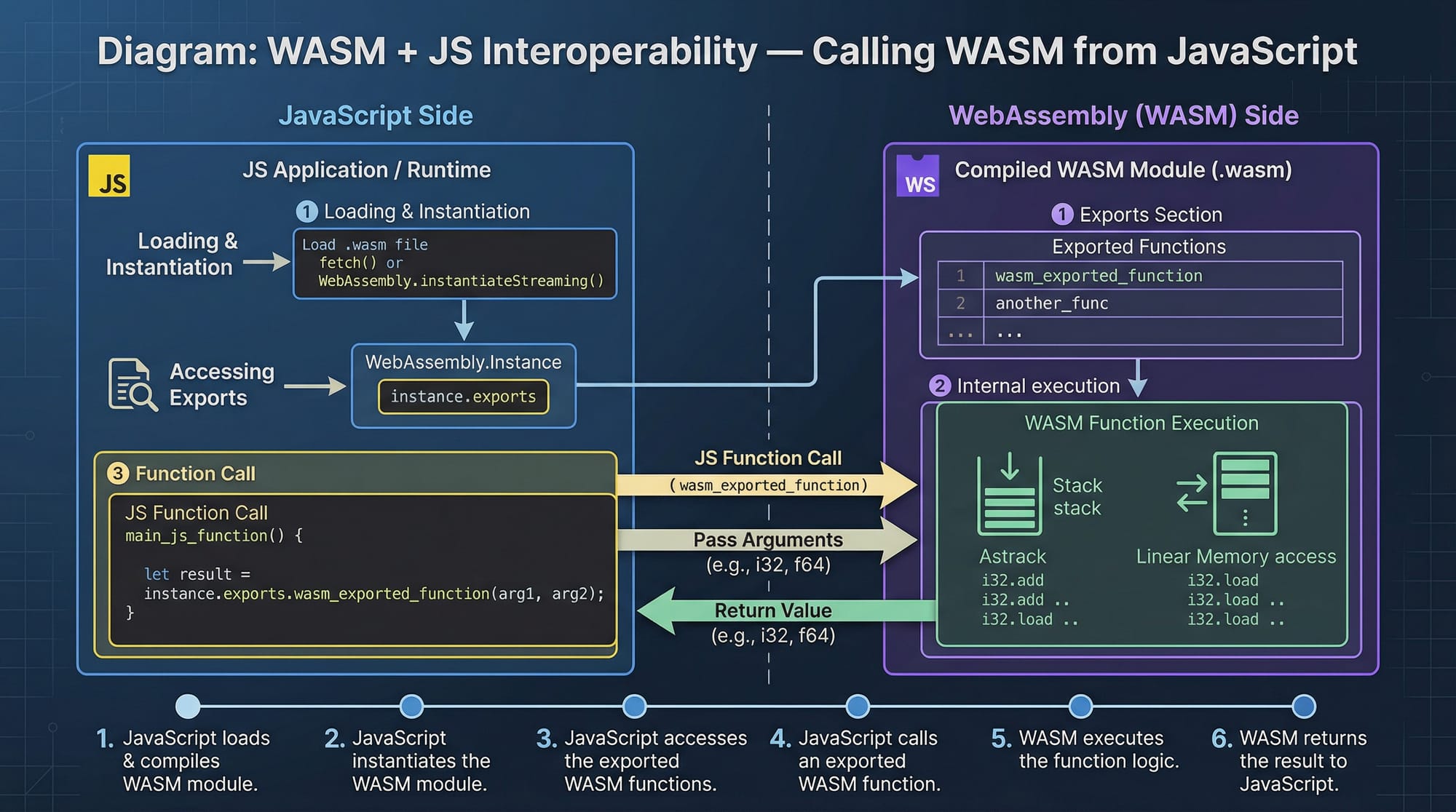
How WebAssembly Works in the Browser
When you load a .wasm file:
- Browser downloads it
- Compiles it quickly
- Executes it in a sandbox
JavaScript acts as the bridge between UI and WASM.
Practical Code Examples
Example 1: Simple WASM Function (Add Numbers)
Let’s create a simple WASM module using JavaScript.
const wasmCode = new Uint8Array([
  0x00,0x61,0x73,0x6d, // magic
  0x01,0x00,0x00,0x00  // version
]);

WebAssembly.instantiate(wasmCode).then(result => {
  console.log("WASM Loaded!");
});
Line-by-line Explanation:
Uint8Array([...])
→ Represents raw WASM binary code.0x00,0x61,0x73,0x6d
→ Magic header identifying WASM file.WebAssembly.instantiate(...)
→ Compiles and runs the WASM module..then(result => {...})
→ Handles the loaded module asynchronously.console.log(...)
→ Prints confirmation in browser console.
💡 This is a minimal example. Real-world WASM modules are compiled from languages like Rust.
Example 2: Real-World Application (Rust + WASM)
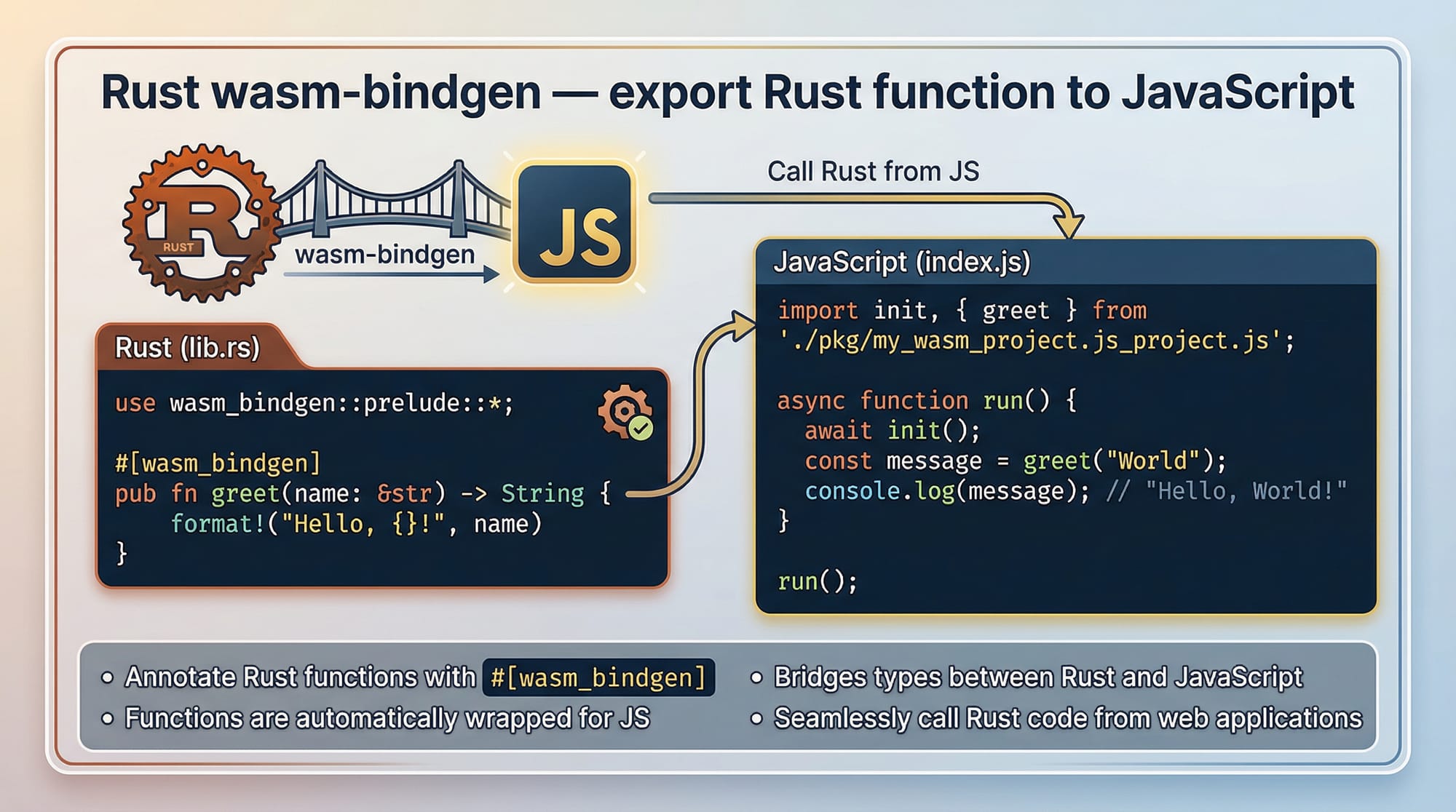
Let’s build a function in Rust and use it in JavaScript.
Step 1: Rust Code
use wasm_bindgen::prelude::*;

#[wasm_bindgen]
pub fn multiply(a: i32, b: i32) -> i32 {
    a * b
}
Explanation:
use wasm_bindgen::prelude::*;
→ Imports WASM tools for Rust.#[wasm_bindgen]
→ Exposes function to JavaScript.pub fn multiply(...)
→ Defines a public function.a * b
→ Returns multiplication result.
Step 2: JavaScript Integration
import init, { multiply } from "./pkg/my_wasm.js";

async function run() {
  await init();
  console.log(multiply(5, 10));
}

run();
Explanation:
import init, { multiply }
→ Imports WASM module and function.await init()
→ Initializes WASM module.multiply(5, 10)
→ Calls Rust function from JS.console.log(...)
→ Outputs result (50).
💡 Imagine Ali building a fee calculator for a tuition center in Islamabad—this could handle complex calculations efficiently.
Common Mistakes & How to Avoid Them
Mistake 1: Using WASM for Everything
❌ Problem: Beginners try to replace JavaScript completely.
✅ Fix:
Use WASM only for heavy computation.
// ❌ Bad: DOM manipulation in WASM
// ✅ Good: Use JS for UI, WASM for logic
💡 Rule:
UI → JavaScript | Performance → WASM
Mistake 2: Not Handling Async Initialization
❌ Problem: Calling WASM before it loads.
// ❌ Wrong
console.log(multiply(2, 3));
✅ Fix:
async function run() {
  await init();
  console.log(multiply(2, 3));
}
run();
Explanation:
async function
→ Enables asynchronous execution.await init()
→ Ensures WASM is ready.multiply(...)
→ Safe to call after initialization.

Practice Exercises
Exercise 1: Add Two Numbers Using WASM
Problem:
Create a function that adds two numbers using WASM.
Solution:
#[wasm_bindgen]
pub fn add(a: i32, b: i32) -> i32 {
    a + b
}
Explanation:
#[wasm_bindgen]
→ Exposes function to JavaScript.pub fn add(...)
→ Defines addition function.a + b
→ Returns sum.
Exercise 2: Currency Converter (PKR to USD)
Problem:
Convert PKR to USD using WASM logic.
Solution:
#[wasm_bindgen]
pub fn convert_pkr_to_usd(pkr: f64) -> f64 {
    pkr / 280.0
}
Explanation:
pkr: f64
→ Accepts PKR value./ 280.0
→ Conversion rate (example).- Returns USD value.
💡 Useful for fintech apps in Pakistan.
Frequently Asked Questions
What is WebAssembly used for?
WebAssembly is used for high-performance tasks like gaming, video editing, and simulations. It allows developers to run compiled code in the browser efficiently.
How do I run WASM in the browser?
You can load .wasm files using JavaScript with WebAssembly.instantiate() or tools like wasm-bindgen for Rust integration.
Is WebAssembly better than JavaScript?
Not entirely. WebAssembly is faster for heavy tasks, but JavaScript is still better for UI and general web development.
Can I use WebAssembly with JavaScript?
Yes, WebAssembly works alongside JavaScript. JavaScript loads and interacts with WASM modules seamlessly.
Which language is best for WebAssembly?
Rust is the most popular choice due to safety and performance, but C and C++ are also widely used.
Summary & Key Takeaways
- WebAssembly enables near-native performance in browsers
- It works alongside JavaScript, not as a replacement
- Best for CPU-heavy tasks like image processing and calculations
- Rust is the most beginner-friendly language for WASM
- Always handle async initialization properly
- Use WASM strategically for performance-critical parts
Next Steps & Related Tutorials
To continue your journey, explore these tutorials on theiqra.edu.pk:
- Learn systems programming with a complete Rust Tutorial
- Strengthen frontend skills with a practical JavaScript Tutorial
- Build APIs using a modern Node.js backend guide
- Explore performance optimization techniques for web apps
💡 Suggested path:
- Master JavaScript
- Learn Rust basics
- Build small WASM projects
- Create real-world apps (e.g., fintech tools, games)
By following this webassembly tutorial, Pakistani students can gain a competitive edge in modern web development and unlock global opportunities in 2026 and beyond 🚀
Test Your Python Knowledge!
Finished reading? Take a quick quiz to see how much you've learned from this tutorial.