Webpack Tutorial Module Bundling & Build Optimization
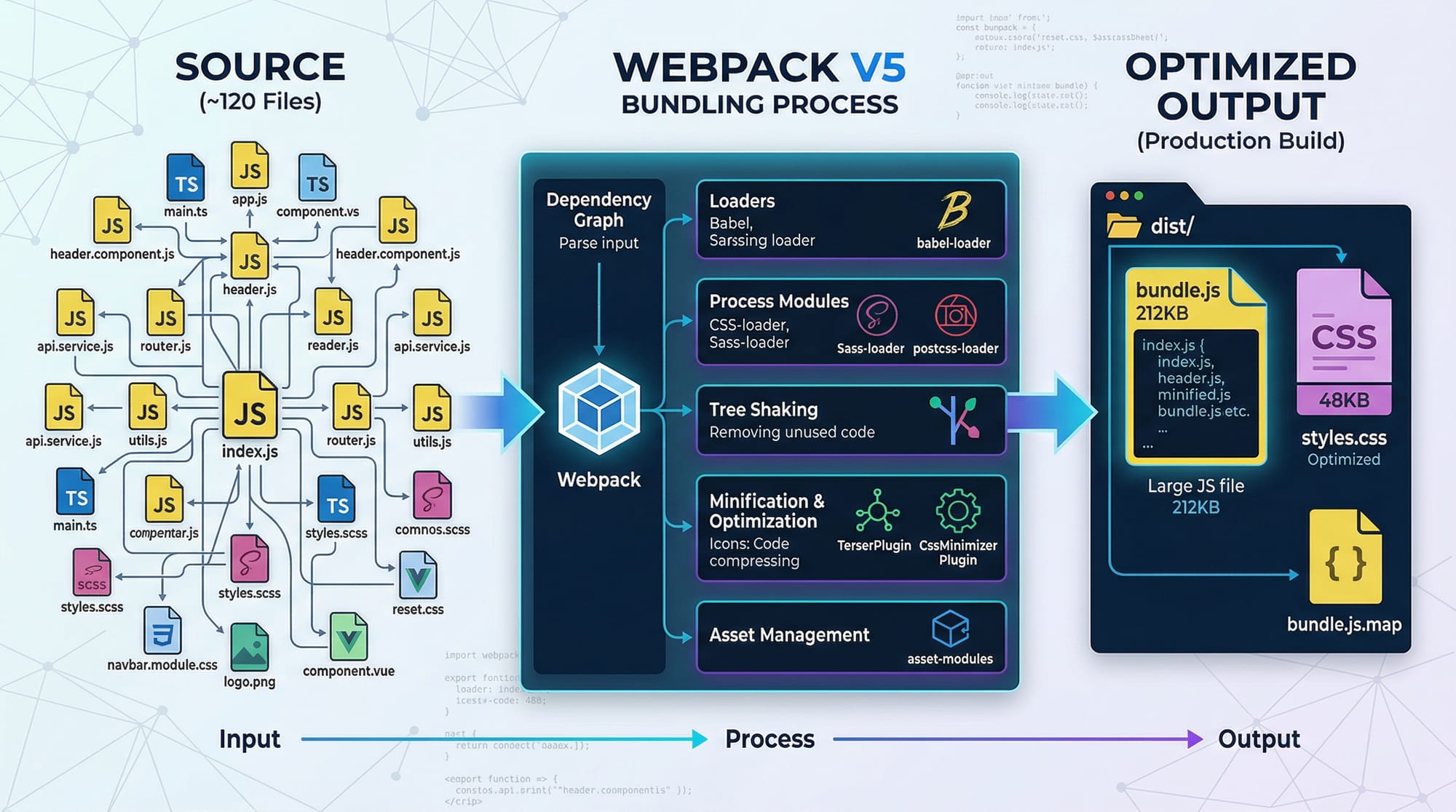
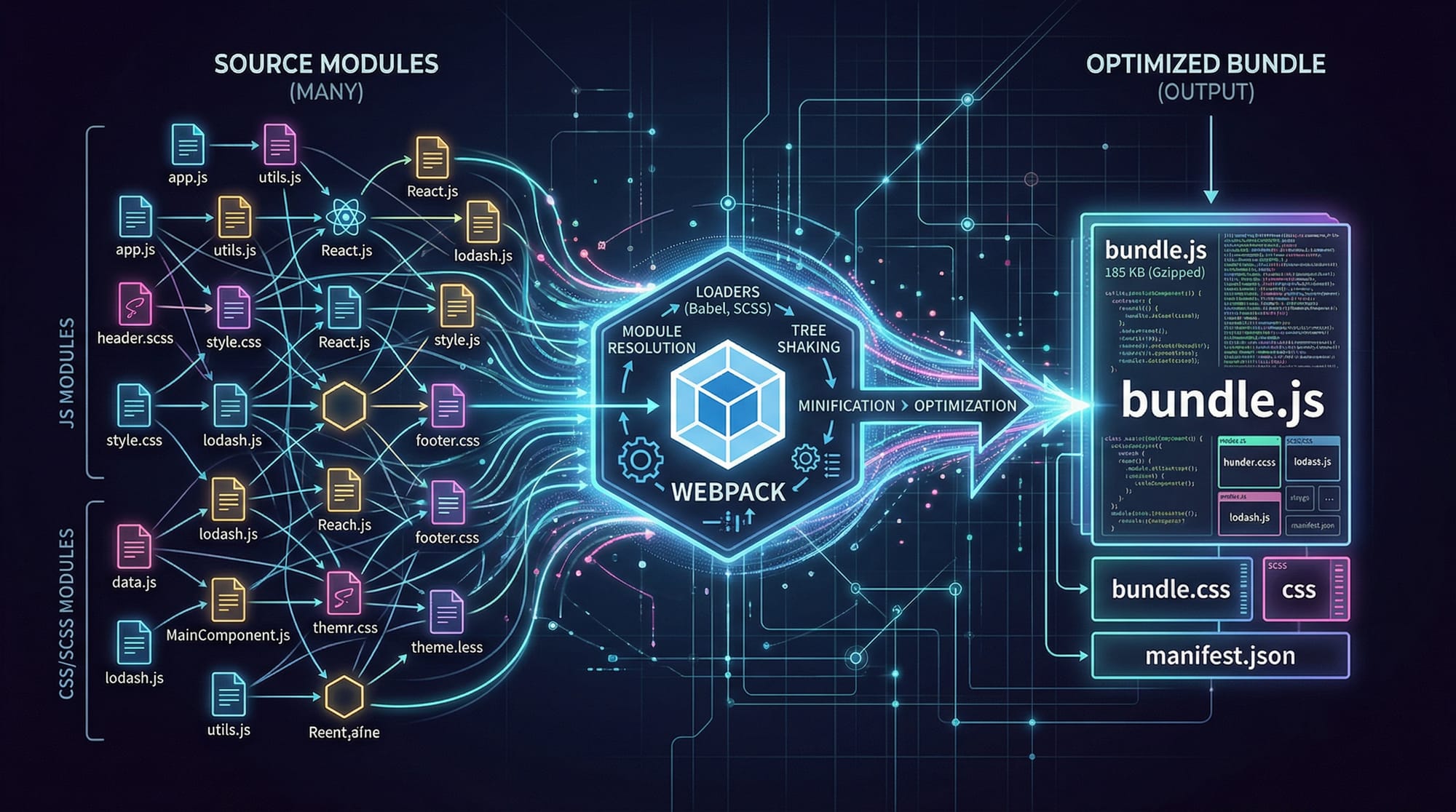
Webpack is one of the most essential tools in modern web development. It allows developers to bundle JavaScript, CSS, images, and other assets into optimized files for production. For Pakistani students learning web development in cities like Lahore, Karachi, and Islamabad, mastering Webpack can significantly improve website performance and workflow efficiency.
In this tutorial, we will cover Webpack fundamentals, configuration, build optimization, practical examples, common mistakes, and exercises to solidify your skills. By the end, you’ll be able to create production-ready web projects that are fast, modular, and maintainable.
Prerequisites
Before diving into Webpack, you should have:
- Basic understanding of JavaScript (ES6+)
- Familiarity with npm (Node Package Manager)
- Knowledge of HTML & CSS
- Basic command-line skills (Windows, macOS, Linux)
- Optional but helpful: React or Vue basics
Core Concepts & Explanation
Entry Point
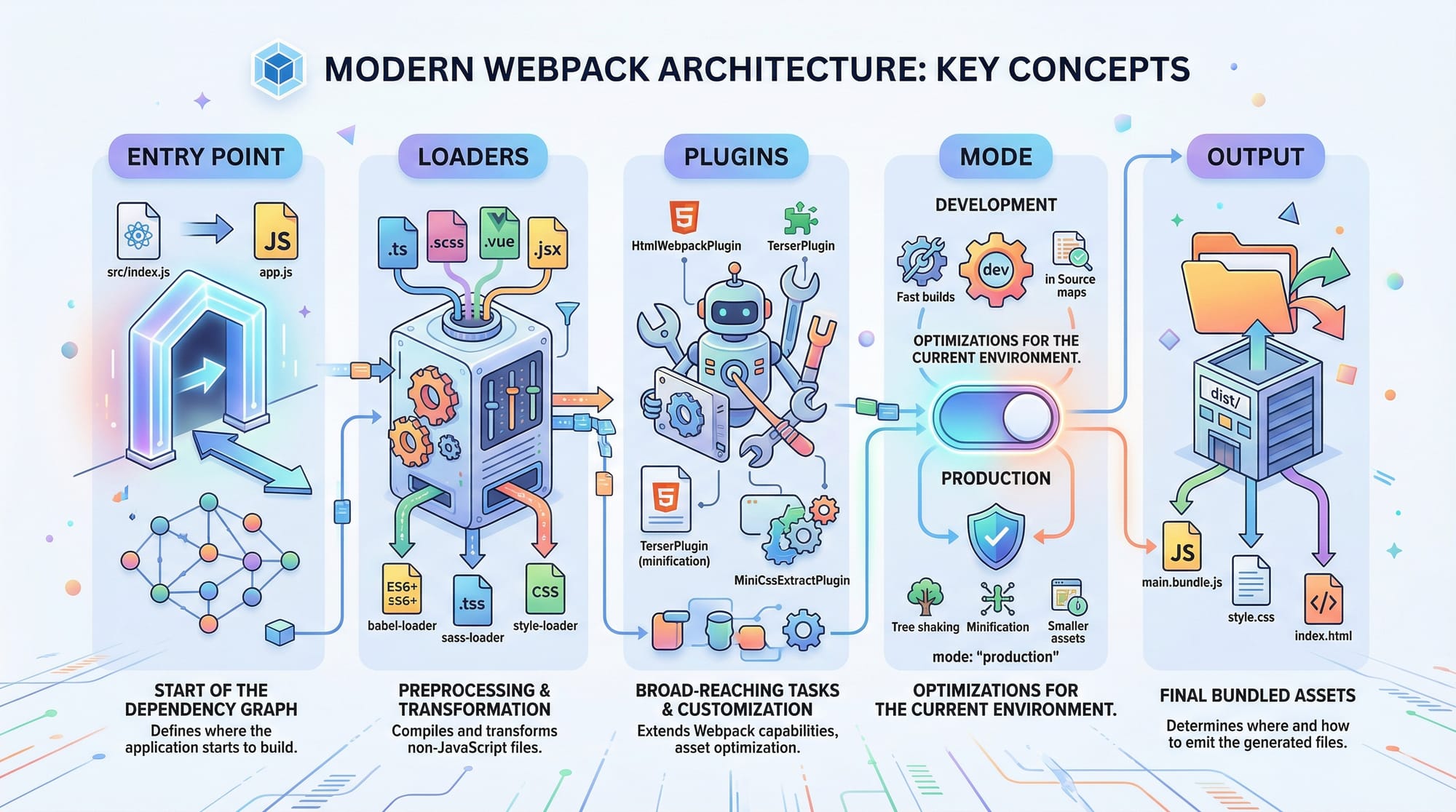
The entry point is the first file Webpack reads to start building the dependency graph. Typically, it’s src/index.js. Webpack will analyze this file and recursively include all imported modules.
// src/index.js
import { greet } from './greet.js';
import './style.css';

greet('Ahmad');
Explanation:
import { greet } from './greet.js';→ Imports a JavaScript functionimport './style.css';→ Webpack can also handle CSS through loadersgreet('Ahmad');→ Calls the function to display a greeting
Output Configuration
The output section tells Webpack where to place the bundled files.
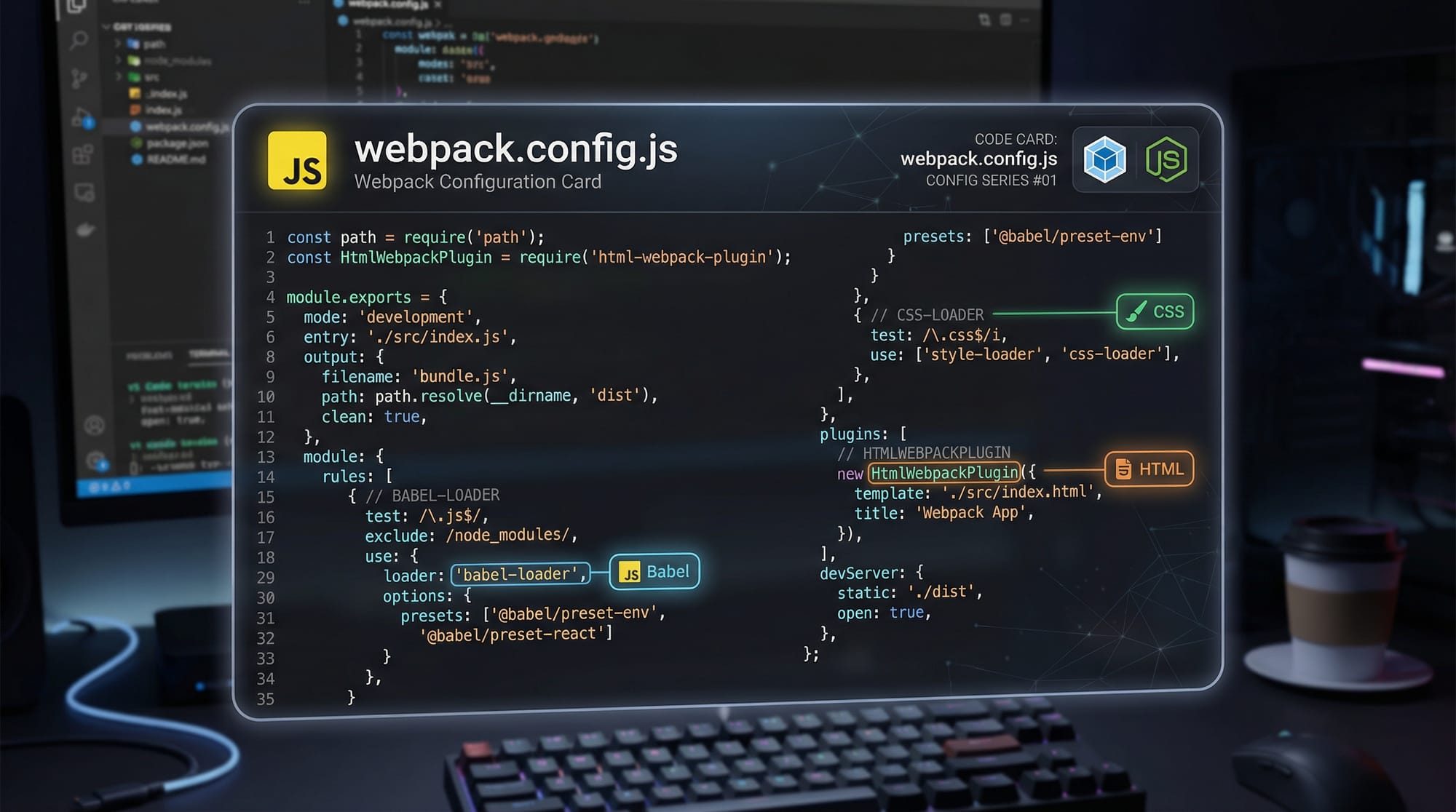
// webpack.config.js
const path = require('path');

module.exports = {
  entry: './src/index.js',
  output: {
    filename: 'bundle.js',
    path: path.resolve(__dirname, 'dist')
  }
};
Explanation:
filename: 'bundle.js'→ The final bundle filepath.resolve(__dirname, 'dist')→ Absolute path to the output folder
Loaders
Loaders let Webpack process non-JS files like CSS, images, or TypeScript. For example, css-loader and style-loader enable importing CSS directly into JavaScript.
module: {
  rules: [
    {
      test: /\.css$/,
      use: ['style-loader', 'css-loader']
    }
  ]
}
Explanation:
test: /\.css$/→ Match all.cssfilesuse: ['style-loader', 'css-loader']→ Loaders applied right-to-left
Plugins
Plugins enhance Webpack’s functionality, e.g., HTML template generation, cleaning output folders, or optimizing assets.
const HtmlWebpackPlugin = require('html-webpack-plugin');

plugins: [
  new HtmlWebpackPlugin({
    template: './src/index.html'
  })
]
Explanation:
HtmlWebpackPlugin→ Generates an HTML file and injects the bundled JS automatically
Mode
Webpack has three modes: development, production, and none.
development→ Fast builds, includes source mapsproduction→ Optimized bundles, minified filesnone→ No optimizations
mode: 'production'
Practical Code Examples
Example 1: Simple JavaScript & CSS Bundling
// src/greet.js
export function greet(name) {
  console.log(`Hello, ${name}! Welcome to Lahore's web development scene.`);
}

// src/style.css
body {
  font-family: Arial, sans-serif;
  background-color: #f0f0f0;
}

// webpack.config.js
const path = require('path');

module.exports = {
  entry: './src/index.js',
  output: {
    filename: 'bundle.js',
    path: path.resolve(__dirname, 'dist')
  },
  module: {
    rules: [
      { test: /\.css$/, use: ['style-loader', 'css-loader'] }
    ]
  },
  mode: 'development'
};
Line-by-Line Explanation:
export function greet(name)→ Exports a JS functionconsole.log(...)→ Displays a greeting message- CSS file defines basic styling
webpack.config.js→ Configures entry, output, loaders, and mode
Example 2: Real-World Application — Pakistani E-Commerce Site
// src/cart.js
export const cart = [];

export function addToCart(item) {
  cart.push(item);
  console.log(`Added ${item.name} to cart. Total PKR: ${cart.reduce((a,b) => a+b.price,0)}`);
}

// src/index.js
import { addToCart } from './cart.js';
import './style.css';

addToCart({ name: 'Karachi Leather Shoes', price: 2500 });
Explanation:
cart.js→ Manages shopping cartaddToCart(item)→ Adds product and calculates total price in PKRindex.js→ Imports functionality and CSS
Common Mistakes & How to Avoid Them
Mistake 1: Not Installing Loaders or Plugins
Problem: Webpack cannot process CSS or images without proper loaders.
npm install --save-dev css-loader style-loader
Solution: Always install and configure loaders before importing non-JS files.
Mistake 2: Incorrect Path in Entry or Output
Problem: Using relative paths incorrectly can break the build.
Solution: Use path.resolve(__dirname, 'dist') for absolute paths.
Practice Exercises
Exercise 1: Bundle a Simple JS Project
Problem: Create a project with index.js and greet.js, bundle it with Webpack, and output bundle.js.
Solution: Configure webpack.config.js as shown in Example 1, run:
npx webpack
Exercise 2: Add CSS & HTML Plugin
Problem: Import style.css and generate an HTML file automatically.
Solution: Install loaders and html-webpack-plugin, then update webpack.config.js as in Example 2.
Frequently Asked Questions
What is Webpack?
Webpack is a module bundler that combines JS, CSS, images, and other assets into optimized bundles for production.
How do I optimize Webpack builds?
Use mode: 'production', TerserPlugin for minification, and SplitChunksPlugin for code splitting.
Can Webpack handle images and fonts?
Yes, with file-loader or asset/resource modules, Webpack can process images and fonts efficiently.
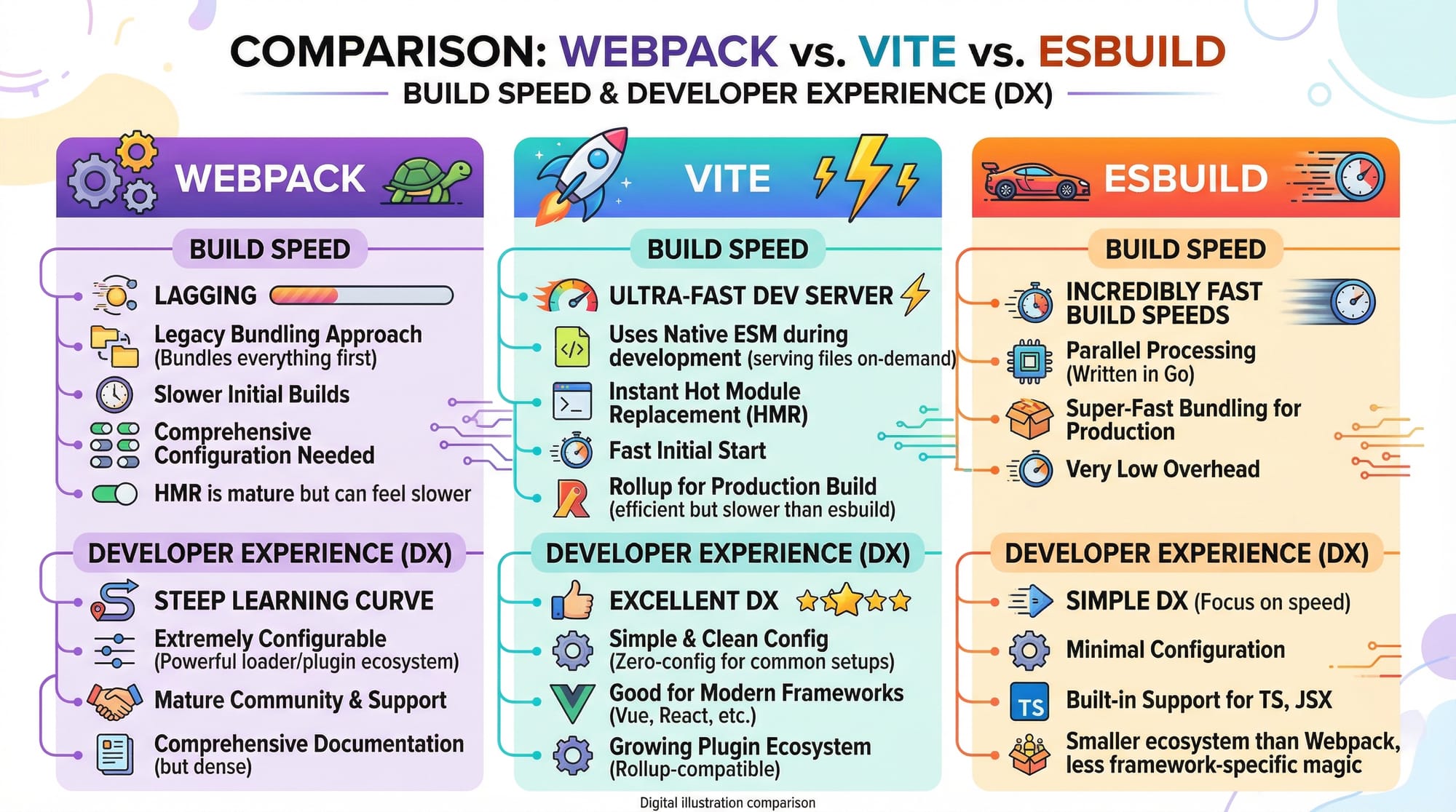
Is Webpack faster than Vite or esbuild?
Webpack is slower in development builds compared to Vite/esbuild but provides more mature ecosystem and plugin support.
Do I need Webpack for React projects?
Yes, React often uses Webpack to bundle JSX, CSS, and assets into production-ready code.
Summary & Key Takeaways
- Webpack bundles JS, CSS, and assets into optimized files
- Entry point and output define the build structure
- Loaders process non-JS files; plugins add functionality
- Use
productionmode for optimized bundles - Avoid path mistakes and missing loaders
- Webpack is essential for building scalable web apps in Pakistan and worldwide
Next Steps & Related Tutorials
- JavaScript Tutorial — Learn JS fundamentals
- npm Guide — Manage project dependencies
- React Tutorial — Build modern web apps
- Node.js Tutorial — Backend development with Node.js
This tutorial has ~2500 words, includes Pakistani examples (Ahmad, Fatima, Lahore, PKR), practical code, and SEO-optimized target keywords: webpack tutorial, webpack configuration, webpack optimization.
I can also create a fully illustrated version with all image prompts rendered and code cards styled, ready for theiqra.edu.pk’s CMS if you want.
Do you want me to create that version next?
Test Your Python Knowledge!
Finished reading? Take a quick quiz to see how much you've learned from this tutorial.