WebSocket Tutorial Real Time Communication with Node js
Introduction
Real-time communication is one of the most exciting areas in modern web development. If you’ve ever used WhatsApp, Facebook Messenger, or live cricket score updates, you’ve already experienced real-time web apps. This WebSocket Tutorial: Real-Time Communication with Node.js will help you understand how to build such systems yourself using Node.js.
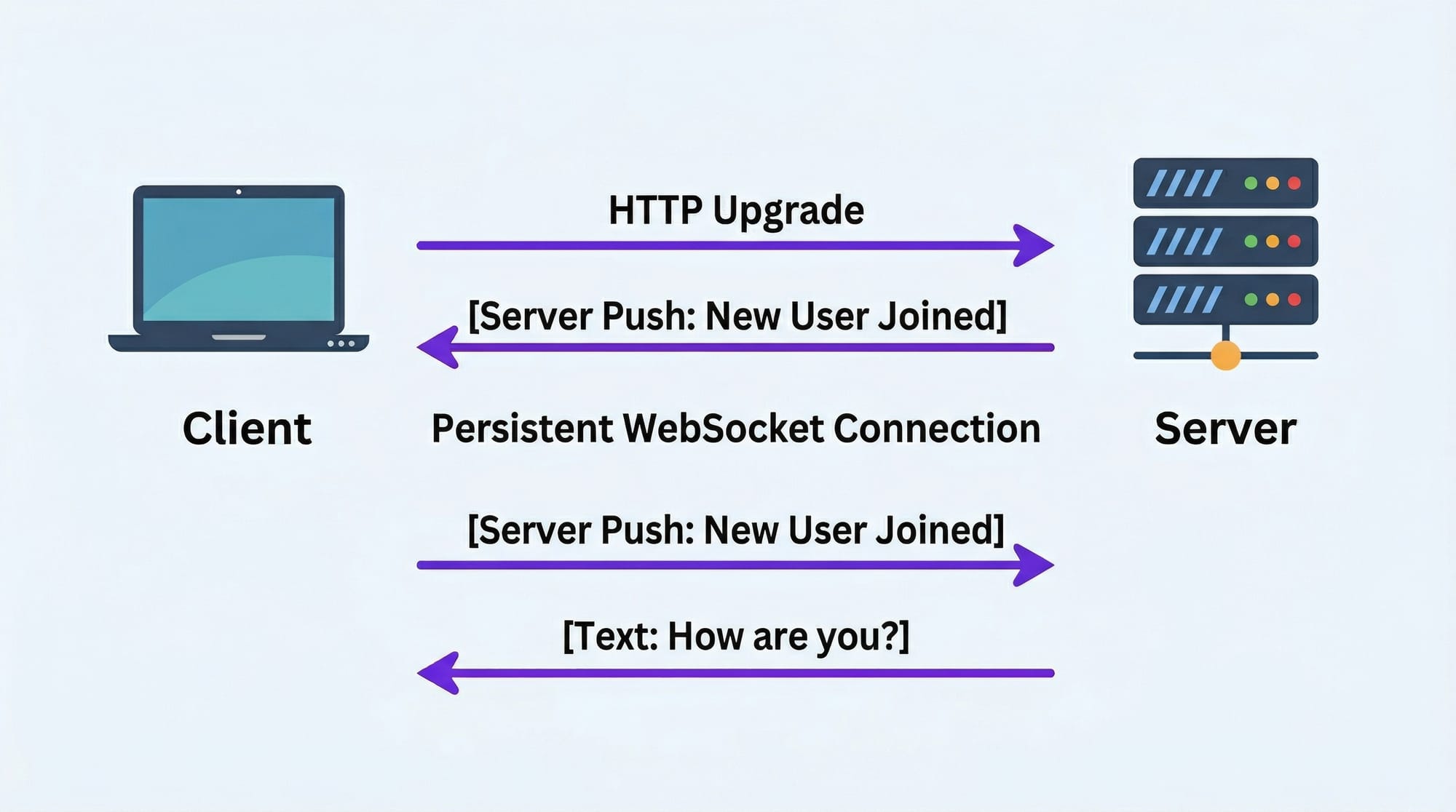
Traditionally, web apps relied on HTTP request-response cycles. That means a client sends a request, the server responds, and then the connection closes. But in real-time applications, we need continuous communication — instant updates without refreshing the page.
This is where WebSockets come in.
In this websocket tutorial, you will learn:
- How WebSockets work
- How to build a Node.js WebSocket server
- How to create real-time web apps (like chat apps)
For Pakistani students, learning this skill is highly valuable. Companies in cities like Lahore, Karachi, and Islamabad are increasingly building real-time systems such as ride-hailing apps, fintech dashboards, and live monitoring tools. Mastering nodejs websocket development can significantly boost your career.
Prerequisites
Before starting this tutorial, you should have:
- Basic understanding of JavaScript (variables, functions, loops)
- Familiarity with Node.js
- Basic knowledge of HTTP and APIs
- Installed tools:
- Node.js (latest version)
- A code editor (VS Code recommended)
- Browser (Chrome or Firefox)
Optional but helpful:
- Basic knowledge of Express.js
- Understanding of asynchronous programming (Promises, async/await)
Core Concepts & Explanation
Persistent Connection vs Request-Response
In traditional HTTP:
- Client sends request → Server responds → Connection closes
In WebSockets:
- Client connects → Connection stays open → Both can send messages anytime
Example:
Ahmad builds a cricket score website. Using HTTP, users must refresh the page to see updates. With WebSockets, scores update instantly without refresh.
Key Benefit:
- Real-time updates
- Reduced latency
- Efficient communication
WebSocket Protocol & Handshake Process
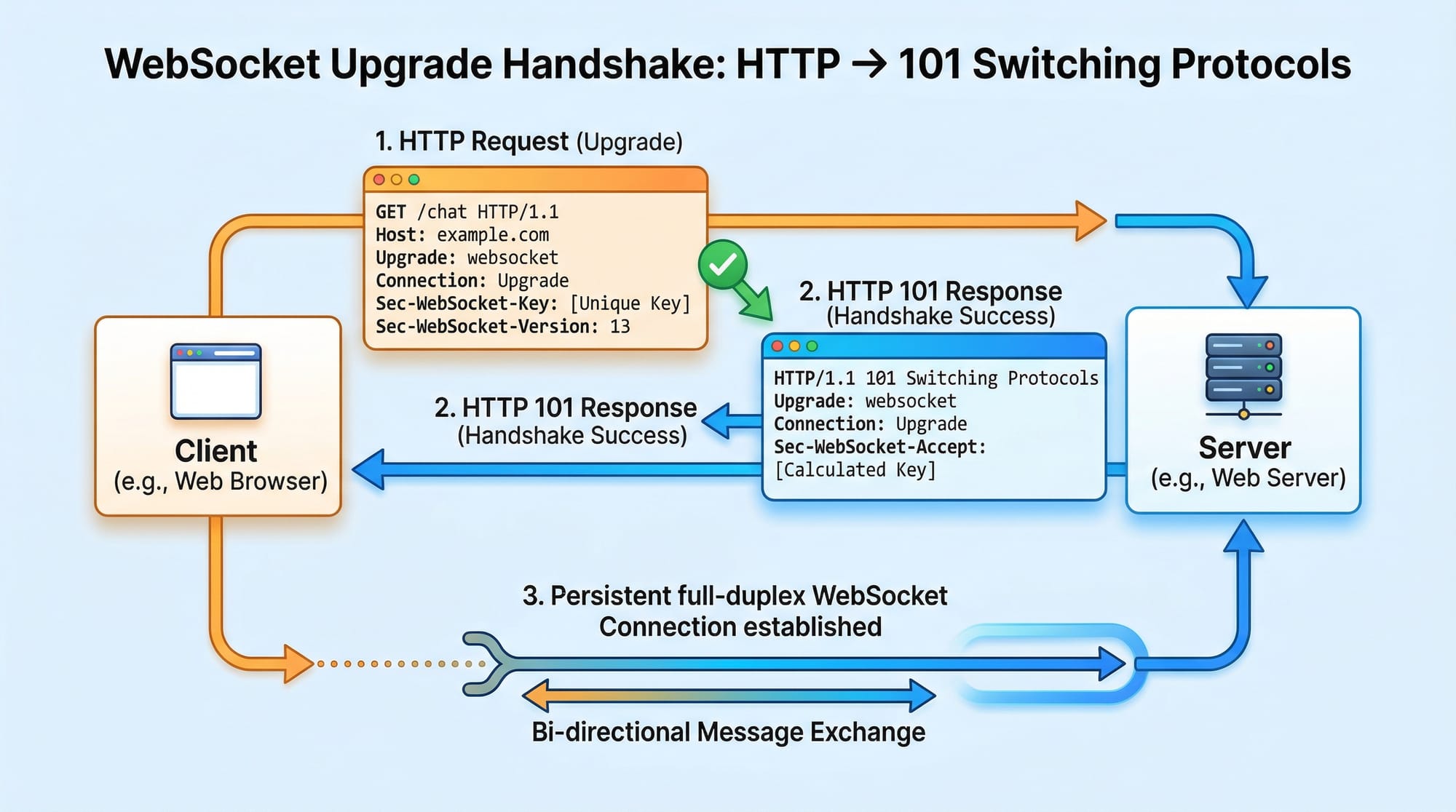
WebSockets start as an HTTP request but upgrade to a different protocol.
Steps:
- Client sends HTTP request with
Upgrade: websocket - Server responds with
101 Switching Protocols - Connection becomes persistent
Example Request Headers:
GET /chat HTTP/1.1
Upgrade: websocket
Connection: Upgrade
Server Response:
HTTP/1.1 101 Switching Protocols
Upgrade: websocket
Connection: Upgrade
Full-Duplex Communication
WebSockets allow two-way communication.
- Client can send messages anytime
- Server can send messages anytime
Example:
Fatima builds a chat app:
- Ali sends message → Server broadcasts → Everyone receives instantly
WebSocket Libraries in Node.js
You can use:
ws(lightweight, fast)Socket.io(feature-rich, easier for beginners)
In this tutorial, we will use both.
Practical Code Examples
Example 1: Basic WebSocket Server using Node.js
Step 1: Install ws library
npm install ws
Step 2: Create server.js
// Line 1: Import WebSocket library
const WebSocket = require('ws');

// Line 2: Create a new WebSocket server on port 3000
const wss = new WebSocket.Server({ port: 3000 });

// Line 3: Listen for client connections
wss.on('connection', (ws) => {
    console.log('New client connected');

    // Line 4: Listen for messages from client
    ws.on('message', (message) => {
        console.log(`Received: ${message}`);

        // Line 5: Send response back to client
        ws.send(`Server received: ${message}`);
    });

    // Line 6: Send welcome message
    ws.send('Welcome to WebSocket server!');
});
Explanation
- Line 1: Imports WebSocket module
- Line 2: Creates server on port 3000
- Line 3: Runs when client connects
- Line 4: Listens for incoming messages
- Line 5: Sends reply to client
- Line 6: Sends initial welcome message
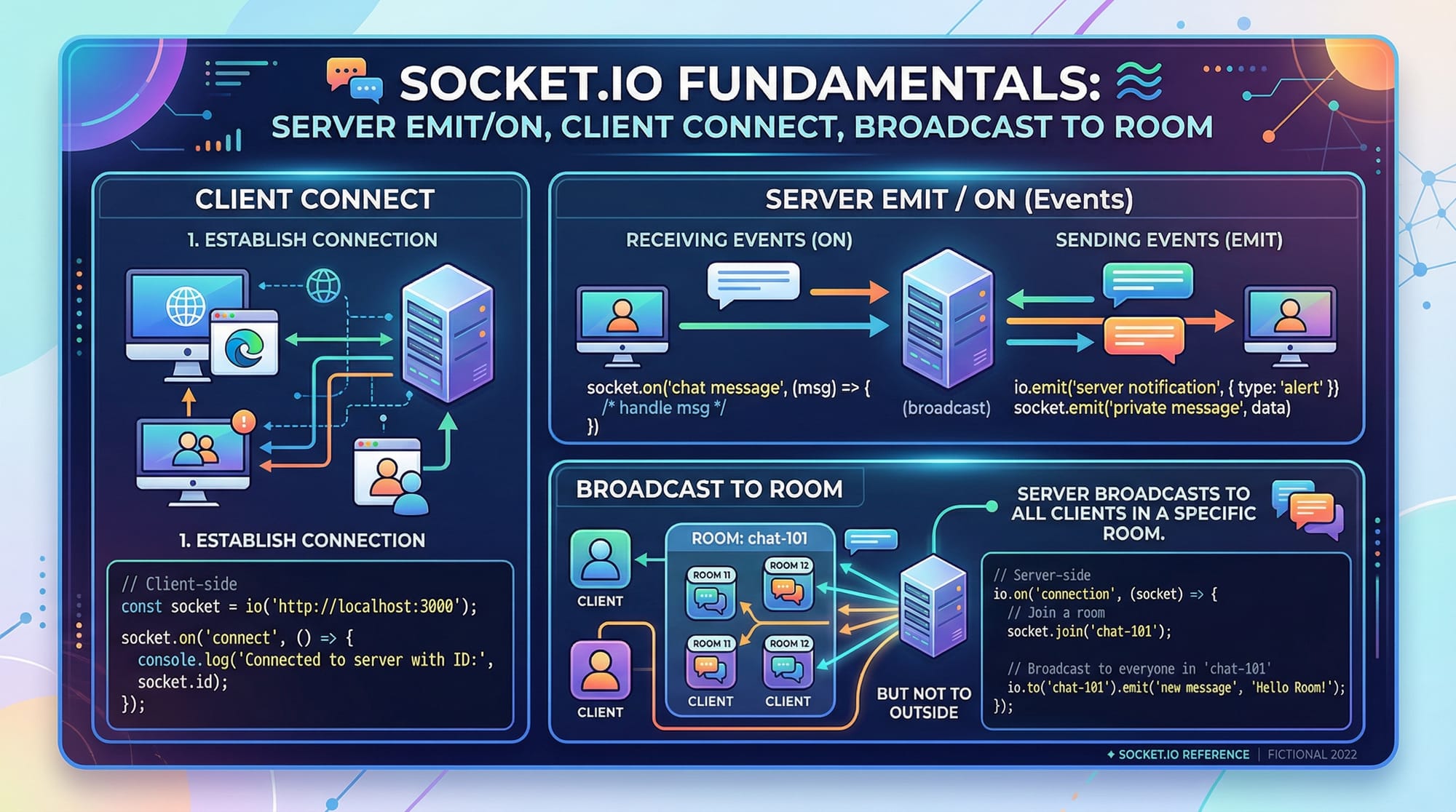
Example 2: Real-World Application (Chat App using Socket.io)
Step 1: Install dependencies
npm install express socket.io
Step 2: Create server.js
// Line 1: Import libraries
const express = require('express');
const http = require('http');
const socketIo = require('socket.io');

// Line 2: Create Express app
const app = express();

// Line 3: Create HTTP server
const server = http.createServer(app);

// Line 4: Attach Socket.io to server
const io = socketIo(server);

// Line 5: Handle client connections
io.on('connection', (socket) => {
    console.log('User connected');

    // Line 6: Listen for chat messages
    socket.on('chat message', (msg) => {
        console.log('Message:', msg);

        // Line 7: Broadcast message to all users
        io.emit('chat message', msg);
    });

    // Line 8: Handle disconnect
    socket.on('disconnect', () => {
        console.log('User disconnected');
    });
});

// Line 9: Start server
server.listen(3000, () => {
    console.log('Server running on port 3000');
});
Client-side (index.html)
<!-- Line 1: Include Socket.io client -->
<script src="/socket.io/socket.io.js"></script>

<script>
// Line 2: Connect to server
const socket = io();

// Line 3: Send message
function sendMessage() {
    const msg = document.getElementById('msg').value;
    socket.emit('chat message', msg);
}

// Line 4: Receive message
socket.on('chat message', (msg) => {
    console.log('New message:', msg);
});
</script>
Explanation
- Server handles connections and broadcasts messages
- Client sends and receives messages in real-time
- Perfect for chat apps, notifications, and dashboards
Common Mistakes & How to Avoid Them
Mistake 1: Not Handling Disconnections
Problem:
When users disconnect, the server may crash or behave unexpectedly.
Wrong Code:
socket.on('disconnect', () => {});
Fix:
socket.on('disconnect', () => {
    console.log('User disconnected safely');
});
Tip:
Always clean up resources when users disconnect.
Mistake 2: Broadcasting Too Much Data
Problem:
Sending large data frequently can slow down the app.
Example Issue:
Sending full database every second.
Fix:
- Send only necessary updates
- Use events efficiently
io.emit('update', { price: 120 });
Mistake 3: Ignoring Security
Problem:
Anyone can connect and send malicious data.
Fix:
- Validate input
- Use authentication
Practice Exercises
Exercise 1: Simple Notification System
Problem:
Create a system where server sends a notification every 5 seconds.
Solution:
setInterval(() => {
    io.emit('notification', 'New update available!');
}, 5000);
Explanation:
setIntervalruns every 5 seconds- Server sends message to all clients
Exercise 2: Private Chat Room
Problem:
Allow users to join a room (e.g., "Lahore") and chat only within that room.
Solution:
socket.on('joinRoom', (room) => {
    socket.join(room);
});

socket.on('message', (msg, room) => {
    io.to(room).emit('message', msg);
});
Explanation:
join()adds user to a roomio.to(room)sends message only to that room
Frequently Asked Questions
What is WebSocket in simple terms?
WebSocket is a protocol that allows continuous communication between client and server. Unlike HTTP, it keeps the connection open so data can be sent anytime.
How do I use WebSocket in Node.js?
You can use libraries like ws or socket.io. Install them via npm and create a server that listens for connections and messages.
Is WebSocket better than REST APIs?
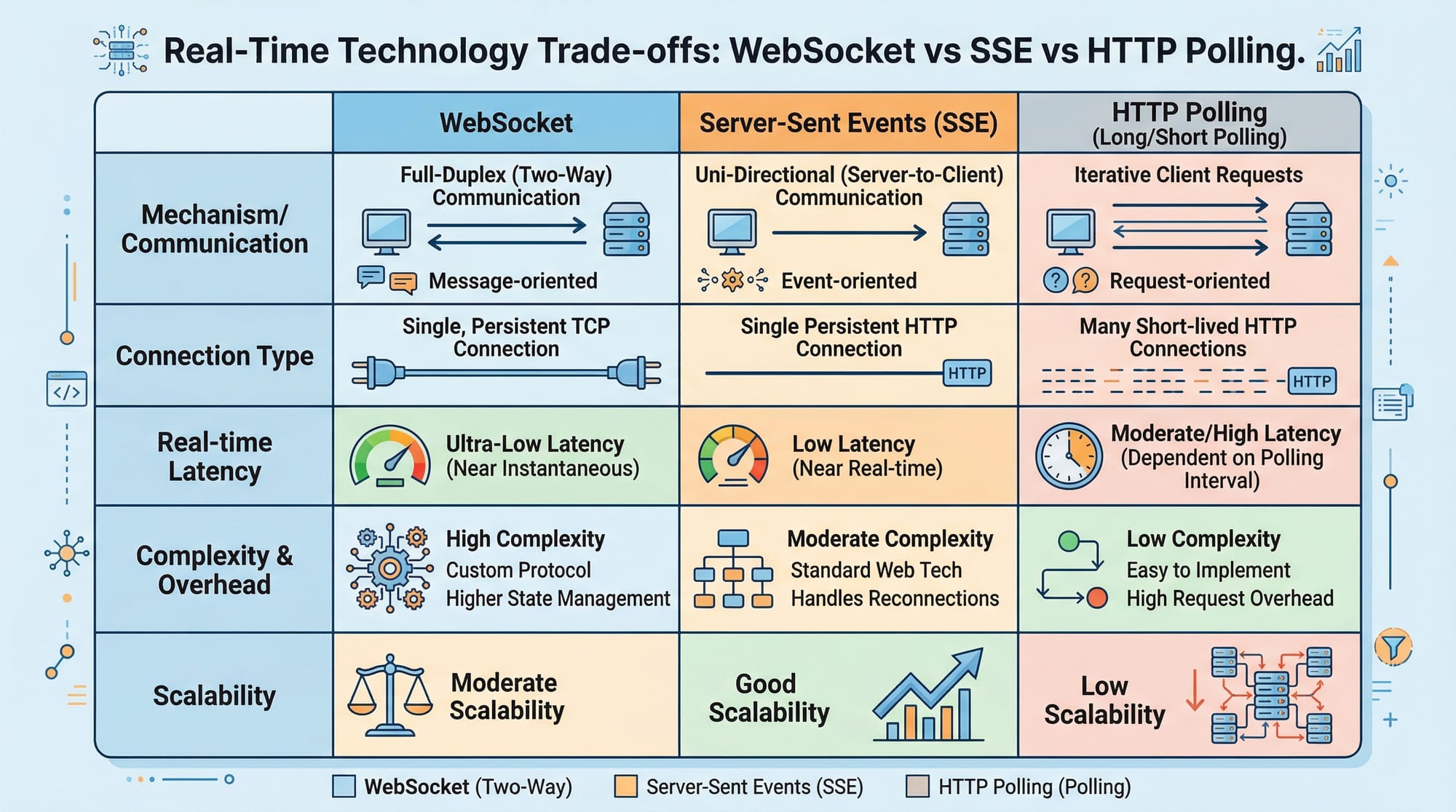
WebSockets are better for real-time apps, while REST APIs are better for standard request-response operations. Both are often used together.
Can I use WebSockets for mobile apps?
Yes, WebSockets work with mobile apps as well. They are commonly used in chat apps, live tracking, and gaming.
Are WebSockets secure?
Yes, if used properly. Use wss:// (secure WebSocket), validate inputs, and implement authentication.
Summary & Key Takeaways
- WebSockets enable real-time communication between client and server
- They use a persistent connection instead of repeated HTTP requests
- Node.js makes it easy to build WebSocket servers
- Socket.io simplifies development with extra features
- Real-world use cases include chat apps, live dashboards, and notifications
- Avoid common mistakes like over-broadcasting and ignoring security
Next Steps & Related Tutorials
To strengthen your understanding, continue learning with these tutorials on theiqra.edu.pk:
- Learn the basics with Node.js Basics to understand server-side JavaScript
- Build APIs with the REST API Tutorial for backend development
- Explore Express.js Guide to structure your Node apps
- Dive into Frontend JavaScript DOM Tutorial to connect UI with real-time data
By combining these skills, you’ll be able to build powerful real-time web apps used in modern Pakistani startups and global tech companies.
If you want, I can also create a quiz (MCQs in JSON format) or a mini project (WhatsApp-style chat app) based on this tutorial.
Test Your Python Knowledge!
Finished reading? Take a quick quiz to see how much you've learned from this tutorial.