Zod Tutorial Runtime Schema Validation with TypeScript
Introduction
If you're building modern applications with TypeScript, you’ve probably faced a common problem: TypeScript only checks types at compile time, not at runtime. This means invalid data from APIs, forms, or user input can still break your app.
This is where Zod comes in.
This Zod tutorial: runtime schema validation with TypeScript will teach you how to validate data safely and effectively using zod schema definitions. Zod is a TypeScript-first validation library that ensures your data is correct both at runtime and compile time.
For Pakistani students working on projects like university portals in Lahore, e-commerce apps in Karachi, or freelance dashboards in Islamabad, Zod is a powerful tool to:
- Validate user input (forms, APIs)
- Ensure backend data integrity
- Reduce runtime bugs
- Improve developer productivity
By the end of this guide, you'll confidently use zod typescript validation in real-world applications.
Prerequisites
Before starting this Zod tutorial, you should have:
- Basic knowledge of TypeScript
- Understanding of:
- Variables and types
- Interfaces and objects
- Functions
- Familiarity with Node.js or frontend frameworks (optional but helpful)
If you're new, we recommend starting with a TypeScript Basics tutorial first.
Core Concepts & Explanation
What is a Zod Schema?
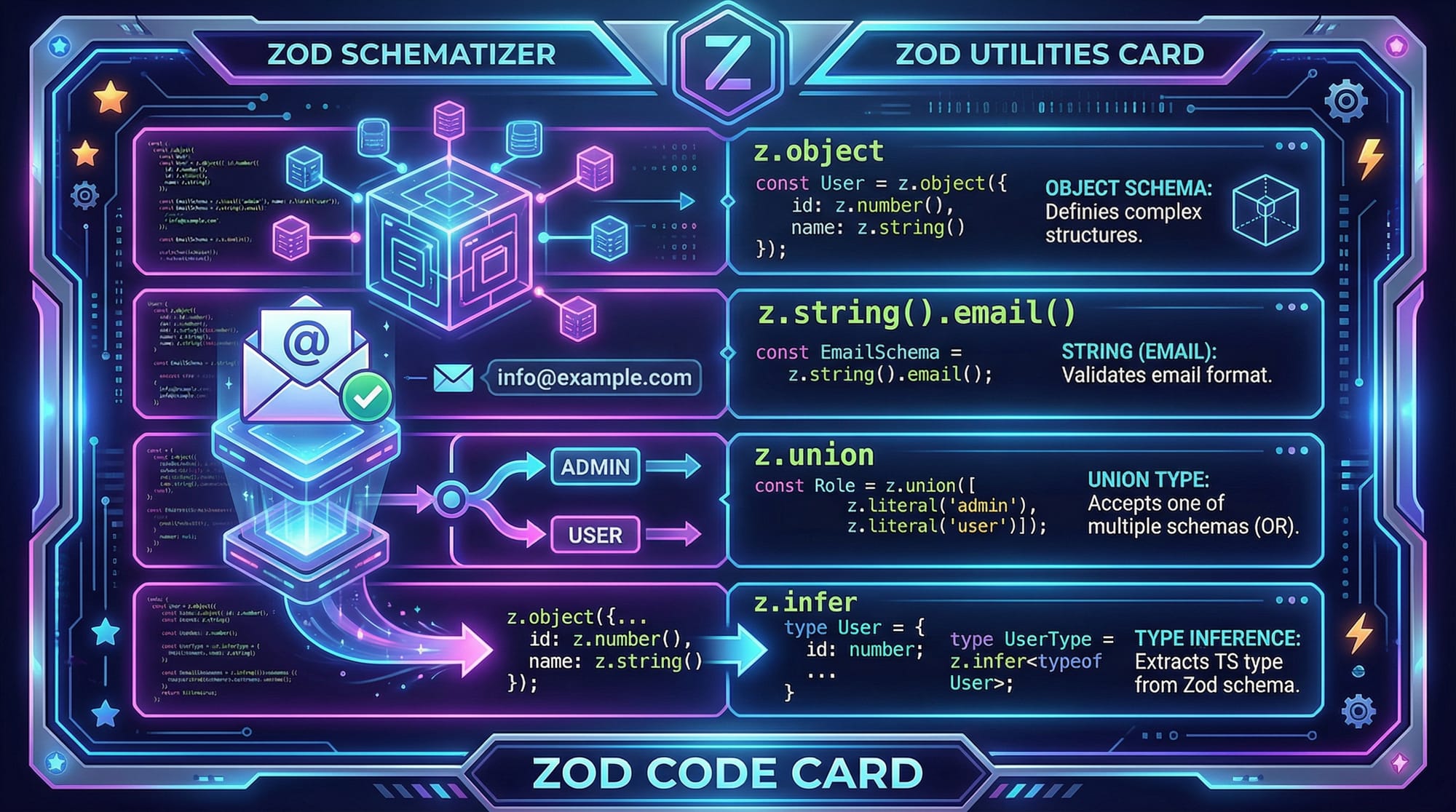
A zod schema is a blueprint that defines the structure and validation rules for your data.
Example:
import { z } from "zod";

const userSchema = z.object({
  name: z.string(),
  age: z.number(),
});
Explanation:
import { z } from "zod";
→ Imports Zod libraryz.object({...})
→ Defines an object schemaname: z.string()
→ Name must be a stringage: z.number()
→ Age must be a number
This schema ensures any "user" object matches this structure.
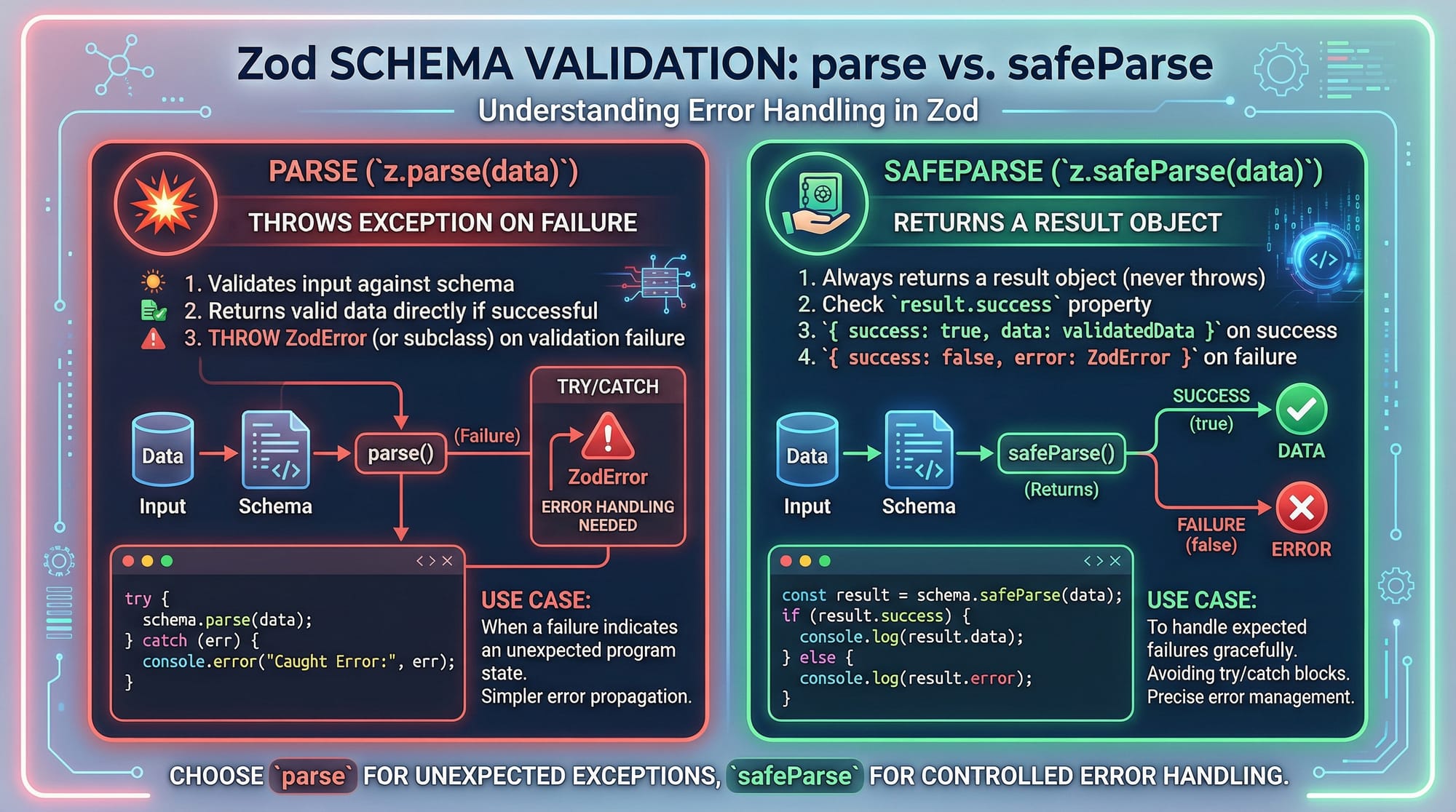
Parsing vs Safe Parsing
Zod provides two main ways to validate data:
1. parse() (throws error)
userSchema.parse({ name: "Ali", age: 20 });
- If valid → returns data
- If invalid → throws error
2. safeParse() (returns result)
const result = userSchema.safeParse({ name: "Ali", age: "20" });
Explanation:
safeParse()returns an object:success: true/falsedata(if valid)error(if invalid)
This is safer for real applications.
Type Inference with Zod
Zod automatically generates TypeScript types from schemas.
type User = z.infer<typeof userSchema>;
Explanation:
z.inferextracts the type- No need to manually write interfaces
- Keeps validation and types in sync
Advanced Schema Types
Zod supports many data types:
const advancedSchema = z.object({
  email: z.string().email(),
  role: z.union([z.literal("admin"), z.literal("user")]),
});
Explanation:
z.string().email()→ validates email formatz.union([...])→ allows multiple possible valuesz.literal()→ exact value match
Practical Code Examples
Example 1: User Registration Validation
Let’s validate a signup form for a student named Ahmad.
import { z } from "zod";

const registerSchema = z.object({
  name: z.string().min(3),
  email: z.string().email(),
  password: z.string().min(6),
});

const formData = {
  name: "Ahmad",
  email: "[email protected]",
  password: "123456",
};

const result = registerSchema.safeParse(formData);

if (result.success) {
  console.log("Valid data:", result.data);
} else {
  console.log("Errors:", result.error.errors);
}
Line-by-line Explanation:
z.string().min(3)
→ Name must have at least 3 charactersz.string().email()
→ Valid email format requiredz.string().min(6)
→ Password must be 6+ characterssafeParse(formData)
→ Validates without crashingresult.success
→ Checks if validation passedresult.error.errors
→ Shows detailed error messages
Example 2: Real-World Application (E-commerce Order)
Let’s validate an order in a Pakistani online store.
import { z } from "zod";

const orderSchema = z.object({
  customerName: z.string(),
  city: z.enum(["Lahore", "Karachi", "Islamabad"]),
  amount: z.number().min(1),
  paymentMethod: z.union([z.literal("COD"), z.literal("Card")]),
});

const orderData = {
  customerName: "Fatima",
  city: "Karachi",
  amount: 2500,
  paymentMethod: "COD",
};

const result = orderSchema.safeParse(orderData);

if (!result.success) {
  console.log("Invalid order:", result.error.format());
} else {
  console.log("Order confirmed:", result.data);
}
Line-by-line Explanation:
z.enum([...])
→ Restricts city to predefined valuesz.number().min(1)
→ Amount must be greater than 0z.union([...])
→ Accepts COD or CardsafeParse(orderData)
→ Validates safelyresult.error.format()
→ Gives structured error output

Common Mistakes & How to Avoid Them
Mistake 1: Using parse() in Production
userSchema.parse(data);
❌ Problem: App crashes if validation fails
✅ Fix:
const result = userSchema.safeParse(data);
if (!result.success) {
  // handle error
}
Mistake 2: Forgetting Type Inference
type User = {
  name: string;
  age: number;
};
❌ Problem: Manual types can go out of sync
✅ Fix:
type User = z.infer<typeof userSchema>;
Mistake 3: Not Using Refinements
z.string();
❌ Problem: Too generic
✅ Fix:
z.string().min(3).max(50);
Mistake 4: Ignoring Error Messages
Always display meaningful errors to users:
result.error.errors.forEach(err => {
  console.log(err.message);
});
Practice Exercises
Exercise 1: Validate Student Data
Problem:
Create a schema for a student with:
- name (string, min 3)
- age (number, min 16)
Solution:
import { z } from "zod";

const studentSchema = z.object({
  name: z.string().min(3),
  age: z.number().min(16),
});

const data = { name: "Ali", age: 18 };

console.log(studentSchema.safeParse(data));
Explanation:
- Validates name length
- Ensures age is at least 16
Exercise 2: Validate Payment Data
Problem:
Validate:
- amount (number > 0)
- method ("JazzCash" or "EasyPaisa")
Solution:
import { z } from "zod";

const paymentSchema = z.object({
  amount: z.number().min(1),
  method: z.union([z.literal("JazzCash"), z.literal("EasyPaisa")]),
});

const data = { amount: 500, method: "JazzCash" };

console.log(paymentSchema.safeParse(data));
Explanation:
- Ensures valid payment methods used in Pakistan
- Prevents invalid inputs
Frequently Asked Questions
What is Zod in TypeScript?
Zod is a TypeScript-first schema validation library used to validate data at runtime. It ensures that external data (like APIs or forms) matches expected types safely.
How do I validate data using Zod?
You create a schema using z.object() and then validate using parse() or safeParse(). safeParse() is recommended because it avoids crashes.
What is the difference between parse and safeParse?
parse() throws an error if validation fails, while safeParse() returns a result object with success status and error details. SafeParse is better for production apps.
Can Zod replace TypeScript types?
Not completely, but it complements TypeScript. Zod provides runtime validation, while TypeScript handles compile-time checks. Together, they provide full safety.
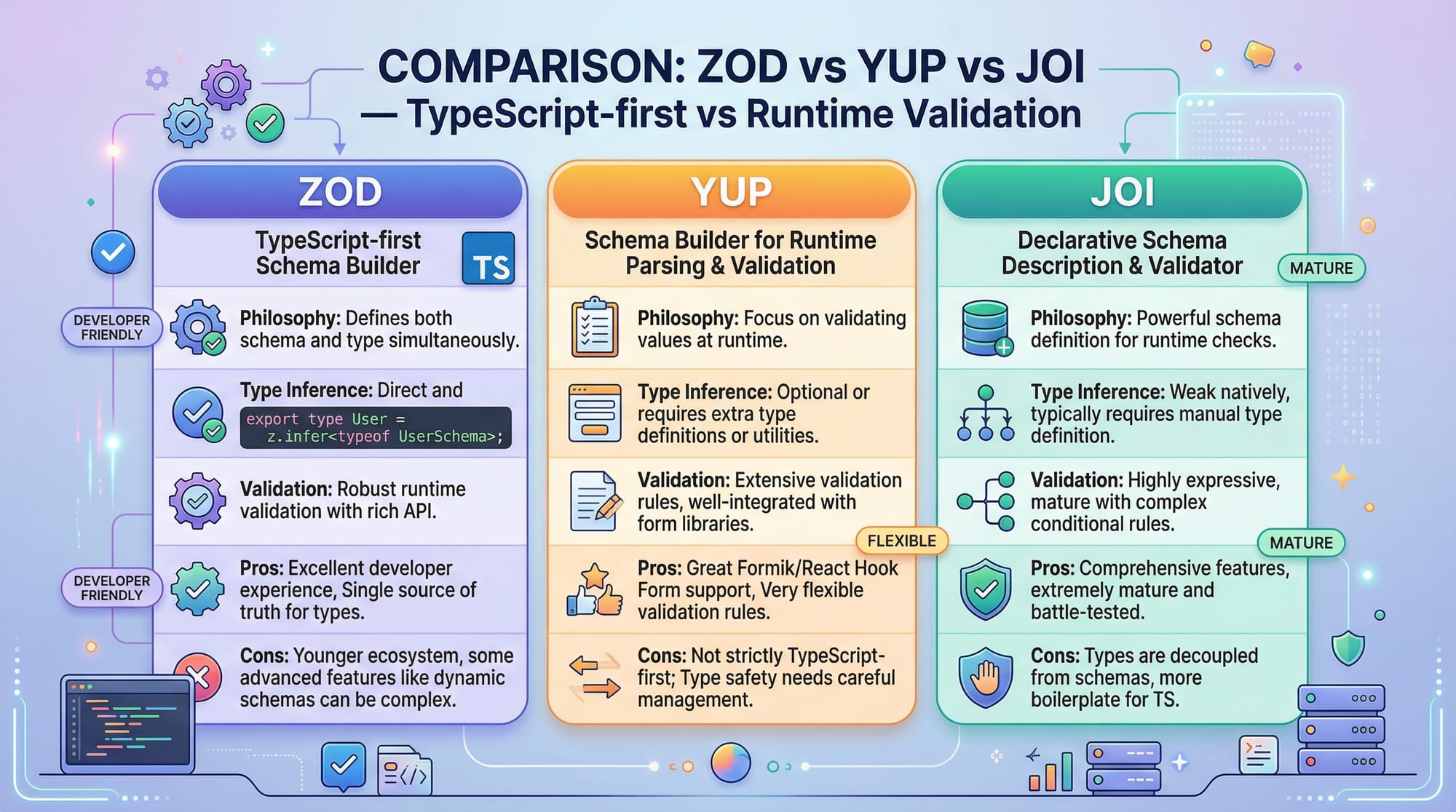
Is Zod better than Yup or Joi?
Zod is more TypeScript-friendly because it automatically infers types. Yup and Joi are powerful but require extra work for TypeScript integration.
Summary & Key Takeaways
- Zod enables runtime validation for TypeScript applications
z.object()defines schemas for structured datasafeParse()is safer thanparse()for productionz.inferautomatically generates TypeScript types- Zod supports advanced validation like unions, enums, and refinements
- Ideal for real-world apps like forms, APIs, and e-commerce systems in Pakistan
Next Steps & Related Tutorials
To deepen your understanding, explore these tutorials on theiqra.edu.pk:
- Learn the fundamentals with TypeScript Basics
- Build APIs using a FastAPI Tutorial
- Understand backend validation with Node.js API Development
- Explore frontend validation with React Forms & Validation Guide
Mastering Zod will significantly improve your ability to build robust, type-safe applications—a crucial skill for Pakistani developers entering the global tech market 🚀
Test Your Python Knowledge!
Finished reading? Take a quick quiz to see how much you've learned from this tutorial.