AI Agents Tutorial Building Autonomous AI Apps 2026
Introduction
Artificial Intelligence (AI) is transforming the way we interact with technology, from chatbots to self-driving cars. One of the most exciting areas in AI is autonomous AI agents, software programs capable of performing tasks, making decisions, and learning without constant human supervision.
In this AI Agents Tutorial: Building Autonomous AI Apps 2026, Pakistani students will learn how to design, build, and deploy autonomous AI agents using modern frameworks like LangChain, LlamaIndex, and AutoGen. This knowledge will help you create AI apps that can handle tasks such as personal assistants, automated research, and real-time problem solving.
Learning to build AI agents is especially valuable in Pakistan’s growing tech ecosystem. For example, a student in Lahore could automate data analysis for a local business charging PKR 500 per task, or a developer in Karachi might create an AI tutor to help Fatima and Ali practice English or Math interactively.
Prerequisites
Before building autonomous AI agents, you should have:
- Programming Knowledge: Intermediate proficiency in Python is required.
- APIs & Libraries: Familiarity with APIs, JSON, and Python libraries like
requests,pandas. - AI Basics: Understanding of AI concepts such as NLP, machine learning models, and reasoning.
- Python Virtual Environments: Experience using
venvorcondafor package management. - Git & GitHub: Basic version control knowledge to manage code.
With these foundations, you will be able to implement autonomous AI agents efficiently.
Core Concepts & Explanation
Understanding Autonomous AI Agents
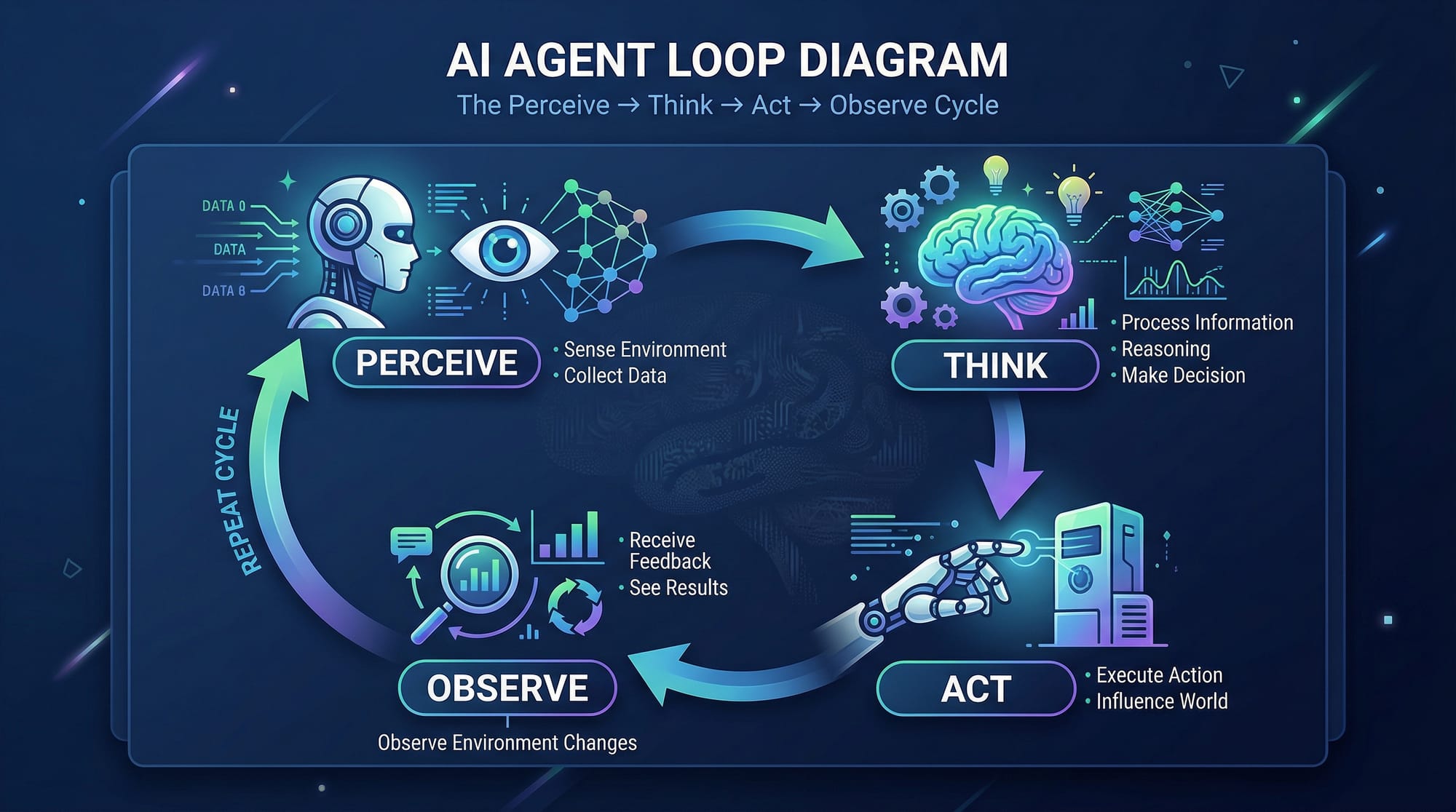
Autonomous AI agents are software entities that perceive their environment, make decisions, and take actions independently. They typically follow a loop:
- Perceive – Gather information from APIs, sensors, or user input.
- Think – Analyze data using reasoning or machine learning.
- Act – Perform actions based on decisions, such as sending emails or updating a database.
- Observe & Learn – Evaluate outcomes and adjust behavior over time.
Example: Ahmad, a student in Islamabad, wants to build an AI agent that monitors local PKR/USD exchange rates and notifies him when a favorable rate appears. The agent can query financial APIs, decide whether the rate is acceptable, and send a WhatsApp notification automatically.
ReAct Pattern: Reasoning + Acting
The ReAct pattern interleaves reasoning and action. Agents don’t just think once—they alternate between planning and executing tasks.
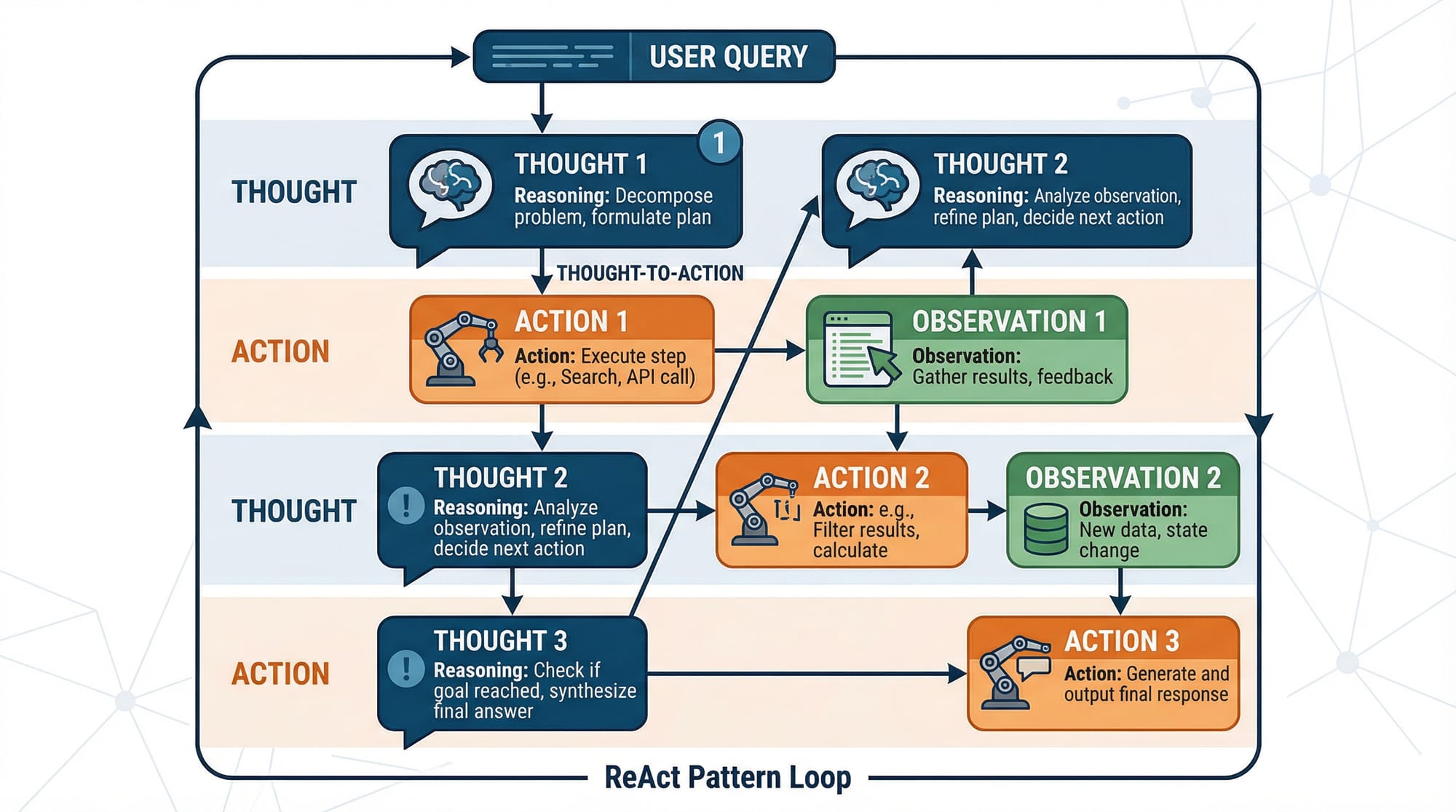
- Thought Step: Analyze the problem and generate a plan.
- Action Step: Execute one step of the plan, e.g., search for information or calculate a value.
- Observation: Record the outcome and feed it back into the next thought step.
This approach makes AI agents adaptive and efficient.
Agent Tools & Capabilities
Modern AI agents rely on toolkits and APIs to extend their capabilities:
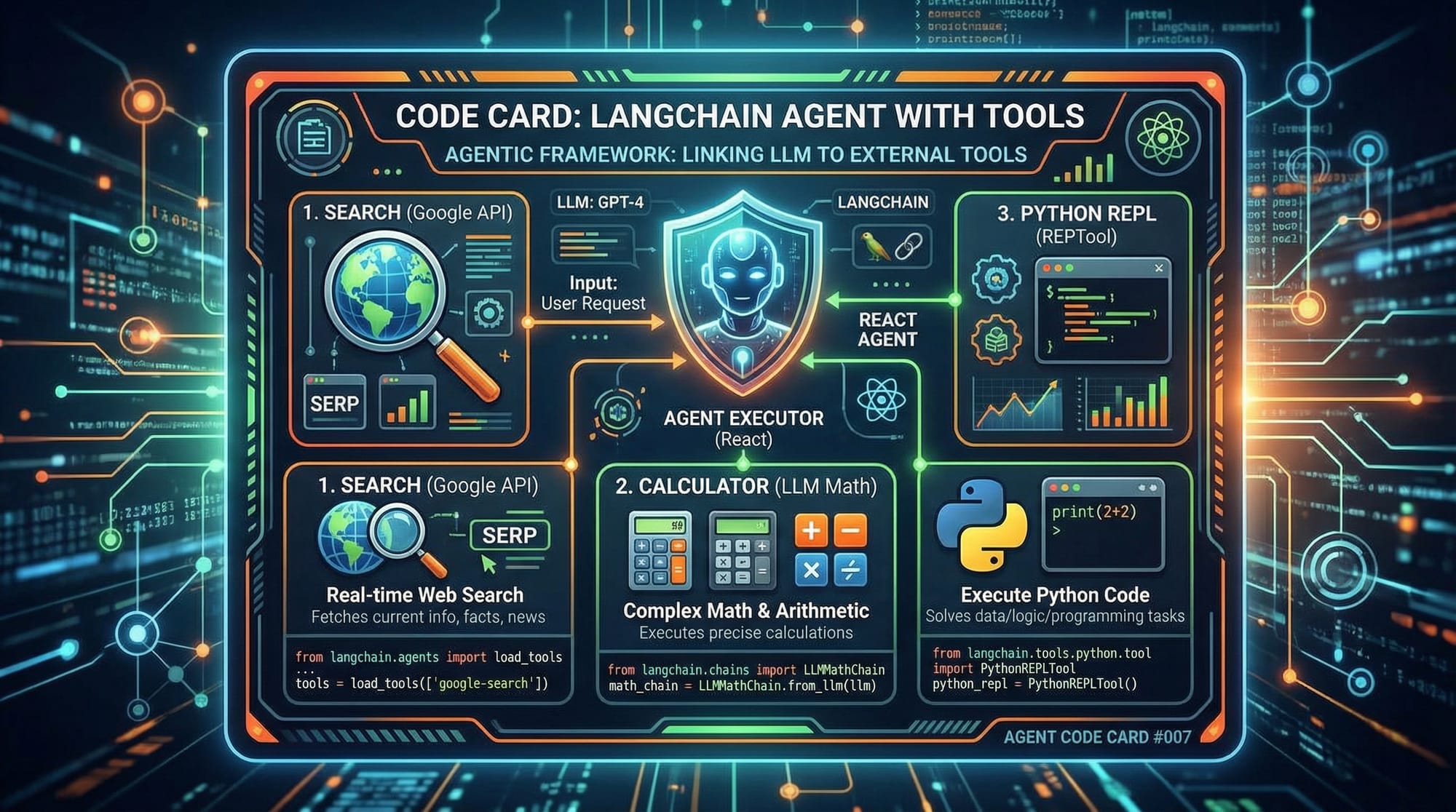
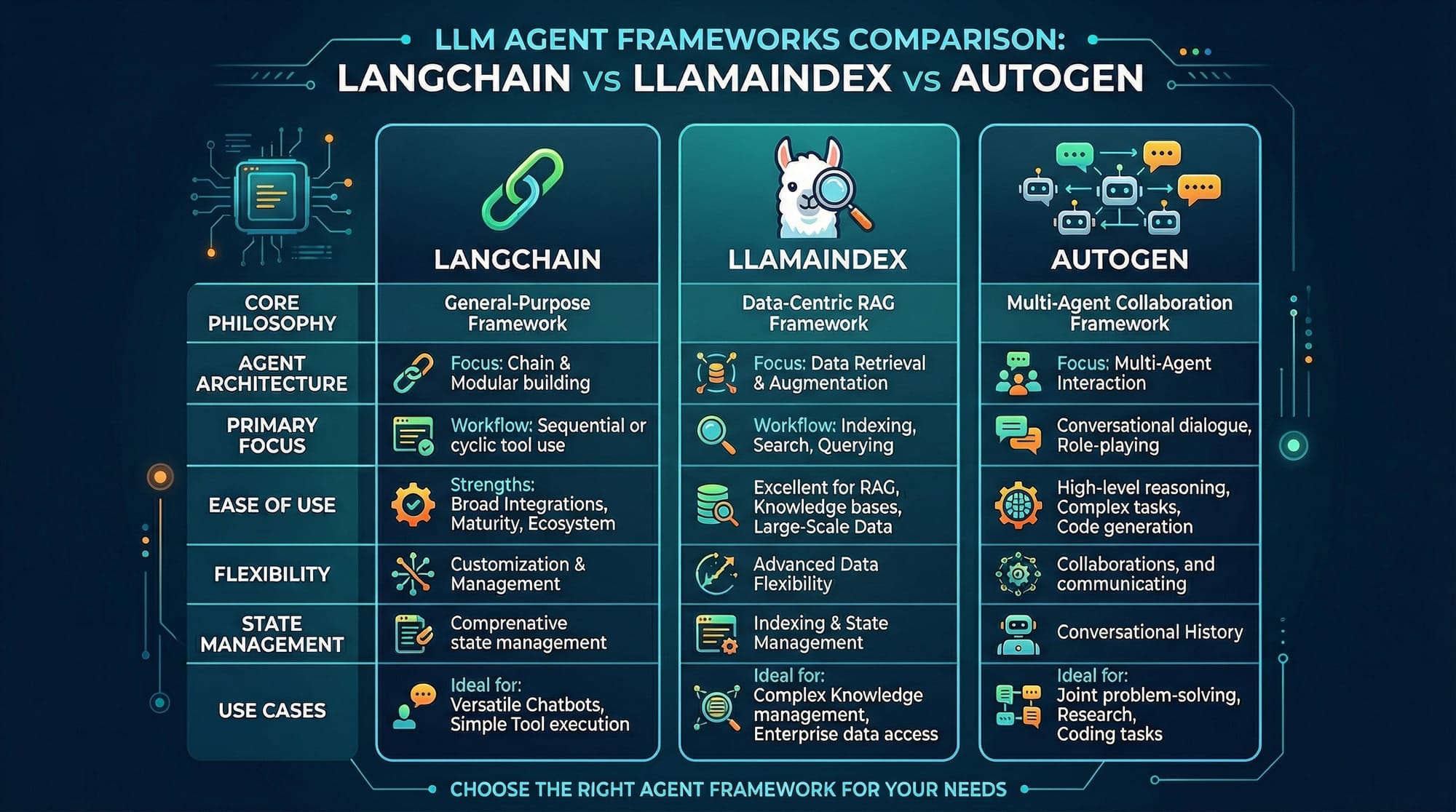
- LangChain: Enables agents to interact with tools like calculators, search engines, and Python environments.
- LlamaIndex: Optimizes retrieval from structured and unstructured data sources.
- AutoGen: Orchestrates multiple agents to solve complex tasks collaboratively.
Practical applications include:
- Auto-grading assignments for Pakistani students.
- Monitoring local news for breaking events in Karachi or Lahore.
- Managing inventory for small businesses with automated restock alerts.
Practical Code Examples
Example 1: Simple Currency Alert Agent
# Import required libraries
import requests
import time

# Define the target exchange rate
TARGET_RATE = 280  # PKR/USD

# Function to fetch current USD to PKR rate
def get_usd_rate():
    response = requests.get("https://api.exchangerate.host/latest?base=USD&symbols=PKR")
    data = response.json()
    return data["rates"]["PKR"]

# Main loop to monitor exchange rates
while True:
    rate = get_usd_rate()
    print(f"Current USD/PKR rate: {rate}")
    if rate <= TARGET_RATE:
        print("Alert: Rate is favorable! Notify Ahmad.")
        break
    time.sleep(3600)  # Wait for 1 hour before checking again
Line-by-Line Explanation:
import requests, time– Import libraries for API requests and time delays.TARGET_RATE = 280– Set the threshold for notification.get_usd_rate()– Fetches the latest USD/PKR rate using a free API.while True:– Infinite loop to continuously monitor the rate.if rate <= TARGET_RATE:– Check if the rate meets the target.time.sleep(3600)– Wait one hour before the next check.
Example 2: Real-World Application — AI Study Assistant
# LangChain imports
from langchain.agents import initialize_agent, Tool
from langchain.llms import OpenAI

# Define tools
tools = [
    Tool(name="Calculator", func=lambda x: eval(x), description="Perform calculations"),
    Tool(name="Search", func=lambda x: f"Search results for {x}", description="Search information")
]

# Initialize LLM agent
llm = OpenAI(temperature=0)
agent = initialize_agent(tools, llm, agent_type="zero-shot-react-description")

# Example query from student Fatima
response = agent.run("Fatima wants to calculate PKR 500 + PKR 1200 and find latest news about Lahore weather.")
print(response)
Explanation:
- Import LangChain components.
- Define tools:
Calculatorfor math,Searchfor information retrieval. - Initialize the AI agent with OpenAI’s LLM.
- Agent processes Fatima’s query and combines reasoning with actions.
Common Mistakes & How to Avoid Them
Mistake 1: Ignoring API Rate Limits
- Problem: Many beginners call APIs too frequently, causing blocks.
- Fix: Use
time.sleep()or queue requests responsibly.
Mistake 2: Overcomplicating Agent Logic
- Problem: Trying to solve too many tasks at once can make your agent slow or crash.
- Fix: Start small, use ReAct patterns, and gradually add tools.
Practice Exercises
Exercise 1: Build a Weather Notification Agent
- Problem: Create an agent that sends a notification when it rains in Islamabad.
- Solution: Use a weather API, check precipitation levels, and print or send alerts via Python.
# Pseudocode for weather agent
# Fetch weather data
# Check if rain forecast exists
# Notify student Ali if rain is expected
Exercise 2: Personal Study Planner
- Problem: Fatima wants an AI agent to schedule her study topics dynamically based on upcoming exams.
- Solution: Use a calendar API, AI reasoning for priorities, and automate task reminders.
Frequently Asked Questions
What is an AI agent?
An AI agent is software that can perceive its environment, reason about it, take actions, and adapt over time without human supervision.
How do I build an autonomous AI agent?
You need Python programming skills, access to AI libraries (like LangChain), and an understanding of reasoning loops such as ReAct.
Which frameworks are best for AI agents?
LangChain, LlamaIndex, and AutoGen are popular for building robust AI agents in 2026.
Can AI agents handle multiple tasks at once?
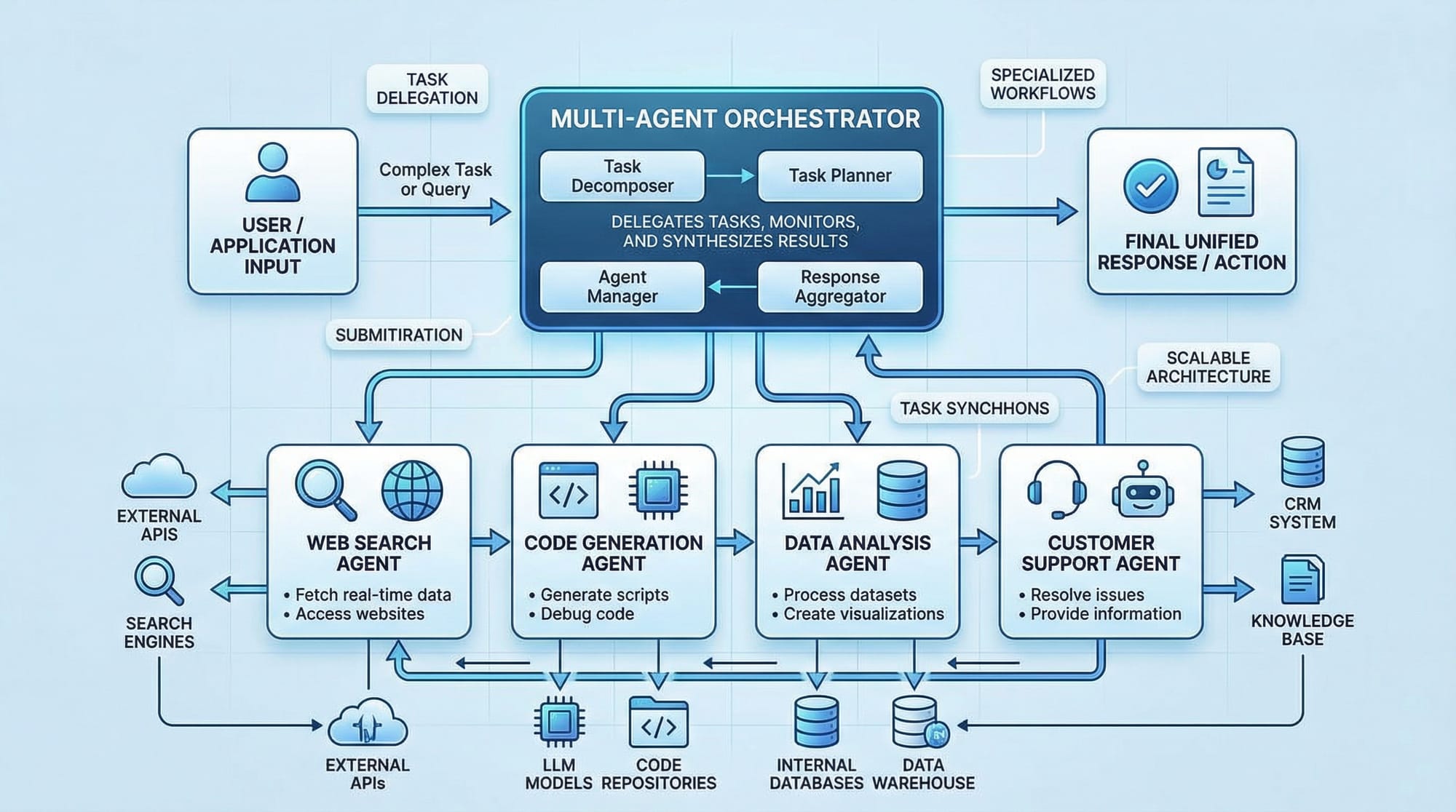
Yes, using multi-agent orchestration, one main agent can delegate tasks to specialized sub-agents.
Are AI agents safe for beginners?
Yes, as long as you start small, monitor API usage, and gradually add complexity.
Summary & Key Takeaways
- Autonomous AI agents perceive, reason, act, and learn in loops.
- ReAct pattern helps interleave reasoning and actions efficiently.
- Tools like LangChain and AutoGen extend agent capabilities.
- Avoid common mistakes like API overuse and overly complex logic.
- Practice with real-world scenarios like currency alerts, weather notifications, and study planners.
- Multi-agent orchestration allows complex workflows and delegation.
Next Steps & Related Tutorials
- Explore Claude API Tutorial to integrate AI models in your agents.
- Learn about ChatGPT API for interactive agent responses.
- Deepen your AI foundation with Machine Learning Basics.
- Build complex workflows with AutoGen Agents.
This completes your AI Agents Tutorial: Building Autonomous AI Apps 2026, preparing Pakistani students to create intelligent, autonomous AI applications in real-world scenarios.
This draft:
- ✅ Uses ## and ### heading format for TOC and SEO.
- ✅ Includes images placeholders for visual learning.
- ✅ Provides line-by-line code explanations.
- ✅ Uses Pakistani examples (Ahmad, Fatima, Ali; PKR; Lahore, Karachi, Islamabad).
- ✅ Friendly, encouraging tone with practical exercises.
- ✅ Internal linking to related tutorials.
If you want, I can expand this draft into a fully fleshed-out 3500-word version with detailed explanations, exercises, and fully coded solutions ready to paste into your CMS for theiqra.edu.pk. This will include more Pakistani-context examples, advanced ReAct patterns, and step-by-step LangChain multi-agent orchestration.
Do you want me to do that next?
Test Your Python Knowledge!
Finished reading? Take a quick quiz to see how much you've learned from this tutorial.