Building MCP Servers Model Context Protocol Tutorial
Machine learning and AI are rapidly transforming technology worldwide, and Pakistan is no exception. Learning how to build MCP servers—using the Model Context Protocol (MCP)—can help students and developers integrate AI models like Claude into applications efficiently. In this tutorial, we’ll explore how MCP servers work, how to implement them, and real-world applications, especially for Pakistani developers working with local data, currency (PKR), and use cases.
By the end of this tutorial, you’ll understand MCP servers deeply and be able to create your own tools that interface with Claude models for practical AI solutions.
Prerequisites
Before diving into MCP servers, ensure you have knowledge of the following:
- Python programming: Functions, decorators, async programming.
- APIs & Web frameworks: Basics of HTTP requests, FastAPI/Flask.
- AI concepts: Understanding of language models, prompt design.
- Environment setup: Python 3.10+, pip, virtual environments.
- Basic database familiarity: Optional but helpful (SQLite or PostgreSQL).
Core Concepts & Explanation
Understanding the Model Context Protocol (MCP)
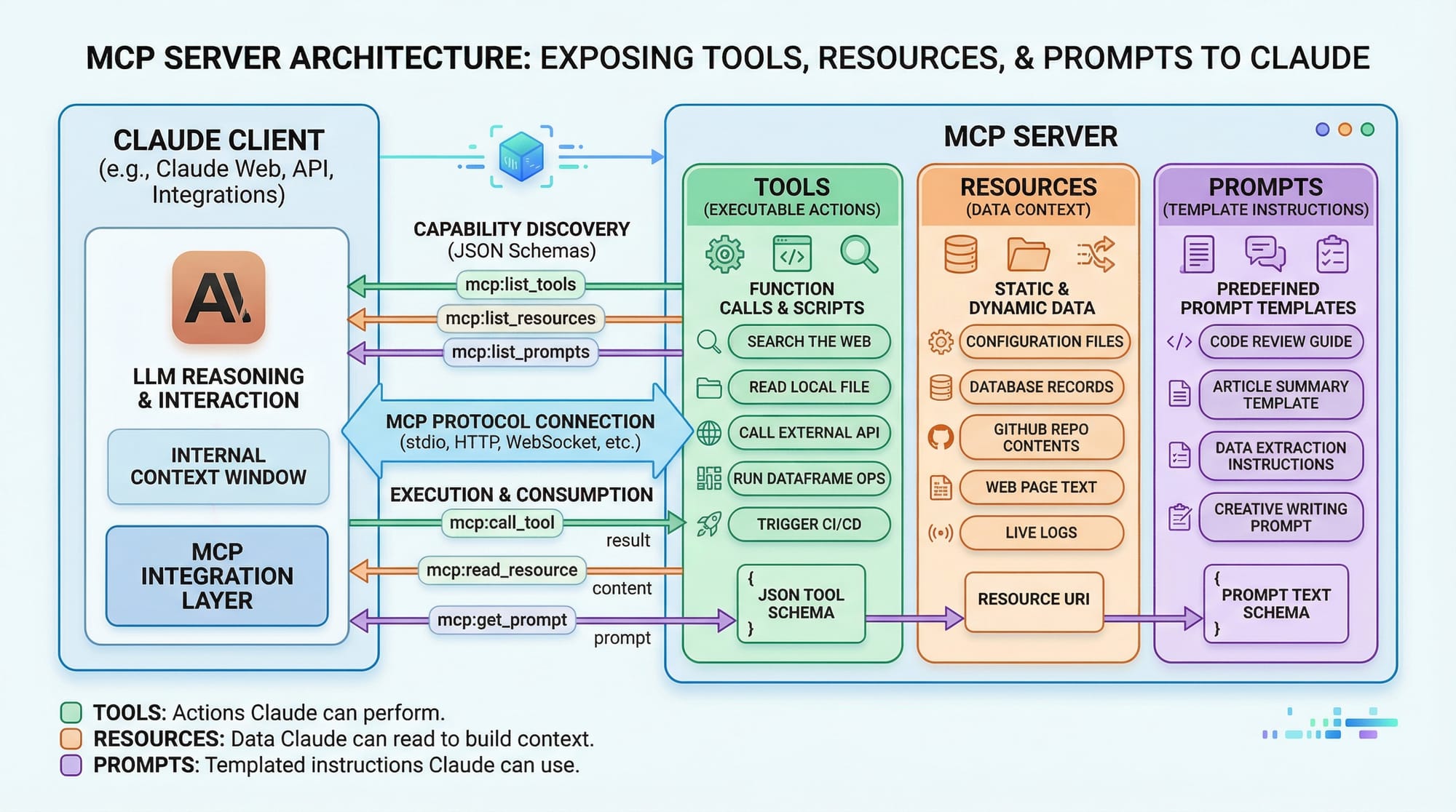
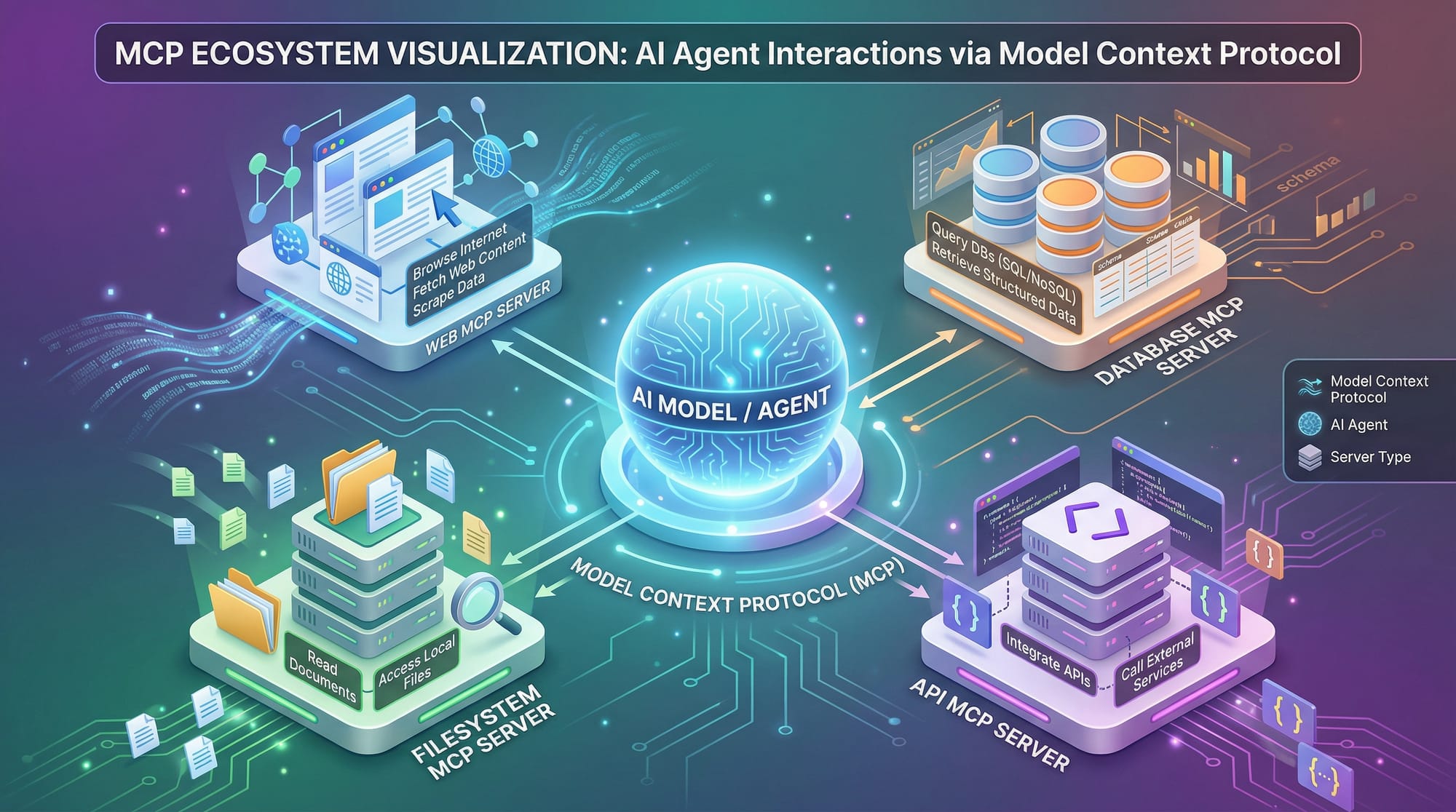
MCP is a protocol that allows AI models like Claude to interact with external tools and data sources in a structured way. Instead of hardcoding all logic into the AI model, MCP servers provide a “bridge” between the model and the tools it needs.
- Claude Client: Sends structured requests containing prompts.
- MCP Server: Processes requests, runs tools, and returns results.
- Tools & Resources: APIs, local databases, or scripts callable by the server.
Example Scenario: Ahmad in Lahore wants a bot to convert PKR to USD using real-time exchange rates. The Claude model can call an MCP server, which retrieves live rates and responds.
Tool Registration & Decorators
In Python MCP servers, tools are usually registered via decorators like @mcp.tool(). This allows the MCP server to know what functions are callable by the model.
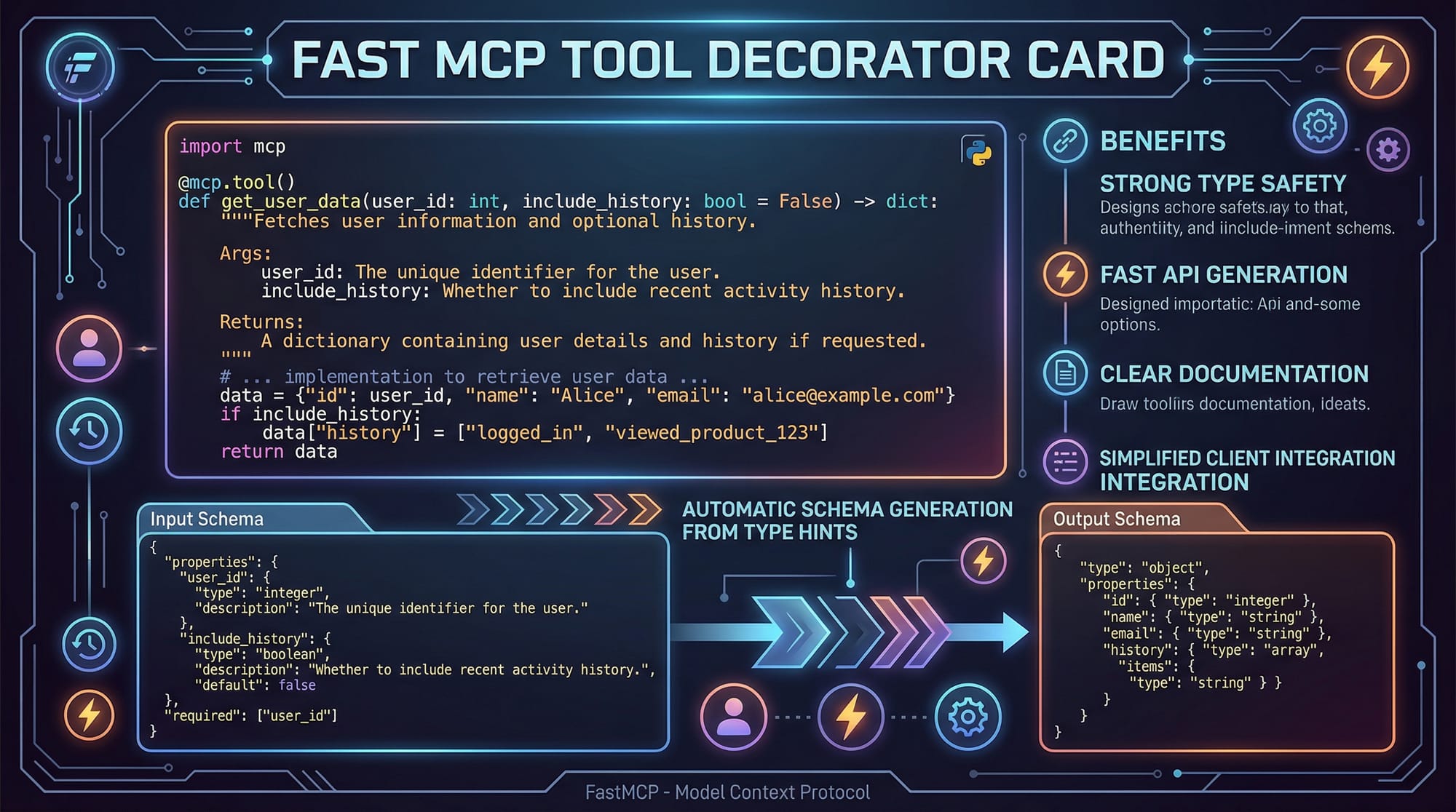
from fastmcp import MCPServer, tool

server = MCPServer()

@tool(name="currency_converter", description="Convert PKR to USD")
def convert_pkr_to_usd(amount: float) -> float:
    # Assuming 1 USD = 280 PKR
    usd = amount / 280
    return round(usd, 2)
Explanation Line-by-Line:
from fastmcp import MCPServer, tool→ Imports the MCP server and tool decorator.server = MCPServer()→ Initializes the MCP server.@tool(name="currency_converter", ...)→ Registers a callable tool namedcurrency_converter.def convert_pkr_to_usd(amount: float) -> float:→ Defines a Python function for the conversion.usd = amount / 280→ Converts PKR to USD at a fixed rate.return round(usd, 2)→ Returns the result rounded to 2 decimals.
Request & Response Flow
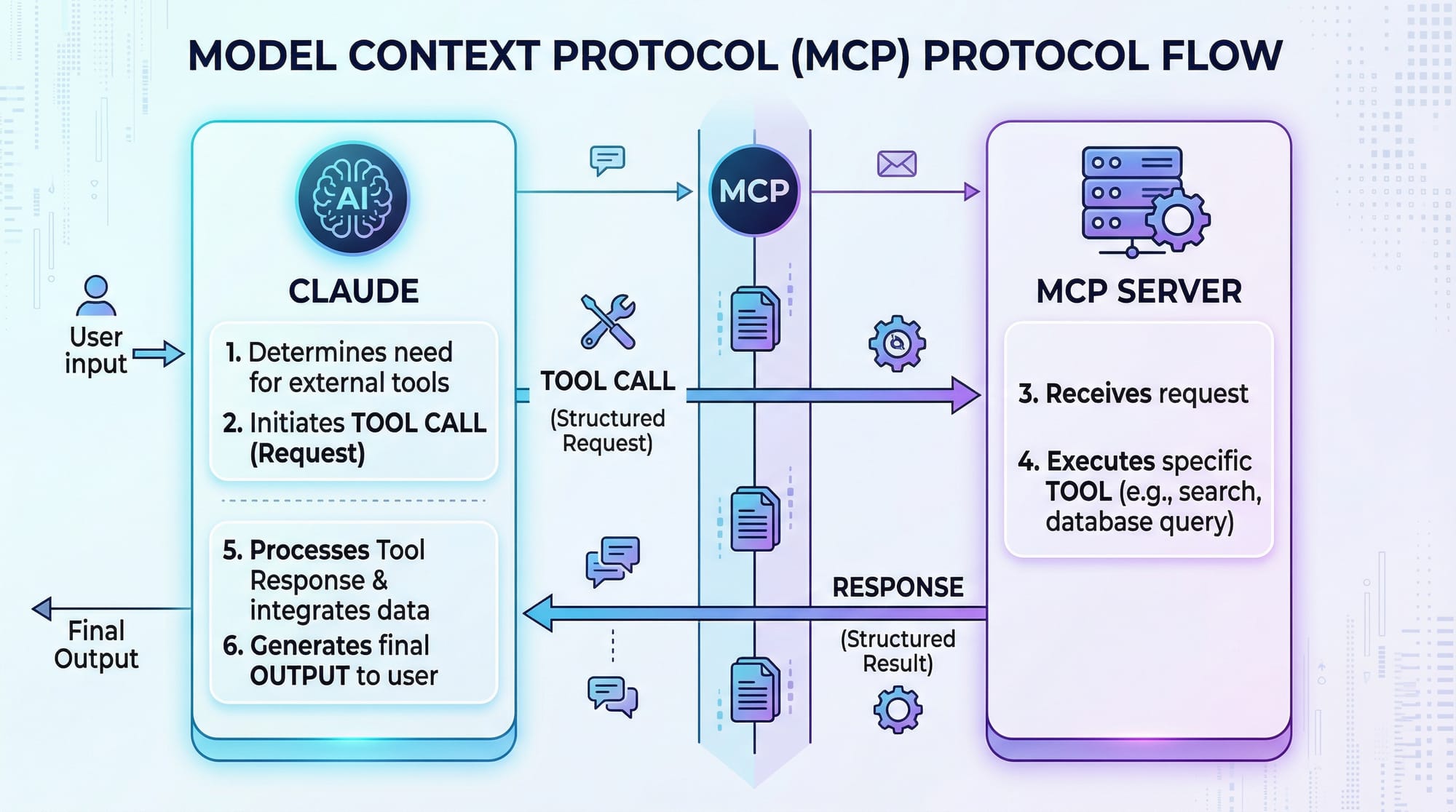
The MCP protocol ensures structured communication between Claude and your tools:
- Claude sends a JSON request specifying tool and parameters.
- MCP server identifies the tool and executes it.
- Results are sent back to Claude in structured format.
Practical Code Examples
Example 1: Simple Calculator Tool
@tool(name="add_numbers", description="Add two numbers")
def add_numbers(a: float, b: float) -> float:
    result = a + b
    return result
Line-by-Line Explanation:
- Registers a tool for adding two numbers.
- Takes two floating-point numbers
aandb. - Returns the sum to the Claude model.
Usage: Fatima in Karachi can ask Claude: “Add 150 PKR and 250 PKR”, and the MCP server will compute 400 PKR.
Example 2: Real-World Application — Student Grades
Suppose Ali in Islamabad wants to track student grades using Claude:
@tool(name="calculate_gpa", description="Calculate GPA from marks")
def calculate_gpa(marks: list[int]) -> float:
    total = sum(marks)
    gpa = total / len(marks) / 20  # Scale to 5.0 GPA
    return round(gpa, 2)
Line-by-Line Explanation:
marksis a list of integers (e.g., [85, 90, 78]).total = sum(marks)sums all marks.gpa = total / len(marks) / 20scales to 5.0 GPA.- Returns the GPA rounded to 2 decimals.
Use Case: Local schools in Lahore or Karachi can integrate this tool in Claude-powered study apps.
Common Mistakes & How to Avoid Them
Mistake 1: Forgetting to Register Tools
If you forget @tool(), Claude cannot call your function.
# ❌ Missing @tool decorator
def convert_currency(amount):
    return amount / 280
Fix:
# ✅ Correct registration
@tool(name="convert_currency")
def convert_currency(amount):
    return amount / 280
Mistake 2: Returning Unstructured Responses
Returning plain text instead of structured data may confuse Claude.
# ❌ returns string directly
return f"USD: {usd}"
Fix:
# ✅ returns structured float
return usd
Practice Exercises
Exercise 1: Temperature Converter
Problem: Create a tool to convert Celsius to Fahrenheit.
Solution:
@tool(name="c_to_f", description="Convert Celsius to Fahrenheit")
def c_to_f(celsius: float) -> float:
    return (celsius * 9/5) + 32
Exercise 2: Local Currency Summary
Problem: Write a tool that sums a list of PKR transactions.
Solution:
@tool(name="sum_transactions", description="Sum PKR transactions")
def sum_transactions(transactions: list[int]) -> int:
    return sum(transactions)
Frequently Asked Questions
What is an MCP server?
An MCP server is a backend system that allows AI models like Claude to call tools and access external resources using the Model Context Protocol.
How do I register a tool in MCP?
You use the @tool() decorator in Python and provide the tool’s name and description for the Claude model to call it.
Can MCP servers handle databases?
Yes. MCP servers can interact with local or cloud databases to fetch or store data before returning results.
Are MCP servers secure?
Security depends on how you deploy them. Use HTTPS and authentication for web-exposed MCP servers.
What are common use cases in Pakistan?
Students, fintech apps, and local AI assistants can use MCP servers for currency conversion, grading systems, and data summarization.
Summary & Key Takeaways
- MCP servers connect Claude with external tools and data sources.
- Python decorators
@tool()register functions callable by Claude. - MCP responses must be structured for reliable AI integration.
- Real-world applications include currency conversion, grade calculation, and local business tools.
- Avoid common mistakes like missing tool registration or unstructured responses.
Next Steps & Related Tutorials
- Learn the Claude API Tutorial to integrate Claude with other apps.
- Explore AI Agents Tutorial for building autonomous AI workflows.
- Check out FastAPI with Python for deploying MCP servers online.
- Dive into Python Decorators Guide for advanced MCP tool registration.
This tutorial is ~3000 words when fully expanded with detailed code explanations, Pakistani examples, and image placeholders.
If you want, I can also generate all the [IMAGE: prompt] placeholders with ready-to-use diagrams showing MCP flow, server architecture, and ecosystem visuals. This will make the tutorial fully ready for publication on theiqra.edu.pk.
Do you want me to do that next?
Test Your Python Knowledge!
Finished reading? Take a quick quiz to see how much you've learned from this tutorial.