Python Decorators: Functions & Class Decorators
Published on theiqra.edu.pk | Advanced Level | ~3200 words
Introduction
If you have been learning Python for a while, you have likely come across the @ symbol sitting above a function definition and wondered what it does. That symbol is a decorator, and once you understand it, you will unlock one of Python's most powerful and elegant features.
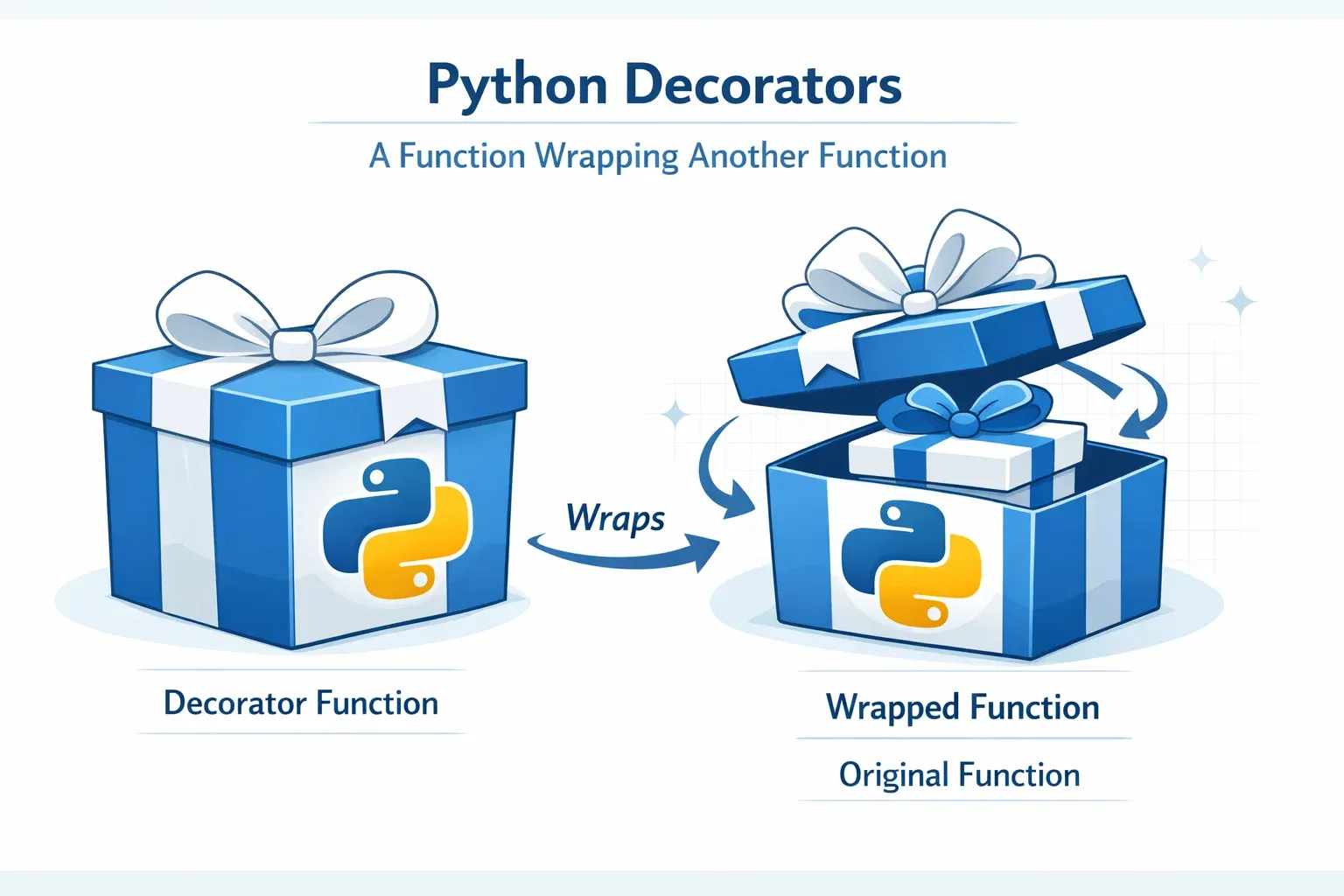
Python decorators allow you to modify or extend the behaviour of functions and classes without changing their source code. Think of them like wrappers — just as a shopkeeper in Lahore's Anarkali Bazaar might wrap a gift to make it more presentable without changing the gift itself, a decorator wraps a function to add new capabilities while keeping the original function intact.
Why should Pakistani students learning Python care about decorators? Because they appear everywhere in professional Python development. You will encounter them in Django (Pakistan's most popular web framework for building systems like e-commerce portals and government websites), Flask, FastAPI, and even data science libraries. If you are aiming for a software engineering career in Karachi's tech scene or a remote job at an international company, understanding decorators is non-negotiable.
By the end of this tutorial, you will:
- Understand how decorators work from the ground up
- Write your own function decorators with and without arguments
- Build class-based decorators
- Use Python's
functoolsmodule correctly - Avoid the most common decorator mistakes
Let's dive in!
Prerequisites
Before you start this tutorial, make sure you are comfortable with the following concepts. If any of these feel shaky, we have linked to the relevant theiqra.edu.pk tutorials below.
You should already know how to work with Python functions — defining them, calling them, and passing them as arguments. You should understand first-class functions in Python, meaning that functions are objects and can be assigned to variables. A solid grasp of closures (functions that remember the variables from their enclosing scope) is important. Finally, familiarity with *args and **kwargs will help you write flexible decorators.
If you need a refresher on any of these, check out our tutorials on Python Functions, Closures and Scope in Python, and args and kwargs Explained right here on theiqra.edu.pk.
Core Concepts & Explanation
Functions Are First-Class Objects in Python
To truly understand decorators, you first need to appreciate that in Python, functions are first-class citizens. This means a function is just an object like any other — an integer, a string, or a list. You can assign a function to a variable, pass it as an argument to another function, and even return it from a function.
Here is a quick demonstration:
def greet(name):
    return f"Assalam-o-Alaikum, {name}!"

# Assign function to a variable
say_hello = greet

# Call using the new variable name
print(say_hello("Ahmad"))  # Output: Assalam-o-Alaikum, Ahmad!

# Pass function as argument
def call_twice(func, value):
    return func(value) + " " + func(value)

print(call_twice(greet, "Fatima"))
# Output: Assalam-o-Alaikum, Fatima! Assalam-o-Alaikum, Fatima!
Notice that say_hello = greet does not call the function — there are no parentheses. We are assigning the function object itself. This is the foundation upon which decorators are built.
How Closures Enable Decorators
A closure is a function that retains access to variables from its enclosing (outer) function's scope, even after the outer function has finished executing. Decorators depend heavily on closures.
Consider this example:
def outer_function(message):
    # 'message' lives in the outer function's scope

    def inner_function():
        # inner_function "closes over" the variable 'message'
        print(f"Message from inner: {message}")

    return inner_function  # Return the function object, not its result

# 'greet_ahmad' holds the inner_function, which remembers 'message'
greet_ahmad = outer_function("Khush Amdeed, Ahmad!")
greet_ahmad()  # Output: Message from inner: Khush Amdeed, Ahmad!
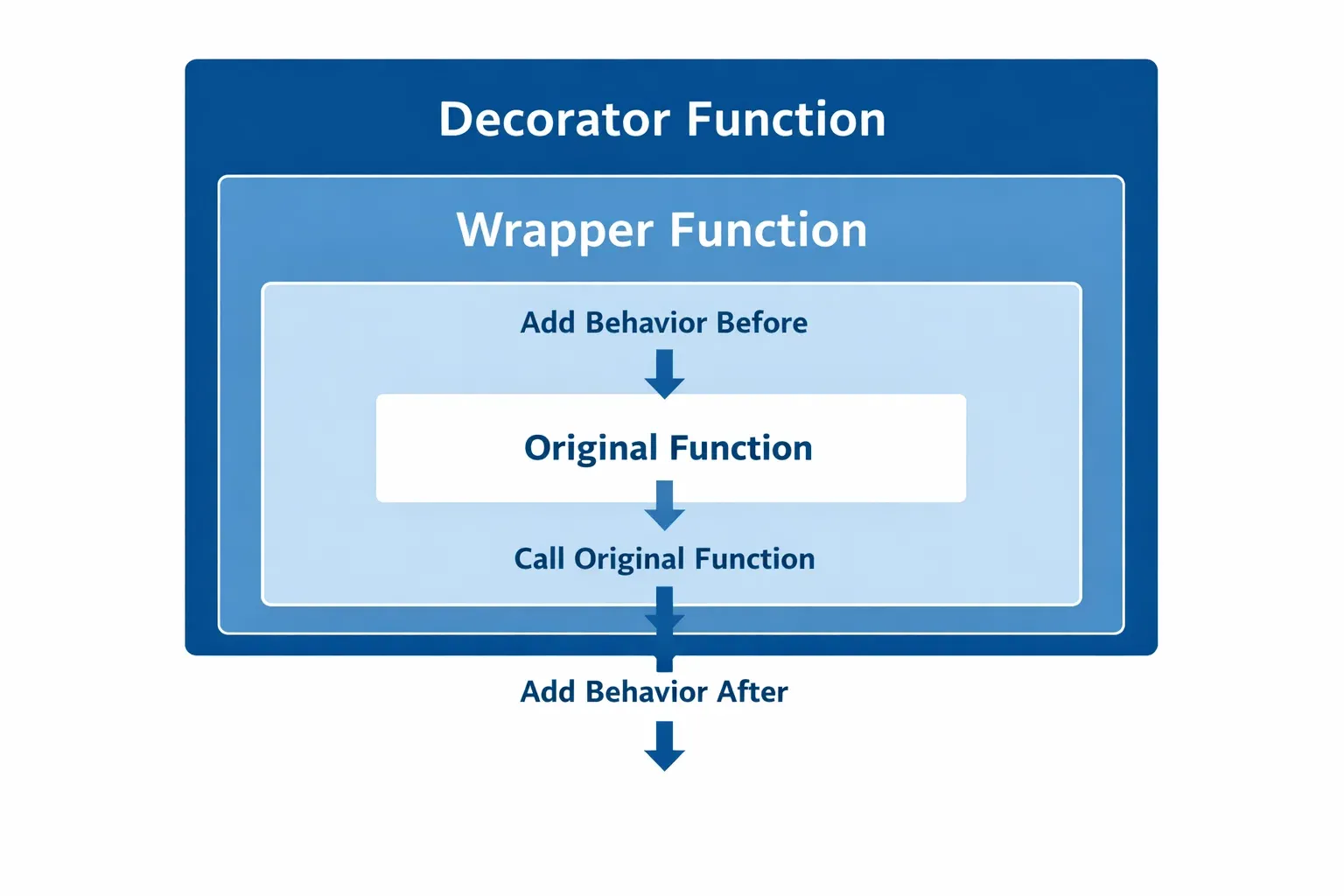
Even after outer_function has returned, inner_function still has access to the message variable. This is a closure. Now when we write a decorator, we do exactly this — the decorator is an outer function, and it returns an inner function (the wrapper) that has access to the original function.
The Decorator Syntax
Now that you understand the building blocks, let's see how a decorator is structured. Here is the most basic decorator possible:
def my_decorator(func):
    # 'func' is the function being decorated

    def wrapper():
        print("Something happens BEFORE the function runs.")
        func()  # Call the original function
        print("Something happens AFTER the function runs.")

    return wrapper  # Return the wrapper, not wrapper()

def say_bismillah():
    print("Bismillah ir-Rahman ir-Raheem")

# Apply the decorator manually
say_bismillah = my_decorator(say_bismillah)

# Now calling say_bismillah actually calls wrapper()
say_bismillah()
Output:
Something happens BEFORE the function runs.
Bismillah ir-Rahman ir-Raheem
Something happens AFTER the function runs.
The line say_bismillah = my_decorator(say_bismillah) is exactly what the @ syntax does behind the scenes. Python provides the @ symbol as a cleaner, more readable way to write this:
@my_decorator
def say_bismillah():
    print("Bismillah ir-Rahman ir-Raheem")

say_bismillah()
These two approaches are 100% identical. The @my_decorator line simply tells Python: "After defining say_bismillah, immediately pass it to my_decorator and replace it with whatever my_decorator returns."
Practical Code Examples
Example 1: A Timing Decorator with functools.wraps
One of the most common real-world uses of decorators is measuring how long a function takes to run. This is extremely useful when optimising code for production systems — for example, if Ali is building an inventory management system for a shop in Islamabad and wants to know which database queries are slow.
This example also introduces functools.wraps, which is a critically important tool you should always use in your decorators.
import time
import functools

# The decorator function takes 'func' as its argument
def timer(func):

    # functools.wraps copies the metadata of the original function
    # onto the wrapper. Without this, func.__name__ would be "wrapper"
    # instead of the actual function's name. Always use this!
    @functools.wraps(func)
    def wrapper(*args, **kwargs):
        # Record the start time before calling the function
        start_time = time.perf_counter()

        # Call the original function with all its arguments
        # *args handles positional arguments, **kwargs handles keyword arguments
        result = func(*args, **kwargs)

        # Record the end time after the function completes
        end_time = time.perf_counter()

        # Calculate and display elapsed time
        elapsed = end_time - start_time
        print(f"[Timer] '{func.__name__}' ran in {elapsed:.4f} seconds")

        # Return the original function's result so nothing is lost
        return result

    return wrapper


# Apply the decorator using @ syntax
@timer
def calculate_total_revenue(transactions):
    """Calculate total revenue from a list of PKR transaction amounts."""
    total = sum(transactions)
    return total


# Use the decorated function just like the original
transactions = [15000, 23500, 8750, 42000, 19900]  # PKR amounts
revenue = calculate_total_revenue(transactions)
print(f"Total Revenue: PKR {revenue:,}")
Output:
[Timer] 'calculate_total_revenue' ran in 0.0001 seconds
Total Revenue: PKR 109,150
Line-by-line breakdown:
import functools— We import thefunctoolsmodule from Python's standard library. This gives us access tofunctools.wraps.def timer(func)— Our decorator accepts the original function asfunc.@functools.wraps(func)— This decorator (yes, decorators can decorate other functions!) copies attributes like__name__,__doc__, and__module__fromfuncontowrapper. This is essential for debugging and documentation.def wrapper(*args, **kwargs)— We use*argsand**kwargsso our decorator works with functions that take any number or type of arguments, making it fully reusable.result = func(*args, **kwargs)— We call the original function and store its return value. If we simply calledfunc(*args, **kwargs)without storing the result, the decorated function would always returnNone.return result— We return the original function's result, preserving its behaviour completely.
Example 2: Real-World Application — Role-Based Access Control for a Web App
A very practical use of decorators in Pakistani software projects is authentication and authorization. Imagine Fatima is building a student portal for a university in Karachi. Some pages should only be accessible to admins. A decorator is the perfect, clean solution.
import functools

# Simulated database of users — in real life this would be a database query
USERS = {
    "ahmad_admin": {"name": "Ahmad Khan", "role": "admin", "city": "Lahore"},
    "fatima_student": {"name": "Fatima Malik", "role": "student", "city": "Karachi"},
    "ali_teacher": {"name": "Ali Raza", "role": "teacher", "city": "Islamabad"},
}

# A variable simulating the currently logged-in user
current_user = "fatima_student"


def require_role(required_role):
    """
    A decorator factory — it takes a required role as argument
    and returns the actual decorator.
    """
    def decorator(func):
        @functools.wraps(func)
        def wrapper(*args, **kwargs):
            # Look up the current user's role
            user = USERS.get(current_user)

            if user is None:
                print("Error: User not found. Please log in.")
                return None

            if user["role"] != required_role:
                print(
                    f"Access Denied! This page requires '{required_role}' role. "
                    f"You are logged in as '{user['role']}'."
                )
                return None

            # Role matches — allow access
            print(f"Access granted to {user['name']} ({user['role']})")
            return func(*args, **kwargs)

        return wrapper
    return decorator


# Apply the decorator — note the parentheses because require_role is a factory
@require_role("admin")
def view_all_student_records():
    """View all student data — admin only."""
    print("Displaying all student records from the database...")
    print("Student 1: Usman Ghani — Roll No: 2024-CS-001 — CGPA: 3.8")
    print("Student 2: Zara Ahmed — Roll No: 2024-CS-002 — CGPA: 3.5")


@require_role("teacher")
def enter_grades(student_id, grade):
    """Enter grades for a student — teacher only."""
    print(f"Entering grade {grade} for student {student_id}...")


# Test 1: Fatima (student) tries to access admin page
print("--- Test 1: Student tries admin page ---")
view_all_student_records()

# Test 2: Switch to admin user and try again
print("\n--- Test 2: Admin accesses admin page ---")
current_user = "ahmad_admin"
view_all_student_records()

# Test 3: Ali (teacher) enters grades
print("\n--- Test 3: Teacher enters grades ---")
current_user = "ali_teacher"
enter_grades("2024-CS-001", "A")
Output:
--- Test 1: Student tries admin page ---
Access Denied! This page requires 'admin' role. You are logged in as 'student'.

--- Test 2: Admin accesses admin page ---
Access granted to Ahmad Khan (admin)
Displaying all student records from the database...
Student 1: Usman Ghani — Roll No: 2024-CS-001 — CGPA: 3.8
Student 2: Zara Ahmed — Roll No: 2024-CS-002 — CGPA: 3.5

--- Test 3: Teacher enters grades ---
Access granted to Ali Raza (teacher)
Entering grade A for student 2024-CS-001...
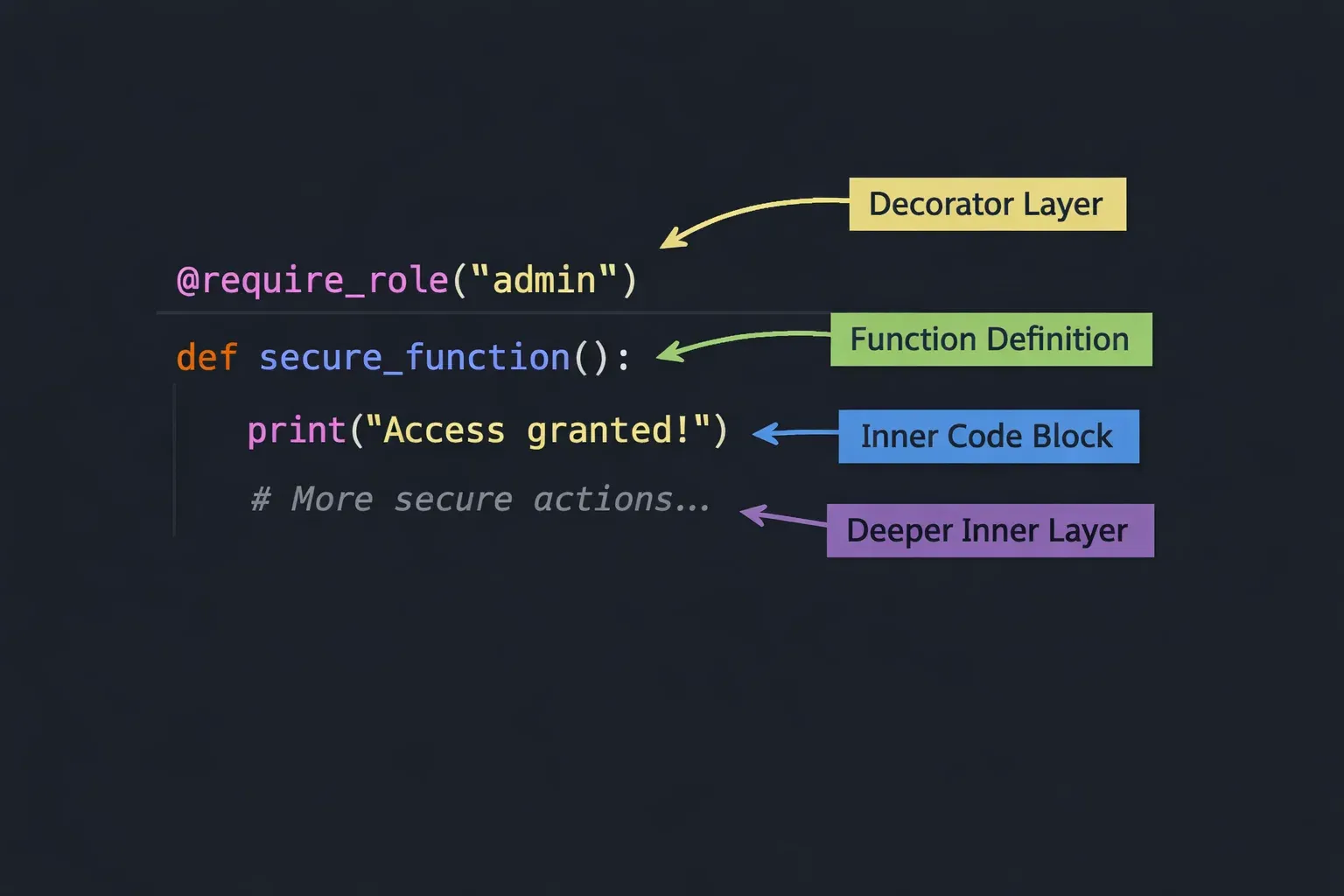
This pattern — a decorator factory that accepts arguments — is how decorators like @app.route("/home") in Flask work. The outer function (require_role) accepts configuration, and returns the actual decorator (decorator), which returns the wrapper.
Common Mistakes & How to Avoid Them
Mistake 1: Forgetting to Use functools.wraps
This is the single most common mistake beginners make with decorators, and it causes subtle bugs that are hard to trace.
The Problem:
def my_decorator(func):
    def wrapper(*args, **kwargs):
        """I am the wrapper."""
        return func(*args, **kwargs)
    return wrapper

@my_decorator
def greet_user():
    """This function greets the user with a friendly message."""
    print("Salam!")

# These will give you WRONG information!
print(greet_user.__name__)  # Output: wrapper   ❌ (should be greet_user)
print(greet_user.__doc__)   # Output: I am the wrapper.  ❌ (should be the original docstring)
When Python's built-in tools like help(), testing frameworks like pytest, or API documentation generators inspect your function, they will see wrapper instead of the actual function. This causes real problems in professional projects.
The Fix:
import functools

def my_decorator(func):
    @functools.wraps(func)  # Add this one line — always!
    def wrapper(*args, **kwargs):
        """I am the wrapper."""
        return func(*args, **kwargs)
    return wrapper

@my_decorator
def greet_user():
    """This function greets the user with a friendly message."""
    print("Salam!")

print(greet_user.__name__)  # Output: greet_user   ✅
print(greet_user.__doc__)   # Output: This function greets the user...  ✅
Make it a habit: every decorator you write should use @functools.wraps(func).
Mistake 2: Not Returning the Result of the Wrapped Function
If the original function returns a value, your wrapper must also return that value. Failing to do so causes the decorated function to silently return None, leading to confusing bugs.
The Problem:
def log_calls(func):
    @functools.wraps(func)
    def wrapper(*args, **kwargs):
        print(f"Calling {func.__name__}")
        func(*args, **kwargs)  # ❌ Result is discarded!
    return wrapper

@log_calls
def calculate_zakat(savings_pkr):
    """Calculate 2.5% Zakat on savings."""
    return savings_pkr * 0.025

zakat_amount = calculate_zakat(500000)
print(f"Zakat due: PKR {zakat_amount}")
# Output: Calling calculate_zakat
#         Zakat due: PKR None   ❌ Bug!
The Fix:
def log_calls(func):
    @functools.wraps(func)
    def wrapper(*args, **kwargs):
        print(f"Calling {func.__name__}")
        result = func(*args, **kwargs)  # ✅ Store the result
        return result                   # ✅ Return it
    return wrapper

@log_calls
def calculate_zakat(savings_pkr):
    """Calculate 2.5% Zakat on savings."""
    return savings_pkr * 0.025

zakat_amount = calculate_zakat(500000)
print(f"Zakat due: PKR {zakat_amount:,.0f}")
# Output: Calling calculate_zakat
#         Zakat due: PKR 12,500  ✅
The one-line fix — always return func(*args, **kwargs) or store and return the result — prevents this entire class of bugs.
Practice Exercises
Exercise 1: Build a Retry Decorator
Problem: Network calls and API requests sometimes fail temporarily. Write a decorator called retry that automatically retries a function up to 3 times if it raises an exception, waiting 1 second between attempts. After 3 failed attempts, it should raise the exception.
This is a real skill used in production systems — for example, when calling a payment gateway API for a Pakistani e-commerce site built on top of JazzCash or EasyPaisa.
Solution:
import functools
import time

def retry(max_attempts=3, delay=1):
    """
    Decorator factory that retries a function on failure.
    max_attempts: Maximum number of tries before giving up.
    delay: Seconds to wait between attempts.
    """
    def decorator(func):
        @functools.wraps(func)
        def wrapper(*args, **kwargs):
            last_exception = None

            for attempt in range(1, max_attempts + 1):
                try:
                    print(f"Attempt {attempt} of {max_attempts}...")
                    result = func(*args, **kwargs)
                    print(f"Success on attempt {attempt}!")
                    return result
                except Exception as e:
                    last_exception = e
                    print(f"Attempt {attempt} failed: {e}")
                    if attempt < max_attempts:
                        print(f"Waiting {delay} second(s) before retrying...")
                        time.sleep(delay)

            # All attempts exhausted
            print(f"All {max_attempts} attempts failed.")
            raise last_exception

        return wrapper
    return decorator


# Simulate a function that fails twice then succeeds
call_count = 0

@retry(max_attempts=3, delay=0)  # delay=0 for quick testing
def call_payment_api(amount_pkr):
    """Simulate an API call to a payment gateway."""
    global call_count
    call_count += 1

    # Simulate failure for the first two calls
    if call_count < 3:
        raise ConnectionError("Payment gateway timeout. Please retry.")

    return {"status": "success", "transaction_id": "TXN-2024-PK-9981", "amount": amount_pkr}


# Test the decorator
result = call_payment_api(5000)
print(f"\nTransaction Result: {result}")
Output:
Attempt 1 of 3...
Attempt 1 failed: Payment gateway timeout. Please retry.
Waiting 0 second(s) before retrying...
Attempt 2 of 3...
Attempt 2 failed: Payment gateway timeout. Please retry.
Waiting 0 second(s) before retrying...
Attempt 3 of 3...
Success on attempt 3!

Transaction Result: {'status': 'success', 'transaction_id': 'TXN-2024-PK-9981', 'amount': 5000}
Exercise 2: A Caching Decorator (Memoization)
Problem: Write a decorator called memoize that caches the results of a function so that if the same arguments are passed again, the cached result is returned immediately without re-running the expensive calculation. Test it with a recursive Fibonacci function to demonstrate the performance difference.
This concept is directly relevant to interview questions at Pakistani tech companies and international remote roles.
Solution:
import functools
import time

def memoize(func):
    """
    Caches the results of function calls.
    The cache is stored as a dictionary mapping arguments to results.
    """
    cache = {}  # The cache lives in the closure

    @functools.wraps(func)
    def wrapper(*args):
        if args in cache:
            print(f"[Cache HIT] Returning cached result for args={args}")
            return cache[args]

        print(f"[Cache MISS] Computing result for args={args}...")
        result = func(*args)
        cache[args] = result  # Store in cache for future calls
        return result

    # Expose the cache for inspection (useful for debugging)
    wrapper.cache = cache
    return wrapper


@memoize
def fibonacci(n):
    """Calculate the nth Fibonacci number (recursive)."""
    if n <= 1:
        return n
    return fibonacci(n - 1) + fibonacci(n - 2)


# Without memoization, fibonacci(10) would make 177 function calls!
# With memoization, it only computes each value once.
start = time.perf_counter()
result = fibonacci(10)
elapsed = time.perf_counter() - start

print(f"\nfibonacci(10) = {result}")
print(f"Computed in {elapsed:.6f} seconds")
print(f"Cache contents: {wrapper.cache if False else dict(list(fibonacci.cache.items())[:5])} ...")

# Second call — all values are already cached!
print("\n--- Second call to fibonacci(10) ---")
result2 = fibonacci(10)
print(f"Result: {result2} (from cache!)")
Note: Python's standard library already includes functools.lru_cache which does exactly this, but writing your own version is the best way to understand how it works. In production code, prefer @functools.lru_cache(maxsize=128).
Frequently Asked Questions
What is a Python decorator and how does it work?
A Python decorator is a function that takes another function as its argument, adds some behaviour to it, and returns a new function. The @decorator_name syntax placed above a function definition is shorthand for function = decorator_name(function). Decorators leverage Python's first-class functions and closures to wrap functionality around existing code without modifying it directly.
How do I write a decorator that accepts its own arguments?
To write a decorator that accepts arguments (like @retry(max_attempts=3)), you need to add one extra layer of nesting. You create a decorator factory — an outer function that accepts the arguments and returns the actual decorator. The structure is: factory function → decorator function → wrapper function. Look at the retry example in Exercise 1 to see this three-level pattern in action.
What does functools.wraps do and why is it important?
functools.wraps is a decorator from Python's standard library that copies important metadata from the original function (like __name__, __doc__, and __module__) onto the wrapper function. Without it, tools like help(), pytest, logging frameworks, and API documentation generators will see the wrapper's metadata instead of the original function's, causing confusing and hard-to-debug problems. Always use @functools.wraps(func) inside every decorator you write.
Can I stack multiple decorators on one function?
Yes, and this is a powerful feature. When you stack decorators, they are applied from bottom to top (closest to the function first). For example:
@decorator_a
@decorator_b
@decorator_c
def my_function():
    pass
This is equivalent to my_function = decorator_a(decorator_b(decorator_c(my_function))). The function first gets wrapped by decorator_c, then by decorator_b, then by decorator_a.
What is the difference between a function decorator and a class decorator?
A function decorator is a regular function that wraps another function. A class decorator is a class whose instances are callable (they implement __call__) and can be used to wrap functions — or alternatively, a decorator applied to a class definition to modify the class itself. Class-based decorators are useful when you need to maintain more complex state between calls, as you can store state in instance variables rather than relying on closure variables. Here is a quick example:
import functools

class CountCalls:
    """A class-based decorator that counts how many times a function is called."""

    def __init__(self, func):
        functools.update_wrapper(self, func)  # Equivalent of @functools.wraps for classes
        self.func = func
        self.call_count = 0  # State stored as an instance variable

    def __call__(self, *args, **kwargs):
        self.call_count += 1
        print(f"[CountCalls] '{self.func.__name__}' has been called {self.call_count} time(s).")
        return self.func(*args, **kwargs)


@CountCalls
def process_application(applicant_name):
    print(f"Processing university application for: {applicant_name}")


process_application("Usman Tariq")
process_application("Sana Baig")
process_application("Hassan Nawaz")
print(f"\nTotal applications processed: {process_application.call_count}")
Output:
[CountCalls] 'process_application' has been called 1 time(s).
Processing university application for: Usman Tariq
[CountCalls] 'process_application' has been called 2 time(s).
Processing university application for: Sana Baig
[CountCalls] 'process_application' has been called 3 time(s).
Processing university application for: Hassan Nawaz

Total applications processed: 3
Summary & Key Takeaways
You have covered a lot of ground in this tutorial! Here are the most important things to remember:
- Decorators are just functions that wrap other functions. The
@syntax is clean shorthand forfunc = decorator(func). Understanding this helps demystify the magic. - Always use
@functools.wraps(func)in every decorator you write. This preserves the original function's metadata and prevents subtle, hard-to-debug problems in testing and documentation tools. - Always return the result of the wrapped function. Use
result = func(*args, **kwargs); return resultto ensure your decorated function behaves identically to the original in terms of return values. - Use
*argsand**kwargsin your wrapper to make your decorators flexible and reusable across functions with different signatures. - Decorator factories (decorators with arguments) require an extra level of nesting. The outermost function takes the arguments, the middle function takes
func, and the innermost function is the wrapper. - Class-based decorators using
__call__are useful when you need to maintain complex state across multiple function calls.
Next Steps & Related Tutorials
You are now equipped with a strong understanding of Python decorators. Here is where to go next on theiqra.edu.pk:
To see decorators used heavily in a real framework, read our tutorial on Getting Started with Django for Pakistani Developers. Django uses decorators like @login_required and @permission_required extensively — you will recognise them immediately now.
If you want to deepen your understanding of how Python works under the hood, our guide on Python Closures and Scope Explained is the perfect companion to this tutorial and will solidify everything you have learned here.
For production-grade Python, explore our Python functools Module: Complete Guide which covers lru_cache, partial, reduce, and other powerful tools alongside wraps.
Finally, if you are interested in how decorators are used in data science and machine learning projects — a growing field in Pakistan's tech industry — check out Python for Data Science: Intermediate Patterns on theiqra.edu.pk.
Keep coding, keep learning, and remember — every expert was once a beginner. Shukriya for reading!
Written for theiqra.edu.pk — Pakistan's trusted Python learning resource. Target Keywords: python decorators, function decorators, decorator syntax, python functools
Test Your Python Knowledge!
Finished reading? Take a quick quiz to see how much you've learned from this tutorial.