C++ STL Vectors Maps Sets & Algorithms

Introduction
The C++ Standard Template Library (STL) is one of the most powerful features of modern C++. It provides ready-made data structures and algorithms that allow developers to write efficient and clean code quickly. Instead of manually implementing complex data structures like dynamic arrays or search algorithms, the c++ stl provides tested and optimized implementations.
The STL is mainly built around three pillars:
- Containers – Store collections of data (vector, map, set, etc.)
- Iterators – Objects used to traverse containers
- Algorithms – Functions for searching, sorting, counting, and transforming data
For Pakistani students learning programming, mastering c++ vector, c++ map, c++ set, and STL algorithms can dramatically improve coding efficiency. Whether you are building university projects, competitive programming solutions, or real-world software, the c++ standard library helps you write less code while achieving better performance.
For example, instead of writing your own sorting logic, you can simply use the built-in sort() function from STL.
In this tutorial, we will explore:
- What the c++ stl is
- How vectors, maps, and sets work
- How to use powerful STL algorithms
- Practical coding examples relevant to Pakistani students
By the end, you will feel confident using the c++ standard library in real projects.
Prerequisites
Before learning c++ stl: vectors, maps, sets & algorithms, you should already understand:
- Basic C++ syntax
- Variables and data types
- Loops (for, while)
- Functions
- Arrays
- Basic understanding of Object-Oriented Programming
If you are new to memory management, we recommend first reading the tutorial on C++ Pointers on theiqra.edu.pk.
Core Concepts & Explanation
STL Containers: The Foundation of Data Storage
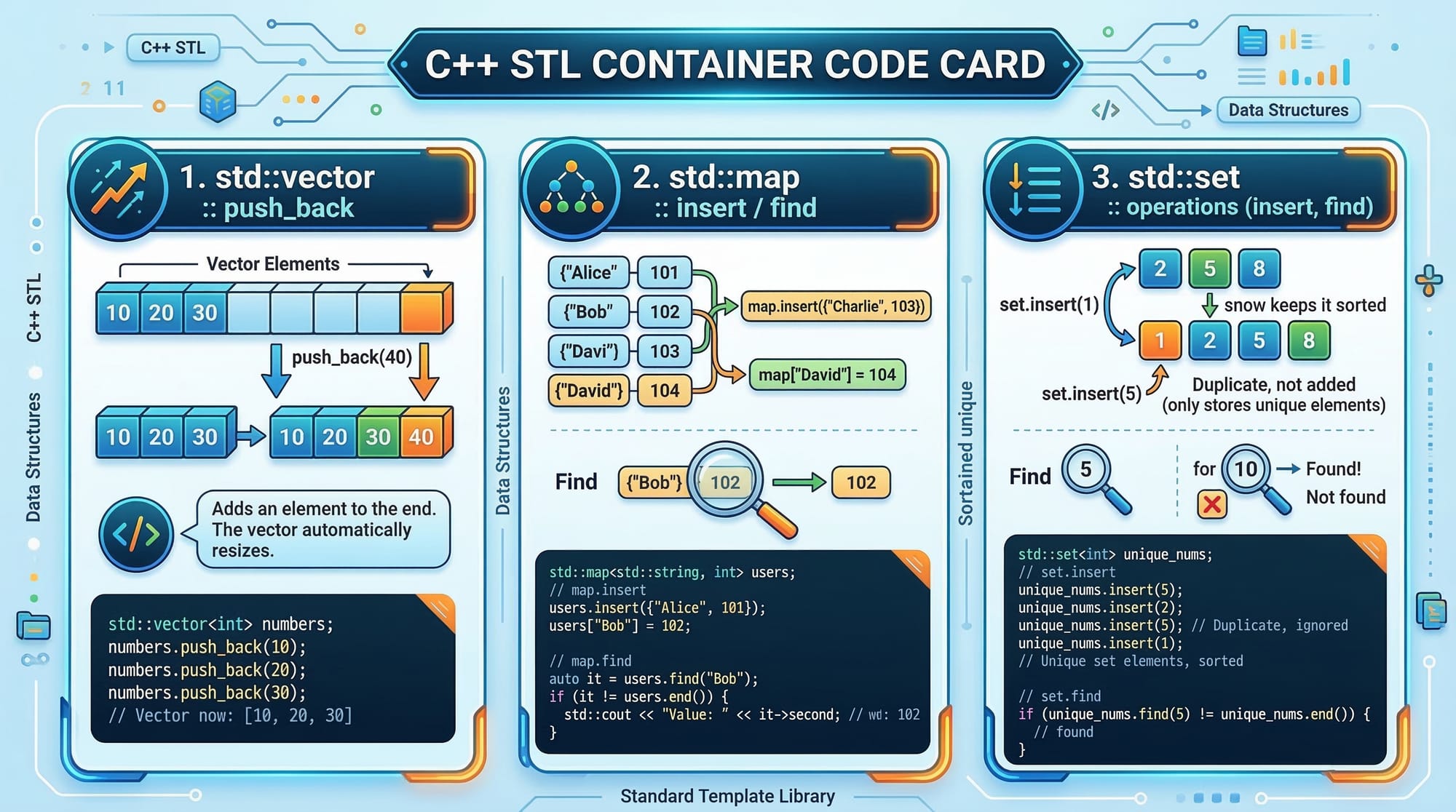
Containers store collections of objects. Instead of writing your own data structures, you can use built-in containers.
Common STL containers include:
| Container | Description |
|---|---|
| Vector | Dynamic array |
| Map | Key-value pairs |
| Set | Unique sorted values |
| List | Doubly linked list |
Example of a c++ vector:
#include <iostream>
#include <vector>

using namespace std;

int main() {
    vector<int> numbers;

    numbers.push_back(10);
    numbers.push_back(20);
    numbers.push_back(30);

    cout << numbers[0];

    return 0;
}
Explanation:
#include <vector>
Includes the vector container from the c++ standard library.vector<int> numbers;
Creates a dynamic array that stores integers.numbers.push_back(10);
Adds value 10 to the vector.numbers.push_back(20);
Adds value 20 to the vector.numbers.push_back(30);
Adds value 30 to the vector.cout << numbers[0];
Accesses the first element of the vector.
Unlike arrays, vectors automatically resize when new elements are added.
Associative Containers: Maps and Sets
Associative containers organize data using keys and automatically keep them sorted.
Two commonly used containers are:
- Map → key-value pairs
- Set → unique values
Example of a c++ map:
#include <iostream>
#include <map>

using namespace std;

int main() {

    map<string, int> studentMarks;

    studentMarks["Ali"] = 85;
    studentMarks["Fatima"] = 90;
    studentMarks["Ahmad"] = 88;

    cout << studentMarks["Fatima"];

    return 0;
}
Explanation:
#include <map>
Imports the map container.map<string, int> studentMarks;
Creates a map where key = string and value = integer.studentMarks["Ali"] = 85;
Stores Ali’s marks.studentMarks["Fatima"] = 90;
Stores Fatima’s marks.studentMarks["Ahmad"] = 88;
Stores Ahmad’s marks.cout << studentMarks["Fatima"];
Prints Fatima’s marks.
Maps are useful for storing structured information like student records, product prices, or bank accounts.
Example of a set:
#include <iostream>
#include <set>

using namespace std;

int main() {

    set<int> numbers;

    numbers.insert(5);
    numbers.insert(3);
    numbers.insert(5);

    for(int n : numbers) {
        cout << n << " ";
    }

    return 0;
}
Explanation:
set<int> numbers;
Creates a set that stores integers.numbers.insert(5);
Inserts value 5.numbers.insert(3);
Inserts value 3.numbers.insert(5);
Duplicate values are ignored.for(int n : numbers)
Iterates through the set.
Output:
3 5
Sets always store unique sorted values.
Practical Code Examples
Example 1: Student Marks Using Vector
Suppose a teacher in Lahore wants to store marks of students in a class.
#include <iostream>
#include <vector>

using namespace std;

int main() {

    vector<int> marks;

    marks.push_back(78);
    marks.push_back(85);
    marks.push_back(90);

    for(int i = 0; i < marks.size(); i++) {
        cout << marks[i] << endl;
    }

    return 0;
}
Explanation:
vector<int> marks;
Creates a vector to store marks.marks.push_back(78);
Adds the first student's marks.marks.push_back(85);
Adds the second student's marks.marks.push_back(90);
Adds the third student's marks.marks.size()
Returns the total number of elements.marks[i]
Accesses each element in the vector.
Output:
78
85
90
Example 2: Real-World Application — Karachi Shop Price List
Imagine a shop in Karachi that stores product prices in PKR.
#include <iostream>
#include <map>

using namespace std;

int main() {

    map<string, int> prices;

    prices["Rice"] = 250;
    prices["Sugar"] = 180;
    prices["Flour"] = 150;

    for(auto item : prices) {
        cout << item.first << " : PKR " << item.second << endl;
    }

    return 0;
}
Explanation:
map<string, int> prices;
Creates a price list.prices["Rice"] = 250;
Rice price is PKR 250.prices["Sugar"] = 180;
Sugar price is PKR 180.prices["Flour"] = 150;
Flour price is PKR 150.for(auto item : prices)
Iterates through the map.item.first
Product name.item.second
Price.
Output example:
Flour : PKR 150
Rice : PKR 250
Sugar : PKR 180
Using STL Algorithms
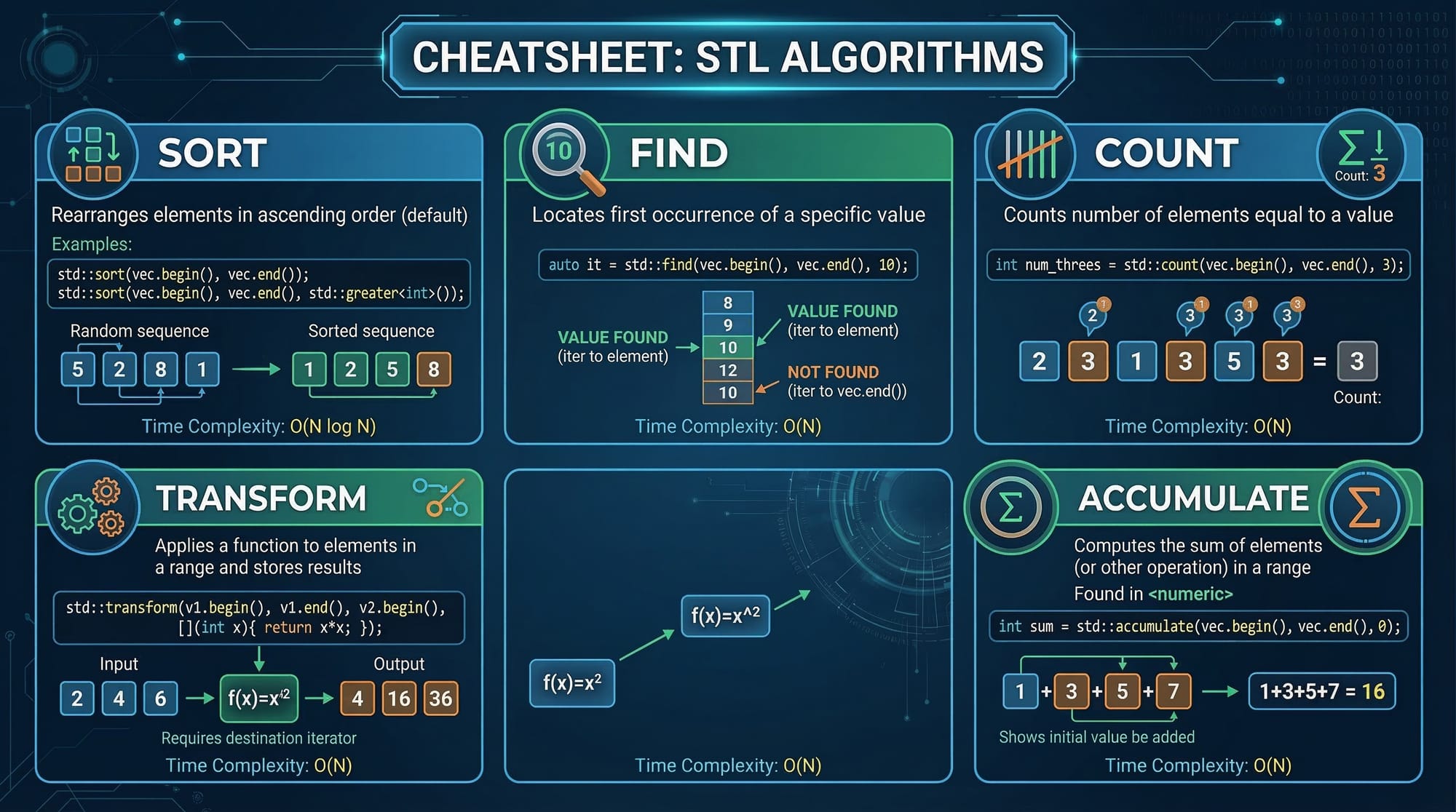
One of the best parts of the c++ standard library is built-in algorithms.
Example:
#include <iostream>
#include <vector>
#include <algorithm>

using namespace std;

int main() {

    vector<int> numbers = {5, 2, 9, 1, 3};

    sort(numbers.begin(), numbers.end());

    for(int n : numbers) {
        cout << n << " ";
    }

    return 0;
}
Explanation:
#include <algorithm>
Imports STL algorithms.vector<int> numbers = {5,2,9,1,3};
Creates a vector.sort(numbers.begin(), numbers.end());
Sorts the vector.numbers.begin()
Starting iterator.numbers.end()
Ending iterator.
Output:
1 2 3 5 9
Common Mistakes & How to Avoid Them
Mistake 1: Forgetting Required Headers
Incorrect code:
vector<int> nums;
Error occurs because the vector library was not included.
Fix:
#include <vector>
Always include the correct STL header file.
Mistake 2: Using Wrong Iterator Range
Incorrect:
sort(numbers.begin(), numbers.begin());
This sorts nothing.
Correct:
sort(numbers.begin(), numbers.end());
Always provide the correct iterator range.

Practice Exercises
Exercise 1: Store Student Names
Problem:
Create a vector that stores names of 5 students and print them.
Solution:
#include <iostream>
#include <vector>

using namespace std;

int main() {

    vector<string> students = {"Ali","Fatima","Ahmad","Sara","Bilal"};

    for(string name : students) {
        cout << name << endl;
    }

    return 0;
}
Explanation:
- A vector of strings stores student names.
- A range-based loop prints each name.
Exercise 2: Count Unique Numbers
Problem:
Use a set to store numbers and remove duplicates.
Solution:
#include <iostream>
#include <set>

using namespace std;

int main() {

    set<int> numbers = {5,3,5,2,3,1};

    for(int n : numbers) {
        cout << n << " ";
    }

    return 0;
}
Explanation:
- Set automatically removes duplicates.
- Iteration prints sorted unique values.
Output:
1 2 3 5
Frequently Asked Questions
What is C++ STL?
The C++ Standard Template Library is a collection of containers, algorithms, and iterators that help programmers manage data efficiently. It saves development time because developers do not need to implement common data structures from scratch.
Why should I learn C++ STL?
Learning c++ stl helps you write cleaner, faster, and more efficient programs. It is widely used in competitive programming, software development, and university assignments.
What is the difference between vector and array?
A vector is a dynamic array that can grow or shrink automatically. An array has a fixed size defined at compile time.
When should I use map instead of vector?
Use map when you need to associate values with unique keys, such as student IDs or product names. Vectors are better for simple ordered lists of data.
Are STL algorithms faster than custom code?
Yes. STL algorithms are usually highly optimized and tested, so they often perform better than beginner-written custom implementations.
Summary & Key Takeaways
- C++ STL provides powerful data structures and algorithms.
- Vectors are dynamic arrays that automatically resize.
- Maps store key-value pairs.
- Sets store unique sorted elements.
- STL algorithms like
sort()simplify complex operations. - Mastering the c++ standard library makes coding faster and more efficient.
Next Steps & Related Tutorials
To continue learning C++, explore these tutorials on theiqra.edu.pk:
- Learn memory handling in C++ Pointers
- Understand Java data structures in Java Collections
- Explore C++ OOP: Classes and Objects
- Build databases using C++ File Handling
These tutorials will help you become a stronger programmer and prepare you for advanced software development and competitive programming.
Test Your Python Knowledge!
Finished reading? Take a quick quiz to see how much you've learned from this tutorial.