C++ Pointers & Memory Management Explained
Introduction
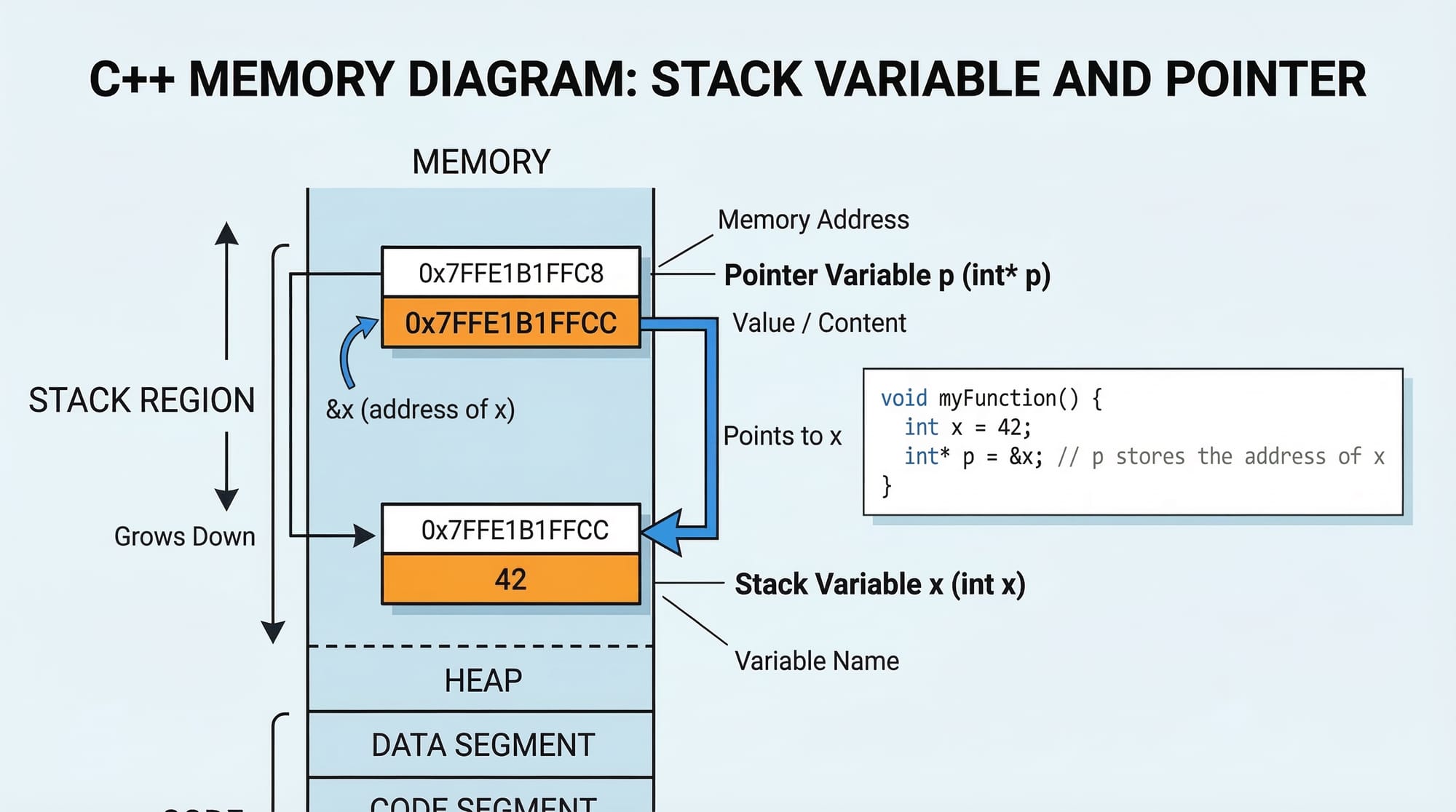
Understanding C++ pointers and C++ memory management is a crucial step for intermediate programmers who want to write efficient, high-performance software in C++. While beginners often focus on variables and functions, pointers unlock deeper control over how programs store and manipulate data in memory.
In simple terms, a pointer is a variable that stores the memory address of another variable. Instead of directly storing a value like 10 or "Hello", a pointer stores where that value lives in your computer’s memory.
Memory management in C++ refers to how your program allocates, uses, and frees memory during execution. Unlike many modern languages that automatically manage memory, C++ gives programmers direct control over it through features like dynamic allocation (new and delete).
For Pakistani students studying computer science in cities like Lahore, Karachi, or Islamabad, learning pointers is especially important because:
- Many university programming courses require it.
- It improves understanding of data structures like linked lists and trees.
- It prepares students for system programming, game development, and high-performance applications.
- It builds strong foundations for languages like C, Rust, and embedded systems programming.
By the end of this tutorial, you will clearly understand how pointers work, how memory is managed in C++, and how to avoid common mistakes.
Prerequisites
Before learning C++ pointers and memory management, you should already be familiar with the following topics:
- Basic C++ syntax
- Variables and data types (
int,float,char) - Functions
- Arrays
- Basic input/output using
cinandcout - Compiling and running C++ programs
If you are new to C++, start with the C++ Tutorial for Beginners on theiqra.edu.pk before continuing.
Core Concepts & Explanation
Understanding Memory Addresses in C++
Every variable in a C++ program is stored somewhere in RAM (Random Access Memory). Each memory location has a unique address.
For example:
int age = 20;
The variable age stores the value 20, but it also exists at a specific memory address.
You can access the address using the address-of operator (&).
#include <iostream>
using namespace std;

int main() {
    int age = 20;

    cout << "Value: " << age << endl;
    cout << "Memory Address: " << &age << endl;

    return 0;
}
Line-by-line explanation
#include <iostream>
Includes the input/output library for using cout.
using namespace std;
Allows using standard library features without writing std::.
int age = 20;
Declares an integer variable named age with value 20.
cout << "Value: " << age;
Prints the value stored in the variable.
cout << &age;
Prints the memory address where age is stored.
return 0;
Ends the program successfully.
Example output might look like:
Value: 20
Memory Address: 0x7ffee5a1
That hexadecimal number represents the location in memory.
Pointer Declaration and Dereferencing
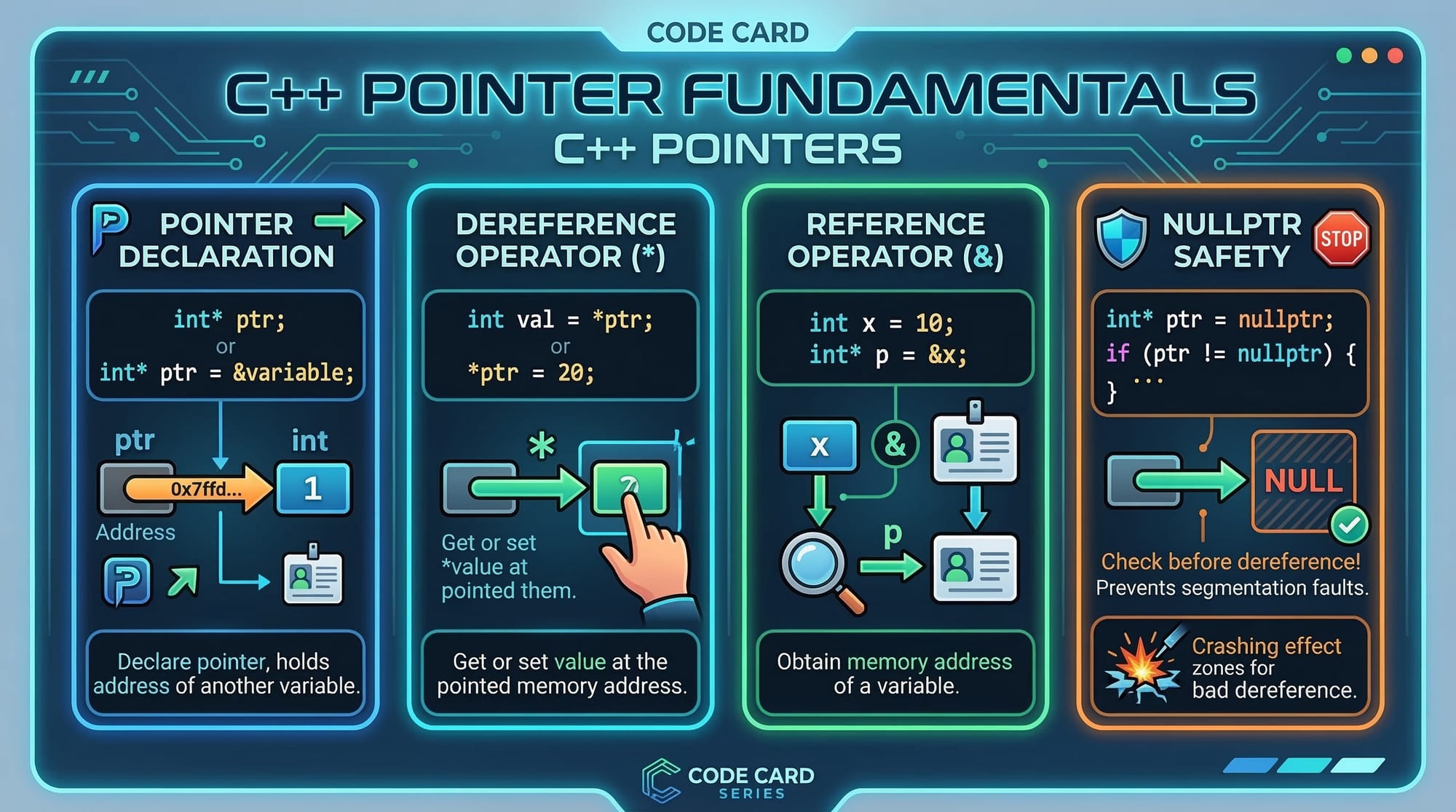
A pointer is a variable that stores the memory address of another variable.
Syntax:
datatype *pointerName;
Example:
int *ptr;
This means ptr can store the address of an integer variable.
Example program:
#include <iostream>
using namespace std;

int main() {
    int marks = 85;
    int *ptr = &marks;

    cout << "Marks value: " << marks << endl;
    cout << "Address of marks: " << &marks << endl;
    cout << "Pointer value (address): " << ptr << endl;
    cout << "Value using pointer: " << *ptr << endl;

    return 0;
}
Line-by-line explanation
int marks = 85;
Stores the student's marks.
int *ptr = &marks;
Creates a pointer ptr that stores the address of marks.
cout << &marks;
Displays the memory address of the variable.
cout << ptr;
Displays the address stored inside the pointer.
cout << *ptr;
The * operator dereferences the pointer, meaning it accesses the value stored at that address.
In simple words:
ptr→ address*ptr→ value at that address
Stack vs Heap Memory
In C++, memory is mainly divided into two parts:
Stack Memory
- Automatically managed
- Used for local variables
- Faster allocation
Example:
int x = 10;
Heap Memory
- Manually managed
- Used for dynamic allocation
- Allocated using
newand released usingdelete
Example:
int *ptr = new int;
Stack memory is released automatically when a function ends. Heap memory must be freed manually.
Dynamic Memory Allocation
Dynamic memory allocation allows programs to request memory during runtime.
This is essential when the program does not know how much memory it needs in advance.
Example:
int *num = new int;
This allocates memory for one integer on the heap.
To free memory:
delete num;
Failing to release memory leads to memory leaks.
Practical Code Examples
Example 1: Pointer Basics with Student Data
Suppose Ahmad is writing a program to store exam marks.
#include <iostream>
using namespace std;

int main() {
    int marks = 90;
    int *ptr;

    ptr = &marks;

    cout << "Marks: " << marks << endl;
    cout << "Address of marks: " << &marks << endl;
    cout << "Pointer value: " << ptr << endl;
    cout << "Marks using pointer: " << *ptr << endl;

    return 0;
}
Line-by-line explanation
int marks = 90;
Stores Ahmad’s exam score.
int *ptr;
Declares a pointer variable.
ptr = &marks;
Stores the address of marks in ptr.
cout << marks;
Prints the marks directly.
cout << ptr;
Prints the address stored in the pointer.
cout << *ptr;
Accesses the value stored at that address.
Output:
Marks: 90
Pointer value: 0x61ff08
Marks using pointer: 90
Example 2: Real-World Application — Dynamic Student Fee Storage
Imagine Fatima is building a program to manage student fees in PKR.
Sometimes the number of students is unknown until runtime, so we use dynamic allocation.
#include <iostream>
using namespace std;

int main() {

    int *fee = new int;

    *fee = 50000;

    cout << "Student Fee (PKR): " << *fee << endl;

    delete fee;

    return 0;
}
Line-by-line explanation
int *fee = new int;
Allocates memory for an integer on the heap.
*fee = 50000;
Stores the fee amount in PKR.
cout << *fee;
Prints the stored value.
delete fee;
Frees the allocated memory.
return 0;
Ends the program.
Without delete, the memory would remain allocated even after the program finishes.

Common Mistakes & How to Avoid Them
Mistake 1: Dereferencing a Null Pointer
A null pointer points to nothing.
Example mistake:
int *ptr = nullptr;
cout << *ptr;
This causes a program crash.
Correct approach:
if(ptr != nullptr) {
    cout << *ptr;
}
Always check before dereferencing.
Mistake 2: Memory Leaks
Memory leaks occur when allocated memory is never freed.
Example mistake:
int *num = new int;
If delete num; is missing, the memory remains reserved.
Correct version:
int *num = new int;

delete num;
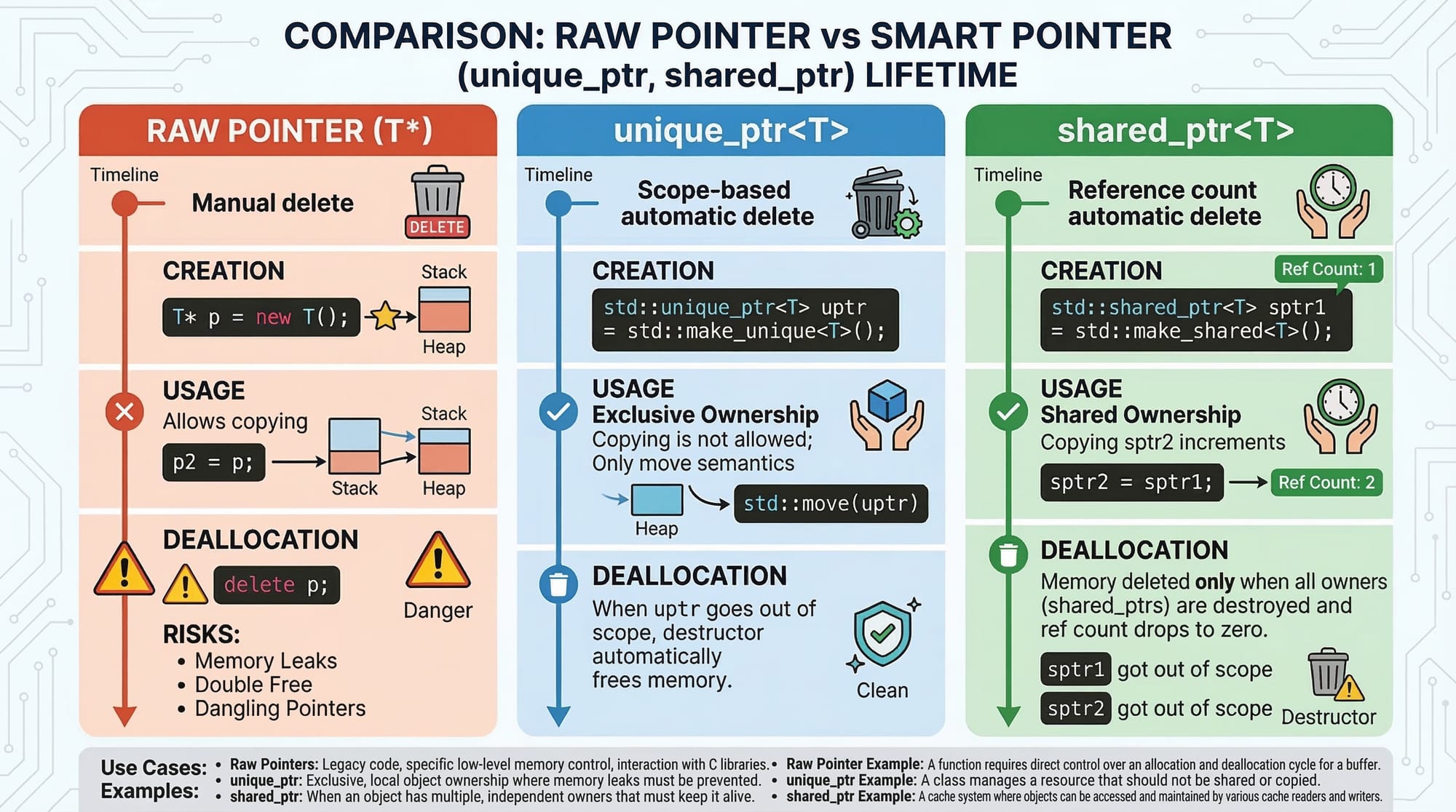
Better solution: Smart pointers
#include <memory>

unique_ptr<int> num = make_unique<int>(10);
Smart pointers automatically release memory.
Practice Exercises
Exercise 1: Pointer Value Swap
Problem
Write a program that swaps two numbers using pointers.
Solution
#include <iostream>
using namespace std;

void swap(int *a, int *b) {
    int temp = *a;
    *a = *b;
    *b = temp;
}

int main() {
    int x = 10, y = 20;

    swap(&x, &y);

    cout << "x: " << x << endl;
    cout << "y: " << y << endl;

    return 0;
}
Explanation:
swap(int *a, int *b)
Function receives memory addresses.
*a and *b
Access actual values.
temp
Temporarily stores a value during swapping.
Exercise 2: Dynamic Array for Student Marks
Problem
Write a program that dynamically allocates memory for 3 student marks.
Solution
#include <iostream>
using namespace std;

int main() {

    int *marks = new int[3];

    marks[0] = 85;
    marks[1] = 90;
    marks[2] = 78;

    for(int i = 0; i < 3; i++) {
        cout << "Student " << i+1 << " marks: " << marks[i] << endl;
    }

    delete[] marks;

    return 0;
}
Explanation:
new int[3]
Allocates memory for three integers.
marks[i]
Accesses array elements.
delete[] marks
Frees the allocated array memory.
Frequently Asked Questions
What is a pointer in C++?
A pointer is a variable that stores the memory address of another variable. It allows programs to access and modify data indirectly.
How do I allocate memory dynamically in C++?
You allocate memory using the new keyword. For example:
int *ptr = new int;
This allocates memory on the heap.
What is the difference between stack and heap memory?
Stack memory is automatically managed and used for local variables. Heap memory is manually managed using new and delete.
Why are pointers important in C++?
Pointers allow efficient memory usage, dynamic data structures, and advanced programming techniques like linked lists and trees.
What are smart pointers?
Smart pointers are modern C++ objects that automatically manage memory. Examples include unique_ptr, shared_ptr, and weak_ptr.
Summary & Key Takeaways
- Pointers store memory addresses instead of direct values.
- The
&operator gets a variable’s address, while*accesses the value. - C++ memory is divided mainly into stack and heap.
- Dynamic memory allocation uses
newanddelete. - Forgetting to free memory can cause memory leaks.
- Smart pointers provide safer memory management in modern C++.
Mastering pointers is one of the most important milestones in becoming a confident C++ programmer.
Next Steps & Related Tutorials
If you want to continue improving your C++ skills, explore these tutorials on theiqra.edu.pk:
- C++ Tutorial for Beginners — build a strong programming foundation
- Understanding C++ Arrays and Strings — essential data structures
- C++ Object-Oriented Programming Guide — classes, objects, inheritance
- C++ Data Structures Explained — linked lists, stacks, and queues
These tutorials will help Pakistani students progress from beginner concepts to advanced C++ programming skills.
Test Your Python Knowledge!
Finished reading? Take a quick quiz to see how much you've learned from this tutorial.