Django REST Framework Building APIs with Python
Introduction
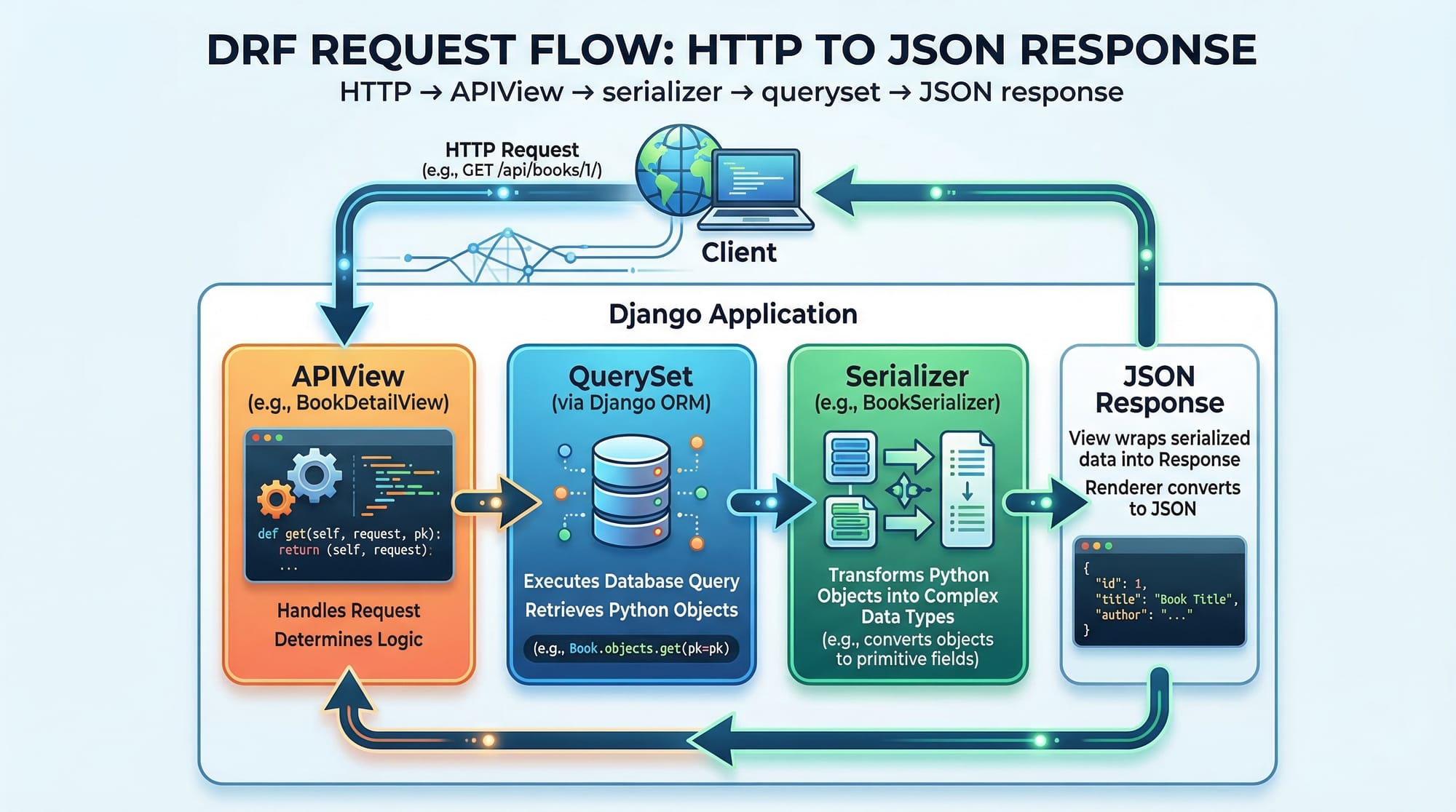
Django REST Framework (DRF) is a powerful and flexible toolkit built on top of Django that allows developers to create web APIs quickly and efficiently using Python. In simple terms, it helps you turn your Django application into a backend service that can communicate with mobile apps, web frontends, and even other systems.
In today’s digital world, APIs (Application Programming Interfaces) are everywhere—from food delivery apps in Lahore to banking apps in Karachi. Learning django rest framework gives Pakistani students a strong edge in modern software development, especially if you’re aiming for careers in backend development, freelancing, or startups.
With DRF, you can build robust APIs for:
- E-commerce platforms handling PKR transactions
- School management systems
- Ride-hailing apps like Careem-style clones
- Mobile apps built with Flutter or React Native
This tutorial will guide you step-by-step through building APIs using Django REST Framework, with real-world examples tailored for Pakistani learners.
Prerequisites
Before starting this drf tutorial, you should have:
- Basic understanding of Python programming
- Familiarity with Django (models, views, URLs)
- Knowledge of HTTP methods (GET, POST, PUT, DELETE)
- Basic understanding of JSON
- Django installed and working on your system
Optional but helpful:
- Experience with Postman or similar API testing tools
- Basic knowledge of databases (SQLite, PostgreSQL)
Core Concepts & Explanation
Understanding APIViews and Request Handling
In Django REST Framework, APIViews allow you to handle HTTP requests like GET, POST, PUT, and DELETE.
Let’s look at a simple example:
from rest_framework.views import APIView
from rest_framework.response import Response

class HelloAPIView(APIView):
    def get(self, request):
        return Response({"message": "Hello, Ahmad!"})
Explanation:
from rest_framework.views import APIView→ Imports the base class for API views.from rest_framework.response import Response→ Used to return API responses in JSON format.class HelloAPIView(APIView):→ Defines a custom API view.def get(self, request):→ Handles GET requests.return Response({...})→ Sends a JSON response to the client.
This is the foundation of any django api.
Serializers: Converting Data to JSON
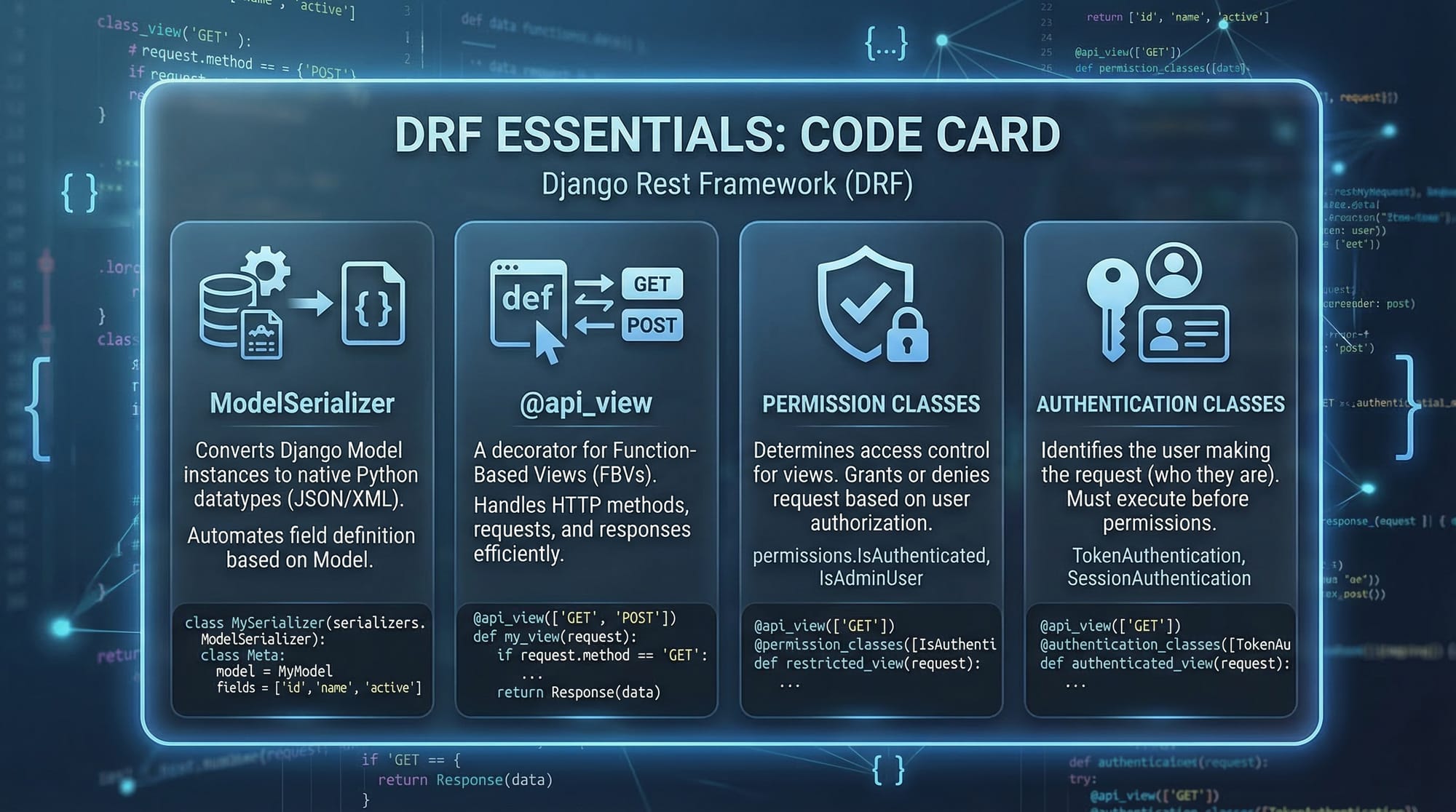
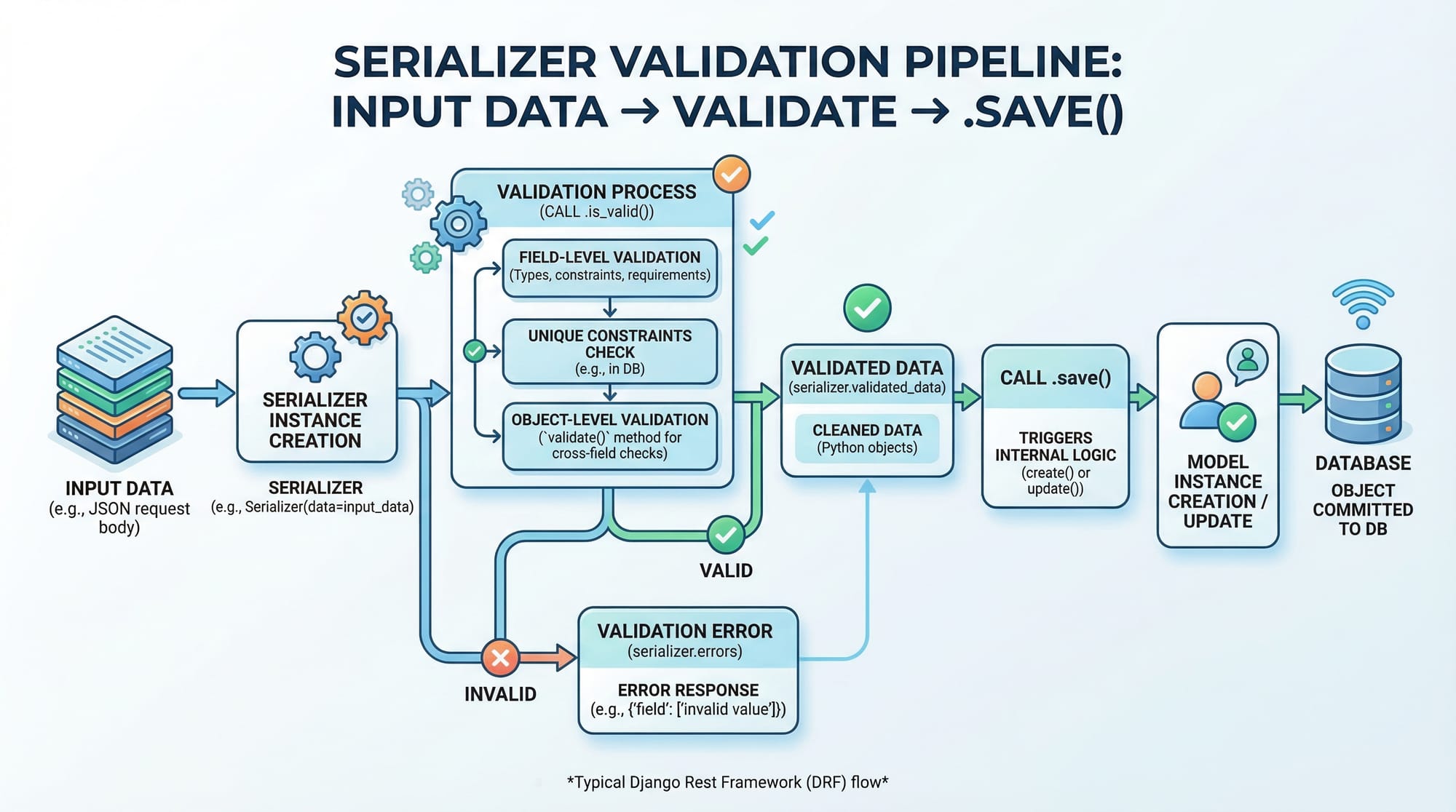
Serializers convert Django models into JSON and validate incoming data.
Example:
from rest_framework import serializers
from .models import Student

class StudentSerializer(serializers.ModelSerializer):
    class Meta:
        model = Student
        fields = ['id', 'name', 'city']
Explanation:
serializers.ModelSerializer→ Automatically maps model fields.class Meta:→ Configuration class.model = Student→ Connects serializer to model.fields = [...]→ Specifies fields to include.
Serializers are crucial for:
- Data validation
- Data transformation
- Clean API responses
ViewSets and Routers: Faster API Development
Instead of writing multiple APIViews, DRF provides ViewSets.
from rest_framework import viewsets
from .models import Student
from .serializers import StudentSerializer

class StudentViewSet(viewsets.ModelViewSet):
    queryset = Student.objects.all()
    serializer_class = StudentSerializer
Explanation:
ModelViewSet→ Provides CRUD operations automatically.queryset→ Defines data source.serializer_class→ Connects serializer.
You can connect it using routers:
from rest_framework.routers import DefaultRouter

router = DefaultRouter()
router.register('students', StudentViewSet)
This automatically creates endpoints like:
/students//students/1/
Authentication and Permissions
DRF allows you to secure your APIs.
from rest_framework.permissions import IsAuthenticated

class SecureView(APIView):
    permission_classes = [IsAuthenticated]
Explanation:
IsAuthenticated→ Only logged-in users can access.permission_classes→ Defines access rules.
You can also use token authentication for mobile apps.
Practical Code Examples
Example 1: Student API (Basic CRUD)
Let’s build a simple API for a student system in Islamabad.
models.py
from django.db import models

class Student(models.Model):
    name = models.CharField(max_length=100)
    city = models.CharField(max_length=100)
Explanation:
models.Model→ Base class for database models.name→ Stores student name.city→ Stores city (e.g., Lahore, Karachi).
serializers.py
from rest_framework import serializers
from .models import Student

class StudentSerializer(serializers.ModelSerializer):
    class Meta:
        model = Student
        fields = '__all__'
Explanation:
__all__→ Includes all model fields.
views.py
from rest_framework.decorators import api_view
from rest_framework.response import Response
from .models import Student
from .serializers import StudentSerializer

@api_view(['GET'])
def student_list(request):
    students = Student.objects.all()
    serializer = StudentSerializer(students, many=True)
    return Response(serializer.data)
Explanation:
@api_view(['GET'])→ Function-based API view.Student.objects.all()→ Fetches all records.many=True→ Indicates multiple objects.serializer.data→ Converts to JSON.
Example 2: Real-World Application (Fee Management API)
Let’s build a system where students pay fees in PKR.
models.py
class Fee(models.Model):
    student_name = models.CharField(max_length=100)
    amount = models.IntegerField()
    paid = models.BooleanField(default=False)
Explanation:
student_name→ Name of student (e.g., Fatima).amount→ Fee amount in PKR.paid→ Tracks payment status.
serializers.py
class FeeSerializer(serializers.ModelSerializer):
    class Meta:
        model = Fee
        fields = '__all__'
views.py
from rest_framework.views import APIView

class FeeAPIView(APIView):
    def post(self, request):
        serializer = FeeSerializer(data=request.data)
        if serializer.is_valid():
            serializer.save()
            return Response(serializer.data)
        return Response(serializer.errors)
Explanation:
data=request.data→ Takes input from request.is_valid()→ Validates data.save()→ Stores in database.serializer.errors→ Returns validation errors.
Common Mistakes & How to Avoid Them
Mistake 1: Not Using Serializers Properly
❌ Wrong:
return Response(Student.objects.all())
✔️ Correct:
serializer = StudentSerializer(Student.objects.all(), many=True)
return Response(serializer.data)
Explanation:
- Directly returning QuerySets won’t work.
- Always use serializers to convert data.
Mistake 2: Ignoring Permissions
❌ Wrong:
class MyView(APIView):
    pass
✔️ Correct:
from rest_framework.permissions import IsAuthenticated

class MyView(APIView):
    permission_classes = [IsAuthenticated]
Explanation:
- Without permissions, your API is open to everyone.
- Always secure sensitive endpoints.
Practice Exercises
Exercise 1: Create a Product API
Problem:
Create an API for products with fields: name, price (PKR), and stock.
Solution:
class Product(models.Model):
    name = models.CharField(max_length=100)
    price = models.IntegerField()
    stock = models.IntegerField()
Explanation:
- Defines product structure.
class ProductSerializer(serializers.ModelSerializer):
    class Meta:
        model = Product
        fields = '__all__'
Explanation:
- Converts model to JSON.
Exercise 2: Create Login-Protected API
Problem:
Allow only logged-in users to view student data.
Solution:
from rest_framework.permissions import IsAuthenticated

class StudentSecureView(APIView):
    permission_classes = [IsAuthenticated]

    def get(self, request):
        students = Student.objects.all()
        serializer = StudentSerializer(students, many=True)
        return Response(serializer.data)
Explanation:
- Adds authentication layer.
- Protects API data.
Frequently Asked Questions
What is Django REST Framework?
Django REST Framework is a toolkit for building APIs using Django. It simplifies data handling, authentication, and serialization, making it ideal for modern web and mobile applications.
How do I create a django api?
You create a Django API by defining models, serializers, and views (APIView or ViewSet), then connecting them via URLs or routers.
Is DRF better than Flask for APIs?
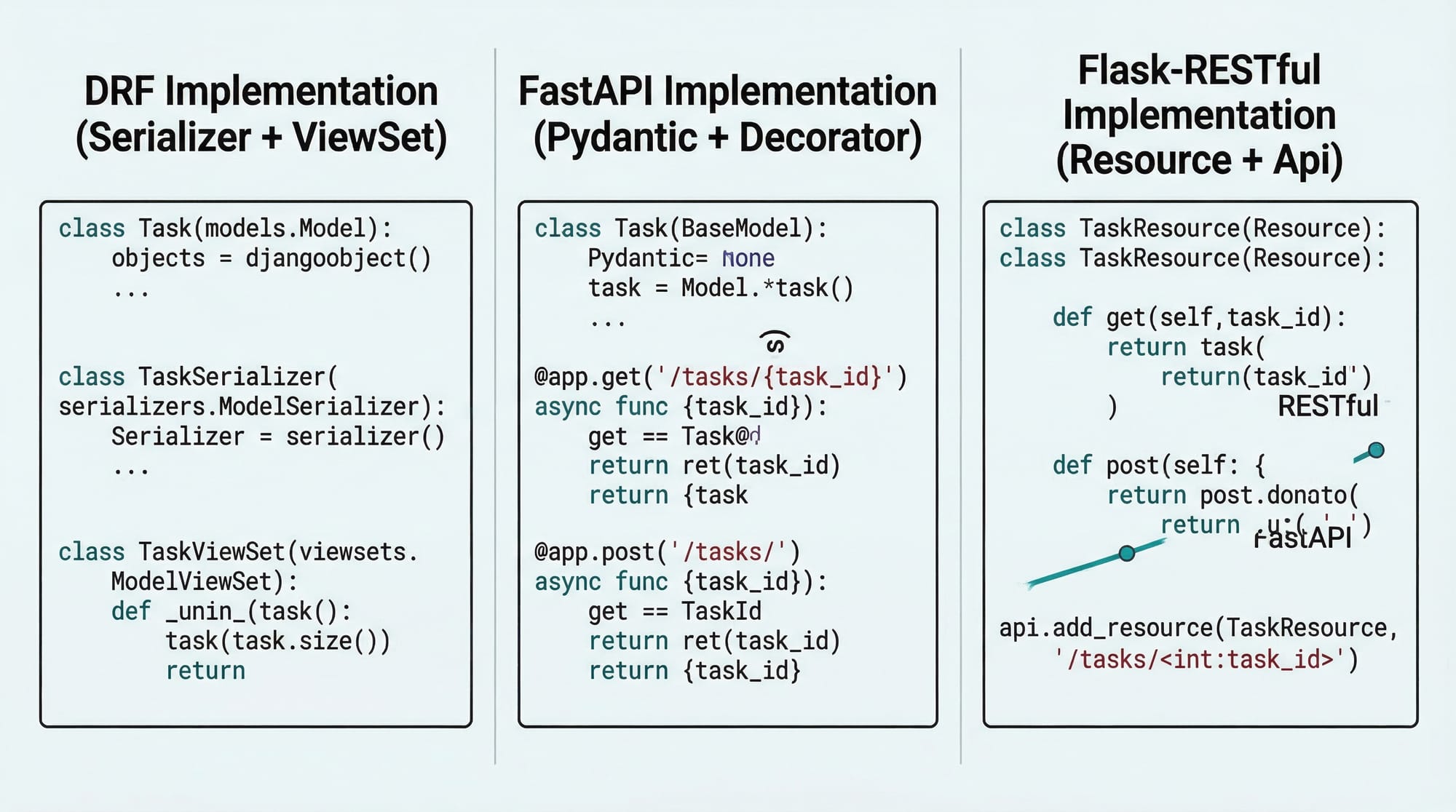
DRF is more feature-rich and structured, while Flask is lightweight. For large projects, DRF is usually preferred.
Can I use DRF for mobile apps?
Yes, DRF is widely used to build backends for mobile apps built with Flutter, React Native, or Android.
How do I secure my API in DRF?
You can use authentication (Token, JWT) and permissions like IsAuthenticated to restrict access to your API.
Summary & Key Takeaways
- Django REST Framework simplifies building powerful APIs in Python
- Serializers are essential for data validation and JSON conversion
- APIViews and ViewSets help structure your API logic
- Authentication and permissions are critical for security
- DRF is widely used in real-world Pakistani projects and freelancing
Next Steps & Related Tutorials
To continue your journey, explore these tutorials on theiqra.edu.pk:
- Learn backend basics with Django Tutorial (models, views, templates)
- Understand API structure in REST API Design
- Build mobile apps with Flutter + Django API integration
- Explore authentication with JWT Authentication in Django REST Framework
By mastering this django rest framework tutorial, you're taking a strong step toward becoming a professional backend developer in Pakistan.
Test Your Python Knowledge!
Finished reading? Take a quick quiz to see how much you've learned from this tutorial.