Django Tutorial for Beginners Full Stack Python Web Dev
Introduction
Django is one of the most powerful and popular web frameworks built using Python. In this django tutorial for beginners: full-stack python web dev, you’ll learn how to build complete, real-world web applications—from backend logic to frontend rendering—using Django.
Django follows a “batteries-included” philosophy, meaning it comes with everything you need: authentication, admin panel, database handling, security, and more. For Pakistani students aiming to build freelance projects, startups, or secure jobs in cities like Lahore, Karachi, or Islamabad, Django is a highly valuable skill in 2026.
Why should you learn Django?
- Python is beginner-friendly and widely used in Pakistan
- Django helps you build full-stack apps quickly
- Strong demand in freelancing (Fiverr, Upwork) and local companies
- Ideal for projects like school portals, e-commerce sites, and blogs
Prerequisites
Before starting this django tutorial, you should have:
- Basic knowledge of Python (variables, loops, functions)
- Understanding of HTML & CSS
- Familiarity with command line (optional but helpful)
- Basic idea of how websites work (client-server model)
If you’re completely new to Python, it’s recommended to first go through a beginner-level Python tutorial.
Core Concepts & Explanation
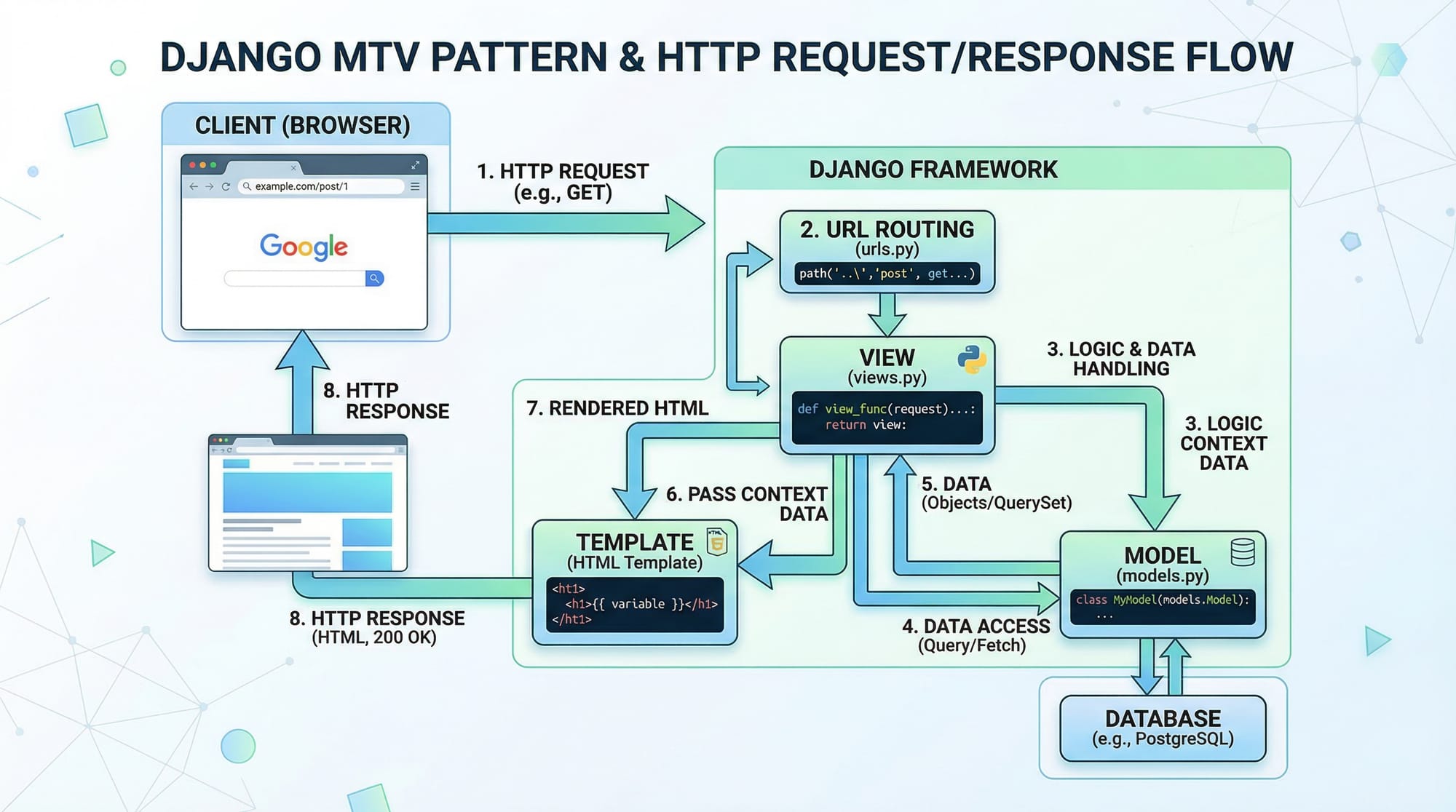
Django Architecture: MTV Pattern (Model-Template-View)
Django uses the MTV architecture, which is similar to MVC.
- Model: Handles database structure
- Template: Handles UI (HTML)
- View: Handles logic and connects model & template
Example:
If Ahmad creates a student management system:
- Model → Student data (name, marks)
- View → Logic to fetch students
- Template → HTML page showing student list
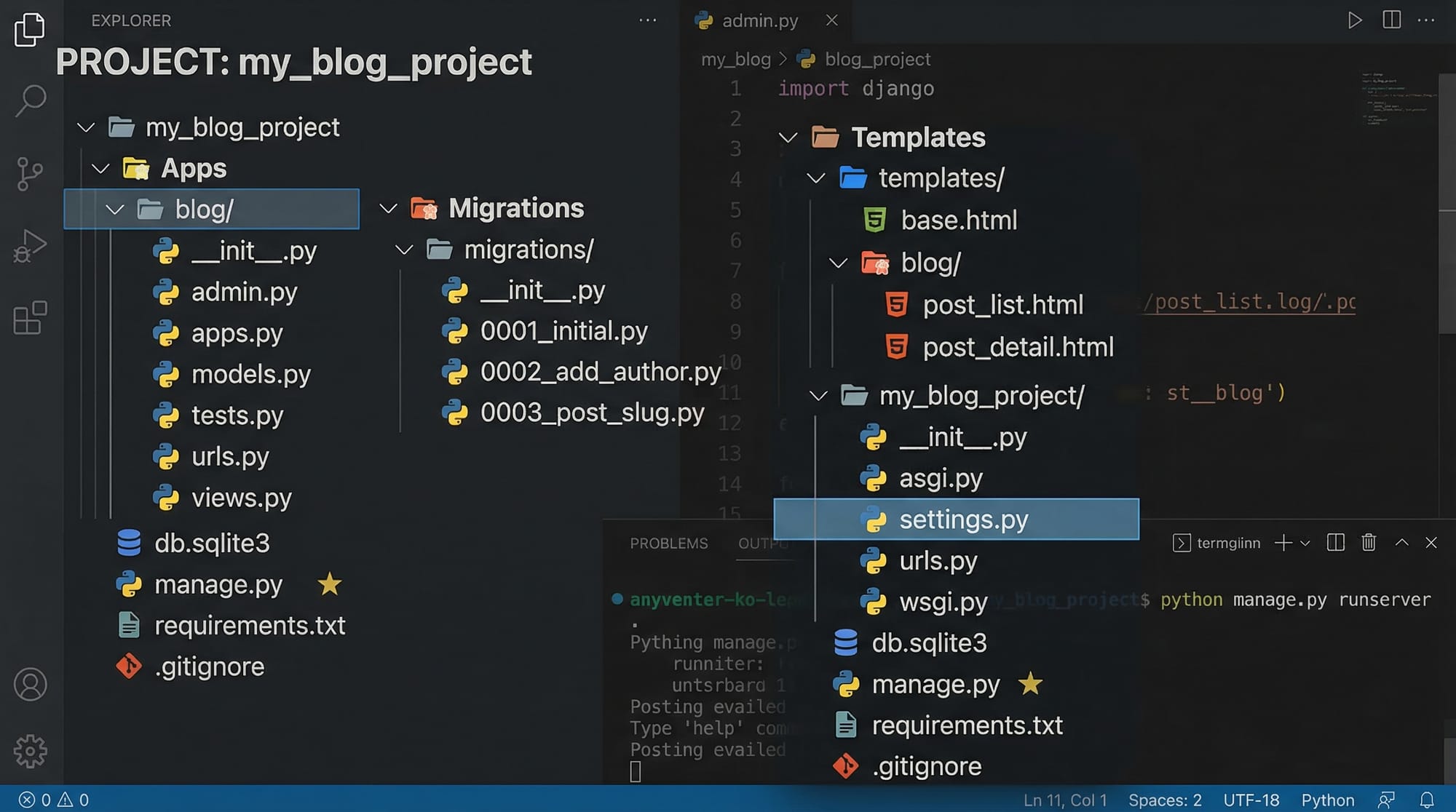
Django Project vs App
In Django:
- Project = Entire website
- App = A specific feature/module
Example:
- Project: School Management System
- Apps:
- Students
- Teachers
- Fees
This modular approach helps organize large projects.
URL Routing
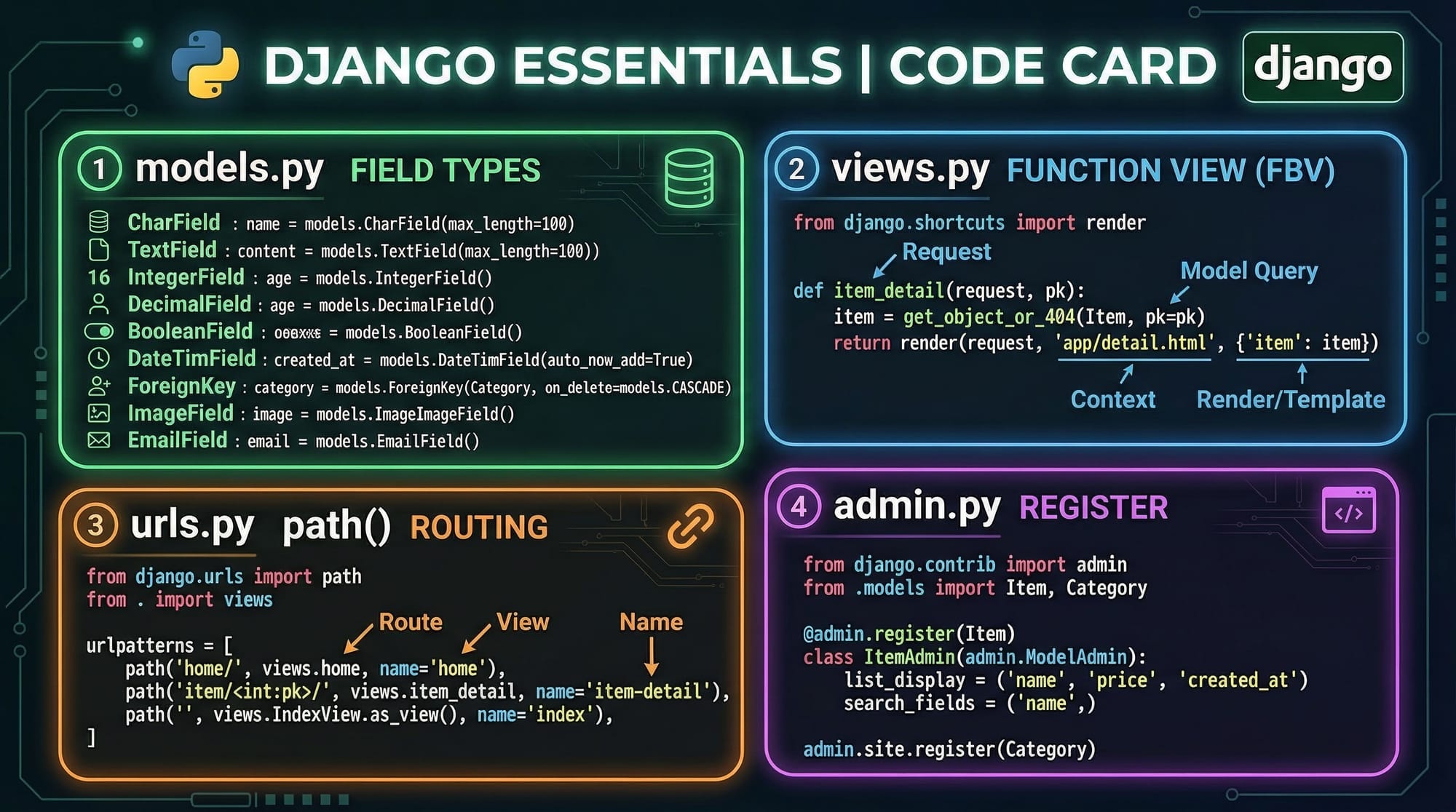
Django maps URLs to views using urls.py.
Example:
from django.urls import path
from . import views

urlpatterns = [
    path('', views.home),
]
Explanation:
path()→ Defines URL route''→ Homepageviews.home→ Calls thehomefunction
Django ORM (Object Relational Mapper)
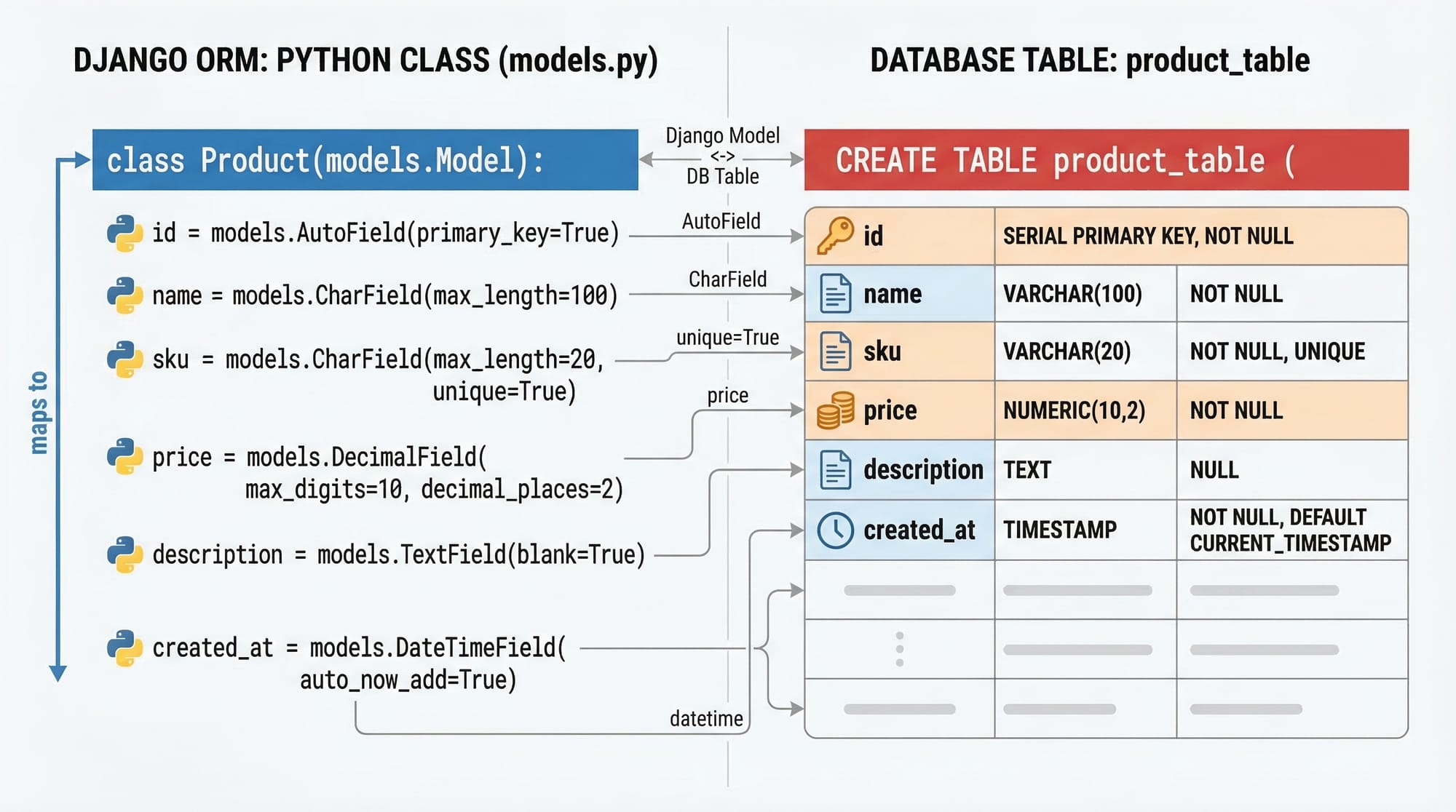
Django lets you interact with databases using Python instead of SQL.
Example:
Student.objects.all()
This retrieves all student records without writing SQL.
Practical Code Examples
Example 1: Create a Simple Blog Page
Let’s build a simple blog system.
Step 1: Model (models.py)
from django.db import models

class Post(models.Model):
    title = models.CharField(max_length=200)
    content = models.TextField()
Explanation:
models.Model→ Base class for database modelstitle→ Text field with max length 200content→ Large text field
Step 2: View (views.py)
from django.shortcuts import render
from .models import Post

def home(request):
    posts = Post.objects.all()
    return render(request, 'home.html', {'posts': posts})
Explanation:
render()→ Combines template + dataPost.objects.all()→ Fetch all posts{'posts': posts}→ Pass data to template
Step 3: Template (home.html)
<h1>Blog Posts</h1>

{% for post in posts %}
  <h2>{{ post.title }}</h2>
  <p>{{ post.content }}</p>
{% endfor %}
Explanation:
{% for %}→ Loop through posts{{ post.title }}→ Display title{{ post.content }}→ Display content
Example 2: Real-World Application — Student Fee Tracker
Let’s create a practical system useful in Pakistan.
Model
class Student(models.Model):
    name = models.CharField(max_length=100)
    fee_paid = models.IntegerField()
Explanation:
name→ Student name (e.g., Ali, Fatima)fee_paid→ Amount in PKR
View
def students(request):
    data = Student.objects.all()
    return render(request, 'students.html', {'data': data})
Explanation:
- Fetch all student data
- Send it to template
Template
<h1>Student Fees</h1>

{% for student in data %}
  <p>{{ student.name }} - PKR {{ student.fee_paid }}</p>
{% endfor %}
Explanation:
- Displays name and fee
- Shows Pakistani currency (PKR)
Common Mistakes & How to Avoid Them
Mistake 1: Forgetting to Run Migrations
After creating models, beginners often forget migrations.
Fix:
python manage.py makemigrations
python manage.py migrate
Explanation:
makemigrations→ Creates migration filesmigrate→ Applies changes to database
Mistake 2: Incorrect Template Path
Error occurs when Django cannot find templates.
Fix:
'DIRS': [BASE_DIR / 'templates'],
Explanation:
- Ensures Django knows where templates are stored
Mistake 3: Not Registering Models in Admin
Without registration, models won’t appear in admin panel.
Fix:
from django.contrib import admin
from .models import Student

admin.site.register(Student)
Explanation:
- Registers model for admin interface
Mistake 4: Debug Mode Left ON in Production
This can expose sensitive data.
Fix:
DEBUG = False
Explanation:
- Always disable debug in production
Practice Exercises
Exercise 1: Create a Student List Page
Problem:
Create a page showing student names and marks.
Solution:
class Student(models.Model):
    name = models.CharField(max_length=100)
    marks = models.IntegerField()
def students(request):
    data = Student.objects.all()
    return render(request, 'students.html', {'data': data})
{% for s in data %}
  <p>{{ s.name }} - {{ s.marks }}</p>
{% endfor %}
Explanation:
- Model defines structure
- View fetches data
- Template displays results
Exercise 2: Build a Simple To-Do App
Problem:
Create a task list app.
Solution:
class Task(models.Model):
    title = models.CharField(max_length=200)
    completed = models.BooleanField(default=False)
def tasks(request):
    tasks = Task.objects.all()
    return render(request, 'tasks.html', {'tasks': tasks})
{% for task in tasks %}
  <p>{{ task.title }} - {{ task.completed }}</p>
{% endfor %}
Explanation:
- Boolean field tracks completion
- Template displays status
Frequently Asked Questions
What is Django used for?
Django is used to build secure and scalable web applications such as blogs, e-commerce platforms, and management systems. It is widely used by startups and enterprises.
How do I install Django?
You can install Django using pip: pip install django. Make sure Python is installed on your system before running this command.
Is Django good for beginners?
Yes, Django is beginner-friendly due to its clear structure and built-in features. However, understanding Python basics is essential before starting.
How do I connect Django to a database?
Django uses SQLite by default, but you can configure MySQL or PostgreSQL in settings.py. The ORM handles database queries automatically.
Can I build full-stack apps with Django?
Yes, Django supports full-stack development by handling backend logic and frontend rendering using templates, making it ideal for complete web applications.
Summary & Key Takeaways
- Django is a powerful full-stack Python framework
- Uses MTV architecture (Model, Template, View)
- Built-in admin panel and ORM simplify development
- Ideal for Pakistani students entering freelancing or tech jobs
- Encourages clean, scalable project structure
- Great for real-world apps like school systems and e-commerce
Next Steps & Related Tutorials
To continue your learning journey, explore these tutorials on theiqra.edu.pk:
- Learn Python fundamentals with our Python Tutorial for Beginners
- Build lightweight apps using the Flask Tutorial
- Explore frontend development with HTML & CSS Guide
- Advance your skills with JavaScript for Beginners
By combining Django with these technologies, you’ll be ready to build modern, professional web applications and start earning through freelancing or jobs in Pakistan.
Test Your Python Knowledge!
Finished reading? Take a quick quiz to see how much you've learned from this tutorial.