Flutter & Dart Tutorial for Beginners 2026
Introduction
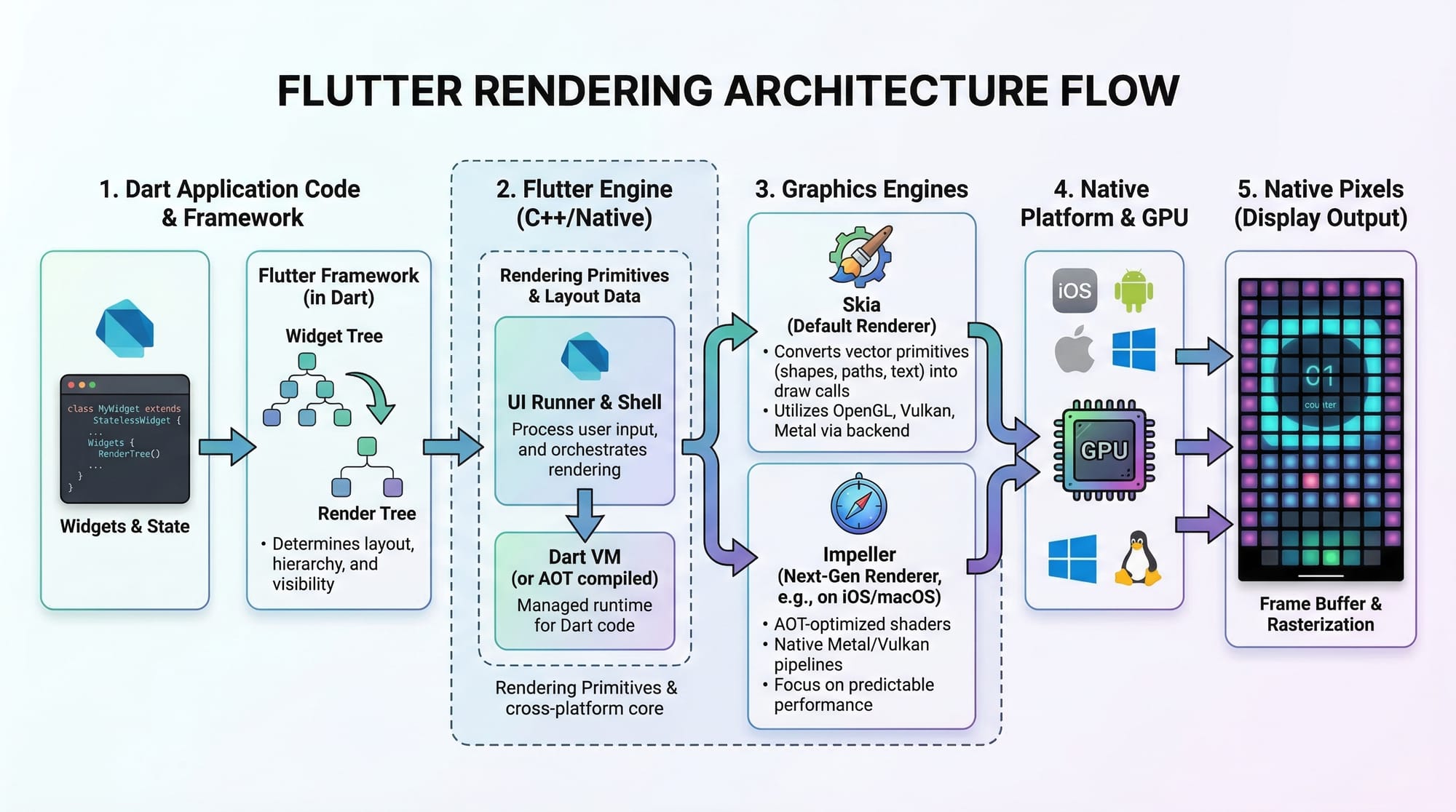
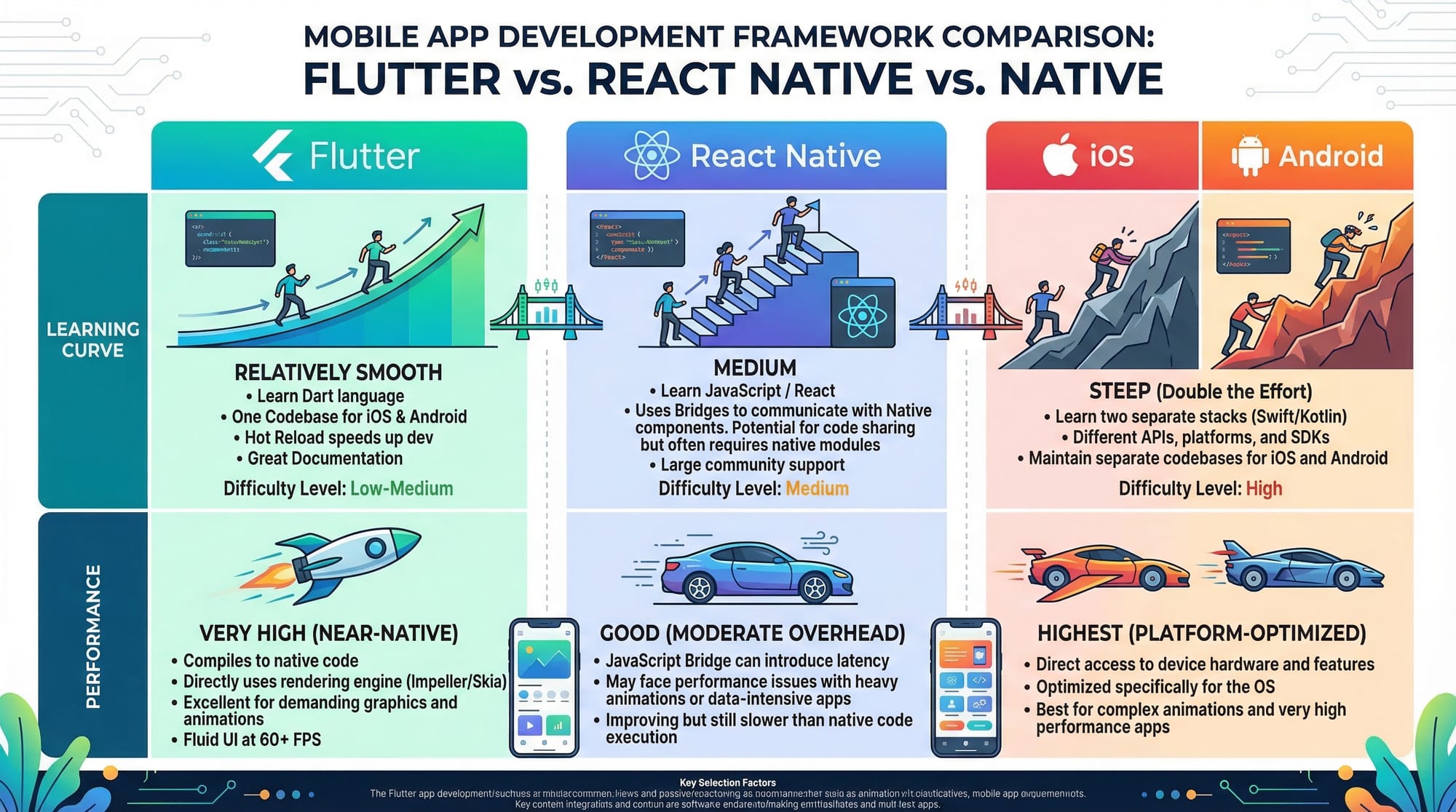
Flutter & Dart tutorial for beginners 2026 is your complete starting point to learn how to build modern, high-performance mobile apps using Flutter (UI toolkit) and Dart (programming language). Whether you want to create Android apps, iOS apps, or even web and desktop apps — Flutter makes it possible with a single codebase.
For Pakistani students in cities like Lahore, Karachi, and Islamabad, learning Flutter is a high-demand skill in 2026. Many software houses, startups, and freelancing platforms are actively hiring Flutter developers. With strong fundamentals, you can earn in PKR or even USD through platforms like Fiverr and Upwork.
Flutter is beginner-friendly, fast (thanks to hot reload), and backed by Google — making it one of the best technologies to start your development journey.
Prerequisites
Before starting this Flutter tutorial, you don’t need to be an expert — but having the following basics will help:
- Basic understanding of programming (variables, loops, conditions)
- Familiarity with any language like C++, Java, or JavaScript
- Basic computer skills (installing software, using IDEs)
- A system (Windows, macOS, or Linux) with internet access
- Optional: Basic understanding of mobile apps
If you are a complete beginner, don’t worry — this tutorial explains everything step by step.
Core Concepts & Explanation
Dart Programming Basics
Dart is the language used to write Flutter apps. It is simple, modern, and easy to learn.
Example: Variables and Functions in Dart
void main() {
  String name = "Ahmad";
  int age = 20;

  print("Name: $name");
  print("Age: $age");
}
Explanation:
void main()→ Entry point of the programString name→ Declares a text variableint age→ Declares a number variableprint()→ Outputs text to console$name→ String interpolation
Dart also supports:
- Lists (
List<String>) - Maps (
Map<String, int>) - Functions and classes
Flutter Widget System (Everything is a Widget)
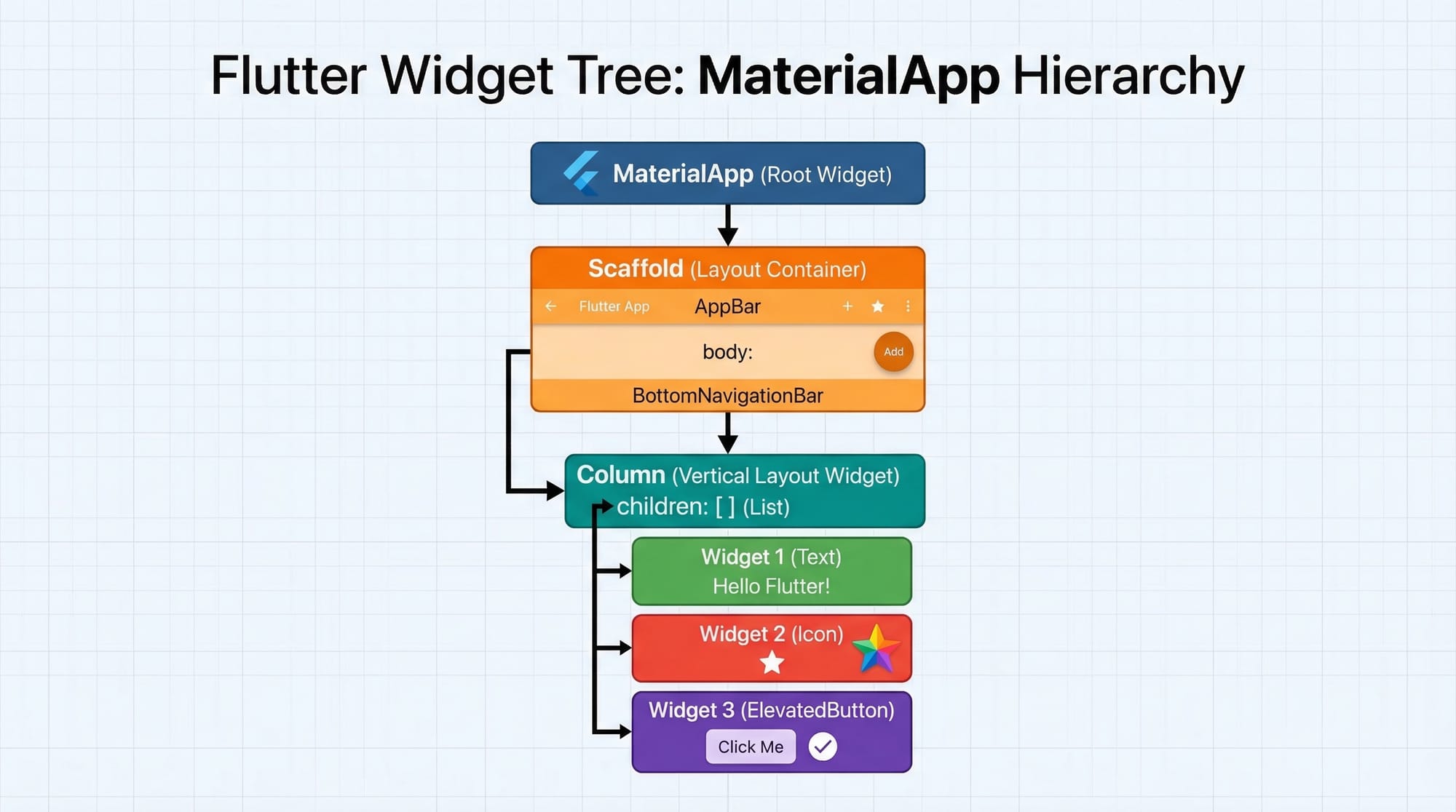
In Flutter, everything is a widget — text, buttons, layouts, even the app itself.
Example:
Text("Hello Pakistan")
This simple line creates a text widget.
Widgets are of two types:
- StatelessWidget → Does not change
- StatefulWidget → Can update dynamically
Layout System in Flutter
Flutter uses widgets like:
Column→ Vertical layoutRow→ Horizontal layoutContainer→ Styling and spacing
Example:
Column(
  children: [
    Text("Ahmad"),
    Text("Fatima"),
  ],
)
Explanation:
Column→ Arranges items verticallychildren→ List of widgets insideText()→ Displays text
Stateful Widgets & setState()
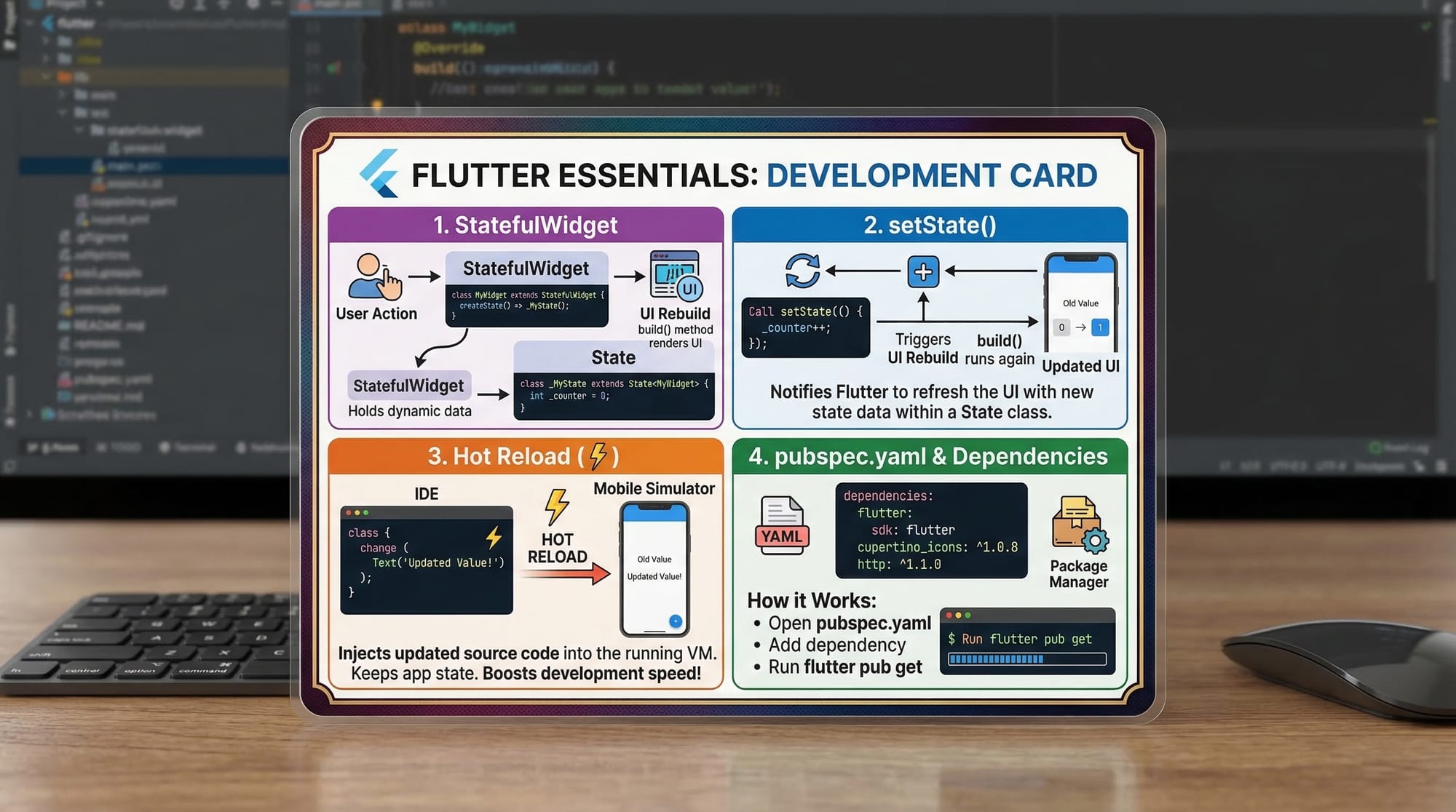
Stateful widgets allow your app to update UI dynamically.
setState(() {
  counter++;
});
Explanation:
setState()→ Tells Flutter to rebuild UIcounter++→ Updates value
Practical Code Examples
Example 1: Simple Counter App
import 'package:flutter/material.dart';

void main() {
  runApp(MyApp());
}

class MyApp extends StatelessWidget {
  @override
  Widget build(BuildContext context) {
    return MaterialApp(
      home: CounterScreen(),
    );
  }
}

class CounterScreen extends StatefulWidget {
  @override
  _CounterScreenState createState() => _CounterScreenState();
}

class _CounterScreenState extends State<CounterScreen> {
  int counter = 0;

  void increment() {
    setState(() {
      counter++;
    });
  }

  @override
  Widget build(BuildContext context) {
    return Scaffold(
      appBar: AppBar(
        title: Text("Counter App"),
      ),
      body: Center(
        child: Text("Counter: $counter"),
      ),
      floatingActionButton: FloatingActionButton(
        onPressed: increment,
        child: Icon(Icons.add),
      ),
    );
  }
}
Line-by-line Explanation:
import 'package:flutter/material.dart';→ Imports Flutter UI libraryrunApp(MyApp());→ Starts the appMaterialApp→ Root widgetStatefulWidget→ Enables dynamic updatescounter = 0→ Initial valueincrement()→ Function to increase countersetState()→ Refresh UIScaffold→ Basic app structureAppBar→ Top navigation barFloatingActionButton→ Button for actions
Example 2: Real-World Application (Student Fee Tracker in PKR)
import 'package:flutter/material.dart';

void main() {
  runApp(FeeApp());
}

class FeeApp extends StatelessWidget {
  @override
  Widget build(BuildContext context) {
    return MaterialApp(
      home: FeeScreen(),
    );
  }
}

class FeeScreen extends StatefulWidget {
  @override
  _FeeScreenState createState() => _FeeScreenState();
}

class _FeeScreenState extends State<FeeScreen> {
  int fee = 20000;

  void payFee() {
    setState(() {
      fee -= 5000;
    });
  }

  @override
  Widget build(BuildContext context) {
    return Scaffold(
      appBar: AppBar(
        title: Text("Student Fee Tracker"),
      ),
      body: Center(
        child: Text("Remaining Fee: PKR $fee"),
      ),
      floatingActionButton: FloatingActionButton(
        onPressed: payFee,
        child: Icon(Icons.payment),
      ),
    );
  }
}
Explanation:
fee = 20000→ Initial fee in PKRpayFee()→ Deducts amountsetState()→ Updates UI- Displays real-world scenario for Pakistani students
Common Mistakes & How to Avoid Them
Mistake 1: Forgetting setState()
Problem:
UI does not update.
counter++;
Fix:
setState(() {
  counter++;
});
Explanation:
Without setState(), Flutter doesn’t know UI changed.
Mistake 2: Misusing StatelessWidget
Problem:
Trying to update UI in StatelessWidget.
Fix:
Use StatefulWidget instead.
class MyWidget extends StatefulWidget
Explanation:
Stateless widgets cannot change dynamically.
Mistake 3: Wrong Layout Usage
Problem:
Using Row instead of Column.
Fix:
Choose correct layout based on direction.
Practice Exercises
Exercise 1: Create a Name Display App
Problem:
Display your name (e.g., Ali or Fatima) on screen.
Solution:
Text("Ali")
Explanation:
Text()→ Displays text- Replace "Ali" with your name
Exercise 2: Simple Calculator (Addition)
Problem:
Add two numbers and display result.
Solution:
int a = 10;
int b = 20;
int sum = a + b;

print(sum);
Explanation:
int a, b→ Variablesa + b→ Additionprint()→ Output result
Frequently Asked Questions
What is Flutter used for?
Flutter is used to build mobile, web, and desktop apps using a single codebase. It is widely used in startups and software houses in Pakistan.
How do I install Flutter in 2026?
Download Flutter SDK from the official website, install Android Studio or VS Code, and configure your environment variables. Follow step-by-step setup guides for Windows or macOS.
Is Dart difficult for beginners?
No, Dart is beginner-friendly and easy to learn. Its syntax is similar to Java and JavaScript, making it simple for new learners.
Can I earn money with Flutter in Pakistan?
Yes, many Pakistani developers earn through freelancing, remote jobs, and local software houses using Flutter skills.
How long does it take to learn Flutter?
With consistent practice (2–3 hours daily), you can learn basics in 1–2 months and start building apps within 3 months.
Summary & Key Takeaways
- Flutter allows building apps for multiple platforms with one codebase
- Dart is easy and beginner-friendly
- Everything in Flutter is a widget
- Stateful widgets allow dynamic UI updates
- setState() is essential for refreshing UI
- Flutter is in high demand in Pakistan and globally
Next Steps & Related Tutorials
Now that you’ve learned Flutter basics, continue your journey with:
- Learn cross-platform apps with our React Native tutorial for beginners
- Master Android development with our Kotlin tutorial
- Explore backend development with Node.js tutorial
- Build APIs with Django for beginners
These tutorials are available on theiqra.edu.pk and will help you become a complete developer.
This Flutter & Dart tutorial for beginners 2026 gives you a strong foundation. Start practicing, build small apps, and gradually move toward real-world projects like e-commerce apps, ride-hailing apps, or educational apps for Pakistani users.
Test Your Python Knowledge!
Finished reading? Take a quick quiz to see how much you've learned from this tutorial.