React Native Tutorial for Beginners 2026
Introduction
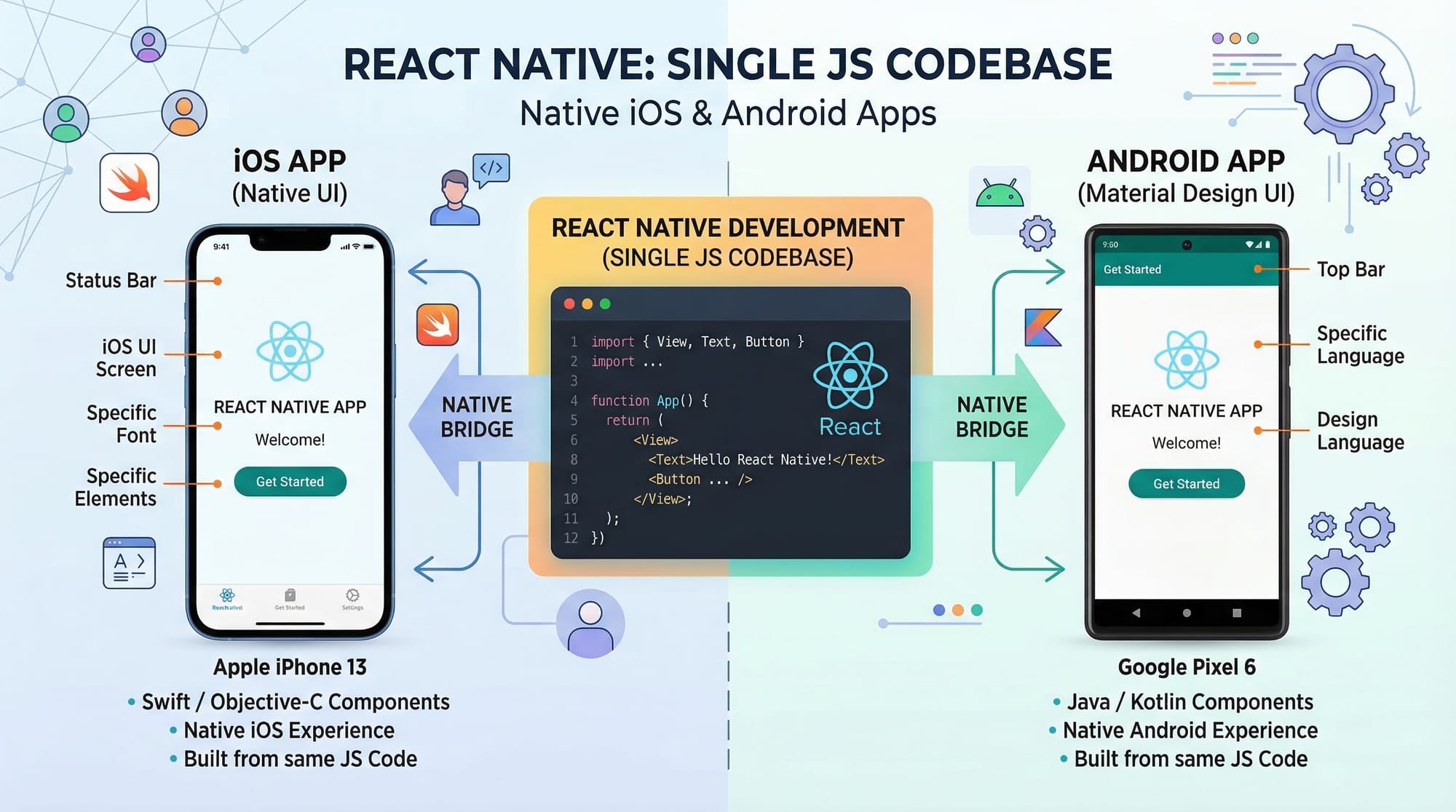
React Native is one of the most powerful technologies for building cross-platform mobile applications using a single codebase. This React Native tutorial for beginners 2026 is designed specifically for Pakistani students who want to enter the mobile app development industry without learning separate languages like Java (Android) and Swift (iOS).
In simple terms, React Native allows you to write your app using JavaScript and React, and then it compiles into native mobile apps for both Android and iOS. This means you can build apps for users in Lahore, Karachi, Islamabad, or even globally — using just one codebase.
For Pakistani students, this is a huge advantage:
- Less time to learn multiple technologies
- Faster job readiness
- High demand in freelancing platforms (Fiverr, Upwork)
- Opportunity to build startups with limited resources
By the end of this tutorial, you’ll learn React Native 2026 concepts, build real apps, and understand how to create professional-level mobile applications.
Prerequisites
Before starting this tutorial, you should have:
- Basic knowledge of JavaScript (ES6)
- Understanding of React.js fundamentals (components, props, state)
- Familiarity with HTML & CSS concepts
- A laptop with:
- Node.js installed
- Android Studio or Expo CLI
👉 If you’re new to React, we recommend starting with a React.js Introduction tutorial before continuing.
Core Concepts & Explanation
Components & JSX in React Native
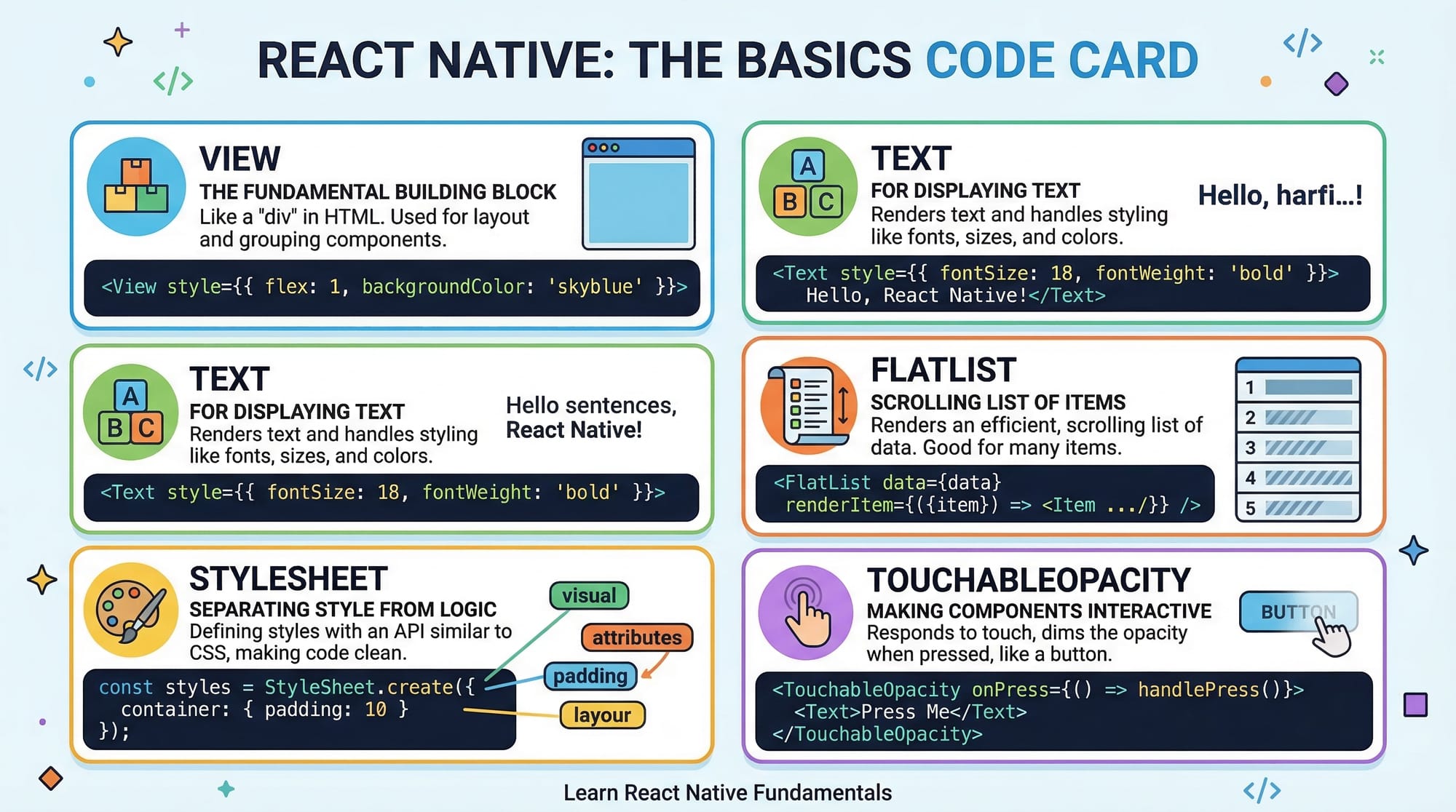
React Native apps are built using components, just like React.js. However, instead of HTML tags like <div> or <p>, React Native uses built-in components such as:
View→ like a<div>Text→ like<p>Image→ displays images
Example:
import React from 'react';
import { View, Text } from 'react-native';

const App = () => {
  return (
    <View>
      <Text>Hello Ahmad! Welcome to React Native.</Text>
    </View>
  );
};

export default App;
Explanation:
import React→ Required to use JSX{ View, Text }→ Built-in React Native components<View>→ Container for layout<Text>→ Displays text (you cannot use plain text outside it)App→ Functional component
State, Props, and Hooks
React Native uses state and props to manage data.
- Props → Passed from parent to child
- State → Local data that changes over time
- Hooks → Functions like
useStateto manage state
Example:
import React, { useState } from 'react';
import { View, Text, Button } from 'react-native';

const CounterApp = () => {
  const [count, setCount] = useState(0);

  return (
    <View>
      <Text>Count: {count}</Text>
      <Button title="Increase" onPress={() => setCount(count + 1)} />
    </View>
  );
};

export default CounterApp;
Explanation:
useState(0)→ Initializes count with 0count→ Current valuesetCount→ Updates valueButton→ Built-in button componentonPress→ Event handler
React Native Architecture (Bridge Concept)
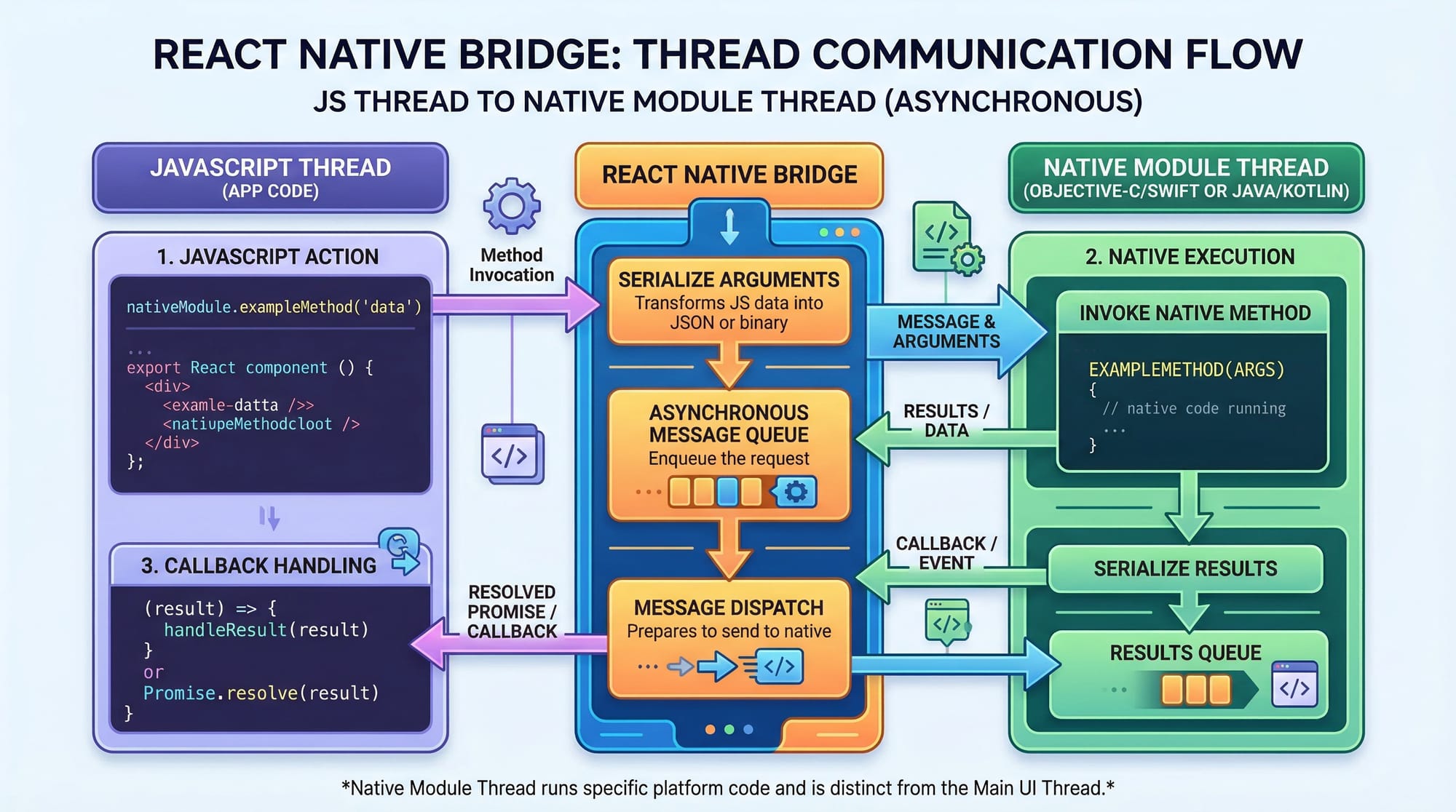
React Native works using a bridge that connects JavaScript code with native modules.
- JS thread → Runs your code
- Native thread → Handles platform-specific UI
- Bridge → Communicates between them
This allows high performance while keeping code reusable.
Practical Code Examples
Example 1: Simple User Profile App
import React from 'react';
import { View, Text, StyleSheet } from 'react-native';

const Profile = () => {
  return (
    <View style={styles.container}>
      <Text style={styles.name}>Ali Khan</Text>
      <Text style={styles.info}>City: Karachi</Text>
      <Text style={styles.info}>Balance: PKR 5000</Text>
    </View>
  );
};

const styles = StyleSheet.create({
  container: {
    padding: 20,
  },
  name: {
    fontSize: 24,
    fontWeight: 'bold',
  },
  info: {
    fontSize: 18,
  },
});

export default Profile;
Explanation:
StyleSheet.create()→ Defines stylescontainer→ Adds paddingname→ Large bold textinfo→ Smaller text- Data shown (PKR, city) → Real-world Pakistani example
Example 2: Real-World Application (Student List App)
import React from 'react';
import { View, Text, FlatList, TouchableOpacity } from 'react-native';

const students = [
  { id: '1', name: 'Ahmad' },
  { id: '2', name: 'Fatima' },
  { id: '3', name: 'Ali' },
];

const StudentApp = () => {
  return (
    <View>
      <FlatList
        data={students}
        keyExtractor={(item) => item.id}
        renderItem={({ item }) => (
          <TouchableOpacity onPress={() => alert(item.name)}>
            <Text>{item.name}</Text>
          </TouchableOpacity>
        )}
      />
    </View>
  );
};

export default StudentApp;
Explanation:
FlatList→ Efficient list renderingdata→ Array of studentskeyExtractor→ Unique IDrenderItem→ Renders each studentTouchableOpacity→ Clickable itemalert(item.name)→ Shows selected student
Common Mistakes & How to Avoid Them
Mistake 1: Using HTML Tags Instead of Native Components
❌ Wrong:
<div>Hello</div>
✅ Correct:
<View>
  <Text>Hello</Text>
</View>
👉 React Native does NOT support HTML.
Mistake 2: Not Using Keys in Lists
❌ Wrong:
students.map(student => <Text>{student.name}</Text>)
✅ Correct:
students.map(student => (
  <Text key={student.id}>{student.name}</Text>
))
👉 Keys improve performance and prevent bugs.
Practice Exercises
Exercise 1: Build a Counter App
Problem:
Create a counter app with increment and decrement buttons.
Solution:
import React, { useState } from 'react';
import { View, Text, Button } from 'react-native';

const Counter = () => {
  const [count, setCount] = useState(0);

  return (
    <View>
      <Text>{count}</Text>
      <Button title="+" onPress={() => setCount(count + 1)} />
      <Button title="-" onPress={() => setCount(count - 1)} />
    </View>
  );
};

export default Counter;
Exercise 2: Create a Shopping List App
Problem:
Display a list of grocery items (e.g., Rice, Milk, Eggs).
Solution:
import React from 'react';
import { View, Text, FlatList } from 'react-native';

const items = ['Rice', 'Milk', 'Eggs'];

const ShoppingList = () => {
  return (
    <View>
      <FlatList
        data={items}
        renderItem={({ item }) => <Text>{item}</Text>}
        keyExtractor={(item, index) => index.toString()}
      />
    </View>
  );
};

export default ShoppingList;
Frequently Asked Questions
What is React Native used for?
React Native is used to build mobile apps for Android and iOS using a single JavaScript codebase. It is widely used by companies and freelancers for fast, cost-effective development.
How do I start learning React Native in Pakistan?
You can start by learning JavaScript and React.js first, then move to React Native using tools like Expo. Many Pakistani students practice by building small apps like student lists or expense trackers.
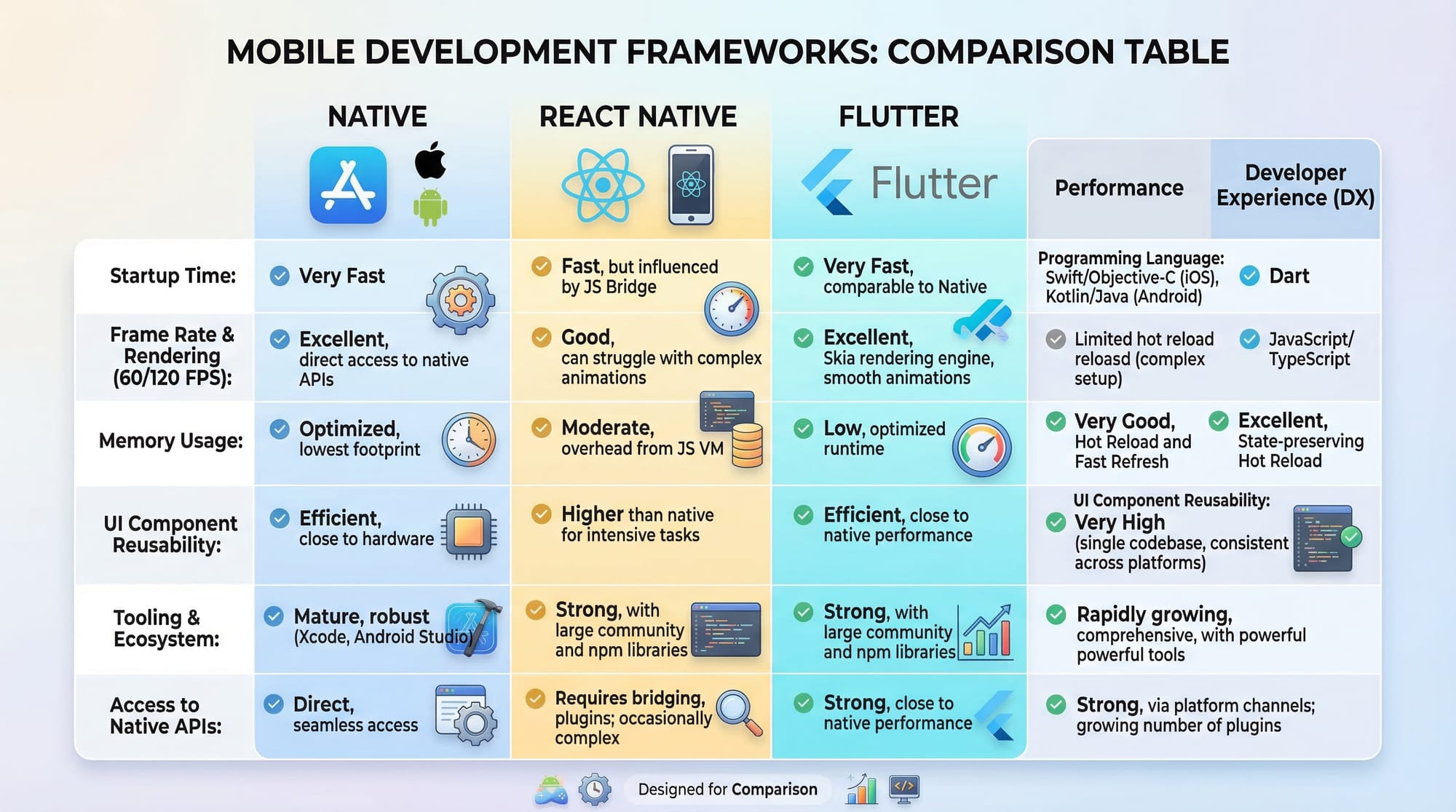
Is React Native better than Flutter?
Both are good for cross-platform apps. React Native uses JavaScript (more popular), while Flutter uses Dart. The choice depends on your preference and job market demand.
Can I earn money with React Native?
Yes, many developers in Pakistan earn through freelancing platforms by building apps for clients. It is a highly in-demand skill globally.
Do I need Android Studio for React Native?
Not always. You can use Expo CLI to start quickly without Android Studio, but for advanced development, Android Studio is recommended.
Summary & Key Takeaways
- React Native allows building cross-platform apps with one codebase
- Uses JavaScript and React concepts
- Components like
ViewandTextreplace HTML - Hooks like
useStatemanage data - Ideal for Pakistani students entering freelancing and jobs
- Real-world apps can be built quickly and efficiently
Next Steps & Related Tutorials
To continue your journey, explore these tutorials on theiqra.edu.pk:
- Learn the basics with React.js Introduction
- Build UI apps with a Flutter Tutorial
- Explore backend integration with Node.js API Development
- Create full apps with Android Development Guide
👉 Start small, build projects, and gradually move toward advanced mobile apps.
If you want, I can also create:
- A quiz (MCQs JSON format) for this tutorial
- A complete project (e.g., Food Delivery App in Pakistan)
- Or a step-by-step roadmap to become a React Native developer in 2026
Test Your Python Knowledge!
Finished reading? Take a quick quiz to see how much you've learned from this tutorial.