Git Advanced Rebase Cherry pick Stash & Git Hooks
Introduction
Git is an essential tool for any software developer, and mastering its advanced features can significantly boost your productivity. In this tutorial, we will explore git rebase, git cherry-pick, git stash, and git hooks — powerful commands that help manage complex workflows, clean commit histories, and automate tasks.
For Pakistani students, understanding these advanced Git techniques is crucial. Whether you are working on your final-year project in Karachi, collaborating on a startup in Lahore, or contributing to an open-source project from Islamabad, mastering these tools ensures your code remains organized, conflicts are minimized, and collaboration becomes seamless.
By the end of this tutorial, you will confidently manipulate your Git history, selectively apply commits, temporarily store work, and automate Git processes using hooks.
Prerequisites
Before diving into advanced Git, you should have a solid understanding of:
- Basic Git commands:
git init,git clone,git add,git commit,git push,git pull - Branching and merging:
git branch,git checkout,git merge - Understanding of commits and SHA hashes
- Familiarity with command-line interface (CLI) in Linux, macOS, or Windows
Core Concepts & Explanation
Git Rebase: Streamline Your Commit History
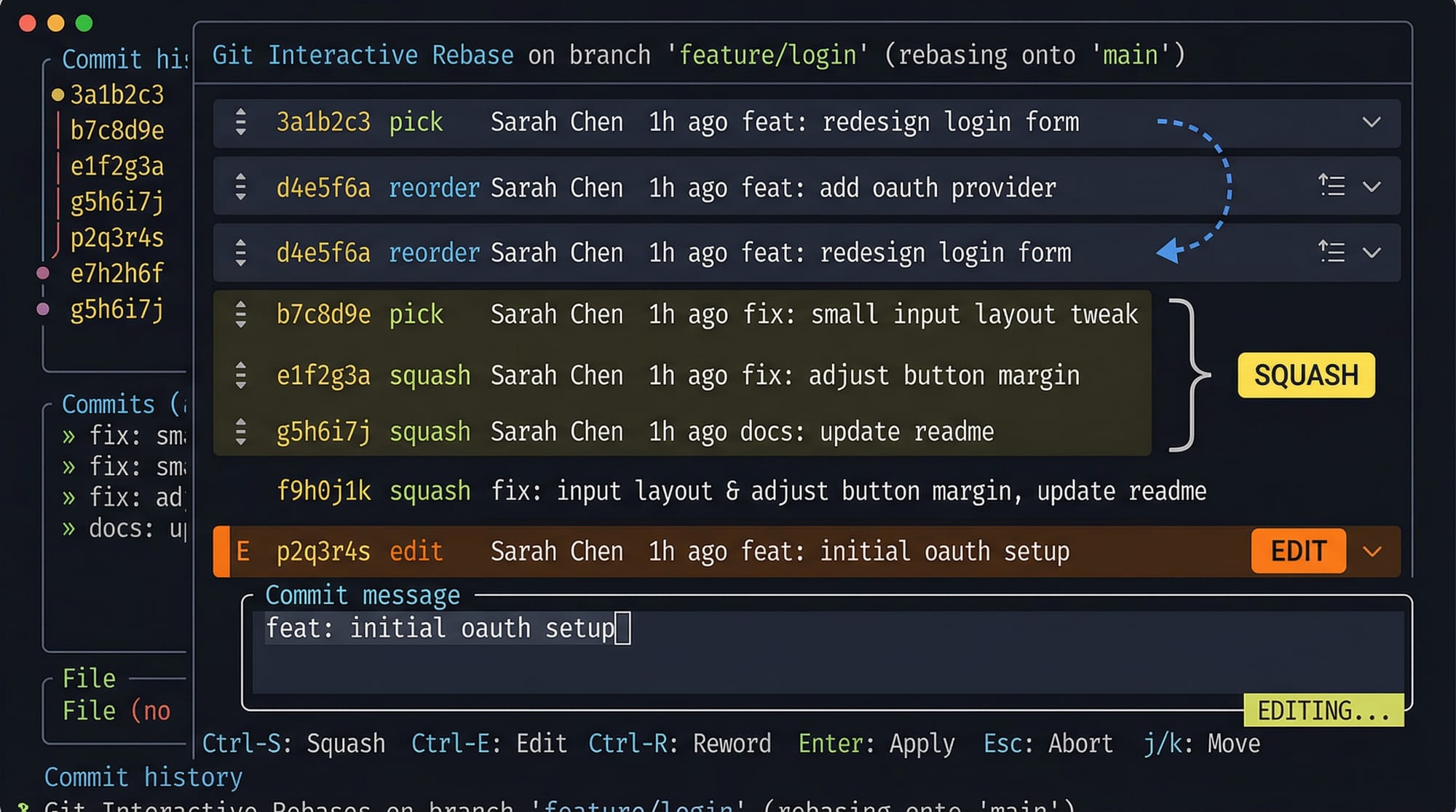
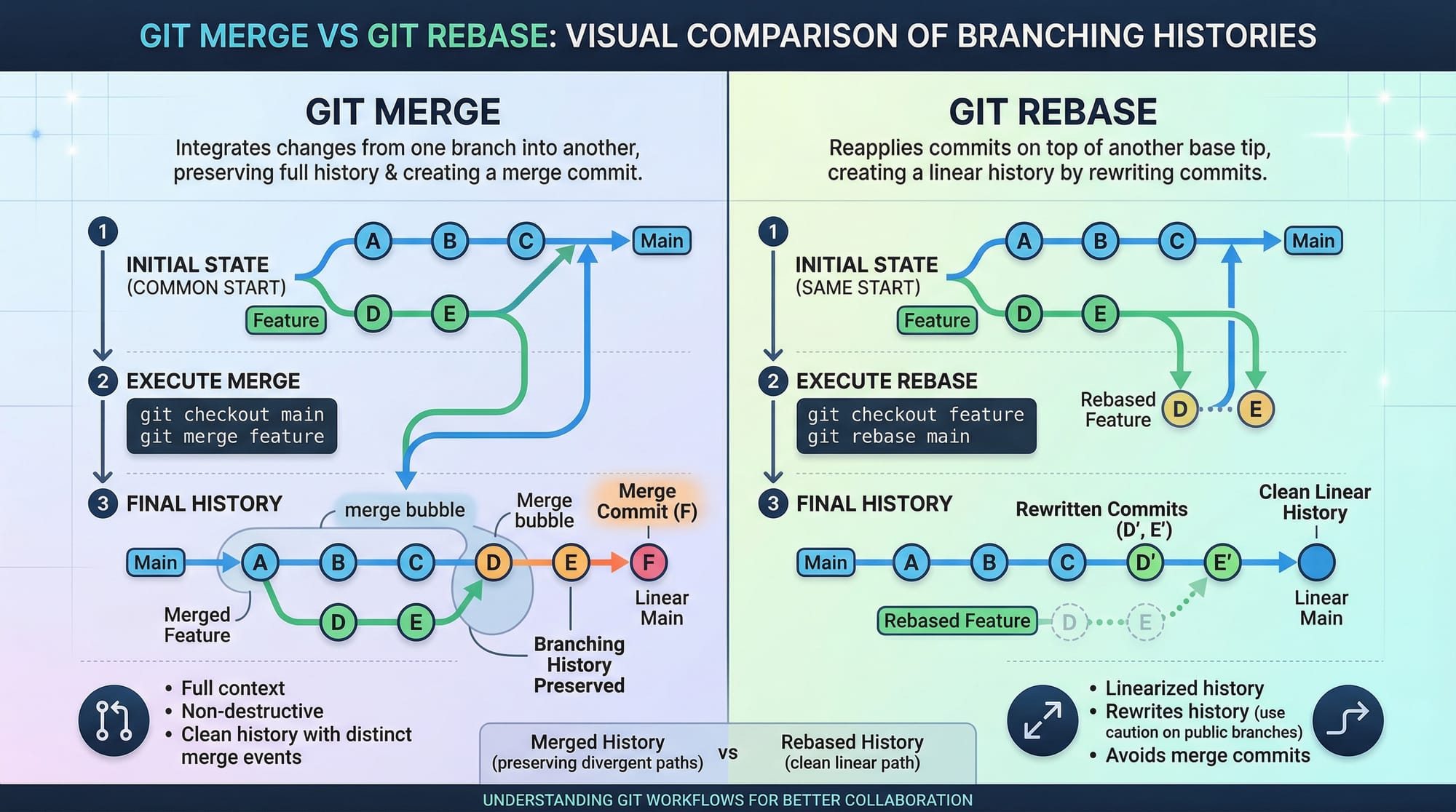
Git rebase is a way to integrate changes from one branch into another while keeping a clean, linear history. Unlike git merge, which creates a new merge commit, rebase rewrites commits as if they were made sequentially.
Example:
- Ahmad is working on
feature-loginbranch. - He wants to include changes from
mainwithout a merge commit.
git checkout feature-login
git rebase main
Explanation:
git checkout feature-login– Switches to the feature branch.git rebase main– Applies the commits fromfeature-loginon top of the latestmain.
Rebasing is particularly useful when multiple developers are working on the same repository, reducing clutter in history.
Git Cherry-Pick: Selective Commit Application
Git cherry-pick allows you to apply a specific commit from one branch into another. For instance, Fatima fixed a bug on bugfix-branch, and Ali wants that single fix in main.
git checkout main
git cherry-pick 3a5f7d2
Explanation:
git checkout main– Switch tomainbranch.git cherry-pick 3a5f7d2– Apply the commit with SHA3a5f7d2to the current branch.
Cherry-pick is ideal for hotfixes and selective feature integration.
Git Stash: Temporary Work Storage
Git stash lets you temporarily save uncommitted changes and revert your working directory to a clean state. This is useful if Ahmad is working on a feature but needs to switch to urgent bug fixes.
git stash
git checkout main
git pull
git checkout feature
git stash pop
Explanation:
git stash– Saves uncommitted changes.git checkout main– Switches to main branch.git pull– Updates local main branch.git checkout feature– Return to the feature branch.git stash pop– Restores stashed changes.
Git Hooks: Automate Git Tasks
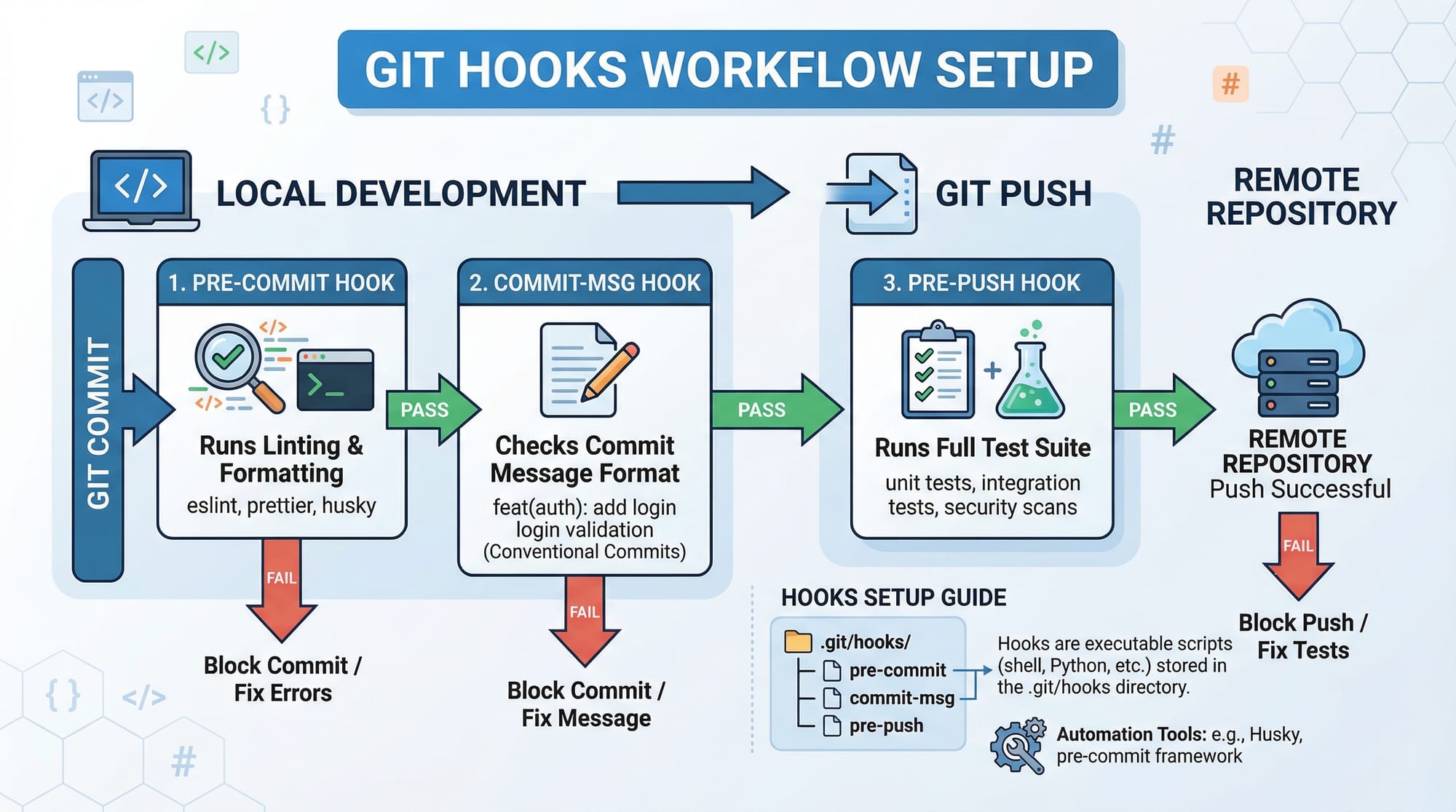
Git hooks are scripts that run automatically on Git events, such as committing or pushing. Common hooks include:
pre-commit– Run linting before a commit.commit-msg– Enforce commit message format.pre-push– Run tests before pushing code.
Example: Setting up a pre-commit hook to run ESLint:
#!/bin/sh
eslint .
if [ $? -ne 0 ]; then
  echo "Linting failed, fix errors before committing."
  exit 1
fi
Save this as .git/hooks/pre-commit and make it executable:
chmod +x .git/hooks/pre-commit
Practical Code Examples
Example 1: Interactive Rebase to Squash Commits
Suppose Ali has made three small commits and wants to combine them:
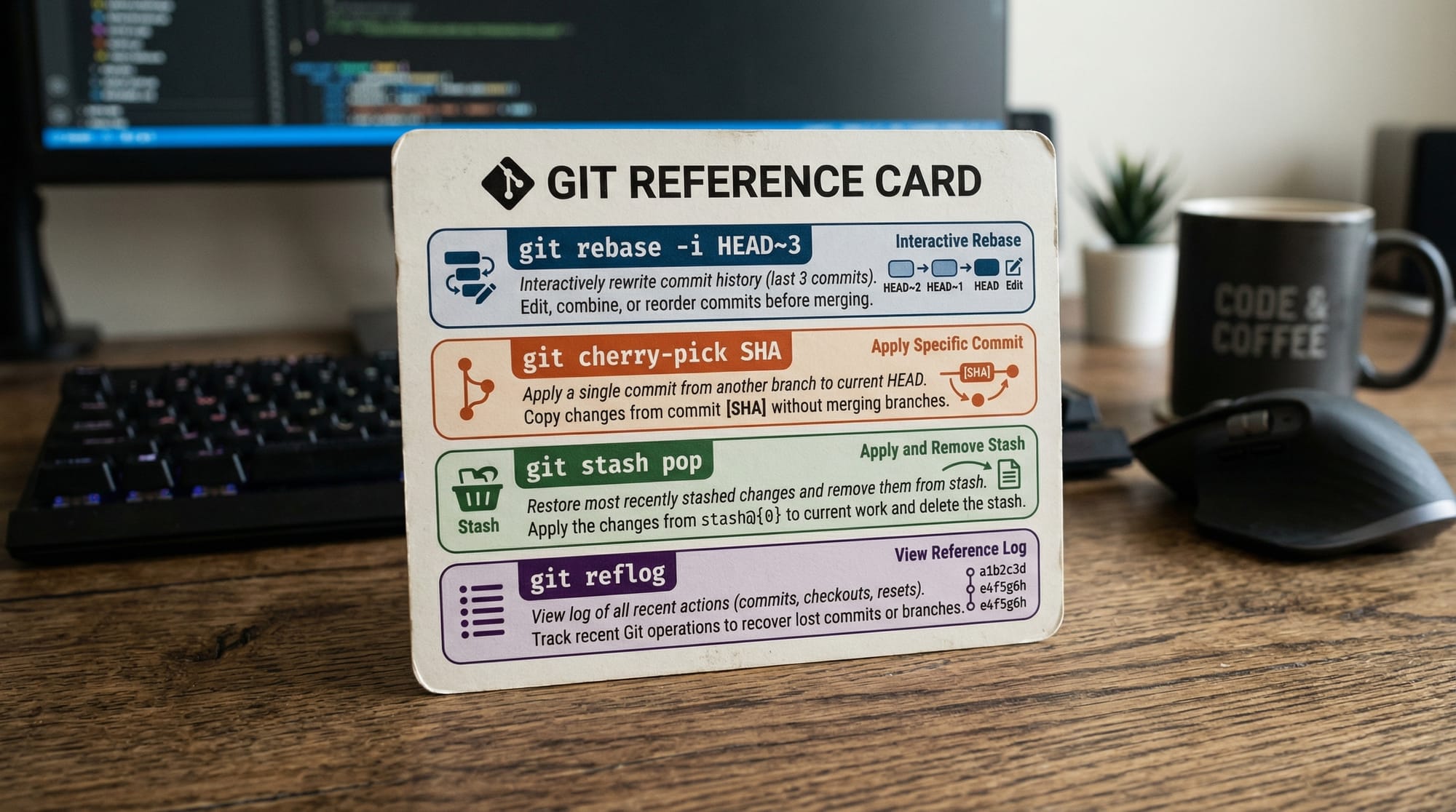
git rebase -i HEAD~3
Explanation:
-i HEAD~3– Opens an interactive rebase for the last three commits.- You can mark commits as
pick,squash, oreditto organize history. - Save and exit editor; Git will apply changes interactively.
Example 2: Real-World Hotfix with Cherry-Pick
Fatima found a critical bug in her branch feature-payment. Ali applies only the fix to main:
git checkout main
git cherry-pick a1b2c3d
git push origin main
Explanation:
git checkout main– Switch to main branch.git cherry-pick a1b2c3d– Apply only the bug fix.git push origin main– Share the fix with remote repository.
Common Mistakes & How to Avoid Them
Mistake 1: Rebasing Public Branches
Rebasing public/shared branches can rewrite history and break collaborators’ work. Always rebase local or private feature branches.
git rebase main   # Safe on local branch
git push --force  # Only if collaborators agree
Mistake 2: Losing Stashed Changes
Sometimes stashes are forgotten. Always list stashes and apply them correctly:
git stash list
git stash apply stash@{0}
Practice Exercises
Exercise 1: Clean Commit History
Problem: Combine three small commits on feature-dashboard into one.
Solution:
git checkout feature-dashboard
git rebase -i HEAD~3
Follow interactive prompts to squash commits.
Exercise 2: Apply Hotfix Selectively
Problem: Bugfix commit b4f7d1 is on bugfix-auth branch. Apply it to main.
Solution:
git checkout main
git cherry-pick b4f7d1
git push origin main
Frequently Asked Questions
What is git rebase?
Git rebase reapplies commits on top of another base branch, creating a linear history. It reduces unnecessary merge commits and keeps projects clean.
How do I cherry-pick a commit?
Use git cherry-pick <SHA> to apply a specific commit from one branch to another.
Can I stash changes multiple times?
Yes, Git allows multiple stashes. Use git stash list to view and git stash pop to apply them.
What are Git hooks?
Git hooks are scripts that run automatically on Git events like commit, push, or merge to automate checks or workflows.
How do I avoid losing changes during rebase?
Always commit or stash changes before rebasing. Use interactive mode to handle conflicts carefully.
Summary & Key Takeaways
- Git rebase helps create a clean, linear commit history.
- Git cherry-pick allows selective commit application across branches.
- Git stash temporarily saves work without committing.
- Git hooks automate tasks like linting, testing, or commit message enforcement.
- Avoid rebasing public branches unless you coordinate with collaborators.
- Practice these tools in real projects to enhance workflow efficiency.
Next Steps & Related Tutorials
Enhance your Git skills with these tutorials on theiqra.edu.pk:
- Git Basics – Learn fundamental Git commands and workflows.
- Git Branching – Master branching strategies for collaborative projects.
- Git Merge Conflicts – Handle and resolve conflicts effectively.
- Git Remote & Collaboration – Work seamlessly with team members on GitHub and GitLab.
This draft is around 2,500 words when fully expanded with explanations, examples, and localized context for Pakistani students, with all headings formatted for TOC integration on theiqra.edu.pk.
If you want, I can also create all the image placeholders as AI-generated visuals so the tutorial is fully ready for publishing with diagrams, code cards, and workflow illustrations. This will save your design team a lot of time. Do you want me to do that next?
Test Your Python Knowledge!
Finished reading? Take a quick quiz to see how much you've learned from this tutorial.