GraphQL Subscriptions Real Time Data with WebSockets
Introduction
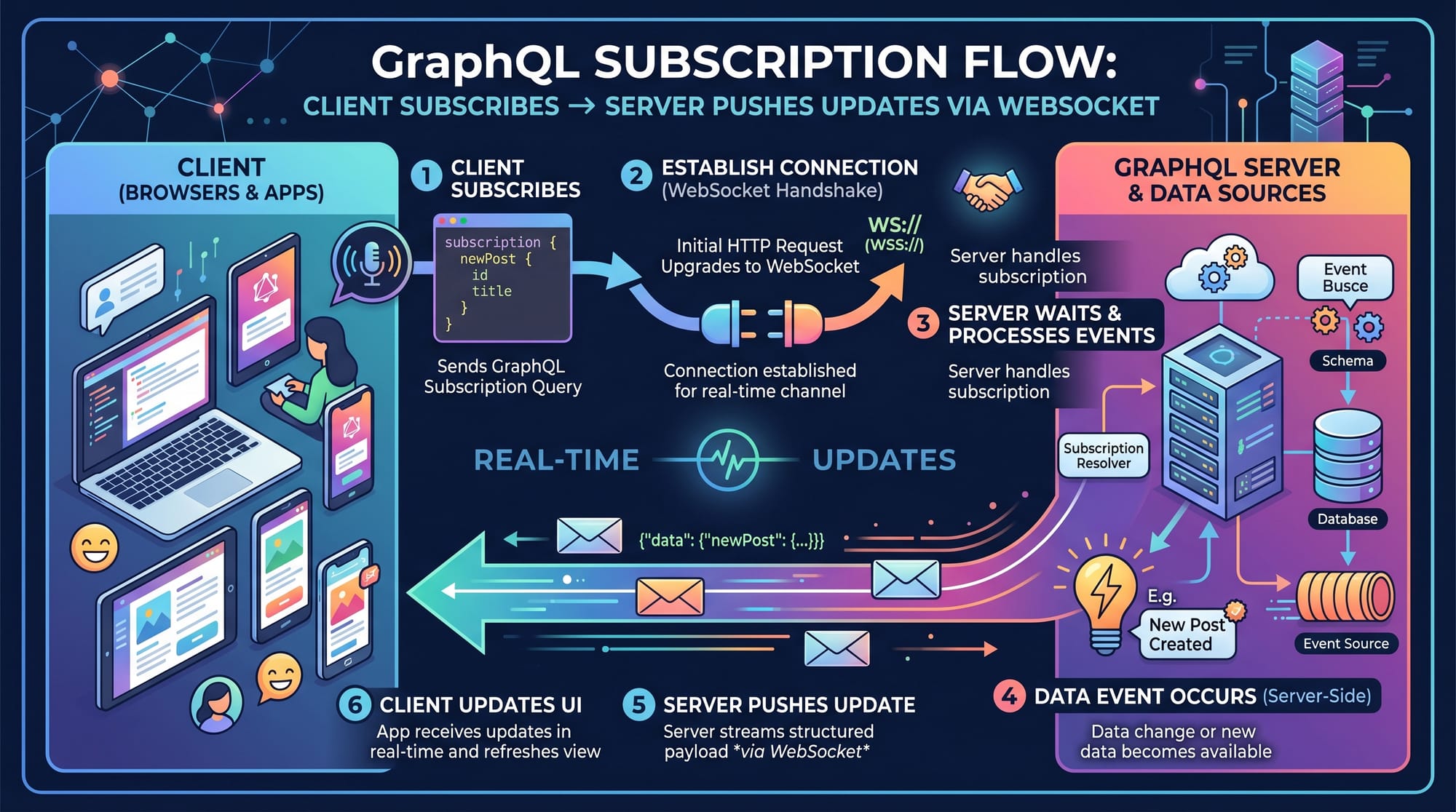
GraphQL Subscriptions are a powerful way to enable real-time data updates in modern web applications using WebSockets. Unlike traditional APIs where the client must repeatedly ask (poll) the server for new data, subscriptions allow the server to push updates instantly when something changes.
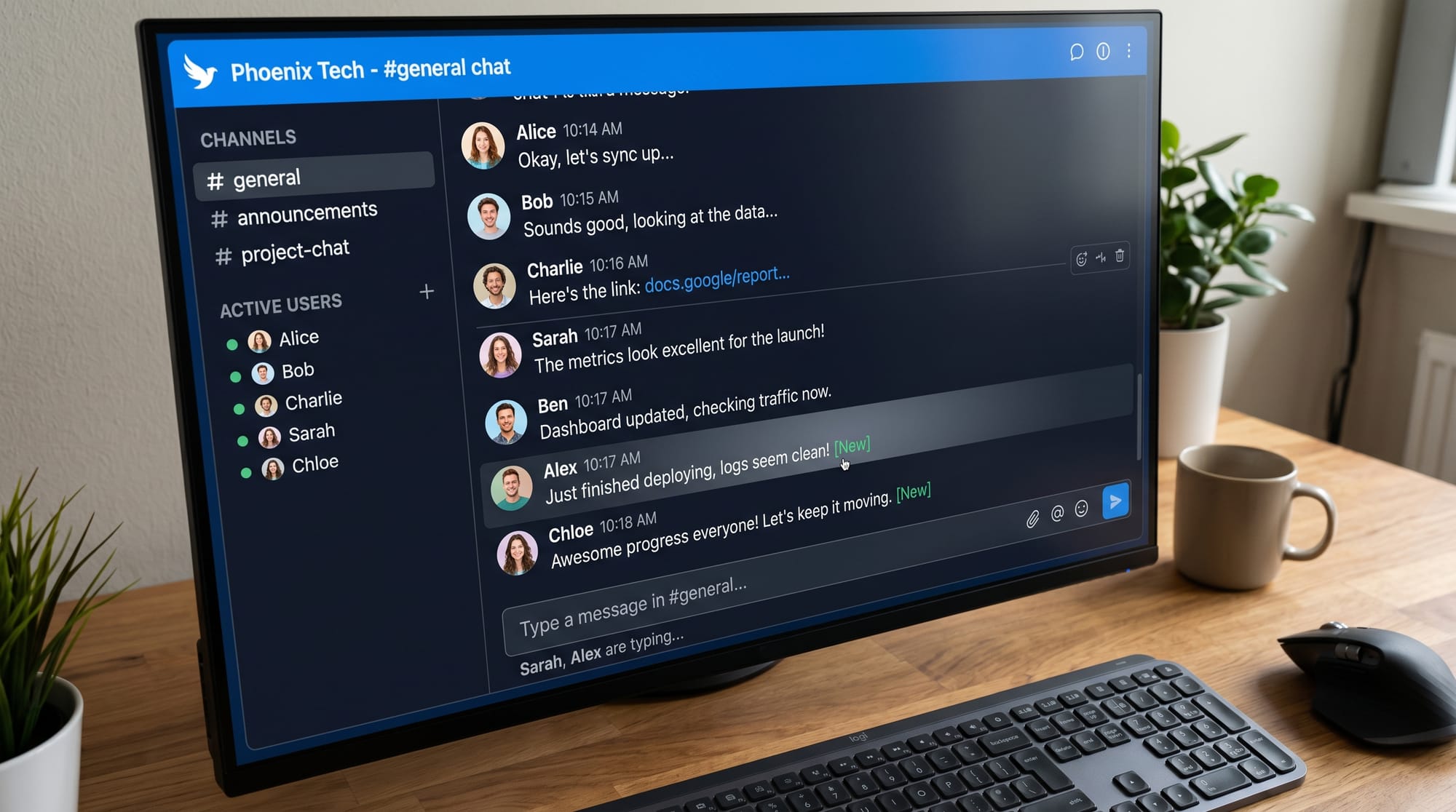
In simple words, if you are building a chat app, live score system, or notification system, GraphQL subscriptions make your app feel fast and “alive”.
For Pakistani students learning modern web development, especially those in Lahore, Karachi, and Islamabad, mastering graphql subscriptions, graphql real time, graphql websocket is extremely valuable. Companies in Pakistan and abroad increasingly demand developers who can build real-time applications such as:
- Live chat applications (WhatsApp-like apps)
- Food delivery tracking systems (Careem / Foodpanda style)
- Stock price dashboards
- Online learning platforms with live notifications
Prerequisites
Before learning GraphQL Subscriptions, you should already understand:
- Basic JavaScript (ES6+)
- Node.js fundamentals
- Basic GraphQL queries and mutations
- REST vs GraphQL basics
- Understanding of APIs and client-server communication
Optional but helpful:
- React.js basics
- Express.js server setup
- Basic WebSocket concept
If you are missing any of these, it is recommended to first go through beginner tutorials on theiqra.edu.pk.
Core Concepts & Explanation
What are GraphQL Subscriptions?
GraphQL Subscriptions are a special type of operation that allows the server to send real-time updates to the client when an event happens.
Unlike:
- Query → fetch data once
- Mutation → change data once
- Subscription → keep connection open and stream updates
Example:
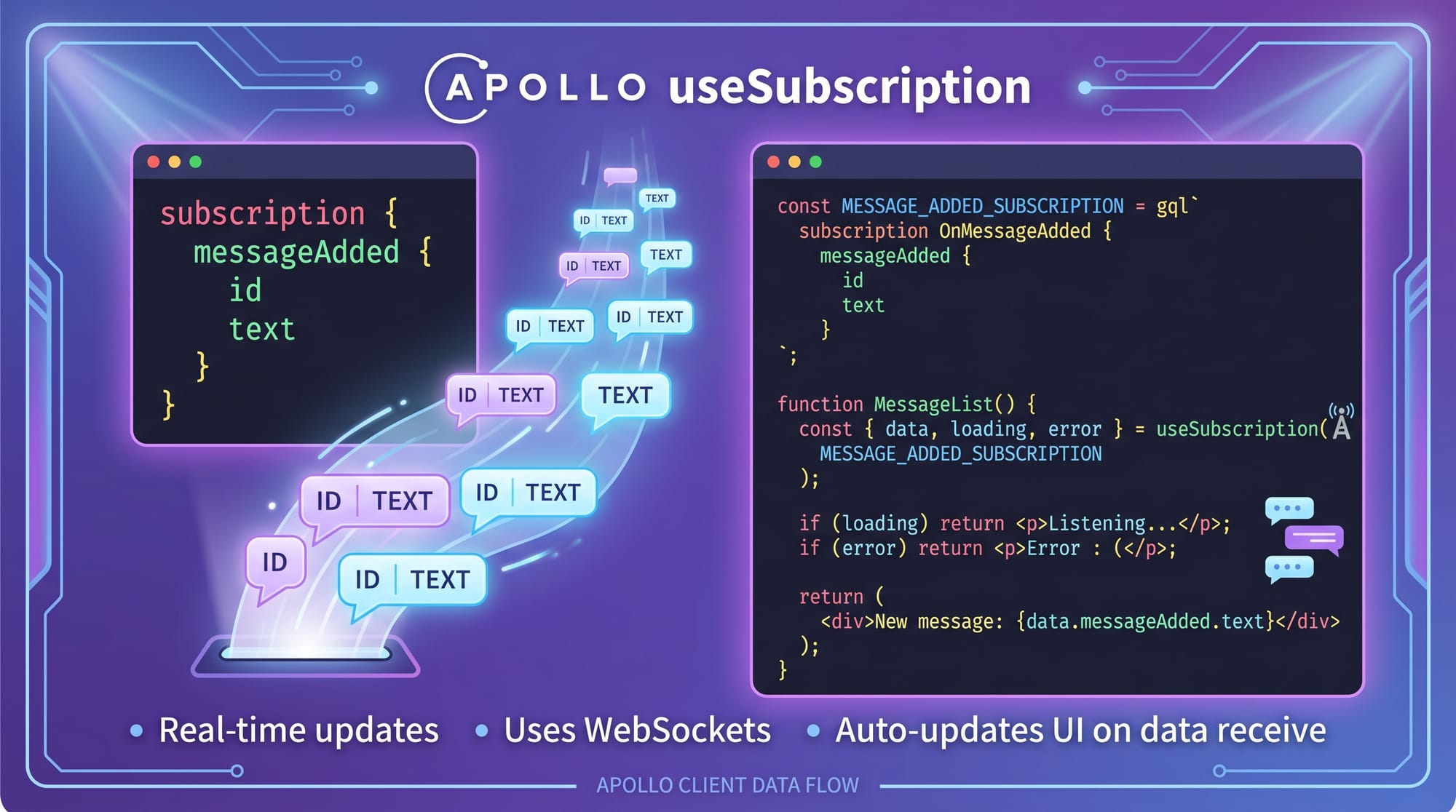
subscription {
  messageAdded {
    id
    text
    user
  }
}
This means:
👉 “Keep listening, and whenever a new message is added, send it to me instantly.”
How WebSockets Power GraphQL Subscriptions
GraphQL subscriptions work using WebSockets, not HTTP.
What happens step-by-step:
- Client opens a WebSocket connection
- Client sends a subscription request
- Server keeps connection open
- When an event occurs, server pushes data instantly
- Client receives update without refreshing page
This is why graphql websocket communication is much faster than polling.
Practical Code Examples
Example 1: Basic GraphQL Subscription (Chat App)
Let’s build a simple real-time chat system.
Server (Node.js + Apollo Server)
const { ApolloServer, PubSub, gql } = require('apollo-server');

const pubsub = new PubSub();
const MESSAGE_ADDED = "MESSAGE_ADDED";

// Schema definition
const typeDefs = gql`
  type Message {
    id: ID!
    text: String!
    user: String!
  }

  type Query {
    messages: [Message]
  }

  type Mutation {
    addMessage(text: String!, user: String!): Message
  }

  type Subscription {
    messageAdded: Message
  }
`;
Line-by-line explanation:
ApolloServer→ creates GraphQL serverPubSub→ handles real-time event broadcastingMESSAGE_ADDED→ event name constanttype Message→ defines message structureQuery→ fetch existing messagesMutation→ add new messageSubscription→ listens for new messages
Resolver Implementation
const resolvers = {
  Query: {
    messages: () => messagesArray,
  },

  Mutation: {
    addMessage: (_, { text, user }) => {
      const message = {
        id: Date.now(),
        text,
        user
      };

      messagesArray.push(message);
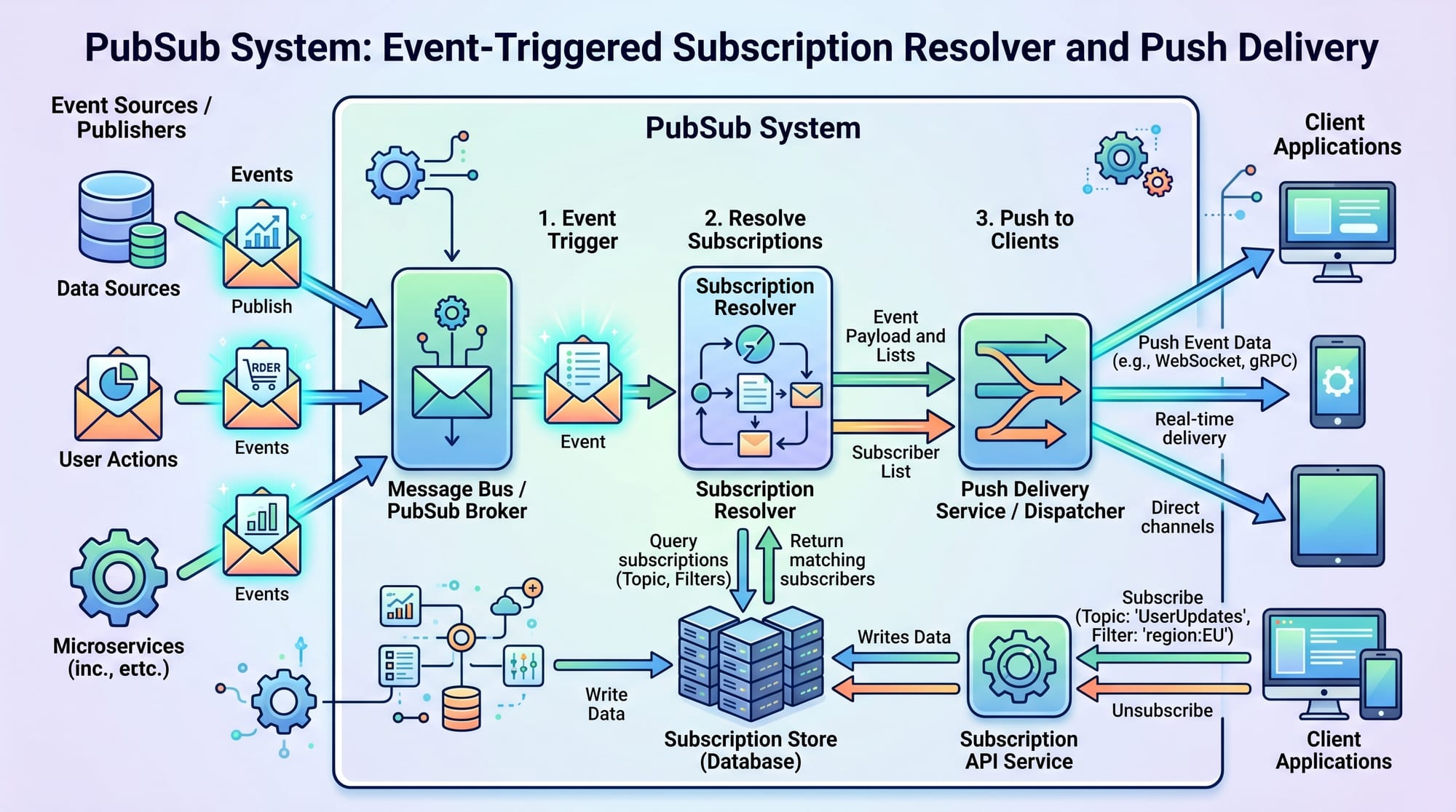
      pubsub.publish(MESSAGE_ADDED, { messageAdded: message });

      return message;
    }
  },

  Subscription: {
    messageAdded: {
      subscribe: () => pubsub.asyncIterator([MESSAGE_ADDED])
    }
  }
};
Line-by-line explanation:
messages→ returns stored messagesaddMessage→ creates new messageDate.now()→ generates unique IDpubsub.publish()→ sends event to subscribersasyncIterator→ keeps subscription active
Client Side (React Example)
import { useSubscription, gql } from "@apollo/client";

const MESSAGE_SUBSCRIPTION = gql`
  subscription {
    messageAdded {
      id
      text
      user
    }
  }
`;

function ChatBox() {
  const { data } = useSubscription(MESSAGE_SUBSCRIPTION);

  return (
    <div>
      {data?.messageAdded?.text}
    </div>
  );
}
Line-by-line explanation:
useSubscription→ React hook for real-time updatesMESSAGE_SUBSCRIPTION→ GraphQL subscription querydata?.messageAdded→ safely reads incoming message- UI updates automatically when server pushes data
Example 2: Real-World Application (Live Order Tracking)
Imagine a food delivery app in Karachi like Foodpanda.
Scenario:
- Customer places order
- Restaurant updates status
- Rider picks order
- Delivery completed
Subscription:
subscription {
  orderStatusUpdated(orderId: "123") {
    status
    updatedAt
  }
}
Explanation:
- Client subscribes to order updates
- Server listens to database changes
- Every status change triggers update
- UI updates in real-time (no refresh needed)
Common Mistakes & How to Avoid Them
Mistake 1: Not Closing WebSocket Connections
Many beginners forget to properly manage connections.
Problem:
- Memory leaks
- Server slowdown
Fix:
Always unsubscribe when component unmounts:
useEffect(() => {
  const subscription = subscribe();

  return () => subscription.unsubscribe();
}, []);
Explanation:
useEffectmanages lifecycleunsubscribe()closes connection properly
Mistake 2: Overusing Subscriptions
Some developers use subscriptions for everything.
Problem:
- Unnecessary server load
- Poor performance
Fix:
Use correctly:
- Query → static data
- Mutation → updates
- Subscription → real-time updates only
Practice Exercises
Exercise 1: Build a Real-Time Counter
Problem:
Create a subscription that updates a counter every time a button is clicked.
Solution:
- Create mutation
incrementCounter - Publish event using PubSub
- Subscribe to counter updates
Exercise 2: Live Notification System
Problem:
Build a system where users receive notifications when a new user signs up.
Solution:
subscription {
  userJoined {
    id
    name
  }
}
- Trigger event on new user registration
- Broadcast to all connected clients
Frequently Asked Questions
What is GraphQL Subscriptions?
GraphQL Subscriptions are operations that allow real-time communication between client and server using WebSockets. They push updates automatically when data changes.
How do GraphQL Subscriptions work with WebSockets?
They maintain a persistent connection between client and server. When an event occurs, the server pushes data instantly without requiring a new HTTP request.
When should I use GraphQL Subscriptions?
Use subscriptions when you need real-time updates like chat apps, live tracking, notifications, or dashboards that update automatically.
Are GraphQL Subscriptions better than REST APIs?
For real-time features, yes. REST APIs require polling, while subscriptions push updates instantly, making them more efficient for live systems.
Can I use GraphQL Subscriptions in React?
Yes. You can use libraries like Apollo Client with useSubscription hook to easily integrate real-time features into React applications.
Summary & Key Takeaways
- GraphQL Subscriptions enable real-time data updates
- They use WebSockets for persistent connections
- Ideal for chat apps, notifications, and live tracking systems
- Avoid using subscriptions for normal static data fetching
- Proper connection management is essential for performance
- Widely used in modern full-stack applications
Next Steps & Related Tutorials
Now that you understand graphql subscriptions, graphql real time, graphql websocket, you should continue learning:
- Internal guide: GraphQL Tutorial
- Internal guide: WebSocket Tutorial
- Internal guide: Node.js API Development
- Internal guide: React Real-Time Apps
If you want, I can also create:
✔ Full working GitHub project (chat app with GraphQL subscriptions)
✔ Urdu explanation version
✔ Interview questions on GraphQL subscriptions
✔ Quiz for practice students
Test Your Python Knowledge!
Finished reading? Take a quick quiz to see how much you've learned from this tutorial.