SSH Tutorial Secure Remote Access & Tunneling Guide
Introduction
SSH (Secure Shell) is one of the most important tools in modern networking and system administration. In this SSH tutorial: Secure Remote Access & Tunneling Guide, you will learn how SSH works, how to use SSH keys, how to configure secure connections, and how SSH tunneling can securely forward traffic between systems.
For Pakistani students learning networking, cybersecurity, or DevOps, SSH is a must-have skill. Whether you are managing a VPS hosted in Karachi, connecting to a cloud server for a university project in Islamabad, or accessing Linux machines in a lab at a college in Lahore, SSH allows you to do it securely over the internet.
Unlike insecure protocols like Telnet, SSH encrypts all communication, ensuring your passwords, commands, and data cannot be easily intercepted.
Prerequisites
Before starting this SSH tutorial, you should be familiar with:
- Basic Linux commands (cd, ls, mkdir, nano)
- Understanding of client-server architecture
- Basic networking concepts (IP address, ports, DNS)
- Access to a Linux machine or VPS (Ubuntu recommended)
- Terminal usage (Windows Terminal, PowerShell, or Linux shell)
If you are new, it is recommended to first study Linux Basics and Linux Networking Fundamentals before diving into SSH.
Core Concepts & Explanation
What is SSH?
SSH (Secure Shell) is a cryptographic network protocol used to securely access remote systems over an insecure network like the internet.
Example:
ssh [email protected]
Line-by-line explanation:
ssh→ command to start a secure shell connectionahmad→ username on the remote machine192.168.1.10→ IP address of the remote server
When executed, SSH:
- Connects to the remote server (usually port 22)
- Verifies identity (password or SSH key)
- Encrypts all communication
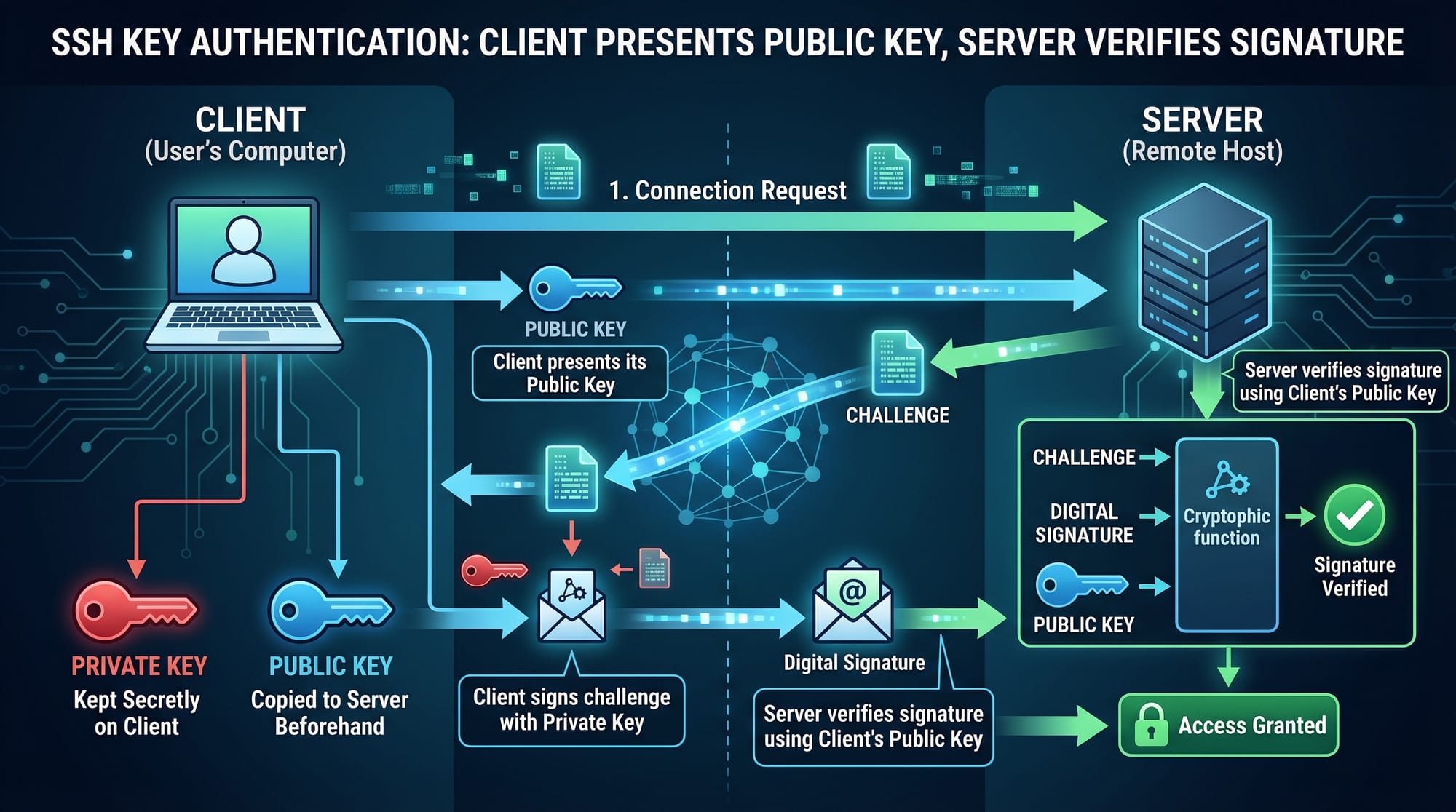
SSH Keys (Public & Private Key Authentication)
Instead of using passwords, SSH supports key-based authentication.
How it works:
- Private key stays on your computer (secret)
- Public key is copied to server
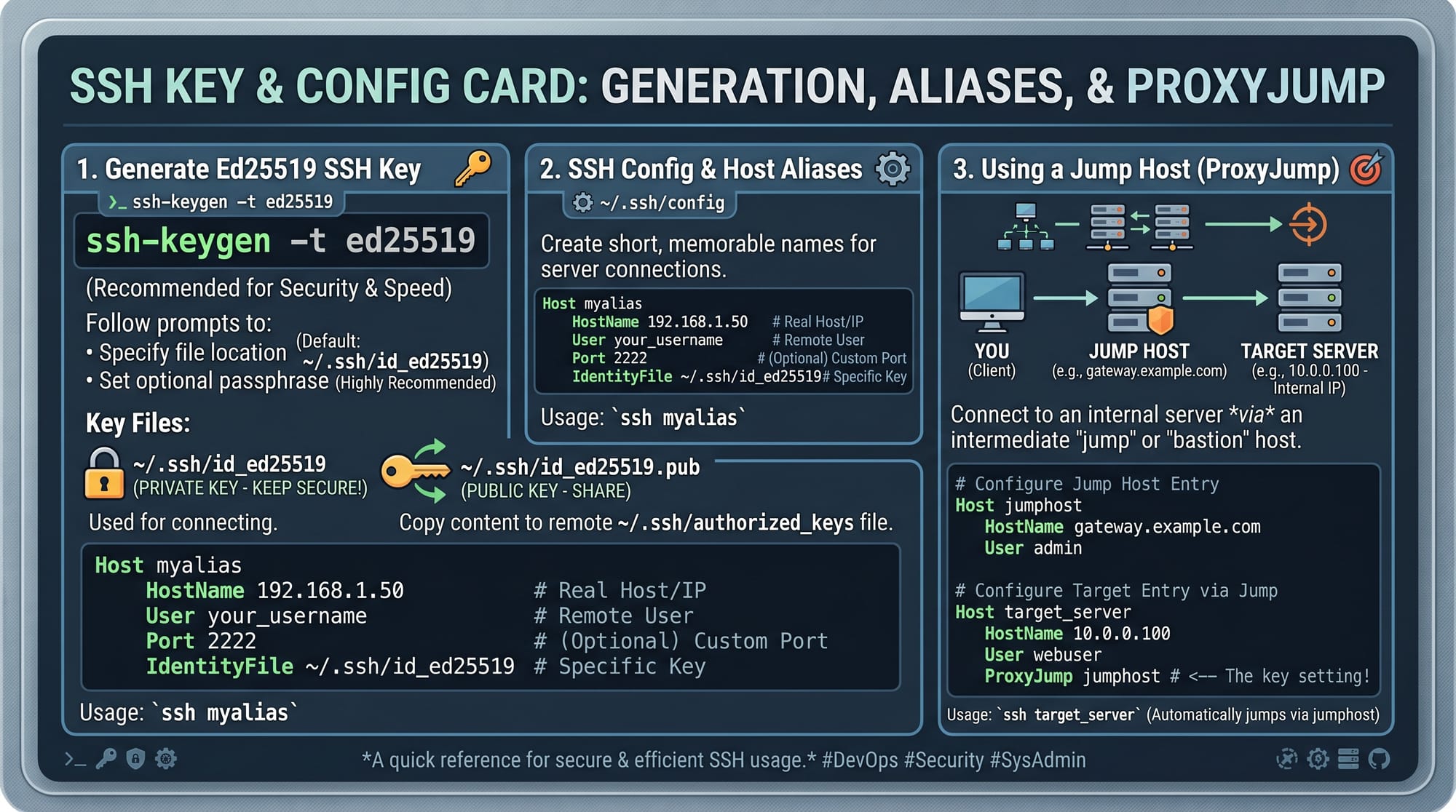
Generate SSH key:
ssh-keygen -t ed25519 -C "ahmad@karachi-server"
Line-by-line explanation:
ssh-keygen→ tool to generate SSH key pair-t ed25519→ type of encryption algorithm (modern & secure)-C→ comment to identify the key
After generating keys:
- Private key:
~/.ssh/id_ed25519 - Public key:
~/.ssh/id_ed25519.pub
Copy key to server:
ssh-copy-id [email protected]
Explanation:
ssh-copy-id→ installs your public key on remote server- After this, login no longer needs password
SSH Tunneling (Port Forwarding)
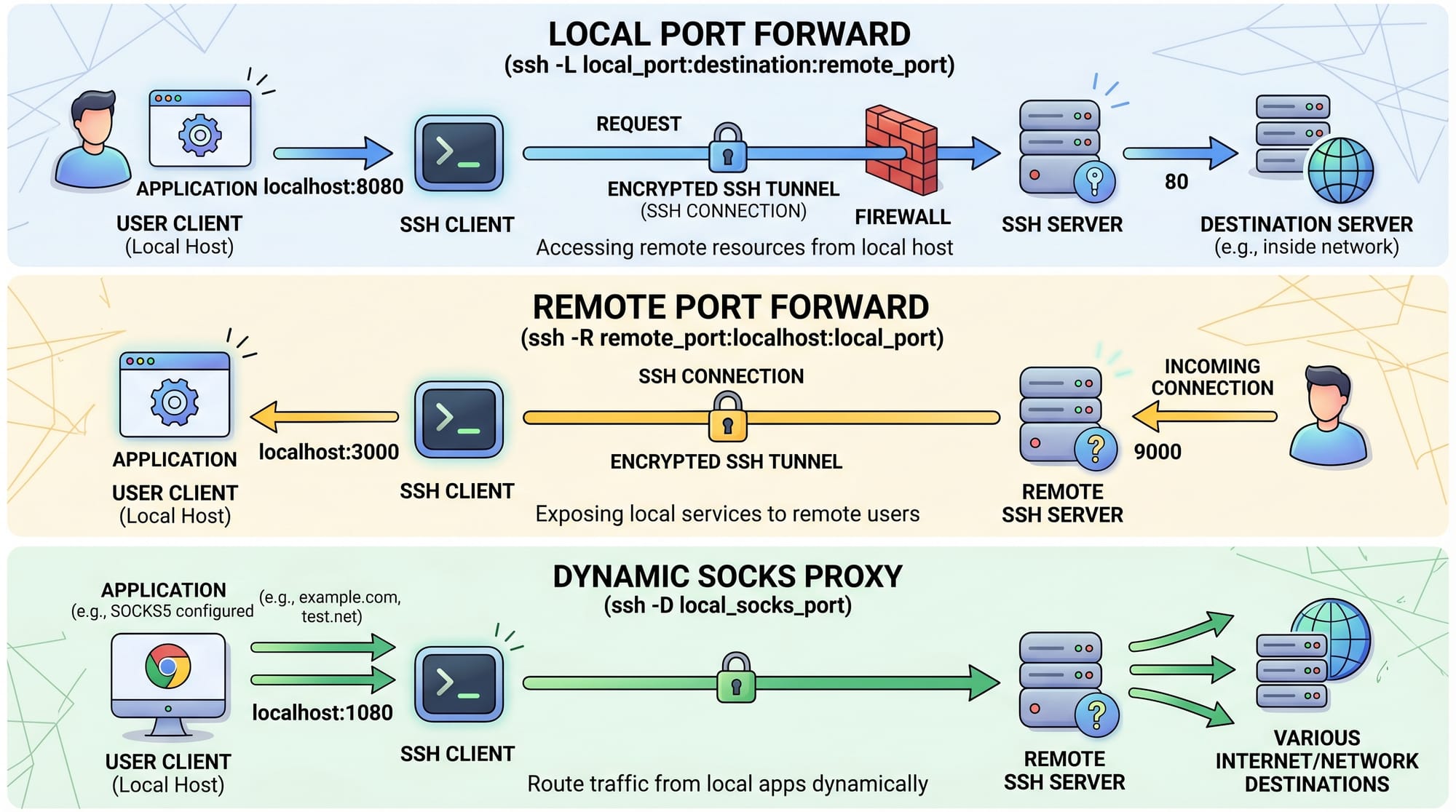
SSH tunneling allows you to securely forward network traffic between systems.
There are three types:
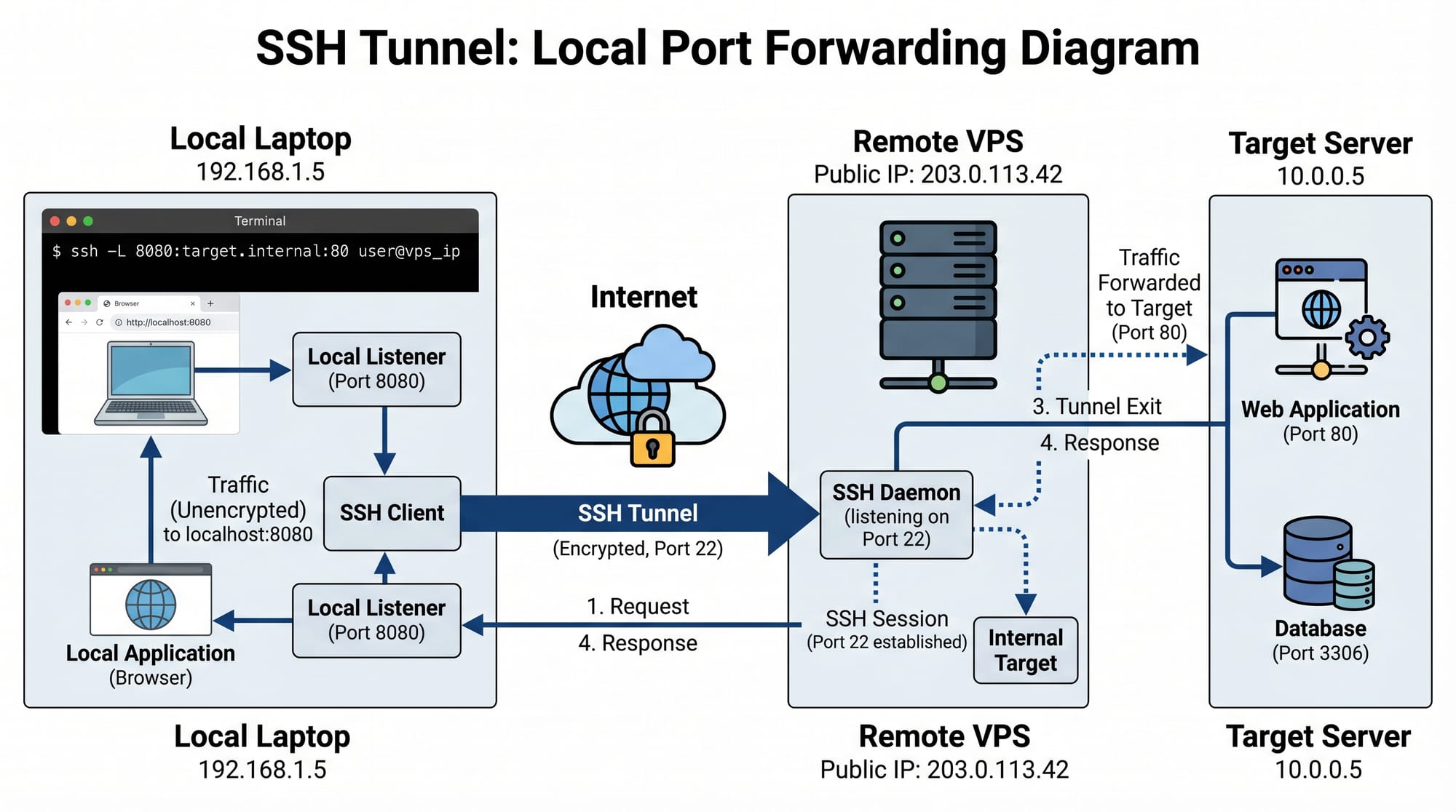
Local Port Forwarding
Access a remote service locally.
ssh -L 8080:localhost:80 [email protected]
Explanation:
-L→ local port forwarding8080→ your local machine portlocalhost:80→ remote serviceserver.com→ SSH server
You can now open:
http://localhost:8080
Remote Port Forwarding
Expose local service to remote server.
ssh -R 9000:localhost:3000 [email protected]
Explanation:
-R→ remote forwarding9000→ remote server port3000→ your local app port
Dynamic Port Forwarding (SOCKS Proxy)
ssh -D 1080 [email protected]
Explanation:
-D→ creates SOCKS proxy1080→ local proxy port
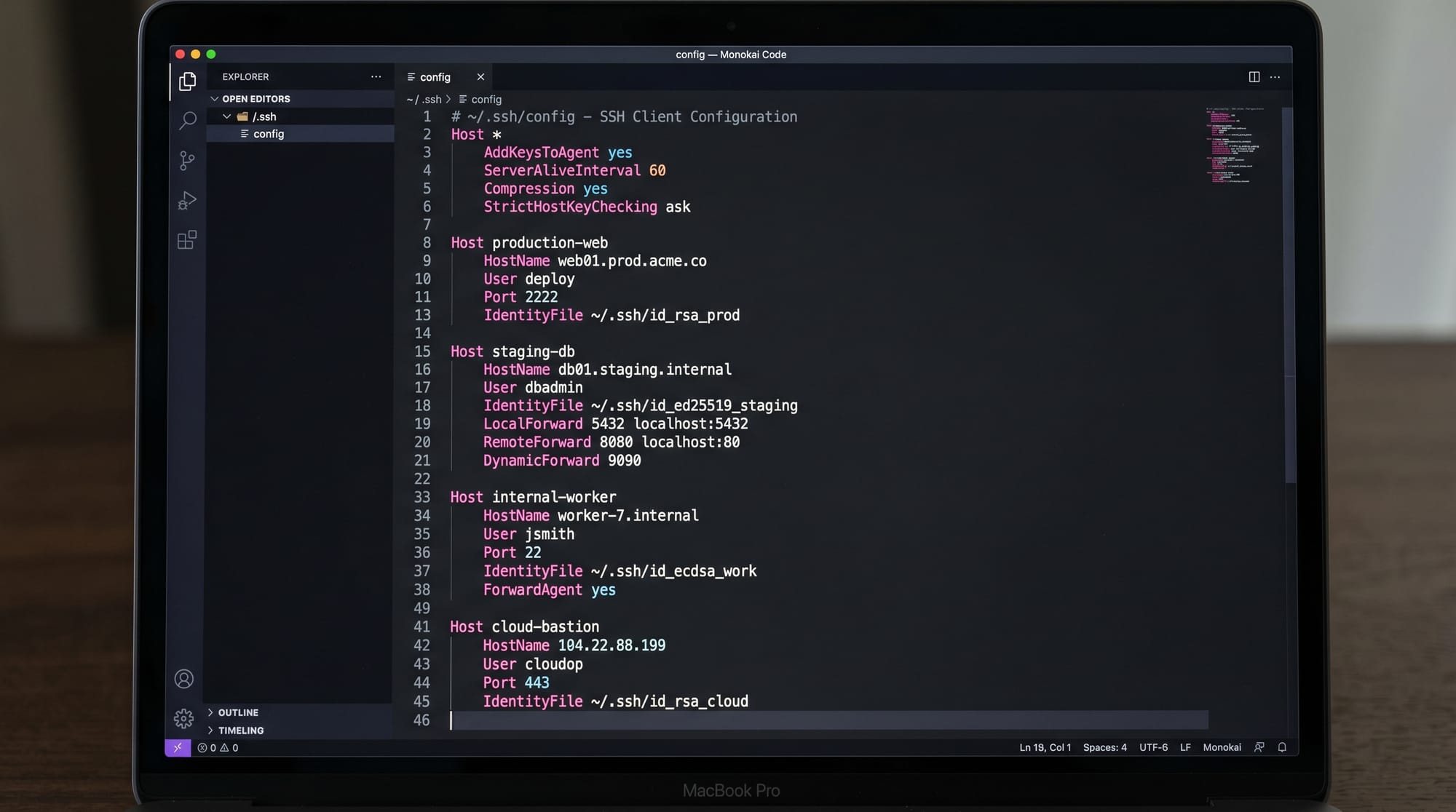
SSH Config File (Automation & Shortcuts)
The SSH config file simplifies long commands.
Location:
~/.ssh/config
Example:
Host myserver
    HostName 192.168.1.10
    User ahmad
    Port 22
    IdentityFile ~/.ssh/id_ed25519
Line-by-line explanation:
Host myserver→ shortcut nameHostName→ actual server IPUser→ login usernamePort→ SSH portIdentityFile→ private key path
Now connect simply:
ssh myserver

Practical Code Examples
Example 1: Secure Login Using SSH Keys
ssh-keygen -t ed25519
ssh-copy-id [email protected]
ssh [email protected]
Explanation:
- First command creates key pair
- Second copies key to server (Ali’s VPS in Islamabad)
- Third logs in without password
Real-world scenario:
Fatima, a student in Lahore, hosts her project on a DigitalOcean VPS and uses SSH keys to securely access her server without typing passwords every time.
Example 2: Access Local Web App via SSH Tunnel
Suppose you are running a Django app on your laptop:
python manage.py runserver 127.0.0.1:8000
Now access it remotely:
ssh -L 9000:127.0.0.1:8000 [email protected]
Explanation:
- Django runs locally on port 8000
- SSH forwards it to remote port 9000
- Now accessible at:
http://localhost:9000
This is widely used by developers in Karachi working on remote servers while testing locally.
Common Mistakes & How to Avoid Them
Mistake 1: Using Password Authentication Only
Many beginners in Pakistan still rely on passwords, which are weak and vulnerable.
Problem:
- Passwords can be brute-forced
- Easy to leak in public Wi-Fi (universities, cafes)
Solution:
Use SSH keys instead:
ssh-keygen -t ed25519
ssh-copy-id user@server
Mistake 2: Incorrect File Permissions in SSH
If permissions are wrong, SSH will refuse connection.
Problem:
Permissions 0644 for id_rsa are too open
Fix:
chmod 600 ~/.ssh/id_rsa
chmod 700 ~/.ssh
Explanation:
600→ only owner can read/write key700→ only owner can access .ssh folder
Practice Exercises
Exercise 1: Create SSH Key & Connect to Server
Task:
Generate an SSH key and connect to a server without password.
Solution:
ssh-keygen -t ed25519
ssh-copy-id user@server_ip
ssh user@server_ip
Exercise 2: Setup Local Port Forwarding
Task:
Forward a remote Apache server running on port 80 to local port 8080.
Solution:
ssh -L 8080:localhost:80 user@server_ip
Now open:
http://localhost:8080
Frequently Asked Questions
What is SSH used for?
SSH is used to securely access remote servers, execute commands, and transfer data. It is widely used in system administration and DevOps.
How do SSH keys improve security?
SSH keys use encryption instead of passwords. Even if someone intercepts traffic, they cannot read or reuse the private key.
What is SSH tunneling?
SSH tunneling allows secure forwarding of network traffic through an encrypted SSH connection. It is commonly used to access restricted services.
How do I configure SSH shortcuts?
You can use the ~/.ssh/config file to define shortcuts for servers, so you can connect using simple names instead of long IP addresses.
Is SSH safe for public Wi-Fi use?
Yes, SSH encrypts all traffic, making it safe even on insecure networks like public Wi-Fi in universities or cafes.
Summary & Key Takeaways
- SSH provides secure encrypted remote access
- SSH keys are more secure than passwords
- SSH tunneling enables secure port forwarding
- SSH config simplifies server management
- File permissions are critical for SSH security
- SSH is essential for Linux, DevOps, and cybersecurity careers
Next Steps & Related Tutorials
To strengthen your skills, explore these tutorials on theiqra.edu.pk:
- Learn Linux fundamentals in Linux Basics for Beginners
- Improve system security with Linux Security Hardening Guide
- Understand networking deeply in Linux Networking Essentials
- Explore server management in DevOps Deployment Basics
If you want, I can also turn this into:
- PDF course notes
- Quiz (MCQs for exams)
- Practical lab exercises for VPS setup
- Or a beginner-friendly SSH cheat sheet
Test Your Python Knowledge!
Finished reading? Take a quick quiz to see how much you've learned from this tutorial.