cURL Tutorial HTTP Requests from Command Line Guide
Introduction
cURL is a powerful command-line tool used to transfer data between a client and a server using various protocols such as HTTP, HTTPS, FTP, and more. In simple words, cURL tutorial: HTTP requests from command line guide teaches you how to send and receive data from APIs and websites directly from your terminal without using a browser.
For Pakistani students learning networking and backend development, especially in cities like Lahore, Karachi, and Islamabad, cURL is an essential skill. It helps you understand how real-world APIs work behind apps like food delivery systems, banking apps, and weather services.
Instead of clicking buttons in a browser, developers use cURL to:
- Test APIs quickly
- Debug server responses
- Send POST requests with data
- Automate network tasks
Prerequisites
Before starting this curl tutorial, you should have basic knowledge of:
- Basic computer operations (Windows/Linux terminal usage)
- Understanding of URLs (like https://example.com)
- Basic HTTP concepts (GET, POST, status codes)
- Basic JSON format
- Familiarity with command line (optional but helpful)
If you are new, you can first read:
- Linux Basics Tutorial on theiqra.edu.pk
- Introduction to REST APIs on theiqra.edu.pk
Core Concepts & Explanation
What is cURL and Why It Is Used?
cURL (Client URL) is a command-line tool that allows you to send HTTP requests directly from your terminal.
Example:
- GET request → Fetch data from server
- POST request → Send data to server
- PUT request → Update data
- DELETE request → Remove data
Example command:
curl https://jsonplaceholder.typicode.com/posts/1
Explanation:
curl→ command tool- URL → API endpoint
- No extra flags → default GET request
Understanding HTTP Requests with cURL
When you use cURL, you are basically simulating a browser request.
A typical HTTP request has:
- Method (GET, POST, etc.)
- Headers (metadata like content type)
- Body (data sent to server)
- Response (server output)
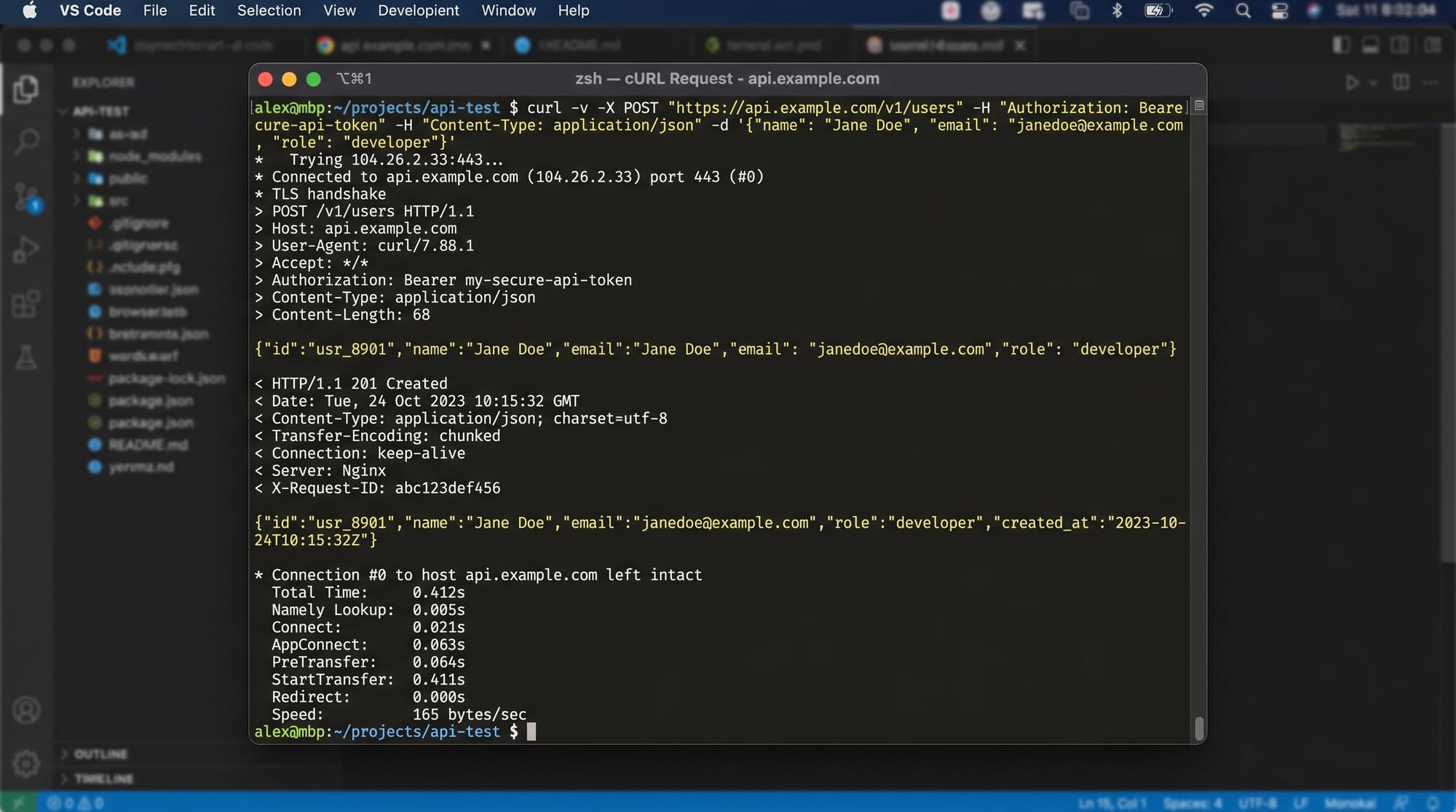
Example POST request:
curl -X POST https://example.com/api -H "Content-Type: application/json" -d '{"name":"Ali"}'
Explanation:
-X POST→ specifies HTTP method-H→ adds header-d→ sends data (JSON body)- URL → API endpoint

Practical Code Examples
Example 1: Simple GET Request
curl https://jsonplaceholder.typicode.com/posts/1
Line-by-line explanation:
curl→ starts the command- URL → API endpoint returning sample JSON data
- No flags → default method is GET
Expected output:
{
  "id": 1,
  "title": "sample title",
  "body": "sample content"
}
This is commonly used in curl api testing to quickly check if an endpoint is working.
Example 2: Real-World POST Request (Student Registration API)
Imagine a system in Karachi university where students register online.
curl -X POST https://api.university.com/register \
-H "Content-Type: application/json" \
-d '{"name":"Fatima","age":20,"city":"Lahore"}'
Explanation:
curl→ tool-X POST→ sending data to server\→ splits command into multiple lines-H→ sets JSON format-d→ student data in JSON format
Server response might be:
{
  "status": "success",
  "message": "Student registered"
}
Example 3: API Testing with Headers
curl -H "Authorization: Bearer abc123token" https://api.example.com/user
Explanation:
-H→ adds authentication header- Token → verifies user identity
- URL → protected API endpoint
Common Mistakes & How to Avoid Them
Mistake 1: Forgetting HTTP Method
Many beginners forget to specify POST when sending data.
Wrong:
curl https://api.example.com/register -d '{"name":"Ali"}'
Fix:
curl -X POST https://api.example.com/register -H "Content-Type: application/json" -d '{"name":"Ali"}'
Explanation:
- Without
-X POST, server may treat it as GET and fail
Mistake 2: Incorrect JSON Format
Wrong:
curl -X POST -d "{name:Ali}" url
Correct:
curl -X POST -H "Content-Type: application/json" -d '{"name":"Ali"}' url
Explanation:
- JSON keys must be in double quotes
- Proper formatting avoids API errors
Practice Exercises
Exercise 1: Fetch Public API Data
Problem:
Use cURL to fetch data from a public API showing a list of users.
Solution:
curl https://jsonplaceholder.typicode.com/users
Explanation:
- Retrieves list of fake users
- Helps practice GET requests
Exercise 2: Send Student Data
Problem:
Send student data (name: Ahmad, city: Islamabad) to a mock API.
Solution:
curl -X POST https://api.example.com/student \
-H "Content-Type: application/json" \
-d '{"name":"Ahmad","city":"Islamabad"}'
Explanation:
- Sends structured JSON data
- Simulates real-world API usage
Frequently Asked Questions
What is cURL used for in networking?
cURL is used to transfer data between client and server using protocols like HTTP. It is commonly used for API testing, debugging, and automation tasks.
How do I install cURL on Windows or Linux?
On Linux, cURL is usually pre-installed. On Windows, you can install it via package managers like Chocolatey or use built-in support in modern Windows versions.
Can I use cURL for REST API testing?
Yes, cURL is widely used for REST API testing because it allows you to send GET, POST, PUT, and DELETE requests directly from the terminal.
What is the difference between curl and browser requests?
A browser sends requests with a graphical interface, while cURL sends raw HTTP requests from the terminal, making it better for developers and automation.
Why is cURL important for Pakistani students?
Students in Islamabad, Lahore, and other cities use cURL to learn backend development, API integration, and networking concepts used in real IT jobs.
Summary & Key Takeaways
- cURL is a command-line tool for sending HTTP requests
- It supports GET, POST, PUT, DELETE methods
- It is essential for API testing and debugging
- JSON formatting is important for POST requests
- Headers are used for authentication and content type
- It helps developers understand backend communication
Next Steps & Related Tutorials
To continue your learning journey, explore:
- REST API Tutorial on theiqra.edu.pk — Learn how APIs work in real systems
- Linux Basics Tutorial on theiqra.edu.pk — Understand terminal commands
- Networking Fundamentals for Beginners — Learn how data travels on the internet
- Bash Scripting Basics — Automate your curl commands for testing APIs
If you want, I can also create a PDF version of this tutorial, a practice lab with curl exercises, or a quiz for students based on this content.
Test Your Python Knowledge!
Finished reading? Take a quick quiz to see how much you've learned from this tutorial.