HTMX Tutorial Build Dynamic UIs Without JavaScript 2026
Introduction
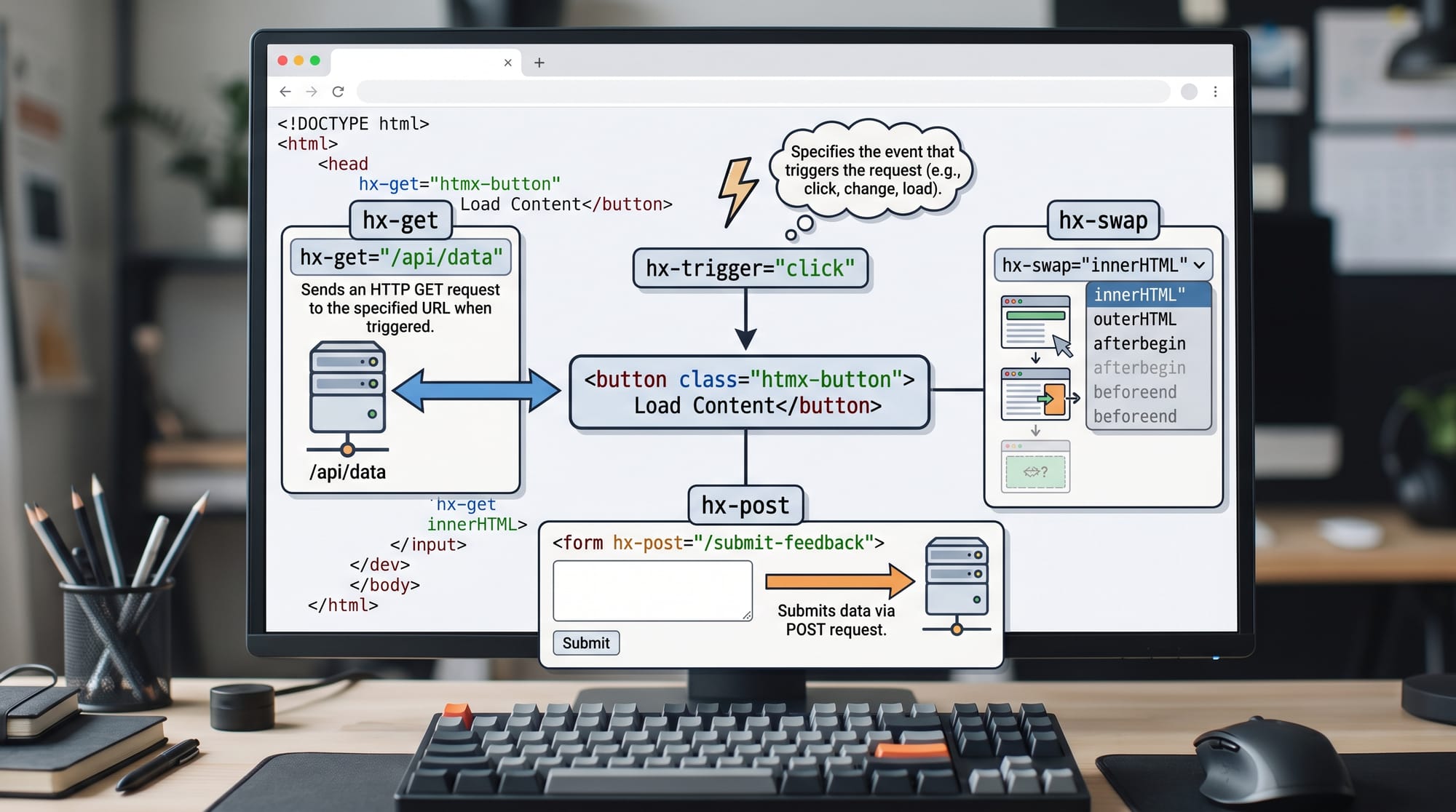
HTMX is a modern lightweight JavaScript library that allows developers to build dynamic, interactive web applications using mostly HTML instead of heavy frontend frameworks. In simple terms, htmx tutorial: build dynamic uis without javascript 2026 teaches you how to make websites dynamic using HTML attributes instead of writing complex JavaScript or using frameworks like React.
For Pakistani students learning web development in 2026, HTMX is especially valuable because it lowers the barrier to building real-world projects. Many students in Lahore, Karachi, and Islamabad struggle with JavaScript-heavy frameworks at the beginning. HTMX solves this by letting you enhance traditional server-rendered websites (like Django or Flask apps) without needing deep frontend engineering knowledge.
For example, instead of writing React components, you simply add attributes like hx-get, hx-post, and hx-swap directly into HTML.
HTMX is also widely used in startups because it reduces complexity, speeds up development, and keeps the backend and frontend closely connected.
Prerequisites
Before starting this htmx tutorial, you should have a basic understanding of the following:
- Basic HTML (tags, attributes, forms)
- Basic CSS (optional but helpful)
- Fundamental HTTP concepts (GET vs POST requests)
- Basic backend knowledge (Django, Flask, Node.js, or PHP)
- Understanding of how web pages are rendered
You do NOT need advanced JavaScript or any frontend framework experience. That is the main advantage of HTMX—it allows beginners and intermediate developers to build dynamic UIs without learning complex SPA architectures.
Core Concepts & Explanation
HTML Over JavaScript Philosophy
HTMX works by extending HTML with special attributes. Instead of writing JavaScript to handle events and fetch data, you use HTML attributes like:
hx-get→ Sends a GET requesthx-post→ Sends a POST requesthx-target→ Defines where response should gohx-swap→ Defines how content is replacedhx-trigger→ Defines what triggers the request
This philosophy allows developers to stay in HTML while still building dynamic applications.
Example:
<button hx-get="/api/time" hx-target="#result" hx-swap="innerHTML">
  Get Server Time
</button>

<div id="result"></div>
In this example, clicking the button sends a request to /api/time and updates the #result div.
Server-Side Rendering with Dynamic Updates
HTMX does not replace your backend. Instead, it enhances it. Every request returns HTML, not JSON.
This means your server (Django, Laravel, etc.) becomes responsible for UI rendering.

For Pakistani students building final-year projects (like student portals or hospital systems), this approach is very practical because:
- Easier debugging
- Less frontend complexity
- Faster development cycles
- Works well on low-end machines
Practical Code Examples
Example 1: Simple Click-to-Load Data
Here is a basic HTMX example:
<!-- Button triggers request -->
<button hx-get="/api/message" hx-target="#message" hx-swap="innerHTML">
  Load Message
</button>

<!-- Target container -->
<div id="message"></div>
Line-by-line explanation:
button→ User clicks this elementhx-get="/api/message"→ Sends GET request to backend routehx-target="#message"→ Response will be inserted into div with idmessagehx-swap="innerHTML"→ Replaces inner content of target divdiv id="message"→ Placeholder for server response
When clicked, the server might return:
<p>Welcome Ahmad from Lahore! Your data is loaded successfully.</p>
Example 2: Real-World Application (Student Search System)
Imagine a university portal in Islamabad where students search for courses.
<input
  type="text"
  name="query"
  placeholder="Search courses..."
  hx-get="/search-courses"
  hx-trigger="keyup changed delay:500ms"
  hx-target="#results"
  hx-swap="innerHTML"
/>

<div id="results"></div>
Line-by-line explanation:
input type="text"→ User types search queryname="query"→ Sends input value to serverhx-get="/search-courses"→ Calls search endpointhx-trigger="keyup changed delay:500ms"→ Waits 500ms after typing stopshx-target="#results"→ Updates results containerhx-swap="innerHTML"→ Replaces content dynamicallydiv id="results"→ Displays search results
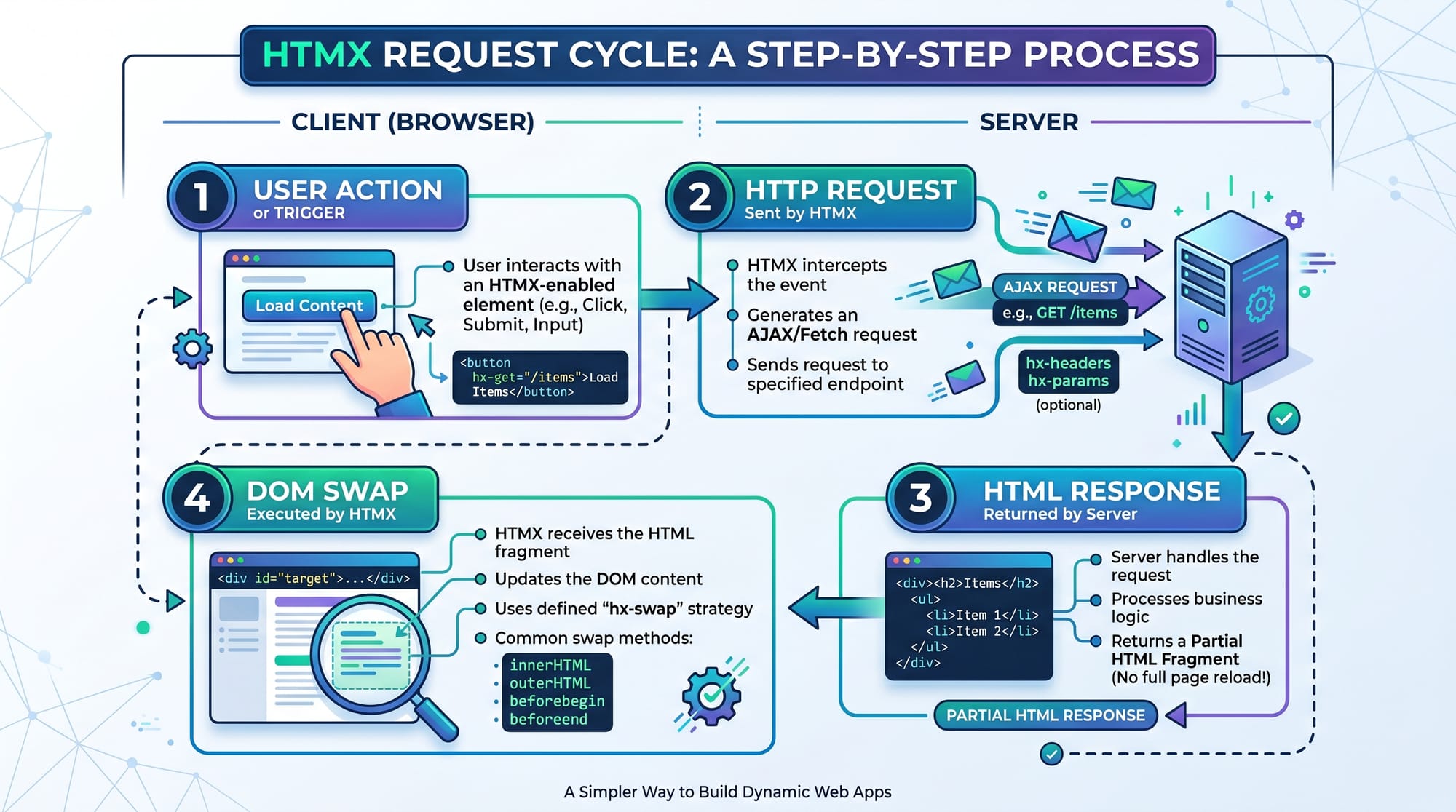
This is similar to how modern e-commerce sites like Daraz search products dynamically.
Common Mistakes & How to Avoid Them
Mistake 1: Returning JSON Instead of HTML
Many beginners assume HTMX works like React and expect JSON responses.
❌ Wrong:
{ "message": "Hello World" }
✔ Correct:
<p>Hello World</p>
Fix:
Always return HTML fragments from your backend.
Mistake 2: Incorrect Target Selection
Sometimes students forget to define correct hx-target.
❌ Wrong:
<button hx-get="/data"></button>
<div id="output"></div>
✔ Correct:
<button hx-get="/data" hx-target="#output"></button>
<div id="output"></div>
Explanation:
Without hx-target, HTMX doesn't know where to insert the response.
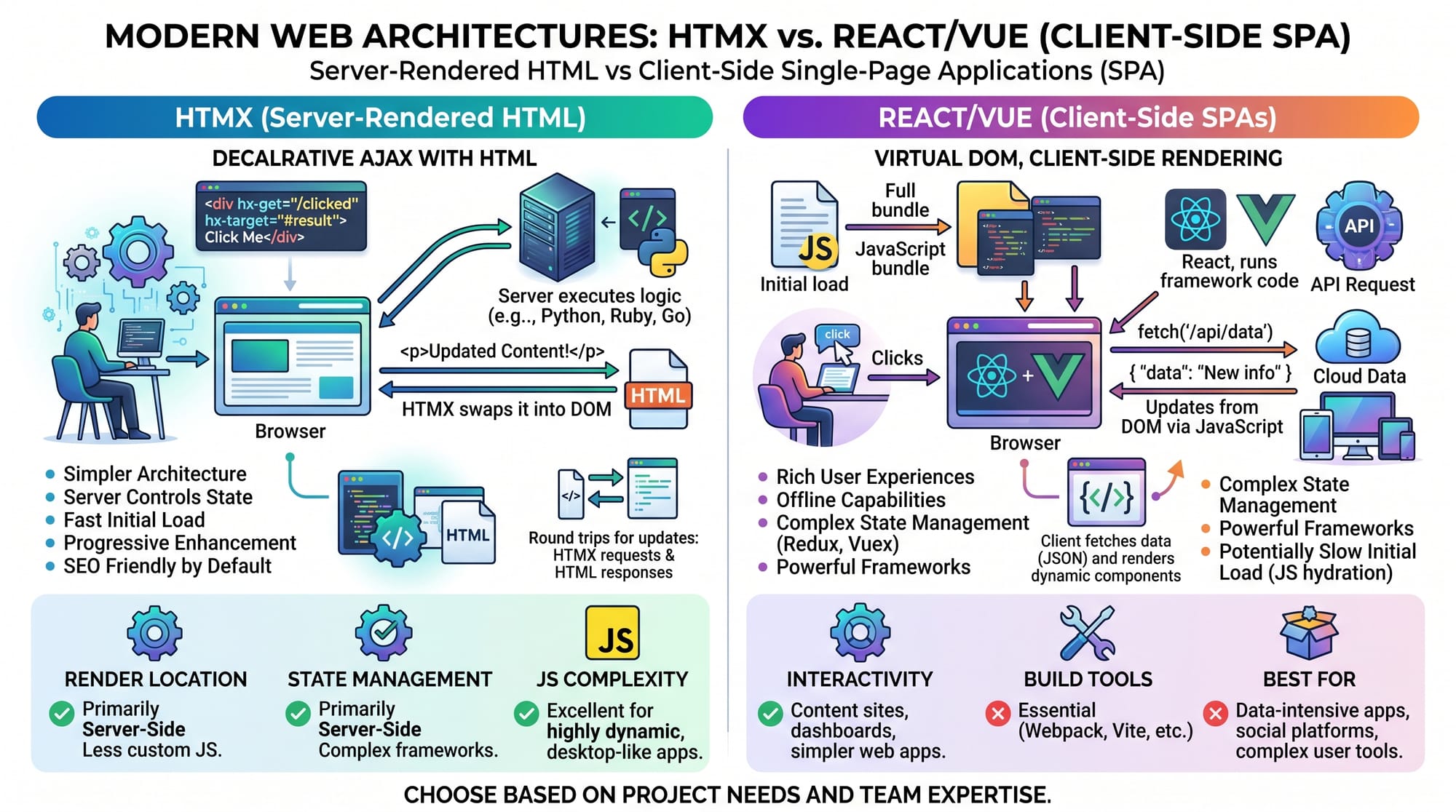
HTMX keeps logic on the server, while React shifts logic to the browser.
Practice Exercises
Exercise 1: Build a Like Button
Problem:
Create a button that increases a like counter without page reload.
Solution:
<button hx-post="/like" hx-target="#likes" hx-swap="innerHTML">
  Like 👍
</button>

<div id="likes">0 Likes</div>
Explanation:
- Clicking sends POST request
- Server increases count
- Updated count replaces old value
Exercise 2: Live Weather Update (Pakistan Cities)
Problem:
Show weather updates for Karachi, Lahore, and Islamabad.
Solution:
<select hx-get="/weather" hx-target="#weather" hx-trigger="change">
  <option value="karachi">Karachi</option>
  <option value="lahore">Lahore</option>
  <option value="islamabad">Islamabad</option>
</select>

<div id="weather"></div>
Explanation:
- Dropdown selection triggers request
- Server returns weather HTML
- UI updates dynamically
Frequently Asked Questions
What is HTMX in simple terms?
HTMX is a JavaScript library that allows you to create dynamic web pages using HTML attributes instead of writing JavaScript. It makes server-driven web applications easier to build.
Is HTMX better than React for beginners?
For beginners in Pakistan, HTMX is often easier than React because it does not require learning JSX, state management, or complex frontend tooling. However, React is better for large-scale SPAs.
Can I use HTMX with Django or Laravel?
Yes, HTMX works perfectly with Django, Laravel, Flask, and Node.js because it relies on server-rendered HTML responses instead of JSON APIs.
Does HTMX replace JavaScript completely?
No. HTMX reduces the need for JavaScript but does not eliminate it. You may still use JavaScript for advanced interactions or animations.
What projects can I build with HTMX?
You can build student portals, dashboards, CRUD apps, blogs, and admin panels. Many Pakistani students use HTMX for final-year university projects.
Summary & Key Takeaways
- HTMX allows dynamic UIs using HTML attributes instead of heavy JavaScript
- It works by sending HTTP requests and swapping HTML fragments
- Perfect for Django, Laravel, and backend-driven applications
- Easier learning curve compared to React or Vue
- Ideal for Pakistani students building academic and real-world projects
- Reduces frontend complexity while maintaining interactivity
Next Steps & Related Tutorials
To continue your learning journey, explore these tutorials on theiqra.edu.pk:
- Learn the basics of web structure in HTML Basics
- Build backend systems with Django Tutorial
- Understand APIs in REST API Development Guide
- Improve UI skills with Frontend Development Roadmap
If you want, I can also create:
- a complete HTMX project (student portal or blog system)
- a Django + HTMX full-stack example
- or an MCQ quiz from this tutorial for your students
Test Your Python Knowledge!
Finished reading? Take a quick quiz to see how much you've learned from this tutorial.