IPFS Tutorial Decentralized File Storage Guide 2026
IPFS Tutorial: Decentralized File Storage Guide 2026
Introduction
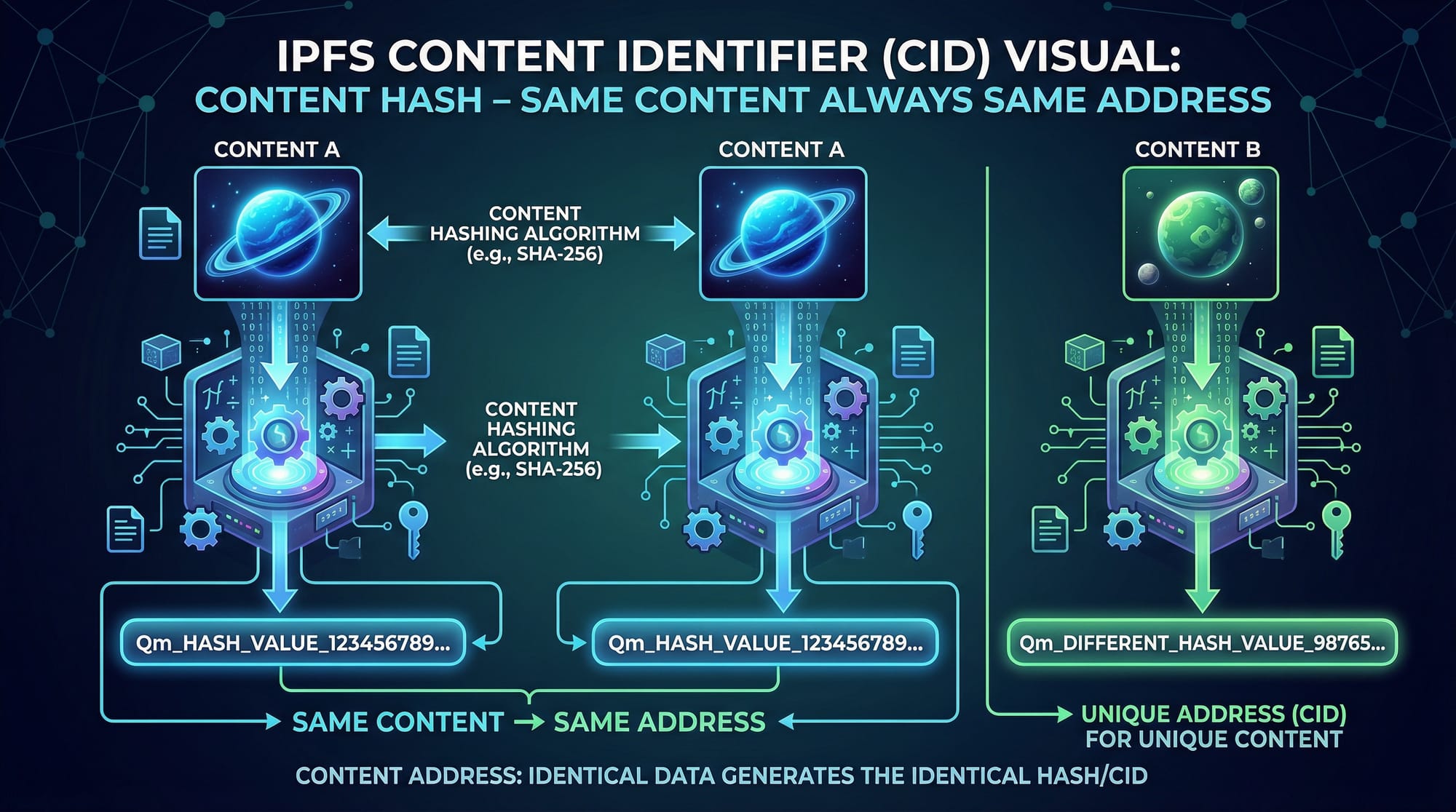
The InterPlanetary File System (IPFS) is a decentralized, peer-to-peer file storage protocol that enables you to share and access files without relying on a central server. Unlike traditional cloud storage, IPFS addresses content by its hash rather than its location. This ensures that:
- Content is immutable and verifiable
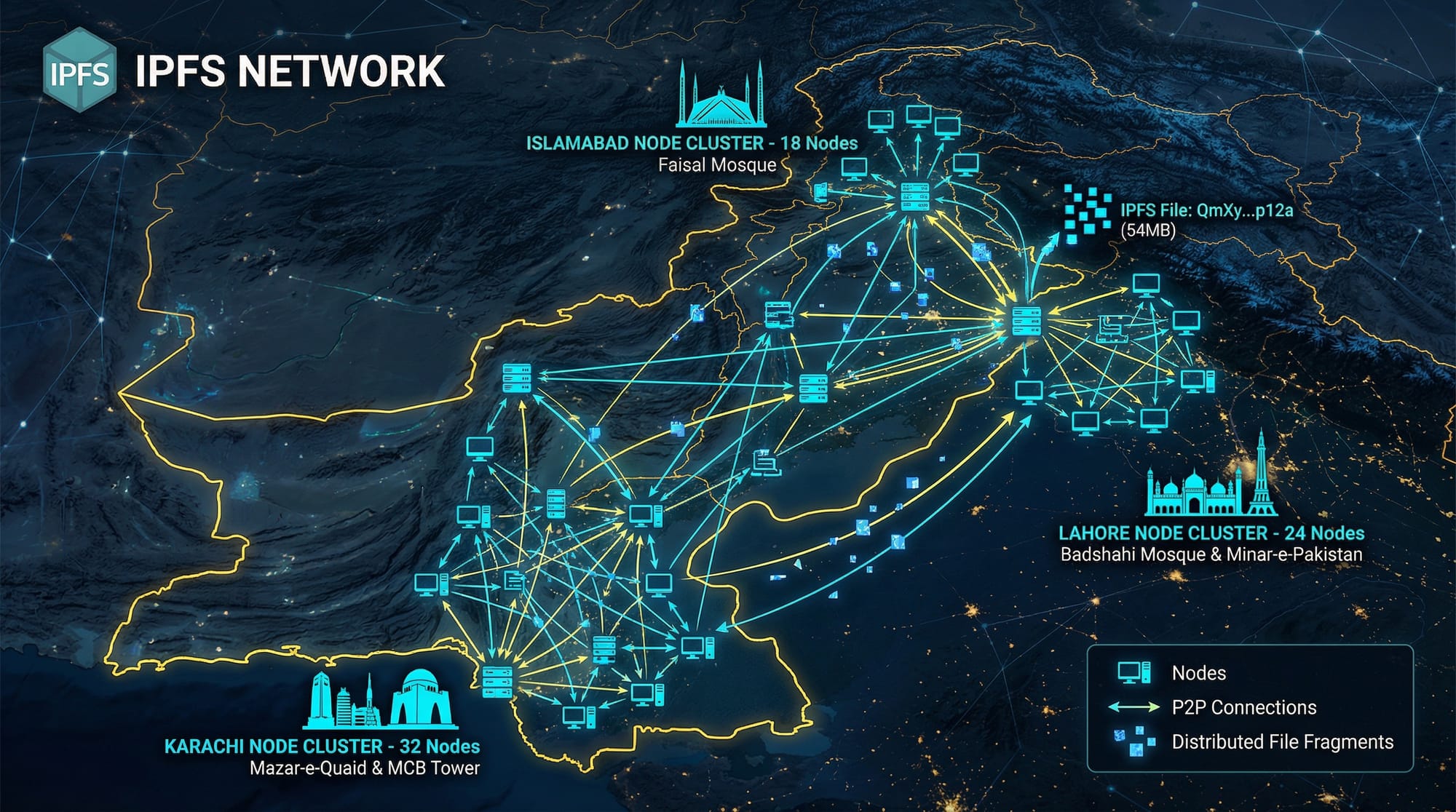
- Files remain accessible even if one node goes offline
- Storage can be distributed globally
For Pakistani students, learning IPFS is valuable because it enables:
- Hosting academic resources without server costs
- Building Web3 applications in cities like Lahore, Karachi, and Islamabad
- Creating resilient decentralized apps that don’t rely on expensive centralized infrastructure
By 2026, decentralized applications (dApps) are expected to grow in Pakistan, making IPFS skills highly relevant.
Prerequisites
Before starting this tutorial, you should have:
- Basic understanding of JavaScript and Node.js
- Familiarity with npm (Node Package Manager)
- Knowledge of Web3 concepts (optional but helpful)
- Basic understanding of HTTP and APIs
Optional but recommended:
- Git installed for version control
- MetaMask wallet for experimenting with blockchain-based dApps
Core Concepts & Explanation
Content Addressing
In IPFS, every file is identified by a CID (Content Identifier), which is a unique hash. This hash ensures that the same content always results in the same address.
Example: Ahmad wants to store his research paper on Lahore’s renewable energy projects. When he uploads the file, IPFS generates a CID like:
QmXoypizjW3WknFiJnKLwHCnL72vedxjQkDDP1mXWo6uco
Anyone accessing this CID will get the exact same content, verifying its authenticity.
Distributed Hash Table (DHT)
IPFS uses a DHT to locate content across peers. When Fatima tries to fetch a file, IPFS searches the network to find a node that stores the requested CID.
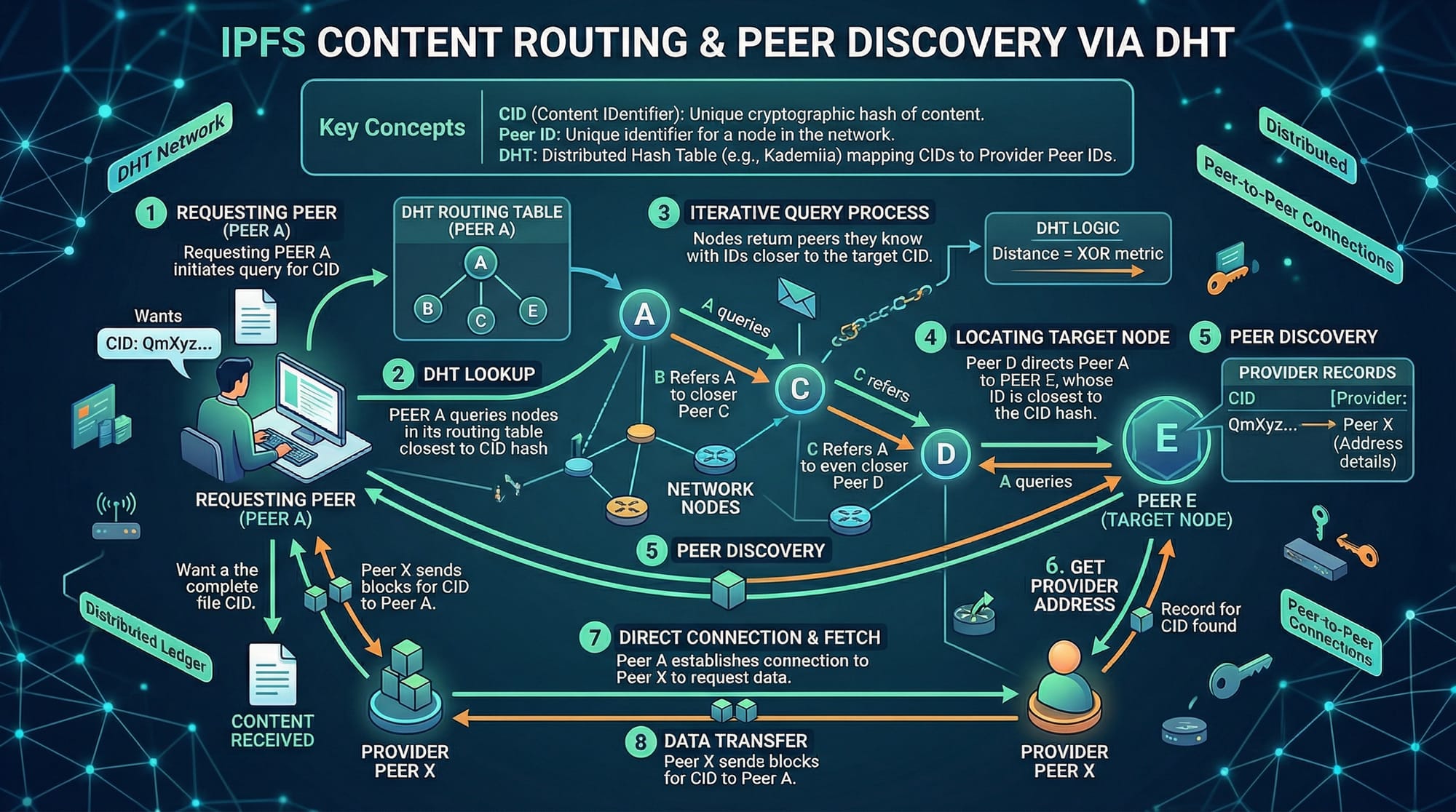
Key points:
- No central server exists; content is shared across multiple nodes
- Faster retrieval if multiple peers host the same content
- Resilient against censorship
Pinning
Pinning is how you ensure your file remains available on the IPFS network. Without pinning, files might disappear when nodes go offline. Services like Pinata and Infura allow developers to pin content reliably.
Practical Code Examples
Example 1: Uploading a File to IPFS Using JavaScript
// 1. Import the IPFS HTTP client
import { create } from 'ipfs-http-client';

// 2. Connect to the IPFS node
const ipfs = create({ url: 'https://ipfs.infura.io:5001/api/v0' });

// 3. Add a file to IPFS
const fileContent = "Hello, this is Ali's project report from Karachi!";
const { cid } = await ipfs.add(fileContent);

// 4. Log the generated CID
console.log('File uploaded! CID:', cid.toString());
Line-by-line explanation:
- Import the IPFS HTTP client for Node.js
- Connect to a remote IPFS node (Infura in this case)
- Add the content to IPFS. The
addfunction returns a CID - Print the CID to access the file later
Example 2: Real-World Application — Decentralized Portfolio
Ali wants to store his web development portfolio on IPFS so that it remains available globally.
import { create } from 'ipfs-http-client';
import fs from 'fs';

const ipfs = create({ url: 'https://ipfs.infura.io:5001/api/v0' });

// Read the local portfolio HTML file
const file = fs.readFileSync('./portfolio.html');

// Upload to IPFS
const { cid } = await ipfs.add(file);

// Pin the file on Pinata for guaranteed availability
console.log('Portfolio is live at IPFS CID:', cid.toString());
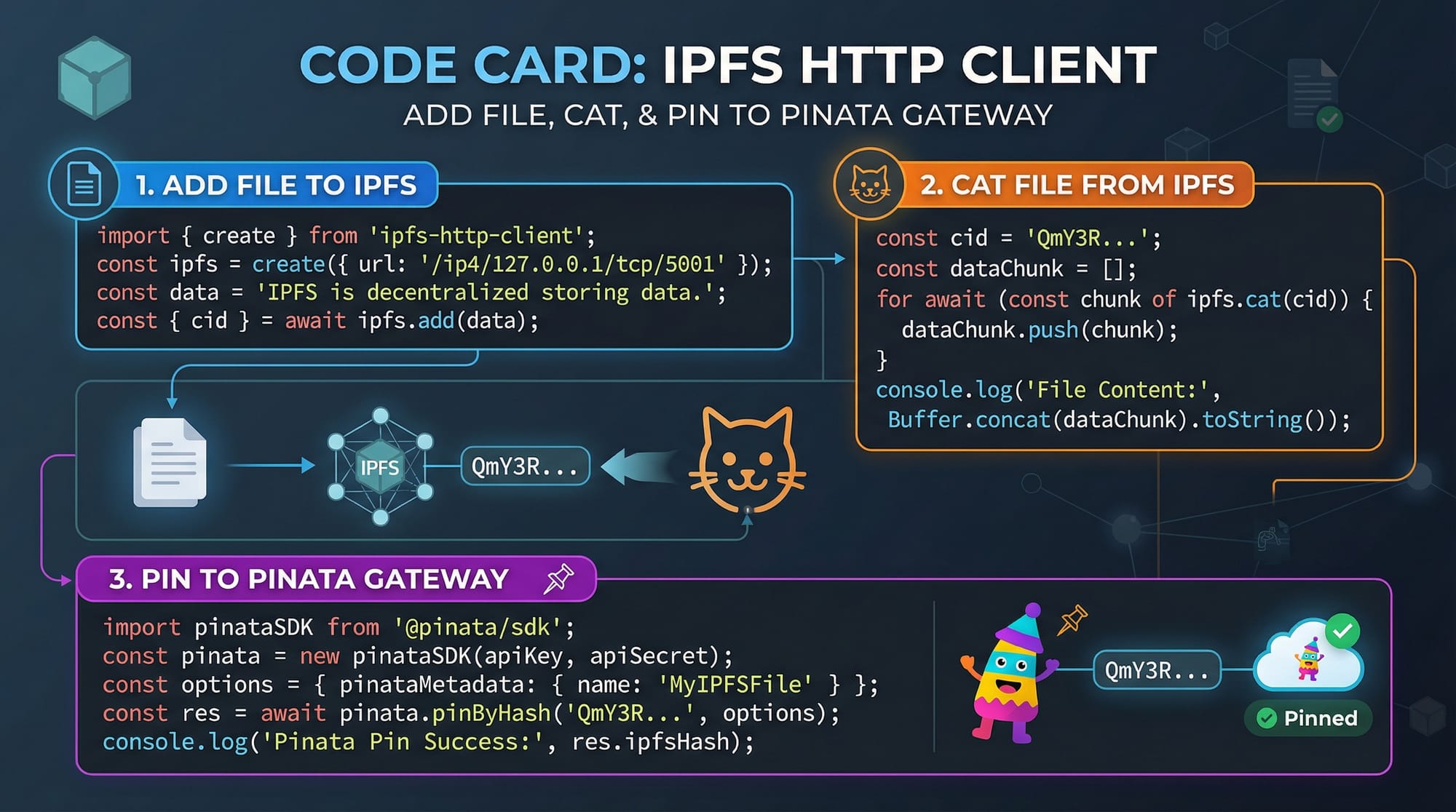
Explanation:
- Reads
portfolio.htmlfrom your local system - Uploads it to IPFS to get a unique CID
- CID can be shared with anyone, and it is immutable
Common Mistakes & How to Avoid Them
Mistake 1: Not Pinning Files
Without pinning, files may become unavailable.
Fix: Use services like Pinata or Infura to pin important files permanently.
Mistake 2: Confusing CIDs with URLs
IPFS CIDs are content identifiers, not web addresses. Access them via a gateway like:
https://ipfs.io/ipfs/<CID>
Practice Exercises
Exercise 1: Upload a Local Image to IPFS
Problem: Upload lahore.jpg and print its CID.
Solution:
import { create } from 'ipfs-http-client';
import fs from 'fs';

const ipfs = create({ url: 'https://ipfs.infura.io:5001/api/v0' });
const image = fs.readFileSync('./lahore.jpg');
const { cid } = await ipfs.add(image);

console.log('Image CID:', cid.toString());
Exercise 2: Fetch a File from IPFS
Problem: Retrieve a file from a given CID.
Solution:
import { create } from 'ipfs-http-client';

const ipfs = create({ url: 'https://ipfs.infura.io:5001/api/v0' });
const cid = 'QmXoypizjW3WknFiJnKLwHCnL72vedxjQkDDP1mXWo6uco';

for await (const file of ipfs.cat(cid)) {
  console.log(file.toString());
}
Frequently Asked Questions
What is IPFS?
IPFS is a decentralized file storage system that stores content by its hash instead of its location, making files immutable and verifiable.
How do I upload files to IPFS using JavaScript?
Install the ipfs-http-client package, connect to an IPFS node, and use the add method to upload files.
Can I pin files for free in Pakistan?
Yes, services like Pinata offer free tiers with limited storage suitable for learning and small projects.
How is IPFS different from traditional cloud storage?
IPFS is content-addressed, decentralized, and peer-to-peer, while traditional storage relies on a central server and location-based addressing.
Can I use IPFS for sensitive data?
Yes, but you should encrypt sensitive data before uploading, as files on IPFS are publicly accessible.
Summary & Key Takeaways
- IPFS enables decentralized file storage and retrieval
- Every file has a unique CID, ensuring content integrity
- Pinning is essential for long-term file availability
- Ideal for Web3 apps and globally accessible portfolios
- Using IPFS with JavaScript is straightforward and beginner-friendly
Next Steps & Related Tutorials
Explore these tutorials on theiqra.edu.pk to expand your Web3 knowledge:
- Web3 & Blockchain Basics
- Node.js Basics
- Ethereum Smart Contract Development
- Frontend Web3 DApps with React
This guide empowers Pakistani students like Ahmad, Fatima, and Ali to start building decentralized applications with IPFS and JavaScript in real-world projects.
If you want, I can also create 10 beginner-to-intermediate quiz questions for this IPFS tutorial formatted exactly for theiqra.edu.pk’s interactive learning system. This will reinforce learning with practical MCQs. Do you want me to do that next?
Test Your Python Knowledge!
Finished reading? Take a quick quiz to see how much you've learned from this tutorial.