JSON & YAML Tutorial Data Formats for Developers
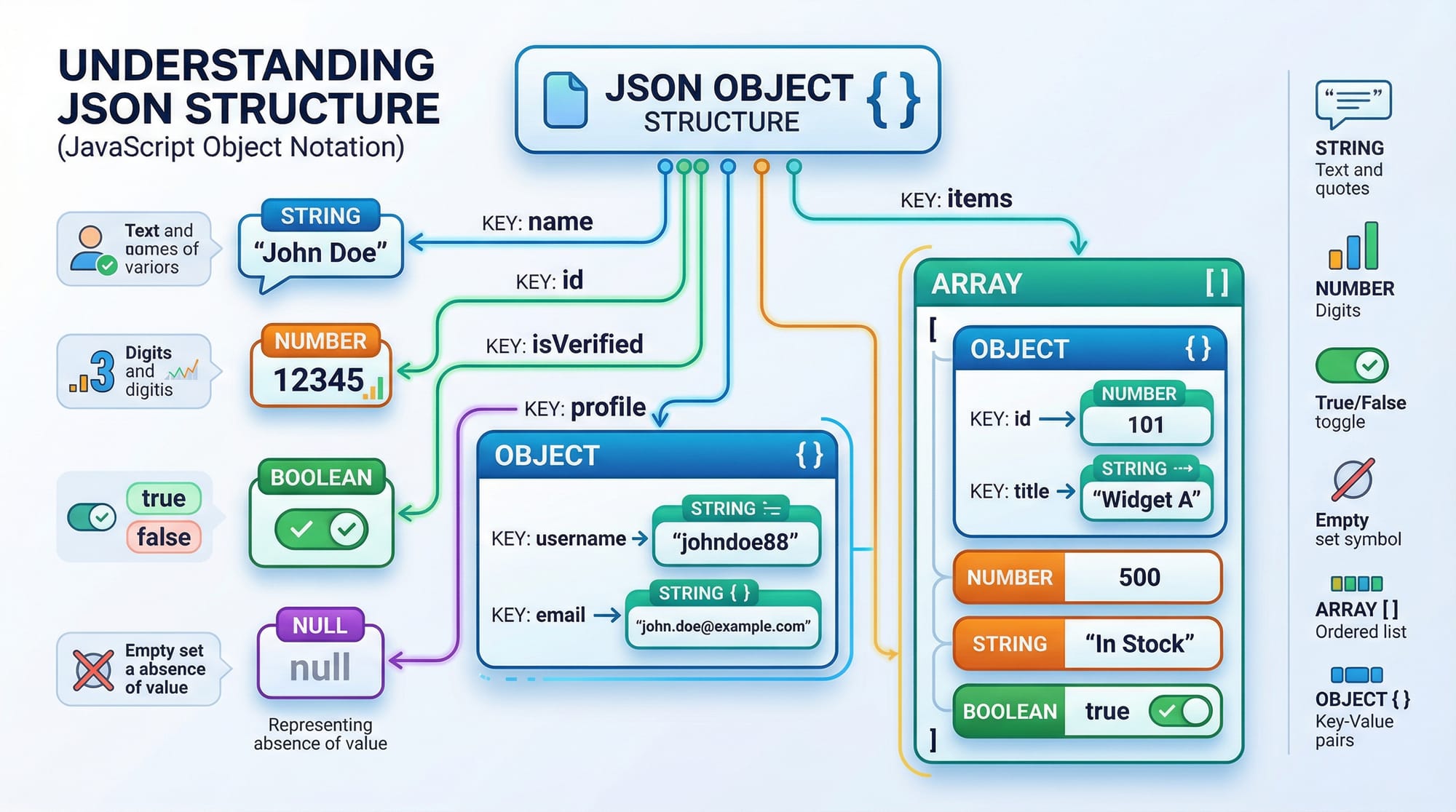
In today's world of programming, data exchange between applications is a crucial skill. Two of the most popular formats for storing and sharing data are JSON (JavaScript Object Notation) and YAML (YAML Ain’t Markup Language).
This tutorial is designed for Pakistani students and beginners who want to understand JSON vs YAML, learn how to read and write these formats, and apply them in real-world programming projects. Whether you’re building web applications in Lahore or automating scripts in Karachi, mastering these data formats is essential for developers.
Prerequisites
Before diving into JSON and YAML, you should be familiar with:
- Basic programming concepts: variables, loops, conditionals
- Understanding of data structures: lists/arrays, dictionaries/objects
- Basic knowledge of Python or JavaScript (optional, but helpful for examples)
- Awareness of file operations in programming
These skills will help you follow the examples and practice exercises in this tutorial.
Core Concepts & Explanation
What is JSON?
JSON is a lightweight data interchange format that is easy for humans to read and write, and easy for machines to parse and generate. It is widely used in APIs, configuration files, and data storage.
JSON data is structured as objects (key-value pairs) or arrays (ordered lists).
Example JSON structure:
{
  "name": "Ahmad",
  "age": 21,
  "city": "Lahore",
  "isStudent": true,
  "courses": ["Python", "JavaScript", "Web Development"],
  "grades": null
}
Explanation:
"name": "Ahmad"— Keynamehas a string value"Ahmad"."age": 21— Keyagehas a numeric value."city": "Lahore"— Keycitystores the student's city."isStudent": true— Boolean value to indicate status."courses": [...]— An array listing courses."grades": null— Represents a missing or undefined value.
JSON strictly uses double quotes for keys and strings, and does not allow comments.
What is YAML?
YAML is another data serialization format, designed to be human-friendly and easy to read. Unlike JSON, YAML relies on indentation rather than brackets to represent structure.
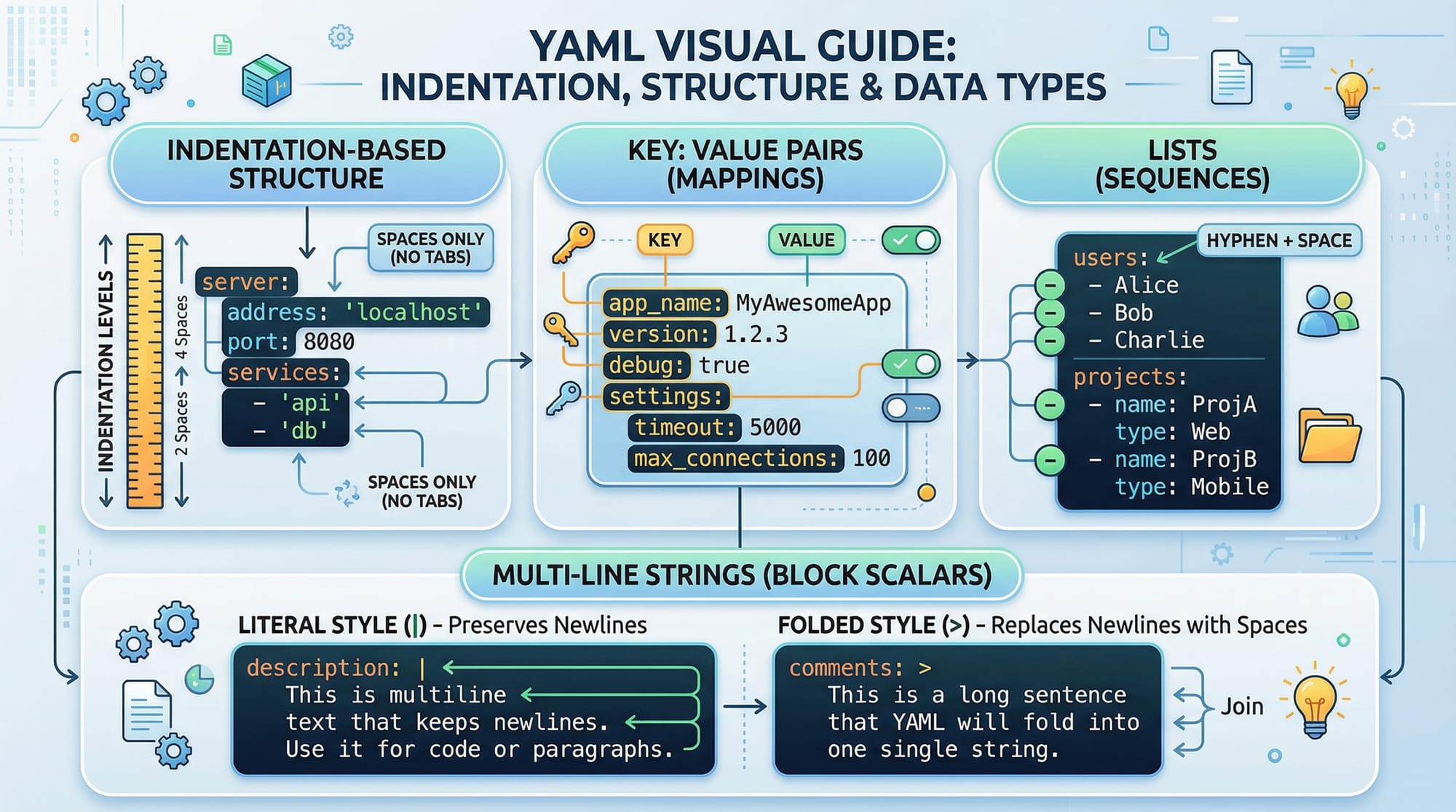
Example YAML structure:
name: Fatima
age: 22
city: Karachi
isStudent: true
courses:
  - Python
  - JavaScript
  - Web Development
grades: null
Explanation:
name: Fatima— Key-value pair using colon.courses:— Introduces a list. Items are indicated with-.grades: null— Represents empty or missing data.
YAML supports multi-line strings, comments, and more complex structures than JSON, but it is sensitive to spacing and indentation.
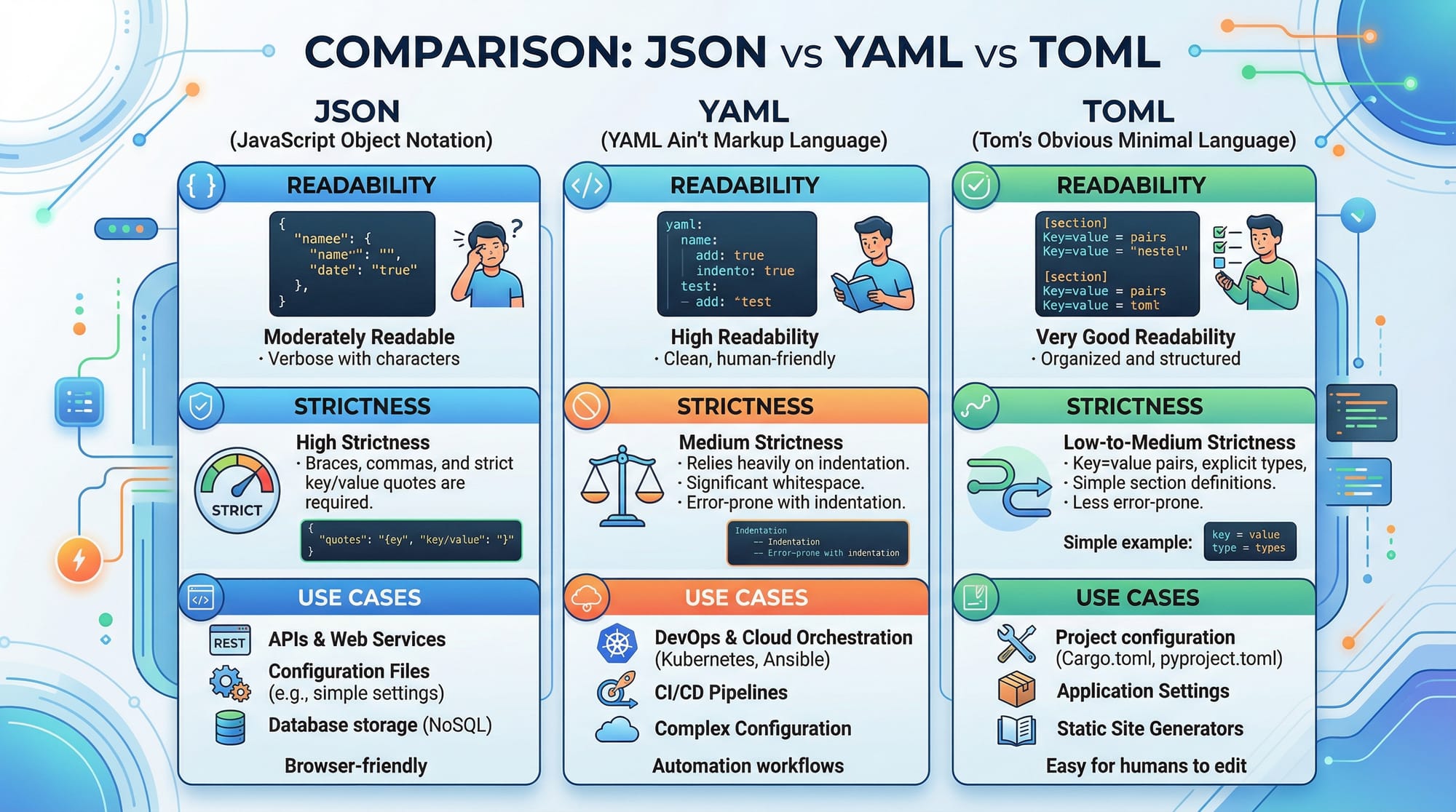
Key Differences: JSON vs YAML
| Feature | JSON | YAML |
|---|---|---|
| Syntax | Brackets and braces | Indentation-based |
| Readability | Less human-friendly | Highly readable |
| Comments | Not supported | Supported with # |
| Data Types | Strings, numbers, booleans, arrays, objects | Same as JSON + multi-line strings |
| Use Cases | APIs, config files, data exchange | Config files, scripts, documentation |
Practical Code Examples
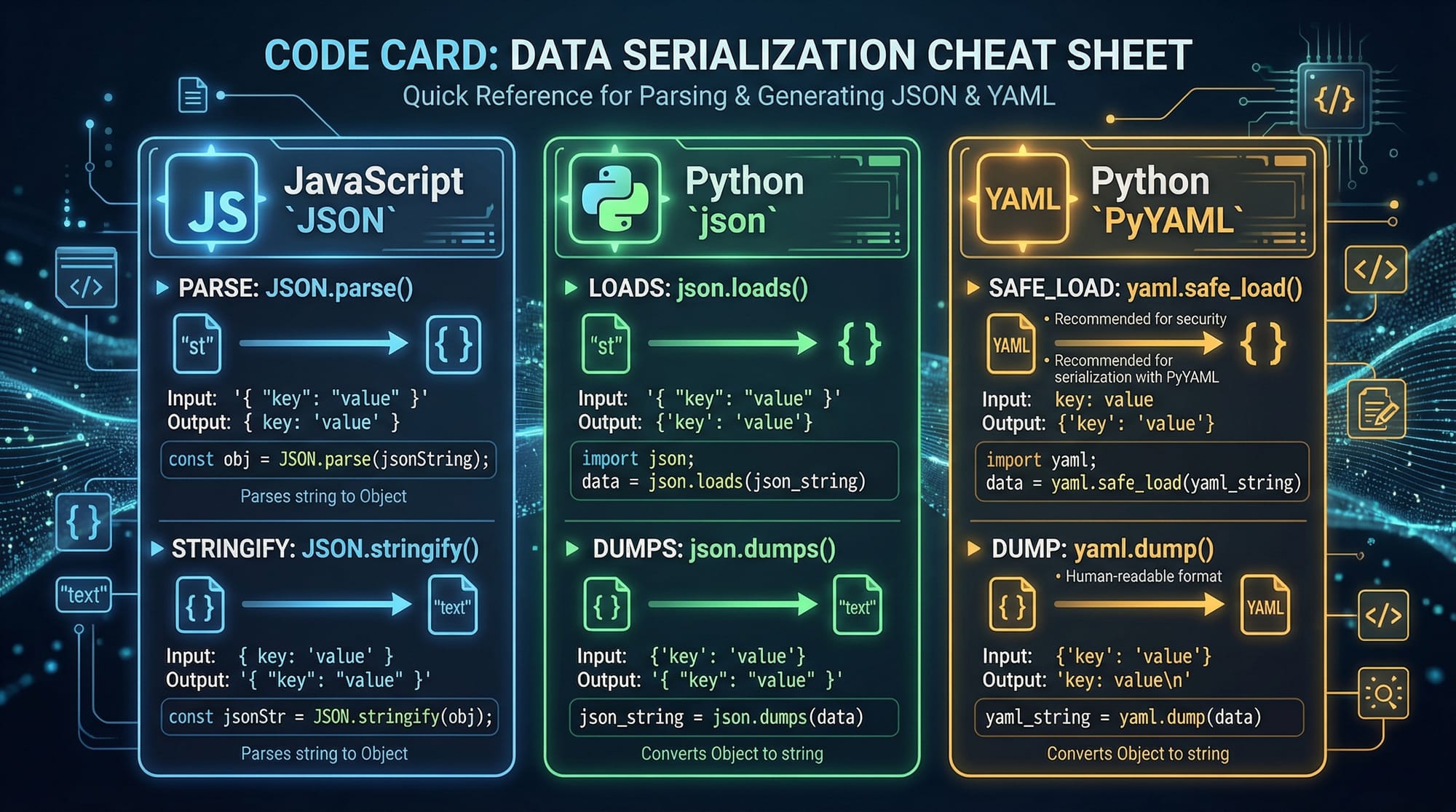
Example 1: Parsing JSON in Python
import json

# JSON string
student_json = '{"name": "Ali", "age": 20, "city": "Islamabad", "courses": ["Python", "Django"]}'

# Parse JSON string into Python dictionary
student_dict = json.loads(student_json)
print(student_dict["name"])  # Output: Ali

# Convert Python dictionary back to JSON string
json_string = json.dumps(student_dict)
print(json_string)
Explanation:
import json— Import the JSON library.json.loads(student_json)— Converts JSON string to Python dictionary.student_dict["name"]— Access thenamekey.json.dumps(student_dict)— Converts Python dictionary back to JSON string.
Example 2: Using YAML in Python
import yaml

# YAML string
student_yaml = """
name: Ahmad
age: 21
city: Lahore
courses:
  - Python
  - Flask
"""

# Parse YAML string into Python dictionary
student_dict = yaml.safe_load(student_yaml)
print(student_dict["courses"])  # Output: ['Python', 'Flask']

# Convert Python dictionary back to YAML string
yaml_string = yaml.safe_dump(student_dict)
print(yaml_string)
Explanation:
import yaml— Import PyYAML library.yaml.safe_load(student_yaml)— Convert YAML string to Python dictionary.yaml.safe_dump(student_dict)— Convert dictionary back to YAML string.
Example 3: Real-World Application — Student Fee Records
JSON for student fees in PKR:
{
  "students": [
    {"name": "Ali", "fee": 15000, "paid": true},
    {"name": "Fatima", "fee": 20000, "paid": false}
  ]
}
YAML equivalent:
students:
  - name: Ali
    fee: 15000
    paid: true
  - name: Fatima
    fee: 20000
    paid: false
This example could be used in a school management system in Lahore or Karachi to track student payments.
Common Mistakes & How to Avoid Them
Mistake 1: Invalid JSON syntax
Problem: Using single quotes or trailing commas.
{
  'name': 'Ali',  // invalid in JSON
  "age": 21,
}
Fix:
{
  "name": "Ali",
  "age": 21
}
Mistake 2: YAML indentation errors
Problem: Misaligned indentation causes parsing errors.
courses:
 - Python
  - JavaScript
Fix:
courses:
  - Python
  - JavaScript
Practice Exercises
Exercise 1: Create a JSON object for a student
Problem: Create a JSON object for a student named “Ahmad”, 19 years old, living in Islamabad, enrolled in Python and Django courses.
Solution:
{
  "name": "Ahmad",
  "age": 19,
  "city": "Islamabad",
  "courses": ["Python", "Django"]
}
Exercise 2: Convert JSON to YAML
Problem: Convert the above JSON into YAML format.
Solution:
name: Ahmad
age: 19
city: Islamabad
courses:
  - Python
  - Django
Frequently Asked Questions
What is JSON used for?
JSON is primarily used to store and transmit data between servers and web applications in a format that both humans and machines can read.
What is YAML used for?
YAML is often used in configuration files, scripts, and applications where human readability is important.
How do I convert JSON to YAML?
You can convert JSON to YAML using programming libraries such as PyYAML in Python or online tools.
Can I use comments in JSON?
No, JSON does not support comments. For configuration files where comments are needed, YAML is preferred.
Which format should I choose: JSON or YAML?
Choose JSON for APIs and web data exchange; choose YAML for configuration files and scenarios where readability matters.
Summary & Key Takeaways
- JSON and YAML are popular data formats for developers.
- JSON uses braces and brackets, while YAML relies on indentation.
- JSON is strict; YAML is more readable and flexible.
- Both can be used in Python, JavaScript, and other programming languages.
- Avoid common mistakes like invalid syntax in JSON and indentation errors in YAML.
- Real-world examples include student records, configuration files, and API data.
Next Steps & Related Tutorials
- Learn more about working with APIs in our REST API Tutorial.
- Explore containerization with Docker Basics.
- Advance your Python skills with Python Data Structures Tutorial.
- Understand front-end development in our JavaScript Basics Tutorial.
This tutorial is beginner-friendly, uses Pakistani examples, and includes practical code explanations for students learning JSON & YAML.
If you want, I can also create ready-to-use images and code card visuals for this tutorial to directly insert into your website. This will fully match the placeholders like [IMAGE: JSON structure visual] and [IMAGE: YAML visual].
Do you want me to generate those visuals next?
Test Your Python Knowledge!
Finished reading? Take a quick quiz to see how much you've learned from this tutorial.