Nginx Tutorial Web Server Reverse Proxy & Load Balancer
Introduction
Nginx is one of the most popular web servers and reverse proxies used worldwide. Unlike traditional web servers, Nginx is highly efficient, lightweight, and capable of handling thousands of concurrent connections with minimal resource usage. In this nginx tutorial, we will explore Nginx as a web server, reverse proxy, and load balancer, providing Pakistani students with practical examples and real-world scenarios.
By learning Nginx, students like Ahmad in Lahore or Fatima in Karachi can build scalable web applications, deploy APIs, serve static websites, and optimize web performance. Understanding Nginx configuration is also essential for DevOps roles in Pakistan, especially for startups and freelance projects where managing servers efficiently can save significant PKR in hosting costs.
Prerequisites
Before diving into Nginx, make sure you are familiar with the following:
- Basic Linux commands — navigating files, editing with
nanoorvim, managing services. - Understanding of HTTP/HTTPS protocols — requests, responses, status codes.
- Basic web development knowledge — HTML, CSS, JavaScript.
- Introductory knowledge of networking — ports, IP addresses, DNS.
- Package management on Linux —
aptfor Ubuntu/Debian,yumfor CentOS.
These prerequisites will help you understand Nginx configuration and troubleshoot common issues efficiently.
Core Concepts & Explanation
Nginx as a Web Server
Nginx can serve static files (HTML, CSS, JS) efficiently without heavy backend processes. It reads incoming HTTP requests and delivers the corresponding content.
Example: Ahmad wants to host a personal blog from his home server in Islamabad. Nginx can serve his HTML files directly to visitors without involving any backend logic, making it extremely fast.
Key configuration elements:
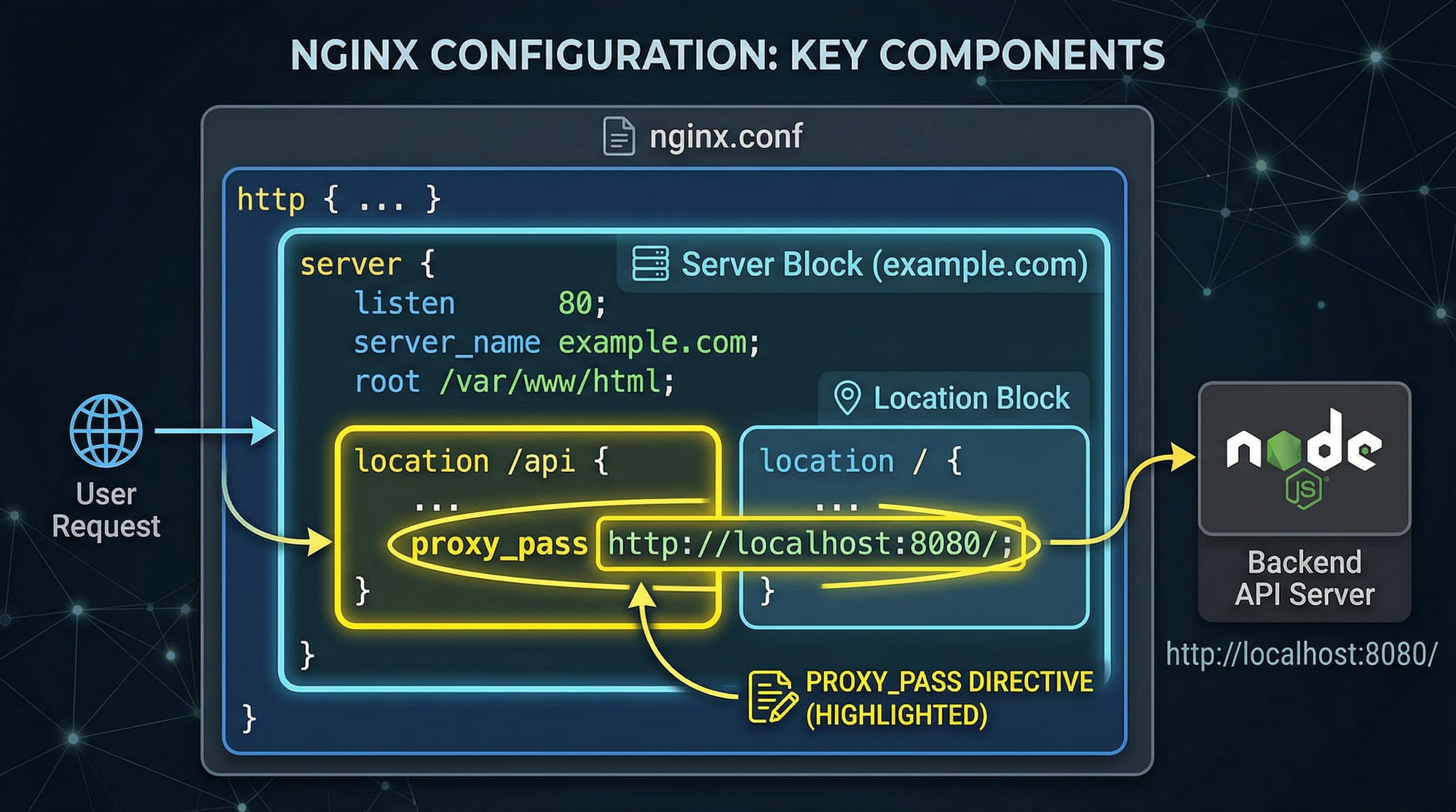
- Server Block: Defines the domain and listening port.
- Location Block: Specifies how requests to certain URLs are handled.
- Root Directive: Points to the folder containing your website files.
server {
    listen 80;                  # Listen on HTTP port 80
    server_name blog.ahmad.pk;  # Domain name

    root /var/www/html/blog;    # Folder containing website files
    index index.html;           # Default file served

    location / {
        try_files $uri $uri/ =404; # Return 404 if file not found
    }
}
Explanation:
listen 80;– Accepts requests on port 80.server_name blog.ahmad.pk;– Nginx identifies requests for this domain.root /var/www/html/blog;– Path to website files.index index.html;– Default page if no specific file requested.location /– Handles all root requests.try_files $uri $uri/ =404;– Checks if the file exists, otherwise returns 404.
Nginx as a Reverse Proxy
A reverse proxy forwards client requests to backend servers and can handle load balancing, caching, and SSL termination.
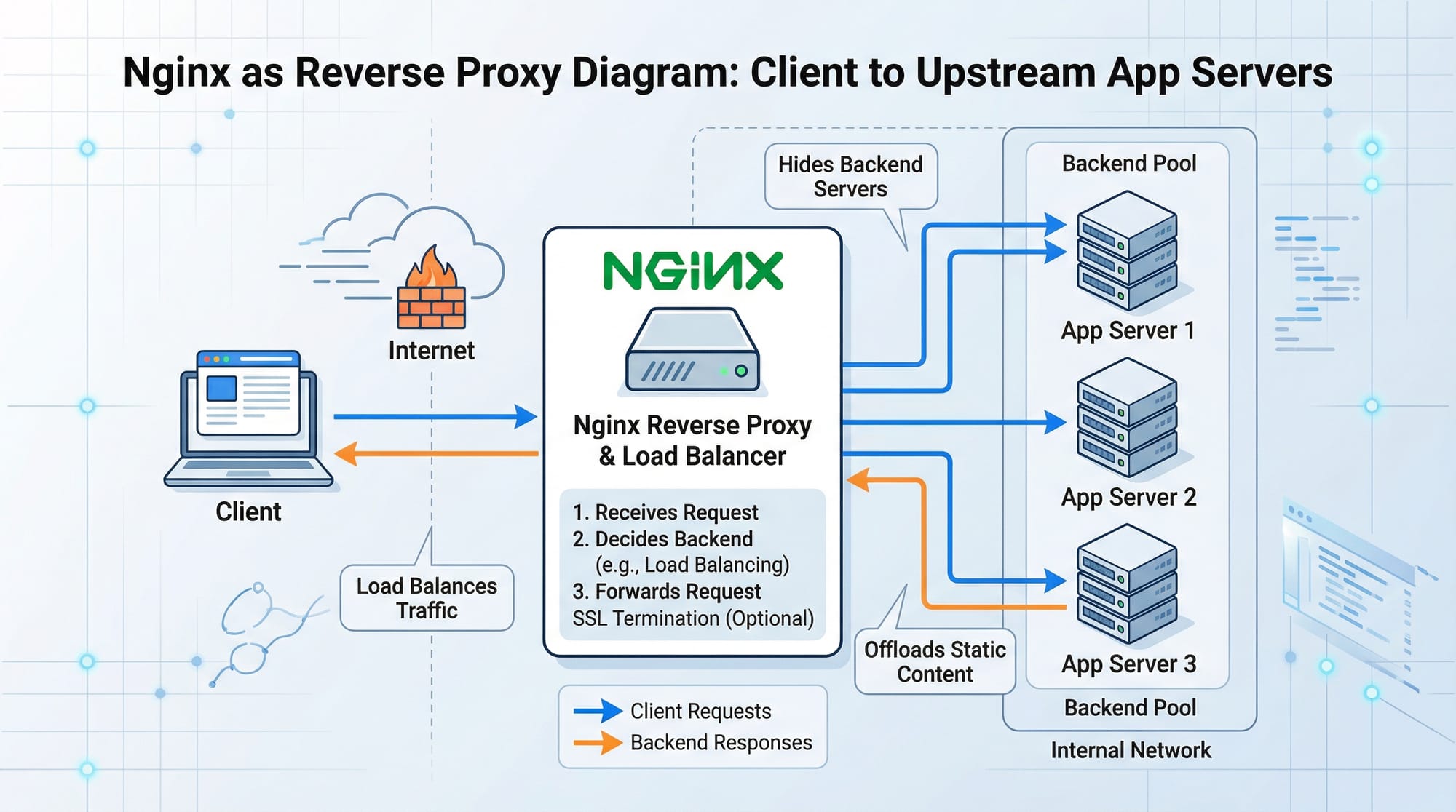
Example: Fatima runs a Node.js application in Karachi but wants Nginx to manage incoming traffic.
server {
    listen 80;
    server_name app.fatima.pk;

    location / {
        proxy_pass http://localhost:3000;    # Forward to Node.js app
        proxy_set_header Host $host;         # Preserve original host header
        proxy_set_header X-Real-IP $remote_addr; # Forward client IP
        proxy_set_header X-Forwarded-For $proxy_add_x_forwarded_for; # Track proxy chain
    }
}
Explanation:
proxy_pass http://localhost:3000;– Sends requests to Node.js running locally.proxy_set_headerdirectives – Ensure backend receives correct headers for logging and authentication.
Load Balancing with Nginx
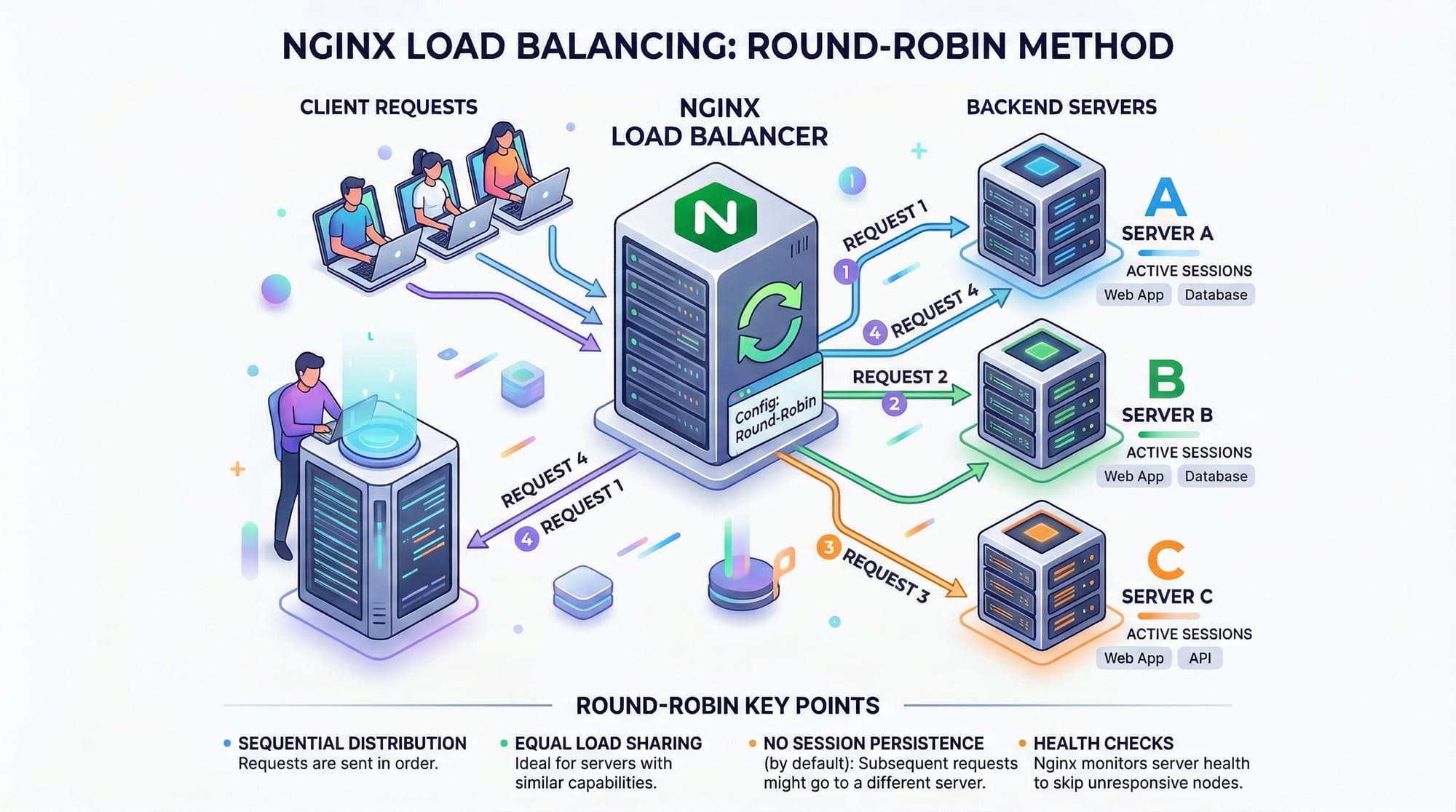
Nginx can distribute requests across multiple backend servers to increase availability and performance. Ahmad in Lahore wants his e-commerce app to handle high traffic during Ramadan sales.
upstream backend_servers {
    server 192.168.1.101;
    server 192.168.1.102;
    server 192.168.1.103;
}

server {
    listen 80;
    server_name shop.ahmad.pk;

    location / {
        proxy_pass http://backend_servers;
    }
}
Explanation:
upstream backend_servers– Defines a group of backend servers.proxy_pass http://backend_servers;– Distributes requests in a round-robin manner by default.
Practical Code Examples
Example 1: Serving Static Website
Ahmad wants to deploy a static portfolio website.
server {
    listen 80;
    server_name portfolio.ahmad.pk;

    root /var/www/portfolio;
    index index.html index.htm;

    location / {
        try_files $uri $uri/ =404;
    }

    location /images/ {
        autoindex on;  # List images in browser
    }
}
Line-by-Line Explanation:
listen 80;– Accept HTTP requests.server_name portfolio.ahmad.pk;– Domain of portfolio.root /var/www/portfolio;– Directory for website files.index index.html index.htm;– Default files served.location /– Handles all requests to root.try_files $uri $uri/ =404;– Serve file or 404 if missing.location /images/– Special rules for images folder.autoindex on;– Enables directory listing for images.
Example 2: Real-World Application — SSL Termination + Reverse Proxy
Fatima wants her Django app running on port 8000 to use HTTPS.
server {
    listen 80;
    server_name app.fatima.pk;
    return 301 https://$host$request_uri;   # Redirect HTTP to HTTPS
}

server {
    listen 443 ssl;
    server_name app.fatima.pk;

    ssl_certificate /etc/ssl/certs/fatima.crt;
    ssl_certificate_key /etc/ssl/private/fatima.key;

    location /static/ {
        alias /var/www/fatima/static/;
    }

    location / {
        proxy_pass http://127.0.0.1:8000;
        proxy_set_header Host $host;
        proxy_set_header X-Real-IP $remote_addr;
        proxy_set_header X-Forwarded-For $proxy_add_x_forwarded_for;
    }
}
Explanation:
- First server block redirects all HTTP traffic to HTTPS.
- Second server block handles secure traffic.
ssl_certificateandssl_certificate_keypoint to SSL files.location /static/serves static files directly for efficiency.- Reverse proxy forwards other requests to Django app.

Common Mistakes & How to Avoid Them
Mistake 1: Misconfigured Server Name
Using the wrong server_name may cause Nginx to serve the default site instead of your intended domain.
Fix:
server_name app.ahmad.pk www.app.ahmad.pk;
Always include both www and non-www versions if needed.
Mistake 2: Forgetting to Reload Nginx
After changing configuration, Nginx must be reloaded; otherwise changes won't apply.
sudo nginx -t    # Test configuration
sudo systemctl reload nginx  # Apply changes
Practice Exercises
Exercise 1: Create a Reverse Proxy for Node.js
Problem: Ali in Islamabad wants Nginx to proxy requests to his Node.js app on port 5000.
Solution:
server {
    listen 80;
    server_name node.ali.pk;

    location / {
        proxy_pass http://127.0.0.1:5000;
        proxy_set_header Host $host;
        proxy_set_header X-Real-IP $remote_addr;
    }
}
Exercise 2: Enable HTTPS for Static Website
Problem: Fatima wants to serve her static HTML site over HTTPS.
Solution:
server {
    listen 443 ssl;
    server_name static.fatima.pk;

    ssl_certificate /etc/ssl/certs/fatima.crt;
    ssl_certificate_key /etc/ssl/private/fatima.key;

    root /var/www/static-site;
    index index.html;

    location / {
        try_files $uri $uri/ =404;
    }
}
Frequently Asked Questions
What is Nginx used for?
Nginx is used as a web server, reverse proxy, and load balancer. It efficiently serves static content and forwards dynamic requests to backend servers.
How do I configure Nginx for a Node.js app?
Use a server block with proxy_pass pointing to your Node.js port and set headers to forward client information.
Can Nginx handle SSL termination?
Yes, Nginx can handle HTTPS by specifying ssl_certificate and ssl_certificate_key in the server block.
How to enable load balancing in Nginx?
Define an upstream block with multiple backend servers and use proxy_pass to that upstream group.
What common mistakes should I avoid in Nginx configuration?
- Wrong
server_name - Forgetting to reload after changes
- Incorrect file permissions for
rootdirectories - Not setting proper headers for reverse proxy
Summary & Key Takeaways
- Nginx efficiently serves static and dynamic content.
- It can act as a reverse proxy to forward requests to backend servers.
- Load balancing improves scalability and uptime for web applications.
- SSL termination ensures secure communication with clients.
- Proper configuration and testing prevent common mistakes.
- Nginx is essential for DevOps and web deployment in Pakistan.
Next Steps & Related Tutorials
- Linux Basics — Learn the foundation for server management.
- SSL/HTTPS Tutorial — Secure your websites with HTTPS.
- Docker Tutorial — Deploy containerized apps behind Nginx.
- Node.js Deployment — Serve Node.js apps with Nginx reverse proxy.
This tutorial is optimized for Pakistani students with real-world examples and local context. It integrates nginx tutorial, nginx configuration, and nginx reverse proxy keywords naturally throughout the content.
If you want, I can also create all the image prompts for this tutorial with detailed visual instructions, ready for your designers or AI image generator. This will make the tutorial fully visual and beginner-friendly.
Do you want me to do that next?
Test Your Python Knowledge!
Finished reading? Take a quick quiz to see how much you've learned from this tutorial.