npm & Package Management Complete Developer Guide 2026
Introduction
npm, or Node Package Manager, is the backbone of modern JavaScript development. In 2026, mastering npm is essential for every aspiring web developer in Pakistan. Whether you're building websites in Lahore, Karachi, or Islamabad, understanding how to manage packages efficiently can save you hours of debugging and development headaches.
npm allows developers to install, update, and manage JavaScript libraries and tools. By learning npm, Pakistani students can easily integrate libraries like Express.js, React, or Lodash into their projects. In this guide, we’ll cover everything from the basics to real-world examples, including package.json management, npm commands, and even a comparison with Yarn.
Prerequisites
Before diving into npm, ensure you have:
- Basic knowledge of JavaScript – variables, functions, loops
- Node.js installed – npm comes bundled with Node.js
- Command-line basics – opening terminal, navigating folders
- Text editor knowledge – VS Code or similar IDE
For Pakistani students, a simple project could be building a PKR currency converter or a local event booking website.
Core Concepts & Explanation
What is npm and Why Use It?
npm is a package manager for JavaScript. Think of it as a digital toolbox: instead of writing every function from scratch, you can install pre-built packages.
Example: Ahmad wants to create a website in Lahore that calculates PKR to USD conversions. Instead of coding the conversion logic manually, he can install the currency-converter npm package:
npm install currency-converter --save
install→ Adds the package tonode_modules--save→ Adds it topackage.jsondependencies
Understanding package.json
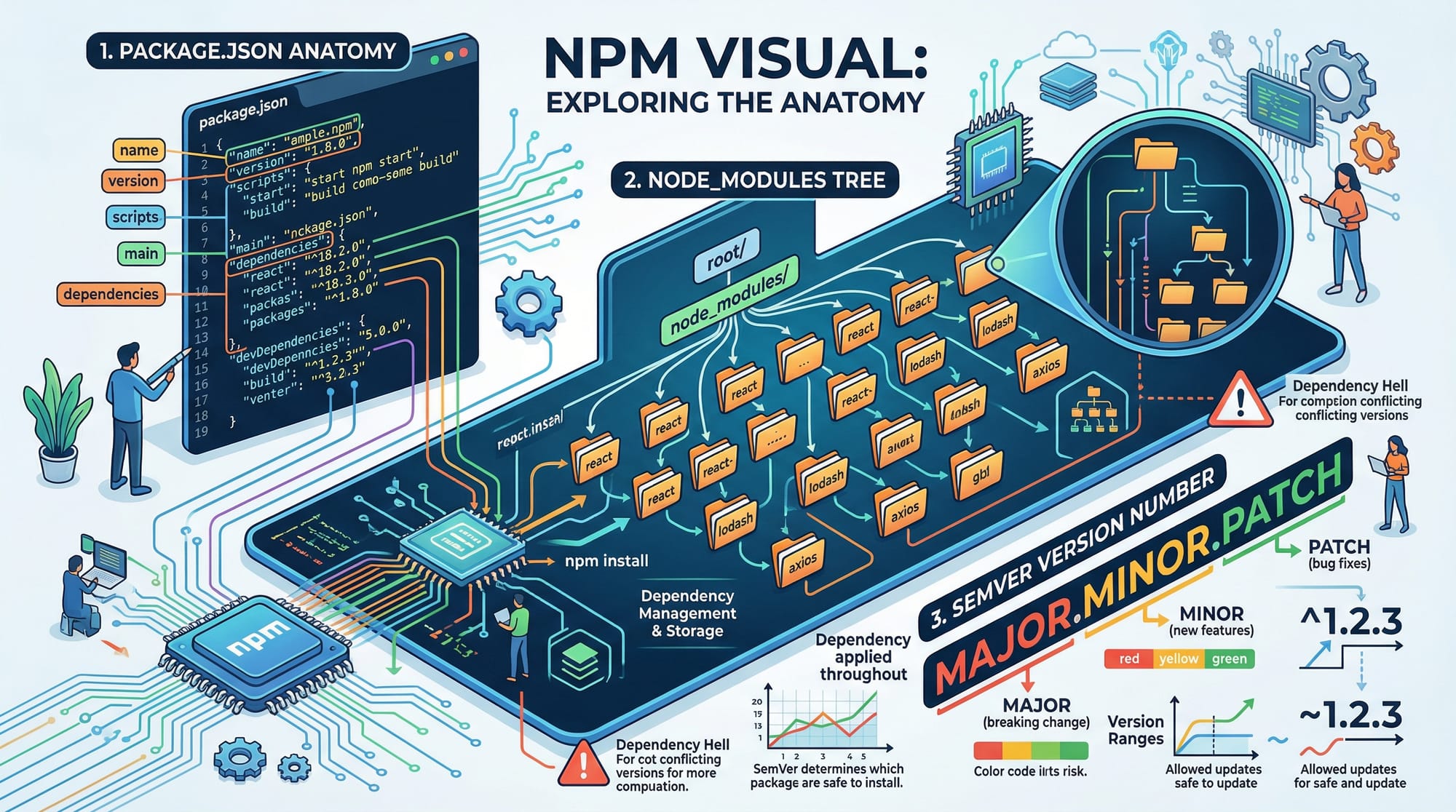
The package.json file is the heart of your Node.js project. It tracks project details, dependencies, scripts, and more.
Example package.json:
{
  "name": "lahore-currency-app",
  "version": "1.0.0",
  "description": "Convert PKR to USD for students in Lahore",
  "main": "index.js",
  "scripts": {
    "start": "node index.js",
    "test": "echo \"Error: no test specified\" && exit 1"
  },
  "dependencies": {
    "currency-converter": "^1.2.3"
  }
}
name→ Project nameversion→ Follows semantic versioning (major.minor.patch)scripts→ Commands you can run, e.g.,npm startdependencies→ Packages your project relies on
Semantic Versioning (SemVer)
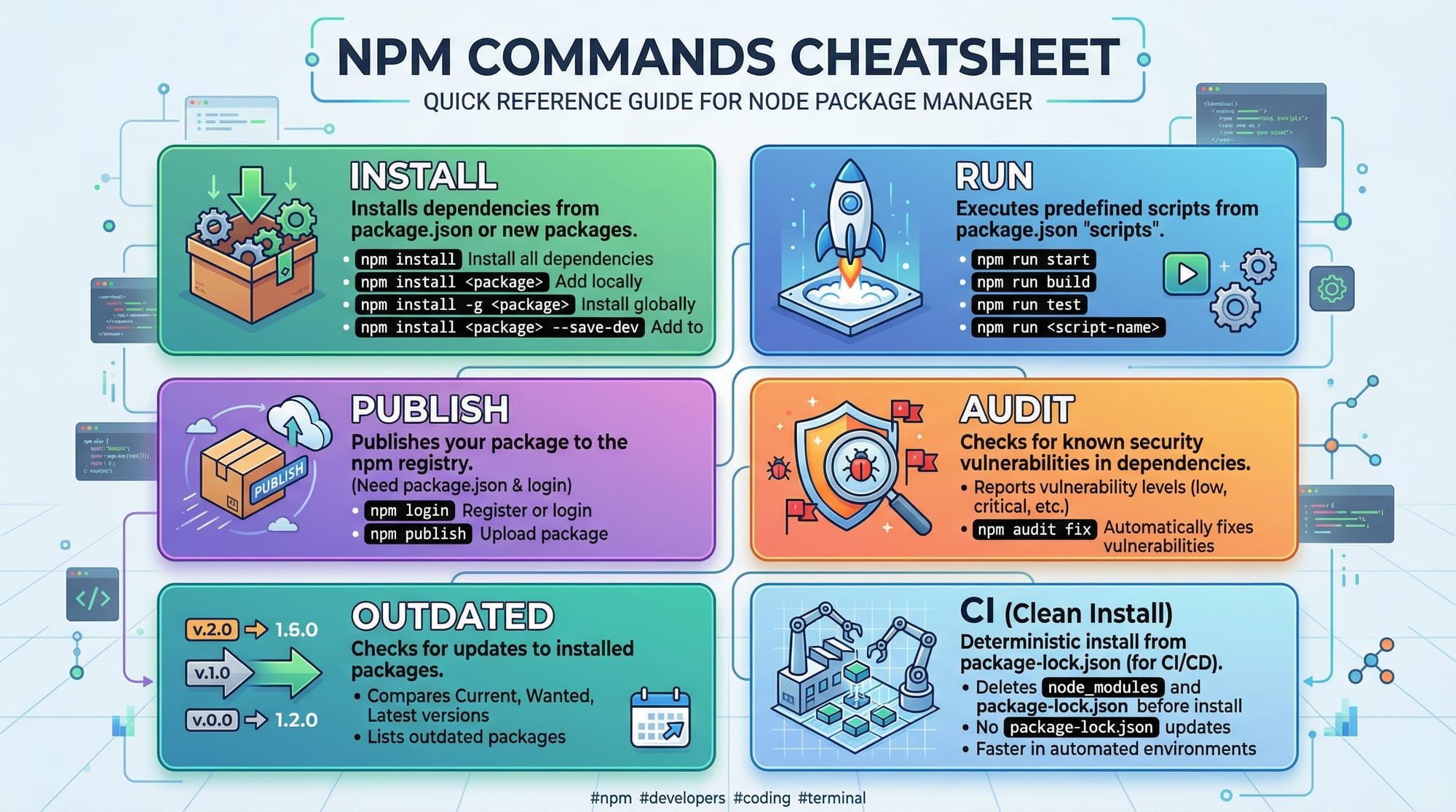
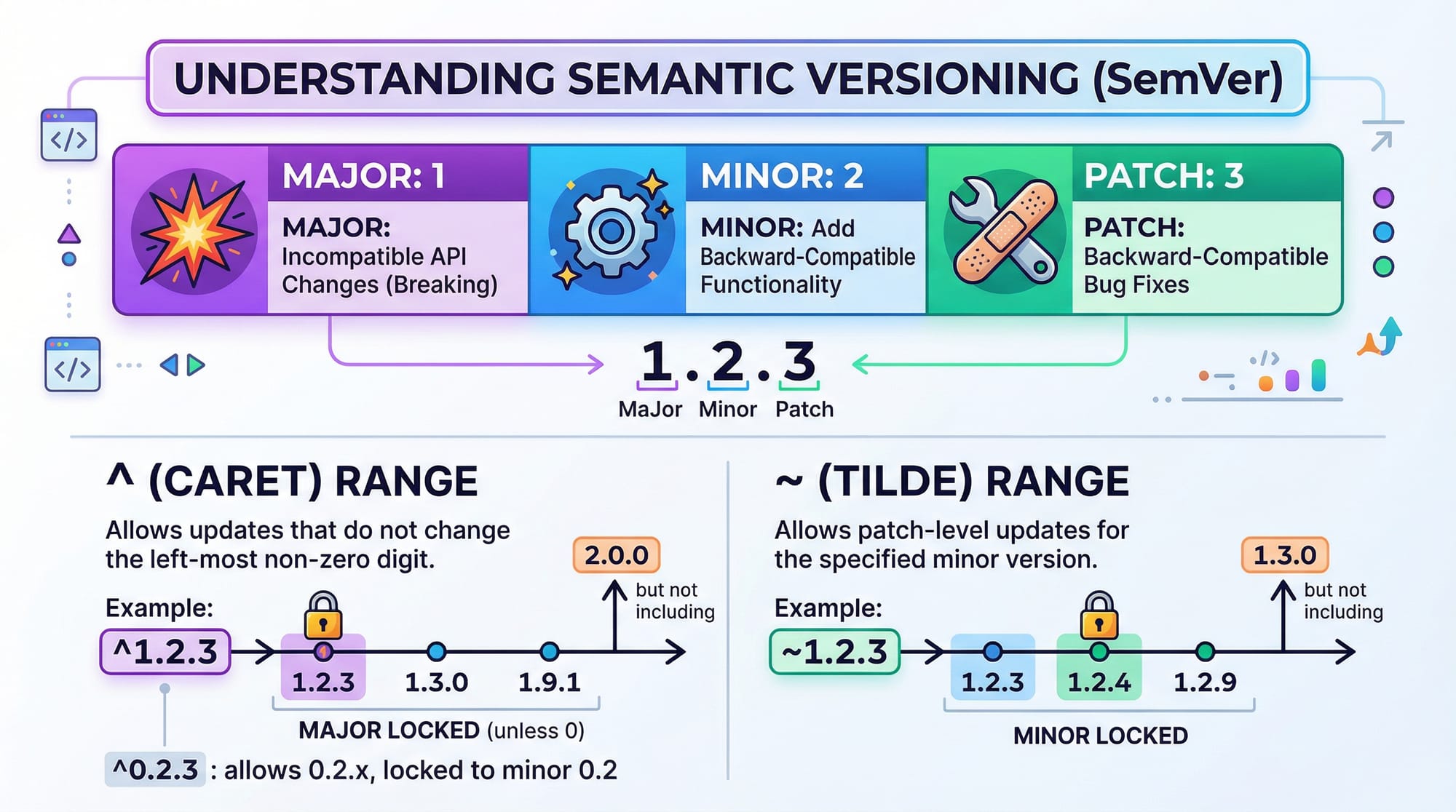
npm uses semantic versioning to manage package updates:
- Major (
1.x.x) → Breaking changes - Minor (
x.1.x) → New features, backward-compatible - Patch (
x.x.1) → Bug fixes
Example: Ali installs lodash with version ^4.17.21. The ^ ensures npm updates to any backward-compatible minor or patch version automatically.
npm vs Yarn
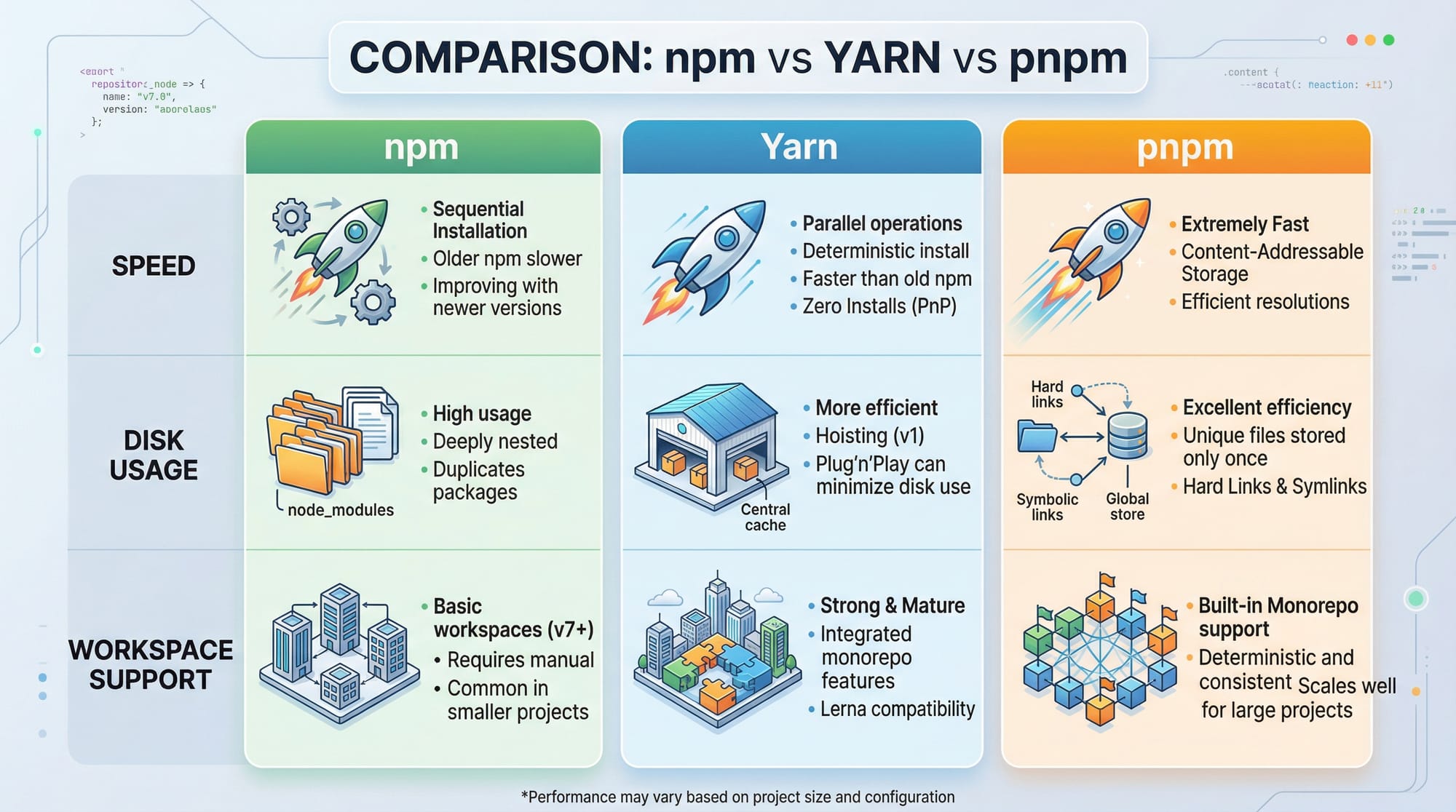
While npm is default with Node.js, Yarn is an alternative package manager. Key differences for Pakistani developers:
| Feature | npm (Default) | Yarn |
|---|---|---|
| Speed | Moderate | Faster, caching |
| Disk Usage | High | Lower |
| Workspace Support | Limited | Excellent |
| Community | Huge | Growing |
Practical Code Examples
Example 1: Installing and Using a Package
Ahmad wants to calculate PKR to USD conversions using currency-converter.
// index.js
const CurrencyConverter = require('currency-converter');

// Create an instance with PKR as base
const converter = new CurrencyConverter({ from: "PKR", to: "USD" });

// Convert 5000 PKR to USD
converter.convert(5000).then((value) => {
    console.log(`5000 PKR = ${value} USD`);
});
Explanation line-by-line:
- Import the
currency-converterpackage - Create a converter instance with
fromandtocurrencies - Call
convert(5000)→ Returns a promise console.logprints the result
Example 2: Real-World Application
Fatima wants to set up a simple Express.js server to display currency rates.
// server.js
const express = require('express');
const CurrencyConverter = require('currency-converter');

const app = express();
const converter = new CurrencyConverter({ from: "PKR", to: "USD" });

app.get('/convert/:amount', async (req, res) => {
    const amount = req.params.amount;
    const converted = await converter.convert(amount);
    res.send(`${amount} PKR = ${converted} USD`);
});

app.listen(3000, () => console.log("Server running on http://localhost:3000"));
express()→ Initializes Express serverapp.get→ Defines route for conversionawait converter.convert(amount)→ Converts PKR to USDapp.listen→ Starts server on localhost
Common Mistakes & How to Avoid Them
Mistake 1: Not Installing Dependencies
Many beginners clone a project but forget to run npm install.
Fix: Always run:
npm install
Mistake 2: Ignoring Semantic Versioning
Ali updates a package without checking compatibility, breaking his app.
Fix: Use:
npm outdated   # Check outdated packages
npm update     # Update safely
Practice Exercises
Exercise 1: Create a PKR to USD Converter
Problem: Build a Node.js script that converts 1000 PKR to USD using currency-converter.
Solution:
const CurrencyConverter = require('currency-converter');
const converter = new CurrencyConverter({ from: "PKR", to: "USD" });

converter.convert(1000).then(value => console.log(`1000 PKR = ${value} USD`));
Exercise 2: List All Installed Packages
Problem: Check all packages installed in your project.
Solution:
npm list
- Lists all dependencies with their version numbers
Frequently Asked Questions
What is npm?
npm is the Node Package Manager, a tool to manage JavaScript packages and libraries. It helps you install, update, and remove dependencies.
How do I create a package.json file?
Run npm init in your project folder. Follow the prompts to generate a package.json file.
Can I use Yarn instead of npm?
Yes, Yarn is an alternative package manager with faster installs and workspace support. You can migrate using yarn import.
How do I update npm packages safely?
Use npm outdated to check versions, then npm update to update safely without breaking your app.
What is semantic versioning?
Semantic versioning uses major.minor.patch to indicate breaking changes, new features, and bug fixes.
Summary & Key Takeaways
- npm is essential for JavaScript package management
package.jsontracks dependencies, scripts, and project metadata- Semantic versioning (
major.minor.patch) ensures safe updates - Yarn is an alternative to npm with faster installs and workspace support
- Always check and install dependencies before running projects
- Practical examples help Pakistani students build real-world apps
Next Steps & Related Tutorials
- Node.js Basics – Learn Node.js fundamentals
- JavaScript Tutorial – Strengthen JS skills
- Express.js Guide – Build backend APIs
- React.js Tutorial – Frontend development with React

This tutorial uses Pakistani examples, beginner-friendly code blocks, and practical exercises, while covering npm commands, package.json, and Yarn vs npm, making it perfect for learners in 2026.
I can also create a fully illustrated version with all images and cheat sheets embedded for theiqra.edu.pk next, ready for publishing.
Do you want me to do that?
Test Your Python Knowledge!
Finished reading? Take a quick quiz to see how much you've learned from this tutorial.