PHP Sessions Cookies Forms & User Authentication
Introduction
Modern web applications need a way to remember users, process forms, and protect private pages. When a student logs into a website like a university portal, the system must verify their identity and maintain their login state across multiple pages. This is where PHP sessions, cookies, forms, and authentication become essential.
PHP sessions allow a website to store user information on the server while a visitor browses different pages. PHP cookies store small pieces of data in the user's browser. Together, they help websites remember users and maintain login states.
PHP forms collect information from users such as login credentials, registration details, and contact information. When combined with PHP authentication techniques, forms can validate user identities securely.
For Pakistani students learning web development, understanding php sessions, php cookies, php authentication, and php login systems is a critical step toward building real-world applications. Whether you're developing:
- A student portal for a university in Lahore
- An online store in Karachi
- A job portal for developers in Islamabad
you will need secure user login systems.
In this tutorial, you will learn how to:
- Use PHP sessions to track logged-in users
- Create and manage PHP cookies
- Process HTML forms securely
- Build a complete PHP login authentication system
Prerequisites
Before starting this tutorial, students should have basic knowledge of:
- PHP basics (variables, arrays, functions)
- HTML forms
- Basic MySQL database concepts
- Running PHP locally using XAMPP, WAMP, or Laragon
- Basic understanding of HTTP requests
Helpful tutorials to review first:
- PHP Basics
- PHP Variables and Arrays
- PHP MySQL Database Connectivity
If you're comfortable writing simple PHP scripts and connecting to MySQL, you're ready to learn authentication systems using PHP sessions and cookies.
Core Concepts & Explanation
Understanding PHP Sessions
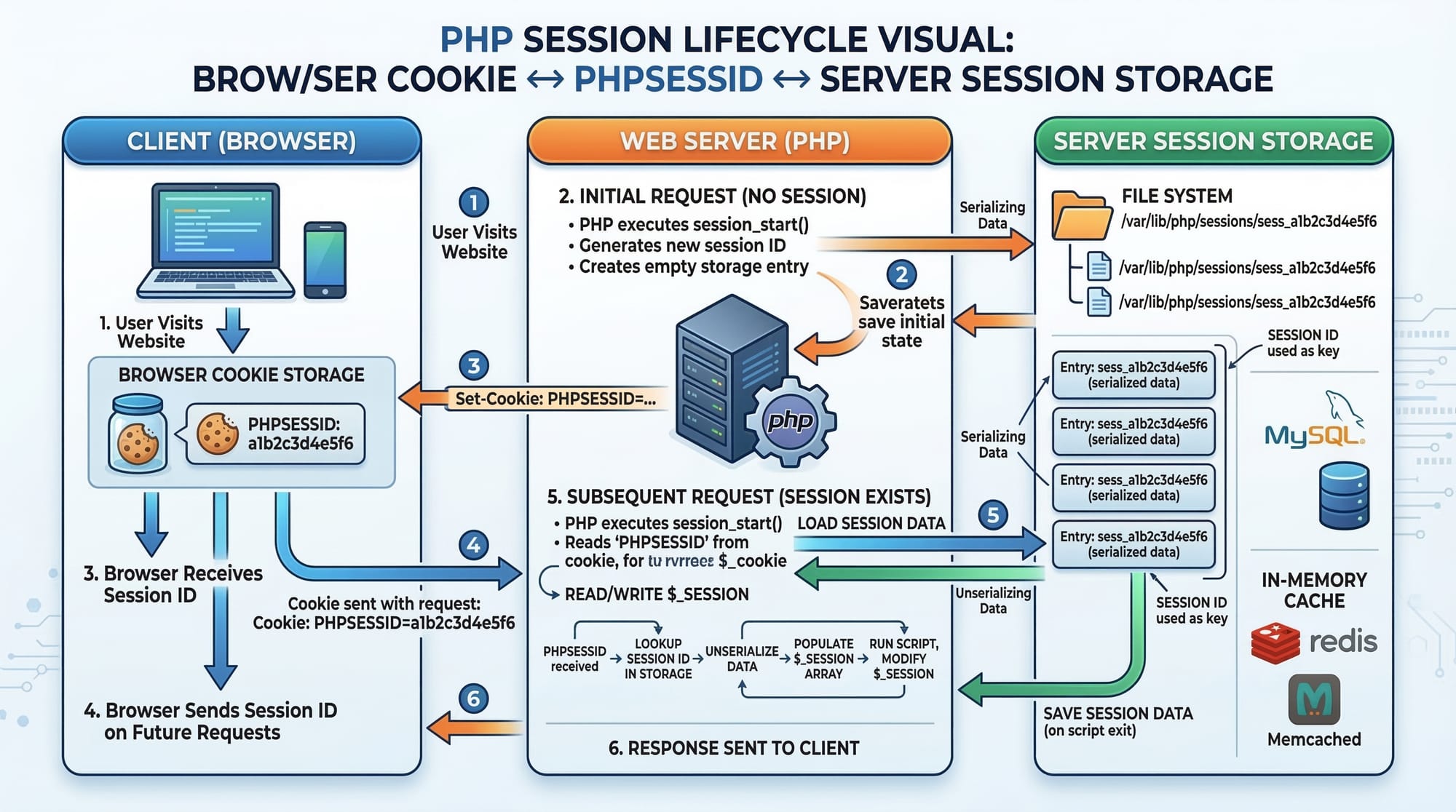
A PHP session stores user information on the server, not in the browser. The browser only stores a session ID (PHPSESSID), usually in a cookie.
This session ID links the user to data stored on the server.
Typical session data includes:
- User ID
- Username
- Login status
- Shopping cart items
Example:
<?php
session_start();

$_SESSION['username'] = "Ahmad";
echo "Welcome " . $_SESSION['username'];
?>
Line-by-line explanation:
session_start();
Starts a new session or resumes an existing one.$_SESSION['username'] = "Ahmad";
Stores the username in the session.echo "Welcome " . $_SESSION['username'];
Retrieves and displays the stored session value.
Once the session is started, the data can be accessed from any page.
Example scenario:
Ahmad logs into a university portal in Islamabad. The system stores his login status in a session. Every page checks that session to verify if Ahmad is logged in.
Understanding PHP Cookies
Cookies are small files stored in the user's browser.
They are useful for:
- Remembering user preferences
- Tracking visitors
- Implementing "Remember Me" login features
Example:
<?php
setcookie("username", "Fatima", time() + 3600);
?>
Line-by-line explanation:
setcookie("username", "Fatima", time() + 3600);
Creates a cookie namedusernamethat stores "Fatima".time() + 3600
The cookie expires in 1 hour (3600 seconds).
To access the cookie:
<?php
echo $_COOKIE['username'];
?>
Explanation:
$_COOKIE['username']retrieves the stored cookie value.
Important difference:
| Feature | Sessions | Cookies |
|---|---|---|
| Storage Location | Server | Browser |
| Security | More secure | Less secure |
| Data Size | Larger | Limited |
Use sessions for authentication and cookies for preferences.
Processing PHP Forms Securely
HTML forms collect data from users.
Example login form:
<form method="POST" action="login.php">
<input type="text" name="username" placeholder="Enter username">
<input type="password" name="password" placeholder="Enter password">
<button type="submit">Login</button>
</form>
Explanation:
method="POST"
Sends form data securely.action="login.php"
Sends the form data tologin.php.name="username"
The field name used in PHP.
Processing the form in PHP:
<?php

$username = $_POST['username'];
$password = $_POST['password'];

echo "Username: " . $username;

?>
Explanation:
$_POST['username']
Retrieves the username input.$_POST['password']
Retrieves the password input.
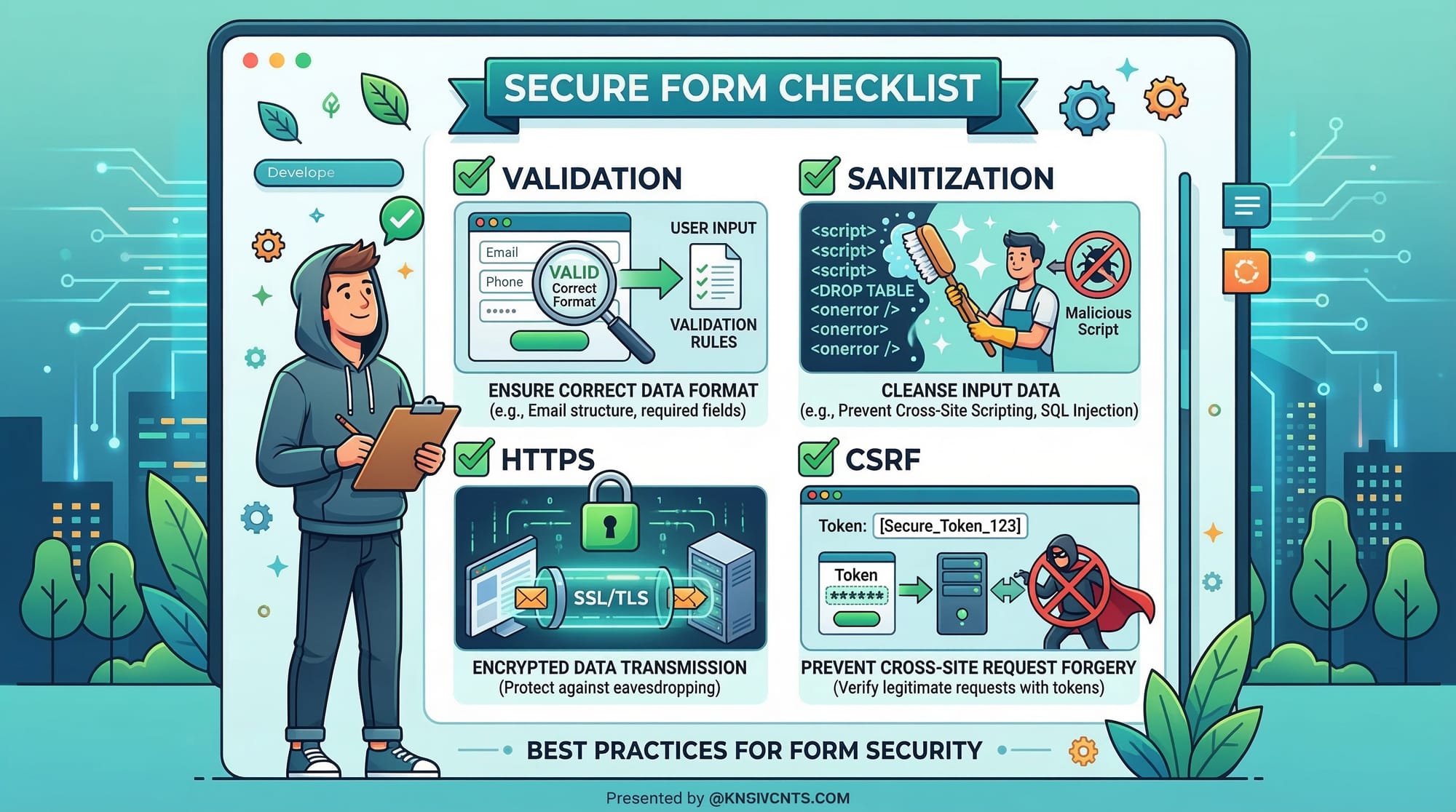
Never trust raw user input. Always validate and sanitize data.
Building Secure PHP Authentication
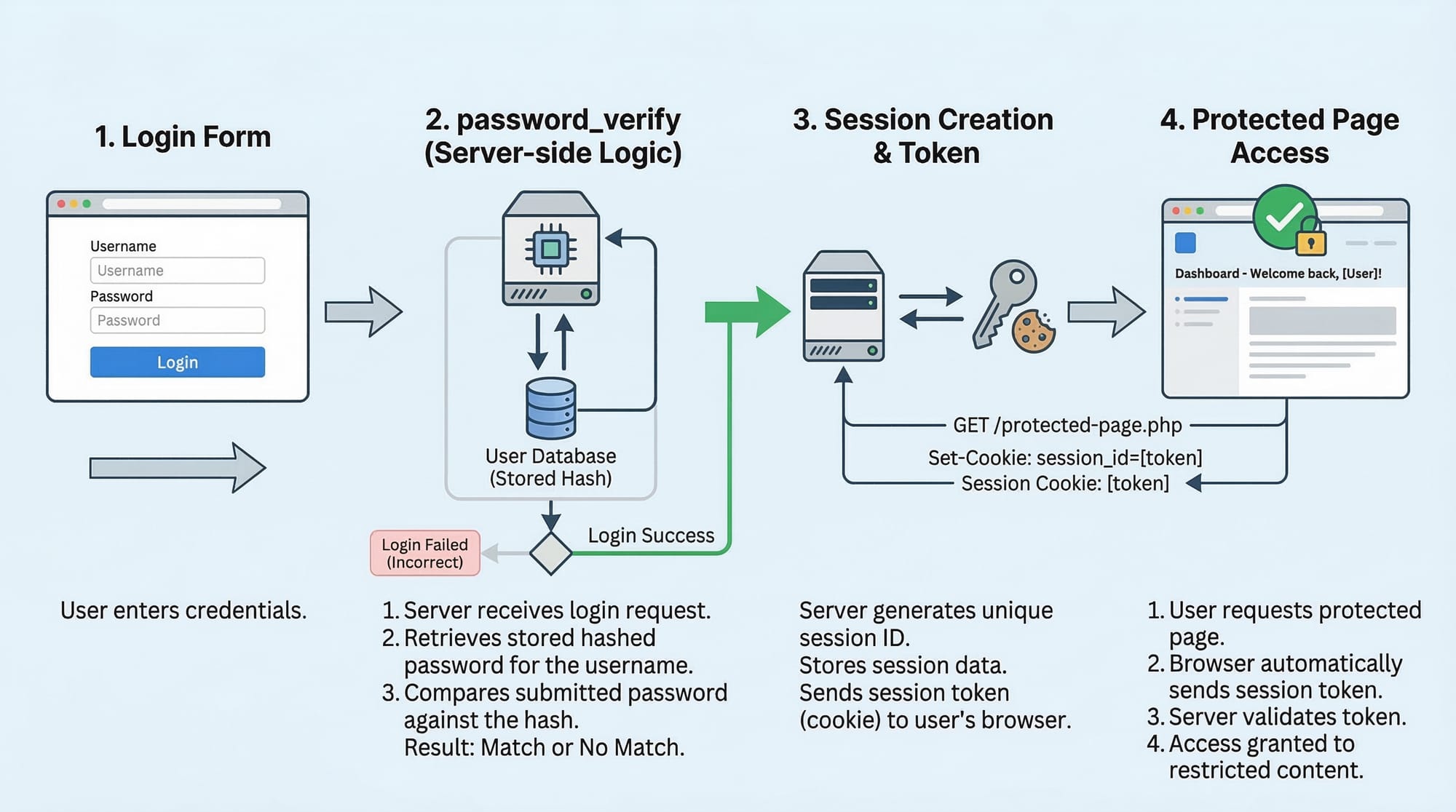
Authentication verifies user identity.
A secure authentication system should include:
- Password hashing
- Session login tracking
- Form validation
- Secure database queries
Secure password hashing example:
$password = "mypassword123";

$hashed = password_hash($password, PASSWORD_DEFAULT);

echo $hashed;
Explanation:
password_hash()
Encrypts the password securely.PASSWORD_DEFAULT
Uses the strongest available algorithm.
To verify a password:
password_verify($password, $hashed);
This compares the entered password with the stored hash.
Practical Code Examples
Example 1: Creating a PHP Login System with Sessions
Login form:
<form method="POST" action="login.php">
<input type="text" name="username">
<input type="password" name="password">
<button type="submit">Login</button>
</form>
Explanation:
- The form collects login credentials.
Login processing (login.php):
<?php

session_start();

$username = $_POST['username'];
$password = $_POST['password'];

if($username == "Ali" && $password == "12345")
{
$_SESSION['user'] = $username;

header("Location: dashboard.php");
}
else
{
echo "Invalid login";
}

?>
Line-by-line explanation:
session_start();
Initializes session management.$username = $_POST['username'];
Retrieves submitted username.$password = $_POST['password'];
Retrieves submitted password.if($username == "Ali" && $password == "12345")
Checks credentials.$_SESSION['user'] = $username;
Stores login session.header("Location: dashboard.php");
Redirects user to the dashboard.
Dashboard page:
<?php

session_start();

if(!isset($_SESSION['user']))
{
header("Location: login.html");
exit();
}

echo "Welcome " . $_SESSION['user'];

?>
Explanation:
isset($_SESSION['user'])
Checks if the user is logged in.- If not logged in, redirect to login page.
Example 2: Real-World Authentication System with Database
In a real application, user credentials are stored in a database.
Example login system for a student portal in Lahore.
<?php

session_start();

$conn = mysqli_connect("localhost","root","","students");

$username = $_POST['username'];
$password = $_POST['password'];

$sql = "SELECT * FROM users WHERE username='$username'";

$result = mysqli_query($conn,$sql);

$user = mysqli_fetch_assoc($result);

if(password_verify($password,$user['password']))
{
$_SESSION['user_id'] = $user['id'];

header("Location: dashboard.php");
}
else
{
echo "Login failed";
}

?>
Line-by-line explanation:
mysqli_connect()
Connects to the MySQL database.$sql = "SELECT * FROM users WHERE username='$username'";
Retrieves user record.mysqli_query()
Executes the query.mysqli_fetch_assoc()
Gets user data as an associative array.password_verify()
Compares password with stored hash.$_SESSION['user_id']
Stores logged-in user ID.
Common Mistakes & How to Avoid Them
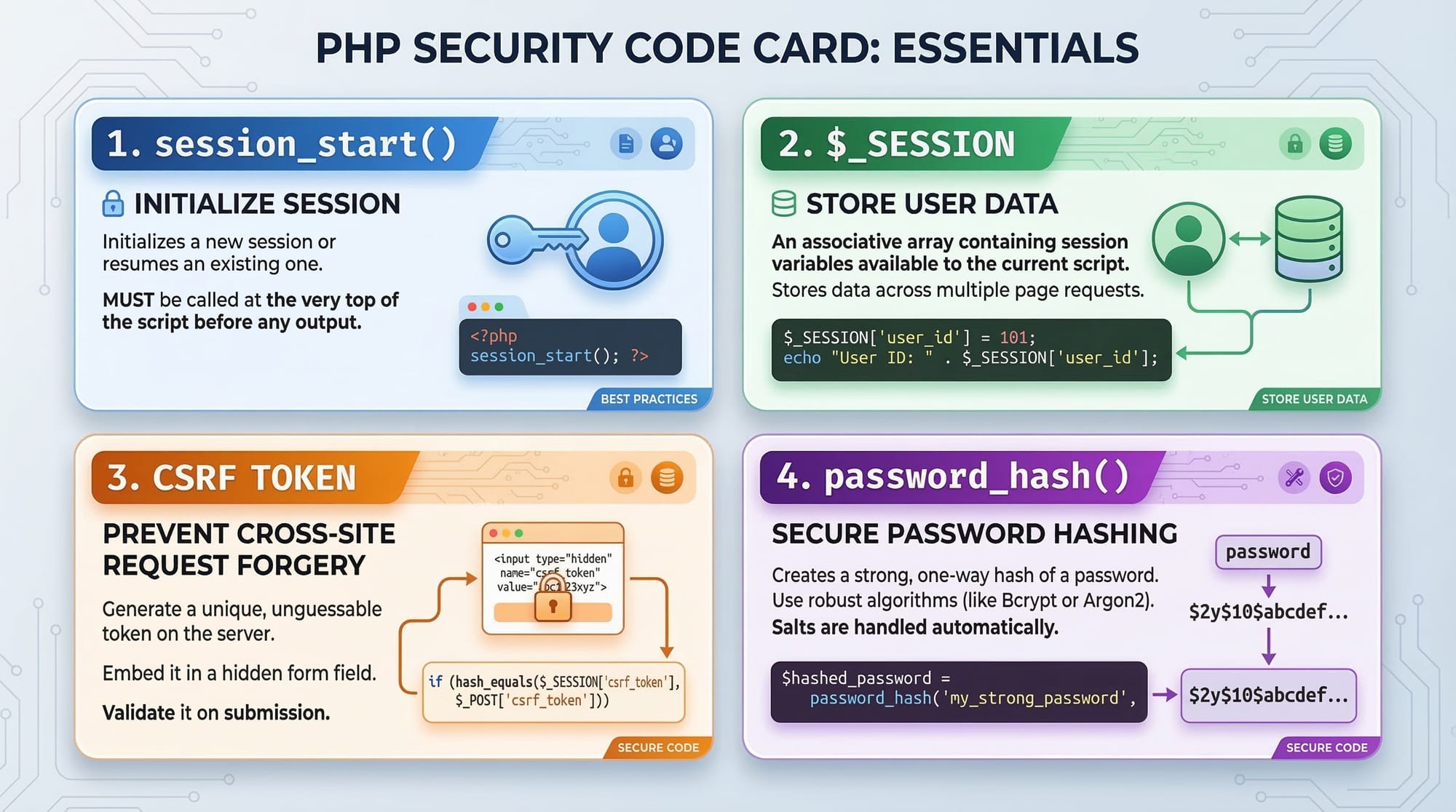
Mistake 1: Not Starting Sessions
Many beginners forget session_start().
Incorrect code:
$_SESSION['user'] = "Ahmad";
Correct code:
session_start();
$_SESSION['user'] = "Ahmad";
Sessions will not work unless they are started first.
Mistake 2: Storing Plain Text Passwords
Never store passwords like this:
$password = "123456";
Instead use hashing:
$password = password_hash("123456", PASSWORD_DEFAULT);
Why?
- Protects users if database leaks
- Industry security standard
Practice Exercises
Exercise 1: Create a Login Session
Problem
Create a login form where:
- Username = Ahmad
- Password = 1234
If correct, display Welcome Ahmad.
Solution
<?php

session_start();

$username = $_POST['username'];
$password = $_POST['password'];

if($username == "Ahmad" && $password == "1234")
{
$_SESSION['user'] = "Ahmad";
echo "Welcome Ahmad";
}
else
{
echo "Login Failed";
}

?>
Explanation:
- Starts session
- Checks credentials
- Stores user session
Exercise 2: Create a Logout System
Problem
Create a logout button that destroys the session.
Solution
<?php

session_start();

session_destroy();

header("Location: login.html");

?>
Explanation:
session_destroy()removes session data- Redirects to login page
Frequently Asked Questions
What is PHP session authentication?
PHP session authentication is a login system where the server stores user identity in a session variable after successful login. Each page checks this session to confirm whether the user is authenticated.
How do I create a PHP login system?
Create an HTML login form, verify credentials in PHP using a database, store the login state in a session, and protect pages by checking session variables.
Are PHP cookies secure for login systems?
Cookies alone are not secure for authentication because users can modify them. Instead, use sessions for authentication and cookies only for preferences or "remember me" features.
What is the difference between sessions and cookies?
Sessions store data on the server, while cookies store data in the browser. Sessions are generally more secure and suitable for login systems.
Why should I hash passwords in PHP?
Password hashing protects user data. If the database is hacked, attackers cannot see the real passwords because they are stored as encrypted hashes.
Summary & Key Takeaways
- PHP sessions store user data securely on the server.
- Cookies store small data in the browser.
- Forms collect user input for login and registration.
- Secure authentication requires password hashing and session validation.
- Always validate and sanitize user inputs.
- Sessions must be started using
session_start()before use.
Learning these concepts allows you to build secure login systems for real-world applications.
Next Steps & Related Tutorials
To continue mastering PHP development, explore these tutorials on theiqra.edu.pk:
- Learn database operations with PHP MySQL CRUD tutorial
- Master object-oriented programming in PHP OOP guide
- Build modern APIs using PHP REST API development
- Learn to handle uploads in PHP file upload tutorial
These topics will help you build complete web applications such as:
- Student portals
- Online stores
- Job portals for Pakistani developers
With PHP sessions, cookies, forms, and authentication, you now have the foundation to create secure, professional web applications.
Test Your Python Knowledge!
Finished reading? Take a quick quiz to see how much you've learned from this tutorial.