Python C Extensions ctypes cffi & Cython Guide
Introduction
Python is powerful, but sometimes it is not fast enough for CPU-intensive tasks like image processing, numerical simulations, or game engines. This is where Python C Extensions come in. The concept of python c extensions: ctypes, cffi & cython guide helps developers connect Python with the speed of C programming.
In simple terms, Python C extensions allow you to write performance-critical parts of your program in C and use them inside Python. This gives you the best of both worlds:
- Python’s simplicity
- C’s speed
For Pakistani students learning advanced programming, this skill is extremely valuable. Whether you are building fintech tools in Karachi, AI models in Lahore, or automation scripts for freelancing clients in Islamabad, C extensions can dramatically improve performance and job opportunities.
Why Pakistani Students Should Learn This
Many freelance platforms like Fiverr and Upwork pay higher rates for optimized software solutions. If you can improve Python performance using C extensions, you can:
- Build faster AI/ML tools
- Optimize data processing systems
- Create high-performance backend services
- Increase your freelance income in PKR
📌 Example: A Python script taking 10 seconds can be reduced to 1 second using Cython or ctypes optimization.
Prerequisites
Before learning Python C extensions, you should be comfortable with:
Basic Python Knowledge
- Variables, loops, functions
- File handling
- Modules and packages
Basic C Language Understanding
- Data types (int, float, char)
- Functions and pointers
- Compilation basics (gcc or clang)
Development Tools
- Python 3.8+
- GCC compiler (Linux/Mac) or MinGW (Windows)
- pip package manager
Optional but Helpful
- Linux terminal usage
- Basic memory management concepts
Core Concepts & Explanation
What Are Python C Extensions?
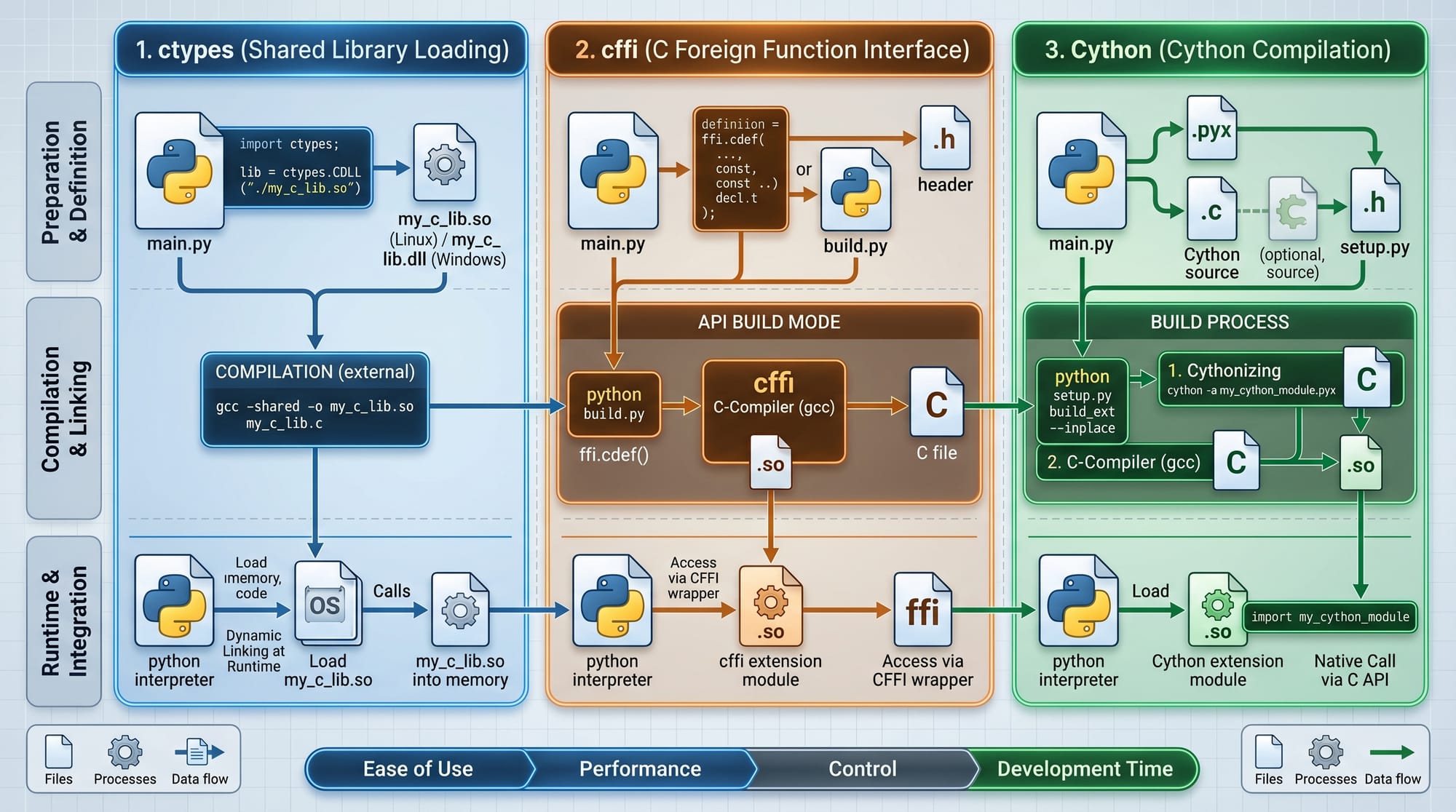
Python C extensions are modules written in C that can be imported directly into Python. They improve performance by bypassing Python’s interpreter overhead.
There are three popular approaches:
- ctypes (built-in Python library)
- cffi (C Foreign Function Interface)
- Cython (Python-like syntax compiled to C)
ctypes: Direct C Library Access
ctypes allows Python to call functions from shared libraries (.dll or .so files).
It is useful when:
- You already have a C library
- You don’t want to compile Python extensions
- You need quick integration
Example idea:
A C function for adding two numbers can be called directly from Python.
cffi: Safer C Interface Layer
cffi (C Foreign Function Interface) provides a safer and more modern way to interact with C code.
It is used when:
- You want better safety than ctypes
- You are working with complex C APIs
- You want portability
It has two modes:
- ABI mode (runtime linking)
- API mode (compile-time linking)
Cython: Python + C Hybrid
Cython is the most powerful tool in this guide. It allows you to write Python-like code that compiles into C.
It is used when:
- You want maximum performance
- You are optimizing loops or algorithms
- You want easy syntax with C speed
Example:
def add(int a, int b):
    return a + b
This compiles into fast C code.
Practical Code Examples
Example 1: Using ctypes for C Library Integration
Let’s say we have a simple C file mathlib.c:
// mathlib.c
int add(int a, int b) {
    return a + b;
}
Now compile it into a shared library:
gcc -shared -o libmath.so -fPIC mathlib.c
Python Code Using ctypes
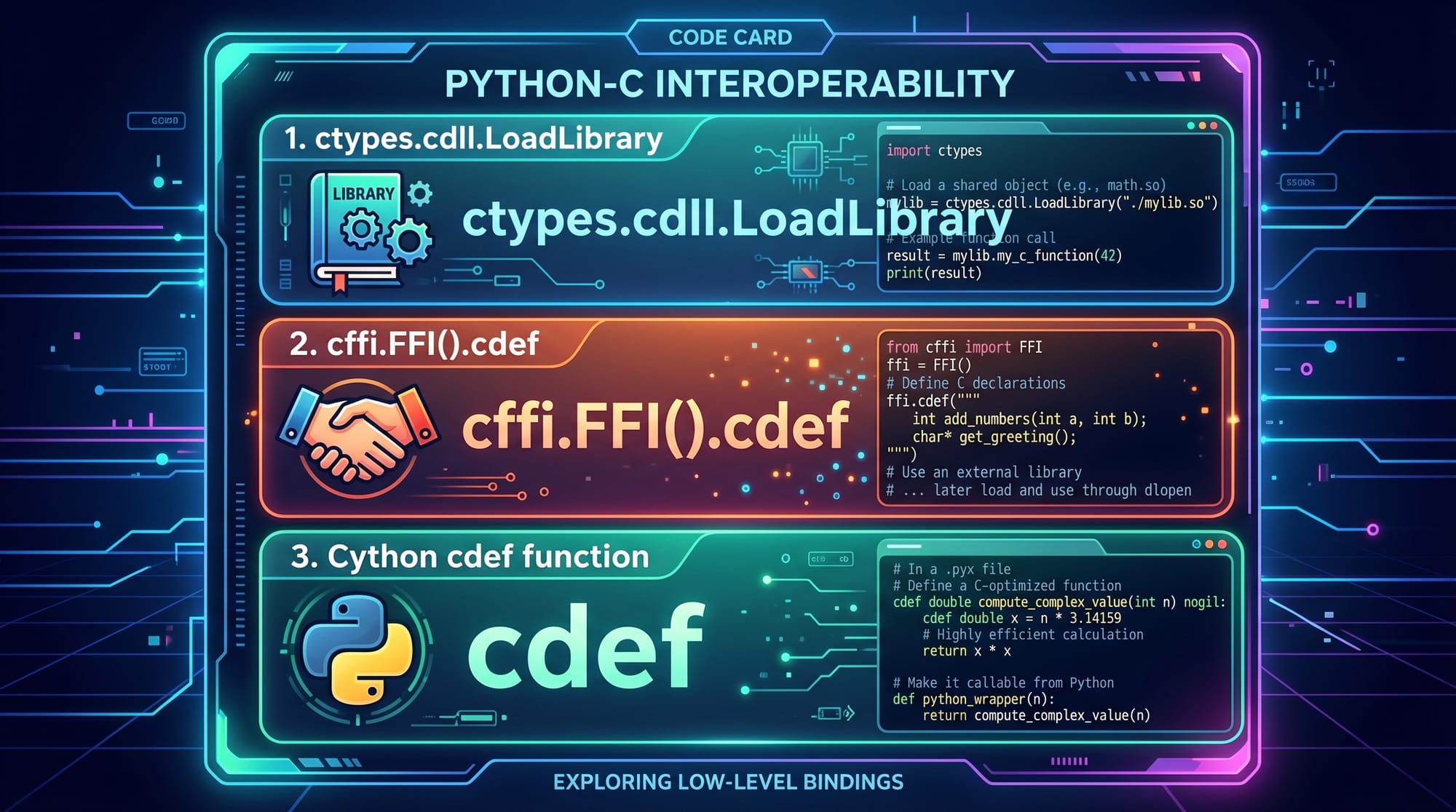
import ctypes

# Load the shared library
lib = ctypes.CDLL('./libmath.so')

# Call the C function
result = lib.add(10, 20)

print("Result:", result)
Line-by-Line Explanation
import ctypes→ Imports the ctypes moduleCDLL('./libmath.so')→ Loads compiled C librarylib.add(10, 20)→ Calls C function directlyprint()→ Displays result
📌 Real-world use: Fast mathematical operations in financial apps used in Pakistani banking systems.
Example 2: Real-World Cython Application
Suppose we want to calculate factorial efficiently.
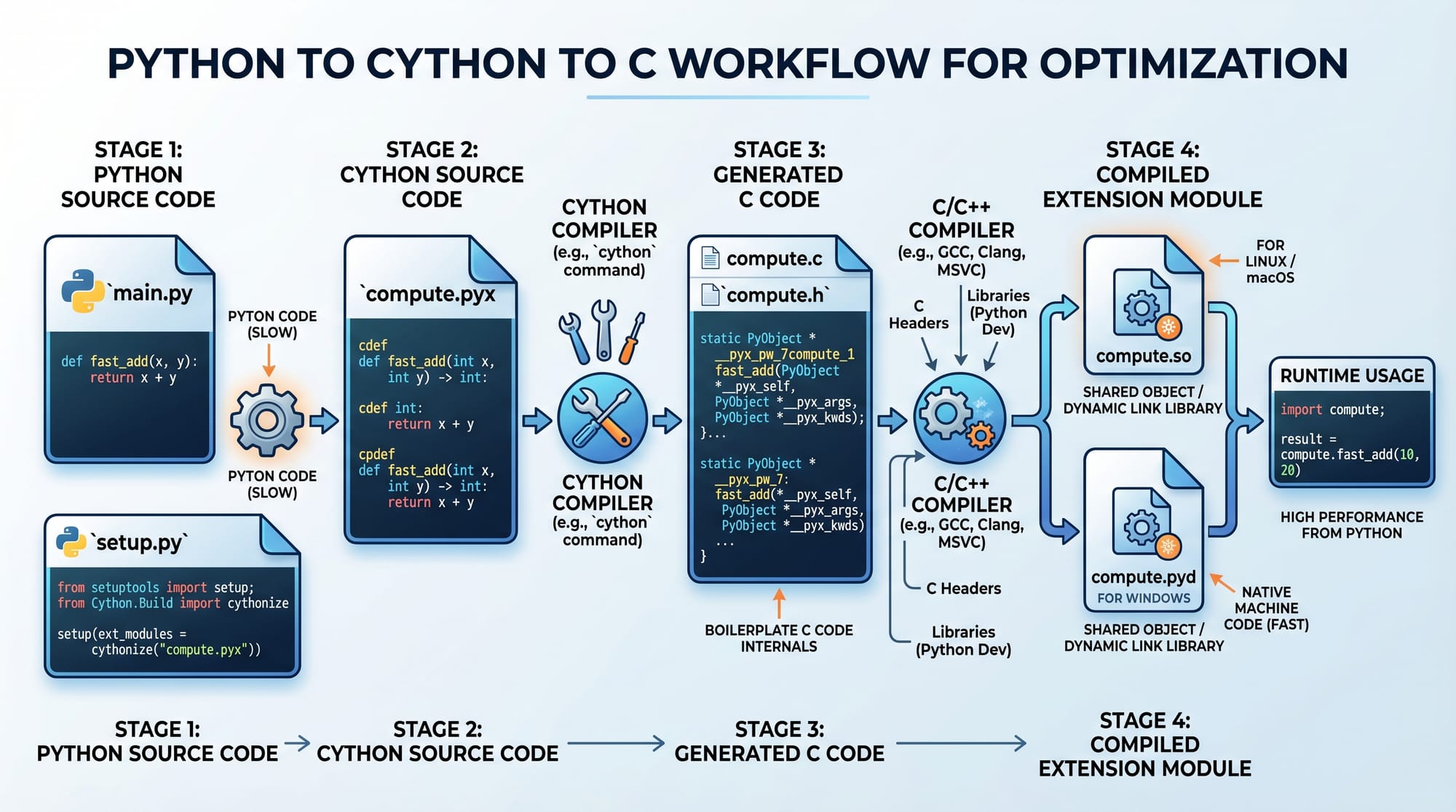
Cython File: factorial.pyx
def factorial(int n):
    cdef int i
    cdef int result = 1

    for i in range(1, n + 1):
        result = result * i

    return result
Build Script: setup.py
from setuptools import setup
from Cython.Build import cythonize

setup(
    ext_modules=cythonize("factorial.pyx")
)
Python Usage
import factorial

print(factorial.factorial(5))
Line-by-Line Explanation
cdef int i→ Declares C-level variable for speedcdef int result→ Stores computation efficiently- Loop runs in compiled C speed
cythonize()→ Converts.pyxto C extension
Common Mistakes & How to Avoid Them
Mistake 1: Incorrect Data Types in ctypes
Many beginners pass Python integers directly without specifying types.
❌ Wrong:
lib.add(10.5, 20.3)
✔ Fix:
lib.add.argtypes = [ctypes.c_int, ctypes.c_int]
lib.add.restype = ctypes.c_int
Explanation:
Without defining types, Python may misinterpret data leading to crashes or wrong results.
Mistake 2: Not Compiling Cython Code Properly
Students often forget to compile .pyx files.
❌ Wrong:
import myfile.pyx
✔ Fix:
- Use
setup.py - Run:
python setup.py build_ext --inplace
Explanation:
Cython files must be compiled into binary modules before import.
Practice Exercises
Exercise 1: Create a C Function for Subtraction
Problem:
Write a C function that subtracts two numbers and call it using ctypes.
Solution:
C Code:
int subtract(int a, int b) {
    return a - b;
}
Python Code:
import ctypes

lib = ctypes.CDLL('./libmath.so')

lib.subtract.argtypes = [ctypes.c_int, ctypes.c_int]
lib.subtract.restype = ctypes.c_int

print(lib.subtract(50, 20))
Exercise 2: Optimize Loop Using Cython
Problem:
Convert a Python loop that sums numbers from 1 to 100000 into Cython.
Solution:
def sum_numbers(int n):
    cdef int i
    cdef int total = 0

    for i in range(n):
        total += i

    return total
Explanation:
Cython converts loop into fast C execution, improving performance significantly.
Frequently Asked Questions
What is Python C Extensions?
Python C extensions are modules written in C that extend Python’s functionality and improve performance. They allow Python programs to execute C code directly for speed improvements.
What is ctypes used for?
ctypes is used to call functions from compiled C libraries directly in Python without writing complex extension modules. It is useful for quick integration.
What is Cython in Python?
Cython is a programming language that allows writing Python-like code which is compiled into C for high performance. It is widely used in scientific computing.
Which is better: ctypes, cffi, or Cython?
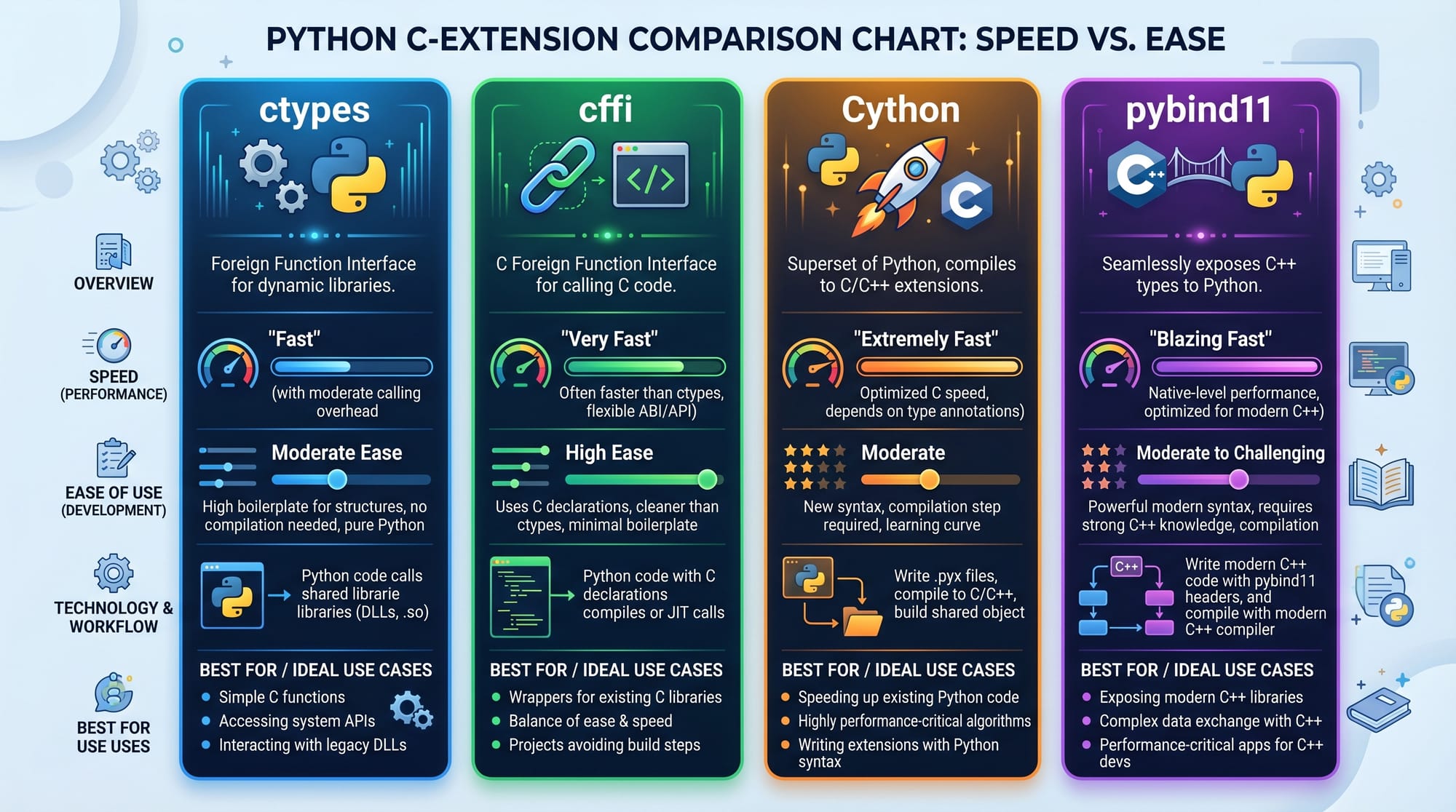
ctypes is easiest, cffi is safer, and Cython is fastest. The best choice depends on your project requirements and performance needs.
Can Pakistani students use C extensions for freelancing?
Yes, absolutely. Many freelancers in Pakistan use Cython and ctypes to optimize AI models, backend systems, and data processing tools, increasing project value and earnings in PKR.
Summary & Key Takeaways
- Python C extensions improve performance by integrating C with Python
- ctypes is best for simple C library access
- cffi provides safer and modern C integration
- Cython offers the highest performance improvements
- Proper compilation is essential for Cython modules
- This skill is highly valuable for freelancing and software engineering careers
Next Steps & Related Tutorials
To continue your learning journey, explore these tutorials on theiqra.edu.pk:
- Learn fundamentals with our Python Tutorial for Beginners
- Strengthen your logic with C++ Programming Tutorial
- Explore advanced optimization techniques in Python Performance Optimization Guide
- Build systems programming skills with Operating Systems Basics
Mastering Python C extensions will place you ahead in the competitive software development market, especially in freelancing and AI development careers in Pakistan.
Test Your Python Knowledge!
Finished reading? Take a quick quiz to see how much you've learned from this tutorial.