Python Concurrency Deep Dive asyncio threading & multiprocessing
Introduction
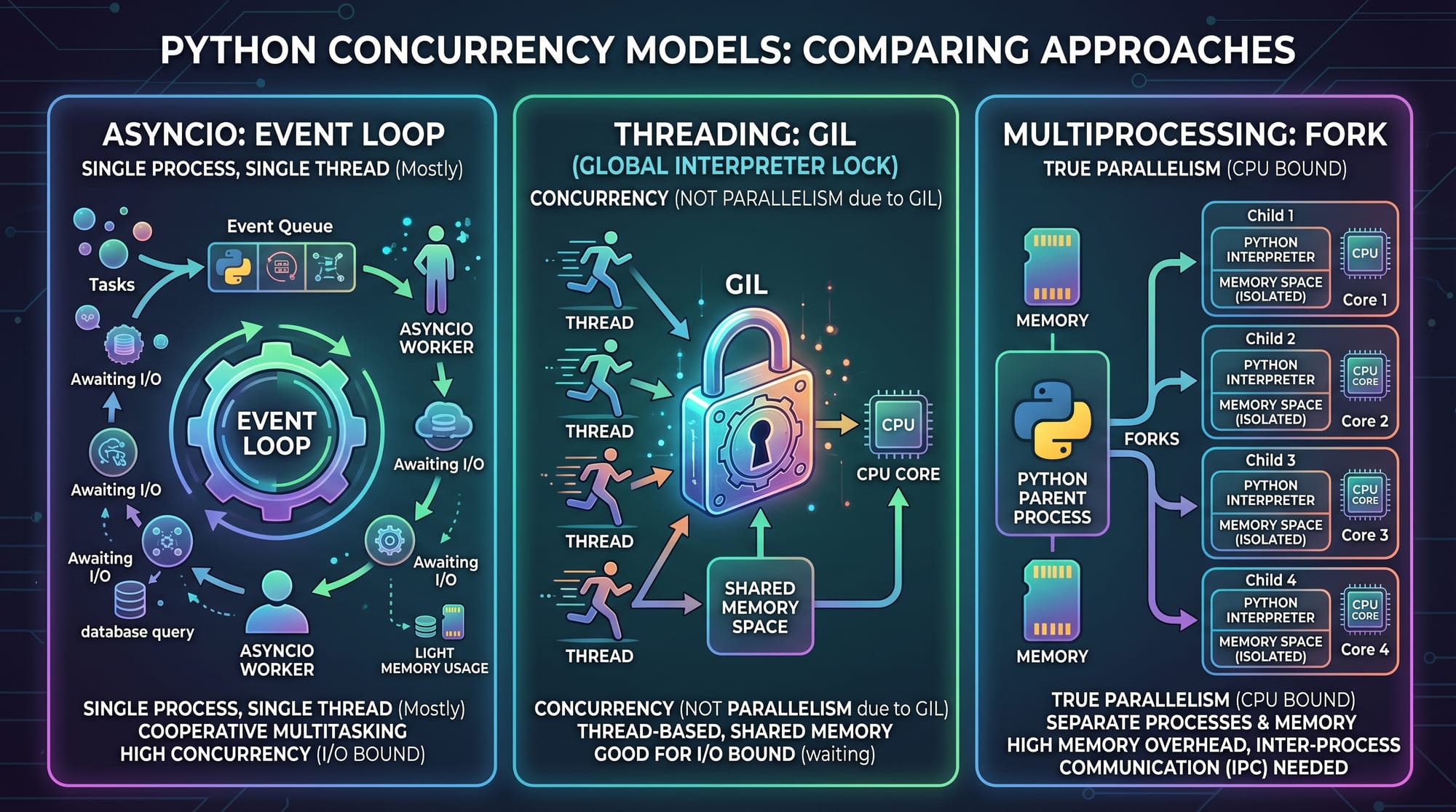
Python concurrency deep dive: asyncio, threading & multiprocessing is a comprehensive study of how Python handles multiple tasks at the same time using different programming models. Concurrency is essential when building modern applications such as web servers, data pipelines, automation tools, and AI systems.
For Pakistani students learning programming—whether in Lahore, Karachi, Islamabad, or studying online—understanding concurrency helps you build faster applications that can handle real-world workloads like APIs, web scraping, and financial systems (e.g., processing transactions in PKR for local fintech apps).
Python provides three major concurrency approaches:
- asyncio (asynchronous programming)
- threading (multi-threaded execution)
- multiprocessing (parallel CPU execution)
Each has different strengths, limitations, and ideal use cases.
Prerequisites
Before learning this python concurrency tutorial, you should already understand:
- Basic Python syntax (functions, loops, classes)
- Working with libraries and modules
- Basic understanding of I/O operations (file handling, HTTP requests)
- Fundamental knowledge of time complexity (helpful but not required)
Recommended prior tutorials on theiqra.edu.pk:
- Python Basics for Beginners
- Python Functions & Modules
- Object-Oriented Programming in Python
Core Concepts & Explanation
Synchronous vs Concurrent Execution
In synchronous execution, tasks run one after another:
import time

def task(name):
    print(f"Starting {name}")
    time.sleep(2)
    print(f"Finished {name}")

task("Ahmad")
task("Fatima")
task("Ali")
Line-by-line explanation:
import time→ Imports time module for delaysdef task(name):→ Defines a function that takes a task nameprint(f"Starting {name}")→ Prints start messagetime.sleep(2)→ Simulates a 2-second delayprint(f"Finished {name}")→ Prints completion message- Each task runs sequentially, so total time = 6 seconds
What is Concurrency in Python?
Concurrency means executing multiple tasks overlapping in time, not necessarily simultaneously.
Python achieves concurrency in three ways:
- asyncio → Single-threaded, cooperative multitasking
- threading → Multiple threads, shared memory
- multiprocessing → Multiple processes, separate memory
1. asyncio (Asynchronous Programming)
Asyncio is best for I/O-bound tasks like:
- Web scraping
- API calls
- Database queries
import asyncio

async def task(name):
    print(f"Start {name}")
    await asyncio.sleep(2)
    print(f"End {name}")

async def main():
    await asyncio.gather(
        task("Ahmad"),
        task("Fatima"),
        task("Ali")
    )

asyncio.run(main())
Line-by-line explanation:
import asyncio→ Imports async libraryasync def task(name):→ Defines asynchronous functionawait asyncio.sleep(2)→ Non-blocking delayasync def main()→ Main async controllerasyncio.gather(...)→ Runs tasks concurrentlyasyncio.run(main())→ Starts event loop
Key idea:
All tasks run on a single thread but switch when waiting.
2. Threading (Multi-threading)
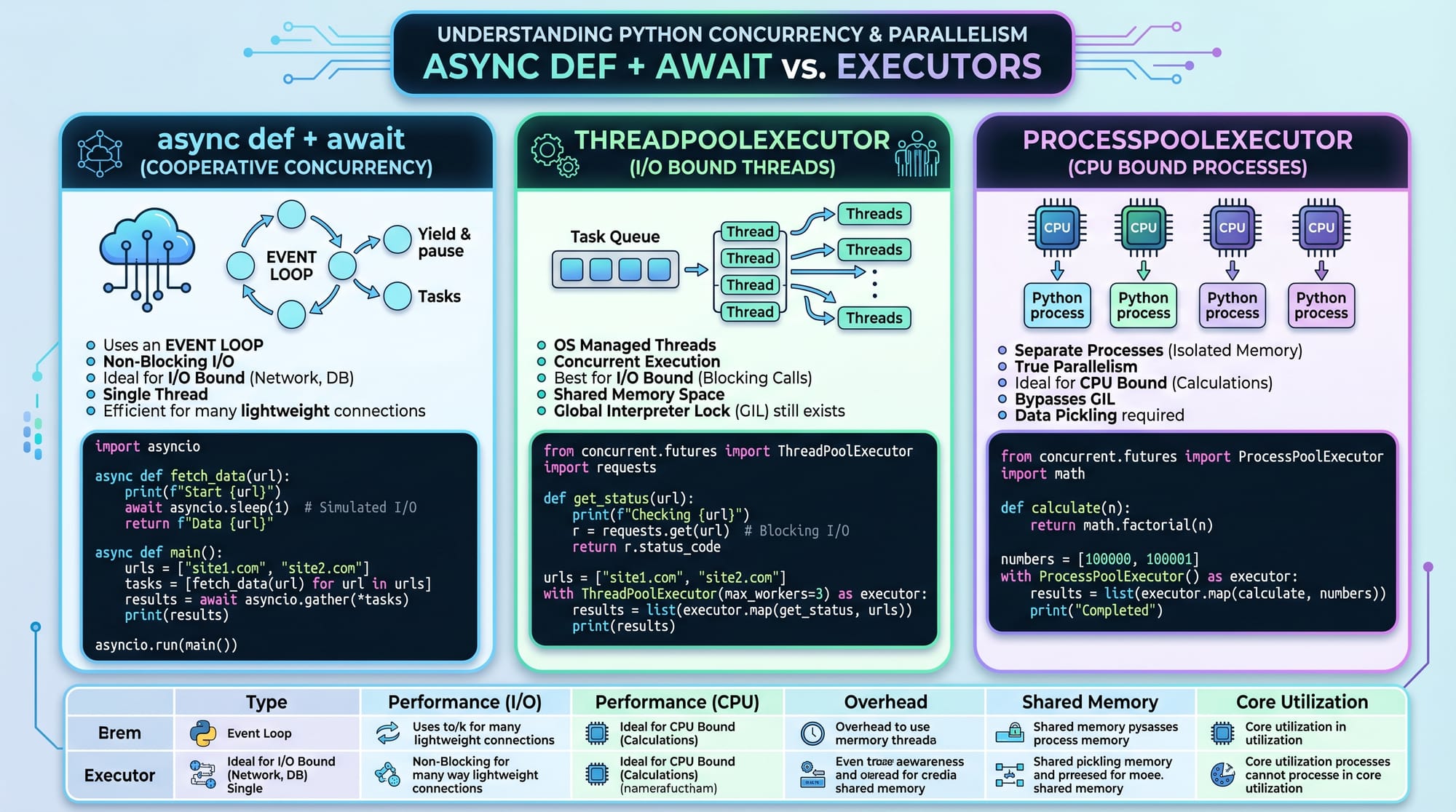
Threading is useful for I/O-bound tasks, but limited by GIL.
import threading
import time

def task(name):
    print(f"Start {name}")
    time.sleep(2)
    print(f"End {name}")

threads = []

for name in ["Ahmad", "Fatima", "Ali"]:
    t = threading.Thread(target=task, args=(name,))
    threads.append(t)
    t.start()

for t in threads:
    t.join()
Line-by-line explanation:
import threading→ Imports threading modulethreads = []→ Stores thread objectsThread(target=task, args=(name,))→ Creates threadt.start()→ Starts executiont.join()→ Waits for completion
Important concept: GIL (Global Interpreter Lock)
Python allows only one thread to execute Python bytecode at a time.
3. Multiprocessing (True Parallelism)
Multiprocessing is best for CPU-bound tasks like:
- Image processing
- Machine learning
- Mathematical computations
from multiprocessing import Process
import time

def task(name):
    print(f"Start {name}")
    time.sleep(2)
    print(f"End {name}")

processes = []

for name in ["Ahmad", "Fatima", "Ali"]:
    p = Process(target=task, args=(name,))
    processes.append(p)
    p.start()

for p in processes:
    p.join()
Line-by-line explanation:
from multiprocessing import Process→ Imports process moduleProcess(target=task, args=(name,))→ Creates a new processp.start()→ Starts process independentlyp.join()→ Waits for process completion
Key advantage:
Each process has its own memory → bypasses GIL

Practical Code Examples
Example 1: Downloading Multiple Web Pages (asyncio)
import asyncio
import aiohttp

async def fetch(url):
    print(f"Fetching {url}")
    async with aiohttp.ClientSession() as session:
        async with session.get(url) as response:
            return await response.text()

async def main():
    urls = [
        "https://example.com",
        "https://example.org",
        "https://example.net"
    ]

    results = await asyncio.gather(*[fetch(url) for url in urls])
    print("Done fetching all pages")

asyncio.run(main())
Line-by-line explanation:
aiohttp→ Async HTTP libraryfetch(url)→ Async function for web requestClientSession()→ Manages HTTP connectionsawait response.text()→ Reads response asynchronouslyasyncio.gather()→ Runs multiple requests in parallel
Example 2: CPU-heavy Calculation (multiprocessing)
from multiprocessing import Pool

def square(n):
    return n * n

if __name__ == "__main__":
    numbers = [1, 2, 3, 4, 5]
    with Pool(3) as p:
        result = p.map(square, numbers)
    print(result)
Line-by-line explanation:
Pool(3)→ Creates 3 worker processesp.map(square, numbers)→ Distributes work across processesif __name__ == "__main__"→ Required for Windows safety
Common Mistakes & How to Avoid Them
Mistake 1: Using threading for CPU-heavy tasks
Many students in Pakistan try using threads for heavy calculations like factorials or image processing.
Problem:
Threads do NOT run in parallel due to GIL.
Fix:
Use multiprocessing instead.
Mistake 2: Blocking asyncio with time.sleep()
import asyncio
import time

async def task():
    time.sleep(2)  # WRONG ❌
Fix:
await asyncio.sleep(2) # CORRECT ✅
Practice Exercises
Exercise 1: Async Greeting System
Problem:
Create an async program where Ahmad, Fatima, and Ali receive greetings after 2 seconds delay.
Solution:
import asyncio

async def greet(name):
    await asyncio.sleep(2)
    print(f"Hello {name}")

async def main():
    await asyncio.gather(
        greet("Ahmad"),
        greet("Fatima"),
        greet("Ali")
    )

asyncio.run(main())
Explanation:
- Each greeting runs concurrently
- Total time ≈ 2 seconds instead of 6
Exercise 2: Square Numbers with multiprocessing
Problem:
Compute squares of numbers 1–10 using multiprocessing.
Solution:
from multiprocessing import Pool

def square(n):
    return n * n

if __name__ == "__main__":
    with Pool(4) as p:
        result = p.map(square, range(1, 11))
    print(result)
Explanation:
- Work is divided across 4 processes
- Faster execution for CPU-heavy tasks
Frequently Asked Questions
What is python concurrency tutorial?
A python concurrency tutorial explains how Python runs multiple tasks at the same time using asyncio, threading, and multiprocessing. It helps improve performance in real-world applications like web apps and automation tools.
What is the difference between threading and multiprocessing?
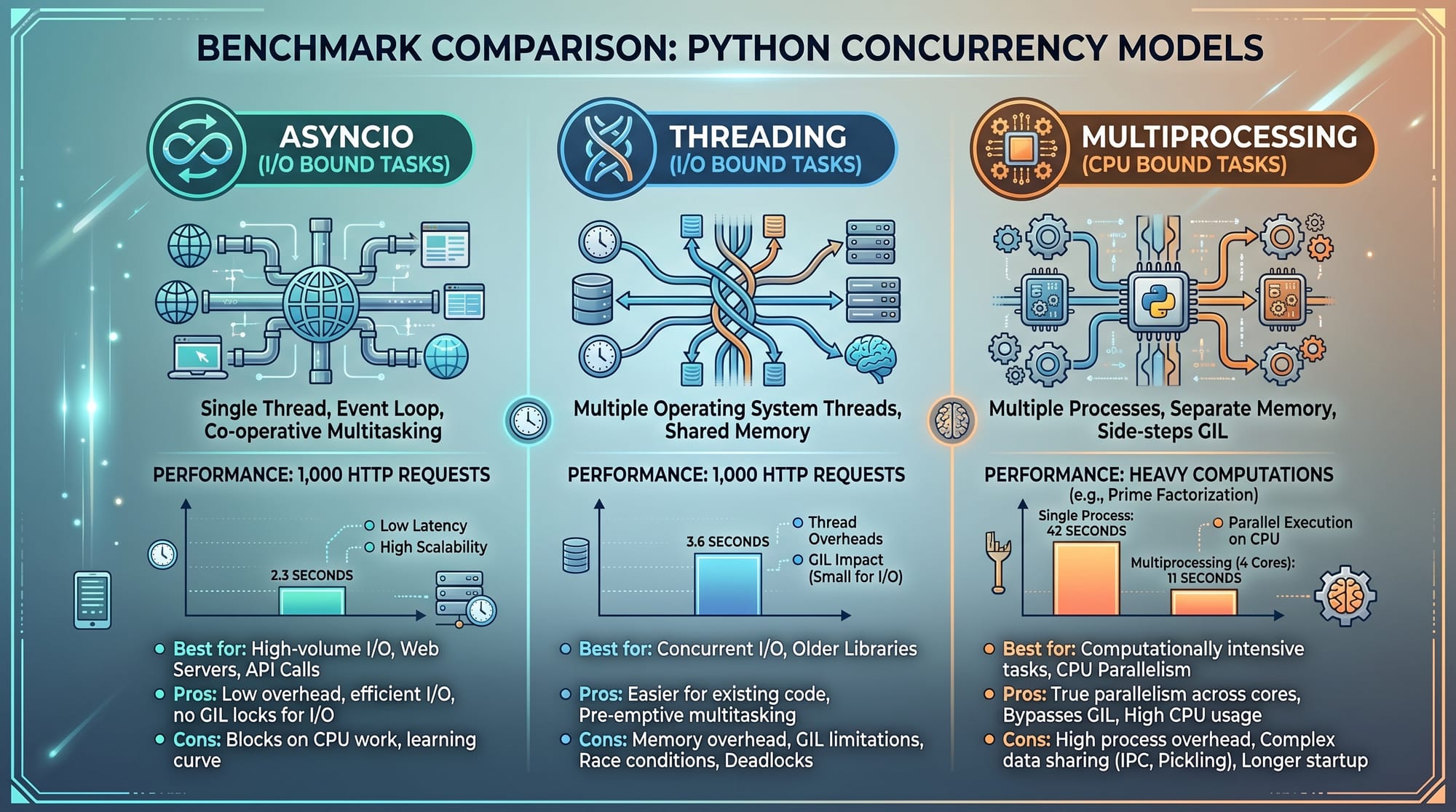
Threading uses shared memory and is limited by Python’s GIL, while multiprocessing uses separate memory and allows true parallel execution. Multiprocessing is better for CPU-heavy tasks.
When should I use asyncio in Python?
Use asyncio when your program spends time waiting for external operations like API calls, file downloads, or database queries. It improves efficiency by avoiding blocking.
Why is Python threading slow for CPU tasks?
Python threading is limited by the Global Interpreter Lock (GIL), which allows only one thread to execute Python code at a time, reducing performance in CPU-bound tasks.
Is multiprocessing always better than threading?
No. Multiprocessing is better for CPU-heavy tasks, but it uses more memory. Threading or asyncio is better for I/O-heavy tasks like networking or file handling.
Summary & Key Takeaways
- asyncio is best for I/O-heavy, high-performance network tasks
- threading is useful but limited by the Python GIL
- multiprocessing enables true parallel execution for CPU tasks
- Choose concurrency model based on task type
- Wrong choice of model can reduce performance instead of improving it
- Real-world systems often combine all three approaches
Next Steps & Related Tutorials
To deepen your understanding, explore these tutorials on theiqra.edu.pk:
- Python Async/Await Complete Guide
- Python Multiprocessing for Data Science
- Python Threading in Real-World Applications
- Python Web Scraping with Asyncio
If you want, I can also:
✅ Turn this into a WordPress-ready HTML article
✅ Add SEO meta title + description
✅ Or generate a quiz based on this tutorial for students
Test Your Python Knowledge!
Finished reading? Take a quick quiz to see how much you've learned from this tutorial.