Python Dataclasses & attrs Modern Data Containers

Introduction
Python has become one of the most popular programming languages in Pakistan, especially among students learning data science, web development, and automation. One powerful feature that often gets overlooked by beginners is modern data containers — specifically Python dataclasses and the third-party library attrs.
These tools help you write cleaner, shorter, and more readable code when working with classes that mainly store data. Instead of writing long boilerplate code, Python can automatically generate it for you.
In simple terms:
- Dataclasses are built into Python (from Python 3.7+)
- attrs is a powerful external library with more advanced features
Both are widely used in real-world applications like APIs, data processing systems, and machine learning pipelines.
📌 Why should Pakistani students learn this?
Because in real-world software companies in Lahore, Karachi, and Islamabad, developers don’t manually write repetitive class code. They use tools like dataclasses and attrs to increase productivity and reduce bugs.
Prerequisites
Before learning dataclasses and attrs, you should be comfortable with:
- Basic Python syntax (variables, loops, functions)
- Object-Oriented Programming (classes and objects)
- Understanding of constructors (
__init__) - Basic knowledge of Python modules and imports
If you are not confident in OOP yet, you should first read:
- Python OOP Tutorial on theiqra.edu.pk
- Python Functions & Modules Guide
Core Concepts & Explanation
Understanding Python Dataclasses
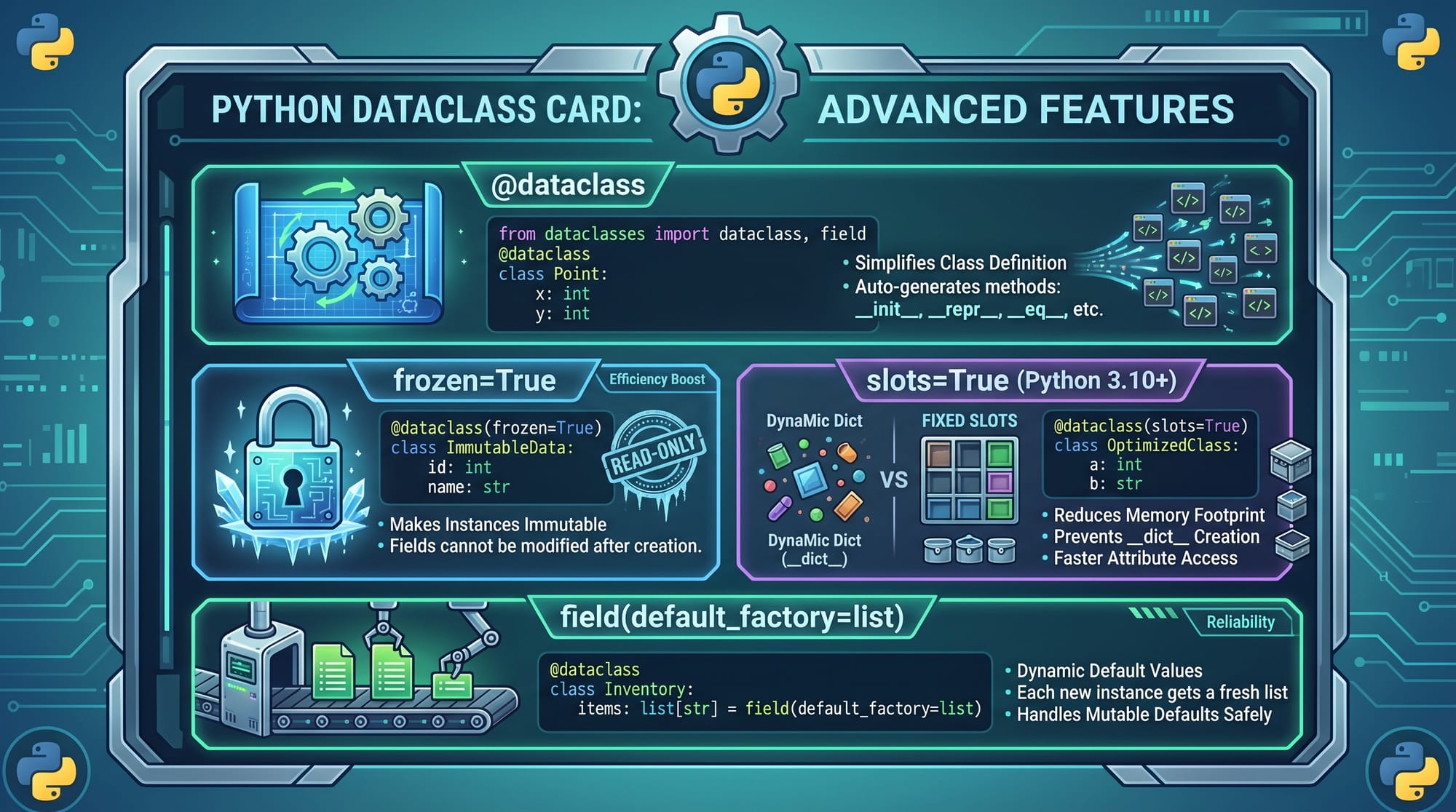
A dataclass is a decorator that automatically generates special methods like:
__init__()(constructor)__repr__()(string representation)__eq__()(comparison)
Instead of writing full class code, Python does it for you.
Example of Traditional Class vs Dataclass
# Traditional class
class Student:
    def __init__(self, name, age, city):
        self.name = name
        self.age = age
        self.city = city

    def __repr__(self):
        return f"Student(name={self.name}, age={self.age}, city={self.city})"
Explanation:
- Line 2: We define a class
Student - Line 3-6: Manual constructor assigns values
- Line 8-9: Custom string representation for debugging
Now compare with dataclass:
from dataclasses import dataclass

@dataclass
class Student:
    name: str
    age: int
    city: str
Explanation:
- Line 1: Import dataclass decorator
- Line 3:
@dataclassautomatically generates methods - Lines 4–6: Just define variables with types
✔ Cleaner code
✔ Less boilerplate
✔ Easier maintenance
Understanding attrs Library
The attrs library is a more powerful version of dataclasses. It provides:
- Validation
- Converters
- Better performance options
- More customization
Install it using:
pip install attrs
Basic attrs Example
import attr

@attr.s
class Student:
    name = attr.ib()
    age = attr.ib()
    city = attr.ib()
Explanation:
- Line 1: Import attrs library
- Line 3:
@attr.sdefines a class container - Lines 4–6:
attr.ib()defines attributes
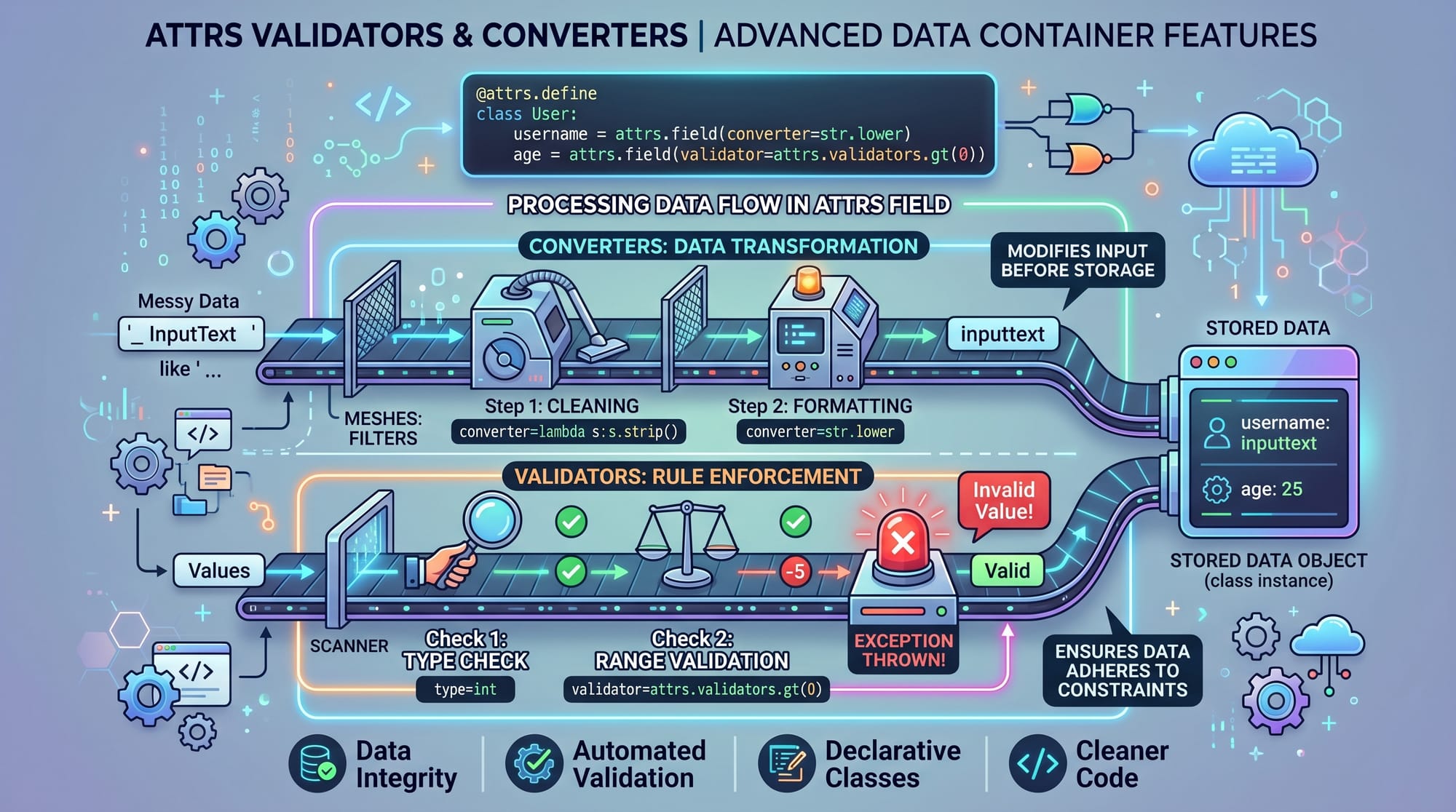
attrs also allows validation:
@attr.s
class Student:
    name = attr.ib()
    age = attr.ib(validator=attr.validators.instance_of(int))
Explanation:
- Ensures age must be an integer
- Prevents invalid data at runtime
Key Difference: dataclass vs attrs
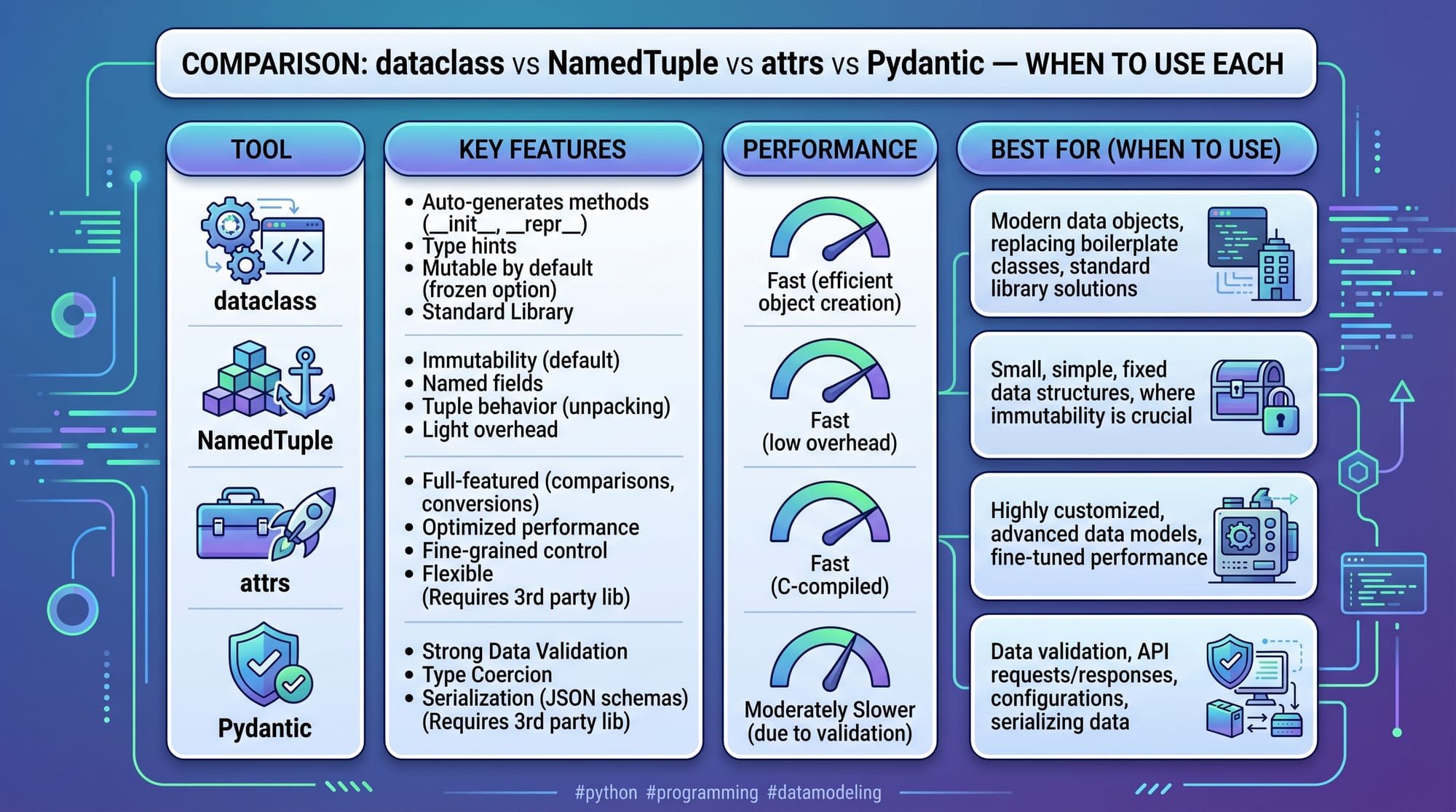
dataclass (Built-in)
- Simple and lightweight
- No external dependency
- Good for basic data models
attrs (External Library)
- More powerful features
- Validation and converters
- Better control over object behavior
Practical Code Examples
Example 1: Student Record System (Pakistan School Example)
from dataclasses import dataclass

@dataclass
class Student:
    name: str
    roll_no: int
    marks: float
    city: str


student1 = Student("Ahmad", 101, 87.5, "Lahore")

print(student1)
Explanation:
- Line 1: Import dataclass
- Lines 3–8: Define student structure
- Line 11: Create student object
- Line 13: Print object automatically formatted
✔ Output:
Student(name='Ahmad', roll_no=101, marks=87.5, city='Lahore')
Example 2: Real-World E-Commerce Order System
from dataclasses import dataclass
from typing import List

@dataclass
class Order:
    customer_name: str
    items: List[str]
    total_price: float
    city: str


order1 = Order(
    customer_name="Fatima",
    items=["Shoes", "Bag"],
    total_price=8500,
    city="Karachi"
)

print(order1.total_price)
Explanation:
- Line 2: Import List type
- Lines 4–9: Define order structure
- Lines 12–17: Create order object
- Line 19: Access total price
💡 Real-world use: Online stores like Daraz-style systems use similar structures.
Common Mistakes & How to Avoid Them
Mistake 1: Not Using Type Hints
❌ Wrong:
@dataclass
class Student:
    name
    age
Problem:
Python cannot understand data types properly.
✔ Fix:
@dataclass
class Student:
    name: str
    age: int
Explanation:
- Always define types for clarity and debugging
Mistake 2: Using Mutable Defaults Incorrectly
❌ Wrong:
from dataclasses import dataclass

@dataclass
class ClassRoom:
    students: list = []
Problem:
All objects share same list
✔ Fix:
from dataclasses import dataclass, field

@dataclass
class ClassRoom:
    students: list = field(default_factory=list)
Explanation:
default_factorycreates a new list for each object- Prevents shared memory bugs
Practice Exercises
Exercise 1: Create a Book Class
Problem:
Create a dataclass for a Book with:
- title
- author
- price
Solution:
from dataclasses import dataclass

@dataclass
class Book:
    title: str
    author: str
    price: float


book1 = Book("Python Basics", "Ali", 1200)
print(book1)
Explanation:
- Defines simple book structure
- Automatically generates methods
Exercise 2: Student Marks System
Problem:
Store student name, marks, and calculate if passed (marks ≥ 50)
Solution:
from dataclasses import dataclass

@dataclass
class Student:
    name: str
    marks: int

    def is_passed(self):
        return self.marks >= 50


s1 = Student("Ahmad", 72)
print(s1.is_passed())
Explanation:
- Adds method inside dataclass
- Shows dataclasses can include behavior too
Frequently Asked Questions
What is Python dataclass?
A dataclass is a Python decorator that automatically generates methods like __init__ and __repr__. It is used to reduce boilerplate code when creating simple data-holding classes.
How is attrs different from dataclass?
attrs is a third-party library with more advanced features like validation, converters, and better customization. Dataclasses are built-in and simpler, while attrs is more powerful.
When should I use dataclass?
Use dataclass when you need simple classes for storing data such as student records, API responses, or configuration objects in Python projects.
Is attrs better than dataclass?
It depends on the use case. For small projects, dataclass is enough. For complex systems requiring validation and control, attrs is better.
Can dataclasses have methods?
Yes, dataclasses can include methods just like normal Python classes. They are not limited to storing data only.
Summary & Key Takeaways
- Dataclasses reduce boilerplate code in Python
- attrs provides advanced features like validation and converters
- Both are used for modern Python data modeling
- Dataclasses are built-in; attrs is external but more powerful
- Proper use improves code readability and maintainability
- Avoid mutable default mistakes like shared lists
Next Steps & Related Tutorials
To continue your Python journey, explore:
- Learn Python OOP fundamentals in our Python OOP Tutorial
- Master data validation in Pydantic Tutorial for Beginners
- Improve coding skills with Python Functions & Modules Guide
- Explore advanced Python in Python Advanced Programming Concepts
These tutorials are available on theiqra.edu.pk and will help you become job-ready for software development roles in Pakistan and beyond.
Test Your Python Knowledge!
Finished reading? Take a quick quiz to see how much you've learned from this tutorial.