MicroPython Tutorial Program Microcontrollers with Python
Introduction
MicroPython is a lightweight implementation of Python 3 designed specifically to run on microcontrollers and embedded systems. In simple terms, it allows you to program hardware devices like the ESP32, ESP8266, Raspberry Pi Pico, and other microcontrollers using Python instead of C or C++.
For Pakistani students, especially those interested in IoT (Internet of Things), robotics, and embedded systems, learning MicroPython is a powerful skill. Instead of struggling with complex low-level programming, you can quickly build real-world projects like:
- Smart home systems (fan automation, smart lights)
- Weather monitoring systems for cities like Lahore or Karachi
- IoT-based school projects (attendance systems, smart lockers)
- Sensor-based agriculture monitoring for rural areas
With the rise of affordable microcontrollers like the ESP32 (available in Pakistan for a few hundred rupees), MicroPython is becoming a gateway technology for beginners who want to enter hardware programming quickly.
This micropython tutorial: program microcontrollers with python will guide you step-by-step from basics to real-world applications.
Prerequisites
Before starting this tutorial, you should have:
- Basic understanding of Python (variables, loops, functions)
- Basic computer skills (installing software, using terminal or command prompt)
- A microcontroller board like ESP32 or ESP8266
- USB cable for connecting board to your computer
- Familiarity with basic electronics (LED, resistor, breadboard is helpful but not required)
Optional but useful:
- Basic knowledge of IoT concepts
- Arduino exposure (not required, but helpful)
If you are a student from Lahore, Islamabad, or Karachi studying computer science or engineering, you can complete this tutorial even as a beginner in hardware.
Core Concepts & Explanation
What is MicroPython?
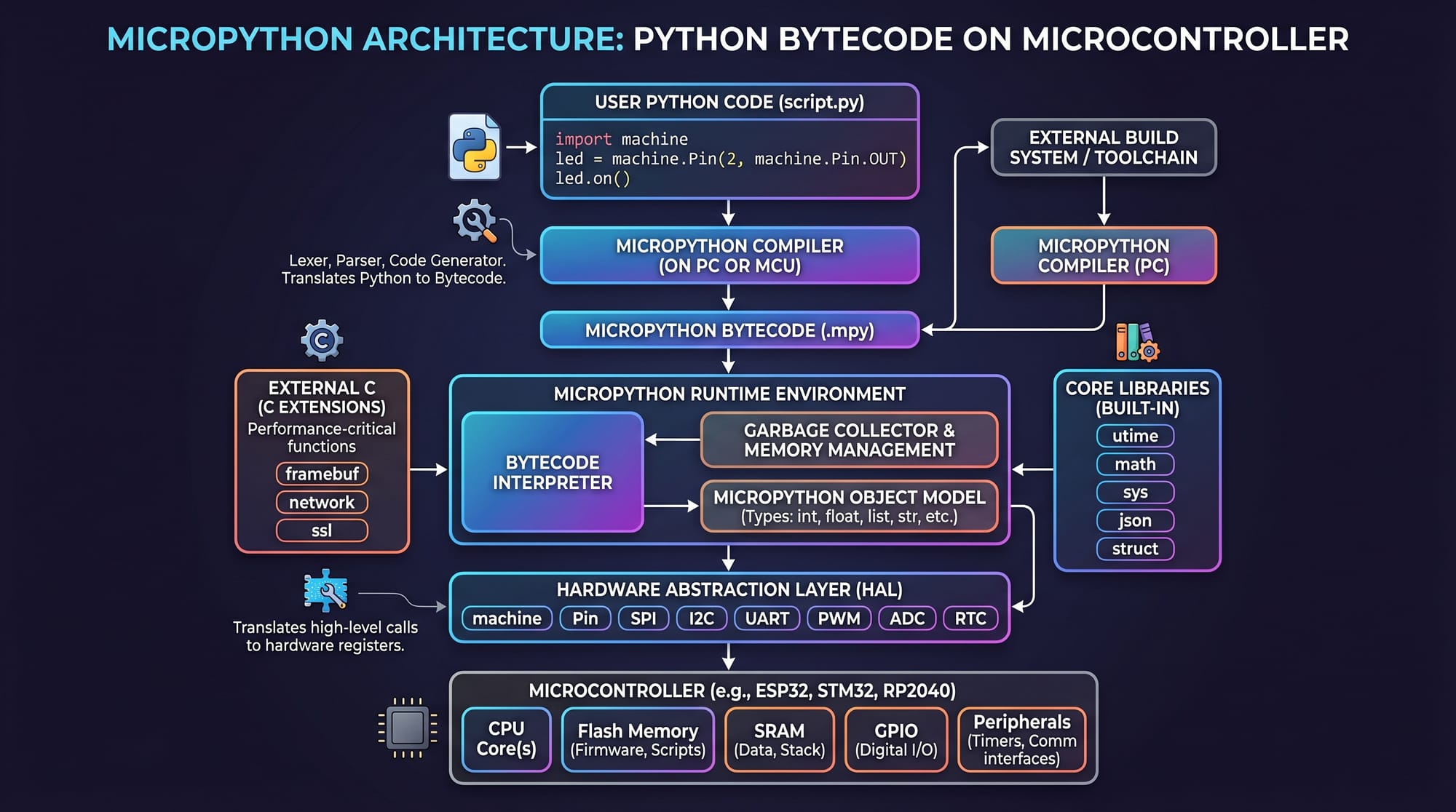
MicroPython is a trimmed-down version of Python that runs directly on microcontrollers. Unlike traditional Python that runs on laptops or servers, MicroPython runs on small chips like ESP32.
It provides modules like:
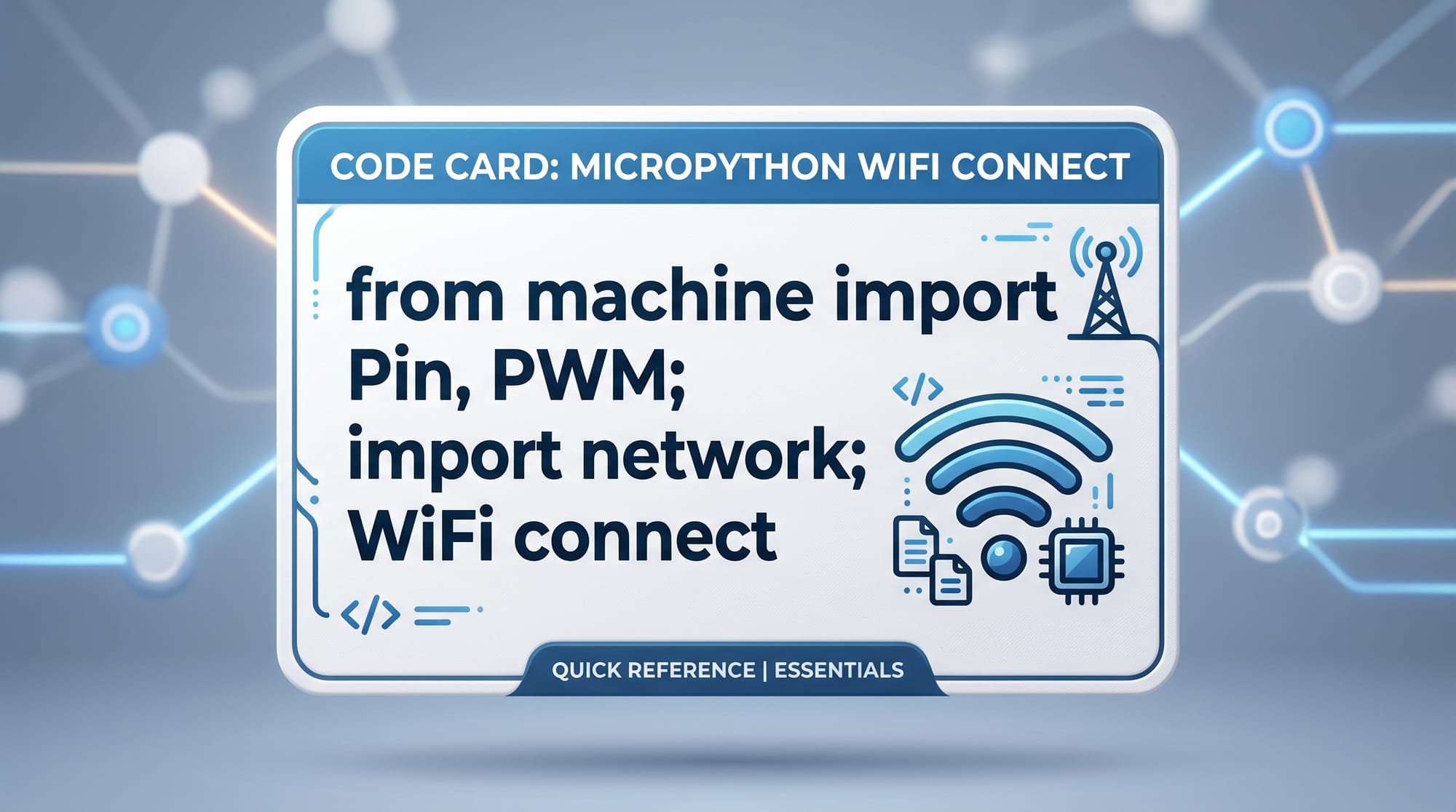
machine→ controls hardware pins, ADC, PWMtime→ delays and timing functionsnetwork→ WiFi and networking (especially on ESP32)
Example:
from machine import Pin
import time
Explanation:
from machine import Pin→ imports Pin class to control GPIO pinsimport time→ imports time module for delays
What is ESP32 and Why MicroPython ESP32?
The ESP32 is a powerful, low-cost microcontroller with built-in WiFi and Bluetooth. It is widely used in Pakistan for IoT projects due to its affordability and features.
When we say micropython esp32, it means running MicroPython firmware on the ESP32 board.
Key features:
- WiFi + Bluetooth built-in
- Multiple GPIO pins
- Supports sensors and actuators
- Ideal for smart IoT systems
Explanation:
machine.Pin→ controls digital input/outputPWM→ controls brightness or motor speednetwork→ handles WiFi connection
Practical Code Examples
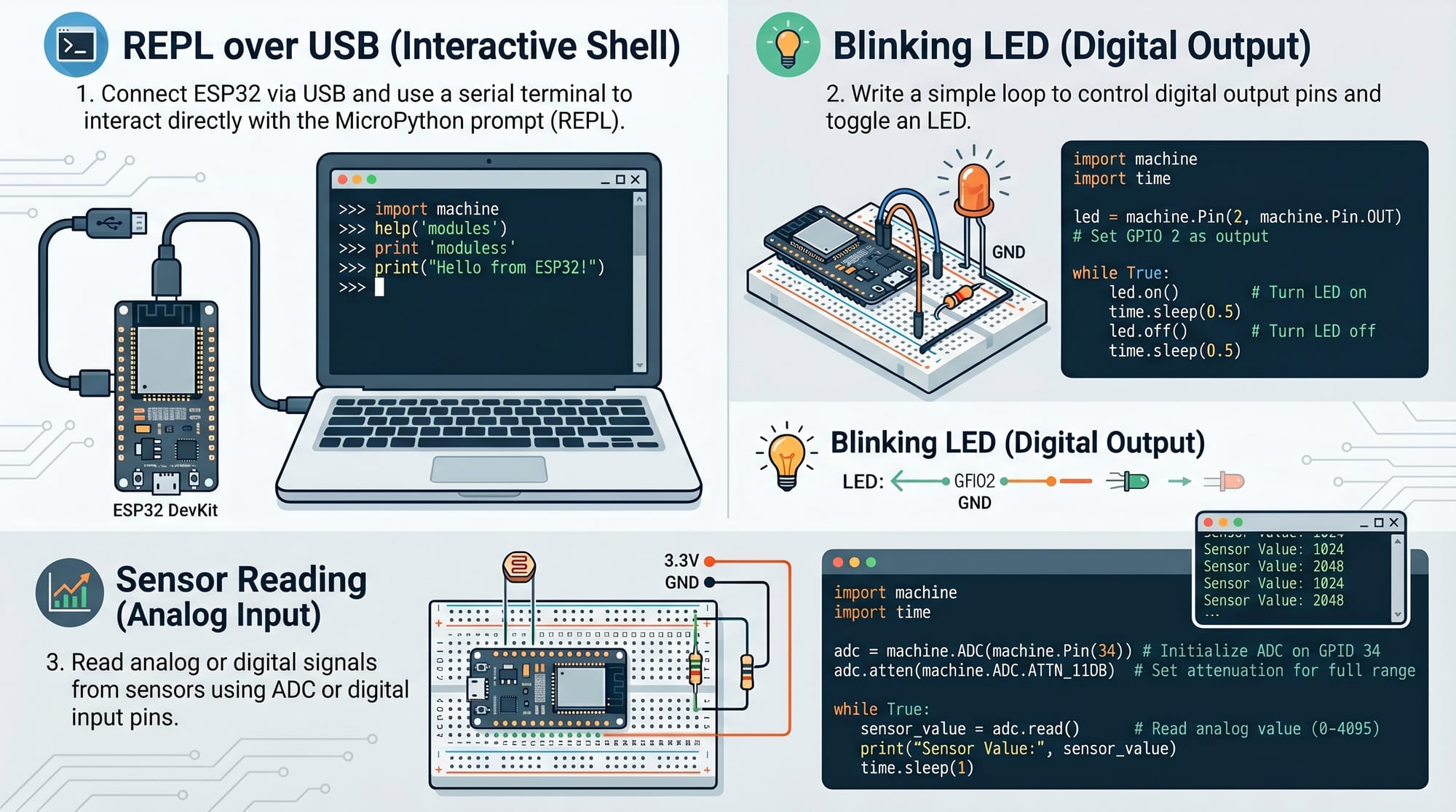
Example 1: Blinking LED (Hello World of Microcontrollers)
This is the first project every beginner should do.
from machine import Pin
import time

led = Pin(2, Pin.OUT)

while True:
    led.value(1)
    time.sleep(1)
    led.value(0)
    time.sleep(1)
Line-by-line explanation:
from machine import Pin→ imports GPIO control moduleimport time→ enables delaysled = Pin(2, Pin.OUT)→ sets GPIO pin 2 as output (built-in LED on ESP32)while True:→ creates infinite loopled.value(1)→ turns LED ONtime.sleep(1)→ waits 1 secondled.value(0)→ turns LED OFFtime.sleep(1)→ waits again
This simple project teaches how microcontrollers control hardware signals.
Example 2: Real-World Application – Smart Temperature Alert System
Imagine a system for a school lab in Islamabad that alerts when temperature is too high.
from machine import Pin, ADC
import time

sensor = ADC(Pin(34))

while True:
    value = sensor.read()
    voltage = value * 3.3 / 4095

    print("Temperature Sensor Value:", voltage)

    if voltage > 2.0:
        print("Alert! High Temperature in Lab!")

    time.sleep(2)
Line-by-line explanation:
ADC(Pin(34))→ reads analog sensor inputsensor.read()→ gets raw sensor valuevoltage = value * 3.3 / 4095→ converts reading into voltageprint()→ shows values on consoleif voltage > 2.0:→ checks threshold conditiontime.sleep(2)→ delays reading by 2 seconds
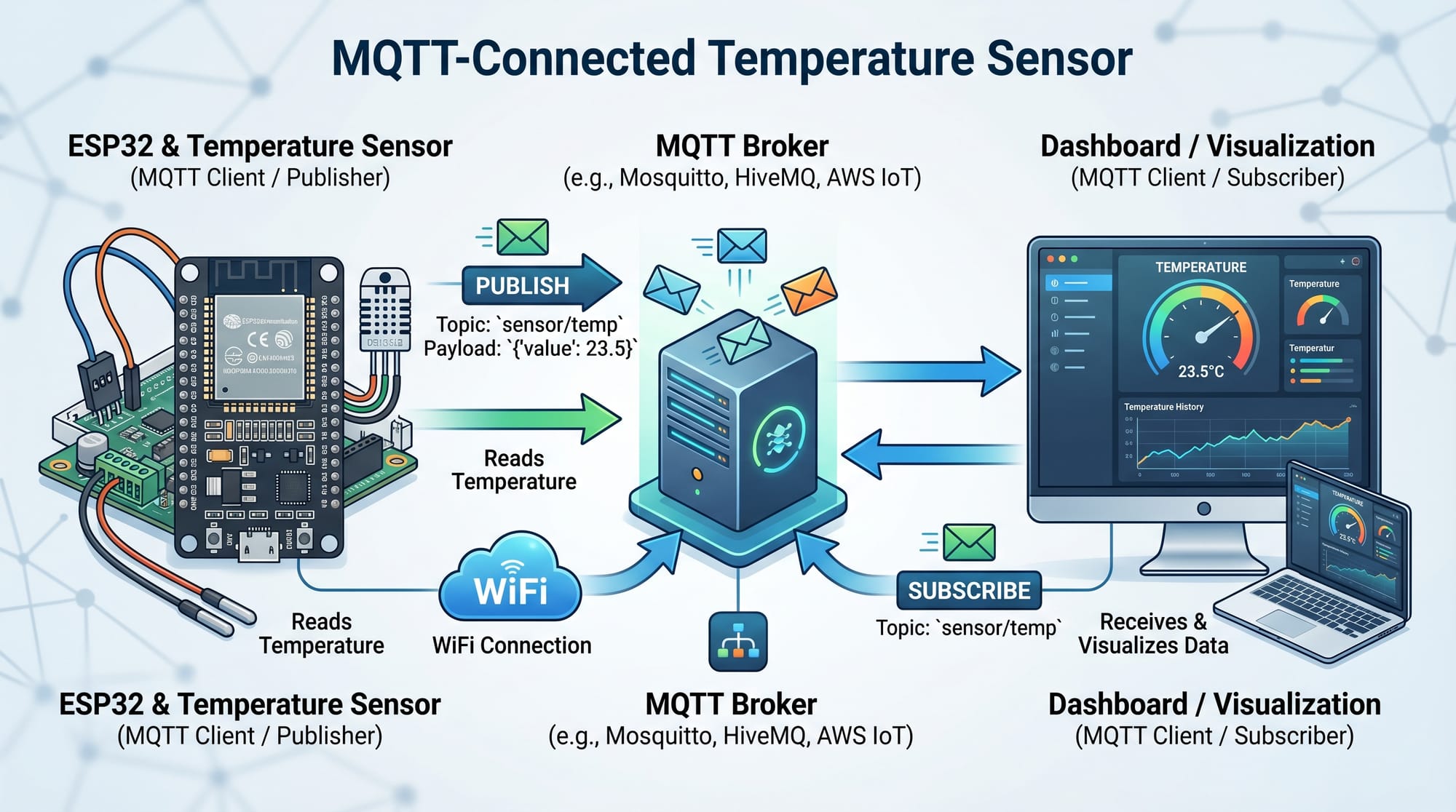
This system can be used in:
- School science labs
- Server rooms
- Greenhouses in rural Pakistan
Common Mistakes & How to Avoid Them
Mistake 1: Wrong GPIO Pin Selection
Many beginners try using incorrect GPIO pins for input/output, causing code not to work.
Fix:
- Always check ESP32 pin diagram before connecting hardware
- Avoid input-only pins for output tasks
Example fix:
Instead of using invalid pin:
led = Pin(1, Pin.OUT)
Use correct GPIO:
led = Pin(2, Pin.OUT)
Mistake 2: Forgetting to Flash MicroPython Firmware
A very common issue is uploading code to ESP32 without installing MicroPython firmware.
Fix:
- First flash MicroPython using tools like
esptool.py - Then use Thonny IDE or uPyCraft to upload scripts
Explanation:
Without firmware, ESP32 cannot interpret Python code.
Practice Exercises
Exercise 1: Button Controlled LED
Problem:
Turn ON LED when a button is pressed.
Solution:
from machine import Pin
import time

button = Pin(12, Pin.IN)
led = Pin(2, Pin.OUT)

while True:
    if button.value() == 1:
        led.value(1)
    else:
        led.value(0)
    time.sleep(0.1)
Explanation:
- Reads button input
- Turns LED ON/OFF based on input state
Exercise 2: Simple WiFi Connection
Problem:
Connect ESP32 to WiFi network.
Solution:
import network
import time

wifi = network.WLAN(network.STA_IF)
wifi.active(True)

wifi.connect("MyWiFi", "12345678")

while not wifi.isconnected():
    print("Connecting...")
    time.sleep(1)

print("Connected!", wifi.ifconfig())
Explanation:
- Activates WiFi interface
- Connects to network
- Waits until connection is successful
- Displays IP configuration
Frequently Asked Questions
What is MicroPython used for?
MicroPython is used to program microcontrollers like ESP32 and ESP8266. It is widely used in IoT projects such as smart homes, sensors, and automation systems.
Is MicroPython better than Arduino?
MicroPython is easier for beginners because it uses Python syntax. Arduino (C/C++) is faster for advanced real-time systems, but MicroPython is faster for learning and prototyping.
Can I use MicroPython on ESP32 in Pakistan easily?
Yes, ESP32 boards are easily available in Pakistan in cities like Lahore, Karachi, and Islamabad at affordable prices. You only need a USB cable and a laptop.
Do I need internet for MicroPython?
No, internet is not required for basic programming. However, IoT projects like WiFi sensors will require internet connectivity.
What is the best IDE for MicroPython?
Popular IDEs include:
- Thonny (recommended for beginners)
- uPyCraft
- VS Code with PyMakr extension
Summary & Key Takeaways
- MicroPython allows Python programming on microcontrollers
- ESP32 is the most popular board for MicroPython projects
- It simplifies IoT development for beginners
- You can control hardware like LEDs, sensors, and motors easily
- Real-world applications include smart homes, agriculture, and automation
- It is an excellent starting point for Pakistani students entering IoT
Next Steps & Related Tutorials
Now that you understand the basics of MicroPython, you should continue building your skills with practical IoT projects.
Recommended tutorials on theiqra.edu.pk:
- Learn more with our Python Tutorial for beginners
- Explore IoT Tutorial to understand smart devices and connectivity
- Study ESP32 Projects Guide for advanced applications
- Try Sensor Programming in Python Microcontrollers
Start building small projects today and gradually move toward advanced IoT systems.
Test Your Python Knowledge!
Finished reading? Take a quick quiz to see how much you've learned from this tutorial.