Python Virtual Environments venv pip & Poetry Guide
Introduction
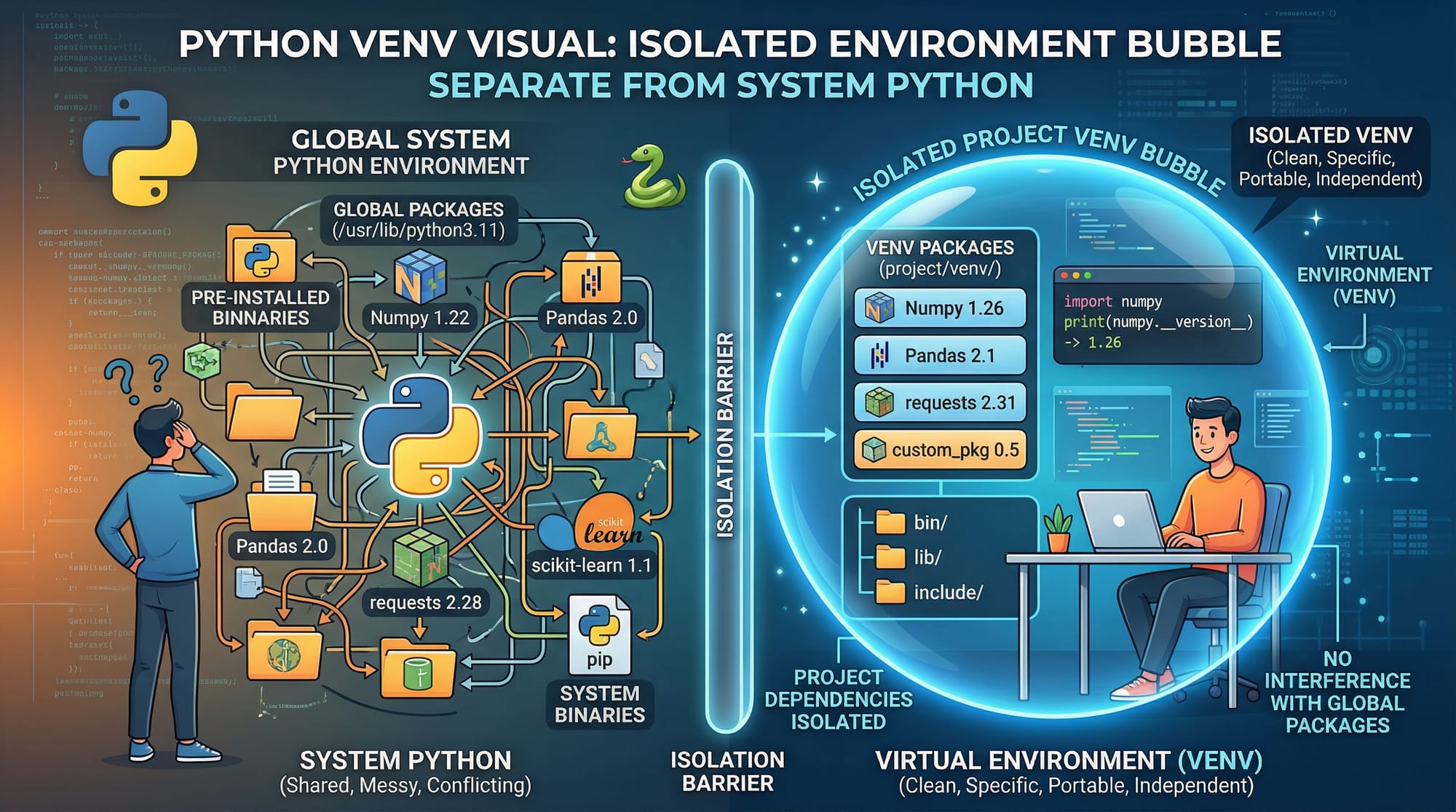
Python virtual environments are isolated spaces where you can install and manage project-specific dependencies without affecting your system-wide Python installation. In this Python Virtual Environments: venv, pip & Poetry Guide, you’ll learn how to use tools like python venv, pip, and Poetry to keep your projects clean, organized, and professional.
For Pakistani students in cities like Lahore, Karachi, and Islamabad, learning virtual environments is essential—especially if you're building multiple projects (e.g., a university assignment and a freelance project for a client paying in PKR). Without isolation, library conflicts can break your work.
Imagine Ahmad is working on two projects:
- Project A requires Django 3
- Project B requires Django 4
Without virtual environments, this creates conflicts. Virtual environments solve this problem.
Prerequisites
Before starting, you should have:
- Basic understanding of Python (variables, functions)
- Python installed (Python 3.8+ recommended)
- Basic command line knowledge (Terminal or Command Prompt)
- Familiarity with installing packages using pip (helpful but not required)
Core Concepts & Explanation
What is a Python Virtual Environment?
A virtual environment is a self-contained directory that contains a Python installation and its own set of libraries.
👉 Key idea:
- Each project gets its own dependencies
- No conflicts between projects
Example:
- Ahmad creates
project1_env→ installs Flask - Fatima creates
project2_env→ installs Django
Both projects work independently.
Understanding pip (Python Package Manager)
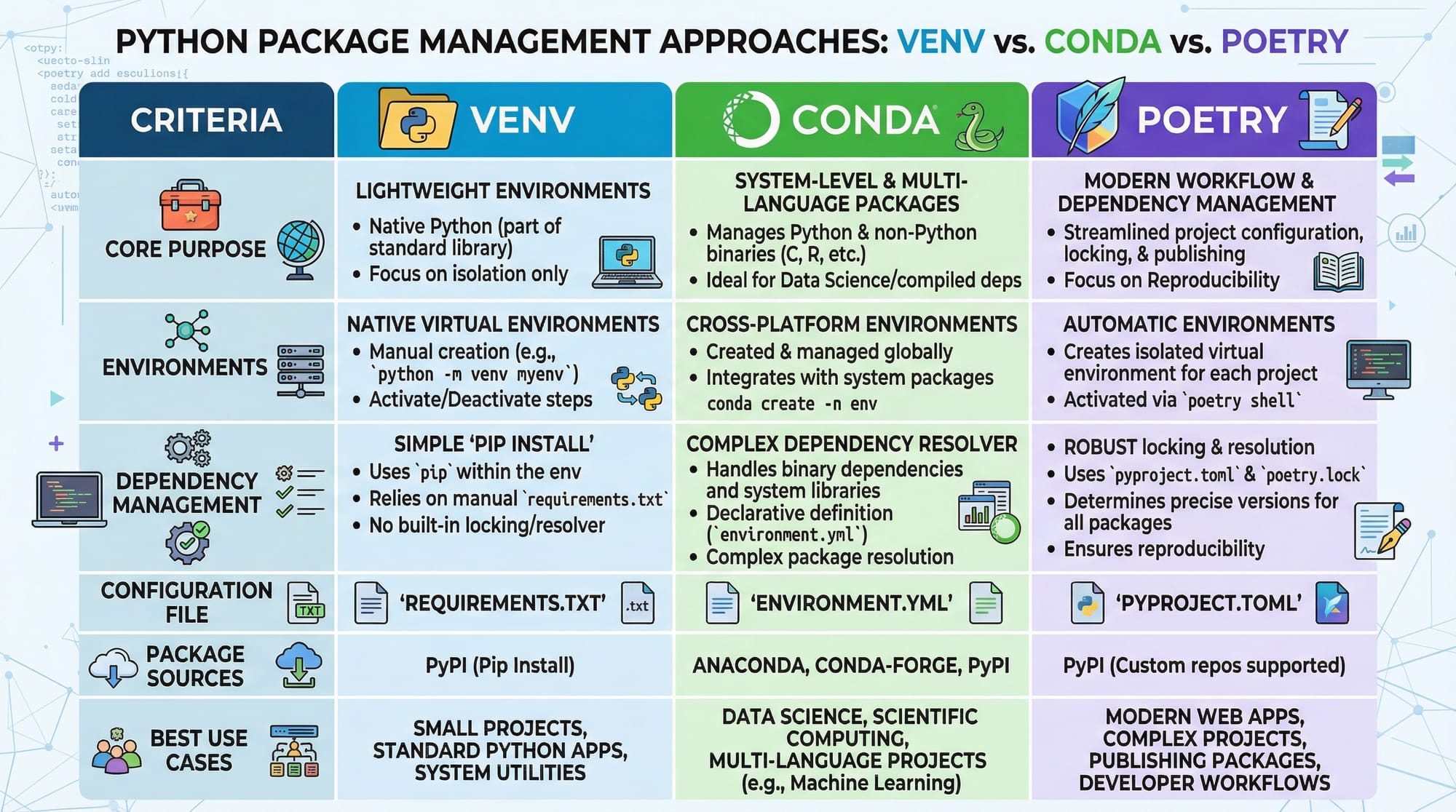
pip is the default package manager for Python. It allows you to install libraries like:
pip install requests
👉 Key Features:
- Install packages from PyPI
- Manage dependencies
- Create
requirements.txtfiles
Example:
pip freeze > requirements.txt
This saves all installed packages.
What is Poetry in Python?
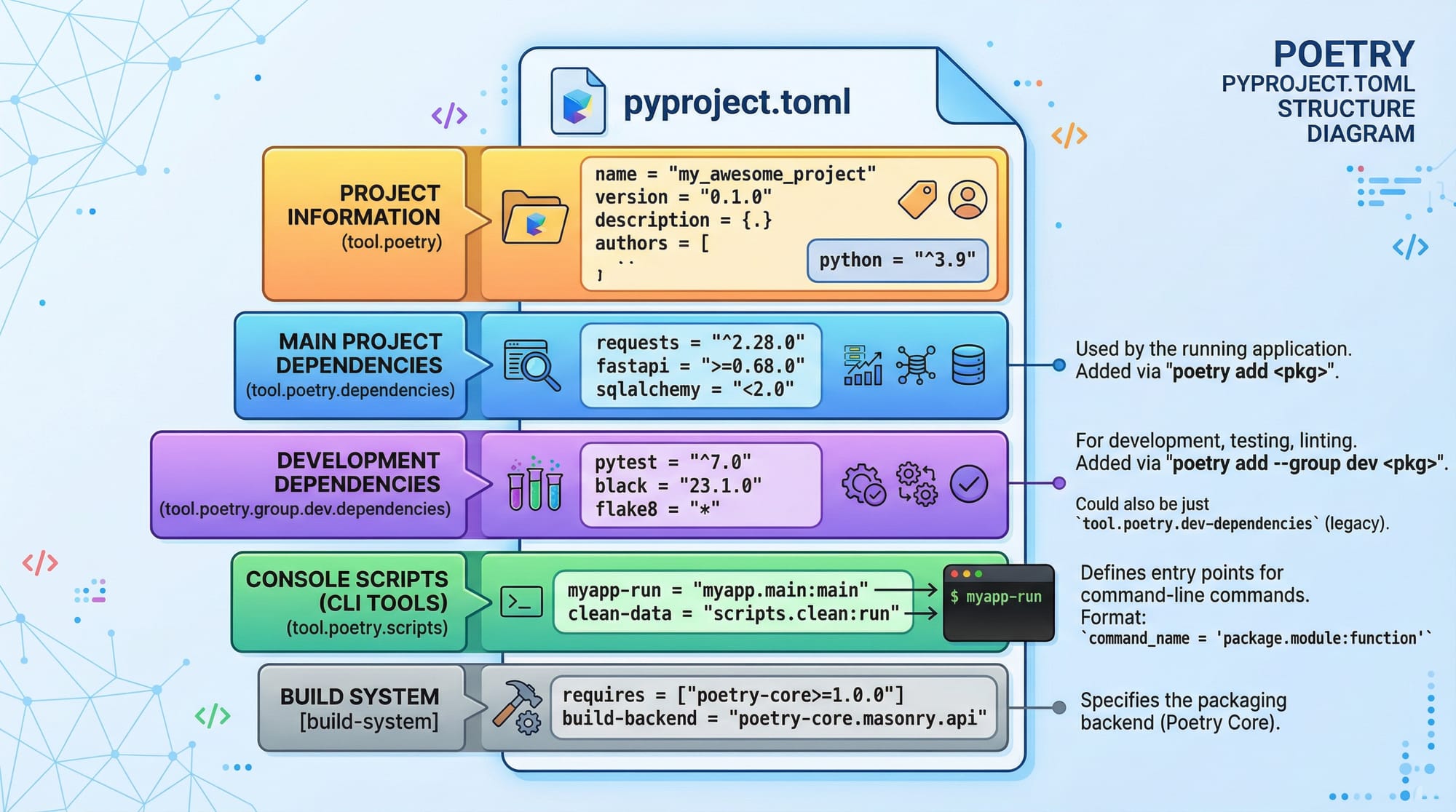
Poetry is a modern dependency and project management tool.
👉 Why Poetry?
- Automatically manages dependencies
- Uses
pyproject.tomlinstead ofrequirements.txt - Handles virtual environments automatically
Example:
poetry add requests
Poetry is especially useful for professional and large-scale projects.
Practical Code Examples
Example 1: Creating and Using a Virtual Environment
Step 1: Create a Virtual Environment
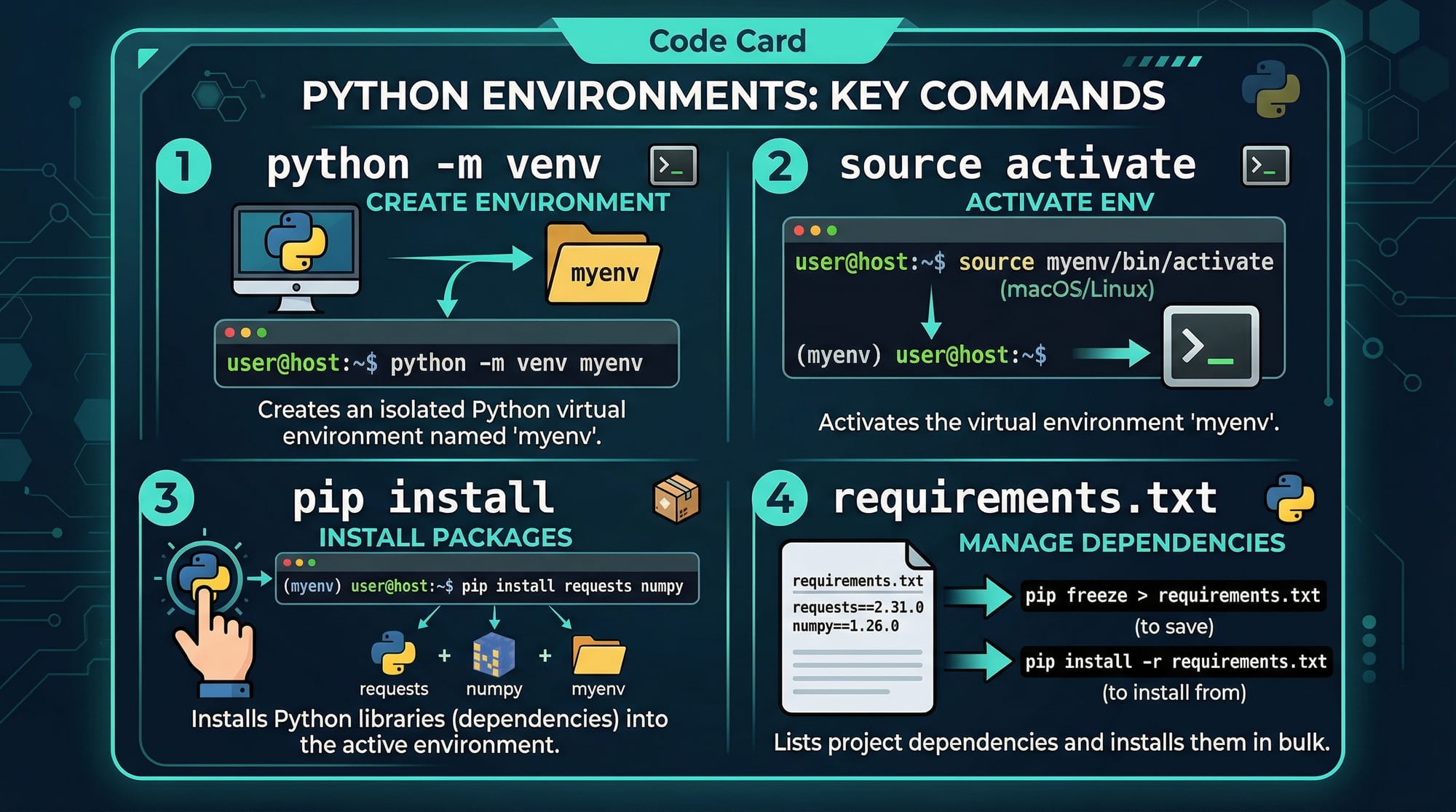
python -m venv myenv
Explanation:
python→ calls Python interpreter-m venv→ runs the venv modulemyenv→ name of the environment folder
Step 2: Activate the Environment
Windows:
myenv\Scripts\activate
Linux/Mac:
source myenv/bin/activate
Explanation:
- Activates isolated environment
- Your terminal will show
(myenv)
Step 3: Install a Package
pip install requests
Explanation:
- Installs
requestsinside the virtual environment only
Step 4: Save Dependencies
pip freeze > requirements.txt
Explanation:
pip freeze→ lists installed packages>→ redirects outputrequirements.txt→ file storing dependencies
Step 5: Deactivate Environment
deactivate
Explanation:
- Returns to system Python
Example 2: Real-World Application
Ahmad is building a student fee management system for a college in Lahore.
Step 1: Setup Project
python -m venv fee_env
Explanation:
- Creates environment for this project only
Step 2: Activate
fee_env\Scripts\activate
Step 3: Install Django
pip install django
Explanation:
- Installs Django framework locally
Step 4: Start Project
django-admin startproject fee_project
Explanation:
- Creates Django project structure
Step 5: Save Requirements
pip freeze > requirements.txt
Step 6: Share Project
Fatima downloads the project and runs:
pip install -r requirements.txt
Explanation:
- Installs exact same dependencies
- Ensures project runs correctly
Common Mistakes & How to Avoid Them
Mistake 1: Installing Packages Globally
❌ Problem:
pip install flask
This installs packages globally and may break other projects.
✅ Solution:
Always activate a virtual environment first:
source myenv/bin/activate
pip install flask
Mistake 2: Forgetting to Save Requirements
❌ Problem:
You install packages but don’t create requirements.txt.
✅ Solution:
pip freeze > requirements.txt
This ensures others can replicate your environment.
Mistake 3: Not Activating Environment
❌ Problem:
Running code without activating environment.
✅ Fix:
Check if (env_name) appears in terminal.
Mistake 4: Ignoring Poetry Benefits
Many beginners avoid Poetry.
✅ Fix:
Use Poetry for:
- Cleaner dependency management
- Automatic virtual environments
Practice Exercises
Exercise 1: Create Your First Virtual Environment
Problem:
Create a virtual environment named test_env, install numpy, and save dependencies.
Solution:
python -m venv test_env
- Creates environment
test_env\Scripts\activate
- Activates environment
pip install numpy
- Installs numpy
pip freeze > requirements.txt
- Saves dependencies
Exercise 2: Use Poetry for a Project
Problem:
Create a project using Poetry and install requests.
Solution:
poetry new my_project
- Creates new project
cd my_project
- Enters project folder
poetry add requests
- Adds dependency
poetry run python
- Runs Python inside environment
Frequently Asked Questions
What is a Python virtual environment?
A Python virtual environment is an isolated space where you can install project-specific libraries. It prevents conflicts between different projects.
How do I create a virtual environment?
Use the command python -m venv env_name. This creates a folder containing a separate Python setup.
What is the difference between pip and Poetry?
pip installs packages manually, while Poetry manages dependencies, versions, and environments automatically using pyproject.toml.
Do I need virtual environments for small projects?
Yes. Even small projects can face dependency issues later. Virtual environments are a best practice from the beginning.
Can I use virtual environments on Windows?
Yes. You can activate them using env\Scripts\activate in Command Prompt or PowerShell.
Summary & Key Takeaways
- Virtual environments isolate project dependencies
venvis built-in and easy to usepiphelps install and manage packages- Poetry is a modern, advanced tool for dependency management
- Always save dependencies using
requirements.txtorpyproject.toml - Essential skill for freelancing and professional development in Pakistan
Next Steps & Related Tutorials
To continue your Python journey, explore these tutorials on theiqra.edu.pk:
- Learn the basics in our Python Tutorial for Beginners
- Understand package distribution in Python Packaging Guide
- Build web apps with Django Web Development Tutorial
- Explore APIs using Python Requests Library Guide
These will help you move from beginner to job-ready developer in Pakistan’s growing tech industry 🚀
Test Your Python Knowledge!
Finished reading? Take a quick quiz to see how much you've learned from this tutorial.