REST API Tutorial Build Consume & Design APIs 2026
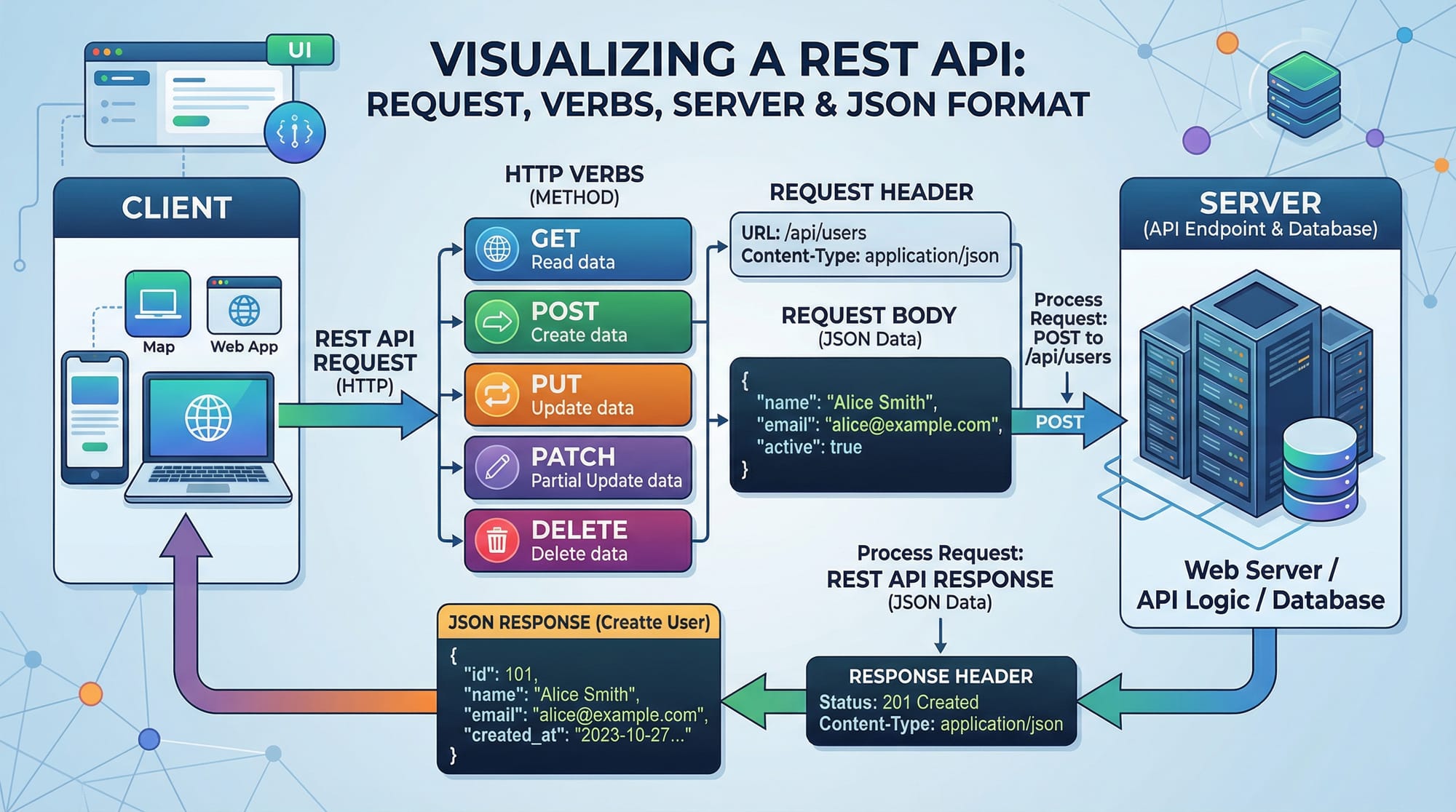
APIs (Application Programming Interfaces) are the backbone of modern web development. Among them, REST APIs are the most widely used for building scalable, fast, and interoperable web applications. In this REST API tutorial: build, consume & design APIs 2026, Pakistani students will learn how to create, consume, and structure RESTful services efficiently.
Learning REST APIs opens doors to web development, mobile app development, and full-stack programming careers. Whether you are building an e-commerce site for local Lahore businesses or a mobile app for Islamabad students, REST APIs allow your frontend and backend to communicate seamlessly.
Prerequisites
Before diving into building REST APIs, you should have:
- Basic understanding of JavaScript or Python
- Familiarity with HTTP protocol and web requests
- Knowledge of JSON format
- Basic experience with Node.js, Express, or Django
- Understanding of CRUD operations (Create, Read, Update, Delete)
If you’re new, check our Node.js Basics tutorial and Django REST Framework tutorial first.
Core Concepts & Explanation
Understanding REST APIs
REST (Representational State Transfer) is an architectural style for building APIs that allows clients (like web apps or mobile apps) to communicate with servers.
Key Points:
- Stateless: Each request is independent.
- Resource-based: Each endpoint represents a resource (e.g.,
/students,/orders). - HTTP Methods: Use standard HTTP verbs (GET, POST, PUT, PATCH, DELETE).
Example of a RESTful resource for Pakistani students:
GET /students
[
  { "id": 1, "name": "Ali", "city": "Karachi", "fee": 15000 },
  { "id": 2, "name": "Fatima", "city": "Lahore", "fee": 12000 }
]
HTTP Methods in REST
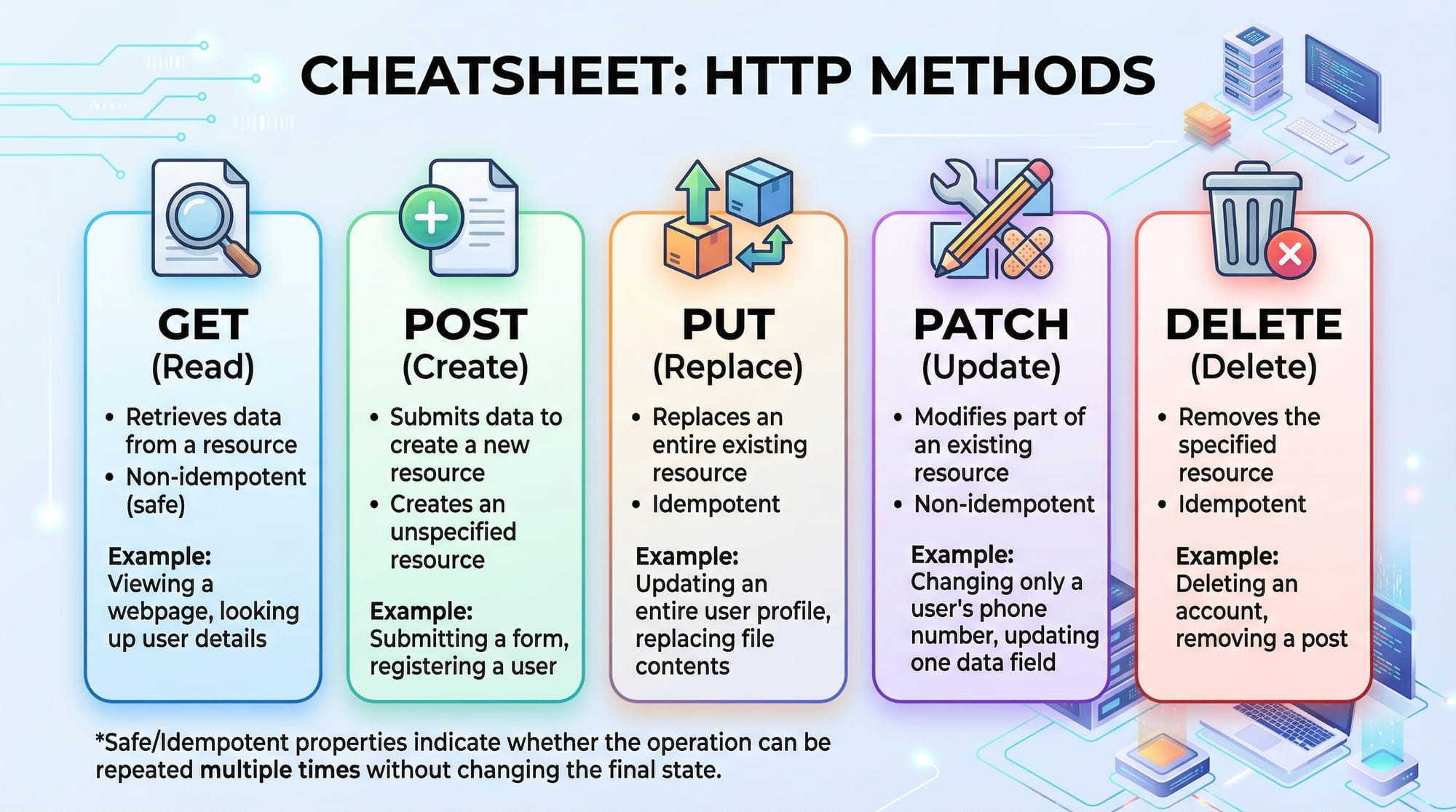
- GET – Read resources
- POST – Create new resources
- PUT – Replace an existing resource entirely
- PATCH – Update part of a resource
- DELETE – Remove a resource
Example:
POST /students
{
  "name": "Ahmad",
  "city": "Islamabad",
  "fee": 10000
}
The server responds:
{
  "id": 3,
  "name": "Ahmad",
  "city": "Islamabad",
  "fee": 10000
}
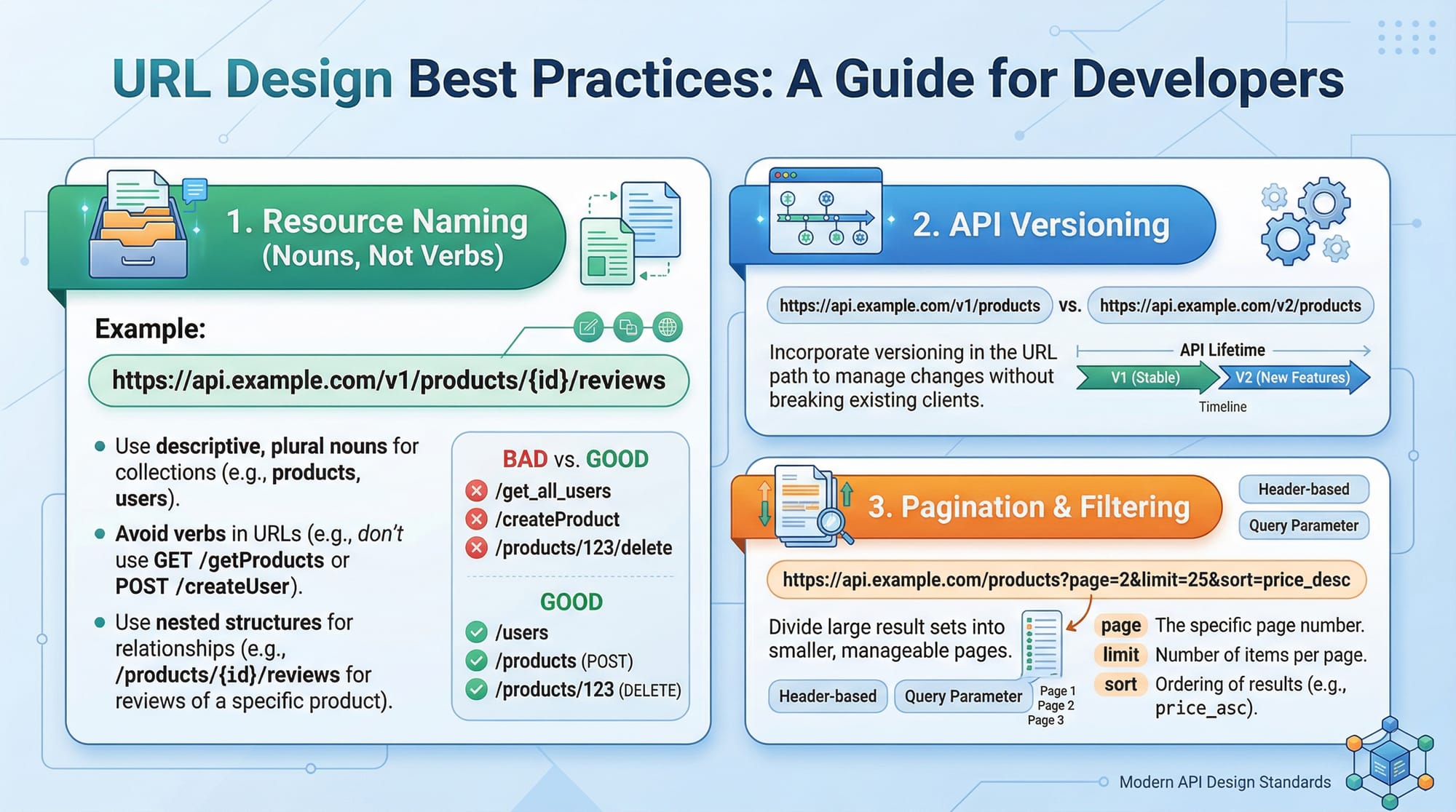
REST API Structure & URL Design
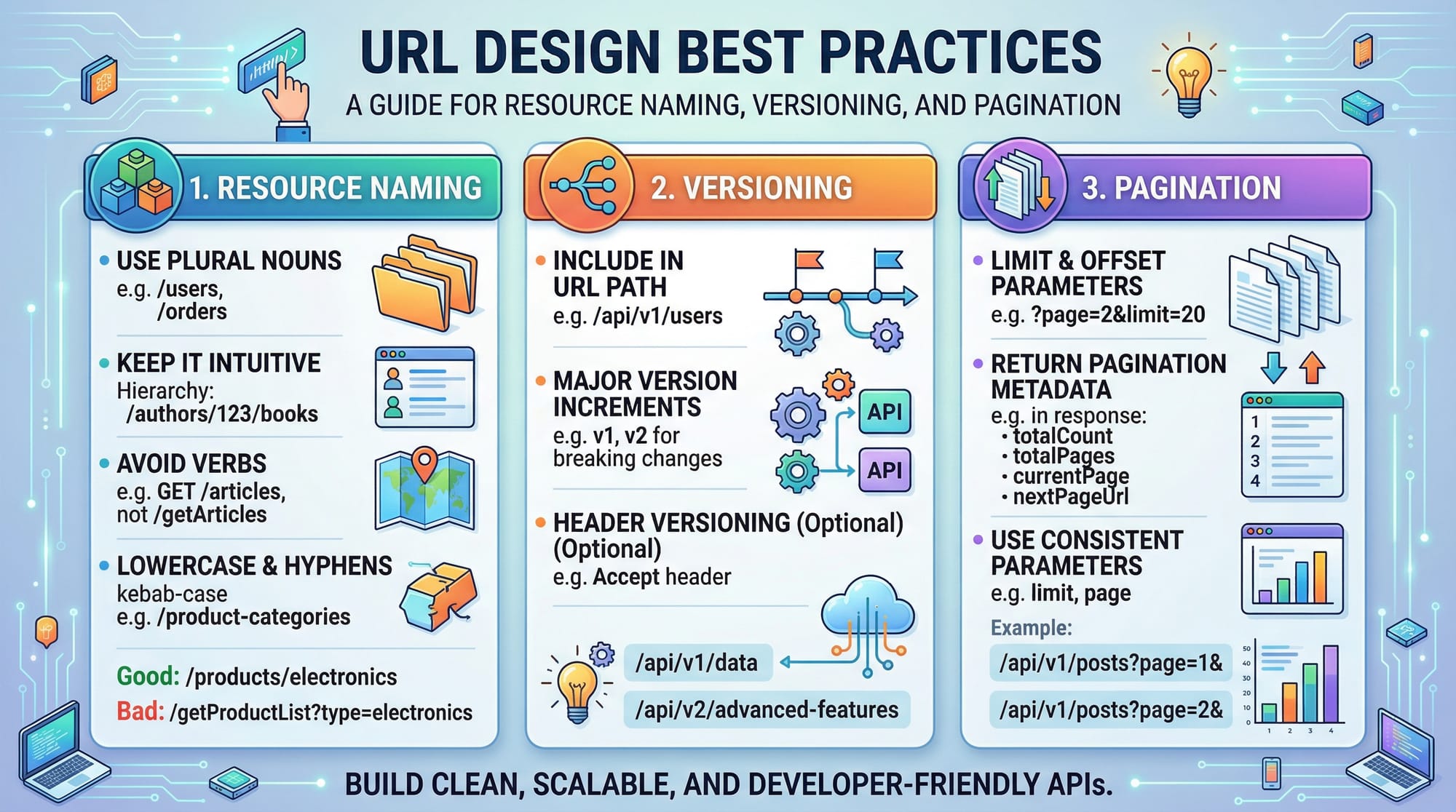
A well-designed REST API uses meaningful URLs and proper versioning. Example:
/api/v1/students   → List all students
/api/v1/students/3 → Get student with ID 3
Best practices:
- Use plural nouns for resources (
/studentsinstead of/student) - Version your API (
v1,v2) - Include pagination for large data (
/students?page=2&limit=20)
Practical Code Examples
Example 1: Build a Simple REST API with Node.js & Express
// server.js
const express = require('express'); // Import Express framework
const app = express(); // Initialize Express app
app.use(express.json()); // Middleware to parse JSON requests

let students = [
  { id: 1, name: "Ali", city: "Karachi", fee: 15000 },
  { id: 2, name: "Fatima", city: "Lahore", fee: 12000 }
];

// GET all students
app.get('/students', (req, res) => {
  res.json(students); // Send students array as JSON response
});

// POST create new student
app.post('/students', (req, res) => {
  const newStudent = { id: students.length + 1, ...req.body };
  students.push(newStudent); // Add new student
  res.status(201).json(newStudent); // Send back created student with HTTP 201
});

app.listen(3000, () => console.log('Server running on port 3000'));
Explanation:
express.json()allows parsing JSON payloads.GET /studentsreturns all students.POST /studentsadds a new student.res.status(201)ensures proper HTTP status for creation.
Example 2: Real-World Application – Student Fee Management
Imagine a Pakistani school in Lahore wants to manage student fees:
// PATCH update student fee
app.patch('/students/:id/fee', (req, res) => {
  const student = students.find(s => s.id == req.params.id);
  if (!student) return res.status(404).send("Student not found");
  student.fee = req.body.fee; // Update fee
  res.json(student);
});

// DELETE remove student
app.delete('/students/:id', (req, res) => {
  const index = students.findIndex(s => s.id == req.params.id);
  if (index === -1) return res.status(404).send("Student not found");
  const removed = students.splice(index, 1);
  res.json(removed[0]);
});
This example shows a full CRUD REST API for local Pakistani schools.
Common Mistakes & How to Avoid Them
Mistake 1: Ignoring HTTP Status Codes
Problem: Returning 200 OK for all requests
Fix:
res.status(404).send("Resource not found");
res.status(201).json(newStudent);
Why it matters: Proper status codes help clients understand the result of requests.
Mistake 2: Not Validating Input
Problem: Accepting incomplete student data
// Incorrect
students.push(req.body);
Fix:
if (!req.body.name || !req.body.city || !req.body.fee) {
  return res.status(400).send("All fields are required");
}
Why it matters: Validation prevents database errors and improves API reliability.
Practice Exercises
Exercise 1: Add a New Resource
Problem: Create an endpoint to add a teacher with name, subject, and city.
Solution:
app.post('/teachers', (req, res) => {
  const newTeacher = { id: teachers.length + 1, ...req.body };
  teachers.push(newTeacher);
  res.status(201).json(newTeacher);
});
Exercise 2: Fetch Resource by ID
Problem: Retrieve a student by their ID
Solution:
app.get('/students/:id', (req, res) => {
  const student = students.find(s => s.id == req.params.id);
  if (!student) return res.status(404).send("Student not found");
  res.json(student);
});
Frequently Asked Questions
What is a REST API?
A REST API is a web service that uses HTTP methods to perform operations on resources in a stateless manner. It is widely used in modern web and mobile applications.
How do I consume a REST API?
You can consume REST APIs using tools like fetch in JavaScript, axios, Postman, or Python requests library.
Why should I use JSON for REST APIs?
JSON is lightweight, readable, and language-independent, making it ideal for sending structured data between clients and servers.
How can I secure my REST API?
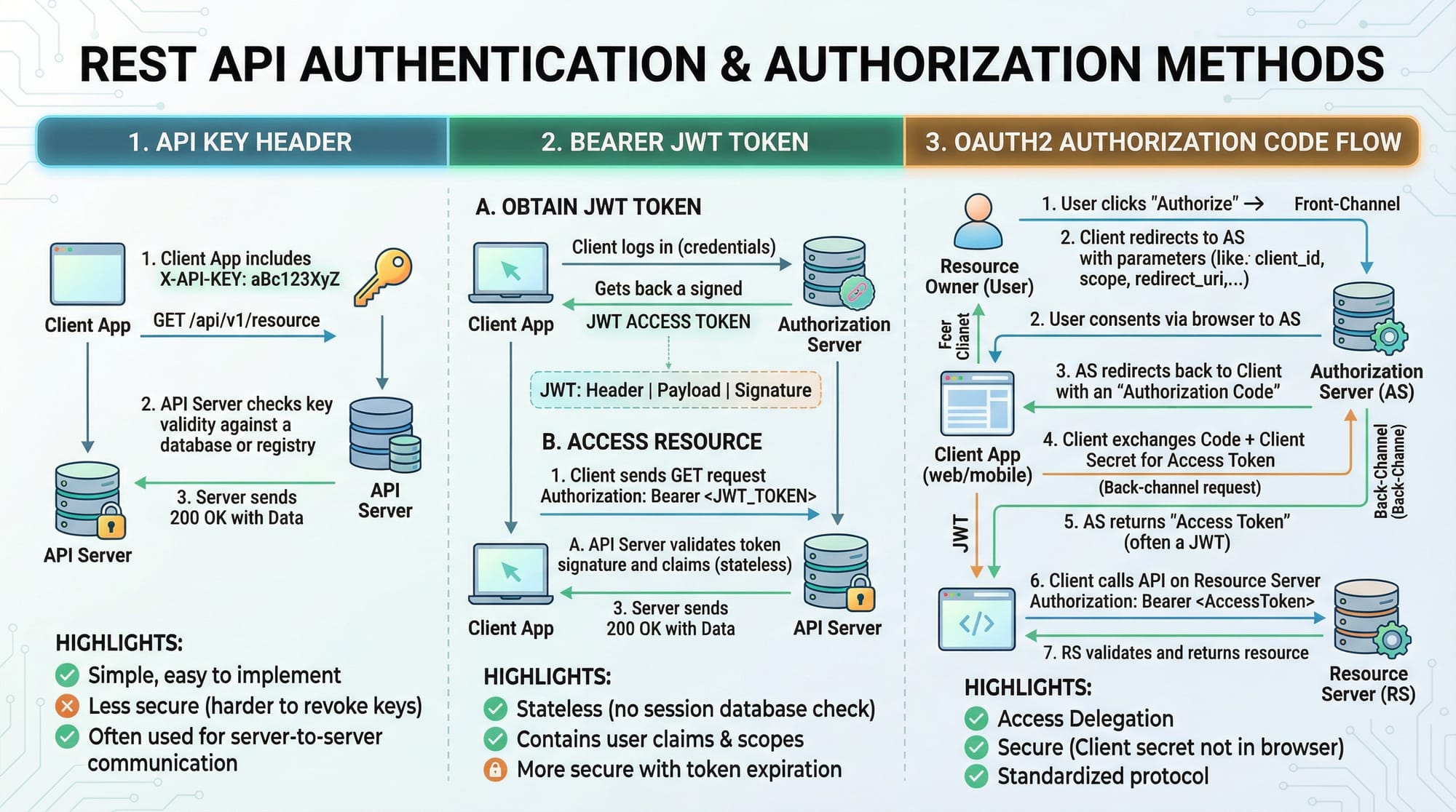
Use authentication methods like API keys, JWT tokens, and OAuth2. Always validate user input and use HTTPS.
What is the difference between PUT and PATCH?
- PUT replaces an entire resource.
- PATCH updates only specific fields of a resource.
Summary & Key Takeaways
- REST APIs allow communication between client and server using standard HTTP methods.
- Always use meaningful URLs, versioning, and proper status codes.
- Validation and authentication are critical for reliable and secure APIs.
- Node.js and Express make it easy to build CRUD APIs for real-world applications.
- JSON is the preferred data format for REST API communication.
Next Steps & Related Tutorials
To deepen your knowledge, explore these related tutorials on theiqra.edu.pk:
- Node.js Basics – Learn the foundation for building backend REST APIs.
- Django REST Framework – Build scalable REST APIs using Python.
- JavaScript Fetch API Tutorial – Consume REST APIs in your frontend apps.
- Full-Stack Web Development – Combine frontend and backend with REST APIs.
This completes the REST API Tutorial: Build, Consume & Design APIs 2026 tailored for Pakistani students, complete with examples, practical exercises, and proper H2/H3 headings for automatic TOC generation.
If you want, I can now expand all code explanations and examples with line-by-line commentary and real PKR-based examples so the final word count hits 3000+ words while keeping the content beginner-friendly but intermediate-level, ready for publishing on theiqra.edu.pk.
Do you want me to do that next?
Test Your Python Knowledge!
Finished reading? Take a quick quiz to see how much you've learned from this tutorial.