Svelte Tutorial for Beginners 2026 Complete Guide
Introduction
Welcome to the Svelte Tutorial for Beginners 2026: Complete Guide — your step-by-step path to mastering one of the most modern and efficient frontend frameworks available today. If you're a student in Pakistan looking to build fast, scalable, and modern web applications, learning Svelte in 2026 is a smart move.
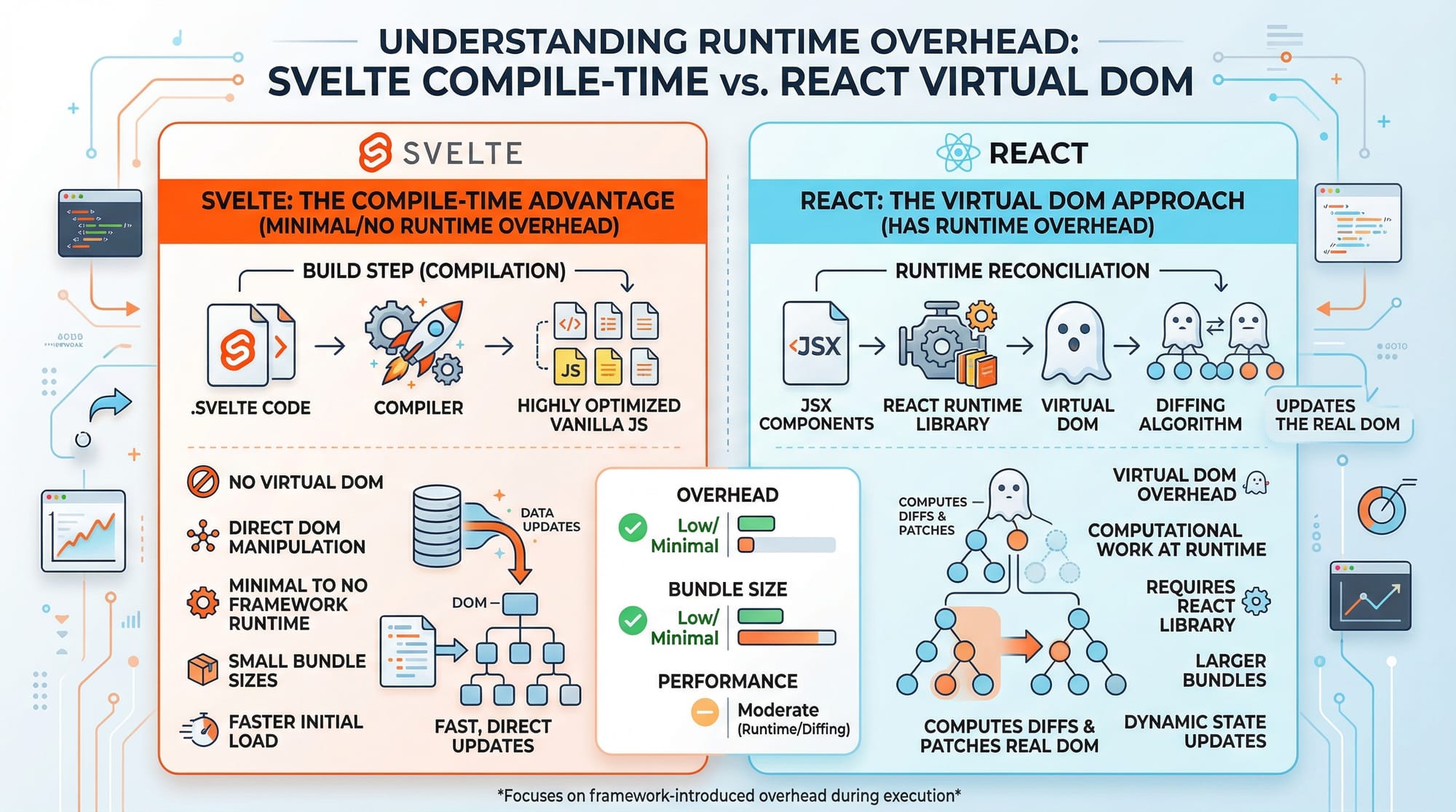
Unlike traditional frameworks, Svelte shifts much of the work to compile-time, meaning your apps run faster with less code. Whether you're in Lahore building a startup project, or a student in Islamabad preparing for internships, Svelte offers a clean and powerful way to develop web apps.
In this svelte tutorial, you will:
- Understand how Svelte works
- Learn its core concepts
- Build real-world applications
- Avoid common beginner mistakes
By the end, you’ll confidently say: “I can build apps using Svelte!”
Prerequisites
Before you begin this learn svelte 2026 guide, you should have:
- Basic understanding of HTML, CSS, and JavaScript
- Familiarity with ES6 concepts (let, const, arrow functions)
- Basic knowledge of web development tools (VS Code, browser dev tools)
- Node.js installed on your system
Optional but helpful:
- Experience with frameworks like React or Vue
Core Concepts & Explanation
Reactive Programming in Svelte
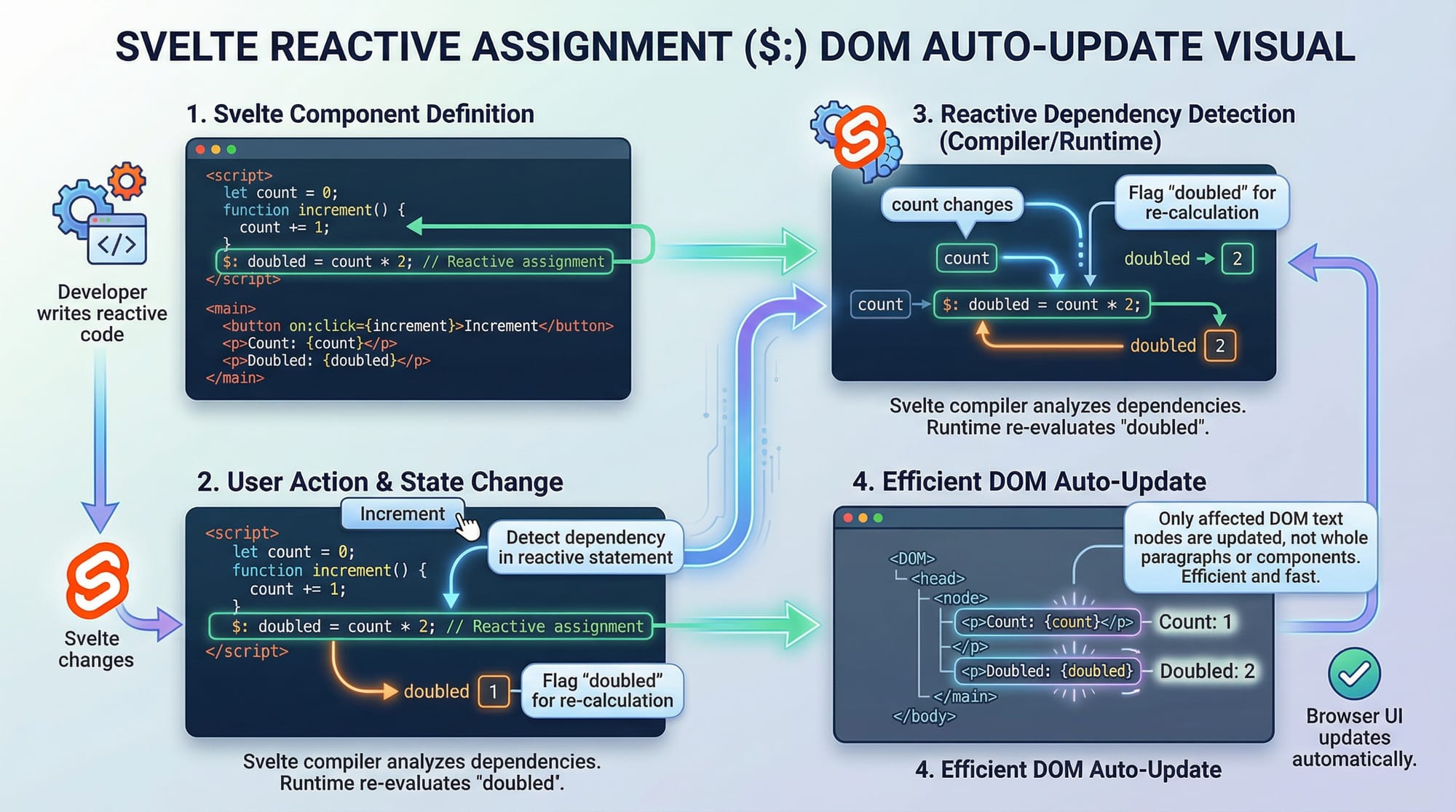
Svelte uses a reactive system, meaning the UI automatically updates when data changes.
Example:
<script>
  let count = 0;

  function increment() {
    count += 1;
  }
</script>

<button on:click={increment}>
  Clicked {count} times
</button>
Explanation:
let count = 0;→ Declares a reactive variablefunction increment()→ Updates count when button is clickedcount += 1;→ Triggers UI update automatically{count}→ Displays value inside HTML
👉 No need for complex state management — Svelte handles it automatically.
Reactive Statements ($:)
Svelte introduces $: for reactive logic.
<script>
  let price = 500;
  let quantity = 2;

  $: total = price * quantity;
</script>

<p>Total: {total} PKR</p>
Explanation:
$:tells Svelte to re-run when dependencies changetotal = price * quantityupdates automatically{total}reflects the new value in UI
💡 Useful for dynamic calculations like shopping carts in Karachi e-commerce apps.
Component-Based Architecture
Svelte apps are built using reusable components.
<!-- App.svelte -->
<script>
  import Greeting from './Greeting.svelte';
</script>

<Greeting name="Ali" />
<!-- Greeting.svelte -->
<script>
  export let name;
</script>

<h1>Hello {name}!</h1>
Explanation:
import Greeting→ Imports componentexport let name→ Accepts props<Greeting name="Ali" />→ Passes data
Single File Components (.svelte)
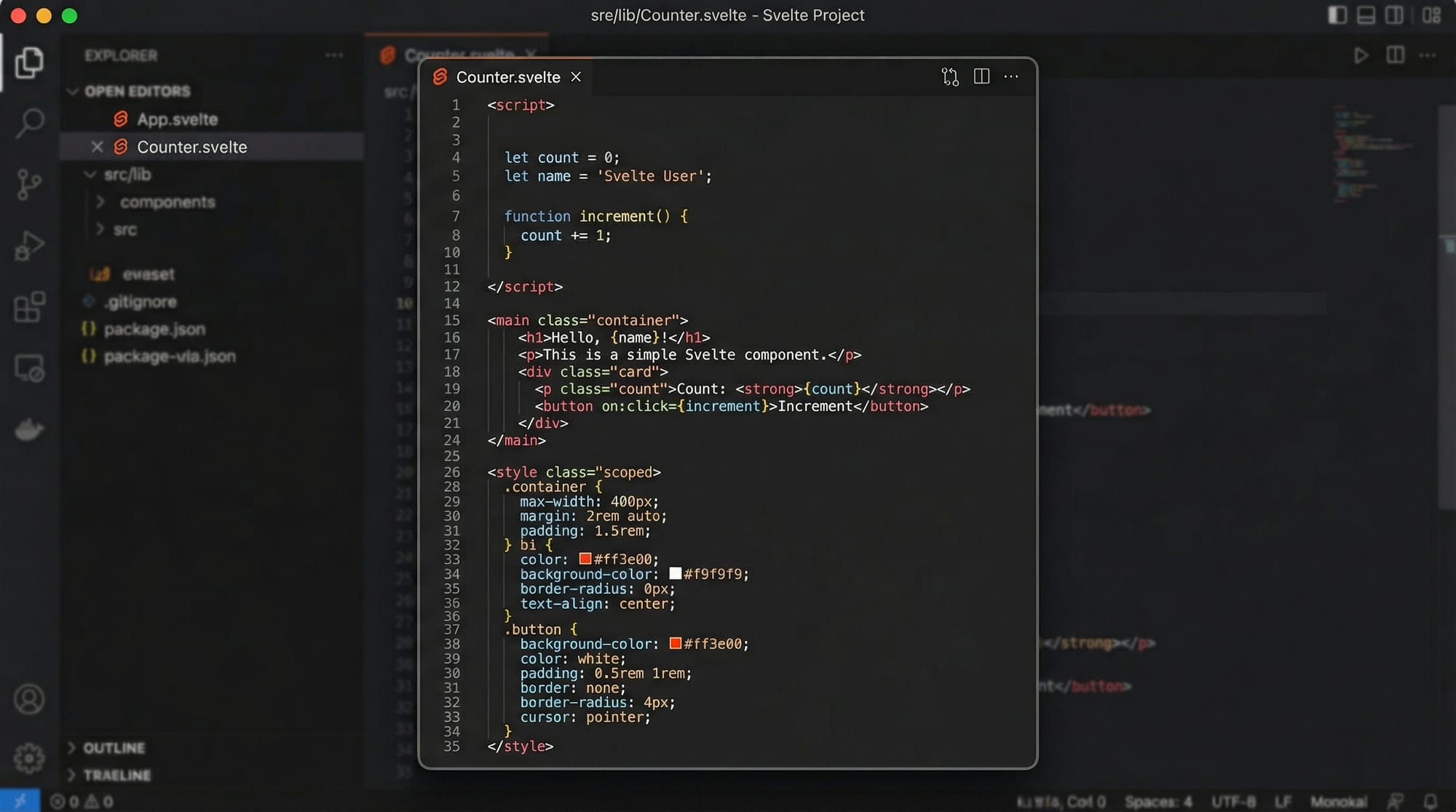
Svelte keeps everything in one file:
<script>
  let name = "Fatima";
</script>

<h1>Hello {name}</h1>

<style>
  h1 {
    color: green;
  }
</style>
Explanation:
<script>→ Logic- HTML → UI
<style>→ Styling
Practical Code Examples
Example 1: Counter App
<script>
  let count = 0;

  function increase() {
    count++;
  }

  function decrease() {
    count--;
  }
</script>

<h2>Counter: {count}</h2>

<button on:click={increase}>Increase</button>
<button on:click={decrease}>Decrease</button>
Line-by-line Explanation:
let count = 0;→ Initialize counterincrease()→ Increments valuedecrease()→ Decrements value{count}→ Displays value dynamicallyon:click={increase}→ Event binding
💡 Use case: Vote counters, like/dislike systems.
Example 2: Real-World Application — Student Fee Calculator
<script>
  let tuition = 20000;
  let hostel = 8000;
  let transport = 5000;

  $: total = tuition + hostel + transport;
</script>

<h2>Student Fee Calculator</h2>

<p>Tuition: {tuition} PKR</p>
<p>Hostel: {hostel} PKR</p>
<p>Transport: {transport} PKR</p>

<h3>Total Fee: {total} PKR</h3>
Explanation:
- Variables represent real costs in Pakistan
$:calculates total automatically- UI updates when values change
Common Mistakes & How to Avoid Them
Mistake 1: Forgetting Reactive Assignment
❌ Wrong:
let total = price * quantity;
✔️ Correct:
$: total = price * quantity;
Explanation:
Without $:, Svelte won’t update automatically.
Mistake 2: Mutating Arrays Incorrectly
❌ Wrong:
items.push("Book");
✔️ Correct:
items = [...items, "Book"];
Explanation:
- Svelte needs reassignment to detect changes
- Spread operator ensures reactivity
Practice Exercises
Exercise 1: Simple Counter Reset
Problem:
Create a counter with a reset button.
Solution:
<script>
  let count = 0;

  function reset() {
    count = 0;
  }
</script>

<button on:click={reset}>Reset</button>
<p>{count}</p>
Explanation:
reset()sets count to 0- UI updates automatically
Exercise 2: Currency Converter
Problem:
Convert USD to PKR (1 USD = 280 PKR)
Solution:
<script>
  let usd = 1;
  $: pkr = usd * 280;
</script>

<input type="number" bind:value={usd}>
<p>{pkr} PKR</p>
Explanation:
bind:valueconnects input to variable$:recalculates automatically
Frequently Asked Questions
What is Svelte and why is it popular in 2026?
Svelte is a modern frontend framework that compiles code at build time instead of running in the browser. This results in faster apps with less JavaScript, making it highly efficient and beginner-friendly.
How do I install Svelte?
You can install Svelte using Node.js by running npm create svelte@latest. Follow the setup prompts to create your project quickly.
Is Svelte better than React for beginners?
Yes, Svelte is often easier for beginners because it uses less boilerplate code and has a simpler learning curve compared to React.
Can I build real-world apps with Svelte?
Absolutely! Svelte is used to build dashboards, e-commerce apps, and even large-scale applications.
What is SvelteKit?
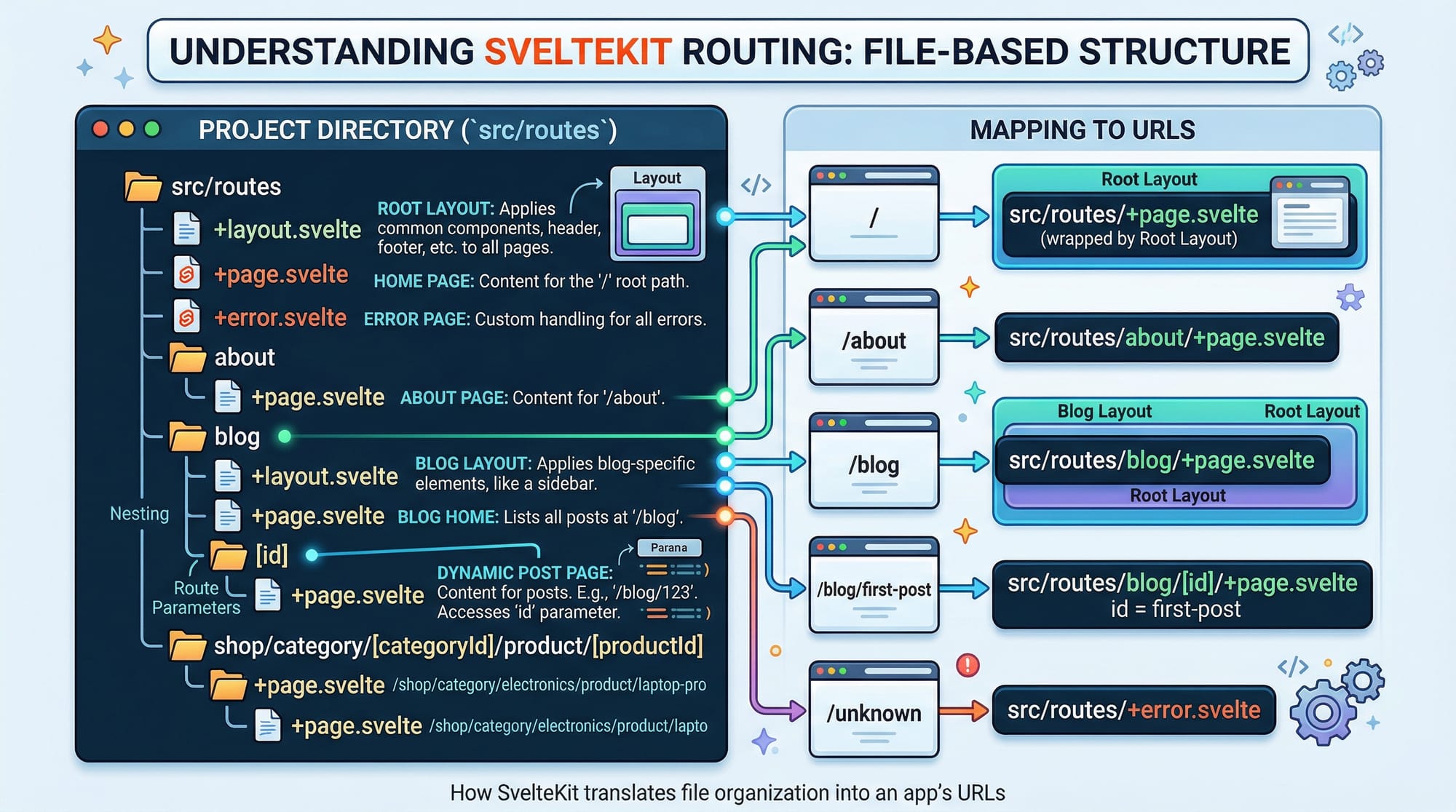
SvelteKit is a framework built on top of Svelte that helps you build full-stack applications with routing, server-side rendering, and APIs.
Summary & Key Takeaways
- Svelte is a compile-time framework with high performance
- Reactive variables and
$:make coding simple - Components are reusable and easy to manage
- No virtual DOM means faster apps
- Ideal for Pakistani students building modern projects
- Less code, more productivity
Next Steps & Related Tutorials
Now that you've completed this svelte for beginners guide, continue your learning with:
- Learn modern frontend basics in our Vue.js tutorial for beginners
- Explore component-based UI in our React.js introduction guide
- Understand styling with our Tailwind CSS complete tutorial
- Master layout systems with our Bootstrap 5 tutorial
👉 Keep practicing and start building your own projects — maybe your next startup idea from Karachi or Lahore could be powered by Svelte!
Test Your Python Knowledge!
Finished reading? Take a quick quiz to see how much you've learned from this tutorial.