Astro Framework Tutorial for Beginners 2026 Static Sites
Introduction
The Astro framework has quickly become one of the most exciting tools for building modern websites, especially static sites. In this Astro Framework Tutorial for Beginners 2026: Static Sites, you will learn how Astro works, why it is gaining popularity, and how you can use it to build fast, SEO-friendly websites.
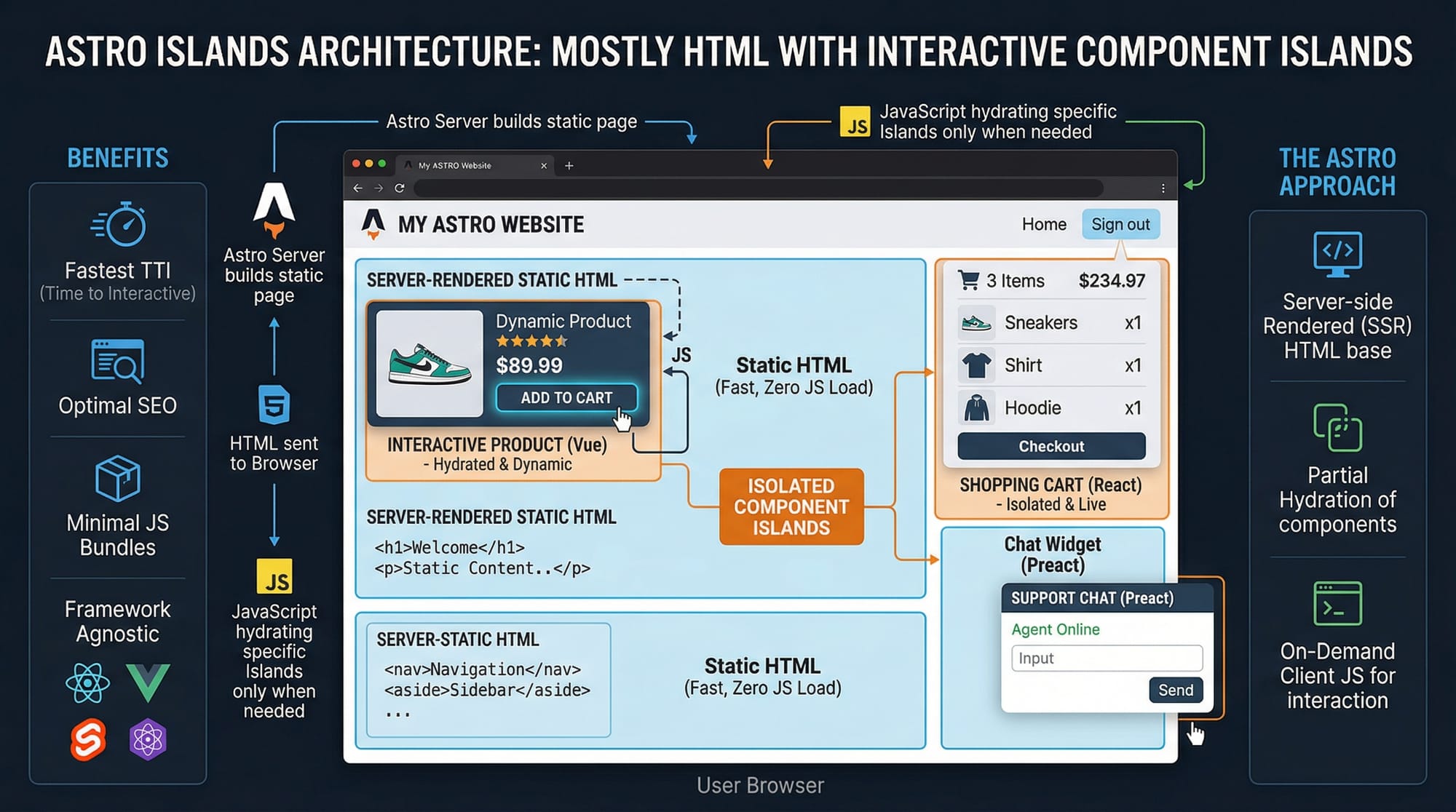
Astro is a modern web framework designed to deliver lightning-fast websites by sending minimal JavaScript to the browser. Unlike traditional frameworks, Astro focuses on static site generation (SSG) and uses a unique concept called Islands Architecture—meaning only the interactive parts of your website load JavaScript.
For Pakistani students—whether you're in Lahore, Karachi, or Islamabad—learning Astro in 2026 is a smart move because:
- It improves web performance skills, which are highly valued in freelancing
- It helps build SEO-optimized websites, ideal for blogs, portfolios, and business sites
- It integrates easily with frameworks like React, Vue, and Svelte
Prerequisites
Before starting this Astro tutorial, you should have:
- Basic understanding of HTML, CSS, and JavaScript
- Familiarity with ES6 concepts (arrow functions, modules)
- Basic knowledge of Node.js and npm
- Some experience with frameworks like React (optional but helpful)
If you're a student like Ahmad or Fatima who has already built simple websites, you're ready to start learning Astro.
Core Concepts & Explanation
Astro Components and File Structure
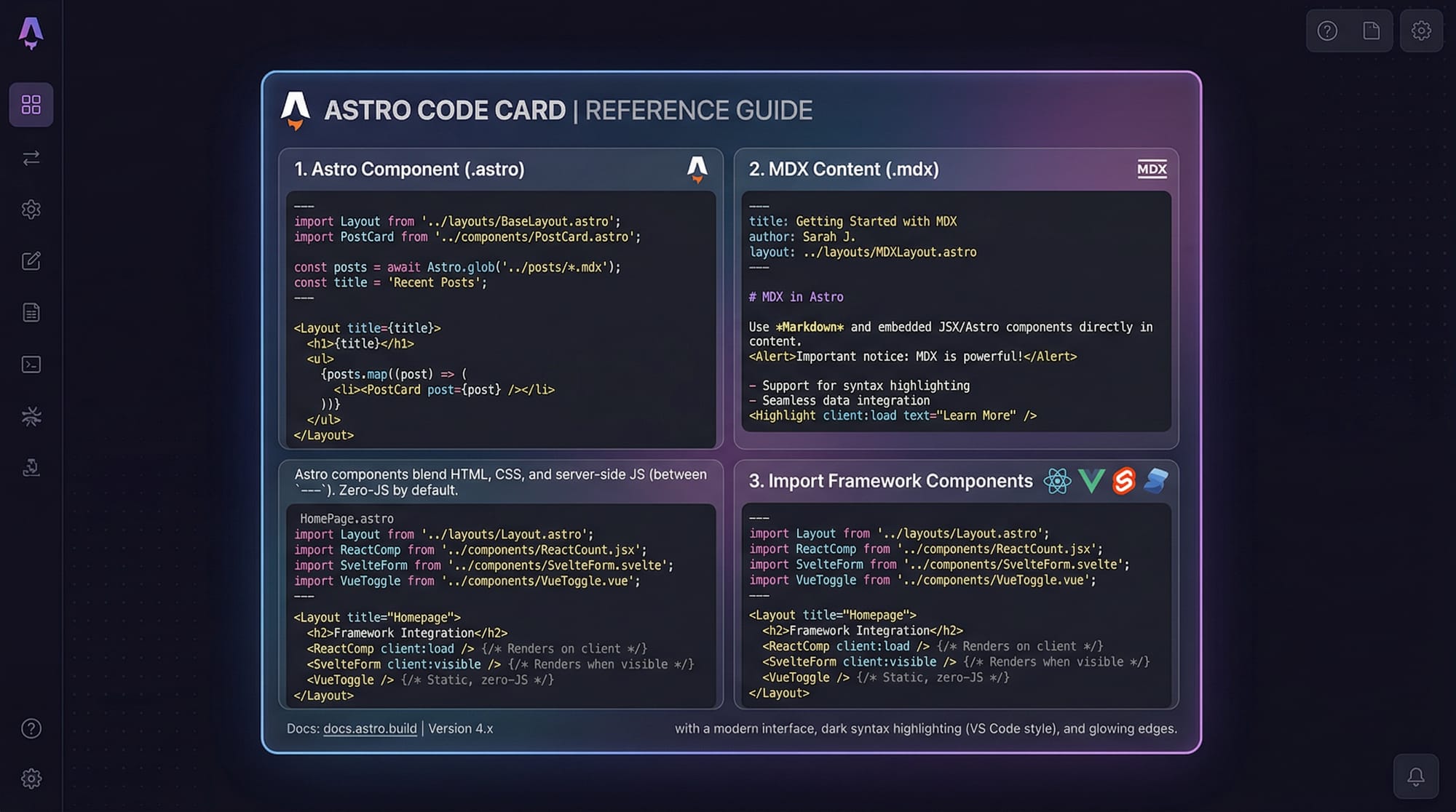
Astro uses .astro files as its core building blocks. These files allow you to combine HTML, JavaScript, and framework components in one place.
Example:
---
// JavaScript logic
const name = "Ali";
---

<h1>Hello, {name}!</h1>
Explanation:
---→ Frontmatter section (JavaScript runs here)const name = "Ali";→ Define a variable{name}→ Inject variable into HTML
This structure makes Astro very simple and beginner-friendly.
Islands Architecture and Partial Hydration
Astro introduces Islands Architecture, where only specific components are interactive.
Example:
---
import Counter from '../components/Counter.jsx';
---

<h1>Welcome to My Site</h1>
<Counter client:load />
Explanation:
import Counter→ Import a React component<Counter client:load />→ Load JavaScript only for this component- Everything else remains static HTML
This improves performance significantly.
Static Site Generation (SSG)
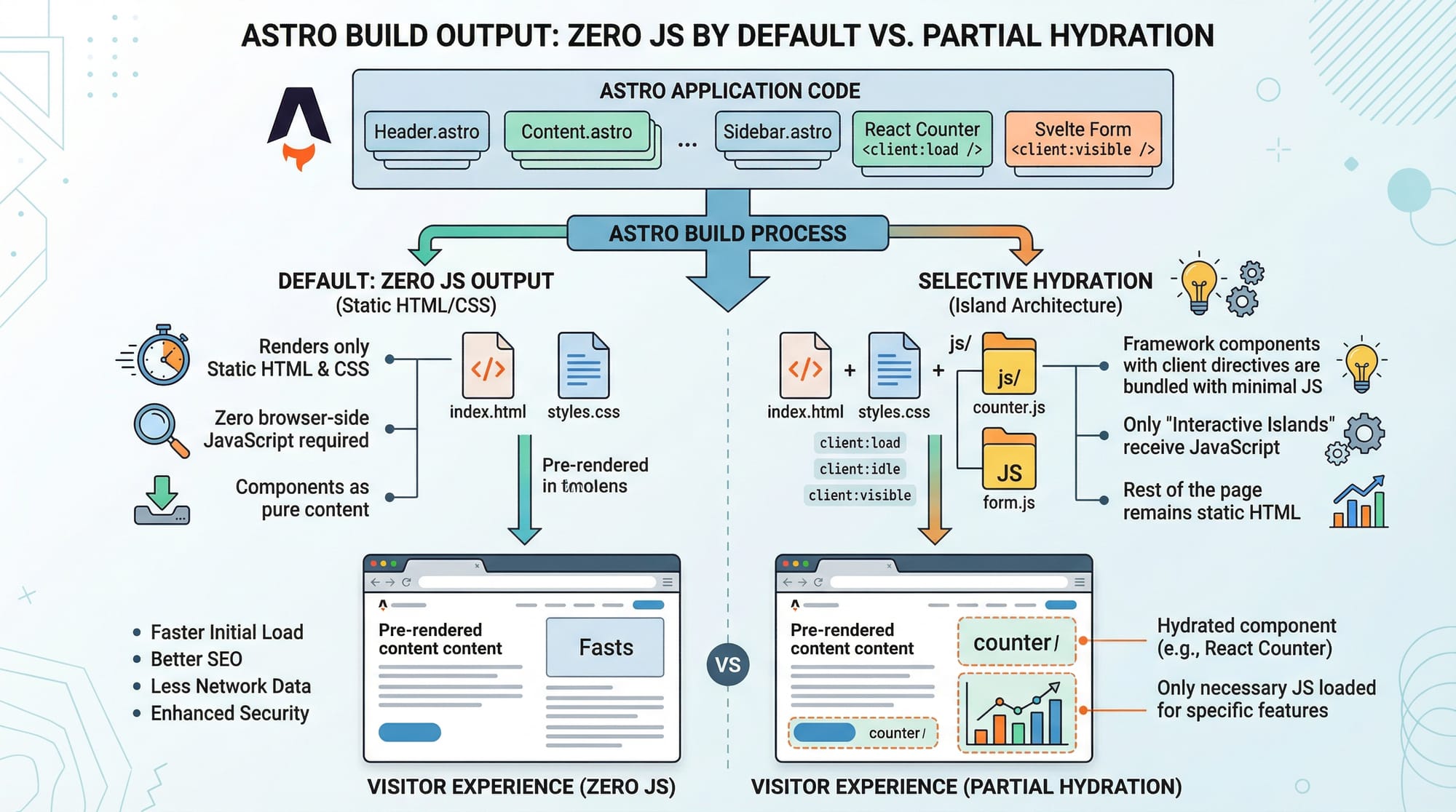
Astro builds your website into static HTML files.
Command:
npm run build
Explanation:
- Generates HTML files
- No server needed
- Perfect for hosting on platforms like Netlify or Vercel
Content Collections (Markdown & MDX)
Astro supports Markdown and MDX for content.
Example:
---
title: "My Blog Post"
---

# Hello Pakistan

This is a blog post written in Markdown.
Explanation:
title→ Metadata# Hello Pakistan→ Markdown heading- Easy for blogs and educational content
Practical Code Examples
Example 1: Create Your First Astro Page
---
const student = "Fatima";
const city = "Lahore";
---

<html>
  <head>
    <title>My First Astro Page</title>
  </head>
  <body>
    <h1>Welcome {student}!</h1>
    <p>You are learning Astro in {city}.</p>
  </body>
</html>
Line-by-line Explanation:
const student = "Fatima";→ Store student's nameconst city = "Lahore";→ Store location<html>→ Standard HTML structure{student}→ Dynamically inject variable{city}→ Display city name
Example 2: Real-World Application (Student Portfolio)
---
const projects = [
  { name: "E-commerce Site", price: "PKR 50,000" },
  { name: "Blog Website", price: "PKR 20,000" }
];
---

<h1>Ahmad's Portfolio</h1>

<ul>
  {projects.map(project => (
    <li>
      {project.name} - {project.price}
    </li>
  ))}
</ul>
Line-by-line Explanation:
projects = [...]→ Array of projects{ name, price }→ Object structure.map()→ Loop through projects<li>→ Display each project{project.name}→ Insert project name{project.price}→ Insert price
This example is useful for Pakistani freelancers showcasing their work.
Common Mistakes & How to Avoid Them
Mistake 1: Overusing JavaScript
Many beginners use too much JavaScript unnecessarily.
❌ Wrong:
<script>
  console.log("Hello");
</script>
✅ Correct:
Use Astro’s static approach unless interactivity is needed.
Fix:
Only use client:* directives when required.
Mistake 2: Not Using Components Properly
Beginners often write everything in one file.
❌ Wrong:
Large .astro file with repeated code
✅ Correct:
---
import Header from '../components/Header.astro';
---

<Header />
Explanation:
- Break UI into reusable components
- Improves maintainability

Practice Exercises
Exercise 1: Create a Student Profile Page
Problem:
Create a page showing:
- Name: Ali
- City: Karachi
- Course: Web Development
Solution:
---
const name = "Ali";
const city = "Karachi";
const course = "Web Development";
---

<h1>{name}</h1>
<p>{city}</p>
<p>{course}</p>
Explanation:
- Variables store data
- Injected into HTML using
{}
Exercise 2: Display Product List
Problem:
Show a list of 3 products with prices in PKR.
Solution:
---
const products = [
  { name: "Laptop", price: "PKR 120,000" },
  { name: "Mobile", price: "PKR 60,000" },
  { name: "Headphones", price: "PKR 5,000" }
];
---

<ul>
  {products.map(item => (
    <li>{item.name} - {item.price}</li>
  ))}
</ul>
Explanation:
- Array stores products
.map()loops through items- Displays each product
Frequently Asked Questions
What is Astro framework?
Astro is a modern web framework used to build fast, static websites with minimal JavaScript. It focuses on performance and SEO, making it ideal for blogs and portfolios.
How do I install Astro?
You can install Astro using npm with the command npm create astro@latest. Follow the setup wizard to create your project.
Can I use React with Astro?
Yes, Astro supports React, Vue, and Svelte. You can import components and use them with client:* directives for interactivity.
Is Astro good for beginners in Pakistan?
Yes, Astro is beginner-friendly and ideal for Pakistani students learning web development. It simplifies complex concepts like performance optimization.
How does Astro improve website performance?
Astro sends zero JavaScript by default and only loads JS when needed. This results in faster load times and better user experience.
Summary & Key Takeaways
- Astro is a modern framework focused on static site generation
- Uses Islands Architecture for better performance
- Sends minimal JavaScript to the browser
- Supports React, Vue, and Svelte integration
- Ideal for blogs, portfolios, and SEO-friendly sites
- Great choice for Pakistani students and freelancers in 2026
Next Steps & Related Tutorials
Now that you've started your journey to learn Astro 2026, here are some helpful tutorials on theiqra.edu.pk:
- Learn how to build dynamic apps with the Next.js Tutorial
- Explore component-based UI with the Svelte Tutorial
- Master styling with Tailwind CSS Advanced Guide
- Improve your frontend skills with Bootstrap 5 Tutorial
Keep practicing, build real-world projects, and soon you'll be ready to create professional websites for clients in Pakistan and beyond 🚀
Test Your Python Knowledge!
Finished reading? Take a quick quiz to see how much you've learned from this tutorial.