Progressive Web Apps (PWA) Tutorial 2026 Build & Deploy
Introduction
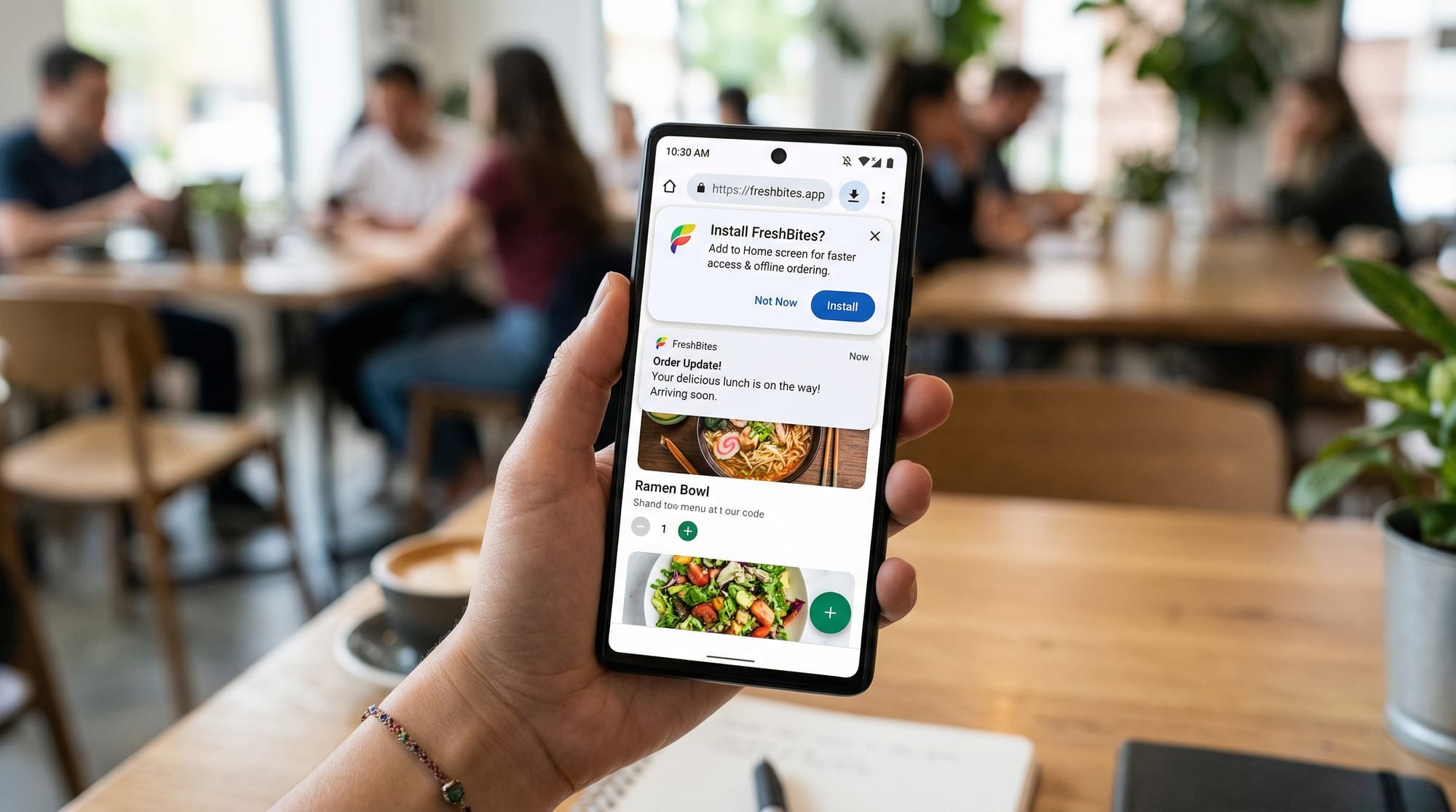
Progressive Web Apps (PWAs) are transforming how modern web applications are built and experienced. In this PWA tutorial 2026: build & deploy, you’ll learn how to create fast, reliable, and installable web apps using modern browser features like service workers, caching, and web manifests.
A progressive web app combines the best of websites and mobile apps. It works in a browser like a normal website but can also:
- Work offline
- Be installed on a device like an app
- Send push notifications
- Load extremely fast—even on slow internet connections
For Pakistani students in cities like Lahore, Karachi, or Islamabad, PWAs are especially valuable. Many users still face slow internet speeds or unstable connections. PWAs solve this problem by caching content and enabling offline access, making them ideal for local startups, e-learning platforms, and small businesses.
For example:
- Ahmad builds an online bookstore in Lahore → customers can browse even without internet.
- Fatima creates a study app → students access notes offline.
- Ali builds a food delivery site → users install it like an app without visiting Play Store.
By the end of this tutorial, you’ll know how to build and deploy a production-ready PWA.
Prerequisites
Before starting this service worker tutorial, you should have:
- Basic knowledge of HTML, CSS, and JavaScript
- Understanding of how websites work (client-server model)
- Familiarity with browser developer tools (Chrome DevTools recommended)
- Basic command line knowledge (optional but helpful)
- A code editor like VS Code
If you already know how to create a simple website, you're ready to dive into PWAs.
Core Concepts & Explanation
What is a Progressive Web App (PWA)?
A Progressive Web App is a web application that uses modern web capabilities to deliver an app-like experience.
Key characteristics:
- Progressive → Works for every user, regardless of browser
- Responsive → Works on mobile, tablet, desktop
- Offline-ready → Works without internet
- Installable → Can be added to home screen
- Secure → Served over HTTPS
Example:
A Karachi-based tuition center creates a PWA so students can access notes even during load shedding when internet is unstable.
Service Workers (The Heart of PWAs)
A service worker is a JavaScript file that runs in the background, separate from your web page.
It enables:
- Offline functionality
- Caching
- Background sync
- Push notifications
Think of it as a proxy between your app and the network.
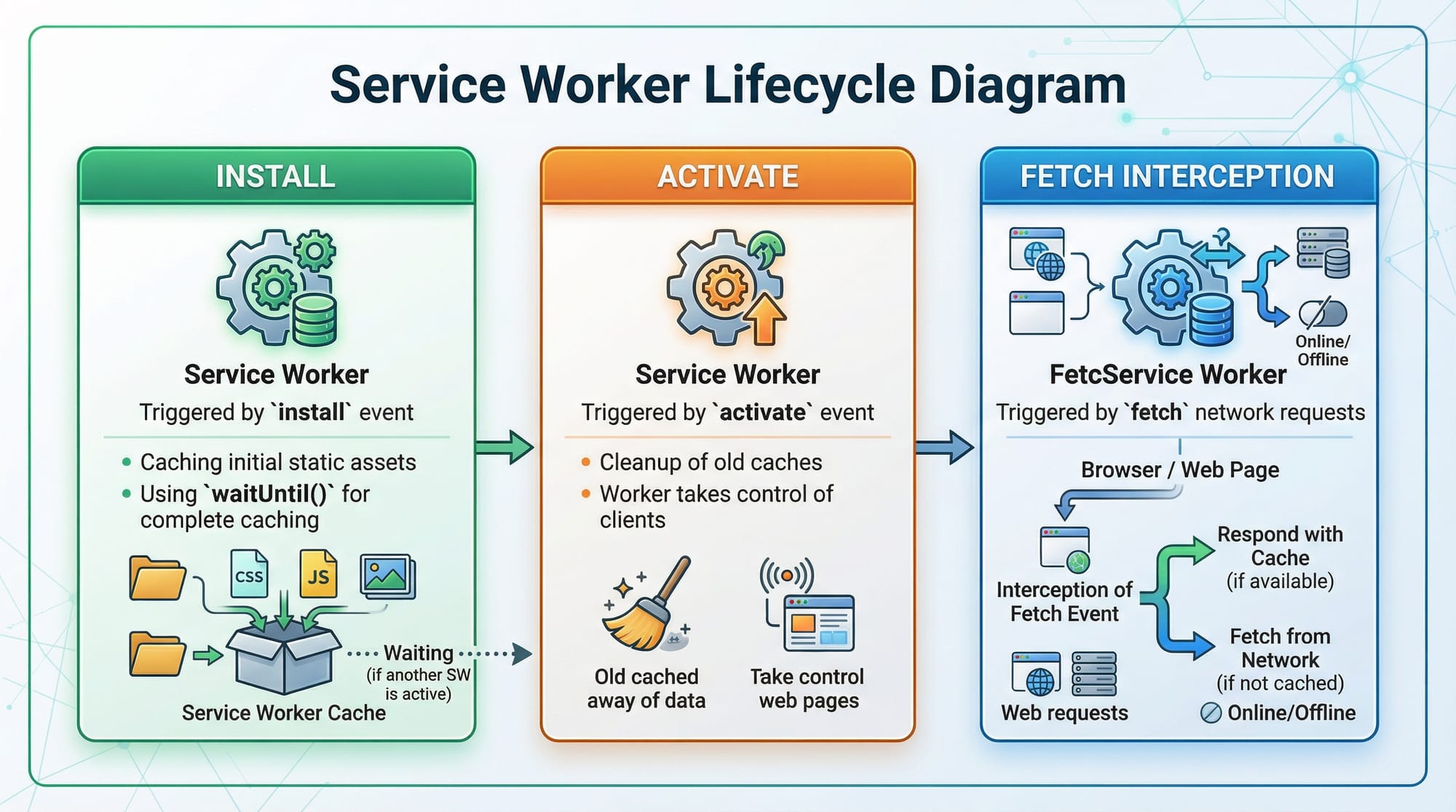
Lifecycle stages:
- Install → Cache assets
- Activate → Clean old caches
- Fetch → Intercept network requests
Web App Manifest
The manifest.json file defines how your PWA appears when installed.
It includes:
- App name
- Icons
- Theme colors
- Display mode
Example use:
A Pakistani e-commerce store shows its logo and branding when installed on a phone.
Caching Strategies
Caching is essential for performance and offline access.
Common strategies:
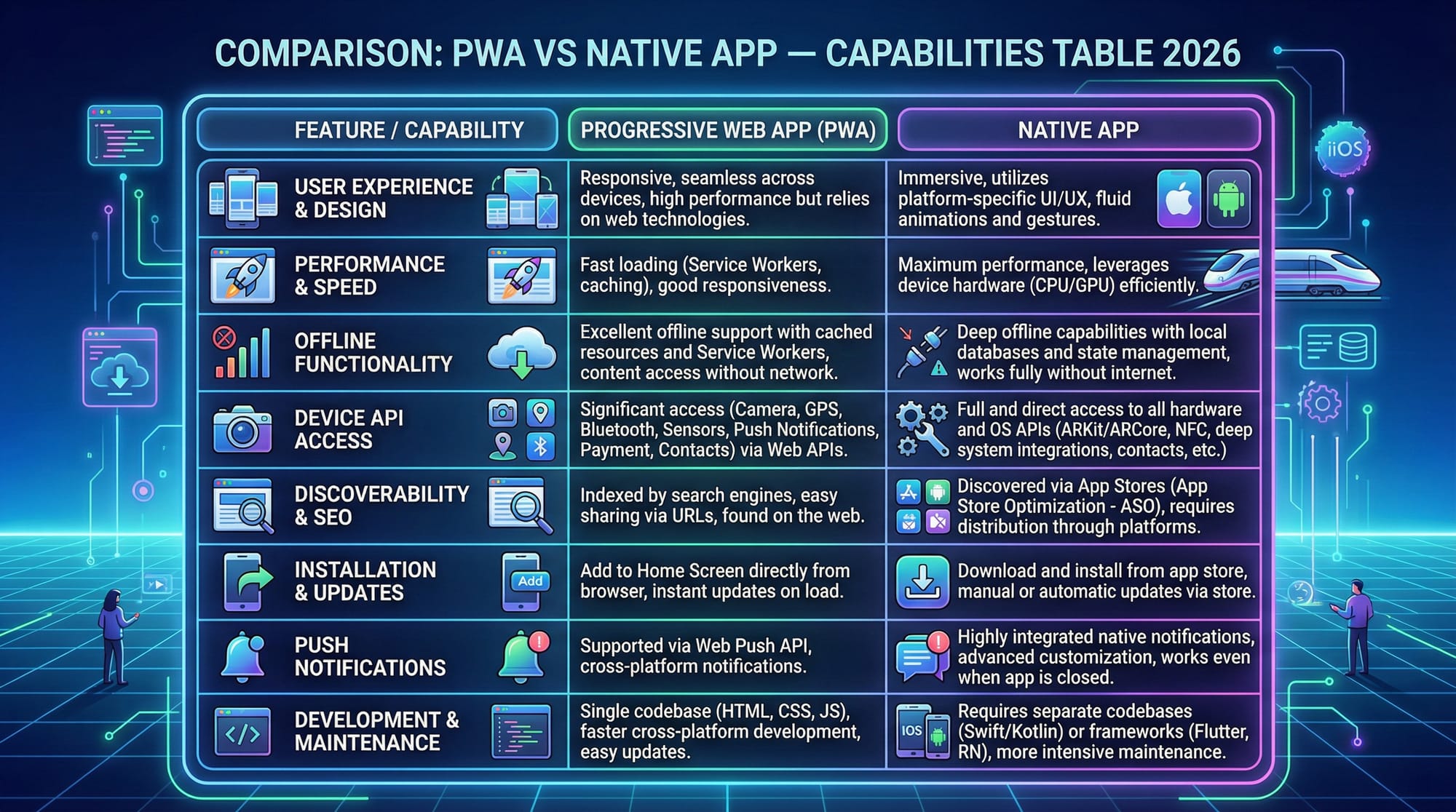
- Cache First → Load from cache, fallback to network
- Network First → Try network, fallback to cache
- Stale While Revalidate → Show cache, update in background
Practical Code Examples
Example 1: Registering a Service Worker
// Check if browser supports service workers
if ('serviceWorker' in navigator) {
  window.addEventListener('load', () => {
    navigator.serviceWorker.register('/sw.js')
      .then(reg => console.log('Service Worker Registered', reg))
      .catch(err => console.log('Registration Failed', err));
  });
}
Line-by-line explanation:
if ('serviceWorker' in navigator)
→ Checks if the browser supports service workerswindow.addEventListener('load', () => {
→ Waits for the page to fully loadnavigator.serviceWorker.register('/sw.js')
→ Registers the service worker file.then(reg => console.log(...))
→ Runs if registration succeeds.catch(err => console.log(...))
→ Handles errors
Example 2: Real-World Application (Offline Cache)
const CACHE_NAME = 'pwa-cache-v1';
const urlsToCache = [
  '/',
  '/index.html',
  '/styles.css',
  '/app.js'
];

// Install event
self.addEventListener('install', event => {
  event.waitUntil(
    caches.open(CACHE_NAME)
      .then(cache => cache.addAll(urlsToCache))
  );
});

// Fetch event
self.addEventListener('fetch', event => {
  event.respondWith(
    caches.match(event.request)
      .then(response => response || fetch(event.request))
  );
});
Line-by-line explanation:
const CACHE_NAME = 'pwa-cache-v1';
→ Defines cache versionconst urlsToCache = [...]
→ Lists files to cacheself.addEventListener('install', event => {
→ Runs when service worker installsevent.waitUntil(...)
→ Keeps service worker alive until caching completescaches.open(CACHE_NAME)
→ Opens cache storagecache.addAll(urlsToCache)
→ Adds files to cacheself.addEventListener('fetch', event => {
→ Intercepts network requestscaches.match(event.request)
→ Checks if request is cachedresponse || fetch(event.request)
→ Returns cache or fetches from network
Common Mistakes & How to Avoid Them
Mistake 1: Not Using HTTPS
PWAs require HTTPS to work properly.
Problem:
Service workers won’t register on insecure sites.
Solution:
- Use HTTPS hosting (e.g., Netlify, Vercel)
- For local testing, use
localhost
Mistake 2: Incorrect Cache Versioning
Problem:
Old files remain cached, causing bugs.
Solution:
const CACHE_NAME = 'pwa-cache-v2';
- Always update cache name when deploying changes
- Delete old caches in activate event
Mistake 3: Over-Caching Everything
Problem:
App becomes outdated or too large.
Solution:
- Cache only essential assets
- Use dynamic caching wisely
Practice Exercises
Exercise 1: Basic Offline Page
Problem:
Create a PWA that shows an offline page when internet is unavailable.
Solution:
self.addEventListener('fetch', event => {
  event.respondWith(
    fetch(event.request).catch(() => caches.match('/offline.html'))
  );
});
Explanation:
- Tries to fetch from network
- If failed → shows offline page
Exercise 2: Installable App
Problem:
Create a manifest file to make your app installable.
Solution:
{
  "name": "My PWA App",
  "short_name": "PWA",
  "start_url": "/index.html",
  "display": "standalone",
  "background_color": "#ffffff",
  "theme_color": "#0d6efd",
  "icons": [
    {
      "src": "/icon.png",
      "sizes": "192x192",
      "type": "image/png"
    }
  ]
}
Explanation:
- Defines app name and icons
display: standalone→ makes it look like an appstart_url→ entry point
Frequently Asked Questions
What is a progressive web app?
A progressive web app is a web application that uses modern browser features to provide an app-like experience. It works offline, loads quickly, and can be installed on a device.
How do I make my website a PWA?
You need three things: a service worker, a manifest.json file, and HTTPS hosting. Once implemented, your site becomes installable and offline-capable.
What is a service worker?
A service worker is a background script that enables caching, offline access, and push notifications. It acts as a proxy between your app and the internet.
Can PWAs replace mobile apps?
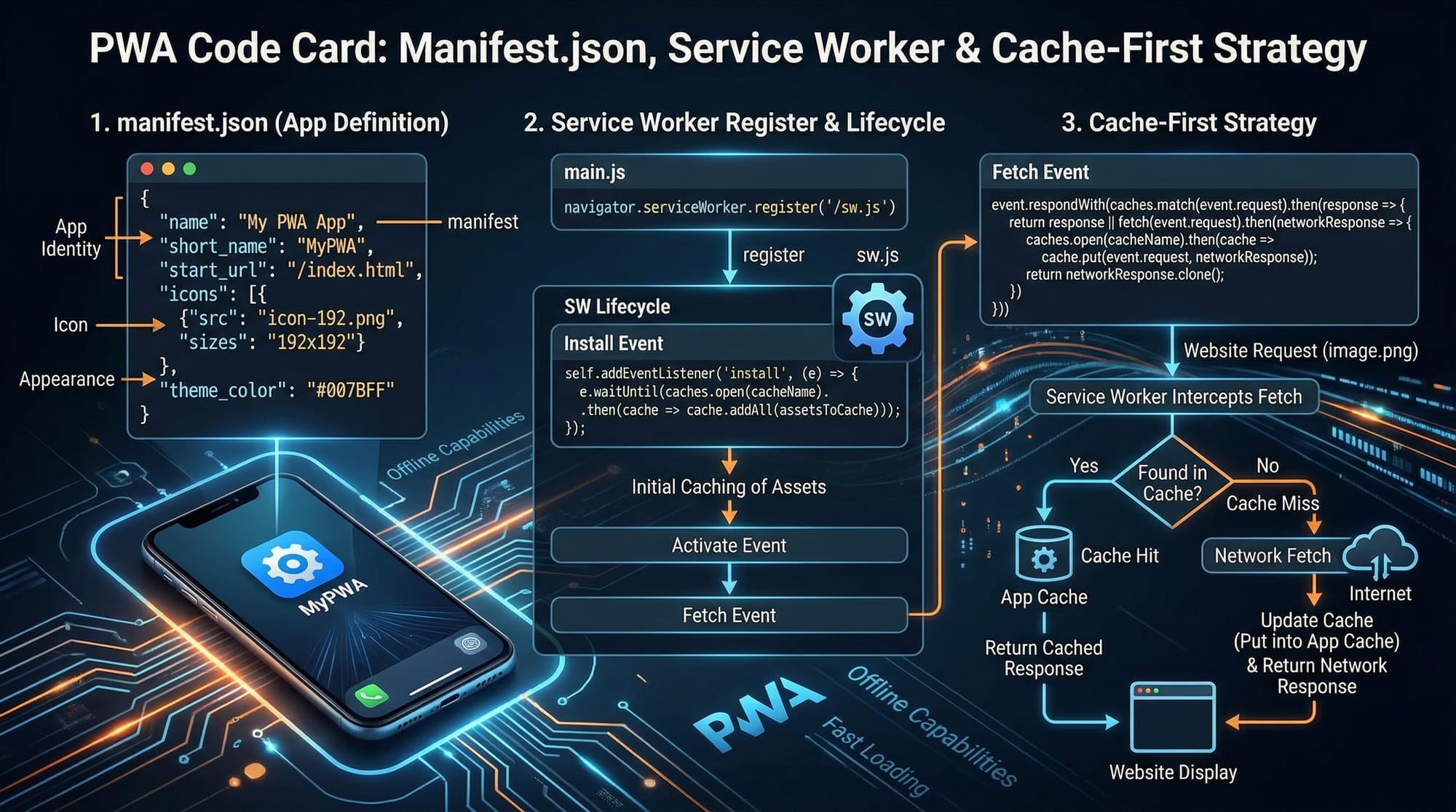
In many cases, yes. PWAs are lighter, cheaper to build, and easier to maintain. However, native apps still have advantages for hardware-intensive tasks.
Are PWAs supported in Pakistan?
Yes, all modern browsers in Pakistan (Chrome, Edge, Firefox) support PWAs. They are especially useful in areas with slow internet connectivity.
Summary & Key Takeaways
- PWAs combine the power of web and mobile apps
- Service workers enable offline functionality and caching
- Manifest.json makes apps installable
- HTTPS is mandatory for PWAs
- Caching strategies improve performance significantly
- PWAs are ideal for Pakistani developers targeting low-bandwidth users
Next Steps & Related Tutorials
Now that you’ve completed this pwa tutorial, continue learning with:
- Learn the basics in our JavaScript Tutorial to strengthen your foundation
- Improve speed with our Web Performance Optimization Guide
- Build modern UIs with our React.js Tutorial for Beginners
- Explore backend integration in our Node.js API Development Tutorial
These tutorials will help you become a complete full-stack developer and build production-ready progressive web apps.
You’re now ready to build your own Progressive Web App 🚀
Test Your Python Knowledge!
Finished reading? Take a quick quiz to see how much you've learned from this tutorial.