Zig Programming Language Tutorial Systems Programming 2026

Introduction
Zig is a modern systems programming language designed for performance, safety, and simplicity. In this zig programming tutorial: systems programming 2026, you’ll learn how Zig works, why it’s gaining popularity, and how Pakistani students can benefit from learning it in today’s tech landscape.
Unlike traditional languages like C or even newer ones like Rust, Zig focuses on explicit control, no hidden runtime, and compile-time execution (comptime). This makes it ideal for systems programming tasks such as operating systems, embedded systems, game engines, and high-performance backend services.
For students in Pakistan—whether you're in Lahore, Karachi, or Islamabad—learning Zig can open doors in low-level programming, DevOps, and high-performance computing, fields that are increasingly in demand globally.
Prerequisites
Before starting this tutorial, you should have:
- Basic understanding of programming (preferably in C, C++, or Rust)
- Knowledge of variables, functions, loops, and data types
- Familiarity with command-line tools
- Basic understanding of memory (stack vs heap)
- A Zig compiler installed on your system
Core Concepts & Explanation
Compile-Time Execution (Comptime)
One of Zig’s most powerful features is comptime, which allows code to run at compile time instead of runtime.
Example:
const std = @import("std");

pub fn main() void {
    const value = comptime square(5);
    std.debug.print("Square: {}\n", .{value});
}

fn square(x: i32) i32 {
    return x * x;
}
Line-by-line explanation:
const std = @import("std");
Imports Zig’s standard library.pub fn main() void {
Entry point of the program.const value = comptime square(5);
Runssquare(5)at compile time instead of runtime.std.debug.print(...)
Prints output to the console.fn square(x: i32) i32
Defines a function that returns the square of a number.
👉 Benefit: Faster execution because calculations are done before the program runs.
Memory Management Without Garbage Collection
Zig gives you full control over memory without using a garbage collector.
Example:
const std = @import("std");

pub fn main() !void {
    var allocator = std.heap.page_allocator;

    const buffer = try allocator.alloc(u8, 10);
    defer allocator.free(buffer);

    buffer[0] = 65;
}
Line-by-line explanation:
var allocator = std.heap.page_allocator;
Uses a memory allocator.const buffer = try allocator.alloc(u8, 10);
Allocates memory for 10 bytes.defer allocator.free(buffer);
Ensures memory is freed after use.buffer[0] = 65;
Stores a value in memory.
👉 This approach is useful for systems programming where memory control is critical.
Error Handling with Error Unions
Zig uses error unions instead of exceptions.
fn divide(a: i32, b: i32) !i32 {
    if (b == 0) return error.DivisionByZero;
    return a / b;
}
Explanation:
!i32means the function can return either an error or an integer.error.DivisionByZerois a custom error.- No hidden control flow—everything is explicit.
Key Language Features Overview
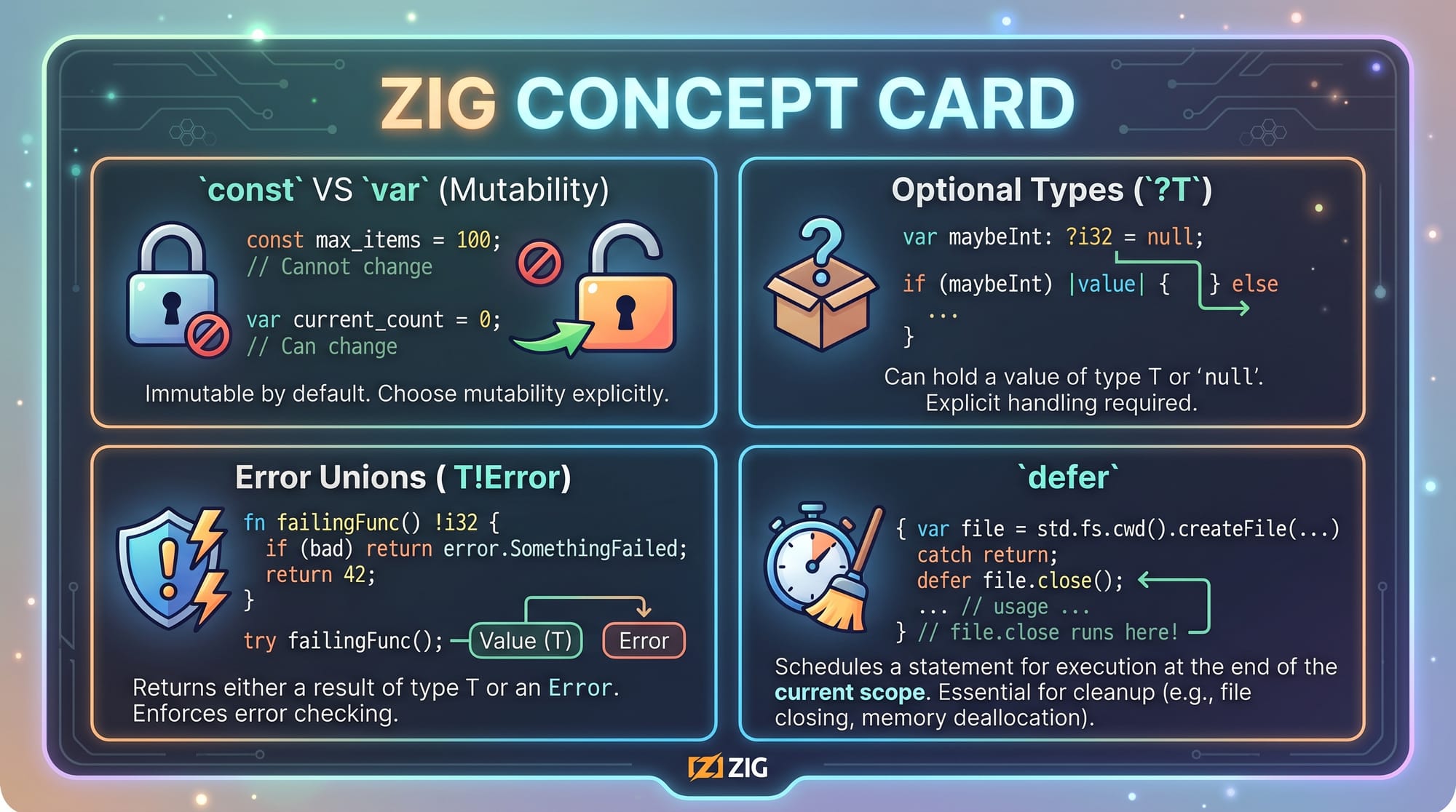
const→ immutable variablesvar→ mutable variables?T→ optional typeT!Error→ error uniondefer→ cleanup mechanism
Practical Code Examples
Example 1: Student Fee Calculator (PKR)
Let’s build a simple program to calculate fees for a student in Pakistan.
const std = @import("std");

pub fn main() void {
    const fee_per_course: i32 = 5000;
    const courses: i32 = 4;

    const total_fee = fee_per_course * courses;

    std.debug.print("Total Fee: {} PKR\n", .{total_fee});
}
Line-by-line explanation:
const fee_per_course: i32 = 5000;
Sets fee per course in PKR.const courses: i32 = 4;
Number of courses taken.const total_fee = fee_per_course * courses;
Calculates total fee.std.debug.print(...)
Displays result.
👉 Output: Total Fee: 20000 PKR
Example 2: Real-World Application — File Reader
Let’s simulate reading a file (useful for log processing or data analysis).
const std = @import("std");

pub fn main() !void {
    const file = try std.fs.cwd().openFile("data.txt", .{});
    defer file.close();

    var buffer: [100]u8 = undefined;
    const bytes_read = try file.read(&buffer);

    std.debug.print("Read {} bytes\n", .{bytes_read});
}
Line-by-line explanation:
openFile("data.txt", .{})
Opens a file in current directory.defer file.close();
Ensures file is closed after use.var buffer: [100]u8 = undefined;
Allocates buffer for reading.file.read(&buffer)
Reads file content into buffer.print("Read {} bytes")
Displays number of bytes read.
👉 Use case: Log analysis for a startup in Karachi or Islamabad.
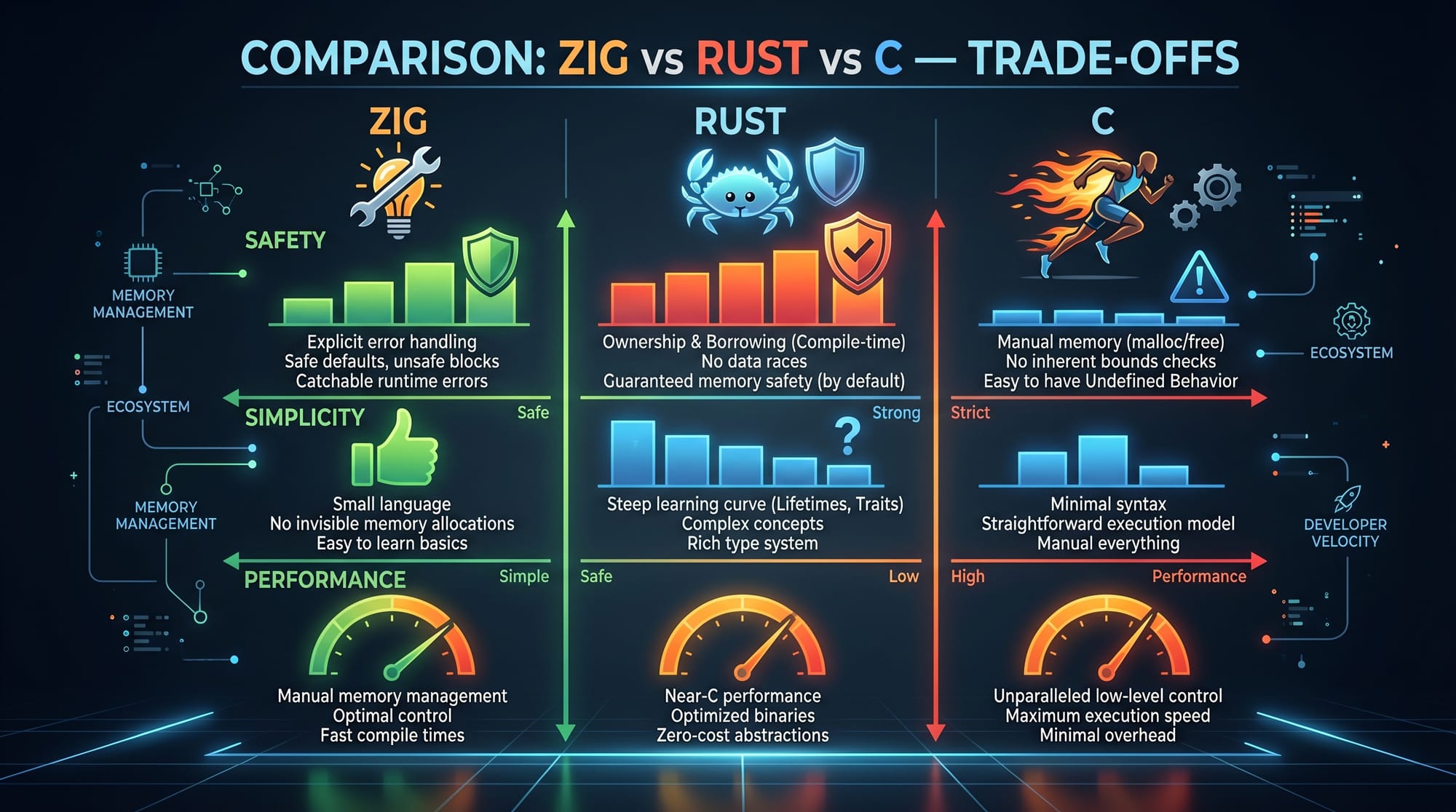
Zig vs Rust vs C
| Feature | Zig | Rust | C |
|---|---|---|---|
| Memory Safety | Manual | Automatic | Manual |
| Complexity | Simple | High | Medium |
| Performance | Very High | Very High | Very High |
| Tooling | Built-in | Cargo | External |
👉 Zig is easier to learn than Rust and safer than C (when used properly).
Common Mistakes & How to Avoid Them
Mistake 1: Forgetting to Free Memory
❌ Wrong:
const buffer = try allocator.alloc(u8, 10);
✔️ Correct:
const buffer = try allocator.alloc(u8, 10);
defer allocator.free(buffer);
Explanation:
- Always free allocated memory to avoid leaks.
- Use
deferto automate cleanup.
Mistake 2: Ignoring Error Handling
❌ Wrong:
const result = divide(10, 0);
✔️ Correct:
const result = divide(10, 0) catch |err| {
    std.debug.print("Error occurred\n", .{});
    return;
};
Explanation:
- Zig forces you to handle errors explicitly.
- Use
catchto manage failures.
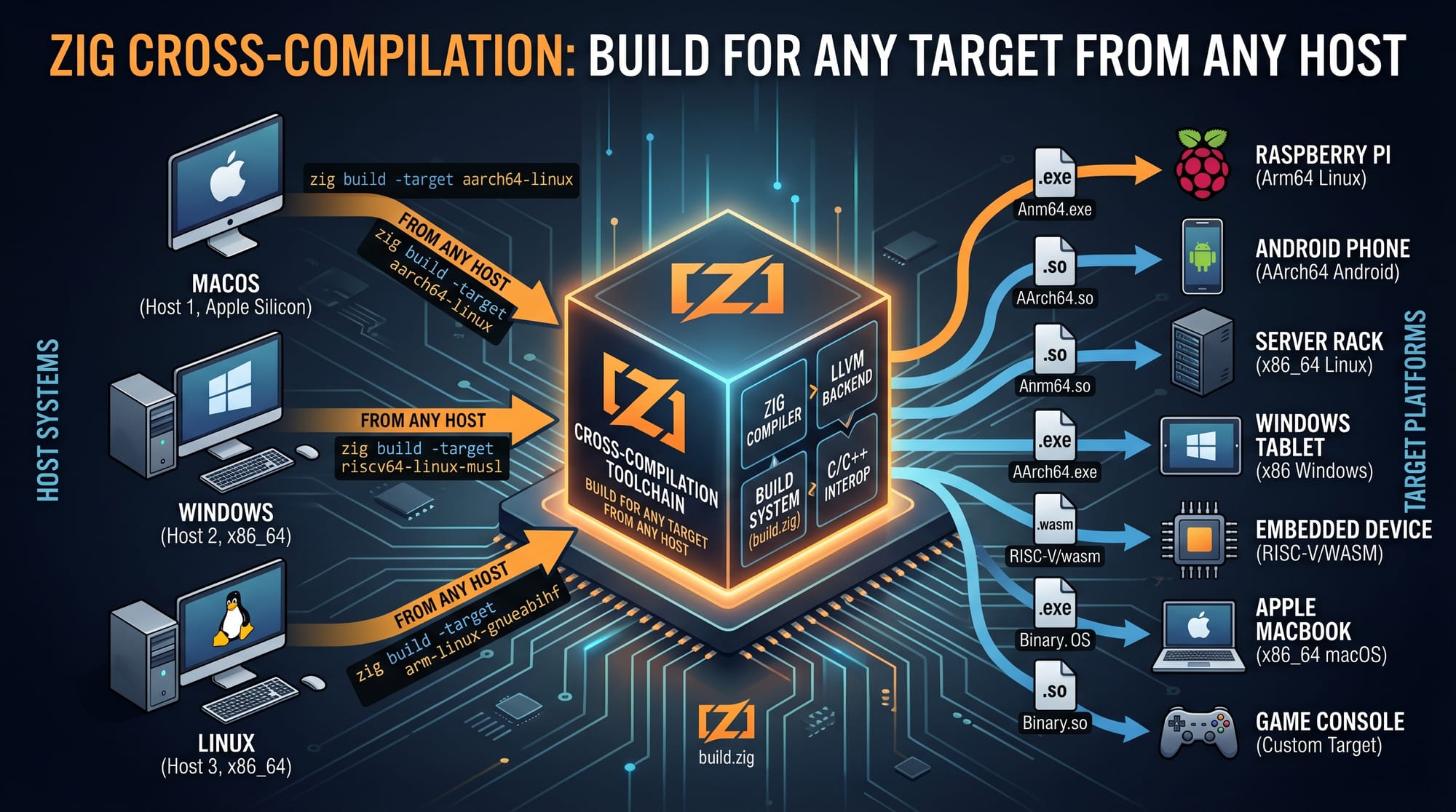
👉 Zig can compile code for different platforms (Windows, Linux, embedded devices) from one machine—very useful for Pakistani freelancers working remotely.
Practice Exercises
Exercise 1: Simple Calculator
Problem:
Write a Zig program that adds two numbers and prints the result.
Solution:
const std = @import("std");

pub fn main() void {
    const a: i32 = 10;
    const b: i32 = 20;

    const sum = a + b;

    std.debug.print("Sum: {}\n", .{sum});
}
Explanation:
- Declares two numbers.
- Adds them.
- Prints result.
Exercise 2: Even or Odd Checker
Problem:
Check whether a number is even or odd.
Solution:
const std = @import("std");

pub fn main() void {
    const num: i32 = 7;

    if (num % 2 == 0) {
        std.debug.print("Even\n", .{});
    } else {
        std.debug.print("Odd\n", .{});
    }
}
Explanation:
%operator checks remainder.- If remainder is 0 → even, else odd.
Frequently Asked Questions
What is Zig programming language?
Zig is a modern systems programming language designed for performance, safety, and simplicity. It provides low-level control like C but avoids hidden behavior.
How do I install Zig in Pakistan?
You can download Zig from its official website and run it directly without installation. It works on Windows, Linux, and macOS.
Is Zig better than Rust?
Zig is simpler and easier to learn, while Rust provides stronger safety guarantees. The choice depends on your project needs.
Can I use Zig for web development?
Zig is mainly used for systems programming, but it can be used for backend services and performance-critical APIs.
How do I start learning Zig?
Start with small programs, understand memory management, and gradually build real-world projects like file processors or CLI tools.
Summary & Key Takeaways
- Zig is a modern systems programming language focused on simplicity and performance
- It offers compile-time execution (comptime) for optimization
- Memory management is manual but explicit and predictable
- Error handling is safer and more transparent than exceptions
- Zig is easier to learn compared to Rust but still powerful
- Ideal for Pakistani students aiming for systems-level programming careers
Next Steps & Related Tutorials
To continue your journey, explore these tutorials on theiqra.edu.pk:
- Learn memory safety in our Rust Tutorial for Beginners
- Master low-level programming with our C++ Tutorial
- Build backend systems with our Systems Programming Guide
- Explore DevOps tools in our Cloud Native CI/CD Tutorial
👉 Suggested path: Start with Zig → Compare with Rust → Practice with C++ → Build real-world systems.
If you stay consistent and practice regularly, you can become a skilled systems programmer—whether you're studying in Islamabad or freelancing from Lahore. Keep coding! 🚀
Test Your Python Knowledge!
Finished reading? Take a quick quiz to see how much you've learned from this tutorial.