Angular Components Services RxJS & Routing

Introduction
Modern web applications are no longer simple static pages—they are dynamic, fast, and interactive. This is where angular components, angular services, RxJS, and angular routing come together to build powerful applications using Angular.
In Angular:
- Components control the UI (what users see)
- Services handle logic and data
- RxJS manages asynchronous data (like APIs)
- Routing allows navigation between pages
For Pakistani students in cities like Lahore, Karachi, and Islamabad, mastering these concepts opens doors to jobs in software houses, freelancing, and startups. Whether you're building an e-commerce app in PKR or a student portal, these tools are essential.
Prerequisites
Before starting this tutorial, you should have:
- Basic understanding of HTML, CSS, JavaScript
- Knowledge of TypeScript
- Familiarity with Angular basics (modules, CLI, project structure)
- Understanding of functions and classes
- Node.js and Angular CLI installed
Core Concepts & Explanation
Angular Components — Building Blocks of UI
Angular components are the core building blocks of any Angular application. Each component controls a part of the screen.
Example:
import { Component } from '@angular/core';

@Component({
  selector: 'app-hello',
  template: `<h1>Hello Ahmad!</h1>`
})
export class HelloComponent {}
Line-by-line explanation:
import { Component }: Imports Angular's component decorator@Component({...}): Defines metadata (selector, template)selector: Custom HTML tag<app-hello>template: Inline HTML for UIexport class HelloComponent: Component class
Angular Services — Sharing Logic & Data
Services allow you to share data or logic across components.
import { Injectable } from '@angular/core';

@Injectable({
  providedIn: 'root'
})
export class DataService {
  getMessage() {
    return "Welcome to Iqra University Portal!";
  }
}
Explanation:
@Injectable: Marks class as a serviceprovidedIn: 'root': Makes it globally availablegetMessage(): Returns data to components
RxJS — Handling Asynchronous Data
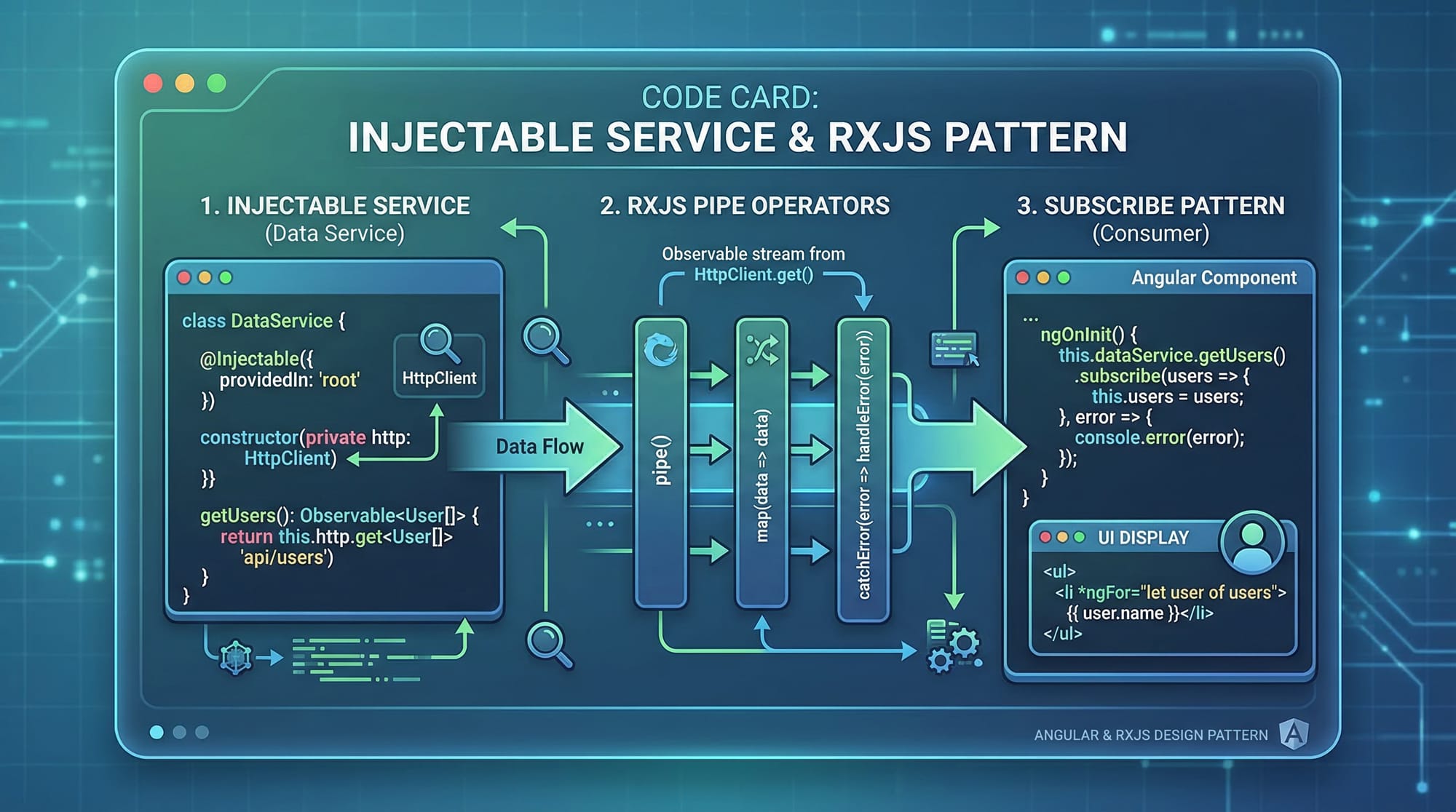
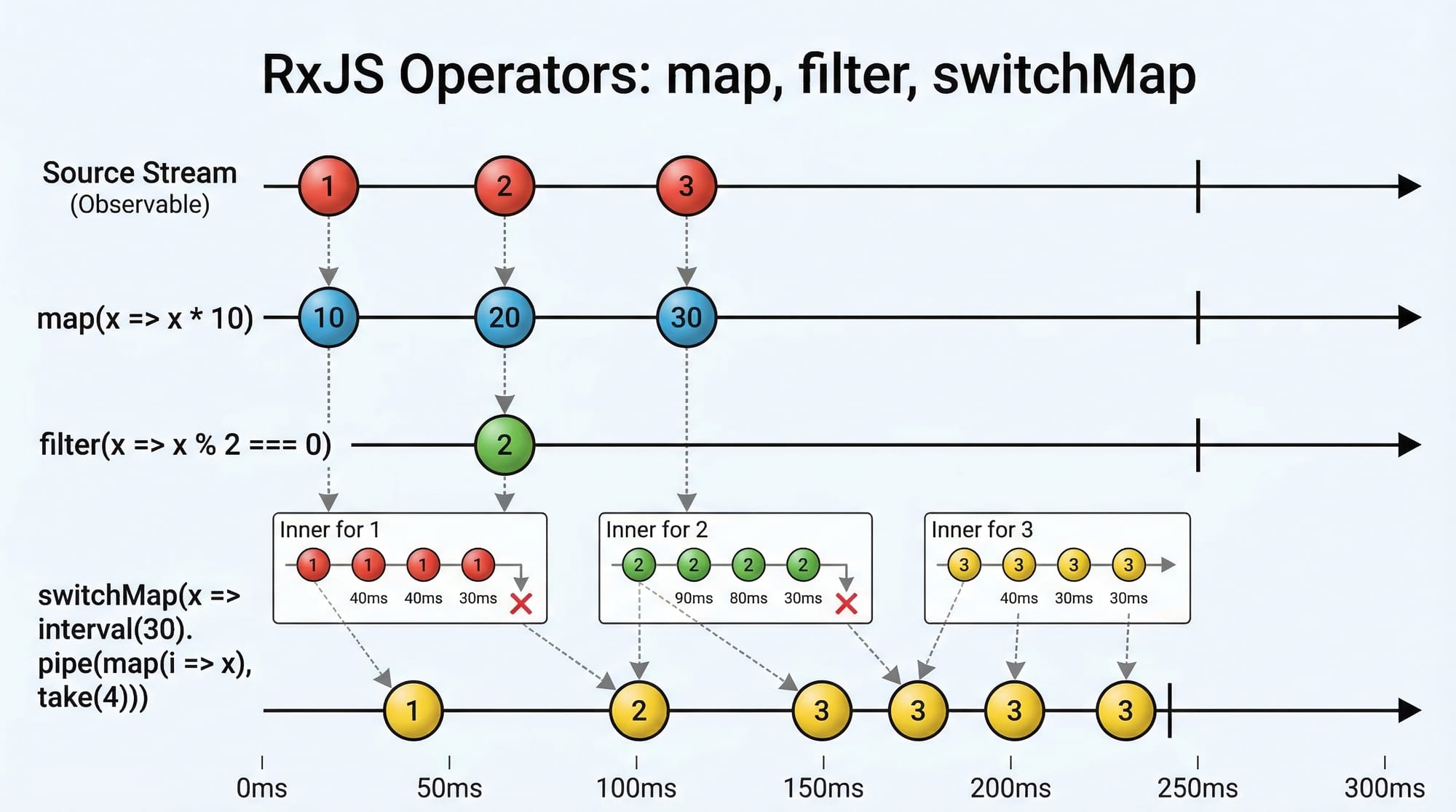
RxJS is used to work with streams (like API responses).
import { of } from 'rxjs';

const data$ = of([1, 2, 3]);

data$.subscribe(value => console.log(value));
Explanation:
of(): Creates an observabledata$: Convention for observable variablesubscribe(): Executes when data arrivesconsole.log(value): Outputs data
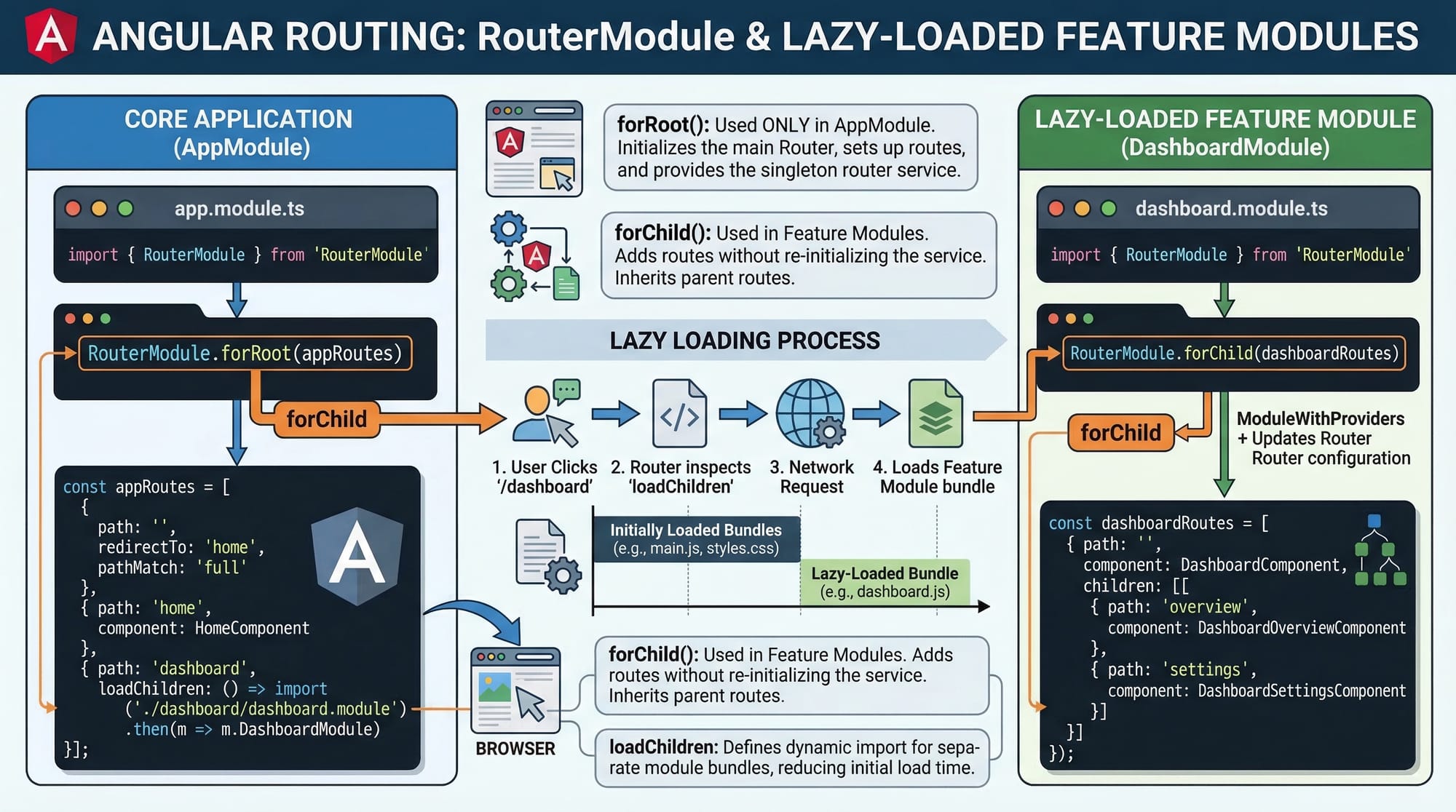
Angular Routing — Navigation Between Pages
Routing allows navigation between different views.
import { NgModule } from '@angular/core';
import { RouterModule, Routes } from '@angular/router';

const routes: Routes = [
  { path: 'home', component: HomeComponent },
  { path: 'about', component: AboutComponent }
];

@NgModule({
  imports: [RouterModule.forRoot(routes)],
  exports: [RouterModule]
})
export class AppRoutingModule {}
Explanation:
Routes: Array defining pathspath: URL routecomponent: Component to loadRouterModule.forRoot(): Registers routes
Practical Code Examples
Example 1: Component + Service Integration
Let’s create a simple app where a service provides data to a component.
Service:
import { Injectable } from '@angular/core';

@Injectable({
  providedIn: 'root'
})
export class StudentService {
  getStudent() {
    return { name: 'Ali', city: 'Lahore' };
  }
}
Explanation:
StudentService: Handles student datagetStudent(): Returns an object
Component:
import { Component } from '@angular/core';
import { StudentService } from './student.service';

@Component({
  selector: 'app-student',
  template: `<h2>{{student.name}} from {{student.city}}</h2>`
})
export class StudentComponent {
  student: any;

  constructor(private studentService: StudentService) {
    this.student = this.studentService.getStudent();
  }
}
Explanation:
import StudentService: Import serviceconstructor(private studentService...): Dependency injectionthis.student = ...: Fetch data from service{{ }}: Angular interpolation
Example 2: Real-World Application (API + RxJS + Routing)
Let’s simulate fetching products priced in PKR.
import { HttpClient } from '@angular/common/http';
import { Component } from '@angular/core';

@Component({
  selector: 'app-products',
  template: `
    <div *ngFor="let product of products">
      {{product.name}} - Rs {{product.price}}
    </div>
  `
})
export class ProductsComponent {
  products: any[] = [];

  constructor(private http: HttpClient) {
    this.http.get('https://api.example.com/products')
      .subscribe((data: any) => {
        this.products = data;
      });
  }
}
Explanation:
HttpClient: Used for API callsproducts: any[]: Array to store datahttp.get(): Fetch data from APIsubscribe(): Receive response*ngFor: Loop through products{{product.name}}: Display product info
Common Mistakes & How to Avoid Them
Mistake 1: Not Unsubscribing from Observables
Problem:
this.http.get('url').subscribe(data => console.log(data));
This can cause memory leaks.
Fix:
import { Subscription } from 'rxjs';

subscription!: Subscription;

ngOnInit() {
  this.subscription = this.http.get('url')
    .subscribe(data => console.log(data));
}

ngOnDestroy() {
  this.subscription.unsubscribe();
}
Mistake 2: Using Services Incorrectly
Problem:
Creating multiple instances instead of singleton.
Fix:
@Injectable({
  providedIn: 'root'
})
Always use providedIn: 'root' unless you need scoped services.
Practice Exercises
Exercise 1: Create a Student Profile Component
Problem:
Create a component that displays:
- Name: Fatima
- City: Karachi
Solution:
@Component({
  selector: 'app-profile',
  template: `<h3>Fatima from Karachi</h3>`
})
export class ProfileComponent {}
Exercise 2: Fetch Data Using Service
Problem:
Create a service that returns a list of courses.
Solution:
@Injectable({
  providedIn: 'root'
})
export class CourseService {
  getCourses() {
    return ['Angular', 'React', 'Vue'];
  }
}
Frequently Asked Questions
What is Angular component?
An Angular component is a TypeScript class that controls a part of the UI. It includes a template, logic, and styling. Components are the core building blocks of Angular apps.
How do I use Angular services?
You create a service using @Injectable() and inject it into components using the constructor. Services help share data and logic across multiple components.
What is RxJS in Angular?
RxJS is a library for handling asynchronous operations using observables. It is commonly used for API calls, events, and real-time data streams.
How do I implement routing in Angular?
You define routes in a Routes array and use RouterModule.forRoot() to register them. Then use <router-outlet> in your HTML to display components.
Why is Angular routing important?
Routing allows users to navigate between different pages without reloading the app. It improves user experience and enables SPA (Single Page Application) behavior.
Summary & Key Takeaways
- Angular components control UI and user interaction
- Services help share logic and data efficiently
- RxJS manages asynchronous operations like APIs
- Routing enables navigation between pages
- Dependency injection is key to Angular architecture
- Avoid memory leaks by unsubscribing from observables
Next Steps & Related Tutorials
To continue your Angular journey, explore these tutorials on theiqra.edu.pk:
- Learn the basics in Angular Tutorial for Beginners
- Strengthen your foundation with TypeScript Basics
- Understand backend integration with REST API Integration in Angular
- Explore advanced concepts in Angular Forms & Validation Guide
Start building real-world projects like student portals, e-commerce apps, or freelancing dashboards using these skills.
Test Your Python Knowledge!
Finished reading? Take a quick quiz to see how much you've learned from this tutorial.