Arduino vs Raspberry Pi vs ESP32 Which Board for Your Project
Introduction
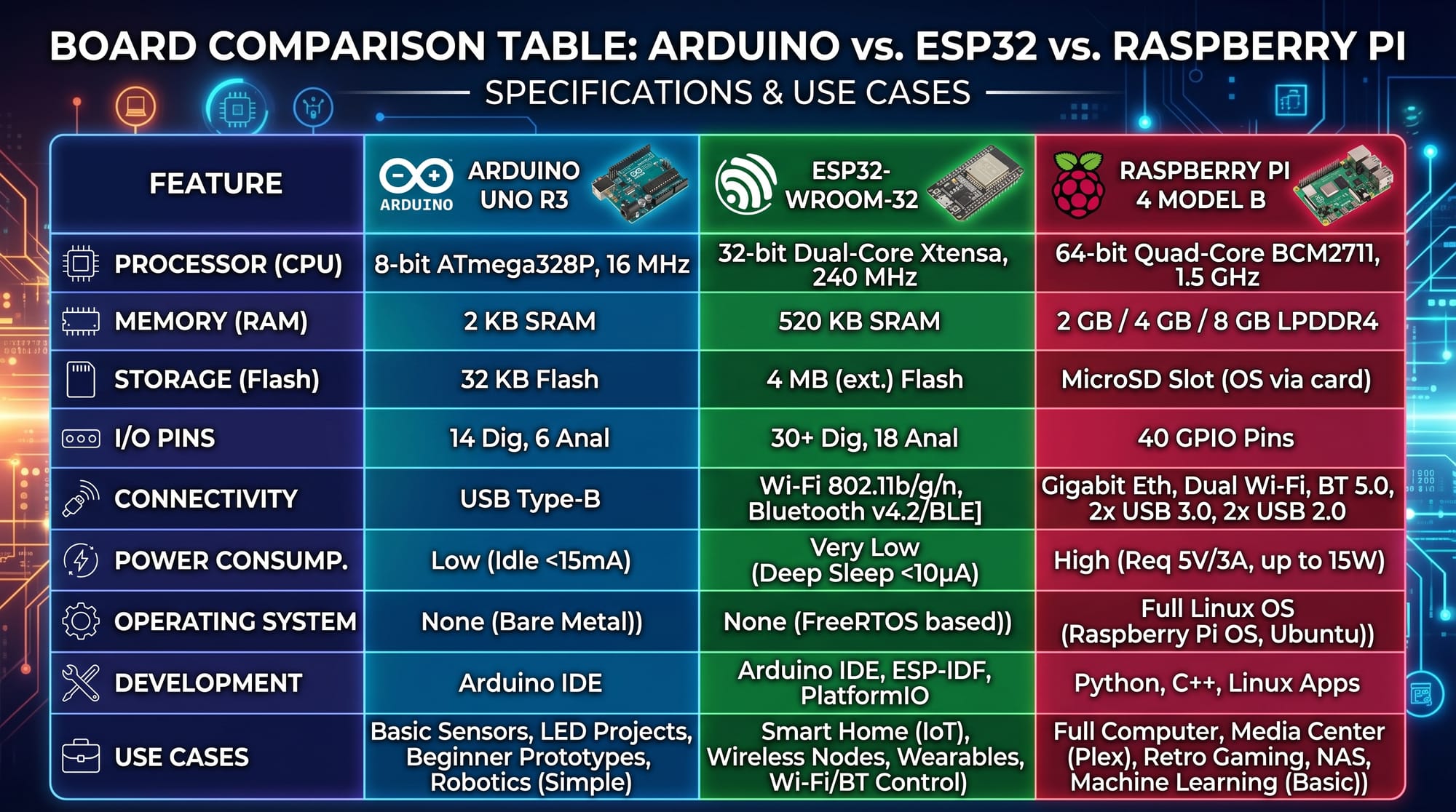
When starting with electronics and IoT development, one of the most common beginner questions is: Arduino vs Raspberry Pi vs ESP32: which board is best for your project?
These three platforms are extremely popular in robotics, smart systems, and IoT development. However, each one is designed for a different purpose:
- Arduino is a simple microcontroller board ideal for controlling sensors and motors.
- Raspberry Pi is a full mini-computer capable of running an operating system.
- ESP32 is a powerful microcontroller with built-in WiFi and Bluetooth.
For Pakistani students learning programming and electronics in cities like Lahore, Karachi, and Islamabad, understanding these boards is essential. Whether you are building a smart home system, a school robotics project, or an IoT weather station, choosing the right board saves time, money, and effort.
Prerequisites
Before learning about Arduino, Raspberry Pi, and ESP32, students should have basic knowledge of:
- Basic computer usage (Windows or Linux)
- Fundamental programming concepts (variables, loops, conditions)
- Basic electronics (resistors, LEDs, breadboards)
- Understanding of voltage and current (simple level)
No advanced experience is required. Even beginners like Fatima (a school student in Karachi) or Ali (a college student in Lahore) can easily start learning with these boards.
Core Concepts & Explanation
Microcontroller vs Microcomputer
The biggest difference between these platforms is their architecture:
- Arduino and ESP32 = Microcontrollers
- Raspberry Pi = Microcomputer
A microcontroller is like a “small brain” designed to perform one task repeatedly, such as blinking an LED or reading a sensor.
A microcomputer is like a “full brain computer” that can run multiple programs, browse the internet, and even host servers.
Example:
- Arduino → Turn on a light when motion is detected
- Raspberry Pi → Run a web server controlling multiple devices
- ESP32 → Send sensor data to cloud via WiFi
Connectivity and Performance Differences
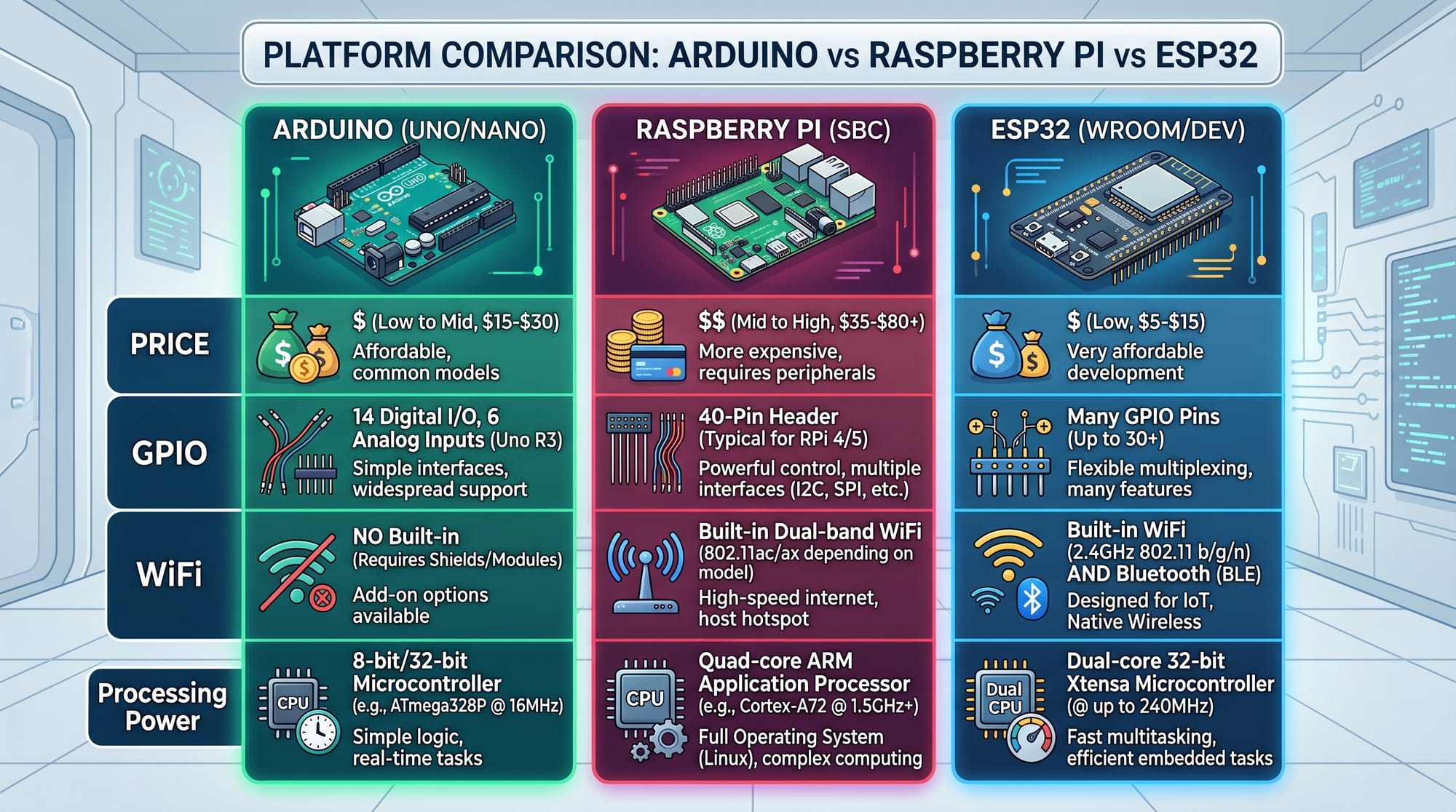
Each board has different strengths:
- Arduino
- No built-in WiFi (unless extra module added)
- Very low power consumption
- Simple and stable for hardware control
- Raspberry Pi
- Built-in WiFi, Bluetooth, USB, HDMI
- High processing power
- Runs Linux operating system
- ESP32
- Built-in WiFi + Bluetooth
- Faster than Arduino
- Lower cost than Raspberry Pi
Practical Code Examples
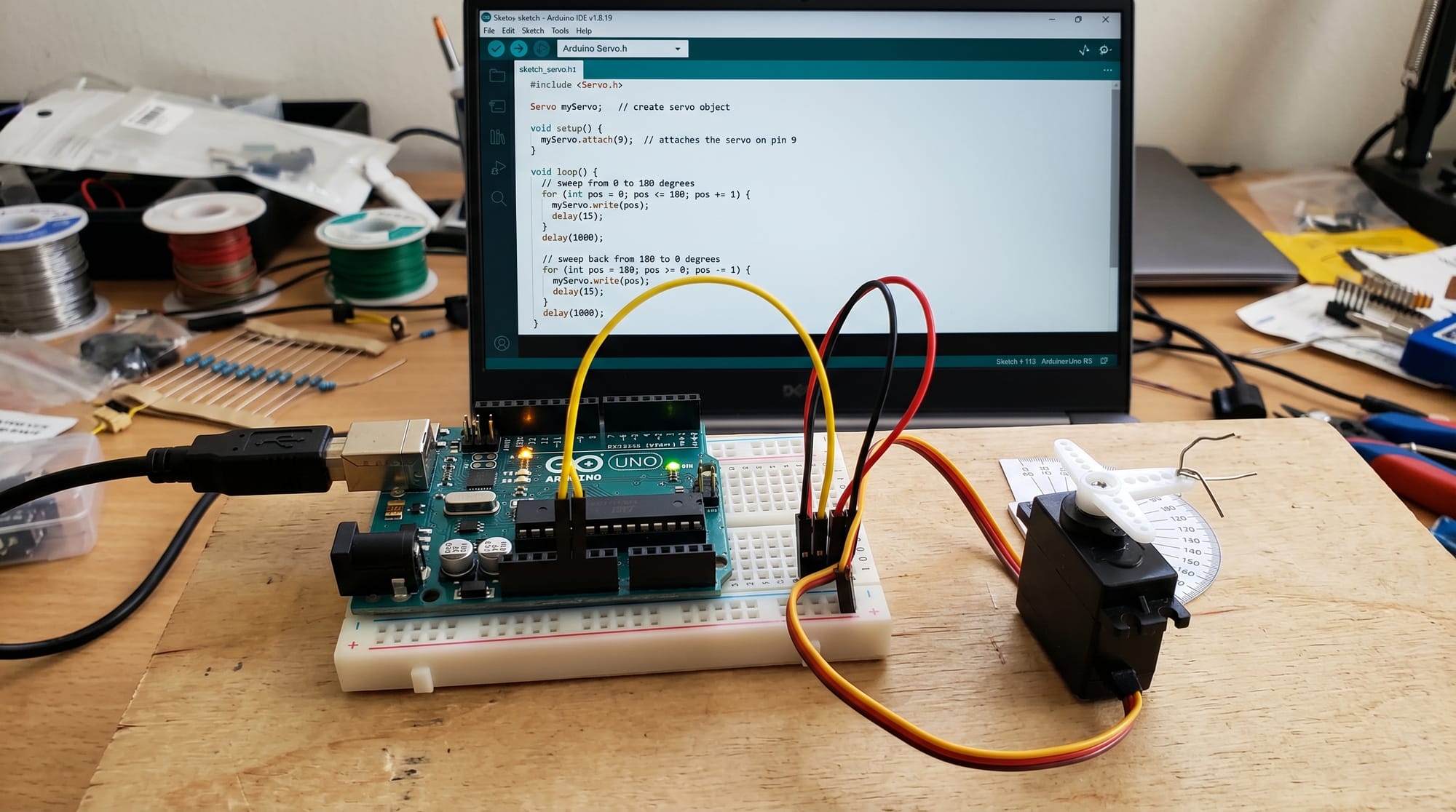
Example 1: Arduino LED Blink Project
This is the most basic Arduino project.
void setup() {
  pinMode(13, OUTPUT);
}

void loop() {
  digitalWrite(13, HIGH);
  delay(1000);
  digitalWrite(13, LOW);
  delay(1000);
}
Line-by-line explanation:
void setup()→ Runs once when Arduino startspinMode(13, OUTPUT);→ Sets pin 13 as outputvoid loop()→ Runs repeatedly foreverdigitalWrite(13, HIGH);→ Turns LED ONdelay(1000);→ Waits 1 seconddigitalWrite(13, LOW);→ Turns LED OFFdelay(1000);→ Waits 1 second again
This simple project is often the first step for students like Ahmed from Islamabad.
Example 2: ESP32 WiFi Temperature Monitor (Real-World IoT)
This example reads data and sends it over WiFi.
#include <WiFi.h>

const char* ssid = "YourWiFi";
const char* password = "YourPassword";

void setup() {
  Serial.begin(115200);
  WiFi.begin(ssid, password);
}

void loop() {
  if (WiFi.status() == WL_CONNECTED) {
    Serial.println("Connected to WiFi");
  }
  delay(2000);
}
Line-by-line explanation:
#include <WiFi.h>→ Adds WiFi libraryssid→ Your WiFi network namepassword→ WiFi passwordSerial.begin(115200);→ Starts serial monitorWiFi.begin()→ Connects ESP32 to WiFiWiFi.status()→ Checks connection statusdelay(2000);→ Waits 2 seconds before repeating
This type of project is used in smart agriculture systems in rural Pakistan to monitor temperature and humidity.
Decision Guide: Which Board Should You Choose?
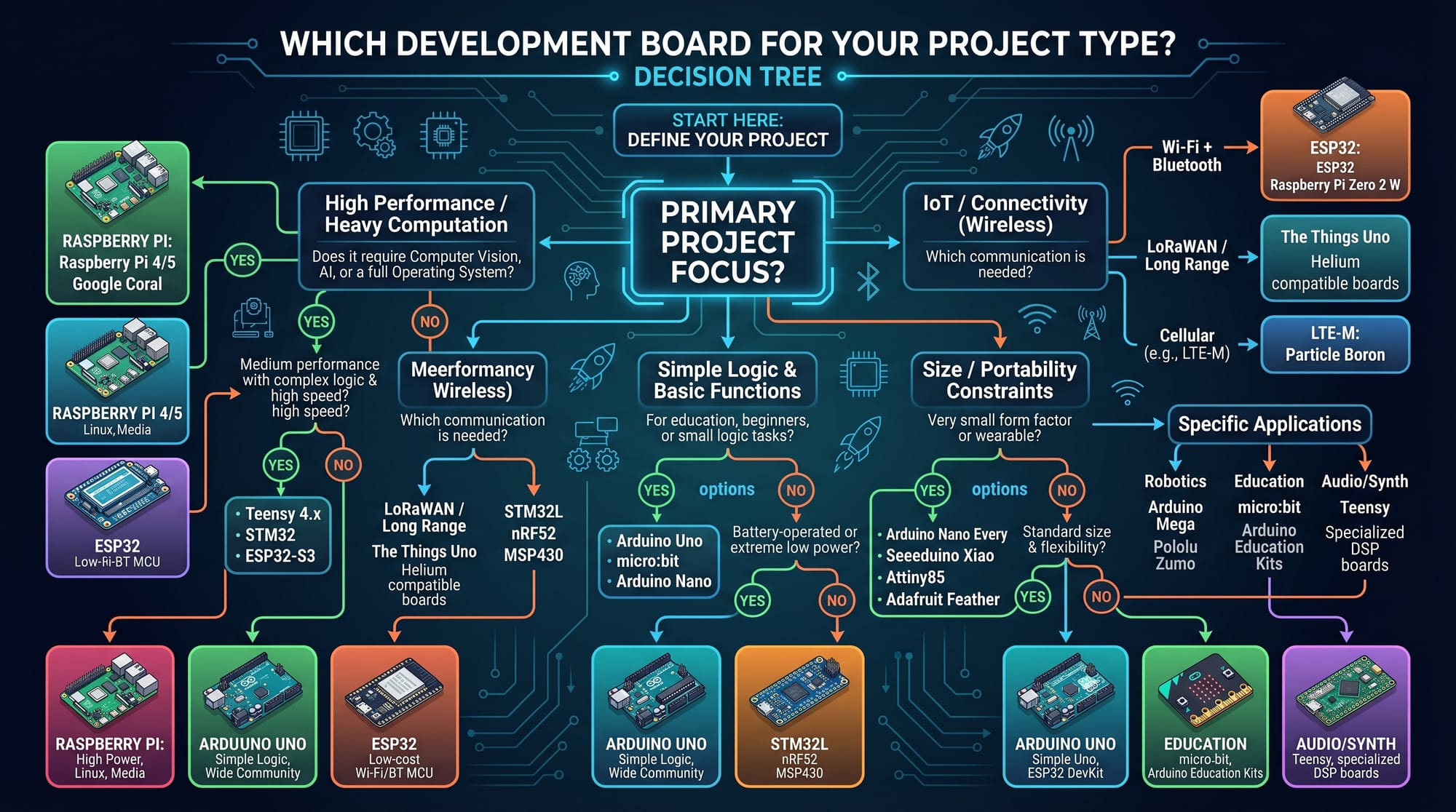
- If you want simple electronics projects → Arduino
- If you want web servers or AI projects → Raspberry Pi
- If you want IoT + WiFi low-cost projects → ESP32
Common Mistakes & How to Avoid Them
Mistake 1: Choosing Raspberry Pi for Simple Tasks
Many beginners think Raspberry Pi is always better. However, using it for simple LED blinking is unnecessary.
Fix:
- Use Arduino for simple sensor control
- Use Raspberry Pi only when OS or multitasking is required
Mistake 2: Ignoring Power Requirements
Each board has different power needs:
- Arduino → 5V low power
- ESP32 → 3.3V efficient
- Raspberry Pi → requires stable 5V high current supply
If not handled correctly, boards may restart or fail.
Practice Exercises
Exercise 1: LED Control System
Problem: Turn on an LED when a button is pressed using Arduino.
Solution:
- Connect button to input pin
- Connect LED to output pin
- Use digitalRead() to detect button press
int button = 2;
int led = 13;

void setup() {
  pinMode(button, INPUT);
  pinMode(led, OUTPUT);
}

void loop() {
  if (digitalRead(button) == HIGH) {
    digitalWrite(led, HIGH);
  } else {
    digitalWrite(led, LOW);
  }
}
Exercise 2: ESP32 Smart Light Idea
Problem: Turn a light ON/OFF using WiFi signal.
Solution Concept:
- ESP32 connects to WiFi
- Receives command from mobile app
- Controls relay module
This is widely used in smart home systems in Pakistani households.
Frequently Asked Questions
What is the main difference between Arduino, Raspberry Pi, and ESP32?
Arduino and ESP32 are microcontrollers used for hardware control, while Raspberry Pi is a full computer capable of running an operating system.
Which is better for beginners in Pakistan?
Arduino is best for beginners because it is simple, affordable, and widely available in local markets like Hall Road Lahore.
Can ESP32 replace Arduino?
In many cases yes, especially for IoT projects. However, Arduino is still better for ultra-stable and simple hardware tasks.
Is Raspberry Pi good for IoT projects?
Yes, Raspberry Pi is excellent for advanced IoT systems that require data processing, web dashboards, or AI integration.
Which board is cheapest in Pakistan?
Arduino clones and ESP32 modules are generally cheaper than Raspberry Pi, making them popular among students in Karachi and Lahore.
Summary & Key Takeaways
- Arduino is best for simple hardware control projects
- Raspberry Pi is a full computer for advanced applications
- ESP32 is best for low-cost IoT and wireless projects
- Each board has different power and performance levels
- Choosing the right board depends on project complexity
- Pakistani students should start with Arduino, then move to ESP32 and Raspberry Pi
Next Steps & Related Tutorials
To continue your IoT learning journey, explore these tutorials on theiqra.edu.pk:
- Learn how to build sensors in the Arduino Projects for Beginners tutorial
- Explore smart systems in the Raspberry Pi Home Automation Guide
- Understand wireless systems in the ESP32 IoT Development Course
- Strengthen fundamentals with MicroPython Tutorial for Beginners
If you're a student in Pakistan starting your journey in electronics, mastering these three boards will open doors to robotics, AI hardware, and IoT careers.
Test Your Python Knowledge!
Finished reading? Take a quick quiz to see how much you've learned from this tutorial.